hexo theme lite
v1.4.1

รักษาความสงบ ไลท์ และการเขียน
ธีมแอปพลิเคชันบล็อกหน้าเดียวแบบ light โดยใช้ Vue , Vuex , ElementUI และอื่นๆ
ธีมบล็อกหน้าเดียวน้ำหนักเบาที่สร้างขึ้นบน Vue , Vuex และ ElementUI
การสาธิต |. การสาธิตออนไลน์
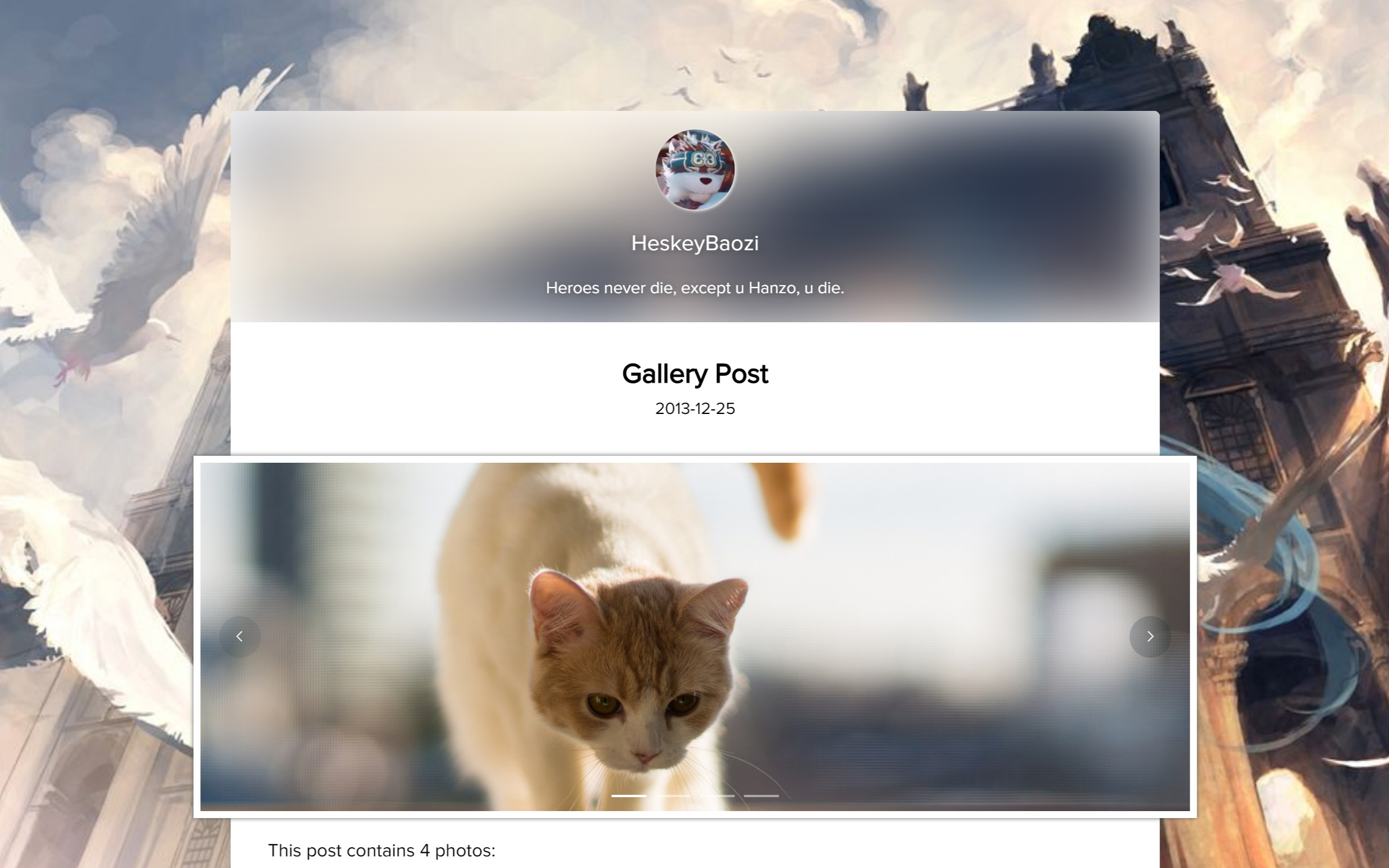
Hexo ไดเร็กทอรีรากต้องมี themes , node_modules , source และอื่นๆ ขั้นแรกให้ป้อนไดเร็กทอรีรากของ Hexo โปรดตรวจสอบให้แน่ใจว่ามี themes , node_modules , source และไฟล์อื่น ๆ ในไดเร็กทอรีนี้
 cd my-hexo
ls
# output:
# _config.yml node_modules package.json public scaffolds source themesgit clone ใช้คำสั่ง git clone เพื่อดาวน์โหลดเวอร์ชันล่าสุด
git clone https://github.com/HeskeyBaozi/hexo-theme-lite themes/lite หลังจาก git clone ผลลัพธ์จะเป็นดังนี้:
หลังจากใช้คำสั่งแล้วผลลัพธ์จะเป็นดังนี้
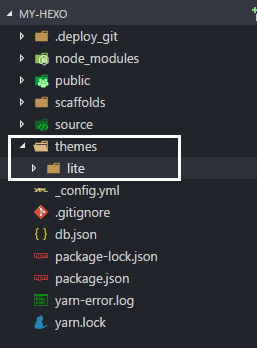
__config.yml ในไดเร็กทอรีรากของคุณ แก้ไข theme ฟิลด์เป็น lite
เปิดไฟล์ __config.yml ในไดเร็กทอรีรากและตั้งค่าฟิลด์ theme เป็น lite
 # Extensions
theme : litehexo gHexo hexo s
# output:
# INFO Hexo is running at http://localhost:4000/. Press Ctrl+C to stop.แก้ไขไฟล์ lite/__config.yml เพื่อปรับแต่งธีมของคุณ
แก้ไขไฟล์ lite/__config.yml เพื่อปรับแต่งธีมของคุณ
 avatar :
  enable : true
  url : /static/images/kamuyi.jpg # mapping to '<blog root>/source/static/images/kamuyi.jpg'
ตามปกติ / จะถูกแมปกับ <blog root>/source ของคุณ ไม่ใช่โฟลเดอร์ static ในธีม โดยปกติแล้วพาธนี้จะอ้างถึงโฟลเดอร์ /source ในไดเร็กทอรีรูทของบล็อก ไม่ใช่โฟลเดอร์ static ในธีม
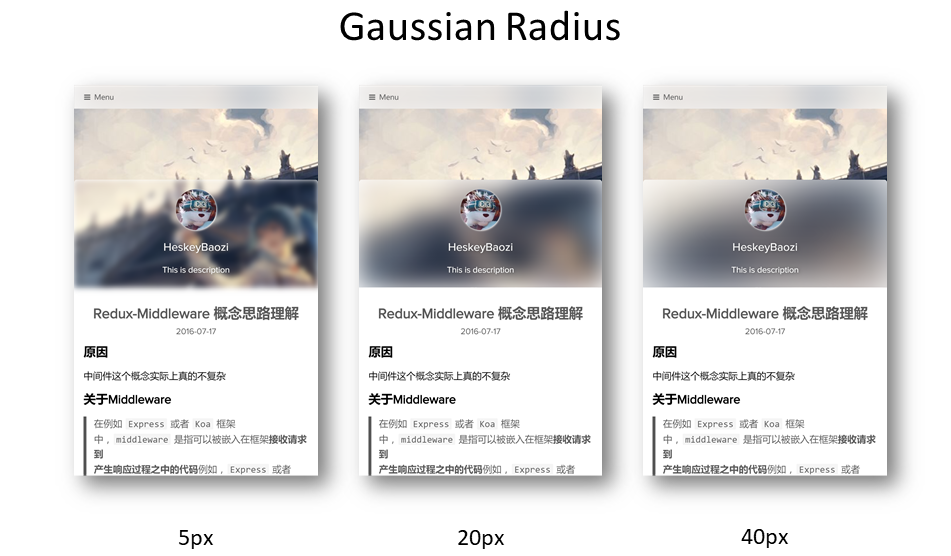
คุณสามารถกำหนดรัศมีเกาส์เซียนได้ที่นี่
คุณสามารถตั้งค่ารัศมีการเบลอแบบเกาส์เซียนได้ที่นี่ โดยเอฟเฟกต์จะเป็นดังนี้
 blur :
  background_color : ' #ffffff '

  # 'true' corresponding to css style 'overflow: hidden'
  # 设置为'true'则对应模糊容器'overflow'选项
  hide_overflow : true

  # Alpha Value of the background color
  # 背景颜色透明值, 启用会导致高斯模糊失效
  opacity :
    enable : false # switch to 'true' will make the gaussian blur lose efficacy
    opacity_value : 0.4

  gaussian_radius : # 高斯模糊程度,数值越大越模糊
    top_navigator : 50 # 40+ preferred
    header : 30 # 5 ~ 50 preferred
    footer : 40 # 5 ~ 100 preferred

  font :
    color : ' #ffffff '
โปรดสังเกตว่า font.color จะส่งผลต่อสีแบบอักษรในพื้นที่เบลอเท่านั้น
โปรดทราบว่า font.color ที่นี่จะส่งผลต่อสีแบบอักษรของพื้นที่เบลอเท่านั้น
 background :
  background_color : ' #ffffff '

  # Custom Background Picture
  enable_picture : true
  url : /static/images/miku.jpg
  css_size : cover
  css_position : 50%

  # Gradient color
  gradient_color :
    enable : false # switch to 'true' will make custom background picture lose efficacy
    css_value : ' linear-gradient(to right, rgb(74, 135, 193), rgb(179, 177, 251)) '
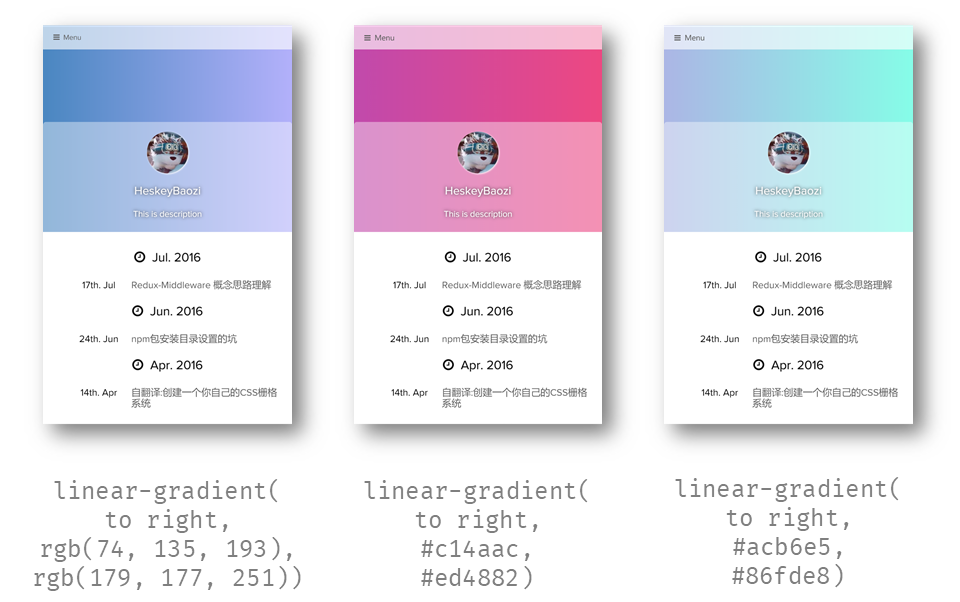
โปรดทราบว่าเราสามารถใช้สีไล่ระดับสีได้ ซึ่งทำงานโดยแก้ไข CSS background-image ดังนั้นมันจะทำให้ภาพพื้นหลังที่กำหนดเองสูญเสียประสิทธิภาพ
โปรดสังเกตว่าคุณสามารถตั้งค่าพื้นหลังไล่ระดับสีได้ที่นี่ ที่จริงแล้ว การใช้งานภายในคือการแก้ไข background-image ของ css ดังนั้นการเปิดใช้งานสีไล่ระดับสีจะทำให้ภาพพื้นหลังที่กำหนดเองไม่ถูกต้อง
ตัวอย่าง:
 background :
  gradient_color :
    enable : true
    css_value : ' linear-gradient(to right, rgb(74, 135, 193), rgb(179, 177, 251)) ' # options

blur :
  opacity :
    enable : true # switch to 'true' will make the gaussian blur lose efficacy
opacity_value : 0.4 แทรก <!-- more --> ในโพสต์ markdown ของคุณ ตัวอย่าง แทรก <!-- more --> ในโพสต์ของคุณเพื่อตัดทอนด้วยตนเอง
 menu :
  # Basic Menu
  Home : true
  Archives : true
  Categories : false
  Tags : false

  # Custom Menu
  # 'About' link to the 'About' page if there exists '/about/index.md' in your 'source' dir.
  # 这里是一个导航到'关于我'的页面,前提是你需要在你的'source'文件夹有'/about/index.md'文件
About : /pages/about/index theme_layout :
dependent_footer : true dependent_footer หมายความว่าส่วนหลักเชื่อมต่อกับส่วนท้ายอย่างใกล้ชิด การตั้งค่า false จะทำให้ส่วนท้ายเป็น "พื้นหลังเต็ม เนื้อหามีเบาะ"
dependent_footer ระบุว่าแถบข้อมูลด้านล่างของธีมเชื่อมต่อเข้าด้วยกัน หากตั้งค่าเป็น false แถบข้อมูลด้านล่างจะมี "เนื้อหาเต็มพื้นหลังและความกว้างคงที่"
 social :
  github : https://github.com/heskeybaozi
  weibo : http://weibo.com/52hezhiyu

  # Email link
  email : mailto:[email protected]

social_icons :
  enable : true

  # icon name docs: http://fontawesome.io/icons/
  github : fa-github-alt
  weibo : fa-weibo
  email : fa-envelope
  wechat : fa-weixin
qq : fa-qq powered_by :
text : Hexo Theme Lite
url : https://github.com/HeskeyBaozi/hexo-theme-lite/ # or false to disable link
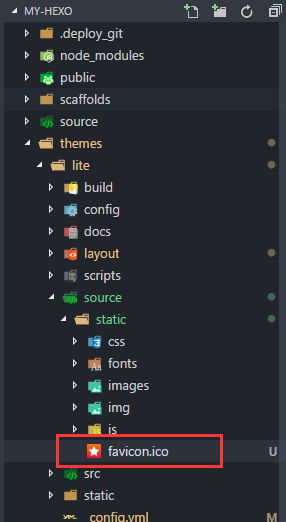
คุณสามารถใช้ไฟล์ .ico ของคุณเอง (แนะนำให้ใช้ 32px * 32px ) เพื่อแทนที่ favicon.ico ดั้งเดิมภายใต้ไดเร็กทอรี /themes/lite/source/static/
คุณสามารถแทนที่ไฟล์ favicon.ico ในไดเร็กทอรี /themes/lite/source/static/ ด้วยไฟล์ไอคอนของคุณเอง โดยควรมีขนาด 32px * 32px
 page_404 :
  # enable to use custom 404 page
  enable : false
  # filename of .md file path in your source dir
source_path : 404/index.md เราใช้ Gitment สำหรับระบบแสดงความคิดเห็น
Gitmentคืออะไร?
Gitment คือระบบแสดงความคิดเห็นที่อิงตามปัญหา GitHub ซึ่งสามารถใช้ในฟรอนต์เอนด์โดยไม่ต้องติดตั้งฝั่งเซิร์ฟเวอร์
Gitment คือระบบแสดงความคิดเห็นฟรี 'ฝั่งเซิร์ฟเวอร์' ที่ใช้หน้า Github Issues เพื่อจัดเก็บความคิดเห็น
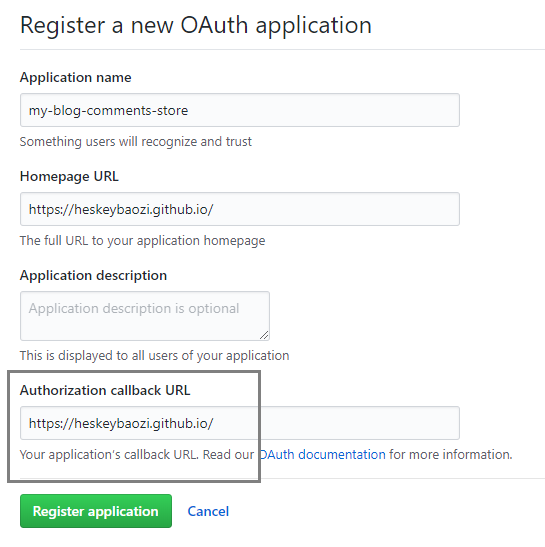
คลิกที่นี่เพื่อลงทะเบียนแอปพลิเคชัน OAuth และคุณจะได้รับ client id และ client secret ตรวจสอบให้แน่ใจว่า URL โทรกลับนั้นถูกต้อง โดยทั่วไปแล้วจะเป็นที่มาของไซต์ของคุณ เช่น https://heskeybaozi.github.io/
คลิกที่นี่เพื่อสร้างแอปพลิเคชัน Github OAuth และคุณจะได้รับ client id และ client secret ตรวจสอบให้แน่ใจว่า URL โทรกลับส่งคืนไปยังชื่อโดเมนหลักของคุณ เช่น https://heskeybaozi.github.io/
 # https://github.com/imsun/gitment#customize
gitment :
  enable : false
  github_id : # your github id
  repository_name : # your repository name

  # client_id & secret will generated after register an OAuth App
  # reference: https://github.com/settings/applications/new
  client_id :
  client_secret :
  per_page : 8 # comments per page
max_comment_height : 250 # default 250px google_analytics :
enable : false # remember to switch to 'true' when using google analytics
# replace to your track_id. It starts with 'UA-'.
# 这里替换为你的跟踪ID,记得打开`enable: true`
track_id : UA-XXXXXX-X hexo-pagination hexo-pagination npm install --save hexo-pagination # or yarn add hexo-pagination ตรวจสอบให้แน่ใจว่าคุณได้เปิดปลั๊กอิน highlight บนรูท __config.yml ของคุณแล้ว
โปรดตรวจสอบให้แน่ใจว่าไฟล์ __config.yml ในไดเร็กทอรีรากของคุณเปิดปลั๊กอิน highlight ไว้
 # example
highlight :
  enable : true
  line_number : true
  auto_detect : true
tab_replace :รันคำสั่งใน root hexo dir ของคุณ
รันคำสั่งเหล่านี้ในไดเร็กทอรีราก
 cd themes/lite

git pull เพียงลบโฟลเดอร์ธีมอีกครั้งแล้วติดตั้งอีกครั้ง อย่าลืมบันทึกไฟล์ __config.yml
บันทึกไฟล์ __config.yml ธีมของคุณ
ลบ /themes/lite dir
ป้อน dir รูท hexo ของคุณ
เรียกใช้คำสั่ง
git clone https://github.com/HeskeyBaozi/hexo-theme-lite themes/lite__config.yml ที่บันทึกไว้ของคุณ เซิร์ฟเวอร์การพัฒนา | เซิร์ฟเวอร์ที่ใช้โดยนักพัฒนาสำหรับการดีบัก








