hexo theme lite
v1.4.1

Keep Calm, Lite and Writing.
light single page blog application theme, using Vue , Vuex , ElementUI and so on.
A lightweight single-page blog theme built on Vue , Vuex and ElementUI
Demo | Online demonstration
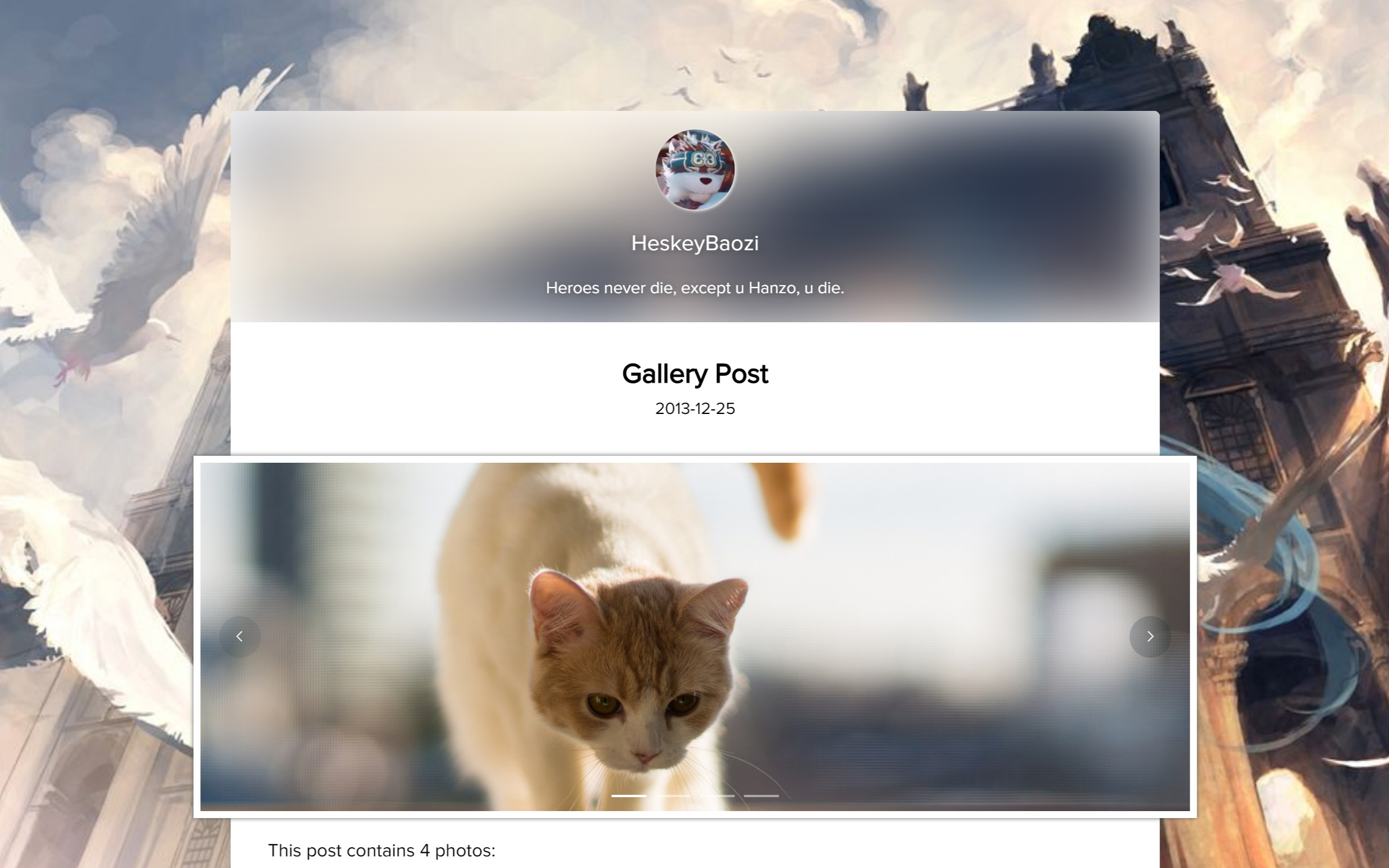
Hexo root directory. The root directory must include themes , node_modules , source and so on. First enter the Hexo root directory. Please ensure that there are themes , node_modules , source and other files in this directory.
 cd my-hexo
ls
# output:
# _config.yml node_modules package.json public scaffolds source themesgit clone Use the git clone command to download the latest release version
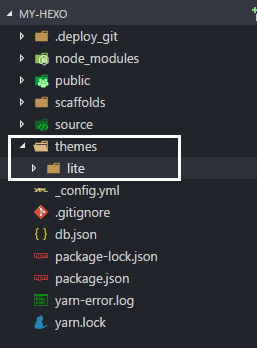
git clone https://github.com/HeskeyBaozi/hexo-theme-lite themes/lite after git clone , the result is like this:
After using the command, the result will look like this
__config.yml in your root directory. modify the field theme into lite .
Open the __config.yml file in the root directory and set theme field to lite
 # Extensions
theme : litehexo gHexo server hexo s
# output:
# INFO Hexo is running at http://localhost:4000/. Press Ctrl+C to stop.Edit the file lite/__config.yml to customize your theme.
Edit the file lite/__config.yml to customize your theme.
 avatar :
  enable : true
  url : /static/images/kamuyi.jpg # mapping to '<blog root>/source/static/images/kamuyi.jpg'
As usual, / is mapped to your <blog root>/source , not the static folder in the theme. Usually this path refers to the /source folder in your blog root directory, not static folder in the theme.
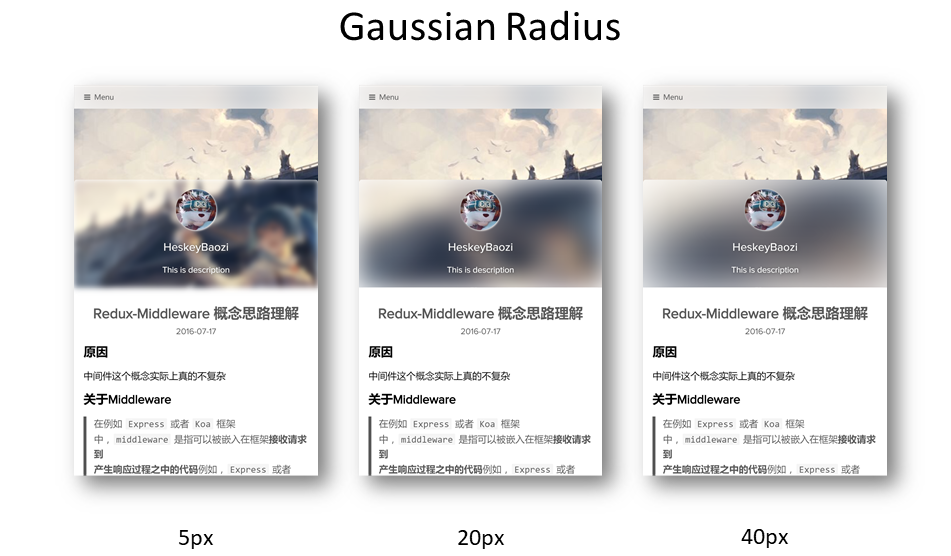
you can set the gaussian radius here.
You can set the Gaussian blur radius here, the effect is as follows.
 blur :
  background_color : ' #ffffff '

  # 'true' corresponding to css style 'overflow: hidden'
  # 设置为'true'则对应模糊容器'overflow'选项
  hide_overflow : true

  # Alpha Value of the background color
  # 背景颜色透明值, 启用会导致高斯模糊失效
  opacity :
    enable : false # switch to 'true' will make the gaussian blur lose efficacy
    opacity_value : 0.4

  gaussian_radius : # 高斯模糊程度,数值越大越模糊
    top_navigator : 50 # 40+ preferred
    header : 30 # 5 ~ 50 preferred
    footer : 40 # 5 ~ 100 preferred

  font :
    color : ' #ffffff '
Notice that the font.color will only affect the font color in the blur area.
Note that font.color here will only affect the font color of the blurred area.
 background :
  background_color : ' #ffffff '

  # Custom Background Picture
  enable_picture : true
  url : /static/images/miku.jpg
  css_size : cover
  css_position : 50%

  # Gradient color
  gradient_color :
    enable : false # switch to 'true' will make custom background picture lose efficacy
    css_value : ' linear-gradient(to right, rgb(74, 135, 193), rgb(179, 177, 251)) '
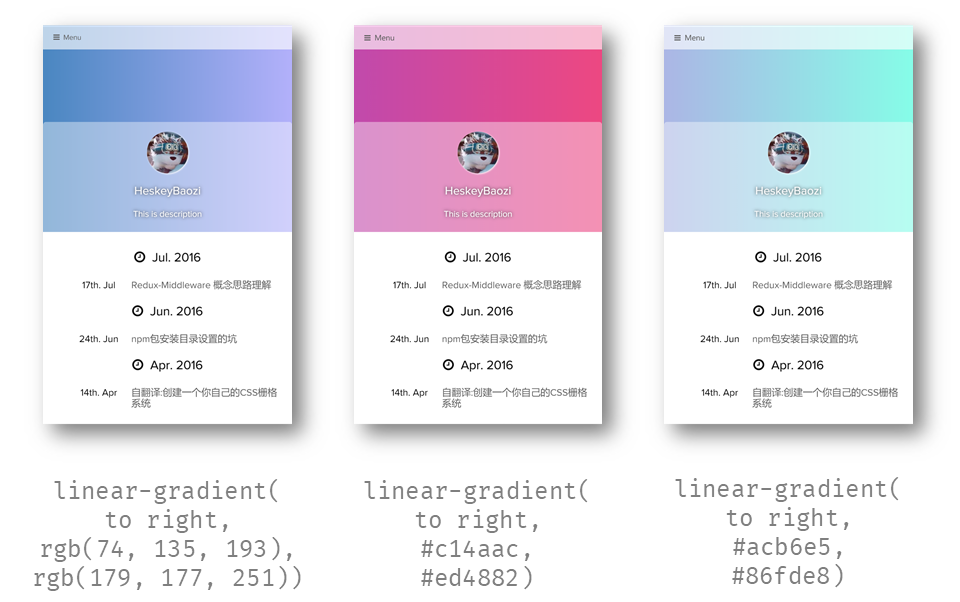
Note that we can use the gradient color, it works by modify the css background-image , so it will make the custom background picture lose efficacy.
Notice that you can set a gradient background here. In fact, the internal implementation is to modify background-image of css, so enabling the gradient color will invalidate the custom background image.
Example:
 background :
  gradient_color :
    enable : true
    css_value : ' linear-gradient(to right, rgb(74, 135, 193), rgb(179, 177, 251)) ' # options

blur :
  opacity :
    enable : true # switch to 'true' will make the gaussian blur lose efficacy
opacity_value : 0.4 insert <!-- more --> in your raw markdown post. Example. Insert <!-- more --> in your post markdown for manual truncation. Example.
 menu :
  # Basic Menu
  Home : true
  Archives : true
  Categories : false
  Tags : false

  # Custom Menu
  # 'About' link to the 'About' page if there exists '/about/index.md' in your 'source' dir.
  # 这里是一个导航到'关于我'的页面,前提是你需要在你的'source'文件夹有'/about/index.md'文件
About : /pages/about/index theme_layout :
dependent_footer : true dependent_footer means that the main body is closely connected with the footer. Setting false will make the footer "full background, padded content".
dependent_footer indicates that the bottom information bar of the theme is connected together. If set to false , the bottom information bar will have "full background, fixed width content"
 social :
  github : https://github.com/heskeybaozi
  weibo : http://weibo.com/52hezhiyu

  # Email link
  email : mailto:[email protected]

social_icons :
  enable : true

  # icon name docs: http://fontawesome.io/icons/
  github : fa-github-alt
  weibo : fa-weibo
  email : fa-envelope
  wechat : fa-weixin
qq : fa-qq powered_by :
text : Hexo Theme Lite
url : https://github.com/HeskeyBaozi/hexo-theme-lite/ # or false to disable link
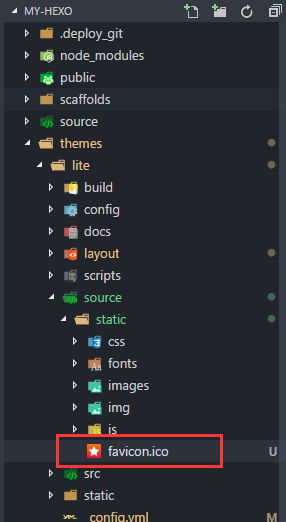
you can use your own .ico file ( 32px * 32px preferred) to replace the original favicon.ico under the directory /themes/lite/source/static/ .
You can replace the favicon.ico file in the directory /themes/lite/source/static/ with your own icon file, preferably 32px * 32px size.
 page_404 :
  # enable to use custom 404 page
  enable : false
  # filename of .md file path in your source dir
source_path : 404/index.md We use Gitment for the comments system.
What's
Gitment?
Gitment is a comment system based on GitHub Issues, which can be used in the frontend without any server-side implementation.
Gitment is a 'server-side' free commenting system that uses Github Issues pages to store comments
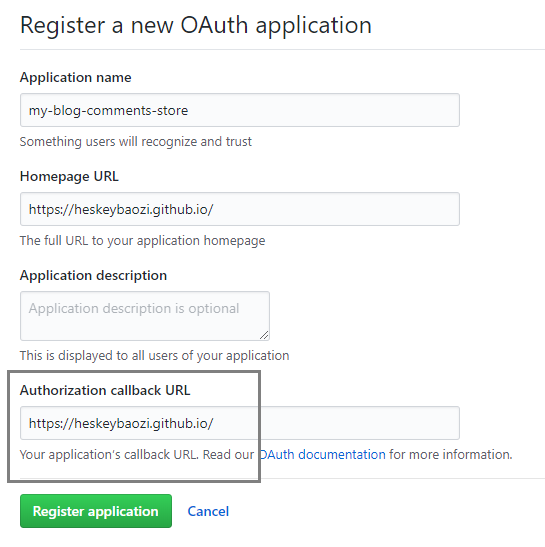
Click here to register an OAuth application, and you will get a client id and a client secret . Make sure the callback URL is right. Generally it's the origin of your site, like https://heskeybaozi.github.io/ .
Click here to create a Github OAuth application, and you will get client id and client secret . Be sure to make sure the callback url returns to your main domain name, such as https://heskeybaozi.github.io/ .
 # https://github.com/imsun/gitment#customize
gitment :
  enable : false
  github_id : # your github id
  repository_name : # your repository name

  # client_id & secret will generated after register an OAuth App
  # reference: https://github.com/settings/applications/new
  client_id :
  client_secret :
  per_page : 8 # comments per page
max_comment_height : 250 # default 250px google_analytics :
enable : false # remember to switch to 'true' when using google analytics
# replace to your track_id. It starts with 'UA-'.
# 这里替换为你的跟踪ID,记得打开`enable: true`
track_id : UA-XXXXXX-X hexo-pagination hexo-pagination npm install --save hexo-pagination # or yarn add hexo-pagination make sure you have turned the highlight plugin on your root __config.yml
Please make sure that the __config.yml file in your root directory has the highlight plug-in turned on.
 # example
highlight :
  enable : true
  line_number : true
  auto_detect : true
tab_replace :run the commands in your root hexo dir.
Run these commands in the root directory
 cd themes/lite

git pull Just delete the theme folder again and install it again. Remember to save the __config.yml file.
save your theme __config.yml file.
delete /themes/lite dir
enter your hexo root dir
run command
git clone https://github.com/HeskeyBaozi/hexo-theme-lite themes/lite__config.yml Development Server | Server used by developers for debugging








