hexo theme lite
v1.4.1

الحفاظ على الهدوء، لايت والكتابة.
سمة تطبيق مدونة خفيفة من صفحة واحدة، باستخدام Vue و Vuex و ElementUI وما إلى ذلك.
سمة مدونة خفيفة الوزن مكونة من صفحة واحدة مبنية على Vue و Vuex و ElementUI
العرض التوضيحي |. العرض التوضيحي عبر الإنترنت
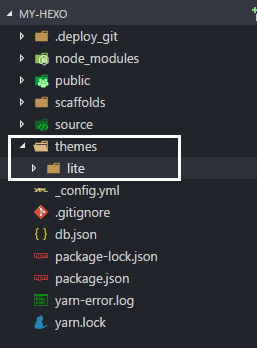
Hexo يجب أن يتضمن الدليل الجذر themes و node_modules source وما إلى ذلك. أدخل أولاً إلى دليل جذر Hexo ، برجاء التأكد من وجود themes node_modules source وملفات أخرى في هذا الدليل.
 cd my-hexo
ls
# output:
# _config.yml node_modules package.json public scaffolds source themesgit clone استخدم الأمر git clone لتنزيل أحدث إصدار
git clone https://github.com/HeskeyBaozi/hexo-theme-lite themes/lite بعد git clone ستكون النتيجة كالتالي:
بعد استخدام الأمر ستكون النتيجة هكذا
__config.yml في الدليل الجذر الخاص بك. تعديل theme الحقل إلى lite .
افتح الملف __config.yml في الدليل الجذر واضبط حقل theme على lite
 # Extensions
theme : litehexo gHexo hexo s
# output:
# INFO Hexo is running at http://localhost:4000/. Press Ctrl+C to stop.قم بتحرير الملف lite/__config.yml لتخصيص المظهر الخاص بك.
قم بتحرير الملف lite/__config.yml لتخصيص المظهر الخاص بك.
 avatar :
  enable : true
  url : /static/images/kamuyi.jpg # mapping to '<blog root>/source/static/images/kamuyi.jpg'
كالعادة، / يتم تعيينه إلى <blog root>/source ، وليس المجلد static في القالب عادةً ما يشير هذا المسار إلى المجلد /source في الدليل الجذر لمدونتك، وليس المجلد static في القالب.
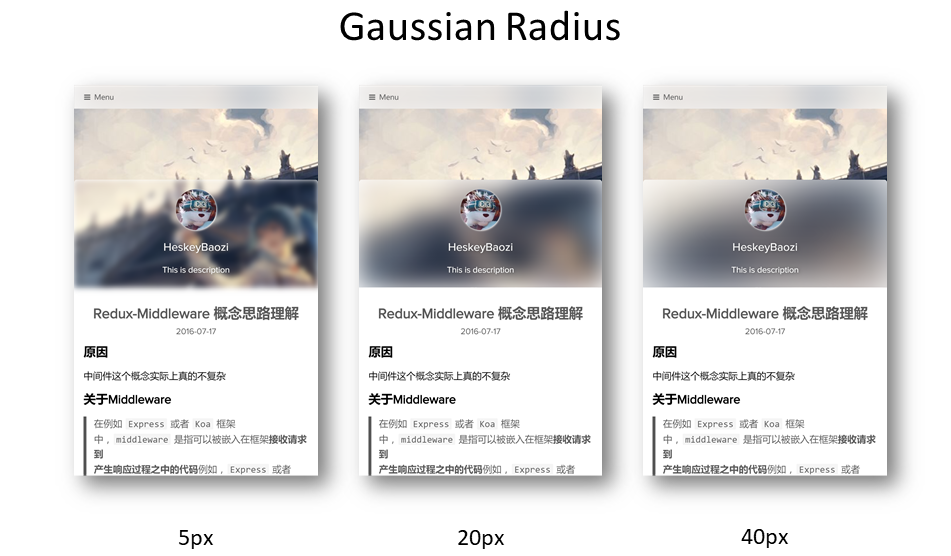
يمكنك ضبط نصف القطر الغوسي هنا.
يمكنك ضبط نصف قطر التمويه الغاوسي هنا، ويكون التأثير كما يلي.
 blur :
  background_color : ' #ffffff '

  # 'true' corresponding to css style 'overflow: hidden'
  # 设置为'true'则对应模糊容器'overflow'选项
  hide_overflow : true

  # Alpha Value of the background color
  # 背景颜色透明值, 启用会导致高斯模糊失效
  opacity :
    enable : false # switch to 'true' will make the gaussian blur lose efficacy
    opacity_value : 0.4

  gaussian_radius : # 高斯模糊程度,数值越大越模糊
    top_navigator : 50 # 40+ preferred
    header : 30 # 5 ~ 50 preferred
    footer : 40 # 5 ~ 100 preferred

  font :
    color : ' #ffffff '
لاحظ أن font.color سيؤثر فقط على لون الخط في منطقة التمويه.
لاحظ أن font.color هنا سيؤثر فقط على لون خط المنطقة غير الواضحة.
 background :
  background_color : ' #ffffff '

  # Custom Background Picture
  enable_picture : true
  url : /static/images/miku.jpg
  css_size : cover
  css_position : 50%

  # Gradient color
  gradient_color :
    enable : false # switch to 'true' will make custom background picture lose efficacy
    css_value : ' linear-gradient(to right, rgb(74, 135, 193), rgb(179, 177, 251)) '
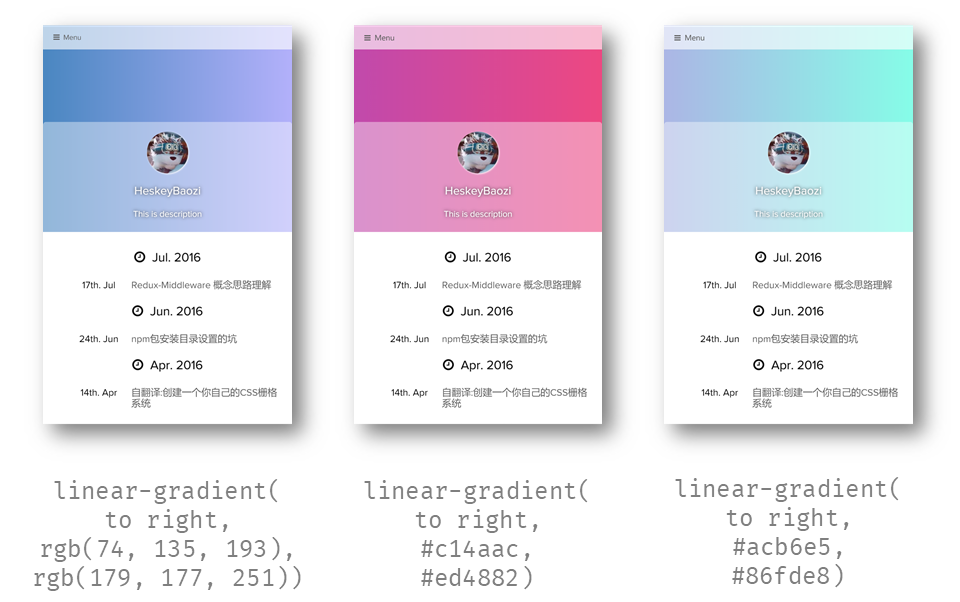
لاحظ أنه يمكننا استخدام التدرج اللوني، فهو يعمل عن طريق تعديل background-image CSS، مما يجعل صورة الخلفية المخصصة تفقد فعاليتها.
لاحظ أنه يمكنك تعيين خلفية متدرجة هنا. في الواقع، التنفيذ الداخلي هو تعديل background-image لـ CSS، لذا فإن تمكين التدرج اللوني سيؤدي إلى إبطال صورة الخلفية المخصصة.
مثال:
 background :
  gradient_color :
    enable : true
    css_value : ' linear-gradient(to right, rgb(74, 135, 193), rgb(179, 177, 251)) ' # options

blur :
  opacity :
    enable : true # switch to 'true' will make the gaussian blur lose efficacy
opacity_value : 0.4 أدخل < <!-- more --> <!-- more --> في تخفيض منشورك للحصول على مثال.
 menu :
  # Basic Menu
  Home : true
  Archives : true
  Categories : false
  Tags : false

  # Custom Menu
  # 'About' link to the 'About' page if there exists '/about/index.md' in your 'source' dir.
  # 这里是一个导航到'关于我'的页面,前提是你需要在你的'source'文件夹有'/about/index.md'文件
About : /pages/about/index theme_layout :
dependent_footer : true dependent_footer يعني أن النص الرئيسي مرتبط بشكل وثيق بالتذييل. سيؤدي الإعداد false إلى جعل التذييل "خلفية كاملة، محتوى مبطن".
يشير dependent_footer إلى أن شريط المعلومات السفلي للموضوع متصل ببعضه البعض، إذا تم تعيينه على false ، فسيحتوي شريط المعلومات السفلي على "خلفية كاملة، محتوى عرض ثابت".
 social :
  github : https://github.com/heskeybaozi
  weibo : http://weibo.com/52hezhiyu

  # Email link
  email : mailto:[email protected]

social_icons :
  enable : true

  # icon name docs: http://fontawesome.io/icons/
  github : fa-github-alt
  weibo : fa-weibo
  email : fa-envelope
  wechat : fa-weixin
qq : fa-qq powered_by :
text : Hexo Theme Lite
url : https://github.com/HeskeyBaozi/hexo-theme-lite/ # or false to disable link
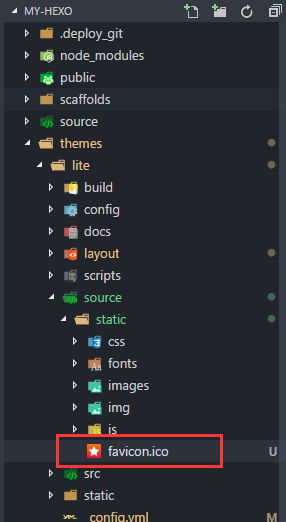
يمكنك استخدام ملف .ico الخاص بك (يفضل 32px * 32px ) لاستبدال ملف favicon.ico الأصلي ضمن الدليل /themes/lite/source/static/ .
يمكنك استبدال ملف favicon.ico الموجود في الدليل /themes/lite/source/static/ بملف الأيقونة الخاص بك، ويفضل أن يكون حجمه 32px * 32px .
 page_404 :
  # enable to use custom 404 page
  enable : false
  # filename of .md file path in your source dir
source_path : 404/index.md نحن نستخدم Gitment لنظام التعليقات.
ما هو
Gitment؟
Gitment هو نظام تعليق يعتمد على مشكلات GitHub، والذي يمكن استخدامه في الواجهة الأمامية دون أي تنفيذ من جانب الخادم.
Gitment هو نظام تعليق مجاني من جانب الخادم يستخدم صفحات Github Issues لتخزين التعليقات
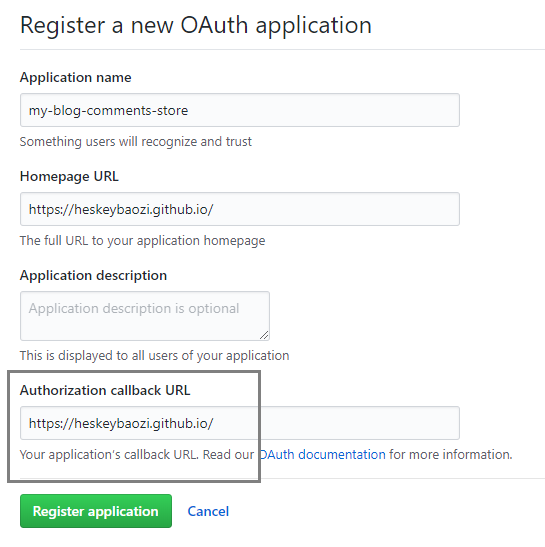
انقر هنا لتسجيل تطبيق OAuth، وستحصل على client id client secret . تأكد من صحة عنوان URL لرد الاتصال. وبشكل عام، يكون هذا هو أصل موقعك، مثل https://heskeybaozi.github.io/ .
انقر هنا لإنشاء تطبيق Github OAuth، وستحصل على client id client secret . تأكد من أن عنوان URL لرد الاتصال يعود إلى اسم المجال الرئيسي الخاص بك، مثل https://heskeybaozi.github.io/ .
 # https://github.com/imsun/gitment#customize
gitment :
  enable : false
  github_id : # your github id
  repository_name : # your repository name

  # client_id & secret will generated after register an OAuth App
  # reference: https://github.com/settings/applications/new
  client_id :
  client_secret :
  per_page : 8 # comments per page
max_comment_height : 250 # default 250px google_analytics :
enable : false # remember to switch to 'true' when using google analytics
# replace to your track_id. It starts with 'UA-'.
# 这里替换为你的跟踪ID,记得打开`enable: true`
track_id : UA-XXXXXX-X hexo-pagination hexo-pagination npm install --save hexo-pagination # or yarn add hexo-pagination تأكد من تشغيل المكون highlight على جذرك __config.yml
يرجى التأكد من أن الملف __config.yml الموجود في الدليل الجذر الخاص بك يحتوي على المكون الإضافي highlight قيد التشغيل.
 # example
highlight :
  enable : true
  line_number : true
  auto_detect : true
tab_replace :قم بتشغيل الأوامر في root hexo dir.
قم بتشغيل هذه الأوامر في الدليل الجذر
 cd themes/lite

git pull ما عليك سوى حذف مجلد السمات مرة أخرى وتثبيته مرة أخرى وتذكر حفظ ملف __config.yml .
احفظ ملف __config.yml الخاص بك.
حذف /themes/lite dir
أدخل دير الجذر hexo الخاص بك
تشغيل الأمر
git clone https://github.com/HeskeyBaozi/hexo-theme-lite themes/lite__config.yml المحفوظ خادم التطوير |. خادم يستخدمه المطورون لتصحيح الأخطاء








