CookIM
1.0.0


类别
###演示
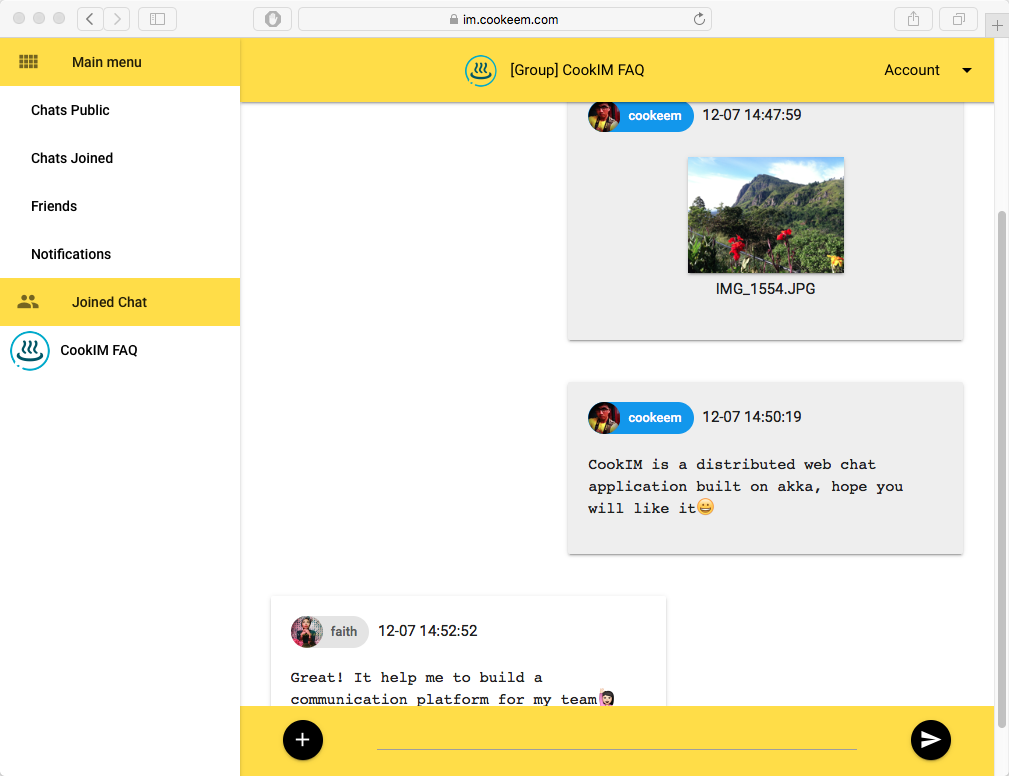
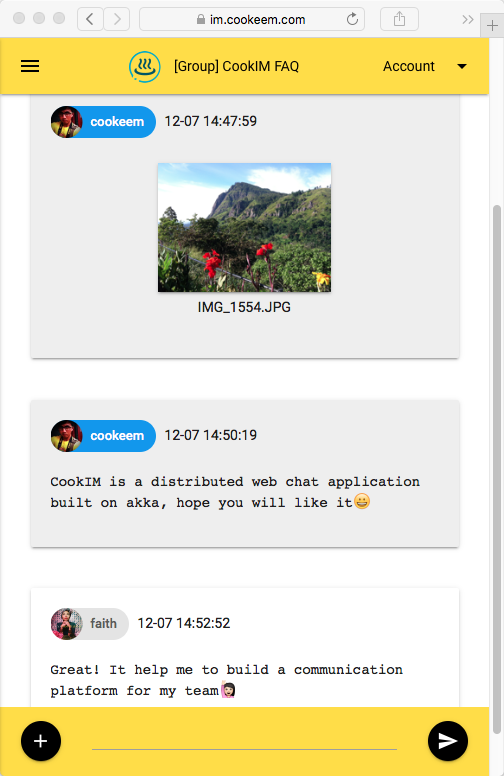
https://im.cookeem.com
更改为cookim目录,在下面运行命令,以Docker组合模式启动多个节点Cookim服务器。这样,将启动3个容器:mongo,cookim1和cookim2
$ git clone https://github.com/cookeem/CookIM.git

$ cd CookIM

$ sudo docker-compose up -d
Creating mongo
Creating cookim1
Creating cookim2
运行Docker作曲后,使用不同的浏览器访问下面的URL以连接到Cookim1和Cookim2
http:// localhost:8080 http:// localhost:8081
类别
您可以在docker-compose.yml中添加config(在cookim目录中)以添加cookim服务器节点,此示例显示了如何在docker组成中添加cookim3:
      cookim3 :
        image : cookeem/cookim
        container_name : cookim3
        hostname : cookim3
        environment :
          HOST_NAME : cookim3
          WEB_PORT : 8080
          AKKA_PORT : 2551
          SEED_NODES : cookim1:2551
          MONGO_URI : mongodb://mongo:27017/local
        ports :
        - " 8082:8080 "
        depends_on :
        - mongo
        - cookim1
类别
查看容器cookim1
$ sudo docker logs -f cookim1执行到容器cookim1进行调试
$ sudo docker exec -ti cookim1 bash类别
$ sudo docker-compose stop
$ sudo docker-compose rm
类别
类别
git clone https://github.com/cookeem/CookIM.git

cd CookIM
类别
配置文件位于conf/application.conf上,请确保您的mongodb uri配置。
mongodb {
  dbname = " cookim "
  uri = " mongodb://mongo:27017/local "
}
cookim的组装cookim项目到fatjar,target jar位于target/scala-2.11/CookIM-assembly-0.2.0-SNAPSHOT.jar
sbt clean assembly类别
Cookim使用MongoDB存储聊天消息和用户数据,请确保您在启动Cookim之前启动MongoDB。
有两种启动cookim服务器的方法:SBT和Java
一个。 SBT调试方式:
$ cd # CookIM directory#

$ sbt " run-main com.cookeem.chat.CookIM -h localhost -w 8080 -a 2551 -s localhost:2551 "
b。包装并编译脂肪罐:
$ sbt assemblyc。 Java生产方式:
$ java -classpath " target/scala-2.11/CookIM-assembly-0.2.4-SNAPSHOT.jar " com.cookeem.chat.CookIM -h localhost -w 8080 -a 2551 -s localhost:2551上面的命令已启动Web服务器收听端口8080和Akka系统听端口2551
参数:
-a -h [-m ] [-n] -s -w -a,--akka-port akka cluster node port -h,--host-name current web service external host name -m,--mongo-uri mongodb connection uri, example: mongodb://localhost:27017/local -n,--nat is nat network or in docker -s,--seed-nodes akka cluster seed节点,与逗号分开,示例:localhost:2551,localhost:2552 -W, - Web-Port Web服务端口
类别
http:// localhost:8080
类别
打开另一个终端,启动另一台Cookim服务器以测试服务器之间的消息通信:
一个。 SBT调试方式:
$ sbt " run-main com.cookeem.chat.CookIM -h localhost -w 8081 -a 2552 -s localhost:2551 "b。 Java生产方式:
$ java -classpath " target/scala-2.11/CookIM-assembly-0.2.0-SNAPSHOT.jar " com.cookeem.chat.CookIM -h localhost -w 8081 -a 2552 -s localhost:2551上面的命令已启动Web服务器收听端口8081和Akka系统听端口2552
类别
http:// localhost:8081
类别
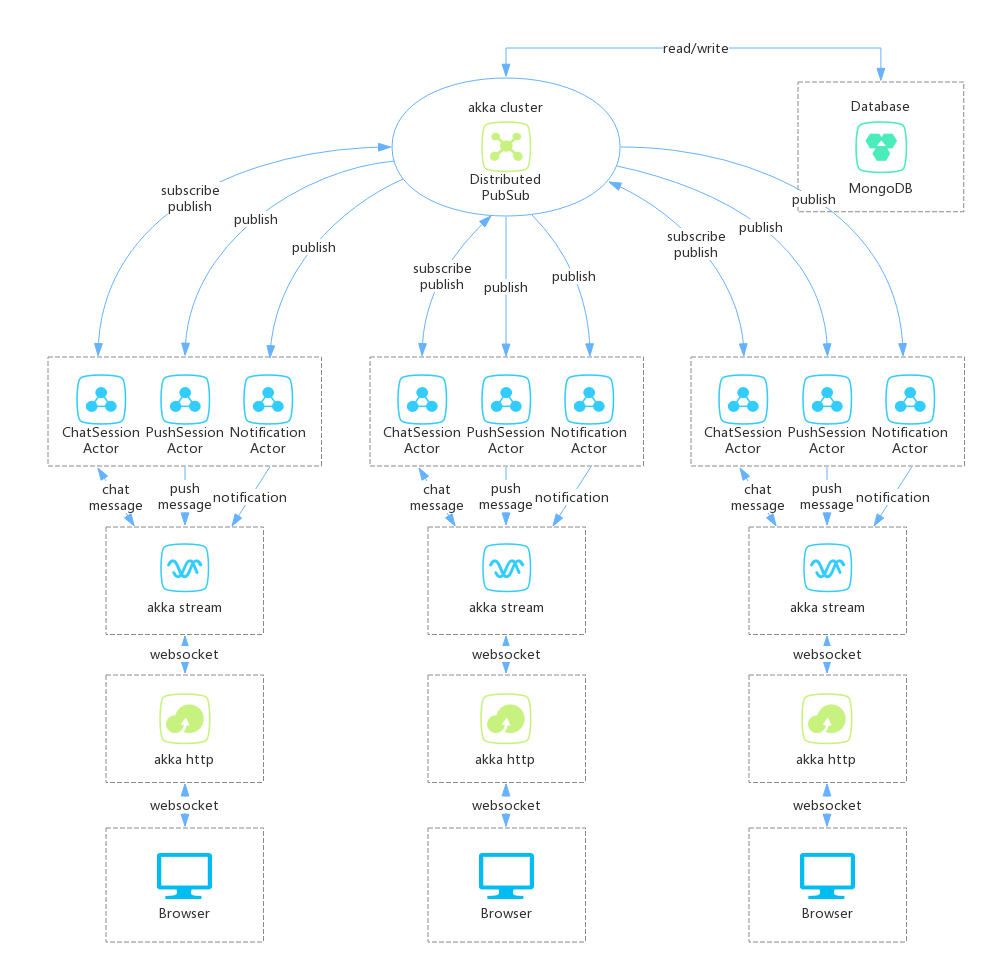
** Cookim服务器从3个部分制作:**
- Akka HTTP:提供Web服务,Websocket的浏览器连接分布式聊天服务器
- Akka流:Akka HTTP接收WebSocket消息(WebSocket消息包括TextMessage和BinaryMessage),然后通过Akka Stream Way将消息发送到ChatService,Websocket Inception Include JWT(JavaScript Web Token),如果JWT verify Failify Failify Failify Failify失败,ChatService流chatservice流将返回拒绝消息;如果JWT验证成功,ChatService流将向ChatSessionActor发送消息
- Akka群集:Akka Stream发送WebSocke消息到Akka cluster ChatSessionActor,ChatSessionActor使用DistribtionPubSub在Akka cluster中订阅和发布消息。当用户在线会话时,它将订阅会话;当用户在会话中发送消息时,它将在Akka群集中发布消息,订阅会话的参与者将接收发布消息
类别
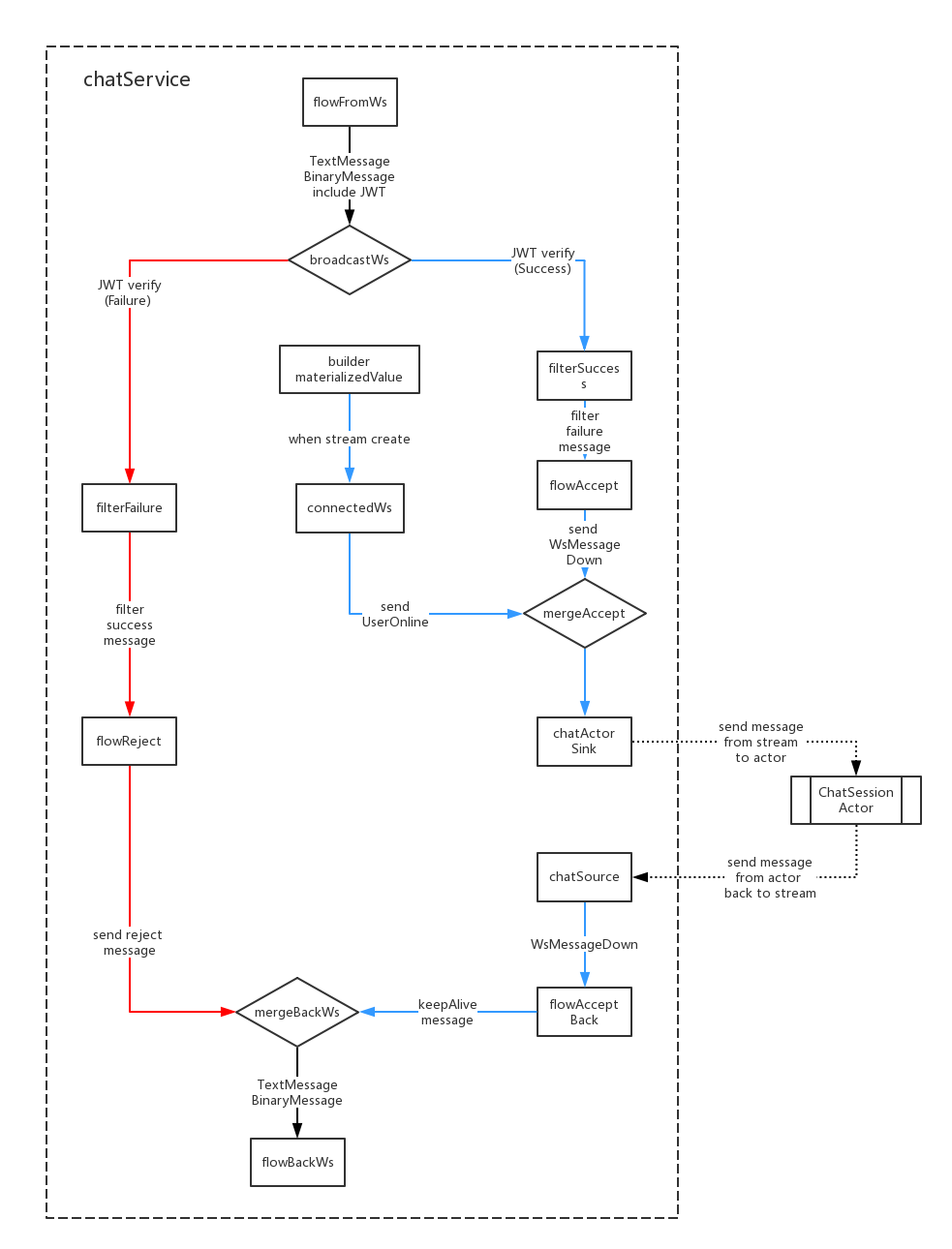
- WebSocket消息主体包括JWT,FlowFromws用于接收WebSocket消息并解码JWT;
- 当JWT验证故障时,它将广播以过滤以滤波以过滤以失败消息;当JWT验证成功时,它将广播到FilterSuccess过滤到成功消息;
- 当创建Akka流时,Builder.MaterializedValue将发送消息到ConnectedWs,ConnectedWs转换消息接收到UserOnline消息,然后发送到ChatSinkactor最终发送到ChatSessionActor;
- ChatActorSink将消息发送给ChatSessionActor,当Akka流关闭时,如果将UserOffline消息发送到Down流;
- ChatSource从ChatSessionActor接收消息,然后将消息发送回FlowAcpppedback;
- flowAcppenT背式背面将使Websocket连接keepalive;
- Flow Repreject和FlowAcppeedback消息最终发送到Flofbackws,FrowBackws将消息转换为WebSocket格式,然后发送回用户;
类别
 *login (login email)
nickname (nickname)
password (password SHA1)
gender (gender: unknow:0, boy:1, girl:2)
avatar (avatar abs path, example: /upload/avatar/201610/26/xxxx.JPG)
lastLogin (last login timestamp)
loginCount (login counts)
sessionsStatus (user joined sessions status)
    [{sessionid: session id, newCount: unread message count in this session}]
friends (user's friends list: [friends uid])
dateline (register timestamp)
 *createuid (creator uid)
*ouid (receiver uid, when session type is private available)
sessionIcon (session icon, when session type is group available)
sessionType (session type: 0:private, 1:group)
publicType (public type: 0:not public, 1:public)
sessionName (session name)
dateline (created timestamp)
usersStatus (users who joined this session status)
    [{uid: uid, online: (true, false)}]
lastMsgid (last message id)
lastUpdate (last update timestamp)
 *uid (send user uid)
*sessionid (relative session id)
msgType (message type)
content (message content)
fileInfo (file information)
    {
        filePath
        fileName
        fileType
        fileSize
        fileThumb
    }
*dateline (created timestamp)
 *uid (online user id)
dateline (last update timestamp)
 noticeType (notification type: "joinFriend", "removeFriend", "inviteSession")
senduid (send user id)
*recvuid (receive user id)
sessionid (relative session id)
isRead (notification is read: 0:not read, 1:already read)
dateline (created timestamp)
类别
有两个WebSocket频道:WS-PUSH和WS-CHAT
ws-push向用户发送会话新消息,当用户不在线会话时,他们仍然可以收到哪些会话有新消息
/WS-PUSH频道
 up message, use to subscribe push message:
{ userToken: "xxx" }

down message:
acceptMsg:     { uid: "xxx", nickname: "xxx", avatar: "xxx", sessionid: "xxx", sessionName: "xxx", sessionIcon: "xxx", msgType: "accept", content: "xxx", dateline: "xxx" }
rejectMsg:     { uid: "", nickname: "", avatar: "", sessionid: "", sessionName: "", sessionIcon: "", msgType: "reject", content: "xxx", dateline: "xxx" }
keepAlive:     { uid: "", nickname: "", avatar: "", sessionid: "", sessionName: "", sessionIcon: "", msgType: "keepalive", content: "", dateline: "xxx" }
textMsg:       { uid: "xxx", nickname: "xxx", avatar: "xxx", sessionid: "xxx", sessionName: "xxx", sessionIcon: "xxx", msgType: "text", content: "xxx", dateline: "xxx" }
fileMsg:       { uid: "xxx", nickname: "xxx", avatar: "xxx", sessionid: "xxx", sessionName: "xxx", sessionIcon: "xxx", msgType: "file", fileName: "xxx", fileType: "xxx", fileid: "xxx", thumbid: "xxx", dateline: "xxx" }
onlineMsg:     { uid: "xxx", nickname: "xxx", avatar: "xxx", sessionid: "xxx", sessionName: "xxx", sessionIcon: "xxx", msgType: "online", content: "xxx", dateline: "xxx" }
offlineMsg:    { uid: "xxx", nickname: "xxx", avatar: "xxx", sessionid: "xxx", sessionName: "xxx", sessionIcon: "xxx", msgType: "offline", content: "xxx", dateline: "xxx" }
joinSessionMsg: { uid: "xxx", nickname: "xxx", avatar: "xxx", sessionid: "xxx", sessionName: "xxx", sessionIcon: "xxx", msgType: "join", content: "xxx", dateline: "xxx" }
leaveSessionMsg:{ uid: "xxx", nickname: "xxx", avatar: "xxx", sessionid: "xxx", sessionName: "xxx", sessionIcon: "xxx", msgType: "leave", content: "xxx", dateline: "xxx" }
noticeMsg:     { uid: "", nickname: "", avatar: "", sessionid: "", sessionName: "xxx", sessionIcon: "xxx", msgType: "system", content: "xxx", dateline: "xxx" }

message push to browser:
pushMsg:       {
                    uid: "xxx", nickname: "xxx", avatar: "xxx", sessionid: "xxx", sessionName: "xxx", sessionIcon: "xxx", msgType: "xxx",
                    content: "xxx", fileName: "xxx", fileType: "xxx", fileid: "xxx", thumbid: "xxx",
                    dateline: "xxx"
               }
类别
WS-CHAT是会话聊天频道,用户在此频道中发送和接收会话消息
 /ws-chat channel
up message:
onlineMsg:     { userToken: "xxx", sessionToken: "xxx", msgType:"online", content:"" }
textMsg:       { userToken: "xxx", sessionToken: "xxx", msgType:"text", content:"xxx" }
fileMsg:       { userToken: "xxx", sessionToken: "xxx", msgType:"file", fileName:"xxx", fileSize: 999, fileType: "xxx" }<#BinaryInfo#>binary_file_array_buffer

down message:
rejectMsg:     { uid: "", nickname: "", avatar: "", sessionid: "", sessionName: "", sessionIcon: "", msgType: "reject", content: "xxx", dateline: "xxx" }
keepAlive:     { uid: "", nickname: "", avatar: "", sessionid: "", sessionName: "", sessionIcon: "", msgType: "keepalive", content: "", dateline: "xxx" }
textMsg:       { uid: "xxx", nickname: "xxx", avatar: "xxx", sessionid: "xxx", sessionName: "xxx", sessionIcon: "xxx", msgType: "text", content: "xxx", dateline: "xxx" }
fileMsg:       { uid: "xxx", nickname: "xxx", avatar: "xxx", sessionid: "xxx", sessionName: "xxx", sessionIcon: "xxx", msgType: "file", fileName: "xxx", fileType: "xxx", fileid: "xxx", thumbid: "xxx", dateline: "xxx" }
onlineMsg:     { uid: "xxx", nickname: "xxx", avatar: "xxx", sessionid: "xxx", sessionName: "xxx", sessionIcon: "xxx", msgType: "online", content: "xxx", dateline: "xxx" }
offlineMsg:    { uid: "xxx", nickname: "xxx", avatar: "xxx", sessionid: "xxx", sessionName: "xxx", sessionIcon: "xxx", msgType: "offline", content: "xxx", dateline: "xxx" }
joinSessionMsg:{ uid: "xxx", nickname: "xxx", avatar: "xxx", sessionid: "xxx", sessionName: "xxx", sessionIcon: "xxx", msgType: "join", content: "xxx", dateline: "xxx" }
leaveSessionMsg:{ uid: "xxx", nickname: "xxx", avatar: "xxx", sessionid: "xxx", sessionName: "xxx", sessionIcon: "xxx", msgType: "leave", content: "xxx", dateline: "xxx" }
noticeMsg:     { uid: "", nickname: "", avatar: "", sessionid: "", sessionName: "xxx", sessionIcon: "xxx", msgType: "system", content: "xxx", dateline: "xxx" }

message push to browser:
chatMsg:       {
                    uid: "xxx", nickname: "xxx", avatar: "xxx", msgType: "xxx",
                    content: "xxx", fileName: "xxx", fileType: "xxx", fileid: "xxx", thumbid: "xxx",
                    dateline: "xxx"
               }
类别
类别
类别
类别







