CookIM
1.0.0


범주
###데모
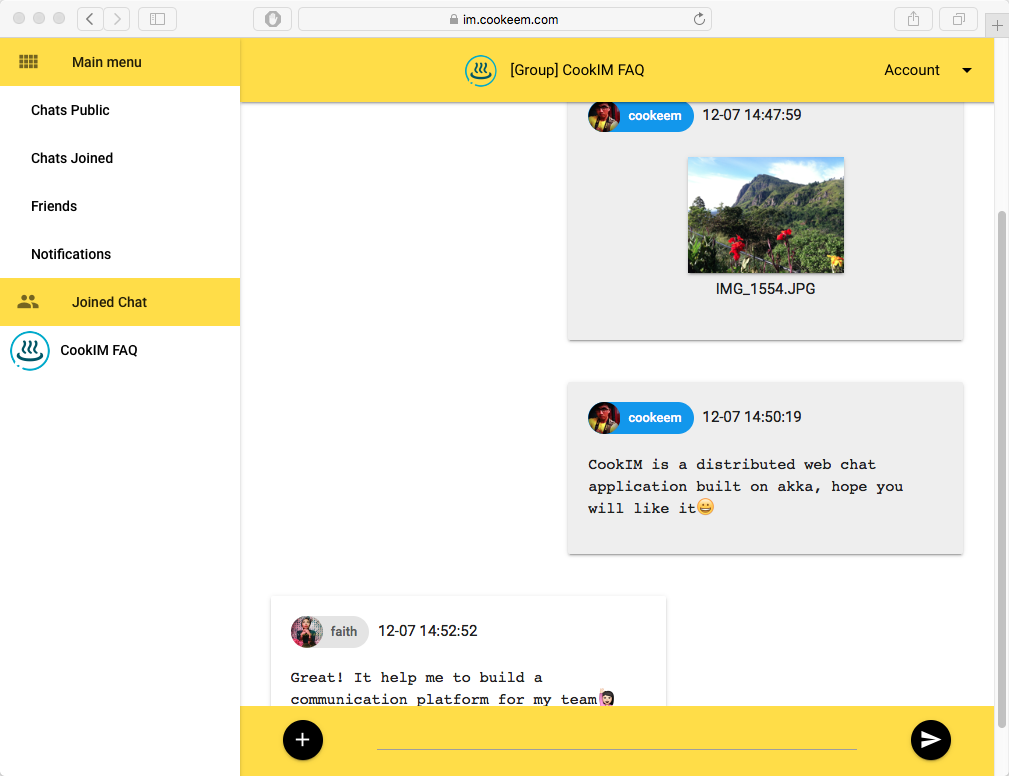
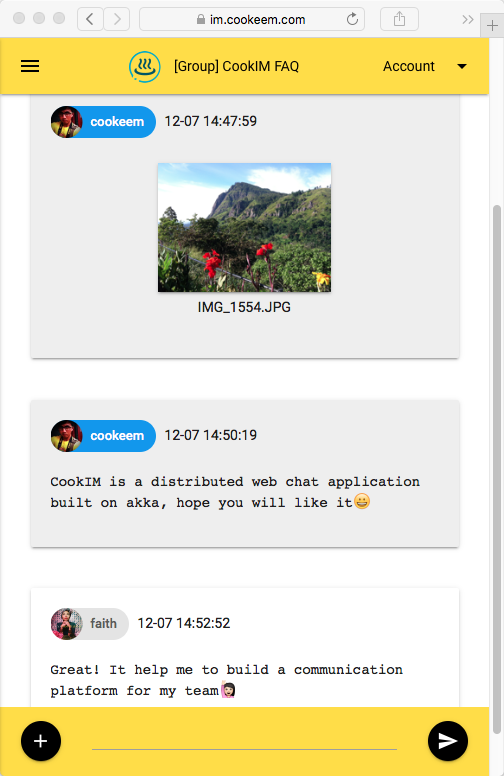
https://im.cookeem.com
Cookim 디렉토리로 변경하고 아래 명령을 실행하고 Docker Compose 모드에서 여러 노드 Cookim 서버를 시작하십시오. 이 방법으로 3 개의 컨테이너가 시작됩니다 : Mongo, Cookim1 및 Cookim2
$ git clone https://github.com/cookeem/CookIM.git

$ cd CookIM

$ sudo docker-compose up -d
Creating mongo
Creating cookim1
Creating cookim2
Docker Compose를 실행 한 후 다른 브라우저를 사용하여 아래 URL에 액세스하여 CookIM1 및 CookIM2에 연결하십시오.
http : // localhost : 8080 http : // localhost : 8081
범주
docker-compose.yml (Cookim 디렉토리)에 구성을 추가하여 Cookim 서버 노드를 추가 할 수 있습니다.이 예제는 Docker Compose에서 CookIM3을 추가하는 방법을 보여줍니다.
      cookim3 :
        image : cookeem/cookim
        container_name : cookim3
        hostname : cookim3
        environment :
          HOST_NAME : cookim3
          WEB_PORT : 8080
          AKKA_PORT : 2551
          SEED_NODES : cookim1:2551
          MONGO_URI : mongodb://mongo:27017/local
        ports :
        - " 8082:8080 "
        depends_on :
        - mongo
        - cookim1
범주
컨테이너 cookim1 로그 출력을 봅니다
$ sudo docker logs -f cookim1 컨테이너로 exec cookim1 사용하여 디버그합니다
$ sudo docker exec -ti cookim1 bash범주
$ sudo docker-compose stop
$ sudo docker-compose rm
범주
범주
git clone https://github.com/cookeem/CookIM.git

cd CookIM
범주
configuration 파일은 conf/application.conf 에서 찾으려면 mongodb uri 구성을 확인하십시오.
mongodb {
  dbname = " cookim "
  uri = " mongodb://mongo:27017/local "
}
어셈블리 Cookim Project to a Fatjar, Target Jar는 target/scala-2.11/CookIM-assembly-0.2.0-SNAPSHOT.jar 에서 위치합니다.
sbt clean assembly범주
Cookim은 MongoDB를 사용하여 채팅 메시지 및 사용자 데이터를 저장하고 Cookim을 시작하기 전에 MongoDB를 시작해야합니다.
Cookim 서버를 시작하는 두 가지 방법이 있습니다 : SBT와 Java
에이. SBT 디버그 방법 :
$ cd # CookIM directory#

$ sbt " run-main com.cookeem.chat.CookIM -h localhost -w 8080 -a 2551 -s localhost:2551 "
비. 뚱뚱한 항아리를 포장하고 컴파일하십시오.
$ sbt assembly기음. 자바 생산 방법 :
$ java -classpath " target/scala-2.11/CookIM-assembly-0.2.4-SNAPSHOT.jar " com.cookeem.chat.CookIM -h localhost -w 8080 -a 2551 -s localhost:2551위의 명령은 웹 서버 청취 포트 8080 및 AKKA 시스템 청취 포트 2551을 시작했습니다.
매개 변수 :
-a -h [-m] [-n] -s -w -a,-akka-port akka 클러스터 노드 포트 -H,-호스트 이름 현재 웹 서비스 외부 호스트 이름 -m,-mongo-uri mongodb 연결 uri, 예 : mongodb : // localhost : 27017/local -n,-nat is nat 네트워크 또는 Seepperates, akkw akkw a akkw a akkw a akke 쉼표, 예 : LocalHost : 2551, LocalHost : 2552 -W,-웹 포트 웹 서비스 포트
범주
http : // localhost : 8080
범주
다른 터미널을 열고 다른 Cookim 서버를 시작하여 서버간에 메시지 통신을 테스트하십시오.
에이. SBT 디버그 방법 :
$ sbt " run-main com.cookeem.chat.CookIM -h localhost -w 8081 -a 2552 -s localhost:2551 "비. 자바 생산 방법 :
$ java -classpath " target/scala-2.11/CookIM-assembly-0.2.0-SNAPSHOT.jar " com.cookeem.chat.CookIM -h localhost -w 8081 -a 2552 -s localhost:2551위의 명령은 웹 서버 청취 포트 8081 및 AKKA 시스템 청취 포트 2552를 시작했습니다.
범주
http : // localhost : 8081
범주
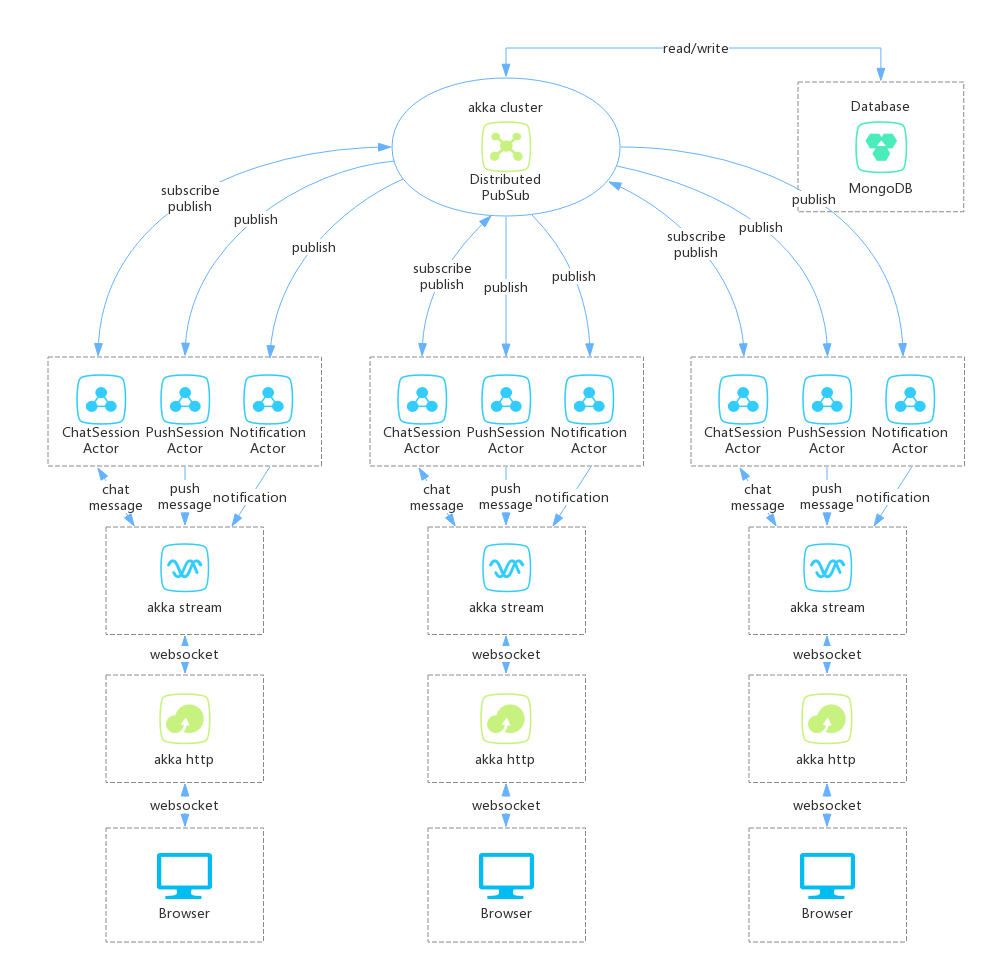
** Cookim Server Make에서 3 부에서 제작 : **
- AKKA HTTP : 웹 서비스 제공, 브라우저 연결 분산 채팅 서버가 WebSocket에 의해 연결됩니다.
- AKKA Stream : AKKA HTTP 수신 웹 소켓 메시지 (WebSocket 메시지는 TextMessage 및 BinaryMessage 포함), Akka Stream Way를 통해 ChatService로 메시지를 보냅니다. WebSocket 메시지는 JWT (JavaScript Web Token)가 포함됩니다. JWT 성공 확인이면 Chatservice Stream이 chatsessionactor에 메시지를 보냅니다.
- AKKA 클러스터 : AKKA 스트림 akka Cluster ChatsessionActor에 webSocket 메시지를 전합니다. ChatsessionActor는 Akka Cluster에서 메시지를 구독하고 게시하기 위해 분산 푸트 서브를 사용합니다. 사용자 온라인 세션은 세션을 구독합니다. 사용자가 세션에서 메시지를 보내면 Akka Cluster에 메시지를 게시하면 세션을 구독 한 액터는 게시 메시지를 받게됩니다.
범주
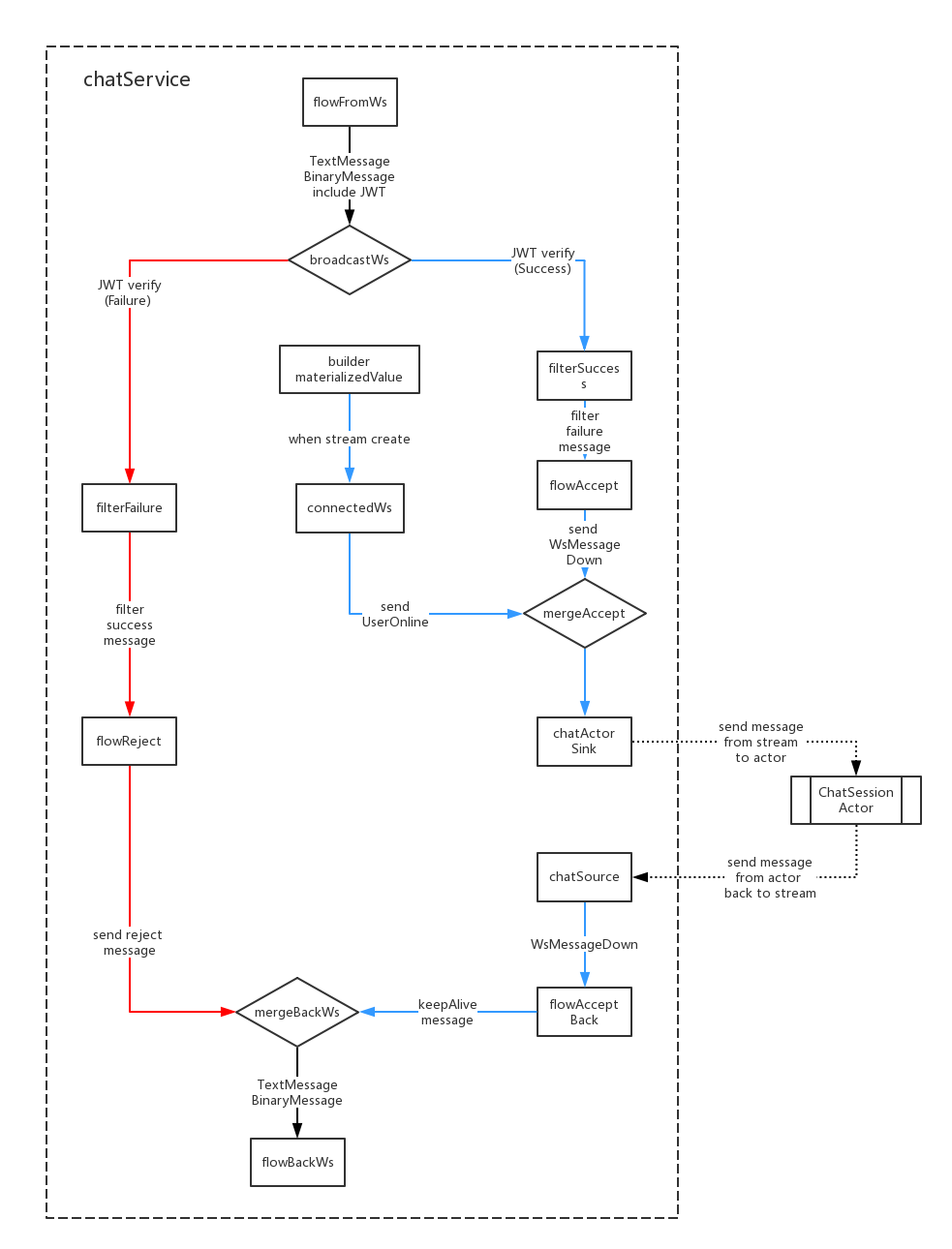
- WebSocket 메시지 본문에는 JWT, WebSocket 메시지를 수신하고 JWT를 Decode에 사용하는 Flowfromws;
- JWT가 실패를 확인하면 FilterFailure로 방송되어 메시지 실패로 필터링됩니다. JWT가 성공을 확인하면 필터 소송으로 브로드 캐스트하여 성공 메시지로 필터링됩니다.
- Akka Stream이 생성되면 Builder.materializedValue는 ConnectedWs에 메시지를 보내고 ConnectedWs는 메시지 수신을 UserOnline 메시지로 변환 한 다음 ChatSinkActor로 보내기 마침내 ChatSessionActor로 보냅니다.
- chatactorsink akka stream이 used useroffline 메시지를 다운 스트림에 보내면 chatsessionactor로 메시지를 보내십시오.
- ChatSource는 ChatsessionActor에서 메시지를 다시받은 다음 FlowAcceptBack으로 메시지를 다시 보냅니다.
- FlowAcceptBack은 WebSocket Connection이 KeepAlive를 허용합니다.
- FlowReject 및 FlowCectsBack 메시지는 마침내 Flovbackws로 전송되고 FlowBacks는 메시지를 WebSocket 형식으로 변환 한 다음 사용자에게 다시 보냅니다.
범주
 *login (login email)
nickname (nickname)
password (password SHA1)
gender (gender: unknow:0, boy:1, girl:2)
avatar (avatar abs path, example: /upload/avatar/201610/26/xxxx.JPG)
lastLogin (last login timestamp)
loginCount (login counts)
sessionsStatus (user joined sessions status)
    [{sessionid: session id, newCount: unread message count in this session}]
friends (user's friends list: [friends uid])
dateline (register timestamp)
 *createuid (creator uid)
*ouid (receiver uid, when session type is private available)
sessionIcon (session icon, when session type is group available)
sessionType (session type: 0:private, 1:group)
publicType (public type: 0:not public, 1:public)
sessionName (session name)
dateline (created timestamp)
usersStatus (users who joined this session status)
    [{uid: uid, online: (true, false)}]
lastMsgid (last message id)
lastUpdate (last update timestamp)
 *uid (send user uid)
*sessionid (relative session id)
msgType (message type)
content (message content)
fileInfo (file information)
    {
        filePath
        fileName
        fileType
        fileSize
        fileThumb
    }
*dateline (created timestamp)
 *uid (online user id)
dateline (last update timestamp)
 noticeType (notification type: "joinFriend", "removeFriend", "inviteSession")
senduid (send user id)
*recvuid (receive user id)
sessionid (relative session id)
isRead (notification is read: 0:not read, 1:already read)
dateline (created timestamp)
범주
WS-Push 및 WS-Chat의 두 가지 WebSocket 채널이 있습니다
ws-push는 사용자에게 새 메시지를 보내고, 사용자가 온라인으로 온라인이 아닌 경우에도 어떤 세션에서 새로운 메시지를받을 수 있는지.
/ws-push 채널
 up message, use to subscribe push message:
{ userToken: "xxx" }

down message:
acceptMsg:     { uid: "xxx", nickname: "xxx", avatar: "xxx", sessionid: "xxx", sessionName: "xxx", sessionIcon: "xxx", msgType: "accept", content: "xxx", dateline: "xxx" }
rejectMsg:     { uid: "", nickname: "", avatar: "", sessionid: "", sessionName: "", sessionIcon: "", msgType: "reject", content: "xxx", dateline: "xxx" }
keepAlive:     { uid: "", nickname: "", avatar: "", sessionid: "", sessionName: "", sessionIcon: "", msgType: "keepalive", content: "", dateline: "xxx" }
textMsg:       { uid: "xxx", nickname: "xxx", avatar: "xxx", sessionid: "xxx", sessionName: "xxx", sessionIcon: "xxx", msgType: "text", content: "xxx", dateline: "xxx" }
fileMsg:       { uid: "xxx", nickname: "xxx", avatar: "xxx", sessionid: "xxx", sessionName: "xxx", sessionIcon: "xxx", msgType: "file", fileName: "xxx", fileType: "xxx", fileid: "xxx", thumbid: "xxx", dateline: "xxx" }
onlineMsg:     { uid: "xxx", nickname: "xxx", avatar: "xxx", sessionid: "xxx", sessionName: "xxx", sessionIcon: "xxx", msgType: "online", content: "xxx", dateline: "xxx" }
offlineMsg:    { uid: "xxx", nickname: "xxx", avatar: "xxx", sessionid: "xxx", sessionName: "xxx", sessionIcon: "xxx", msgType: "offline", content: "xxx", dateline: "xxx" }
joinSessionMsg: { uid: "xxx", nickname: "xxx", avatar: "xxx", sessionid: "xxx", sessionName: "xxx", sessionIcon: "xxx", msgType: "join", content: "xxx", dateline: "xxx" }
leaveSessionMsg:{ uid: "xxx", nickname: "xxx", avatar: "xxx", sessionid: "xxx", sessionName: "xxx", sessionIcon: "xxx", msgType: "leave", content: "xxx", dateline: "xxx" }
noticeMsg:     { uid: "", nickname: "", avatar: "", sessionid: "", sessionName: "xxx", sessionIcon: "xxx", msgType: "system", content: "xxx", dateline: "xxx" }

message push to browser:
pushMsg:       {
                    uid: "xxx", nickname: "xxx", avatar: "xxx", sessionid: "xxx", sessionName: "xxx", sessionIcon: "xxx", msgType: "xxx",
                    content: "xxx", fileName: "xxx", fileType: "xxx", fileid: "xxx", thumbid: "xxx",
                    dateline: "xxx"
               }
범주
WS-Chat은 세션 채팅 채널입니다.이 채널에서 사용자 보내기 및 수신 세션 메시지
 /ws-chat channel
up message:
onlineMsg:     { userToken: "xxx", sessionToken: "xxx", msgType:"online", content:"" }
textMsg:       { userToken: "xxx", sessionToken: "xxx", msgType:"text", content:"xxx" }
fileMsg:       { userToken: "xxx", sessionToken: "xxx", msgType:"file", fileName:"xxx", fileSize: 999, fileType: "xxx" }<#BinaryInfo#>binary_file_array_buffer

down message:
rejectMsg:     { uid: "", nickname: "", avatar: "", sessionid: "", sessionName: "", sessionIcon: "", msgType: "reject", content: "xxx", dateline: "xxx" }
keepAlive:     { uid: "", nickname: "", avatar: "", sessionid: "", sessionName: "", sessionIcon: "", msgType: "keepalive", content: "", dateline: "xxx" }
textMsg:       { uid: "xxx", nickname: "xxx", avatar: "xxx", sessionid: "xxx", sessionName: "xxx", sessionIcon: "xxx", msgType: "text", content: "xxx", dateline: "xxx" }
fileMsg:       { uid: "xxx", nickname: "xxx", avatar: "xxx", sessionid: "xxx", sessionName: "xxx", sessionIcon: "xxx", msgType: "file", fileName: "xxx", fileType: "xxx", fileid: "xxx", thumbid: "xxx", dateline: "xxx" }
onlineMsg:     { uid: "xxx", nickname: "xxx", avatar: "xxx", sessionid: "xxx", sessionName: "xxx", sessionIcon: "xxx", msgType: "online", content: "xxx", dateline: "xxx" }
offlineMsg:    { uid: "xxx", nickname: "xxx", avatar: "xxx", sessionid: "xxx", sessionName: "xxx", sessionIcon: "xxx", msgType: "offline", content: "xxx", dateline: "xxx" }
joinSessionMsg:{ uid: "xxx", nickname: "xxx", avatar: "xxx", sessionid: "xxx", sessionName: "xxx", sessionIcon: "xxx", msgType: "join", content: "xxx", dateline: "xxx" }
leaveSessionMsg:{ uid: "xxx", nickname: "xxx", avatar: "xxx", sessionid: "xxx", sessionName: "xxx", sessionIcon: "xxx", msgType: "leave", content: "xxx", dateline: "xxx" }
noticeMsg:     { uid: "", nickname: "", avatar: "", sessionid: "", sessionName: "xxx", sessionIcon: "xxx", msgType: "system", content: "xxx", dateline: "xxx" }

message push to browser:
chatMsg:       {
                    uid: "xxx", nickname: "xxx", avatar: "xxx", msgType: "xxx",
                    content: "xxx", fileName: "xxx", fileType: "xxx", fileid: "xxx", thumbid: "xxx",
                    dateline: "xxx"
               }
범주
범주
범주
범주







