CookIM
1.0.0


หมวดหมู่
### สาธิต
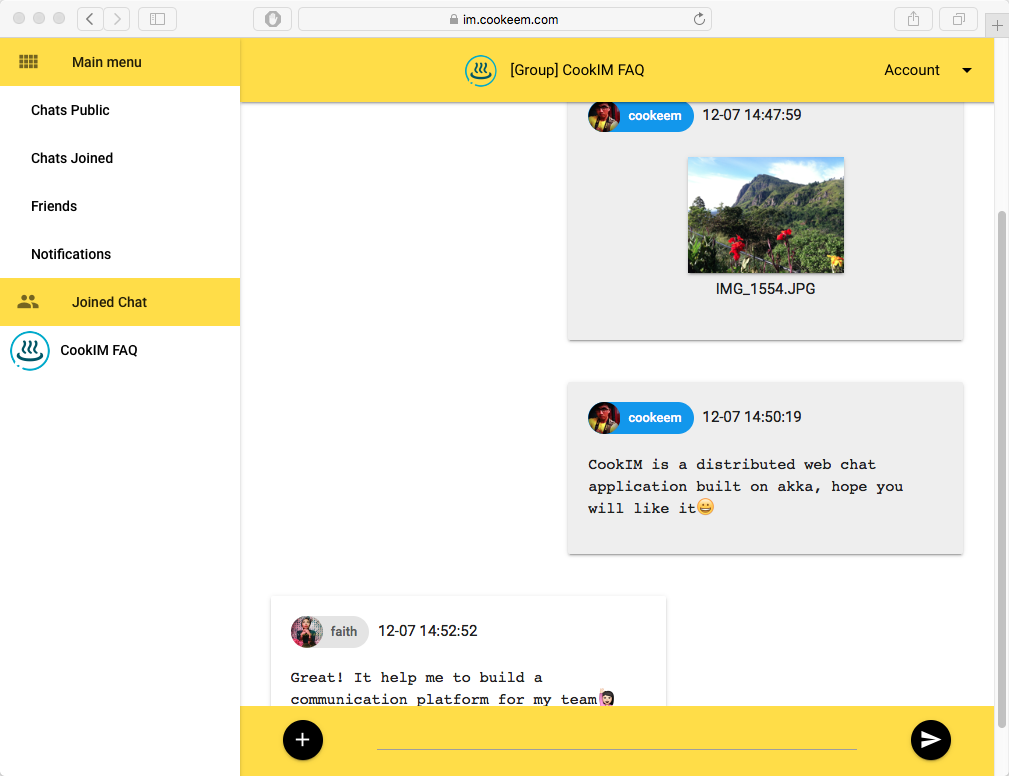
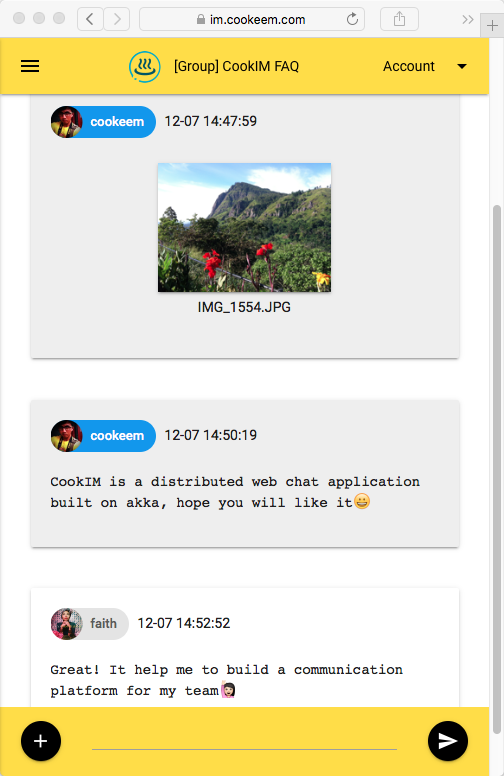
https://im.cookeem.com
เปลี่ยนเป็นไดเรกทอรี Cookim, Run Command ด้านล่างเริ่มต้นหลายโหนดเซิร์ฟเวอร์ Cookim ในโหมด Docker Compose วิธีนี้จะเริ่ม 3 คอนเทนเนอร์: Mongo, Cookim1 และ Cookim2
$ git clone https://github.com/cookeem/CookIM.git

$ cd CookIM

$ sudo docker-compose up -d
Creating mongo
Creating cookim1
Creating cookim2
หลังจาก Run Docker Compose ใช้เบราว์เซอร์ที่แตกต่างกันเพื่อเข้าถึง URL ด้านล่างเพื่อเชื่อมต่อกับ Cookim1 และ Cookim2
http: // localhost: 8080 http: // localhost: 8081
หมวดหมู่
คุณสามารถเพิ่ม config ใน docker-compose.yml (ในไดเรกทอรี cookim) เพื่อเพิ่มโหนดเซิร์ฟเวอร์ Cookim ตัวอย่างนี้แสดงวิธีเพิ่ม Cookim3 ใน Docker Compose:
      cookim3 :
        image : cookeem/cookim
        container_name : cookim3
        hostname : cookim3
        environment :
          HOST_NAME : cookim3
          WEB_PORT : 8080
          AKKA_PORT : 2551
          SEED_NODES : cookim1:2551
          MONGO_URI : mongodb://mongo:27017/local
        ports :
        - " 8082:8080 "
        depends_on :
        - mongo
        - cookim1
หมวดหมู่
ดูคอนเทนเนอร์ cookim1 บันทึกเอาต์พุต
$ sudo docker logs -f cookim1 Exec ลงใน Container cookim1 เพื่อแก้ไขข้อบกพร่อง
$ sudo docker exec -ti cookim1 bashหมวดหมู่
$ sudo docker-compose stop
$ sudo docker-compose rm
หมวดหมู่
หมวดหมู่
git clone https://github.com/cookeem/CookIM.git

cd CookIM
หมวดหมู่
ไฟล์การกำหนดค่าค้นหาที่ conf/application.conf โปรดตรวจสอบให้แน่ใจว่าการกำหนดค่า MongoDB URI ของคุณ
mongodb {
  dbname = " cookim "
  uri = " mongodb://mongo:27017/local "
}
แอสเซมบลี Cookim Project ไปยัง fatjar, jar target ตั้งอยู่ที่ target/scala-2.11/CookIM-assembly-0.2.0-SNAPSHOT.jar
sbt clean assemblyหมวดหมู่
Cookim ใช้ MongoDB เพื่อจัดเก็บข้อความแชทและข้อมูลผู้ใช้ตรวจสอบให้แน่ใจว่าคุณเริ่มต้น MongoDB ก่อนที่จะเริ่มต้น Cookim
มีสองวิธีในการเริ่ม Cookim Server: SBT และ Java
. SBT Debug Way:
$ cd # CookIM directory#

$ sbt " run-main com.cookeem.chat.CookIM -h localhost -w 8080 -a 2551 -s localhost:2551 "
ข. แพ็คและคอมไพล์ไขมันขวด:
$ sbt assemblyค. วิธีการผลิตชวา:
$ java -classpath " target/scala-2.11/CookIM-assembly-0.2.4-SNAPSHOT.jar " com.cookeem.chat.CookIM -h localhost -w 8080 -a 2551 -s localhost:2551คำสั่งด้านบนได้เริ่มต้นเว็บเซิร์ฟเวอร์ฟังพอร์ต 8080 และระบบ Akka Listen Port 2551
พารามิเตอร์:
-a -h [-m] [-n] -s -w -a,-akka-port akka คลัสเตอร์โหนดพอร์ต -h,-โฮสต์บริการเว็บบริการปัจจุบันชื่อโฮสต์ภายนอก -m,-Mongo-Uri MongoDB การเชื่อมต่อ Uri-mongoDB: // localhost: 27017/ท้องถิ่น แยกด้วยเครื่องหมายจุลภาคตัวอย่าง: localhost: 2551, localhost: 2552 -w,-พอร์ตบริการเว็บพอร์ตเว็บพอร์ต
หมวดหมู่
http: // localhost: 8080
หมวดหมู่
เปิดเทอร์มินัลอื่นเริ่มเซิร์ฟเวอร์ Cookim อื่นเพื่อทดสอบการสื่อสารข้อความระหว่างเซิร์ฟเวอร์:
. SBT Debug Way:
$ sbt " run-main com.cookeem.chat.CookIM -h localhost -w 8081 -a 2552 -s localhost:2551 "ข. วิธีการผลิตชวา:
$ java -classpath " target/scala-2.11/CookIM-assembly-0.2.0-SNAPSHOT.jar " com.cookeem.chat.CookIM -h localhost -w 8081 -a 2552 -s localhost:2551คำสั่งด้านบนได้เริ่มต้นเว็บเซิร์ฟเวอร์ฟังพอร์ต 8081 และระบบ Akka Listen Port 2552
หมวดหมู่
http: // localhost: 8081
หมวดหมู่
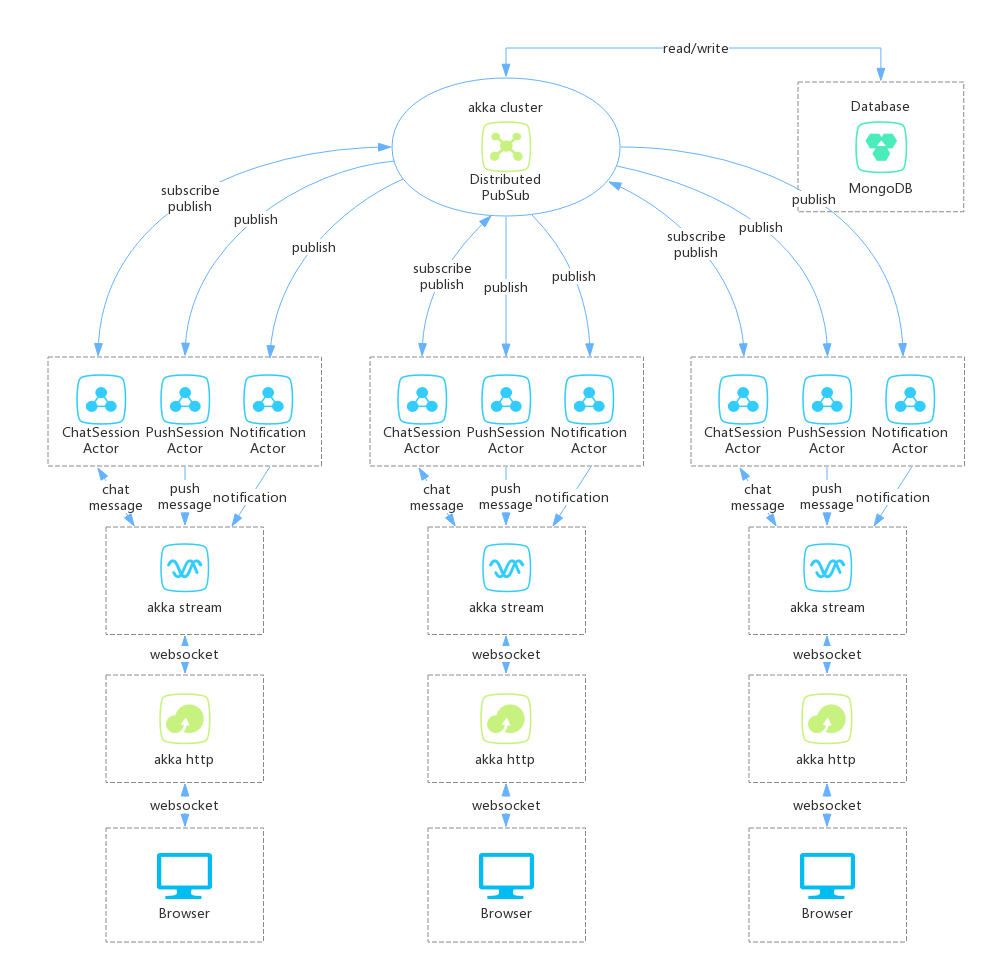
** เซิร์ฟเวอร์ Cookim ทำจาก 3 ส่วน: **
- Akka HTTP: ให้บริการเว็บ, เบราว์เซอร์เชื่อมต่อเซิร์ฟเวอร์แชทแบบกระจายโดย WebSocket
- Akka Stream: Akka HTTP ได้รับข้อความ WebSocket (ข้อความ WebSocket รวมถึงข้อความและ binaryMessage) จากนั้นส่งข้อความไปที่แชทบริการโดย Akka Stream Way ข้อความ WebSocket รวม JWT (JavaScript Web Token) หาก JWT ตรวจสอบความสำเร็จแชทบริการสตรีมจะส่งข้อความไปยังแชทเซสชั่น
- Akka Cluster: Akka Stream ส่งข้อความ WebSocket ไปยัง Akka Cluster Chatsessionactor, ChatsessionActor ใช้ DistributedPubsub เพื่อสมัครและเผยแพร่ข้อความในคลัสเตอร์ Akka เมื่อเซสชันผู้ใช้ออนไลน์จะสมัครรับเซสชัน; เมื่อผู้ใช้ส่งข้อความในเซสชันจะเผยแพร่ข้อความในคลัสเตอร์ Akka นักแสดงที่สมัครสมาชิกเซสชันจะได้รับข้อความเผยแพร่
หมวดหมู่
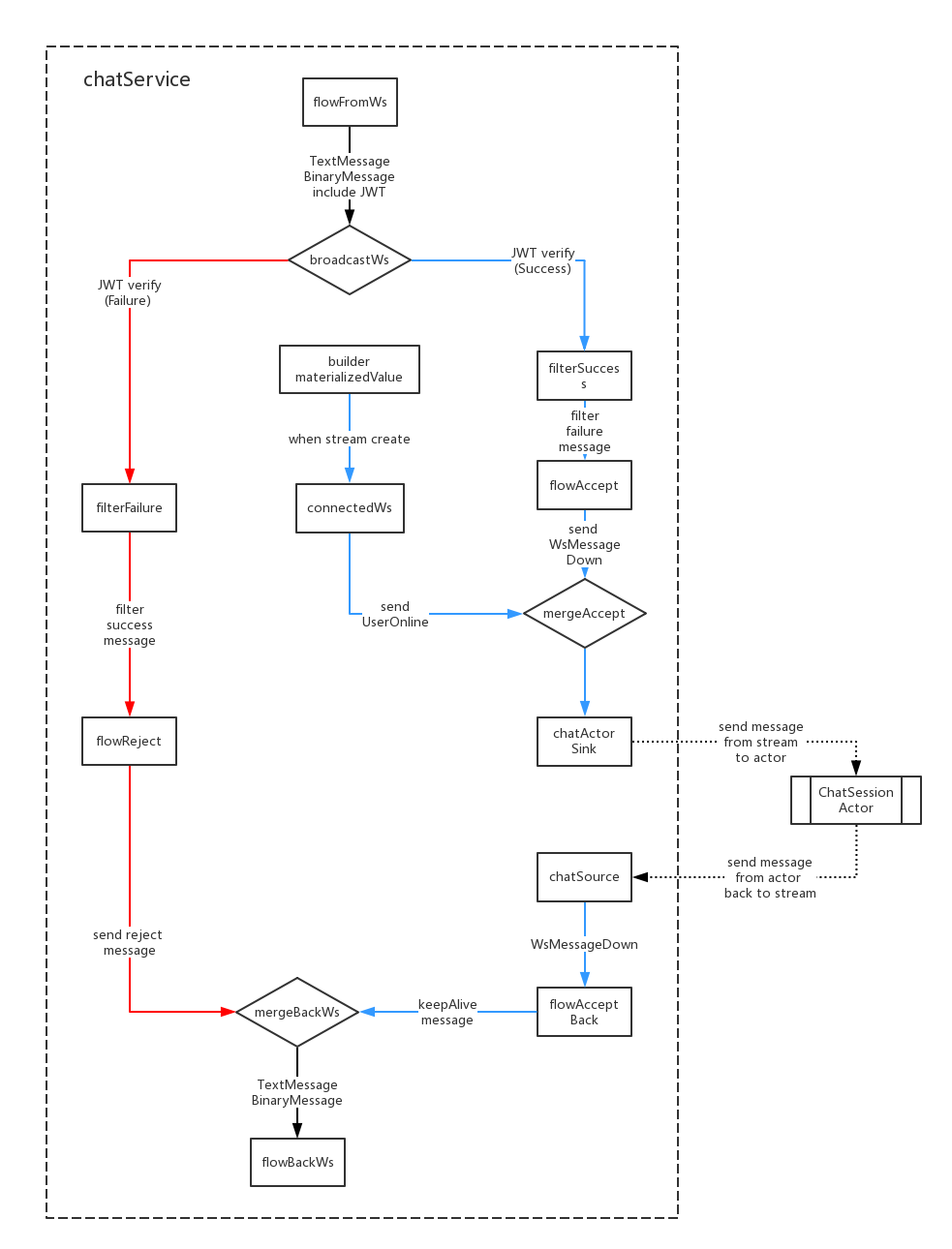
- Body Message Body รวมถึง JWT, FlowFromws ใช้เพื่อรับข้อความ WebSocket และ DECODE JWT;
- เมื่อ JWT ตรวจสอบความล้มเหลวมันจะออกอากาศไปยัง FilterFailure เพื่อกรองเพื่อล้มเหลวข้อความ; เมื่อ JWT ตรวจสอบความสำเร็จมันจะออกอากาศไปยัง Filtersuccess เพื่อกรองข้อความที่ประสบความสำเร็จ
- เมื่อ Akka Stream สร้างขึ้น Builder.MaterializedValue จะส่งข้อความไปยัง ConnectedWs, ConnectedWs Convert Message ได้รับข้อความ UserOnline จากนั้นส่งไปยัง ChatSinkactor ในที่สุดก็ส่งไปยัง ChatsessionActor;
- ChatactorSink ส่งข้อความไปยัง ChatsessionActor เมื่อ Akka Stream ปิดถ้าจะส่งข้อความ UserOffline ไปยังสตรีมลง
- แชทซอร์ซรับข้อความกลับจาก ChatsessionActor จากนั้นส่งข้อความกลับไปที่ FlowacceptBack;
- Flowacceptback จะปล่อยให้ WebSocket Connection Keepalive;
- ในที่สุดข้อความ flowreject และ flowacceptback จะส่งไปยัง flowbackws, flowbackws แปลงข้อความเป็นรูปแบบ websocket จากนั้นส่งกลับไปยังผู้ใช้
หมวดหมู่
 *login (login email)
nickname (nickname)
password (password SHA1)
gender (gender: unknow:0, boy:1, girl:2)
avatar (avatar abs path, example: /upload/avatar/201610/26/xxxx.JPG)
lastLogin (last login timestamp)
loginCount (login counts)
sessionsStatus (user joined sessions status)
    [{sessionid: session id, newCount: unread message count in this session}]
friends (user's friends list: [friends uid])
dateline (register timestamp)
 *createuid (creator uid)
*ouid (receiver uid, when session type is private available)
sessionIcon (session icon, when session type is group available)
sessionType (session type: 0:private, 1:group)
publicType (public type: 0:not public, 1:public)
sessionName (session name)
dateline (created timestamp)
usersStatus (users who joined this session status)
    [{uid: uid, online: (true, false)}]
lastMsgid (last message id)
lastUpdate (last update timestamp)
 *uid (send user uid)
*sessionid (relative session id)
msgType (message type)
content (message content)
fileInfo (file information)
    {
        filePath
        fileName
        fileType
        fileSize
        fileThumb
    }
*dateline (created timestamp)
 *uid (online user id)
dateline (last update timestamp)
 noticeType (notification type: "joinFriend", "removeFriend", "inviteSession")
senduid (send user id)
*recvuid (receive user id)
sessionid (relative session id)
isRead (notification is read: 0:not read, 1:already read)
dateline (created timestamp)
หมวดหมู่
มีสองช่องทาง WebSocket: WS-PUSH และ WS-Chat
WS-Push Send Sessions ข้อความใหม่ไปยังผู้ใช้เมื่อผู้ใช้ไม่ออนไลน์เซสชันพวกเขายังสามารถรับเซสชันที่มีข้อความใหม่
/ช่องสัญญาณ WS-PUSH
 up message, use to subscribe push message:
{ userToken: "xxx" }

down message:
acceptMsg:     { uid: "xxx", nickname: "xxx", avatar: "xxx", sessionid: "xxx", sessionName: "xxx", sessionIcon: "xxx", msgType: "accept", content: "xxx", dateline: "xxx" }
rejectMsg:     { uid: "", nickname: "", avatar: "", sessionid: "", sessionName: "", sessionIcon: "", msgType: "reject", content: "xxx", dateline: "xxx" }
keepAlive:     { uid: "", nickname: "", avatar: "", sessionid: "", sessionName: "", sessionIcon: "", msgType: "keepalive", content: "", dateline: "xxx" }
textMsg:       { uid: "xxx", nickname: "xxx", avatar: "xxx", sessionid: "xxx", sessionName: "xxx", sessionIcon: "xxx", msgType: "text", content: "xxx", dateline: "xxx" }
fileMsg:       { uid: "xxx", nickname: "xxx", avatar: "xxx", sessionid: "xxx", sessionName: "xxx", sessionIcon: "xxx", msgType: "file", fileName: "xxx", fileType: "xxx", fileid: "xxx", thumbid: "xxx", dateline: "xxx" }
onlineMsg:     { uid: "xxx", nickname: "xxx", avatar: "xxx", sessionid: "xxx", sessionName: "xxx", sessionIcon: "xxx", msgType: "online", content: "xxx", dateline: "xxx" }
offlineMsg:    { uid: "xxx", nickname: "xxx", avatar: "xxx", sessionid: "xxx", sessionName: "xxx", sessionIcon: "xxx", msgType: "offline", content: "xxx", dateline: "xxx" }
joinSessionMsg: { uid: "xxx", nickname: "xxx", avatar: "xxx", sessionid: "xxx", sessionName: "xxx", sessionIcon: "xxx", msgType: "join", content: "xxx", dateline: "xxx" }
leaveSessionMsg:{ uid: "xxx", nickname: "xxx", avatar: "xxx", sessionid: "xxx", sessionName: "xxx", sessionIcon: "xxx", msgType: "leave", content: "xxx", dateline: "xxx" }
noticeMsg:     { uid: "", nickname: "", avatar: "", sessionid: "", sessionName: "xxx", sessionIcon: "xxx", msgType: "system", content: "xxx", dateline: "xxx" }

message push to browser:
pushMsg:       {
                    uid: "xxx", nickname: "xxx", avatar: "xxx", sessionid: "xxx", sessionName: "xxx", sessionIcon: "xxx", msgType: "xxx",
                    content: "xxx", fileName: "xxx", fileType: "xxx", fileid: "xxx", thumbid: "xxx",
                    dateline: "xxx"
               }
หมวดหมู่
ws-chat คือช่องแชทเซสชันการส่งผู้ใช้และรับข้อความเซสชันในช่องนี้
 /ws-chat channel
up message:
onlineMsg:     { userToken: "xxx", sessionToken: "xxx", msgType:"online", content:"" }
textMsg:       { userToken: "xxx", sessionToken: "xxx", msgType:"text", content:"xxx" }
fileMsg:       { userToken: "xxx", sessionToken: "xxx", msgType:"file", fileName:"xxx", fileSize: 999, fileType: "xxx" }<#BinaryInfo#>binary_file_array_buffer

down message:
rejectMsg:     { uid: "", nickname: "", avatar: "", sessionid: "", sessionName: "", sessionIcon: "", msgType: "reject", content: "xxx", dateline: "xxx" }
keepAlive:     { uid: "", nickname: "", avatar: "", sessionid: "", sessionName: "", sessionIcon: "", msgType: "keepalive", content: "", dateline: "xxx" }
textMsg:       { uid: "xxx", nickname: "xxx", avatar: "xxx", sessionid: "xxx", sessionName: "xxx", sessionIcon: "xxx", msgType: "text", content: "xxx", dateline: "xxx" }
fileMsg:       { uid: "xxx", nickname: "xxx", avatar: "xxx", sessionid: "xxx", sessionName: "xxx", sessionIcon: "xxx", msgType: "file", fileName: "xxx", fileType: "xxx", fileid: "xxx", thumbid: "xxx", dateline: "xxx" }
onlineMsg:     { uid: "xxx", nickname: "xxx", avatar: "xxx", sessionid: "xxx", sessionName: "xxx", sessionIcon: "xxx", msgType: "online", content: "xxx", dateline: "xxx" }
offlineMsg:    { uid: "xxx", nickname: "xxx", avatar: "xxx", sessionid: "xxx", sessionName: "xxx", sessionIcon: "xxx", msgType: "offline", content: "xxx", dateline: "xxx" }
joinSessionMsg:{ uid: "xxx", nickname: "xxx", avatar: "xxx", sessionid: "xxx", sessionName: "xxx", sessionIcon: "xxx", msgType: "join", content: "xxx", dateline: "xxx" }
leaveSessionMsg:{ uid: "xxx", nickname: "xxx", avatar: "xxx", sessionid: "xxx", sessionName: "xxx", sessionIcon: "xxx", msgType: "leave", content: "xxx", dateline: "xxx" }
noticeMsg:     { uid: "", nickname: "", avatar: "", sessionid: "", sessionName: "xxx", sessionIcon: "xxx", msgType: "system", content: "xxx", dateline: "xxx" }

message push to browser:
chatMsg:       {
                    uid: "xxx", nickname: "xxx", avatar: "xxx", msgType: "xxx",
                    content: "xxx", fileName: "xxx", fileType: "xxx", fileid: "xxx", thumbid: "xxx",
                    dateline: "xxx"
               }
หมวดหมู่
หมวดหมู่
หมวดหมู่
หมวดหมู่







