CookIM
1.0.0


Categoría
###Manifestación
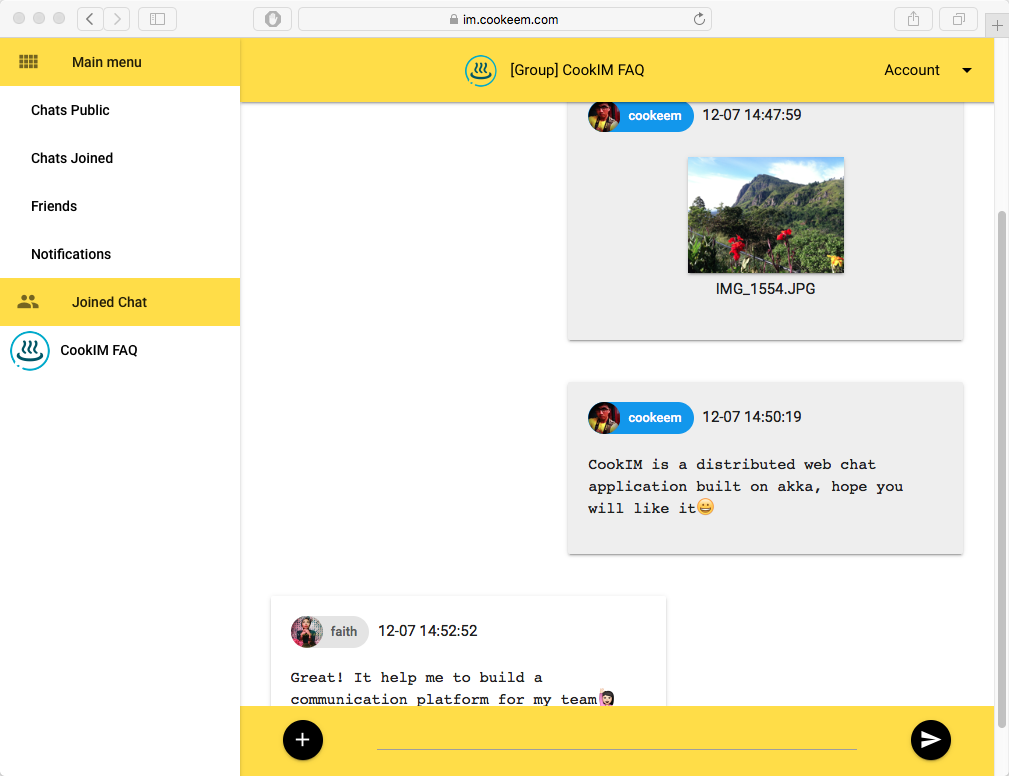
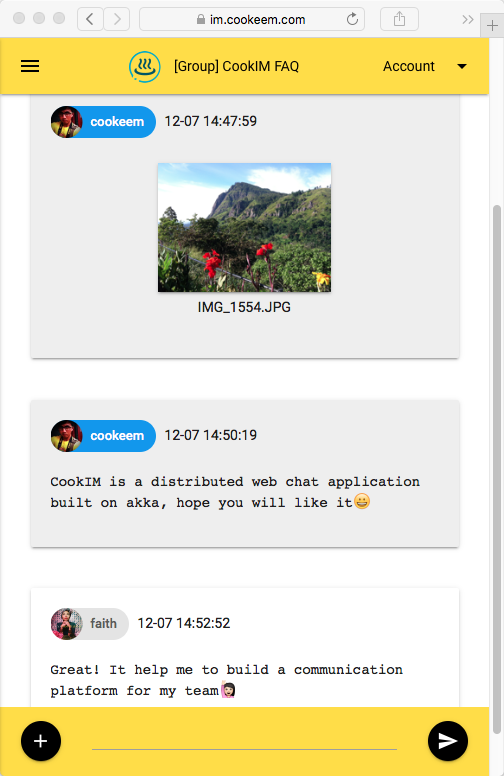
https://im.cookeem.com
Cambie en el directorio de Cookim, ejecute el comando a continuación, inicie múltiples nodos servidores Cookim en el modo Docker Compose. De esta manera comenzará 3 contenedores: Mongo, Cookim1 y Cookim2
$ git clone https://github.com/cookeem/CookIM.git

$ cd CookIM

$ sudo docker-compose up -d
Creating mongo
Creating cookim1
Creating cookim2
Después de ejecutar Docker Compose, use diferentes navegadores para acceder a las URL a continuación para conectarse a Cookim1 y Cookim2
http: // localhost: 8080 http: // localhost: 8081
Categoría
Puede agregar config en docker-compose.yml (en el directorio cookim) para agregar nodos de servidor Cookim, este ejemplo muestra cómo agregar Cookim3 en Docker Compose:
      cookim3 :
        image : cookeem/cookim
        container_name : cookim3
        hostname : cookim3
        environment :
          HOST_NAME : cookim3
          WEB_PORT : 8080
          AKKA_PORT : 2551
          SEED_NODES : cookim1:2551
          MONGO_URI : mongodb://mongo:27017/local
        ports :
        - " 8082:8080 "
        depends_on :
        - mongo
        - cookim1
Categoría
Ver contenedor cookim1 Registros de salida
$ sudo docker logs -f cookim1 Ejecutar en contenedor cookim1 para depurar
$ sudo docker exec -ti cookim1 bashCategoría
$ sudo docker-compose stop
$ sudo docker-compose rm
Categoría
Categoría
git clone https://github.com/cookeem/CookIM.git

cd CookIM
Categoría
El archivo de configuración se ubica en conf/application.conf , asegúrese de que su configuración URI de MongoDB.
mongodb {
  dbname = " cookim "
  uri = " mongodb://mongo:27017/local "
}
Proyecto de Cookim de ensamblaje a un fatJar, Jar de destino ubicado en target/scala-2.11/CookIM-assembly-0.2.0-SNAPSHOT.jar
sbt clean assemblyCategoría
Cookim Use MongoDB para almacenar mensajes de chat y datos de usuarios, asegúrese de iniciar MongoDB antes de inicio de Cookim.
Hay dos formas de iniciar el servidor Cookim: SBT y Java
a. SBT Way de depuración:
$ cd # CookIM directory#

$ sbt " run-main com.cookeem.chat.CookIM -h localhost -w 8080 -a 2551 -s localhost:2551 "
b. empacar y compilar frasco de grasa:
$ sbt assemblydo. Java de producción de Java:
$ java -classpath " target/scala-2.11/CookIM-assembly-0.2.4-SNAPSHOT.jar " com.cookeem.chat.CookIM -h localhost -w 8080 -a 2551 -s localhost:2551El comando anterior ha iniciado un puerto de escucha del servidor web 8080 y el puerto de escucha del sistema AKKA 2551
Parámetros:
-a -h [-m ] [-n] -s -w -a,--akka-port akka cluster node port -h,--host-name current web service external host name -m,--mongo-uri mongodb connection uri, example: mongodb://localhost:27017/local -n,--nat is nat network or in docker -s,--seed-nodes akka cluster seed nodes, seperate with coma, ejemplo: localhost: 2551, localhost: 2552 -W,-puerto de servicio web de puerto web
Categoría
http: // localhost: 8080
Categoría
Abra otro terminal, inicie otro servidor Cookim para probar la comunicación de mensajes entre servidores:
a. SBT Way de depuración:
$ sbt " run-main com.cookeem.chat.CookIM -h localhost -w 8081 -a 2552 -s localhost:2551 "b. Java de producción de Java:
$ java -classpath " target/scala-2.11/CookIM-assembly-0.2.0-SNAPSHOT.jar " com.cookeem.chat.CookIM -h localhost -w 8081 -a 2552 -s localhost:2551El comando anterior ha iniciado un puerto de escucha del servidor web 8081 y el sistema de escucha del sistema AKKA 2552
Categoría
http: // localhost: 8081
Categoría
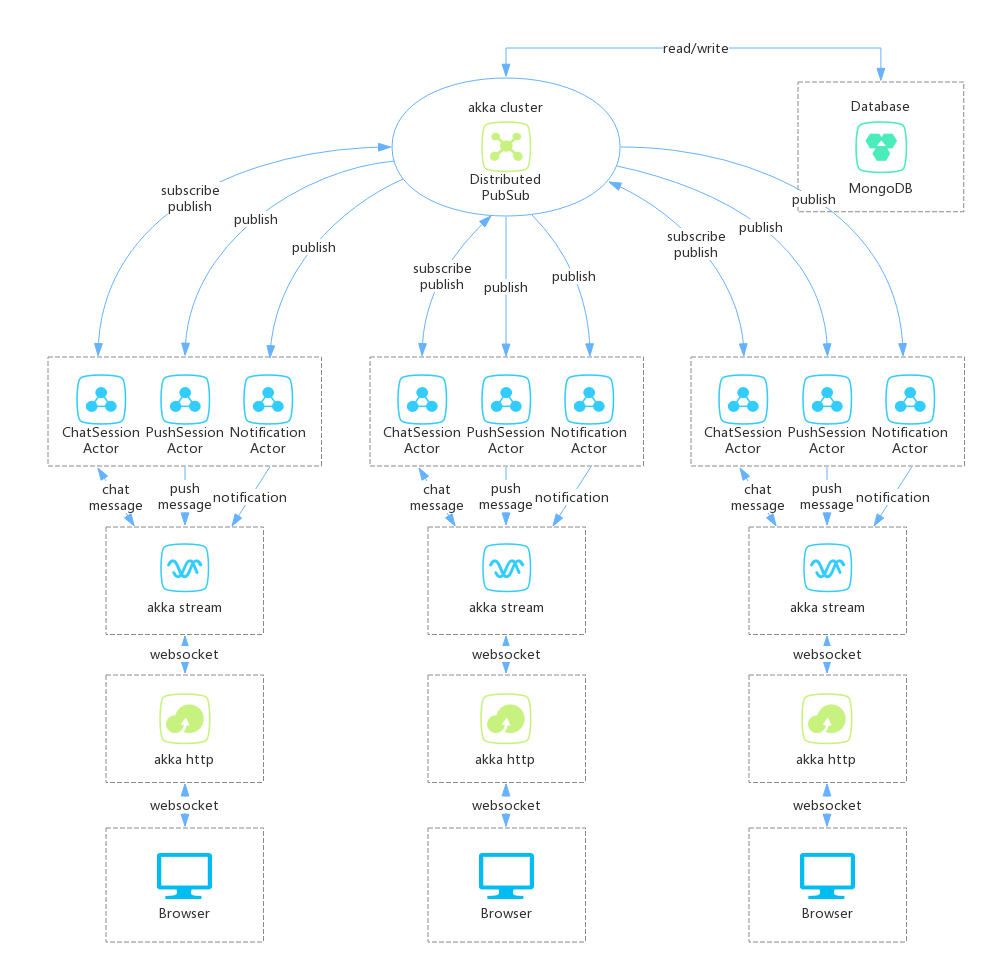
** El servidor Cookim hace de 3 partes: **
- AKKA HTTP: Proporcionar servicio web, servidores de chat distribuidos de Browser Connect por WebSocket
- Akka Stream: Akka http recibe el mensaje WebSocket (el mensaje de WebSocket incluye TextMessage y BinaryMessage), luego envíe el mensaje a Chatservice por Akka Stream Way, el mensaje WebSocket incluye JWT (JavaScript Web Token), si JWT verifica la falla, Chatservice Stream devolverá el mensaje rechazar; Si JWT verifica el éxito, ChatService Stream enviará un mensaje a ChatSessionActor
- Akka Cluster: Akka Stream Enviar mensaje de WebSocket a Akka Cluster ChatsessionActor, ChatSessionActor usa DistributedPubSub para suscribir y publicar un mensaje en Akka Cluster. Cuando la sesión en línea del usuario, suscribirá la sesión; Cuando el usuario envíe el mensaje en sesión, publicará un mensaje en Akka Cluster, los actores que suscriben la sesión recibirán el mensaje de publicación
Categoría
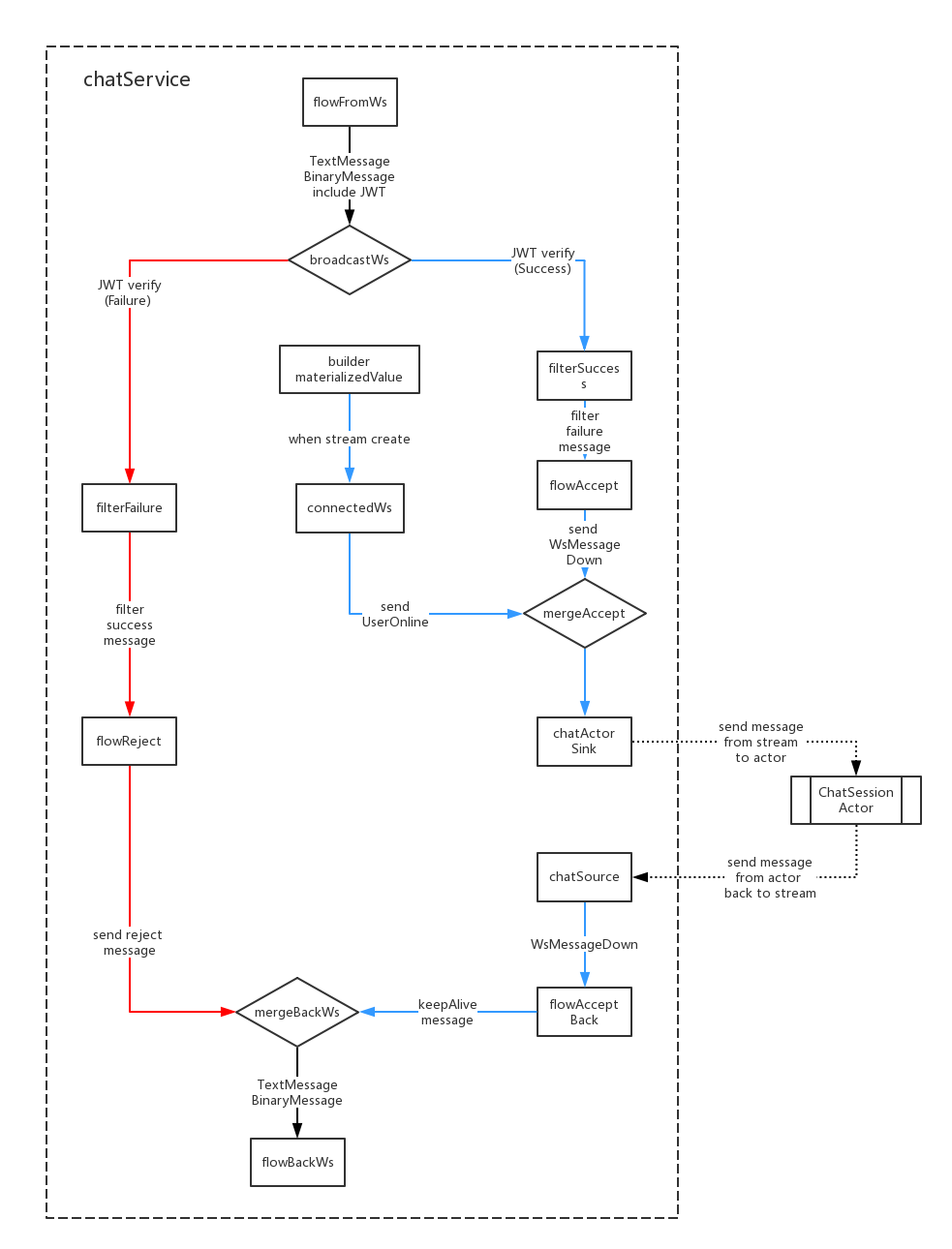
- El cuerpo de mensajes de WebSocket incluye JWT, FlowFromWS usa para recibir mensajes de WebSocket y decodificar JWT;
- Cuando JWT verifique la falla, se transmitirá a FilterFailure para filtrar para fallar el mensaje; Cuando JWT verifique el éxito, se transmitirá a FilterSuccess para filtrar al mensaje de éxito;
- Cuando Akka Stream creó, Builder.MaterializedValue enviará un mensaje a ConnectedWS, ConnectedWS Convertir Mensaje Recibir al mensaje UserOnline, luego enviar a ChatSinkActor finalmente enviar a ChatsessionActor;
- ChatActorSink Enviar mensaje a ChatSessionActor, cuando Akka transmite cerrado si enviará el mensaje de UserOffline a la transmisión de abajo;
- ChatSource Reciba el mensaje de ChatsessionActor, luego envíe el mensaje de regreso a Flowacceptback;
- Flowacceptback permitirá que la conexión WebSocket se mantenga;
- FlowRject y Flowacceptback Mensajes finalmente se envían a FlowBackws, FlowBackws convierte los mensajes a formato WebSocket y luego envíe nuevamente a los usuarios;
Categoría
 *login (login email)
nickname (nickname)
password (password SHA1)
gender (gender: unknow:0, boy:1, girl:2)
avatar (avatar abs path, example: /upload/avatar/201610/26/xxxx.JPG)
lastLogin (last login timestamp)
loginCount (login counts)
sessionsStatus (user joined sessions status)
    [{sessionid: session id, newCount: unread message count in this session}]
friends (user's friends list: [friends uid])
dateline (register timestamp)
 *createuid (creator uid)
*ouid (receiver uid, when session type is private available)
sessionIcon (session icon, when session type is group available)
sessionType (session type: 0:private, 1:group)
publicType (public type: 0:not public, 1:public)
sessionName (session name)
dateline (created timestamp)
usersStatus (users who joined this session status)
    [{uid: uid, online: (true, false)}]
lastMsgid (last message id)
lastUpdate (last update timestamp)
 *uid (send user uid)
*sessionid (relative session id)
msgType (message type)
content (message content)
fileInfo (file information)
    {
        filePath
        fileName
        fileType
        fileSize
        fileThumb
    }
*dateline (created timestamp)
 *uid (online user id)
dateline (last update timestamp)
 noticeType (notification type: "joinFriend", "removeFriend", "inviteSession")
senduid (send user id)
*recvuid (receive user id)
sessionid (relative session id)
isRead (notification is read: 0:not read, 1:already read)
dateline (created timestamp)
Categoría
Hay dos canales de WebSocket: WS-Push y WS-Chat
WS-Push Enviar sesiones Nuevos mensaje a los usuarios, cuando el usuario no en línea en la sesión, aún puede recibir qué sesiones tiene nuevos mensajes
/canal WS-Push
 up message, use to subscribe push message:
{ userToken: "xxx" }

down message:
acceptMsg:     { uid: "xxx", nickname: "xxx", avatar: "xxx", sessionid: "xxx", sessionName: "xxx", sessionIcon: "xxx", msgType: "accept", content: "xxx", dateline: "xxx" }
rejectMsg:     { uid: "", nickname: "", avatar: "", sessionid: "", sessionName: "", sessionIcon: "", msgType: "reject", content: "xxx", dateline: "xxx" }
keepAlive:     { uid: "", nickname: "", avatar: "", sessionid: "", sessionName: "", sessionIcon: "", msgType: "keepalive", content: "", dateline: "xxx" }
textMsg:       { uid: "xxx", nickname: "xxx", avatar: "xxx", sessionid: "xxx", sessionName: "xxx", sessionIcon: "xxx", msgType: "text", content: "xxx", dateline: "xxx" }
fileMsg:       { uid: "xxx", nickname: "xxx", avatar: "xxx", sessionid: "xxx", sessionName: "xxx", sessionIcon: "xxx", msgType: "file", fileName: "xxx", fileType: "xxx", fileid: "xxx", thumbid: "xxx", dateline: "xxx" }
onlineMsg:     { uid: "xxx", nickname: "xxx", avatar: "xxx", sessionid: "xxx", sessionName: "xxx", sessionIcon: "xxx", msgType: "online", content: "xxx", dateline: "xxx" }
offlineMsg:    { uid: "xxx", nickname: "xxx", avatar: "xxx", sessionid: "xxx", sessionName: "xxx", sessionIcon: "xxx", msgType: "offline", content: "xxx", dateline: "xxx" }
joinSessionMsg: { uid: "xxx", nickname: "xxx", avatar: "xxx", sessionid: "xxx", sessionName: "xxx", sessionIcon: "xxx", msgType: "join", content: "xxx", dateline: "xxx" }
leaveSessionMsg:{ uid: "xxx", nickname: "xxx", avatar: "xxx", sessionid: "xxx", sessionName: "xxx", sessionIcon: "xxx", msgType: "leave", content: "xxx", dateline: "xxx" }
noticeMsg:     { uid: "", nickname: "", avatar: "", sessionid: "", sessionName: "xxx", sessionIcon: "xxx", msgType: "system", content: "xxx", dateline: "xxx" }

message push to browser:
pushMsg:       {
                    uid: "xxx", nickname: "xxx", avatar: "xxx", sessionid: "xxx", sessionName: "xxx", sessionIcon: "xxx", msgType: "xxx",
                    content: "xxx", fileName: "xxx", fileType: "xxx", fileid: "xxx", thumbid: "xxx",
                    dateline: "xxx"
               }
Categoría
WS-Chat es canal de chat de sesión, envío de usuarios y recibe mensajes de sesión en este canal
 /ws-chat channel
up message:
onlineMsg:     { userToken: "xxx", sessionToken: "xxx", msgType:"online", content:"" }
textMsg:       { userToken: "xxx", sessionToken: "xxx", msgType:"text", content:"xxx" }
fileMsg:       { userToken: "xxx", sessionToken: "xxx", msgType:"file", fileName:"xxx", fileSize: 999, fileType: "xxx" }<#BinaryInfo#>binary_file_array_buffer

down message:
rejectMsg:     { uid: "", nickname: "", avatar: "", sessionid: "", sessionName: "", sessionIcon: "", msgType: "reject", content: "xxx", dateline: "xxx" }
keepAlive:     { uid: "", nickname: "", avatar: "", sessionid: "", sessionName: "", sessionIcon: "", msgType: "keepalive", content: "", dateline: "xxx" }
textMsg:       { uid: "xxx", nickname: "xxx", avatar: "xxx", sessionid: "xxx", sessionName: "xxx", sessionIcon: "xxx", msgType: "text", content: "xxx", dateline: "xxx" }
fileMsg:       { uid: "xxx", nickname: "xxx", avatar: "xxx", sessionid: "xxx", sessionName: "xxx", sessionIcon: "xxx", msgType: "file", fileName: "xxx", fileType: "xxx", fileid: "xxx", thumbid: "xxx", dateline: "xxx" }
onlineMsg:     { uid: "xxx", nickname: "xxx", avatar: "xxx", sessionid: "xxx", sessionName: "xxx", sessionIcon: "xxx", msgType: "online", content: "xxx", dateline: "xxx" }
offlineMsg:    { uid: "xxx", nickname: "xxx", avatar: "xxx", sessionid: "xxx", sessionName: "xxx", sessionIcon: "xxx", msgType: "offline", content: "xxx", dateline: "xxx" }
joinSessionMsg:{ uid: "xxx", nickname: "xxx", avatar: "xxx", sessionid: "xxx", sessionName: "xxx", sessionIcon: "xxx", msgType: "join", content: "xxx", dateline: "xxx" }
leaveSessionMsg:{ uid: "xxx", nickname: "xxx", avatar: "xxx", sessionid: "xxx", sessionName: "xxx", sessionIcon: "xxx", msgType: "leave", content: "xxx", dateline: "xxx" }
noticeMsg:     { uid: "", nickname: "", avatar: "", sessionid: "", sessionName: "xxx", sessionIcon: "xxx", msgType: "system", content: "xxx", dateline: "xxx" }

message push to browser:
chatMsg:       {
                    uid: "xxx", nickname: "xxx", avatar: "xxx", msgType: "xxx",
                    content: "xxx", fileName: "xxx", fileType: "xxx", fileid: "xxx", thumbid: "xxx",
                    dateline: "xxx"
               }
Categoría
Categoría
Categoría
Categoría







