angular editor
2.1.0

一个简单的本机Wysiwyg/Angular 6-19+的丰富文本编辑器
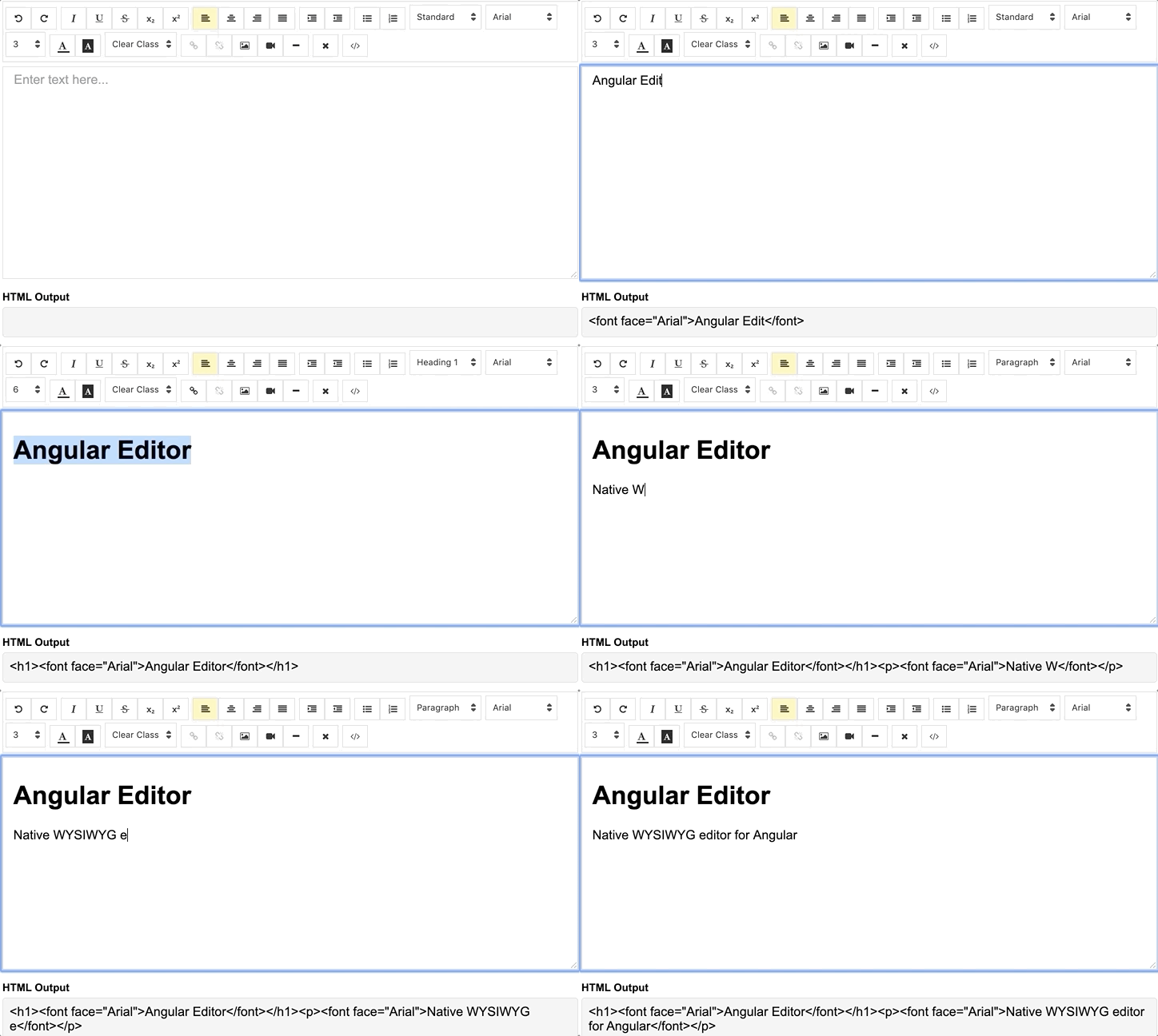
演示|请参阅Stackblitz中的代码。
通过NPM软件包管理器安装
npm install @kolkov/angular-editor --save3.0.0及以上 - 对于Angular V13 +(删除的字体很棒的图标DEP + CSS变量)
2.0.0及以上 - 对于角v13.xx及以上
1.0.0及以上 - 对于Angular V8.xx及以上
0.18.4及以上 - 对于角v7.xx
0.15.x-对于角v6.xx
注意力! alpha和beta版本可能包含破坏变化。
导入angular-editor模块
 import { HttpClientModule } from '@angular/common/http' ;
import { AngularEditorModule } from '@kolkov/angular-editor' ;

@ NgModule ( {
  imports : [ HttpClientModule , AngularEditorModule ]
} )
然后在HTML中
< angular-editor [placeholder] =" 'Enter text here...' " [(ngModel)] =" htmlContent " > </ angular-editor >或用反应性形式使用
< angular-editor formControlName =" htmlContent " [config] =" editorConfig " > </ angular-editor >如果您在同一页面设置id属性上使用了多个编辑器
 < angular-editor id =" editor1 " formControlName =" htmlContent1 " [config] =" editorConfig " > </ angular-editor >
< angular-editor id =" editor2 " formControlName =" htmlContent2 " [config] =" editorConfig " > </ angular-editor >
在哪里
 import { AngularEditorConfig } from '@kolkov/angular-editor' ;


editorConfig: AngularEditorConfig = {
    editable : true ,
      spellcheck : true ,
      height : 'auto' ,
      minHeight : '0' ,
      maxHeight : 'auto' ,
      width : 'auto' ,
      minWidth : '0' ,
      translate : 'yes' ,
      enableToolbar : true ,
      showToolbar : true ,
      placeholder : 'Enter text here...' ,
      defaultParagraphSeparator : '' ,
      defaultFontName : '' ,
      defaultFontSize : '' ,
      fonts : [
        { class : 'arial' , name : 'Arial' } ,
        { class : 'times-new-roman' , name : 'Times New Roman' } ,
        { class : 'calibri' , name : 'Calibri' } ,
        { class : 'comic-sans-ms' , name : 'Comic Sans MS' }
      ] ,
      customClasses : [
      {
        name : 'quote' ,
        class : 'quote' ,
      } ,
      {
        name : 'redText' ,
        class : 'redText'
      } ,
      {
        name : 'titleText' ,
        class : 'titleText' ,
        tag : 'h1' ,
      } ,
    ] ,
    uploadUrl : 'v1/image' ,
    upload : ( file : File ) => { ... }
    uploadWithCredentials : false ,
    sanitize : true ,
    toolbarPosition : 'top' ,
    toolbarHiddenButtons : [
      [ 'bold' , 'italic' ] ,
      [ 'fontSize' ]
    ]
} ;要使ngModel工作,您必须从@angular/forms或formControlName导入FormsModule ,您必须从@angular/forms ReactiveFormsModule
要服务图标文件,请确保您的angular.json包含以下资产配置:
 {
  "glob": "**/*",
  "input": "node_modules/@kolkov/angular-editor/assets/icons",
  "output": "assets/ae-icons/"
}
将默认主题文件连接到您的angular.json或nx.json
 "styles": [
     "projects/angular-editor-app/src/styles.scss",
     "node_modules/@kolkov/angular-editor/themes/default.scss"
],
或您的project styles.scss文件中的@include或@use ,然后覆盖默认主题变量:
 :root {
  --ae-gap : 5 px ;
  --ae-text-area-border : 1 px solid #ddd ;
  --ae-text-area-border-radius : 0 ;
  --ae-focus-outline-color : #afaeae auto 1 px ;
  --ae-toolbar-padding : 1 px ;
  --ae-toolbar-bg-color : #b3dca0 ;
  --ae-toolbar-border-radius : 1 px solid #ddd ;
  --ae-button-bg-color : #dadad7 ;
  --ae-button-border : 3 px solid #3fb74e ;
  --ae-button-radius : 5 px ;
  --ae-button-hover-bg-color : #3fb74e ;
  --ae-button-active-bg-color : red ;
  --ae-button-active-hover-bg-color : blue ;
  --ae-button-disabled-bg-color : gray ;
  --ae-picker-label-color : rgb ( 78 , 84 , 155 );
  --ae-picker-icon-bg-color : rgb ( 34 , 41 , 122 );
  --ae-picker-option-bg-color : rgba ( 221 , 221 , 84 , 0.76 );
  --ae-picker-option-active-bg-color : rgba ( 237 , 237 , 62 , 0.9 );
  --ae-picker-option-focused-bg-color : rgb ( 255 , 255 , 0 );
}您可以使用ExecuteCommandFN使用自定义操作来定义自定义按钮。它接受execcommand的命令。该方法的第一个参数是acommandname,第二个参数是avalueargument。示例显示了一个将角编辑器徽标添加到编辑器中的按钮。
 < angular-editor id =" editor1 " [(ngModel)] =" htmlContent1 " [config] =" config1 " (ngModelChange) =" onChange($event) "
                (blur) =" onBlur($event) " >
  < ng-template #customButtons let-executeCommandFn =" executeCommandFn " >
    < ae-toolbar-set >
      < button aeButton title =" Angular editor logo " (click) =" executeCommandFn('insertHtml', angularEditorLogo) " >
        < svg viewBox =" -8 0 272 272 " xmlns =" http://www.w3.org/2000/svg "
             preserveAspectRatio =" xMidYMid " fill =" #000000 " >
          < g id =" SVGRepo_bgCarrier " stroke-width =" 0 " > </ g >
          < g id =" SVGRepo_tracerCarrier " stroke-linecap =" round " stroke-linejoin =" round " > </ g >
          < g id =" SVGRepo_iconCarrier " >
            < g >
              < path
                d =" M0.0996108949,45.522179 L125.908171,0.697276265 L255.103502,44.7252918 L234.185214,211.175097 L125.908171,271.140856 L19.3245136,211.971984 L0.0996108949,45.522179 Z "
                fill =" #E23237 " > </ path >
              < path
                d =" M255.103502,44.7252918 L125.908171,0.697276265 L125.908171,271.140856 L234.185214,211.274708 L255.103502,44.7252918 L255.103502,44.7252918 Z "
                fill =" #B52E31 " > </ path >
              < path
                d =" M126.107393,32.27393 L126.107393,32.27393 L47.7136187,206.692607 L76.9992218,206.194553 L92.7377432,166.848249 L126.207004,166.848249 L126.306615,166.848249 L163.063035,166.848249 L180.29572,206.692607 L208.286381,207.190661 L126.107393,32.27393 L126.107393,32.27393 Z M126.306615,88.155642 L152.803113,143.5393 L127.402335,143.5393 L126.107393,143.5393 L102.997665,143.5393 L126.306615,88.155642 L126.306615,88.155642 Z "
                fill =" #FFFFFF " > </ path >
            </ g >
          </ g >
        </ svg >
      </ button >
    </ ae-toolbar-set >
  </ ng-template >
</ angular-editor > | 输入 | 类型 | 默认 | 必需的 | 描述 |
|---|---|---|---|---|
| ID | string | - | 不 | 同一页面上使用多个编辑器时的ID属性 |
| [config] | AngularEditorConfig | default config | 不 | 编辑器的配置 |
| 占位符 | string | - | 不 | 设置输入区域的自定义占位符 |
| Tabindex | number | - | 不 | 在Angular-编辑器上设置Tabindex |
| 输出 | 描述 |
|---|---|
| (html) | 输出HTML |
| (ViewMode) | 切换Visual和HTML源模式时发射 |
| (模糊) | 当编辑模糊时被解雇 |
| (重点) | 当编辑重点时被解雇 |
| 姓名 | 描述 |
|---|---|
| 重点 | 聚焦编辑器元素 |
| 姓名 | 类型 | 描述 |
|---|---|---|
| AngulareditorConfig | 配置 | Angulareditor组件的配置。 |
| 输入 | 类型 | 默认 | 必需的 | 描述 |
|---|---|---|---|---|
| 可编辑 | bolean | true | 不 | 设置启用是否设置编辑 |
| 拼写检查 | bolean | true | 不 | 设置启用拼写检查是否 |
| 翻译 | string | yes | 不 | 设置启用的翻译与否 |
| 消毒 | bolean | true | 不 | 设置启用dom消毒或不设置 |
| 高度 | string | auto | 不 | 编辑器的设置高度 |
| Minheight | string | 0 | 不 | 设置编辑器的最小高度 |
| 麦克海 | string | auto | 不 | 设置编辑器的最大高度 |
| 宽度 | string | auto | 不 | 设置编辑器的宽度 |
| 最小 | string | 0 | 不 | 设置编辑器的最小宽度 |
| enabletoolbar | bolean | true | 不 | 设置工具栏是否启用 |
| Showtoolbar | bolean | true | 不 | 设置工具栏是否可见 |
| 工具栏 | string | top | 不 | 设置工具栏位置顶部或底部 |
| 占位符 | string | - | 不 | 设定占位符文字 |
| DefaultParagraphaphapharator | string | - | 不 | 设置默认段落分隔符,例如p |
| DefaultFontName | string | - | 不 | 设置默认字体,例如Comic Sans MS |
| DefaultFontSize | string | - | 不 | 设置默认字体大小7例如1 |
| 上载 | string | - | 不 | 设置图像上传端点https://api.exapple.com/v1/image/upload ,并使用imageUrl键返回响应。 {“ imageUrl”:} |
| 上传 | function | - | 不 | 设置图像上传功能 |
| 上传WithCredentials | bolean | false | 不 | 在图像上传电话中设置通过或不凭据 |
| 字体 | Font[] | - | 不 | 设置一系列可用字体[{name, class},...] |
| 定制类 | CustomClass[] | - | 不 | 设置可用字体的数组[{name, class, tag},...] |
| 大纲 | bolean | true | 不 | 如果焦点为focor |
| 工具巴尔汉顿顿 | string[][] | - | 不 | 一组要隐藏的按钮名称或元素 |
toolbarHiddenButtons: [
  [
    'undo' ,
    'redo' ,
    'bold' ,
    'italic' ,
    'underline' ,
    'strikeThrough' ,
    'subscript' ,
    'superscript' ,
    'justifyLeft' ,
    'justifyCenter' ,
    'justifyRight' ,
    'justifyFull' ,
    'indent' ,
    'outdent' ,
    'insertUnorderedList' ,
    'insertOrderedList' ,
    'heading' ,
    'fontName'
  ] ,
  [
    'fontSize' ,
    'textColor' ,
    'backgroundColor' ,
    'customClasses' ,
    'link' ,
    'unlink' ,
    'insertImage' ,
    'insertVideo' ,
    'insertHorizontalRule' ,
    'removeFormat' ,
    'toggleEditorMode'
  ]
] 在下载中,您会找到以下目录和文件。您会看到这样的东西:
 angular-editor/
└── projects/
    ├── angular-editor/
    └── angular-editor-app/
angular-editor/ - 库
angular-editor-app/ - 演示应用程序
Angulareditor的文档托管在我们的网站Angulareditor
来自绑扎符号的图标图标集合图标
请阅读我们的贡献指南。其中包括开放问题,编码标准和开发说明的方向。
编辑器首选项在编辑器配置中可用,以便在常见的文本编辑器中轻松使用。在http://editorconfig.org上阅读更多并下载插件。
为了透明我们的发行周期并努力保持向后兼容性,在语义版本指南下保持了Angularedit。
请参阅每个发行版本的更改程序项目的发布部分。
安德烈·科尔科夫
如果您喜欢我的工作,我节省了您的时间,您可以给我买一个吗?或者 ?






