angular editor
2.1.0

Wysiwyg/Rich Text Editor สำหรับ Angular 6-19+
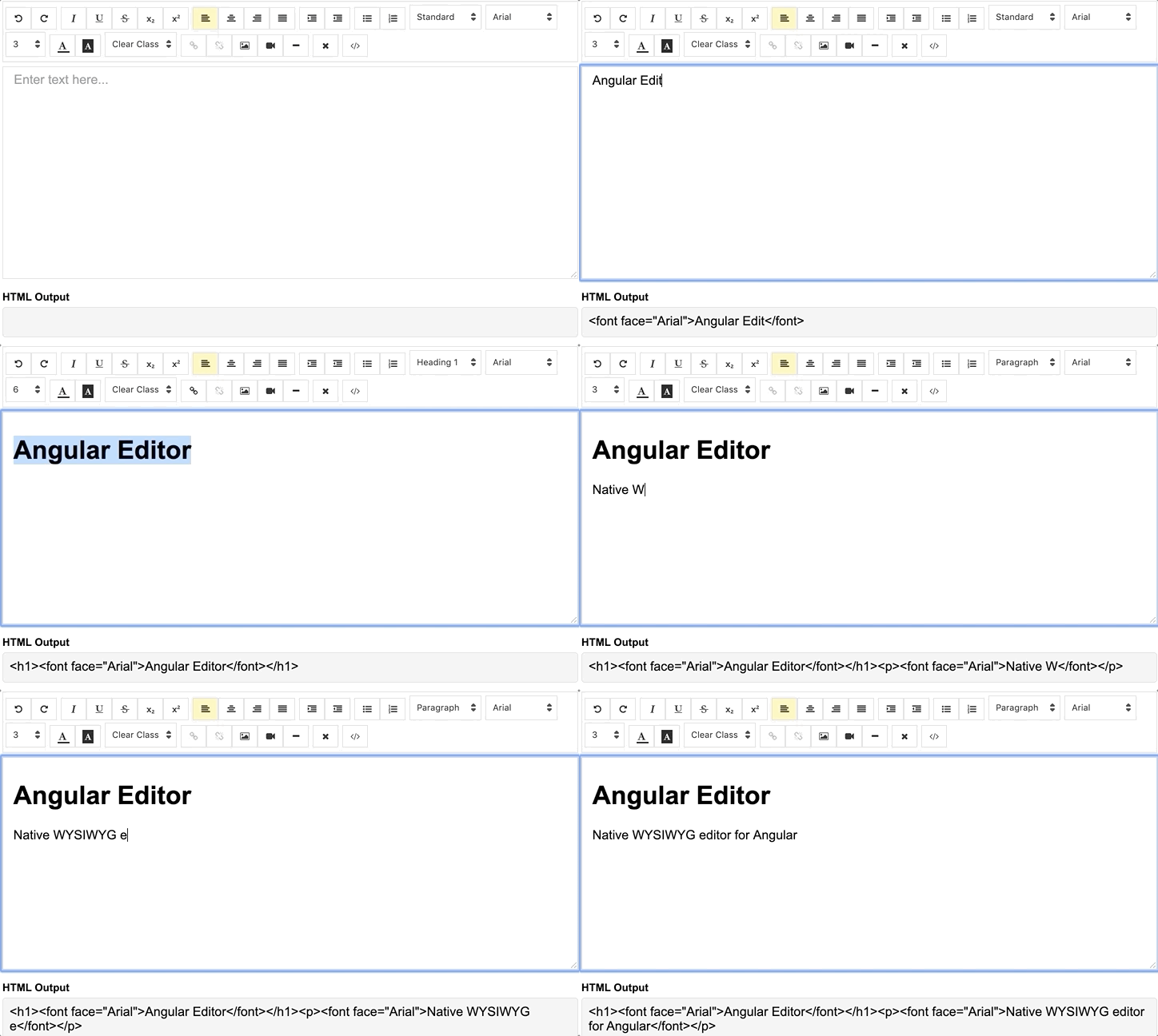
การสาธิต ดูรหัสใน Stackblitz
ติดตั้งผ่าน NPM Package Manager
npm install @kolkov/angular-editor --save3.0.0 และสูงกว่า - สำหรับ Angular V13 + (ลบตัวอักษร FONT ICONS Awesome DEPS + ตัวแปร CSS)
2.0.0 ขึ้นไป - สำหรับ V13.xx เชิงมุมและสูงกว่า
1.0.0 ขึ้นไป - สำหรับ angular v8.xx และสูงกว่า
0.18.4 ขึ้นไป - สำหรับ angular v7.xx
0.15.x - สำหรับ Angular V6.xx
ความสนใจ! รุ่น alpha และ beta อาจมีการเปลี่ยนแปลงที่แตกหัก
นำเข้าโมดูล angular-editor
 import { HttpClientModule } from '@angular/common/http' ;
import { AngularEditorModule } from '@kolkov/angular-editor' ;

@ NgModule ( {
  imports : [ HttpClientModule , AngularEditorModule ]
} )
จากนั้นใน html
< angular-editor [placeholder] =" 'Enter text here...' " [(ngModel)] =" htmlContent " > </ angular-editor >หรือสำหรับการใช้งานด้วยรูปแบบปฏิกิริยา
< angular-editor formControlName =" htmlContent " [config] =" editorConfig " > </ angular-editor > หากคุณใช้ตัวแก้ไขมากกว่าหนึ่งตัวในคุณสมบัติ id ชุดหน้าเดียวกัน
 < angular-editor id =" editor1 " formControlName =" htmlContent1 " [config] =" editorConfig " > </ angular-editor >
< angular-editor id =" editor2 " formControlName =" htmlContent2 " [config] =" editorConfig " > </ angular-editor >
ที่ไหน
 import { AngularEditorConfig } from '@kolkov/angular-editor' ;


editorConfig: AngularEditorConfig = {
    editable : true ,
      spellcheck : true ,
      height : 'auto' ,
      minHeight : '0' ,
      maxHeight : 'auto' ,
      width : 'auto' ,
      minWidth : '0' ,
      translate : 'yes' ,
      enableToolbar : true ,
      showToolbar : true ,
      placeholder : 'Enter text here...' ,
      defaultParagraphSeparator : '' ,
      defaultFontName : '' ,
      defaultFontSize : '' ,
      fonts : [
        { class : 'arial' , name : 'Arial' } ,
        { class : 'times-new-roman' , name : 'Times New Roman' } ,
        { class : 'calibri' , name : 'Calibri' } ,
        { class : 'comic-sans-ms' , name : 'Comic Sans MS' }
      ] ,
      customClasses : [
      {
        name : 'quote' ,
        class : 'quote' ,
      } ,
      {
        name : 'redText' ,
        class : 'redText'
      } ,
      {
        name : 'titleText' ,
        class : 'titleText' ,
        tag : 'h1' ,
      } ,
    ] ,
    uploadUrl : 'v1/image' ,
    upload : ( file : File ) => { ... }
    uploadWithCredentials : false ,
    sanitize : true ,
    toolbarPosition : 'top' ,
    toolbarHiddenButtons : [
      [ 'bold' , 'italic' ] ,
      [ 'fontSize' ]
    ]
} ;
เพื่อให้ ngModel ทำงานได้คุณต้องนำเข้า FormsModule จาก @angular/forms หรือสำหรับ formControlName คุณต้องนำเข้า ReactiveFormsModule จาก @angular/forms
ในการให้บริการไฟล์ไอคอนตรวจสอบให้แน่ใจว่า angular.json ของคุณมีการกำหนดค่าสินทรัพย์ต่อไปนี้:
 {
  "glob": "**/*",
  "input": "node_modules/@kolkov/angular-editor/assets/icons",
  "output": "assets/ae-icons/"
}
เชื่อมต่อไฟล์ธีมเริ่มต้นกับ angular.json หรือ nx.json ของคุณ
 "styles": [
     "projects/angular-editor-app/src/styles.scss",
     "node_modules/@kolkov/angular-editor/themes/default.scss"
],
หรือ @include หรือ @use ในไฟล์ Project styles.scss จากนั้นแทนที่ตัวแปรชุดรูปแบบเริ่มต้นเช่นนี้:
 :root {
  --ae-gap : 5 px ;
  --ae-text-area-border : 1 px solid #ddd ;
  --ae-text-area-border-radius : 0 ;
  --ae-focus-outline-color : #afaeae auto 1 px ;
  --ae-toolbar-padding : 1 px ;
  --ae-toolbar-bg-color : #b3dca0 ;
  --ae-toolbar-border-radius : 1 px solid #ddd ;
  --ae-button-bg-color : #dadad7 ;
  --ae-button-border : 3 px solid #3fb74e ;
  --ae-button-radius : 5 px ;
  --ae-button-hover-bg-color : #3fb74e ;
  --ae-button-active-bg-color : red ;
  --ae-button-active-hover-bg-color : blue ;
  --ae-button-disabled-bg-color : gray ;
  --ae-picker-label-color : rgb ( 78 , 84 , 155 );
  --ae-picker-icon-bg-color : rgb ( 34 , 41 , 122 );
  --ae-picker-option-bg-color : rgba ( 221 , 221 , 84 , 0.76 );
  --ae-picker-option-active-bg-color : rgba ( 237 , 237 , 62 , 0.9 );
  --ae-picker-option-focused-bg-color : rgb ( 255 , 255 , 0 );
}คุณสามารถกำหนดปุ่มที่กำหนดเองของคุณด้วยการกระทำที่กำหนดเองโดยใช้ ExecuteCommandFN ยอมรับคำสั่งจาก ExecCommand อาร์กิวเมนต์แรกของวิธีนี้คือ AcommandName และอาร์กิวเมนต์ที่สองคือ AvalueArgument ตัวอย่างแสดงปุ่มที่เพิ่มโลโก้ตัวแก้ไขเชิงมุมลงในตัวแก้ไข
 < angular-editor id =" editor1 " [(ngModel)] =" htmlContent1 " [config] =" config1 " (ngModelChange) =" onChange($event) "
                (blur) =" onBlur($event) " >
  < ng-template #customButtons let-executeCommandFn =" executeCommandFn " >
    < ae-toolbar-set >
      < button aeButton title =" Angular editor logo " (click) =" executeCommandFn('insertHtml', angularEditorLogo) " >
        < svg viewBox =" -8 0 272 272 " xmlns =" http://www.w3.org/2000/svg "
             preserveAspectRatio =" xMidYMid " fill =" #000000 " >
          < g id =" SVGRepo_bgCarrier " stroke-width =" 0 " > </ g >
          < g id =" SVGRepo_tracerCarrier " stroke-linecap =" round " stroke-linejoin =" round " > </ g >
          < g id =" SVGRepo_iconCarrier " >
            < g >
              < path
                d =" M0.0996108949,45.522179 L125.908171,0.697276265 L255.103502,44.7252918 L234.185214,211.175097 L125.908171,271.140856 L19.3245136,211.971984 L0.0996108949,45.522179 Z "
                fill =" #E23237 " > </ path >
              < path
                d =" M255.103502,44.7252918 L125.908171,0.697276265 L125.908171,271.140856 L234.185214,211.274708 L255.103502,44.7252918 L255.103502,44.7252918 Z "
                fill =" #B52E31 " > </ path >
              < path
                d =" M126.107393,32.27393 L126.107393,32.27393 L47.7136187,206.692607 L76.9992218,206.194553 L92.7377432,166.848249 L126.207004,166.848249 L126.306615,166.848249 L163.063035,166.848249 L180.29572,206.692607 L208.286381,207.190661 L126.107393,32.27393 L126.107393,32.27393 Z M126.306615,88.155642 L152.803113,143.5393 L127.402335,143.5393 L126.107393,143.5393 L102.997665,143.5393 L126.306615,88.155642 L126.306615,88.155642 Z "
                fill =" #FFFFFF " > </ path >
            </ g >
          </ g >
        </ svg >
      </ button >
    </ ae-toolbar-set >
  </ ng-template >
</ angular-editor > | ป้อนข้อมูล | พิมพ์ | ค่าเริ่มต้น | ที่จำเป็น | คำอธิบาย |
|---|---|---|---|---|
| รหัสประจำตัว | string | - | เลขที่ | คุณสมบัติ id เมื่อมีตัวแก้ไขหลายตัวใช้ในหน้าเดียวกัน |
| [config] | AngularEditorConfig | default config | เลขที่ | กำหนดค่าสำหรับตัวแก้ไข |
| ผู้ถือครองตำแหน่ง | string | - | เลขที่ | ตั้งค่าตัวยึดตำแหน่งที่กำหนดเองสำหรับพื้นที่ป้อนข้อมูล |
| Tabindex | number | - | เลขที่ | ตั้งค่า tabindex บน Angular-editor |
| เอาท์พุท | คำอธิบาย |
|---|---|
| (HTML) | เอาต์พุต html |
| (ViewMode) | ถูกยิงเมื่อเปลี่ยนโหมดแหล่งข้อมูลและ HTML |
| (เบลอ) | ยิงเมื่อบรรณาธิการเบลอ |
| (จุดสนใจ) | ยิงเมื่อบรรณาธิการโฟกัส |
| ชื่อ | คำอธิบาย |
|---|---|
| จุดสนใจ | มุ่งเน้นองค์ประกอบตัวแก้ไข |
| ชื่อ | พิมพ์ | คำอธิบาย |
|---|---|---|
| AngulareditorConfig | การกำหนดค่า | การกำหนดค่าสำหรับส่วนประกอบ AngularEditor |
| ป้อนข้อมูล | พิมพ์ | ค่าเริ่มต้น | ที่จำเป็น | คำอธิบาย |
|---|---|---|---|---|
| สามารถแก้ไขได้ | bolean | true | เลขที่ | ตั้งค่าการแก้ไขเปิดใช้งานหรือไม่ |
| ตรวจการสะกดคำ | bolean | true | เลขที่ | ตั้งค่าการสะกดการสะกดคำหรือไม่ |
| แปล | string | yes | เลขที่ | ตั้งค่าการแปลเปิดใช้งานหรือไม่ |
| ฆ่าเชื้อ | bolean | true | เลขที่ | ตั้งค่า Dom Sanitizing เปิดใช้งานหรือไม่ |
| ความสูง | string | auto | เลขที่ | ตั้งค่าความสูงของตัวแก้ไข |
| Minheight | string | 0 | เลขที่ | ตั้งค่าความสูงขั้นต่ำของตัวแก้ไข |
| MaxHeight | string | auto | เลขที่ | ตั้งค่าความสูงสูงสุดของตัวแก้ไข |
| ความกว้าง | string | auto | เลขที่ | ตั้งค่าความกว้างของตัวแก้ไข |
| Minwidth | string | 0 | เลขที่ | ตั้งค่าความกว้างขั้นต่ำของตัวแก้ไข |
| enabletoolbar | bolean | true | เลขที่ | ตั้งค่าแถบเครื่องมือเปิดใช้งานหรือไม่ |
| showtoolbar | bolean | true | เลขที่ | ตั้งแถบเครื่องมือที่มองเห็นได้หรือไม่ |
| แถบเครื่องมือ | string | top | เลขที่ | ตั้งค่าแถบเครื่องมือตำแหน่งด้านบนหรือด้านล่าง |
| ผู้ถือครองตำแหน่ง | string | - | เลขที่ | กำหนดข้อความตัวยึดตำแหน่ง |
| default paragraphseparator | string | - | เลขที่ | ตั้งค่าตัวคั่นย่อหน้าเริ่มต้นเช่น p |
| defaultFontName | string | - | เลขที่ | ตั้งค่าฟอนต์เริ่มต้นเช่น Comic Sans MS |
| defaultFontSize | string | - | เลขที่ | ตั้งค่าขนาดตัวอักษรเริ่มต้นเช่น 1 - 7 |
| อัพโหลด | string | - | เลขที่ | ตั้งค่าการอัปโหลดจุดสิ้นสุดของภาพ https://api.exapple.com/v1/image/upload และส่งคืนการตอบกลับด้วยคีย์ ImageUrl {"ImageUrl":} |
| อัพโหลด | function | - | เลขที่ | ตั้งค่าฟังก์ชั่นอัปโหลดรูปภาพ |
| Uploadwithcredentials | bolean | false | เลขที่ | ตั้งค่าผ่านหรือไม่ข้อมูลรับรองในการอัพโหลดรูปภาพ |
| แบบอักษร | Font[] | - | เลขที่ | ตั้งค่าอาร์เรย์ของแบบอักษรที่มีอยู่ [{name, class},...] |
| customclasses | CustomClass[] | - | เลขที่ | ตั้งค่าอาร์เรย์ของแบบอักษรที่มีอยู่ [{name, class, tag},...] |
| ร่าง | bolean | true | เลขที่ | กำหนดโครงร่างของตัวแก้ไขหากอยู่ในโฟกัส |
| Toolbarhiddenbuttons | string[][] | - | เลขที่ | ตั้งค่าอาร์เรย์ของชื่อปุ่มหรือองค์ประกอบเพื่อซ่อน |
toolbarHiddenButtons: [
  [
    'undo' ,
    'redo' ,
    'bold' ,
    'italic' ,
    'underline' ,
    'strikeThrough' ,
    'subscript' ,
    'superscript' ,
    'justifyLeft' ,
    'justifyCenter' ,
    'justifyRight' ,
    'justifyFull' ,
    'indent' ,
    'outdent' ,
    'insertUnorderedList' ,
    'insertOrderedList' ,
    'heading' ,
    'fontName'
  ] ,
  [
    'fontSize' ,
    'textColor' ,
    'backgroundColor' ,
    'customClasses' ,
    'link' ,
    'unlink' ,
    'insertImage' ,
    'insertVideo' ,
    'insertHorizontalRule' ,
    'removeFormat' ,
    'toggleEditorMode'
  ]
] ภายในการดาวน์โหลดคุณจะพบไดเรกทอรีและไฟล์ต่อไปนี้ คุณจะเห็นอะไรแบบนี้:
 angular-editor/
└── projects/
    ├── angular-editor/
    └── angular-editor-app/
angular-editor/ - Library
angular-editor-app/ /-Demo
เอกสารสำหรับ AngularEditor นั้นโฮสต์ที่เว็บไซต์ของเรา AngularEditor
ไอคอนไอคอนไอคอนไอคอนสัญลักษณ์การรวบรวมไอคอน
โปรดอ่านแนวทางการสนับสนุนของเรา รวมอยู่ในทิศทางสำหรับการเปิดปัญหามาตรฐานการเข้ารหัสและหมายเหตุเกี่ยวกับการพัฒนา
การตั้งค่าตัวแก้ไขมีอยู่ในการกำหนดค่าตัวแก้ไขเพื่อใช้งานง่ายในตัวแก้ไขข้อความทั่วไป อ่านเพิ่มเติมและดาวน์โหลดปลั๊กอินได้ที่ http://editorconfig.org
เพื่อความโปร่งใสในวงจรการวางจำหน่ายของเราและพยายามที่จะรักษาความเข้ากันได้ย้อนหลัง AngularEditor จะได้รับการดูแลรักษาภายใต้แนวทางการกำหนดเวอร์ชันความหมาย
ดูส่วนการเปิดตัวของโครงการของเราสำหรับการเปลี่ยนแปลงสำหรับแต่ละรุ่นรุ่น
Andrey Kolkov
ถ้าคุณชอบงานของฉันและฉันประหยัดเวลาของคุณคุณสามารถซื้อฉันได้? หรือ ?






