angular editor
2.1.0

Angular 6-19+의 간단한 기본 Wysiwyg/Rich Text 편집기
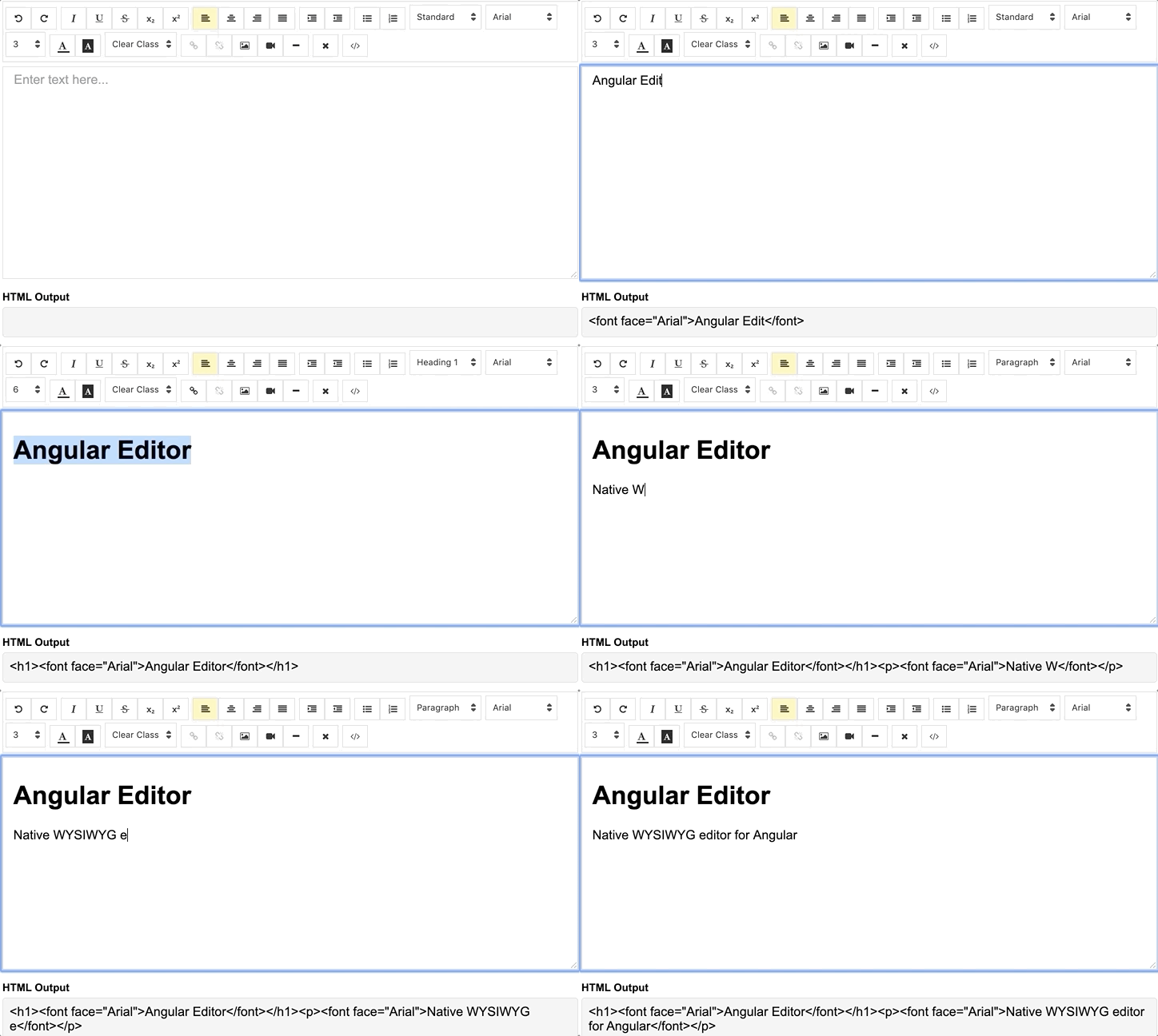
데모 | Stackblitz의 코드를 참조하십시오.
NPM 패키지 관리자를 통해 설치하십시오
npm install @kolkov/angular-editor --save3.0.0 이상 - 각도 V13 +의 경우 (제거 된 글꼴 멋진 아이콘 DEPS + CSS 변수)
2.0.0 이상 - 각도 V13.xx 이상
1.0.0 이상 - 각도 V8.xx 이상
0.18.4 이상 - 각도 V7.xx의 경우
0.15.x- 각도 V6.xx의 경우
주목! alpha 및 beta 버전에는 변화가 포함될 수 있습니다.
angular-editor 모듈을 가져옵니다
 import { HttpClientModule } from '@angular/common/http' ;
import { AngularEditorModule } from '@kolkov/angular-editor' ;

@ NgModule ( {
  imports : [ HttpClientModule , AngularEditorModule ]
} )
그런 다음 HTML에서
< angular-editor [placeholder] =" 'Enter text here...' " [(ngModel)] =" htmlContent " > </ angular-editor >또는 반응 형태로 사용되는 경우
< angular-editor formControlName =" htmlContent " [config] =" editorConfig " > </ angular-editor > 같은 페이지에서 둘 이상의 편집기를 사용하는 경우 id 속성 세트 세트
 < angular-editor id =" editor1 " formControlName =" htmlContent1 " [config] =" editorConfig " > </ angular-editor >
< angular-editor id =" editor2 " formControlName =" htmlContent2 " [config] =" editorConfig " > </ angular-editor >
어디
 import { AngularEditorConfig } from '@kolkov/angular-editor' ;


editorConfig: AngularEditorConfig = {
    editable : true ,
      spellcheck : true ,
      height : 'auto' ,
      minHeight : '0' ,
      maxHeight : 'auto' ,
      width : 'auto' ,
      minWidth : '0' ,
      translate : 'yes' ,
      enableToolbar : true ,
      showToolbar : true ,
      placeholder : 'Enter text here...' ,
      defaultParagraphSeparator : '' ,
      defaultFontName : '' ,
      defaultFontSize : '' ,
      fonts : [
        { class : 'arial' , name : 'Arial' } ,
        { class : 'times-new-roman' , name : 'Times New Roman' } ,
        { class : 'calibri' , name : 'Calibri' } ,
        { class : 'comic-sans-ms' , name : 'Comic Sans MS' }
      ] ,
      customClasses : [
      {
        name : 'quote' ,
        class : 'quote' ,
      } ,
      {
        name : 'redText' ,
        class : 'redText'
      } ,
      {
        name : 'titleText' ,
        class : 'titleText' ,
        tag : 'h1' ,
      } ,
    ] ,
    uploadUrl : 'v1/image' ,
    upload : ( file : File ) => { ... }
    uploadWithCredentials : false ,
    sanitize : true ,
    toolbarPosition : 'top' ,
    toolbarHiddenButtons : [
      [ 'bold' , 'italic' ] ,
      [ 'fontSize' ]
    ]
} ;
ngModel 작동하려면 @angular/forms 에서 FormsModule 가져 오거나 formControlName 위해서는 @angular/forms 에서 ReactiveFormsModule 가져와야합니다.
아이콘 파일을 제공하려면 angular.json 에 다음 자산 구성이 포함되어 있는지 확인하십시오.
 {
  "glob": "**/*",
  "input": "node_modules/@kolkov/angular-editor/assets/icons",
  "output": "assets/ae-icons/"
}
기본 테마 파일을 angular.json 또는 nx.json 에 연결하십시오
 "styles": [
     "projects/angular-editor-app/src/styles.scss",
     "node_modules/@kolkov/angular-editor/themes/default.scss"
],
또는 Project styles.scss 파일에서 @include 또는 @use 다음과 같은 기본 테마 변수를 재정의합니다.
 :root {
  --ae-gap : 5 px ;
  --ae-text-area-border : 1 px solid #ddd ;
  --ae-text-area-border-radius : 0 ;
  --ae-focus-outline-color : #afaeae auto 1 px ;
  --ae-toolbar-padding : 1 px ;
  --ae-toolbar-bg-color : #b3dca0 ;
  --ae-toolbar-border-radius : 1 px solid #ddd ;
  --ae-button-bg-color : #dadad7 ;
  --ae-button-border : 3 px solid #3fb74e ;
  --ae-button-radius : 5 px ;
  --ae-button-hover-bg-color : #3fb74e ;
  --ae-button-active-bg-color : red ;
  --ae-button-active-hover-bg-color : blue ;
  --ae-button-disabled-bg-color : gray ;
  --ae-picker-label-color : rgb ( 78 , 84 , 155 );
  --ae-picker-icon-bg-color : rgb ( 34 , 41 , 122 );
  --ae-picker-option-bg-color : rgba ( 221 , 221 , 84 , 0.76 );
  --ae-picker-option-active-bg-color : rgba ( 237 , 237 , 62 , 0.9 );
  --ae-picker-option-focused-bg-color : rgb ( 255 , 255 , 0 );
}ExecuteCommandFn을 사용하여 사용자 정의 작업으로 사용자 정의 버튼을 정의 할 수 있습니다. execcommand의 명령을 수락합니다. 이 방법의 첫 번째 인수는 AcommandName이고 두 번째 인수는 Avalueargument입니다. 예제에 편집기에 앵귤러 편집기 로고를 추가하는 버튼이 표시됩니다.
 < angular-editor id =" editor1 " [(ngModel)] =" htmlContent1 " [config] =" config1 " (ngModelChange) =" onChange($event) "
                (blur) =" onBlur($event) " >
  < ng-template #customButtons let-executeCommandFn =" executeCommandFn " >
    < ae-toolbar-set >
      < button aeButton title =" Angular editor logo " (click) =" executeCommandFn('insertHtml', angularEditorLogo) " >
        < svg viewBox =" -8 0 272 272 " xmlns =" http://www.w3.org/2000/svg "
             preserveAspectRatio =" xMidYMid " fill =" #000000 " >
          < g id =" SVGRepo_bgCarrier " stroke-width =" 0 " > </ g >
          < g id =" SVGRepo_tracerCarrier " stroke-linecap =" round " stroke-linejoin =" round " > </ g >
          < g id =" SVGRepo_iconCarrier " >
            < g >
              < path
                d =" M0.0996108949,45.522179 L125.908171,0.697276265 L255.103502,44.7252918 L234.185214,211.175097 L125.908171,271.140856 L19.3245136,211.971984 L0.0996108949,45.522179 Z "
                fill =" #E23237 " > </ path >
              < path
                d =" M255.103502,44.7252918 L125.908171,0.697276265 L125.908171,271.140856 L234.185214,211.274708 L255.103502,44.7252918 L255.103502,44.7252918 Z "
                fill =" #B52E31 " > </ path >
              < path
                d =" M126.107393,32.27393 L126.107393,32.27393 L47.7136187,206.692607 L76.9992218,206.194553 L92.7377432,166.848249 L126.207004,166.848249 L126.306615,166.848249 L163.063035,166.848249 L180.29572,206.692607 L208.286381,207.190661 L126.107393,32.27393 L126.107393,32.27393 Z M126.306615,88.155642 L152.803113,143.5393 L127.402335,143.5393 L126.107393,143.5393 L102.997665,143.5393 L126.306615,88.155642 L126.306615,88.155642 Z "
                fill =" #FFFFFF " > </ path >
            </ g >
          </ g >
        </ svg >
      </ button >
    </ ae-toolbar-set >
  </ ng-template >
</ angular-editor > | 입력 | 유형 | 기본 | 필수의 | 설명 |
|---|---|---|---|---|
| ID | string | - | 아니요 | ID 속성 여러 편집기가 같은 페이지에서 사용했을 때 |
| [구성] | AngularEditorConfig | default config | 아니요 | 편집기 구성 |
| 자리 표시 자 | string | - | 아니요 | 입력 영역에 대한 사용자 정의 자리 표시자를 설정하십시오 |
| tabindex | number | - | 아니요 | Angular 편집자에서 tabindex를 설정하십시오 |
| 산출 | 설명 |
|---|---|
| (HTML) | 출력 HTML |
| (ViewMode) | 시각적 및 HTML 소스 모드를 전환했을 때 발사되었습니다 |
| (흐림) | 편집기가 흐리면 해고되었습니다 |
| (집중하다) | 편집기 초점이 해고되었습니다 |
| 이름 | 설명 |
|---|---|
| 집중하다 | 편집기 요소에 중점을 둡니다 |
| 이름 | 유형 | 설명 |
|---|---|---|
| AngularEditorconfig | 구성 | AngularEditor 구성 요소의 구성. |
| 입력 | 유형 | 기본 | 필수의 | 설명 |
|---|---|---|---|---|
| 편집 가능한 | bolean | true | 아니요 | 편집 활성화 여부를 설정하십시오 |
| 맞춤법 검사 | bolean | true | 아니요 | 맞춤법 검사 활성화 여부를 설정하십시오 |
| 번역하다 | string | yes | 아니요 | 번역 활성화 여부를 설정하십시오 |
| 소독 | bolean | true | 아니요 | Dom Sanitizing 활성화 여부를 설정하십시오 |
| 키 | string | auto | 아니요 | 편집기의 높이를 설정하십시오 |
| MinHeight | string | 0 | 아니요 | 편집기의 최소 높이를 설정하십시오 |
| Maxheight | string | auto | 아니요 | 편집기의 최대 높이를 설정하십시오 |
| 너비 | string | auto | 아니요 | 편집기의 너비를 설정합니다 |
| Minwidth | string | 0 | 아니요 | 편집기의 최소 너비를 설정하십시오 |
| enabletoolbar | bolean | true | 아니요 | 도구 모음을 활성화 여부를 설정하십시오 |
| ShowToolbar | bolean | true | 아니요 | 도구 모음이 표시되는지 여부를 설정하십시오 |
| 도구 모음 | string | top | 아니요 | 도구 모음 위치 상단 또는 하단을 설정합니다 |
| 자리 표시 자 | string | - | 아니요 | 자리 표시 자 텍스트를 설정하십시오 |
| DefaultParagraphSeparator | string | - | 아니요 | p 와 같은 기본 단락 분리기를 설정하십시오 |
| DefaultFontName | string | - | 아니요 | Comic Sans MS 와 같은 기본 글꼴을 설정하십시오 |
| DefaultFontsize | string | - | 아니요 | 1 7 같은 기본 글꼴 크기를 설정하십시오 |
| 업로드 | string | - | 아니요 | 이미지 업로드 엔드 포인트 https://api.exapple.com/v1/image/upload 설정하고 ImageUrl 키를 사용하여 응답을 반환합니다. { "imageUrl":} |
| 업로드 | function | - | 아니요 | 이미지 업로드 기능을 설정합니다 |
| 업로드 위장 | bolean | false | 아니요 | 이미지 업로드 호출에서 전달 또는 자격 증명 설정 |
| 글꼴 | Font[] | - | 아니요 | 사용 가능한 글꼴 배열을 설정 [{name, class},...] |
| CustomClasses | CustomClass[] | - | 아니요 | 사용 가능한 글꼴 배열을 설정 [{name, class, tag},...] |
| 개요 | bolean | true | 아니요 | 초점을 맞추면 편집기의 개요를 설정하십시오 |
| 도구 바 히든 부트 턴 | string[][] | - | 아니요 | 숨길 버튼 이름 또는 요소 세트 세트 |
toolbarHiddenButtons: [
  [
    'undo' ,
    'redo' ,
    'bold' ,
    'italic' ,
    'underline' ,
    'strikeThrough' ,
    'subscript' ,
    'superscript' ,
    'justifyLeft' ,
    'justifyCenter' ,
    'justifyRight' ,
    'justifyFull' ,
    'indent' ,
    'outdent' ,
    'insertUnorderedList' ,
    'insertOrderedList' ,
    'heading' ,
    'fontName'
  ] ,
  [
    'fontSize' ,
    'textColor' ,
    'backgroundColor' ,
    'customClasses' ,
    'link' ,
    'unlink' ,
    'insertImage' ,
    'insertVideo' ,
    'insertHorizontalRule' ,
    'removeFormat' ,
    'toggleEditorMode'
  ]
] 다운로드 내에서 다음 디렉토리와 파일이 있습니다. 당신은 다음과 같은 것을 볼 수 있습니다 :
 angular-editor/
└── projects/
    ├── angular-editor/
    └── angular-editor-app/
angular-editor/ - 라이브러리
angular-editor-app/ -데모 응용 프로그램
AngularEeditor의 문서는 웹 사이트 AngularEeditor에서 호스팅됩니다.
합자 기호의 아이콘 아이콘 수집 아이콘
기고 가이드 라인을 읽으십시오. 문제 개방 문제, 코딩 표준 및 개발에 대한 메모에 대한 지침이 포함되어 있습니다.
편집기 환경 설정은 편집기 구성에서 공통 텍스트 편집기에서 쉽게 사용할 수 있도록 제공됩니다. 자세한 내용을 읽고 http://editorconfig.org에서 플러그인을 다운로드하십시오.
릴리스주기에 투명성을 유지하고 후진 호환성을 유지하기 위해 angulareeditor는 의미 론적 버전 관리 지침에 따라 유지됩니다.
각 릴리스 버전의 ChangElogs에 대한 프로젝트의 릴리스 섹션을 참조하십시오.
Andrey Kolkov
당신이 내 일을 좋아하고 시간을 절약한다면 당신은 나를 살 수 있습니까? 또는 ?






