smartblock
1.0.0

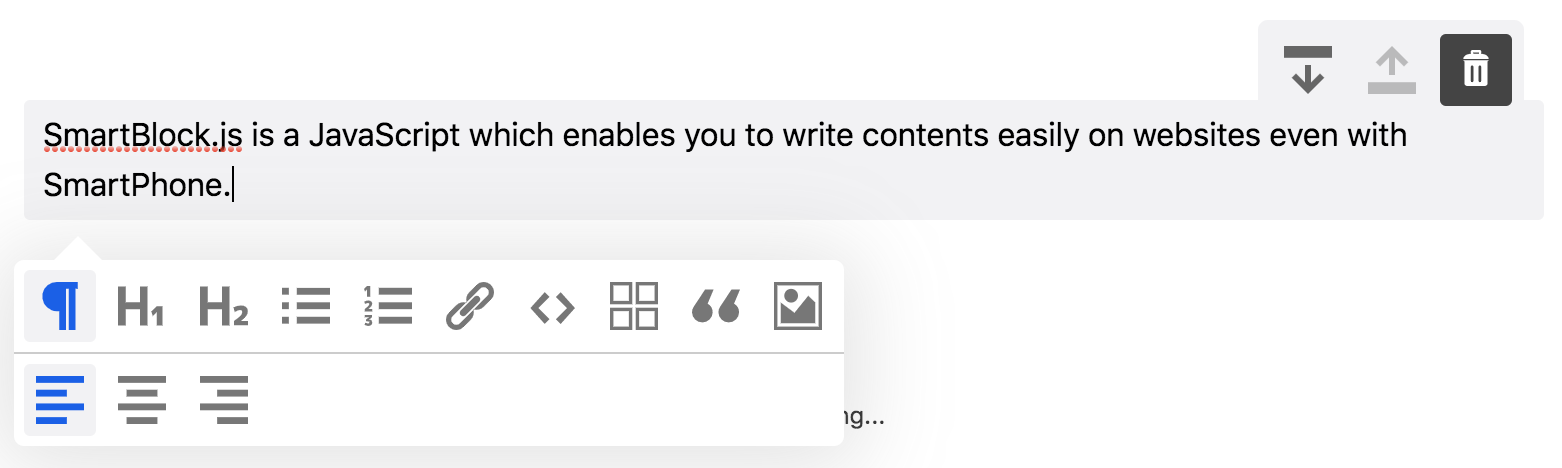
SmartBlock.js是一个基于JavaScript块的编辑器,即使使用智能手机,您也可以在网站上轻松编写内容。
IE11 / Edge | Firefox | 铬合金 | 野生动物园 | ios野生动物园 |
|---|
$ npm install smartblock --save import * as React from 'react' ;
import { render } from 'react-dom' ;
import 'smartblock/css/smartblock.css' ;
import { SmartBlock , Extensions } from 'smartblock' ;
render ( < >
< SmartBlock
extensions = { Extensions }
html = { '<h2>Hello World</h2><p>hello</p>' }
onChange = { ( { json , html } ) => { console . log ( json , html ) ; } }
/>
</ > , document . getElementById ( "app" ) ) ; 您可以添加自定义块
 import * as React from 'react' ;
import { Extensions , CustomBlock , CustomMark } from 'smartblock' ;
Extensions . push ( new CustomBlock ( {
  tagName : 'div' ,
  className : '.alert' ,
  icon : < SomeIconComponent />
} ) ;

render ( < >
  < SmartBlock
    extensions = { Extensions }
    html = { '<h2>Hello World</h2><p>hello</p>' }
    onChange = { ( { json , html } ) => { console . log ( json , html ) ; } }
  />
</ > , document . getElementById ( "app" ) ) ;
您可以添加这样的自定义内联元素
 import * as React from 'react' ;
import { Extension , CustomBlock , CustomMark } from 'smartblock' ;
import 'smartblock/css/smartblock.css' ;
Extension . push ( new CustomMark ( {
  tagName : 'span' ,
  className : '.small' ,
  icon : < SomeIconComponent />
} ) ;

render ( < >
  < SmartBlock
    extensions = { Extensions }
    html = { '<h2>Hello World</h2><p><small>hello</small></p>' }
    onChange = { ( { json , html } ) => { console . log ( json , html ) ; } }
  />
</ > , document . getElementById ( "app" ) ) ; | 道具 | 描述 | 类型 | 默认 |
|---|---|---|---|
| 扩展 | 扩展的扩展阵列,这些扩展是SmartBlock的功能 | 扩大[] | 一系列扩展 |
| Onchange | 更改编辑器的内容时调用回调函数。您可以同时获得HTML和JSON | 功能 | |
| Oninit | 调用编辑器时调用的回调函数 | 功能 | |
| JSON | 编辑器内容将使用JSON数据初始化 | 目的 | {} |
| html | 编辑器内容将用HTML初始化 | 细绳 | '' |
| Showtitle | 标题将显示 | 布尔 | 错误的 |
| Showbackbtn | BTN将显示支持历史记录 | 布尔 | 错误的 |
| AutoSave | 每次更改内容时,HTML都会存储到本地存储 | 布尔 | 错误的 |
| geteDitorRef | 获取编辑器参考对象 | 功能 |
下载zip
https://github.com/appleple/smartblock
@steelydylan
代码和文档版权所有2020年Appleple,Inc。根据MIT许可发布的代码。






