styled components rhythm
1.0.0

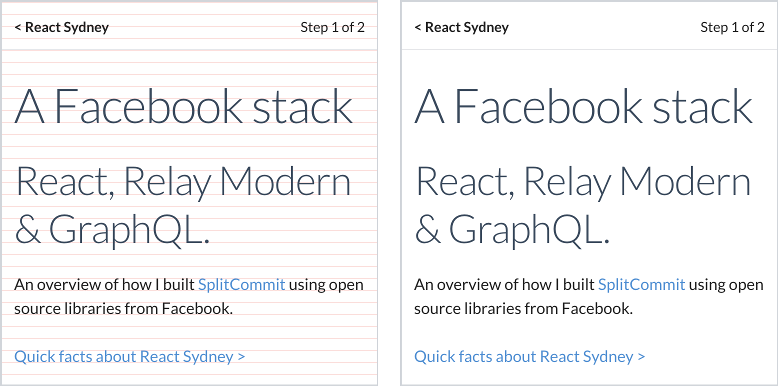
12px垂直节奏,正确对齐基线
精美对齐的类型,带有样式的组件
npm i @ceteio/styled-components-rhythm
或者,用纱线:
yarn add @ceteio/styled-components-rhythm
 import { ThemeProvider , injectGLobal } , styled from 'styled-components' ;
import styledComponentsRhythm from '@ceteio/styled-components-rhythm' ;

const rhythm = styledComponentsRhythm ( {
  baseFontSize : 1 , // 1rem. Browser default makes this 16px
  baseLineHeight : 1.2 , // unitless line-height, see: https://css-tricks.com/almanac/properties/l/line-height/#comment-1587658
  rhythmHeight : 0.75 , // rem units. With browser default, this is 16px * 0.75rem == 12px
  capHeights : {
    // Calculated with https://codepen.io/sebdesign/pen/EKmbGL?editors=0011
    Lato : 0.72 ,
  } ,
  debug : true ,
} ) ;

injectGLobal `
  /* Reset global margins and padding */
  h1, p {
    margin: 0;
    padding: 0;
  }

  /* Using Lato font https://fonts.google.com/specimen/Lato */
  @import url('https://fonts.googleapis.com/css?family=Lato')

  ${ rhythm . global ( ) }
` ;

const H1 = styled . h1 `
  ${ props => props . theme . setFontWithRhythm ( 'Lato' , 3 ) }
  margin-top: ${ props => props . theme . rhythmSizing ( 3 ) } rem;
` ;

const Paragraph = styled . p `
  ${ props => props . theme . setFontWithRhythm ( 'Lato' , 1 ) }
  margin-top: ${ props => props . theme . rhythmSizing ( 2 ) } rem;
` ;

export default ( ) => (
  < ThemeProvider theme = { rhythm . theme } >
    < H1 > Hello world </ H1 >
    < Paragraph > How are you today? </ Paragraph >
    < Paragraph > Feeling quite < em > aligned </ em > ! </ Paragraph >
  </ ThemeProvider >
) ; 主要导出是返回适合添加到样式组件<ThemeProvider>节奏对象的函数:
 import styledComponentsRhythm from '@ceteio/styled-components-rhythm' ;

const rhythm = styledComponentsRhythm ( options ) ;
// { theme: ..., global: ... }
options ( Object )baseFontSize ( Number ):root元素的rem字体大小(即; the <body> )。rhythmHeight ( Number ): rem垂直网格大小,文本将其基线对齐。当它均匀分成( baseFontSize * defaultLineHeight )时,最有效。capHeights ( Object ): font-family字体名称 - >大写字母的比例高度。可以使用此工具来计算高度。例如: {
Lato : 0.72 ,
}defaultLineHeight ( Number ):下面的setFontWithRhythm()默认值。必须是无单位值,这将是相对于元素的字体大小。debug ( Boolean ):将向身体注入红色水平线以进行视觉调试对齐。defaultOutputType ( String ):设置setFontWithRhythm()和global()的输出类型。 'string' :返回CSS字符串。 'object' :返回CSS样式对象。默认值: 'string' 。难题有两块,必须将两种都用来具有有效的垂直节奏。 rhythm.theme和rhythm.global :
 import styledComponentsRhythm from '@ceteio/styled-components-rhythm' ;
import { injectGlobal , ThemeProvider } from 'styled-components' ;

const rhythm = styledComponentsRhythm ( options ) ;

injectGlobal ` ${ rhythm . global ( ) } ` ;
return < ThemeProvider theme = { rhythm . theme } > ... </ ThemeProvider > ;
theme ( Object )将此对象传递给样式的组件ThemeProvider作为主题:
 const rhythm = styledComponentsRhythm ( options ) ;

return < ThemeProvider theme = { rhythm . theme } > ... </ ThemeProvider > ;
global([outputType]) => String包含需要应用的全局CS的字符串。最好使用样式组件的injectGlobal完成:
 const rhythm = styledComponentsRhythm ( options ) ;

injectGlobal ` ${ rhythm . global ( ) } ` ;或情感的<Global>组成部分:
< Global styles = { rhythm . global ( 'object' ) } />参数
outputType ( String ): 'string' :返回CSS字符串。 'object' :返回CSS样式对象。默认值: defaultOutputType的值。现在,您可以通过样式组件中的theme道具访问以下内容:
rhythmHeight创建主题对象时传递的值。
setFontWithRhythm(fontName, fontSizeRem[, desiredLineHeight[, outputType]]) => String将生成必要的CSS的主要函数将字体正确对齐与节奏基线。
此功能是2个假设:
padding-top或margin-bottom 。参数
fontName ( String ):应像您在CSS属性font-family中声明的字体名称匹配。fontSizeRem ( Number ): baseFontSize的倍数。desiredLineHeight ( Number ):将四舍五入到最近的节奏线上,因此您不必担心。outputType ( String ): 'string' :返回CSS字符串。 'object' :返回CSS样式对象。默认值: defaultOutputType的值。输出是添加到组件的CSS字符串:
 const H1 = styled . h1 `
  ${ props => props . theme . setFontWithRhythm ( 'Lato' , 3 ) }
` ;
或作为使用CSS道具的对象(在样式的组件和情感中):
 const H1 = props => (
  < h1 css = { theme => theme . setFontWithRhythm ( 'Lato' , 3 , 1 , 'object' ) } />
) ;
rhythmSizing(multiple) => Number一个简单的助手来计算multiple * rhythmHeight 。
非常适合设置边距或填充:
 const H1 = styled . h1 `
  margin-top: ${ props => props . theme . rhythmSizing ( 3 ) } rem;
` ; capsize : “使用字体元数据,现在可以根据其大写字母的高度进行尺寸,同时修整大写字母以上的空间和基线之下。”basekick是同一事物的另一个实施,其针对性更少。







