styled components rhythm
1.0.0

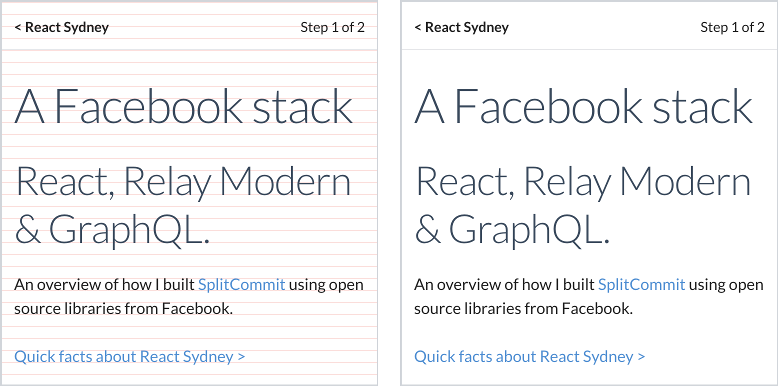
12px إيقاع عمودي مع خطوط الأساس المحاذاة بشكل صحيح
نوع محاذاة جميل مع مكونات مصممة
npm i @ceteio/styled-components-rhythm
أو مع الغزل:
yarn add @ceteio/styled-components-rhythm
 import { ThemeProvider , injectGLobal } , styled from 'styled-components' ;
import styledComponentsRhythm from '@ceteio/styled-components-rhythm' ;

const rhythm = styledComponentsRhythm ( {
  baseFontSize : 1 , // 1rem. Browser default makes this 16px
  baseLineHeight : 1.2 , // unitless line-height, see: https://css-tricks.com/almanac/properties/l/line-height/#comment-1587658
  rhythmHeight : 0.75 , // rem units. With browser default, this is 16px * 0.75rem == 12px
  capHeights : {
    // Calculated with https://codepen.io/sebdesign/pen/EKmbGL?editors=0011
    Lato : 0.72 ,
  } ,
  debug : true ,
} ) ;

injectGLobal `
  /* Reset global margins and padding */
  h1, p {
    margin: 0;
    padding: 0;
  }

  /* Using Lato font https://fonts.google.com/specimen/Lato */
  @import url('https://fonts.googleapis.com/css?family=Lato')

  ${ rhythm . global ( ) }
` ;

const H1 = styled . h1 `
  ${ props => props . theme . setFontWithRhythm ( 'Lato' , 3 ) }
  margin-top: ${ props => props . theme . rhythmSizing ( 3 ) } rem;
` ;

const Paragraph = styled . p `
  ${ props => props . theme . setFontWithRhythm ( 'Lato' , 1 ) }
  margin-top: ${ props => props . theme . rhythmSizing ( 2 ) } rem;
` ;

export default ( ) => (
  < ThemeProvider theme = { rhythm . theme } >
    < H1 > Hello world </ H1 >
    < Paragraph > How are you today? </ Paragraph >
    < Paragraph > Feeling quite < em > aligned </ em > ! </ Paragraph >
  </ ThemeProvider >
) ; التصدير الرئيسي هو وظيفة تُرجع كائن إيقاع مناسب للإضافة إلى مكونات مصممة <ThemeProvider> :
 import styledComponentsRhythm from '@ceteio/styled-components-rhythm' ;

const rhythm = styledComponentsRhythm ( options ) ;
// { theme: ..., global: ... }
options ( Object )baseFontSize ( Number ): حجم خط rem لعنصر الجذر الخاص بك (أي <body> ).rhythmHeight ( Number ): حجم الشبكة الرأسية في rem ، والذي سيكون له النص محاذاة خط الأساس. يعمل بشكل أفضل عندما ينقسم بالتساوي إلى ( baseFontSize * defaultLineHeight ).capHeights ( Object ): خريطة اسم خط font-family -> الارتفاع النسبي لأحرف رأس المال. يمكن حساب الارتفاعات مع هذه الأداة. على سبيل المثال: {
Lato : 0.72 ,
}defaultLineHeight ( Number ): الافتراضي ل setFontWithRhythm() أدناه. يجب أن تكون قيمة بدون وحدات ، والتي ستكون نسبة إلى حجم الخط لعنصر.debug ( Boolean ): سوف يضخ خطوط أفقية حمراء إلى الجسم لمحاذاة تصحيح تصحيح بصري.defaultOutputType ( String ): اضبط نوع الإخراج من setFontWithRhythm() و global() . 'string' : إرجاع سلسلة CSS. 'object' : إرجاع كائن نمط CSS. الافتراضي: 'string' . هناك قطعتان للغز ، وكلاهما يجب استخدامه لإيقاع عمودي فعال ؛ rhythm.theme ، و rhythm.global :
 import styledComponentsRhythm from '@ceteio/styled-components-rhythm' ;
import { injectGlobal , ThemeProvider } from 'styled-components' ;

const rhythm = styledComponentsRhythm ( options ) ;

injectGlobal ` ${ rhythm . global ( ) } ` ;
return < ThemeProvider theme = { rhythm . theme } > ... </ ThemeProvider > ;
theme ( Object ) تمرير هذا الكائن إلى مكونات مصممة على ThemeProvider كموضوع:
 const rhythm = styledComponentsRhythm ( options ) ;

return < ThemeProvider theme = { rhythm . theme } > ... </ ThemeProvider > ;
global([outputType]) => String سلسلة تحتوي على CSS العالمية التي يجب تطبيقها. من الأفضل القيام به باستخدام injectGlobal المكون من نوعه:
 const rhythm = styledComponentsRhythm ( options ) ;

injectGlobal ` ${ rhythm . global ( ) } ` ;
أو العاطفة <Global> المكون:
< Global styles = { rhythm . global ( 'object' ) } />حدود
outputType ( String ): 'string' : Return a css string. 'object' : إرجاع كائن نمط CSS. الافتراضي: قيمة defaultOutputType . يمكنك الآن الوصول إلى ما يلي من خلال الدعامة theme داخل مكون مصمم:
rhythmHeightالقيمة كما تم تمريرها عند إنشاء كائن السمة.
setFontWithRhythm(fontName, fontSizeRem[, desiredLineHeight[, outputType]]) => Stringالوظيفة الرئيسية التي ستولد CSS اللازمة لمحاذاة الخط بشكل صحيح مع خط الأساس إيقاع.
هذه الوظيفة تجعل 2 افتراضات:
padding-top أو margin-bottom على هذا العنصر.حدود
fontName ( String ): يجب أن تتطابق مع اسم الخط كما ستعلن ذلك في font-family خاصية CSS.fontSizeRem ( Number ): مضاعفات baseFontSize .desiredLineHeight ( Number ): سيتم تقريبه إلى أقرب خط إيقاع حتى لا داعي للقلق.outputType ( String ): 'string' : Return a css string. 'object' : إرجاع كائن نمط CSS. الافتراضي: قيمة defaultOutputType .الإخراج هو سلسلة CSS لإضافتها إلى المكون:
 const H1 = styled . h1 `
  ${ props => props . theme . setFontWithRhythm ( 'Lato' , 3 ) }
` ;
أو ككائن يستخدم Prop CSS (في كل من المكونات العاطفية والعاطفة):
 const H1 = props => (
  < h1 css = { theme => theme . setFontWithRhythm ( 'Lato' , 3 , 1 , 'object' ) } />
) ;
rhythmSizing(multiple) => Number مساعد بسيط لحساب multiple * rhythmHeight .
يعمل بشكل رائع لوضع الهوامش أو الحشو:
 const H1 = styled . h1 `
  margin-top: ${ props => props . theme . rhythmSizing ( 3 ) } rem;
` ; capsize عن طريق البحث: "باستخدام بيانات تعريف الخط ، يمكن الآن حجم النص وفقًا لارتفاع رسائل رأسها مع تقليص المساحة فوق الحروف الرأسمالية وتحت خط الأساس."basekick by Michael Taranto هو تطبيق آخر لنفس الشيء ، يستهدف أقل.







