styled components rhythm
1.0.0

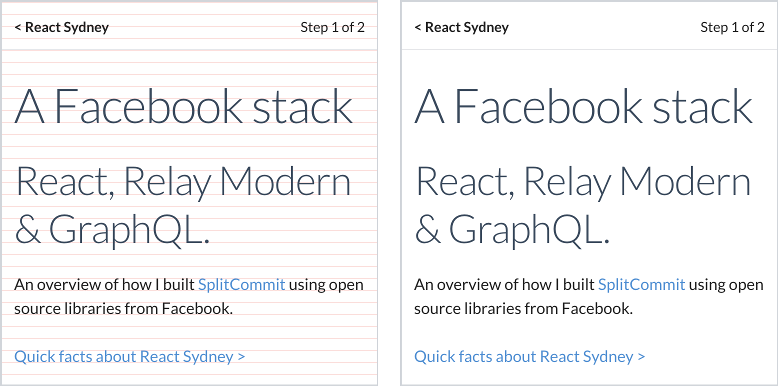
올바르게 정렬 된 기준선이있는 12px 수직 리듬
스타일링 된 구성 요소와 아름답게 정렬 된 유형
npm i @ceteio/styled-components-rhythm
또는 원사로 :
yarn add @ceteio/styled-components-rhythm
 import { ThemeProvider , injectGLobal } , styled from 'styled-components' ;
import styledComponentsRhythm from '@ceteio/styled-components-rhythm' ;

const rhythm = styledComponentsRhythm ( {
  baseFontSize : 1 , // 1rem. Browser default makes this 16px
  baseLineHeight : 1.2 , // unitless line-height, see: https://css-tricks.com/almanac/properties/l/line-height/#comment-1587658
  rhythmHeight : 0.75 , // rem units. With browser default, this is 16px * 0.75rem == 12px
  capHeights : {
    // Calculated with https://codepen.io/sebdesign/pen/EKmbGL?editors=0011
    Lato : 0.72 ,
  } ,
  debug : true ,
} ) ;

injectGLobal `
  /* Reset global margins and padding */
  h1, p {
    margin: 0;
    padding: 0;
  }

  /* Using Lato font https://fonts.google.com/specimen/Lato */
  @import url('https://fonts.googleapis.com/css?family=Lato')

  ${ rhythm . global ( ) }
` ;

const H1 = styled . h1 `
  ${ props => props . theme . setFontWithRhythm ( 'Lato' , 3 ) }
  margin-top: ${ props => props . theme . rhythmSizing ( 3 ) } rem;
` ;

const Paragraph = styled . p `
  ${ props => props . theme . setFontWithRhythm ( 'Lato' , 1 ) }
  margin-top: ${ props => props . theme . rhythmSizing ( 2 ) } rem;
` ;

export default ( ) => (
  < ThemeProvider theme = { rhythm . theme } >
    < H1 > Hello world </ H1 >
    < Paragraph > How are you today? </ Paragraph >
    < Paragraph > Feeling quite < em > aligned </ em > ! </ Paragraph >
  </ ThemeProvider >
) ; 메인 내보내기는 스타일의 구성 요소에 추가하는 데 적합한 리듬 객체를 반환하는 함수 <ThemeProvider> :
 import styledComponentsRhythm from '@ceteio/styled-components-rhythm' ;

const rhythm = styledComponentsRhythm ( options ) ;
// { theme: ..., global: ... }
options ( Object )baseFontSize ( Number ) : 루트 요소의 rem 글꼴 크기 (예 : <body> ).rhythmHeight ( Number ) : 텍스트에 기준선이 정렬되는 rem 수직 그리드 크기. ( baseFontSize * defaultLineHeight )로 균등하게 나눌 때 가장 잘 작동합니다.capHeights ( Object ) : font-family Font Name의지도 -> 대문자의 비례 높이. 이 도구로 높이를 계산할 수 있습니다. 예를 들어: {
Lato : 0.72 ,
}defaultLineHeight ( Number ) : 아래의 setFontWithRhythm() 의 기본값. 요소의 글꼴 크기와 관련하여 단위가없는 값이어야합니다.debug ( Boolean ) : 시각적으로 디버깅 정렬을 위해 적색 수평선을 바디에 주입합니다.defaultOutputType ( String ) : setFontWithRhythm() & global() 의 출력 유형을 설정합니다. 'string' : CSS 문자열을 반환합니다. 'object' : CSS 스타일 객체를 반환합니다. 기본값 : 'string' . 퍼즐에는 두 가지 조각이 있으며, 둘 다 효과적인 수직 리듬을 갖는 데 사용되어야합니다. rhythm.theme 및 rhythm.global :
 import styledComponentsRhythm from '@ceteio/styled-components-rhythm' ;
import { injectGlobal , ThemeProvider } from 'styled-components' ;

const rhythm = styledComponentsRhythm ( options ) ;

injectGlobal ` ${ rhythm . global ( ) } ` ;
return < ThemeProvider theme = { rhythm . theme } > ... </ ThemeProvider > ;
theme ( Object ) 이 개체를 테마로 스타일의 구성 요소 ThemeProvider 로 전달하십시오.
 const rhythm = styledComponentsRhythm ( options ) ;

return < ThemeProvider theme = { rhythm . theme } > ... </ ThemeProvider > ;
global([outputType]) => String 적용 해야하는 글로벌 CS를 포함하는 문자열. 스타일의 구성 요소의 injectGlobal 사용하여 가장 잘 수행 :
 const rhythm = styledComponentsRhythm ( options ) ;

injectGlobal ` ${ rhythm . global ( ) } ` ;
또는 감정의 <Global> 구성 요소 :
< Global styles = { rhythm . global ( 'object' ) } />매개 변수
outputType ( String ) : 'string' : CSS 문자열을 반환합니다. 'object' : CSS 스타일 객체를 반환합니다. 기본값 : defaultOutputType 의 값입니다. 이제 스타일 구성 요소 내 theme 소품을 통해 다음에 액세스 할 수 있습니다.
rhythmHeight테마 개체를 만들 때 통과 한 값.
setFontWithRhythm(fontName, fontSizeRem[, desiredLineHeight[, outputType]]) => String글꼴을 리듬 기준선에 올바르게 정렬하는 데 필요한 CSS를 생성하는 주요 기능.
이 기능은 두 가지 가정을 만듭니다.
padding-top 또는 margin-bottom 수동으로 설정하지 않습니다.매개 변수
fontName ( String ) : CSS 속성 font-family 에서 선언 할대로 글꼴 이름과 일치해야합니다.fontSizeRem ( Number ) : baseFontSize 의 배수.desiredLineHeight ( Number ) : 가장 가까운 리듬 라인으로 반올림되므로 걱정할 필요가 없습니다.outputType ( String ) : 'string' : CSS 문자열을 반환합니다. 'object' : CSS 스타일 객체를 반환합니다. 기본값 : defaultOutputType 의 값입니다.출력은 구성 요소에 추가 할 CSS 문자열입니다.
 const H1 = styled . h1 `
  ${ props => props . theme . setFontWithRhythm ( 'Lato' , 3 ) }
` ;
또는 CSS 소품을 사용하는 객체 (스타일링 된 구성 요소 및 감정 모두) :
 const H1 = props => (
  < h1 css = { theme => theme . setFontWithRhythm ( 'Lato' , 3 , 1 , 'object' ) } />
) ;
rhythmSizing(multiple) => Number multiple * rhythmHeight 계산하는 간단한 도우미.
마진 또는 패딩을 설정하는 데 적합합니다.
 const H1 = styled . h1 `
  margin-top: ${ props => props . theme . rhythmSizing ( 3 ) } rem;
` ; capsize : Seek : "글꼴 메타 데이터를 사용하여 텍스트는 대문자의 높이에 따라 크기를 조정하면서 대문자 위의 공간을 다듬고 기준선 아래에서 크기를 줄일 수 있습니다."basekick 덜 목표로하는 것과 같은 또 다른 구현입니다.







