styled components rhythm
1.0.0

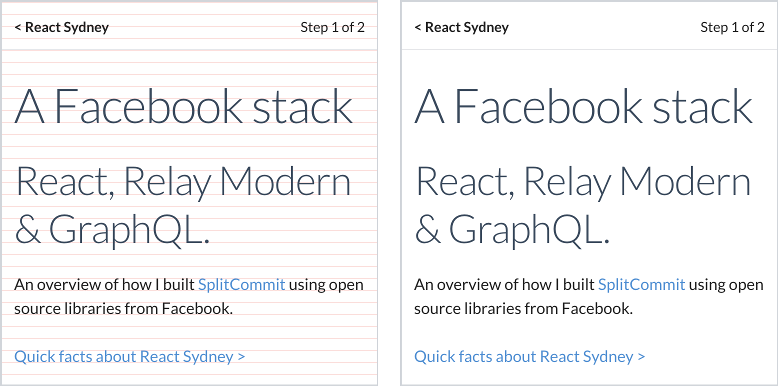
12px ritmo vertical con líneas de base correctamente alineadas
Tipo bellamente alineado con componentes de estilo
npm i @ceteio/styled-components-rhythm
o, con hilo:
yarn add @ceteio/styled-components-rhythm
 import { ThemeProvider , injectGLobal } , styled from 'styled-components' ;
import styledComponentsRhythm from '@ceteio/styled-components-rhythm' ;

const rhythm = styledComponentsRhythm ( {
  baseFontSize : 1 , // 1rem. Browser default makes this 16px
  baseLineHeight : 1.2 , // unitless line-height, see: https://css-tricks.com/almanac/properties/l/line-height/#comment-1587658
  rhythmHeight : 0.75 , // rem units. With browser default, this is 16px * 0.75rem == 12px
  capHeights : {
    // Calculated with https://codepen.io/sebdesign/pen/EKmbGL?editors=0011
    Lato : 0.72 ,
  } ,
  debug : true ,
} ) ;

injectGLobal `
  /* Reset global margins and padding */
  h1, p {
    margin: 0;
    padding: 0;
  }

  /* Using Lato font https://fonts.google.com/specimen/Lato */
  @import url('https://fonts.googleapis.com/css?family=Lato')

  ${ rhythm . global ( ) }
` ;

const H1 = styled . h1 `
  ${ props => props . theme . setFontWithRhythm ( 'Lato' , 3 ) }
  margin-top: ${ props => props . theme . rhythmSizing ( 3 ) } rem;
` ;

const Paragraph = styled . p `
  ${ props => props . theme . setFontWithRhythm ( 'Lato' , 1 ) }
  margin-top: ${ props => props . theme . rhythmSizing ( 2 ) } rem;
` ;

export default ( ) => (
  < ThemeProvider theme = { rhythm . theme } >
    < H1 > Hello world </ H1 >
    < Paragraph > How are you today? </ Paragraph >
    < Paragraph > Feeling quite < em > aligned </ em > ! </ Paragraph >
  </ ThemeProvider >
) ; La exportación principal es una función que devuelve un objeto de ritmo adecuado para agregar a un componentes de estilo <ThemeProvider> :
 import styledComponentsRhythm from '@ceteio/styled-components-rhythm' ;

const rhythm = styledComponentsRhythm ( options ) ;
// { theme: ..., global: ... }
options ( Object )baseFontSize ( Number ): el tamaño de fuente rem de su elemento raíz (es decir, el <body> ).rhythmHeight ( Number ): el tamaño de la cuadrícula vertical rem , al que el texto tendrá su línea de base alineada. Funciona mejor cuando se divide de manera uniforme en ( baseFontSize * defaultLineHeight ).capHeights ( Object ): mapa del nombre de fuente de fuente font-family -> Altura proporcional de las letras mayúsculas. Las alturas se pueden calcular con esta herramienta. Por ejemplo: {
Lato : 0.72 ,
}defaultLineHeight ( Number ): predeterminado para setFontWithRhythm() a continuación. Debe ser un valor sin unidad, que será relativo al tamaño de la fuente de un elemento.debug ( Boolean ): inyectará líneas horizontales rojas al cuerpo para alineaciones de depuración visuales.defaultOutputType ( String ): Establezca el tipo de salida de setFontWithRhythm() y global() . 'string' : devuelve una cadena CSS. 'object' : devuelve un objeto de estilo CSS. Predeterminado: 'string' . Hay dos piezas en el rompecabezas, que deben usarse para tener un ritmo vertical efectivo; rhythm.theme y rhythm.global :
 import styledComponentsRhythm from '@ceteio/styled-components-rhythm' ;
import { injectGlobal , ThemeProvider } from 'styled-components' ;

const rhythm = styledComponentsRhythm ( options ) ;

injectGlobal ` ${ rhythm . global ( ) } ` ;
return < ThemeProvider theme = { rhythm . theme } > ... </ ThemeProvider > ;
theme ( Object ) Pase este objeto a un componente de estilo ThemeProvider como tema:
 const rhythm = styledComponentsRhythm ( options ) ;

return < ThemeProvider theme = { rhythm . theme } > ... </ ThemeProvider > ;
global([outputType]) => String Una cadena que contiene CSS global que debe aplicarse. Mejor utilizando injectGlobal de componente de estilo:
 const rhythm = styledComponentsRhythm ( options ) ;

injectGlobal ` ${ rhythm . global ( ) } ` ;
o el componente <Global> de emoción:
< Global styles = { rhythm . global ( 'object' ) } />Parámetros
outputType ( String ): 'string' : devuelve una cadena CSS. 'object' : devuelve un objeto de estilo CSS. Valor predeterminado: el valor de defaultOutputType . Ahora tiene acceso a lo siguiente a través del accesorio theme dentro de un componente de estilo:
rhythmHeightEl valor pasó al crear el objeto de tema.
setFontWithRhythm(fontName, fontSizeRem[, desiredLineHeight[, outputType]]) => StringLa función principal que generará el CSS necesario para alinear correctamente la fuente con una línea de base de ritmo.
Esta función hace 2 suposiciones:
padding-top o margin-bottom en este elemento.Parámetros
fontName ( String ): debe coincidir con el nombre de la fuente como lo declarará en la font-family de la propiedad CSS.fontSizeRem ( Number ): un múltiplo de baseFontSize .desiredLineHeight ( Number ): se redondeará a la línea de ritmo más cercana para que no tenga que preocuparse.outputType ( String ): 'string' : devuelve una cadena CSS. 'object' : devuelve un objeto de estilo CSS. Valor predeterminado: el valor de defaultOutputType .La salida es la cadena CSS para agregar al componente:
 const H1 = styled . h1 `
  ${ props => props . theme . setFontWithRhythm ( 'Lato' , 3 ) }
` ;
O como un objeto usando el accesorio CSS (tanto en componentes de estilo y emoción):
 const H1 = props => (
  < h1 css = { theme => theme . setFontWithRhythm ( 'Lato' , 3 , 1 , 'object' ) } />
) ;
rhythmSizing(multiple) => Number Un ayudante simple para calcular multiple * rhythmHeight .
Funciona muy bien para establecer márgenes o relleno:
 const H1 = styled . h1 `
  margin-top: ${ props => props . theme . rhythmSizing ( 3 ) } rem;
` ; capsize por buscar: "Usando metadatos de fuente, el texto ahora se puede dimensionar de acuerdo con la altura de sus letras mayúsculas mientras recorta el espacio por encima de las letras mayúsculas y debajo de la línea de base".basekick de Michael Taranto es otra implementación de lo mismo, dirigida a menos.







