sdl stb font
1.0.0

仅使用STB_TRUETYPE在纯SDL2中渲染文本的仅标题库。这是绘制的,即允许快速文本渲染的字形。它还提供了几种简单的方法来渲染一个字符串以使纹理以使更快的文本渲染。
新(2022)!可以使用producerConsumerFrontend.h的多线程环境中的prerender!
新(2021)!也可以使用bgfxFrontend.h在BGFX中渲染!
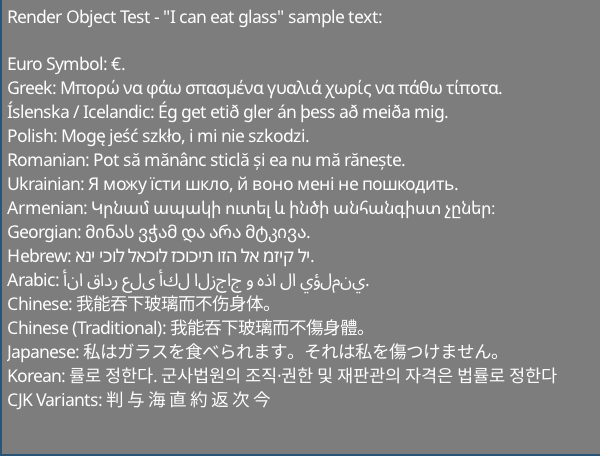
示例文本来自http://www.columbia.edu/~fdc/utf8/index.html
liam twigger- @snapperthetwig
fc.drawText(x, y, string)fc.renderTextToTexture(string, &widthOut, &heightOut)在英特尔I7-8750H上:
如果使用纹理( renderTextToTexture / renderTextToObject ),则示例图像需要0.7ms渲染(〜1400 fps)。速度将是SDL2使您可以在纹理上翻转纹理的最大值。
如果直接呈现( drawText ),则示例图像需要约5ms渲染(〜200 fps)(〜200 fps)
对于持续多个帧的文本,您应该使用renderTextToTexture或renderTextToObject缓存。
格式化文字:
非SDL前端:
这是一个仅标题库 - 无需构建系统
在任何标题中:
# include " path/to/sdlStbFont/sdlStbFont.h "一个.cpp:
# define SDL_STB_FONT_IMPL
# include " path/to/sdlStbFont/sdlStbFont.h "该库对STB_TRUETYPE具有依赖性。它将自动包含此。如果您不希望它自动包含它,请使用#define STB_TRUETYPE_INCLUDE_HANDLED ,并处理您自己的stb_truetype.h。
# define SDL_STB_FONT_IMPL
# include " sdlStbFont.h "

...

// Load font
char * ttfFontFromMemory = loadFontFileSomehow( " path/to/file.ttf " );

sdl_stb_font_cache fc;
fc.faceSize = 24 ; // Must be set before loadFont()!
fc.tabWidthInSpaces = 8 ; // Optional
fc.loadFont(ttfFontFromMemory);

...

// Setup renderer
SDL_Renderer * mSdlRenderer = SDL_CreateRenderer( mWindow , SDL_RENDERER_SOFTWARE, 0 );
fc.bindRenderer( mSdlRenderer ); // Must bind a renderer before generating any glyphs

...

// Main loop
SDL_SetRenderDrawColor ( mSdlRenderer , 125 , 125 , 125 , 255 );
SDL_RenderClear ( mSdlRenderer );
fc.drawText( 5 , 5 , " Hello world! " );
SDL_RenderPresent ( mSdlRenderer );

// fc will clean itself up when it falls out of scope
delete[] ttfFontFromMemory; // You must manually remove the char buff when done
// if you want auto management use fc.loadFontManaged(), which will transfer
// ownership of ttfFontFromMemory to fc and be freed when done.
您还可以获取渲染字符串的宽度和高度:
 fc.drawText(5, 5, widthOut, heightOut, "Hello world!");
// Draws "hello world" and sets widthOut and heightOut to the size of the string
 class sdl_stb_font_cache {
...
public:
  int ascent;
  int descent;
  int lineGap;
  int baseline;
  int rowSize;
  int tabWidth;  // May be changed later
  float scale;
  float underlineThickness;
  float strikethroughThickness;
  float underlinePosition;
  float strikethroughPosition;
  // Must be set before loadFont() is called. Cannot be changed after
  int faceSize;      // Default is 20. All the parameters are calcualted based on this
  int tabWidthInSpaces;  // Default is 8, set this before loadFont(). Max 128. Sets tabWidth when font is loaded
...
  }
fc.loadFont(ttfFontFromMemory);
fc.addFont(someSecondFontFromMemory);
fc.addFont(someThirdFontFromMemory);
...
etc
首先加载的字体必须带有“ LoadFont”。
请注意,在调用任何绘图功能之前,必须加载所有字体。如果在第一字体中找不到字形,则将搜索第二个字体,等等。
 int w, h;
fc.getTextSize(w, h, " Text " ); // Get width and height at same time

// Also
h = fc.getTextHeight( " Text " ); // Faster, if only height is needed
w = fc.getTextWidth( " Text " ); // Internally just a wrapper for getTextSize
int nRows = fc.getTextRows( " Text n More text " ); // UTF8 safe, returns the number of rows of text - here it's 2
int numNewlines = fc.getNumNewLines
提示: drawText()返回绘制字符串或格式的文本对象的末端的X坐标。
对于线条包装,请使用fc.breakString(stringIn, arrayOut, width)功能。这将字符串或格式的文本对象转换为字符串或格式的文本对象的向量每个小于宽度。这将尝试首先打破新线和空格,然后将单词拆分,如果该单词比指定的宽度更长。这是UTF8安全。
手册管理:
 char * mFontData = loadFontFromFileSomehow( " path/to/file.ttf " );
fc.loadFont( mFontData );
// You will have to free mFontData when you are done with it
// fc does not copy mFontData internally
// using fc after free'ing mFontData will result in undefined behaviour
自动管理:
filep * file = openFile( " path/to/file " );
sttfont_memory mFontData ;
mFontData .alloc(file_size);
fread (file, & mFontData .data);
fc.loadFontManaged( mFontData );
// fc now owns mFontData's contents and will free it when fc is destroyed
// You can safely let mFontData fall out of scope
// Also addFontManaged is avaliable for adding fallback fonts 第一种方法:
 // creating
int RTw, RTh;
SDL_Texture * RT;
RT = fc.renderTextToTexture ( " Text " , &RTw, &RTh);

// Rendering
SDL_Rect r;
r.x = 5 ;
r.y = 5 ;
r.w = RTw;
r.h = RTh;
SDL_RenderCopy ( mSdlRenderer , RT , NULL , &r);
第二种方式(相同效果,但更干净)
 // creating
sdl_stb_prerendered_text prt;
prt. mRenderer = your__SDL_Render__instance;
fc.renderTextToObject(&prt, " Text " );

// Rendering
prt.draw(x, y);

// Rendering in colour & alpha
prt.drawWithColor(x, y, 255 , 185 , 85 , 255 );

// Cleanup
prt.freeTexture();
提示: prt.draw()返回对象末端的X坐标。
使用带有缓存纹理的SDL_SetTextureColorMod 。或使用sdl_stb_prerendered_text::drawWithColor 。
使用getCaretPos(text, relativeMouseX, relativeMouseY)
请注意,这仅当前仅支持没有新线的字符串中的Carret查找 - 如果您使用多行字符串尝试此操作,则可能会返回不正确的值。
TAB宽度由可变fc.tabWidth处理。选项卡之后的字符将与下一个标签位置对齐。
您可以在调用fc.loadFont(...)之前将fc.tabWidthInSpaces = X ,将fc.tabWidth自动设置为空间宽度的某个倍数。默认情况下,字体设置为宽度8个空间。较低的值对单义字体更好,较高的值对于非单调字体的字体更好。
该库由两个部分组成 - 字体处理后端(名为sttfont_* )和SDL渲染前端( sdl_stb_* )。
为了使您自己的渲染前端扩展相关的sttfont_*类。有关详细信息,请参见SDL实现。它约200行的代码,您要做的就是取出特定的SDL特定内容并放入渲染器特定的内容中。在您的应用程序中,包括sttFont.h而不是sdlStbFont.h
您可以使用pregenGlyphs function :
std::vector<sttfont_uint32_t_range> codepoint_ranges;
sttfont_uint32_t_range customRange;
customRange.start = 1337 ; customRange.end = 1444 ; // end is inclusive

sttfont_uint32_t_range::populateRangesLatin (codepoint_ranges); // add the Latin character set
sttfont_uint32_t_range::populateRangesCyrillic (codepoint_ranges); // add the Cyrillic character set
fc.pregenGlyphs(codepoint_ranges, 0 ); // generatess the glyps如果您是在SDL中渲染的软件,则不需要,只会放慢启动。如果您使用的是使用纹理图集(例如BGFX)的自定义前端,则建议这样做。
使用producerConsumerExample.h 。有关工作示例,请参见producerConsumerExample.cpp 。
想法是,您实例化生产者和消费者线程之间共享的producer_consumer_font_cache对象。该对象的成员指向消费者使用的实际前端:
近活化:
producer_consumer_font_cache mPcCache ;
sdl_stb_font_cache mSdlFontCache ;


mPcCache .consumer_font_cache = & mSdlFontCache ;

sttfont_memory m;
m.data = &fontData[ 0 ];
m.size = fontData.size();
m.ownsData = false ;

mPcCache .faceSize = 24 ;
mPcCache .loadFontManagedBoth(m); // Loads the font into both frontends
生产:
pcfc_prerendered_text prt;
mPcCache .renderTextToObject(&prt, " Prerendered text from Producer Thread! " ); // prt.handle now holds a handle
pcfc_handle h = mPcCache .pushText( 5 , 5 , " Hello World! " ); // use this instead of "drawText"
mPcCache .submitToConsumer(); // sends to consumer
消费:
 // <somehow send prt.handle and h to consumer thread>
// Suggestion: use a concurrentqueue (https://github.com/cameron314/concurrentqueue)
// and/or some kind of command buffer (https://github.com/SnapperTT/nanovg_command_buffer)
mPcCache .receiveFromProducer();
mPcCache .dispatchPrerenderJobs<sdl_stb_prerendered_text>(); // takes the prerended text and creates sdl_stb_prerended_text objects (invokes mPcCache.consumer_font_cache->renderTextToObject)

mPcCache .dispatchSinglePrerendered(prt.handle, 5 , 5 ); // actually draws the prerendered text
mPcCache .dispatchSingleText(h); // Renders "hello world" at 5,5
清理:
 // Cleanup - just let mPcCache fall out of scope
mPcCache .freeStoredPrerenderedText( true ); // deletes all prerendered text objects stored. true == also calls prt->freeTexture() for all prerendered text
										  // this is manual destruction as destroying a large number of objects can be expensive, esp. when you want to exit quickly
// Don't forget to delete mPcCache.consumer_font_cache if it was heap allocated
delete mPcCache .consumer_font_cache;
USERDATA:您可以和文本一起提交原始指针。
 mPcCahce.pushUserdata(void*); // producer
void* foo = mPcCahce.getUserdata(); // consumer
如果您不这样做,则使用std::mutex将状态从生产者传递到消费者。暂时缓冲区中只有一个插槽。您必须有一些机械设备才能停止,例如,生产商的运行速度比消费者快。
如果您想使用队列,我建议Moodycamel :: ReaderWriterQueue。您可以使用producer_consumer_font_cache启用它:
#define SSF_CONCURRENT_QUEUE moodycamel::ReaderWriterQueue
进行更改的投票:
 if (mPcCache.receiveFromProducer()) { // wraps moodycamel::ReaderWriterQueue::try_dequeue()
	// have dequeued!
	}
清理(冲洗队列)
 while (mPcCache.receiveFromProducer()) {
	// pulls stuff from the queue until its empty
	delete mPcCache.getUserdata(); // if we're using heap allocated userdata here is how to clear it
	}
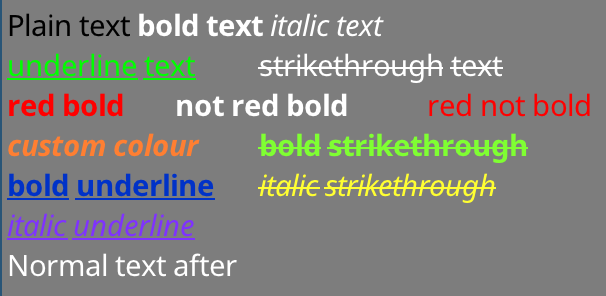
首先创建一个sttfont_formatted_text 。上面的示例是由以下示例创建的:
sttfont_formatted_text formattedText;
formattedText << sttfont_format::black << " Plain text "
<< sttfont_format:: bold << " bold text "
<< sttfont_format:: italic << " italic text n "
<< sttfont_format:: underline << sttfont_format::green << " underline text t "
<< sttfont_format::strikethrough << " strikethrough text n "
<< sttfont_format::red << sttfont_format:: bold << " red bold t "
<< sttfont_format:: bold << " not red bold t "
<< sttfont_format::red << " red not bold n "
<< sttfont_format:: bold << sttfont_format:: italic		<< sttfont_format::colour( 255 , 127 , 50 ) << " custom colour t "
<< sttfont_format:: bold << sttfont_format::strikethrough	<< sttfont_format::colour( 127 , 255 , 50 ) << " bold strikethrough n "
<< sttfont_format:: bold << sttfont_format:: underline		<< sttfont_format::colour(  0 , 50 , 200 ) << " bold underline t "
<< sttfont_format:: italic << sttfont_format::strikethrough	<< sttfont_format::colour( 255 , 255 , 50 ) << " italic strikethrough n "
<< sttfont_format:: italic << sttfont_format:: underline << sttfont_format::colour( 127 , 50 , 255 ) << " italic underline "您可以将格式选项与<<运算符相结合。插入字符串后重置格式。
然后,您可以使用用于简单字符串( drawText(x, y, formattedText)等)的相同功能渲染。这包括使用renderTextToObject呈现纹理。您可以使用一个简单的字符串可以使用相同命名函数( getTextSize , getNumRows , getCaretPos等)来完成的所有操作)
为了使BOLD/斜体变体工作,您必须加载字体的粗体/斜体变体。对于粗体+斜体,您必须加载字体的粗体+斜体变体!该库自动生成了下划线和罢工。
加载变体后,加载基本字体后,使用addFormatFont或addFormatFontManaged 。如果您关心这些字体在BOLD/ITALIC中可用,则也应该为后备字体(用于多语言支持)进行此操作。
fc.loadFontManaged(notoSans);	// First font - loadFont
	fc.addFormatFontManaged(sttfont_format::FORMAT_BOLD, notoSansBold);
	fc.addFormatFontManaged(sttfont_format::FORMAT_ITALIC, notoSansItalic);
	fc.addFormatFontManaged(sttfont_format::FORMAT_BOLD | sttfont_format::FORMAT_ITALIC, notoSansBoldItalic);
fc.addFontManaged(notoSansArmenian);	// Fallback fonts - addFont
	fc.addFormatFontManaged(sttfont_format::FORMAT_BOLD, notoSansArmenianBold);
	fc.addFormatFontManaged(sttfont_format::FORMAT_ITALIC, notoSansArmenianItalic);
fc.addFormatFontManaged(sttfont_format::FORMAT_BOLD | sttfont_format::FORMAT_ITALIC, notoSansArmenianBoldItalic);如果您请求粗体或斜体字符串,并且没有大胆或斜体变体可用,则将使用常规变体。如果您请求一个粗体+斜体字符串,并且只有一个加载(但不是组合),则将使用最后加载的变体 - 因此,如果您请求Bold+Italic且已加载粗体,然后将斜体(但不是Bold Italic)加载,则呈现斜体。
图书馆将绘制下划线并罢工本身,您无需提供这些变体。
包括bgfxFrontend.h ,并创建一个bgfx_stb_font_cache的实例。
请参阅bgfxExample.cpp查看如何使用此前端。
一些注释:
sttfont_uint32_t_range::populateRangesLatin()并在渲染前填充地图集可能是有益的。如果一个地图集充满了字形,则前端将创建一个新的地图集页。确保创建/编辑.lzz文件,而不是生成的.h文件。提供了从.lzz源创建标头文件的工具 +脚本。
感谢SDL和STB项目的贡献!
公共领域
STB_TRUETYPE是公共领域
Noto字体为(C)Google,并根据SIL Open Font许可证(版本1.1)发布。请参阅https://www.google.com/get/noto/








