sdl stb font
1.0.0

ไลบรารีส่วนหัวอย่างเดียวสำหรับการแสดงข้อความใน SDL2 บริสุทธิ์ด้วย STB_Truetype แคชนี้ร่ายมนตร์ขณะที่พวกเขาถูกดึงออกมาเพื่อให้สามารถแสดงข้อความได้อย่างรวดเร็ว นอกจากนี้ยังมีวิธีง่ายๆสองสามวิธีในการทำให้สตริงกับพื้นผิวสำหรับการแสดงข้อความที่เร็วขึ้น
ใหม่ (2022)! preerender สามารถในสภาพแวดล้อมแบบมัลติเธรดด้วย producerConsumerFrontend.h !
ใหม่ (2021)! ยังสามารถแสดงผลใน BGFX ด้วย bgfxFrontend.h !
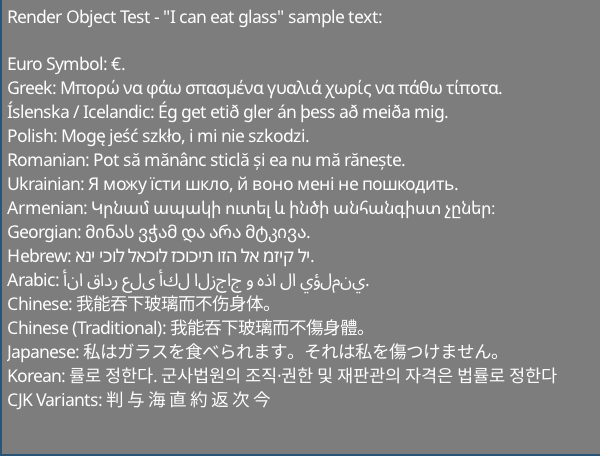
ตัวอย่างข้อความจาก http://www.columbia.edu/~fdc/utf8/index.html
Liam Twigger - @snapperthetwig
fc.drawText(x, y, string)fc.renderTextToTexture(string, &widthOut, &heightOut)บน Intel i7-8750h:
ตัวอย่างภาพใช้เวลา 0.7ms ในการเรนเดอร์ (~ 1400 fps) หากใช้พื้นผิว ( renderTextToTexture / renderTextToObject ) ความเร็วจะเป็นค่าสูงสุดที่ SDL2 ช่วยให้คุณสามารถพลิกพื้นผิวได้
ตัวอย่างภาพใช้เวลา ~ 5ms ในการแสดงผล (~ 200 fps) ถ้าแสดงผลโดยตรง ( drawText )
สำหรับข้อความที่ใช้งานได้มากกว่าหนึ่งเฟรมคุณควรแคชด้วย renderTextToTexture หรือ renderTextToObject
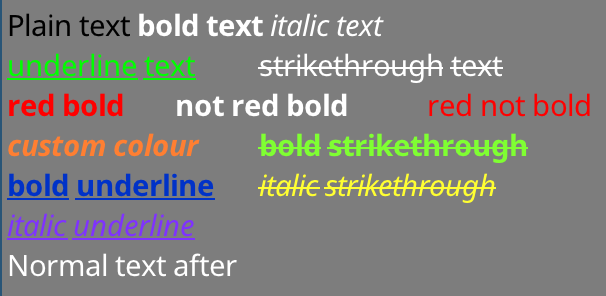
ข้อความที่จัดรูปแบบ:
Non-SDL frontends:
นี่คือส่วนหัวเท่านั้นไลบรารี - ไม่จำเป็นต้องมีระบบการสร้าง
ในส่วนหัวใด ๆ :
# include " path/to/sdlStbFont/sdlStbFont.h "ใน หนึ่ง .cpp:
# define SDL_STB_FONT_IMPL
# include " path/to/sdlStbFont/sdlStbFont.h "
ห้องสมุดนี้มีการพึ่งพา STB_Truetype มันจะรวมสิ่งนี้โดยอัตโนมัติ หากคุณไม่ต้องการรวมโดยอัตโนมัติให้ใช้ #define STB_TRUETYPE_INCLUDE_HANDLED และจัดการกับ STB_TRUETYPE.H ด้วยตัวคุณเอง
# define SDL_STB_FONT_IMPL
# include " sdlStbFont.h "

...

// Load font
char * ttfFontFromMemory = loadFontFileSomehow( " path/to/file.ttf " );

sdl_stb_font_cache fc;
fc.faceSize = 24 ; // Must be set before loadFont()!
fc.tabWidthInSpaces = 8 ; // Optional
fc.loadFont(ttfFontFromMemory);

...

// Setup renderer
SDL_Renderer * mSdlRenderer = SDL_CreateRenderer( mWindow , SDL_RENDERER_SOFTWARE, 0 );
fc.bindRenderer( mSdlRenderer ); // Must bind a renderer before generating any glyphs

...

// Main loop
SDL_SetRenderDrawColor ( mSdlRenderer , 125 , 125 , 125 , 255 );
SDL_RenderClear ( mSdlRenderer );
fc.drawText( 5 , 5 , " Hello world! " );
SDL_RenderPresent ( mSdlRenderer );

// fc will clean itself up when it falls out of scope
delete[] ttfFontFromMemory; // You must manually remove the char buff when done
// if you want auto management use fc.loadFontManaged(), which will transfer
// ownership of ttfFontFromMemory to fc and be freed when done.
นอกจากนี้คุณยังสามารถรับความกว้างและความสูงของสตริงที่แสดงผล:
 fc.drawText(5, 5, widthOut, heightOut, "Hello world!");
// Draws "hello world" and sets widthOut and heightOut to the size of the string
 class sdl_stb_font_cache {
...
public:
  int ascent;
  int descent;
  int lineGap;
  int baseline;
  int rowSize;
  int tabWidth;  // May be changed later
  float scale;
  float underlineThickness;
  float strikethroughThickness;
  float underlinePosition;
  float strikethroughPosition;
  // Must be set before loadFont() is called. Cannot be changed after
  int faceSize;      // Default is 20. All the parameters are calcualted based on this
  int tabWidthInSpaces;  // Default is 8, set this before loadFont(). Max 128. Sets tabWidth when font is loaded
...
  }
fc.loadFont(ttfFontFromMemory);
fc.addFont(someSecondFontFromMemory);
fc.addFont(someThirdFontFromMemory);
...
etc
ตัวอักษรแรกที่โหลดต้องอยู่กับ "loadfont"
โปรดทราบว่าต้องโหลดแบบอักษรทั้งหมดก่อนที่จะเรียกฟังก์ชั่นการวาดใด ๆ หากไม่พบสัญลักษณ์ในตัวอักษรแรกตัวอักษรที่สองจะถูกค้นหา ฯลฯ
 int w, h;
fc.getTextSize(w, h, " Text " ); // Get width and height at same time

// Also
h = fc.getTextHeight( " Text " ); // Faster, if only height is needed
w = fc.getTextWidth( " Text " ); // Internally just a wrapper for getTextSize
int nRows = fc.getTextRows( " Text n More text " ); // UTF8 safe, returns the number of rows of text - here it's 2
int numNewlines = fc.getNumNewLines
เคล็ดลับ: drawText() ส่งคืนพิกัด X ของปลายของสตริงวาดหรือวัตถุข้อความที่จัดรูปแบบ
สำหรับการห่อเส้นใช้ฟังก์ชัน fc.breakString(stringIn, arrayOut, width) สิ่งนี้จะแปลงสตริงหรือวัตถุข้อความที่จัดรูปแบบเป็นเวกเตอร์ของสตริงหรือวัตถุข้อความที่จัดรูปแบบซึ่งแต่ละอันมีความกว้างน้อยกว่า สิ่งนี้จะพยายามทำลายสายใหม่และช่องว่างก่อนจากนั้นมันจะแยกคำถ้าความยาวกว่าความกว้างที่ระบุ นี่คือ UTF8 ที่ปลอดภัย
การจัดการด้วยตนเอง:
 char * mFontData = loadFontFromFileSomehow( " path/to/file.ttf " );
fc.loadFont( mFontData );
// You will have to free mFontData when you are done with it
// fc does not copy mFontData internally
// using fc after free'ing mFontData will result in undefined behaviour
การจัดการอัตโนมัติ:
filep * file = openFile( " path/to/file " );
sttfont_memory mFontData ;
mFontData .alloc(file_size);
fread (file, & mFontData .data);
fc.loadFontManaged( mFontData );
// fc now owns mFontData's contents and will free it when fc is destroyed
// You can safely let mFontData fall out of scope
// Also addFontManaged is avaliable for adding fallback fonts วิธีแรก:
 // creating
int RTw, RTh;
SDL_Texture * RT;
RT = fc.renderTextToTexture ( " Text " , &RTw, &RTh);

// Rendering
SDL_Rect r;
r.x = 5 ;
r.y = 5 ;
r.w = RTw;
r.h = RTh;
SDL_RenderCopy ( mSdlRenderer , RT , NULL , &r);
วิธีที่สอง (เอฟเฟกต์เดียวกัน แต่สะอาดกว่า)
 // creating
sdl_stb_prerendered_text prt;
prt. mRenderer = your__SDL_Render__instance;
fc.renderTextToObject(&prt, " Text " );

// Rendering
prt.draw(x, y);

// Rendering in colour & alpha
prt.drawWithColor(x, y, 255 , 185 , 85 , 255 );

// Cleanup
prt.freeTexture();
เคล็ดลับ: prt.draw() ส่งคืนพิกัด x ของจุดสิ้นสุดของวัตถุ
ใช้ SDL_SetTextureColorMod กับพื้นผิวที่แคช หรือใช้ sdl_stb_prerendered_text::drawWithColor
ใช้ getCaretPos(text, relativeMouseX, relativeMouseY)
โปรดทราบว่าในปัจจุบันนี้รองรับการค้นหาของ Carret ในสตริงโดยไม่ต้องใช้สายใหม่ - หากคุณลองใช้สตริง multiline แล้วมันอาจส่งคืนค่าที่ไม่ถูกต้อง
ความกว้างของแท็บได้รับการจัดการโดยตัวแปร fc.tabWidth อักขระหลังจากแท็บจะสอดคล้องกับตำแหน่งแท็บถัดไป
คุณสามารถตั้งค่า fc.tabWidthInSpaces = X ก่อนที่จะเรียก fc.loadFont(...) เพื่อตั้งค่า fc.tabWidth โดยอัตโนมัติเป็นความกว้างหลายช่องว่าง โดยฟอนต์เริ่มต้นถูกตั้งค่าเป็น 8 ช่องว่างในความกว้าง ค่าที่ต่ำกว่าจะดีกว่าสำหรับแบบอักษร monospace ค่าที่สูงกว่าจะดีกว่าสำหรับแบบอักษรที่ไม่ใช่ monospace
ห้องสมุดนี้ประกอบด้วยสองส่วน - แบ็กเอนด์การจัดการแบบอักษร (คลาสชื่อ sttfont_* ) และส่วนหน้าการเรนเดอร์ SDL ( sdl_stb_* )
เพื่อให้การเรนเดอร์ของคุณเองขยายคลาส sttfont_* ที่เกี่ยวข้อง ดูการใช้งาน SDL สำหรับรายละเอียด รหัส ~ 200 บรรทัดสิ่งที่คุณต้องทำคือนำสิ่งเฉพาะ SDL ออกมาและใส่ในสิ่งที่เฉพาะเจาะจงของคุณ ในแอปพลิเคชันของคุณให้รวม sttFont.h แทน sdlStbFont.h
คุณสามารถใช้ pregenGlyphs function :
std::vector<sttfont_uint32_t_range> codepoint_ranges;
sttfont_uint32_t_range customRange;
customRange.start = 1337 ; customRange.end = 1444 ; // end is inclusive

sttfont_uint32_t_range::populateRangesLatin (codepoint_ranges); // add the Latin character set
sttfont_uint32_t_range::populateRangesCyrillic (codepoint_ranges); // add the Cyrillic character set
fc.pregenGlyphs(codepoint_ranges, 0 ); // generatess the glyps
หากคุณกำลังแสดงซอฟต์แวร์ใน SDL ไม่จำเป็นต้องใช้ และจะช้าลงเริ่มต้น หากคุณใช้ส่วนหน้าแบบกำหนดเองที่ใช้ Atlases พื้นผิว (เช่น BGFX) แนะนำให้ใช้
ใช้ producerConsumerExample.h ดู producerConsumerExample.cpp สำหรับตัวอย่างการทำงาน
แนวคิดคือคุณอินสแตนซ์วัตถุ producer_consumer_font_cache ที่แชร์ระหว่างผู้ผลิตและเธรดผู้บริโภคของคุณ วัตถุนี้มีสมาชิกที่ชี้ไปที่ส่วนหน้าจริงที่ใช้โดยผู้บริโภค:
Initalising:
producer_consumer_font_cache mPcCache ;
sdl_stb_font_cache mSdlFontCache ;


mPcCache .consumer_font_cache = & mSdlFontCache ;

sttfont_memory m;
m.data = &fontData[ 0 ];
m.size = fontData.size();
m.ownsData = false ;

mPcCache .faceSize = 24 ;
mPcCache .loadFontManagedBoth(m); // Loads the font into both frontends
การผลิต:
pcfc_prerendered_text prt;
mPcCache .renderTextToObject(&prt, " Prerendered text from Producer Thread! " ); // prt.handle now holds a handle
pcfc_handle h = mPcCache .pushText( 5 , 5 , " Hello World! " ); // use this instead of "drawText"
mPcCache .submitToConsumer(); // sends to consumer
การบริโภค:
 // <somehow send prt.handle and h to consumer thread>
// Suggestion: use a concurrentqueue (https://github.com/cameron314/concurrentqueue)
// and/or some kind of command buffer (https://github.com/SnapperTT/nanovg_command_buffer)
mPcCache .receiveFromProducer();
mPcCache .dispatchPrerenderJobs<sdl_stb_prerendered_text>(); // takes the prerended text and creates sdl_stb_prerended_text objects (invokes mPcCache.consumer_font_cache->renderTextToObject)

mPcCache .dispatchSinglePrerendered(prt.handle, 5 , 5 ); // actually draws the prerendered text
mPcCache .dispatchSingleText(h); // Renders "hello world" at 5,5
ทำความสะอาด:
 // Cleanup - just let mPcCache fall out of scope
mPcCache .freeStoredPrerenderedText( true ); // deletes all prerendered text objects stored. true == also calls prt->freeTexture() for all prerendered text
										  // this is manual destruction as destroying a large number of objects can be expensive, esp. when you want to exit quickly
// Don't forget to delete mPcCache.consumer_font_cache if it was heap allocated
delete mPcCache .consumer_font_cache;
UserData: คุณสามารถส่งตัวชี้ดิบพร้อมกับข้อความของคุณ
 mPcCahce.pushUserdata(void*); // producer
void* foo = mPcCahce.getUserdata(); // consumer
หากคุณไม่ทำเช่นนี้ std::mutex จะใช้เพื่อส่งผ่านสถานะจากผู้ผลิตไปยังผู้บริโภค มีเพียงช่องเดียวในบัฟเฟอร์ชั่วคราว คุณต้องมีกลไกบางอย่างที่จะหยุดเช่นผู้ผลิตทำงานเร็วกว่าผู้บริโภค
หากคุณต้องการใช้คิวฉันแนะนำ MoodyCamel :: ReaderWriterQueue คุณสามารถเปิดใช้งานได้ด้วย producer_consumer_font_cache โดย:
#define SSF_CONCURRENT_QUEUE moodycamel::ReaderWriterQueue
การสำรวจสำหรับการเปลี่ยนแปลง:
 if (mPcCache.receiveFromProducer()) { // wraps moodycamel::ReaderWriterQueue::try_dequeue()
	// have dequeued!
	}
ทำความสะอาด (ล้างคิว)
 while (mPcCache.receiveFromProducer()) {
	// pulls stuff from the queue until its empty
	delete mPcCache.getUserdata(); // if we're using heap allocated userdata here is how to clear it
	}
ก่อนอื่นสร้าง sttfont_formatted_text ตัวอย่างข้างต้นถูกสร้างขึ้นด้วย:
sttfont_formatted_text formattedText;
formattedText << sttfont_format::black << " Plain text "
<< sttfont_format:: bold << " bold text "
<< sttfont_format:: italic << " italic text n "
<< sttfont_format:: underline << sttfont_format::green << " underline text t "
<< sttfont_format::strikethrough << " strikethrough text n "
<< sttfont_format::red << sttfont_format:: bold << " red bold t "
<< sttfont_format:: bold << " not red bold t "
<< sttfont_format::red << " red not bold n "
<< sttfont_format:: bold << sttfont_format:: italic		<< sttfont_format::colour( 255 , 127 , 50 ) << " custom colour t "
<< sttfont_format:: bold << sttfont_format::strikethrough	<< sttfont_format::colour( 127 , 255 , 50 ) << " bold strikethrough n "
<< sttfont_format:: bold << sttfont_format:: underline		<< sttfont_format::colour(  0 , 50 , 200 ) << " bold underline t "
<< sttfont_format:: italic << sttfont_format::strikethrough	<< sttfont_format::colour( 255 , 255 , 50 ) << " italic strikethrough n "
<< sttfont_format:: italic << sttfont_format:: underline		<< sttfont_format::colour( 127 , 50 , 255 ) << " italic underline "
คุณสามารถรวมตัวเลือกการจัดรูปแบบเข้ากับผู้ให้บริการ << การจัดรูปแบบจะถูกรีเซ็ตหลังจากใส่สตริง
จากนั้นคุณสามารถแสดงผลโดยใช้ฟังก์ชั่นเดียวกับที่ใช้สำหรับสตริงง่าย ๆ ( drawText(x, y, formattedText) ฯลฯ ) ซึ่งรวมถึงการแสดงผลกับพื้นผิวด้วย renderTextToObject ทุกสิ่งที่คุณสามารถทำได้ด้วยสตริงง่าย ๆ ที่คุณควรจะทำกับฟังก์ชั่นที่มีชื่อเดียวกัน ( getTextSize , getNumRows , getCaretPos ฯลฯ )
สำหรับตัวแปรตัวหนา/ตัวเอียงในการทำงานคุณต้องโหลดตัวแปรตัวหนา/ตัวเอียงของแบบอักษร สำหรับ BOLD+italic คุณต้องโหลดตัวแปร Bold+ตัวเอียงของแบบอักษร! ขีดเส้นใต้และ strikethroughs ถูกสร้างขึ้นโดยอัตโนมัติโดยห้องสมุดนี้
ในการโหลดตัวแปรใช้ addFormatFont หรือ addFormatFontManaged หลังจากโหลดแบบอักษรพื้นฐาน สิ่งนี้ควรทำสำหรับฟอนต์ทางเลือก (สำหรับการสนับสนุนหลายภาษา) หากคุณใส่ใจเกี่ยวกับแบบอักษรเหล่านั้นที่มีความสามารถในการเป็นตัวหนา/ตัวเอียง
fc.loadFontManaged(notoSans);	// First font - loadFont
	fc.addFormatFontManaged(sttfont_format::FORMAT_BOLD, notoSansBold);
	fc.addFormatFontManaged(sttfont_format::FORMAT_ITALIC, notoSansItalic);
	fc.addFormatFontManaged(sttfont_format::FORMAT_BOLD | sttfont_format::FORMAT_ITALIC, notoSansBoldItalic);
fc.addFontManaged(notoSansArmenian);	// Fallback fonts - addFont
	fc.addFormatFontManaged(sttfont_format::FORMAT_BOLD, notoSansArmenianBold);
	fc.addFormatFontManaged(sttfont_format::FORMAT_ITALIC, notoSansArmenianItalic);
fc.addFormatFontManaged(sttfont_format::FORMAT_BOLD | sttfont_format::FORMAT_ITALIC, notoSansArmenianBoldItalic);หากคุณขอสตริงตัวหนาหรือตัวเอียงและไม่มีตัวแปรที่เป็นตัวหนาหรือตัวเอียงตัวแปรจะใช้ตัวแปรปกติ หากคุณขอสตริงตัวเอียง+ตัวเอียงและมีเพียงโหลดเดียว (แต่ไม่ใช่ชุดค่าผสม) ตัวแปรที่โหลดล่าสุดจะถูกใช้ - ดังนั้นหากคุณขอ BOLD+ITALIC และคุณได้โหลด BOLD แล้วตัวเอียง (แต่ไม่ใช่ BOLD+ITALIC) ตัวเอียง
ห้องสมุดจะวาดขีดเส้นใต้และตัวแปร Strikethrough เองคุณไม่จำเป็นต้องให้สิ่งเหล่านี้
รวม bgfxFrontend.h และสร้างอินสแตนซ์ของ bgfx_stb_font_cache
ดู bgfxExample.cpp เพื่อดูวิธีการใช้ส่วนหน้านี้
หมายเหตุบางอย่าง:
sttfont_uint32_t_range::populateRangesLatin() และคล้ายกับการเติมแอตลาสก่อนที่จะแสดงผล หากแอตลาสเต็มไปด้วยร่ายมนตร์ส่วนหน้าจะสร้างหน้า Atlas ใหม่ ตรวจสอบให้แน่ใจว่าได้สร้าง/แก้ไขไฟล์ .lzz ไม่ใช่ไฟล์ .h ที่สร้างขึ้น เครื่องมือ + สคริปต์เพื่อสร้างไฟล์ส่วนหัวจากแหล่งข้อมูล .lzz
ขอบคุณผู้มีส่วนร่วมทั้งโครงการ SDL และ STB!
โดเมนสาธารณะ
stb_truetype เป็นโดเมนสาธารณะ
Noto Fonts คือ (c) Google และเปิดตัวภายใต้ใบอนุญาต SIL Open Font, เวอร์ชัน 1.1 ดู https://www.google.com/get/noto/








