sdl stb font
1.0.0

STB_TRUETYPEを使用して、純粋なSDL2でテキストをレンダリングするためのヘッダーのみのライブラリ。このキャッシュは、描かれているため、グリフが高速なテキストレンダリングを可能にします。また、テキストレンダリングをさらに高速にするために、文字列をテクスチャにレンダリングする簡単な方法も提供します。
新しい(2022)! producerConsumerFrontend.hを使用して、マルチスレッド環境でプレレンダーができます!
新しい(2021)! bgfxFrontend.hでBGFXでレンダリングすることもできます!
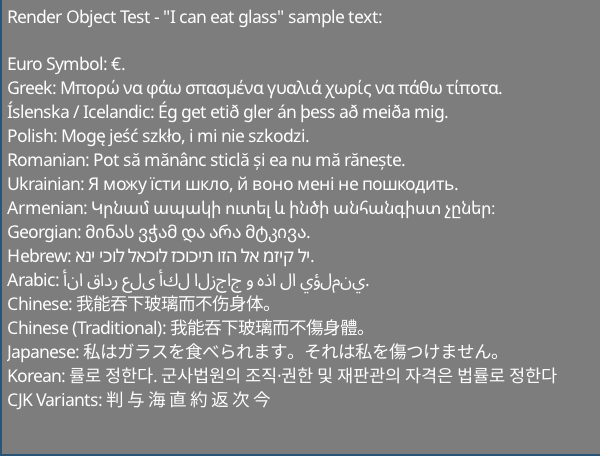
http://www.columbia.edu/~fdc/utf8/index.htmlのサンプルテキスト
Liam Twigger -@snapperthetwig
fc.drawText(x, y, string)fc.renderTextToTexture(string, &widthOut, &heightOut)Intel I7-8750Hについて:
テクスチャ( renderTextToTexture / renderTextToObject )を使用する場合、画像のレンダリングに0.7ms(〜1400 fps)が必要です。速度は、SDL2がテクスチャをひっくり返すことができる最大値になります。
画像の例は、直接レンダリングする場合(〜200 fps)に〜5msのかかります( drawText )
複数のフレームを持続するテキストの場合、 renderTextToTextureまたはrenderTextToObjectのいずれかでキャッシュする必要があります。
フォーマットされたテキスト:
非SDLフロントエンド:
これはヘッダーのみのライブラリです - ビルドシステムは必要ありません
任意のヘッダー:
# include " path/to/sdlStbFont/sdlStbFont.h "1つの.cpp:
# define SDL_STB_FONT_IMPL
# include " path/to/sdlStbFont/sdlStbFont.h "
このライブラリは、STB_TRUETYPEに依存しています。これは自動的に含まれます。自動的に含まれたくない場合は、 #define STB_TRUETYPE_INCLUDE_HANDLEDを使用し、stb_truetype.hの類似を自分で処理します。
# define SDL_STB_FONT_IMPL
# include " sdlStbFont.h "

...

// Load font
char * ttfFontFromMemory = loadFontFileSomehow( " path/to/file.ttf " );

sdl_stb_font_cache fc;
fc.faceSize = 24 ; // Must be set before loadFont()!
fc.tabWidthInSpaces = 8 ; // Optional
fc.loadFont(ttfFontFromMemory);

...

// Setup renderer
SDL_Renderer * mSdlRenderer = SDL_CreateRenderer( mWindow , SDL_RENDERER_SOFTWARE, 0 );
fc.bindRenderer( mSdlRenderer ); // Must bind a renderer before generating any glyphs

...

// Main loop
SDL_SetRenderDrawColor ( mSdlRenderer , 125 , 125 , 125 , 255 );
SDL_RenderClear ( mSdlRenderer );
fc.drawText( 5 , 5 , " Hello world! " );
SDL_RenderPresent ( mSdlRenderer );

// fc will clean itself up when it falls out of scope
delete[] ttfFontFromMemory; // You must manually remove the char buff when done
// if you want auto management use fc.loadFontManaged(), which will transfer
// ownership of ttfFontFromMemory to fc and be freed when done.
レンダリングされた文字列の幅と高さを取得することもできます。
 fc.drawText(5, 5, widthOut, heightOut, "Hello world!");
// Draws "hello world" and sets widthOut and heightOut to the size of the string
 class sdl_stb_font_cache {
...
public:
  int ascent;
  int descent;
  int lineGap;
  int baseline;
  int rowSize;
  int tabWidth;  // May be changed later
  float scale;
  float underlineThickness;
  float strikethroughThickness;
  float underlinePosition;
  float strikethroughPosition;
  // Must be set before loadFont() is called. Cannot be changed after
  int faceSize;      // Default is 20. All the parameters are calcualted based on this
  int tabWidthInSpaces;  // Default is 8, set this before loadFont(). Max 128. Sets tabWidth when font is loaded
...
  }
fc.loadFont(ttfFontFromMemory);
fc.addFont(someSecondFontFromMemory);
fc.addFont(someThirdFontFromMemory);
...
etc
最初にロードされたフォントは「loadfont」を使用する必要があります。
図面関数が呼び出される前に、すべてのフォントをロードする必要があることに注意してください。最初のフォントにグリフが見つからない場合、2番目のフォントが検索されます。
 int w, h;
fc.getTextSize(w, h, " Text " ); // Get width and height at same time

// Also
h = fc.getTextHeight( " Text " ); // Faster, if only height is needed
w = fc.getTextWidth( " Text " ); // Internally just a wrapper for getTextSize
int nRows = fc.getTextRows( " Text n More text " ); // UTF8 safe, returns the number of rows of text - here it's 2
int numNewlines = fc.getNumNewLines
ヒント: drawText()描画された文字列またはフォーマットされたテキストオブジェクトの端のx座標を返します。
ラインラッピングにはfc.breakString(stringIn, arrayOut, width)関数を使用します。これにより、文字列またはフォーマットされたテキストオブジェクトを文字列またはフォーマットされたテキストオブジェクトのベクトルに変換します。これにより、最初にnewlinesとWhitespaceを破ろうとします。次に、指定された幅よりも長い場合に単語を分割します。これはUTF8安全です。
マニュアル管理:
 char * mFontData = loadFontFromFileSomehow( " path/to/file.ttf " );
fc.loadFont( mFontData );
// You will have to free mFontData when you are done with it
// fc does not copy mFontData internally
// using fc after free'ing mFontData will result in undefined behaviour
自動管理:
filep * file = openFile( " path/to/file " );
sttfont_memory mFontData ;
mFontData .alloc(file_size);
fread (file, & mFontData .data);
fc.loadFontManaged( mFontData );
// fc now owns mFontData's contents and will free it when fc is destroyed
// You can safely let mFontData fall out of scope
// Also addFontManaged is avaliable for adding fallback fonts 最初の方法:
 // creating
int RTw, RTh;
SDL_Texture * RT;
RT = fc.renderTextToTexture ( " Text " , &RTw, &RTh);

// Rendering
SDL_Rect r;
r.x = 5 ;
r.y = 5 ;
r.w = RTw;
r.h = RTh;
SDL_RenderCopy ( mSdlRenderer , RT , NULL , &r);
2番目の方法(同じ効果ですが、クリーナー)
 // creating
sdl_stb_prerendered_text prt;
prt. mRenderer = your__SDL_Render__instance;
fc.renderTextToObject(&prt, " Text " );

// Rendering
prt.draw(x, y);

// Rendering in colour & alpha
prt.drawWithColor(x, y, 255 , 185 , 85 , 255 );

// Cleanup
prt.freeTexture();
ヒント: prt.draw()オブジェクトの端のx座標を返します。
キャッシュテクスチャでSDL_SetTextureColorModを使用します。または、 sdl_stb_prerendered_text::drawWithColor使用します。
getCaretPos(text, relativeMouseX, relativeMouseY)を使用してください
これは現在、Newlinesのない文字列のCarret Lookupのみをサポートしていることに注意してください。マルチライン文字列でこれを試みた場合、誤った値を返す可能性があります。
タブ幅は、変数fc.tabWidthによって処理されます。タブの後の文字は、次のタブの場所に並べられます。
fc.tabWidthInSpaces = Xを設定してからfc.loadFont(...)を呼び出して、 fc.tabWidth空間幅の複数に自動的に設定できます。デフォルトでは、フォントは幅が8つのスペースに設定されています。値が低い方は、モノスペースフォントの方が優れており、非モノスペースフォントの値が高いほど優れています。
このライブラリは、フォント処理バックエンド( sttfont_*という名前のクラス)とSDLレンダリングフロントエンド( sdl_stb_* )の2つの部分で構成されています。
独自のレンダリングフロントエンドを作成するには、関連するsttfont_*クラスを拡張します。詳細については、SDLの実装を参照してください。その〜200行のコードは、SDL固有のものを取り出してレンダラー固有のものに入れることだけです。アプリケーションには、 sdlStbFont.hの代わりにsttFont.hを含めます
pregenGlyphs functionを使用できます。
std::vector<sttfont_uint32_t_range> codepoint_ranges;
sttfont_uint32_t_range customRange;
customRange.start = 1337 ; customRange.end = 1444 ; // end is inclusive

sttfont_uint32_t_range::populateRangesLatin (codepoint_ranges); // add the Latin character set
sttfont_uint32_t_range::populateRangesCyrillic (codepoint_ranges); // add the Cyrillic character set
fc.pregenGlyphs(codepoint_ranges, 0 ); // generatess the glypsSDLでソフトウェアレンダリングを行っている場合、これは必要ありません。また、スタートアップを遅くするだけです。テクスチャアトラーゼ(BGFXなど)を使用するカスタムフロントエンドを使用している場合は、これが推奨されます。
producerConsumerExample.hを使用します。実用的な例については、 producerConsumerExample.cpp参照してください。
アイデアは、プロデューサーと消費者のスレッド間で共有されるproducer_consumer_font_cacheオブジェクトをインスタンス化するということです。このオブジェクトには、消費者が使用する実際のフロントエンドを指すメンバーがあります。
イタリゼーション:
producer_consumer_font_cache mPcCache ;
sdl_stb_font_cache mSdlFontCache ;


mPcCache .consumer_font_cache = & mSdlFontCache ;

sttfont_memory m;
m.data = &fontData[ 0 ];
m.size = fontData.size();
m.ownsData = false ;

mPcCache .faceSize = 24 ;
mPcCache .loadFontManagedBoth(m); // Loads the font into both frontends
プロデュース:
pcfc_prerendered_text prt;
mPcCache .renderTextToObject(&prt, " Prerendered text from Producer Thread! " ); // prt.handle now holds a handle
pcfc_handle h = mPcCache .pushText( 5 , 5 , " Hello World! " ); // use this instead of "drawText"
mPcCache .submitToConsumer(); // sends to consumer
消費:
 // <somehow send prt.handle and h to consumer thread>
// Suggestion: use a concurrentqueue (https://github.com/cameron314/concurrentqueue)
// and/or some kind of command buffer (https://github.com/SnapperTT/nanovg_command_buffer)
mPcCache .receiveFromProducer();
mPcCache .dispatchPrerenderJobs<sdl_stb_prerendered_text>(); // takes the prerended text and creates sdl_stb_prerended_text objects (invokes mPcCache.consumer_font_cache->renderTextToObject)

mPcCache .dispatchSinglePrerendered(prt.handle, 5 , 5 ); // actually draws the prerendered text
mPcCache .dispatchSingleText(h); // Renders "hello world" at 5,5
掃除:
 // Cleanup - just let mPcCache fall out of scope
mPcCache .freeStoredPrerenderedText( true ); // deletes all prerendered text objects stored. true == also calls prt->freeTexture() for all prerendered text
										  // this is manual destruction as destroying a large number of objects can be expensive, esp. when you want to exit quickly
// Don't forget to delete mPcCache.consumer_font_cache if it was heap allocated
delete mPcCache .consumer_font_cache;
userData:テキストと一緒に生のポインターを送信できます。
 mPcCahce.pushUserdata(void*); // producer
void* foo = mPcCahce.getUserdata(); // consumer
これを行わない場合、 std::mutex 、生産者から消費者に状態を渡すために使用されます。一時的なバッファには1つのスロットのみがあります。たとえば、プロデューサーが消費者よりも速く走っているのを止めるために、いくつかのmechanisimが必要です。
キューを使用したい場合は、MoodyCamel :: ReaderWriterQueueをお勧めします。 producer_consumer_font_cacheであるconsumer_font_cacheで有効にすることができます。
#define SSF_CONCURRENT_QUEUE moodycamel::ReaderWriterQueue
変更の投票:
 if (mPcCache.receiveFromProducer()) { // wraps moodycamel::ReaderWriterQueue::try_dequeue()
	// have dequeued!
	}
クリーンアップ(キューをフラッシュ)
 while (mPcCache.receiveFromProducer()) {
	// pulls stuff from the queue until its empty
	delete mPcCache.getUserdata(); // if we're using heap allocated userdata here is how to clear it
	}
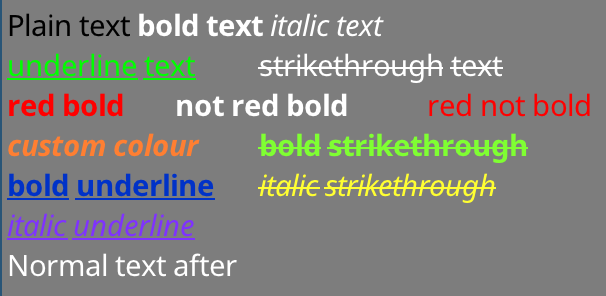
最初にsttfont_formatted_textを作成します。上記の例は、次のように作成されました。
sttfont_formatted_text formattedText;
formattedText << sttfont_format::black << " Plain text "
<< sttfont_format:: bold << " bold text "
<< sttfont_format:: italic << " italic text n "
<< sttfont_format:: underline << sttfont_format::green << " underline text t "
<< sttfont_format::strikethrough << " strikethrough text n "
<< sttfont_format::red << sttfont_format:: bold << " red bold t "
<< sttfont_format:: bold << " not red bold t "
<< sttfont_format::red << " red not bold n "
<< sttfont_format:: bold << sttfont_format:: italic		<< sttfont_format::colour( 255 , 127 , 50 ) << " custom colour t "
<< sttfont_format:: bold << sttfont_format::strikethrough	<< sttfont_format::colour( 127 , 255 , 50 ) << " bold strikethrough n "
<< sttfont_format:: bold << sttfont_format:: underline		<< sttfont_format::colour(  0 , 50 , 200 ) << " bold underline t "
<< sttfont_format:: italic << sttfont_format::strikethrough	<< sttfont_format::colour( 255 , 255 , 50 ) << " italic strikethrough n "
<< sttfont_format:: italic << sttfont_format:: underline << sttfont_format::colour( 127 , 50 , 255 ) << " italic underline "フォーマットオプションを<<演算子と組み合わせることができます。文字列が挿入された後、フォーマットはリセットされます。
次に、単純な文字列に使用される同じ関数( drawText(x, y, formattedText)などを使用してレンダリングできます。これには、 renderTextToObjectを使用したテクスチャへのレンダリングが含まれます。あなたが同じ名前の関数でできるはずの単純な文字列でできるすべてのこと( getTextSize 、 getNumRows 、 getCaretPosなど)
太字/斜体のバリアントが機能するには、フォントの太字/斜体バリアントをロードする必要があります。太字+イタリックの場合、フォントの太字+イタリックバリアントをロードする必要があります!このライブラリによって下線とストリケスラフが自動的に生成されます。
バリアントをロードするには、ベースフォントをロードした後、 addFormatFontまたはaddFormatFontManagedを使用します。これは、太字/イタリックで利用できるフォントを気にする場合は、フォールバックフォント(多言語サポート用)に対しても行う必要があります。
fc.loadFontManaged(notoSans);	// First font - loadFont
	fc.addFormatFontManaged(sttfont_format::FORMAT_BOLD, notoSansBold);
	fc.addFormatFontManaged(sttfont_format::FORMAT_ITALIC, notoSansItalic);
	fc.addFormatFontManaged(sttfont_format::FORMAT_BOLD | sttfont_format::FORMAT_ITALIC, notoSansBoldItalic);
fc.addFontManaged(notoSansArmenian);	// Fallback fonts - addFont
	fc.addFormatFontManaged(sttfont_format::FORMAT_BOLD, notoSansArmenianBold);
	fc.addFormatFontManaged(sttfont_format::FORMAT_ITALIC, notoSansArmenianItalic);
fc.addFormatFontManaged(sttfont_format::FORMAT_BOLD | sttfont_format::FORMAT_ITALIC, notoSansArmenianBoldItalic);太字または斜体の文字列を要求し、利用可能な太字または斜体のバリアントがない場合、通常のバリアントが使用されます。太字+イタリックの文字列を要求し、ロードされた1つだけ(組み合わせではない)がある場合、最後の荷重バリアントが使用されます。
ライブラリは境界線を描き、バリエーション自体を描きます。これらを提供する必要はありません。
bgfxFrontend.hを含め、 bgfx_stb_font_cacheのインスタンスを作成します。
bgfxExample.cppを参照して、このフロントエンドの使用方法を確認してください。
いくつかのメモ:
sttfont_uint32_t_range::populateRangesLatin()を呼び出し、レンダリングの前にアトラスに入力することは有益かもしれません。アトラスがグリフで満たされている場合、フロントエンドは新しいAtlasページを作成します。生成された.hファイルではなく、 .lzzファイルを作成/編集してください。 .lzzソースからヘッダーファイルを作成するツール +スクリプトが提供されます。
SDLプロジェクトとSTBプロジェクトの両方の貢献者に感謝します!
パブリックドメイン
STB_TRUETYPEはパブリックドメインです
NOTOフォントは(c)Googleであり、SIL Open Fontライセンスバージョン1.1でリリースされます。 https://www.google.com/get/noto/を参照してください








