tesla style solar power card
Corrected sizing for HA 2024.6.x

警告:打破配置更改
您必须再次定义流!
如果不定义每个流,则不会显示任何线路,请仔细阅读使用部分(可以单击气泡,但这是可选的)
这是用于太阳能安装的家庭辅助卡。它提供了特斯拉风格的图形,可以看到能量流((k)w)。
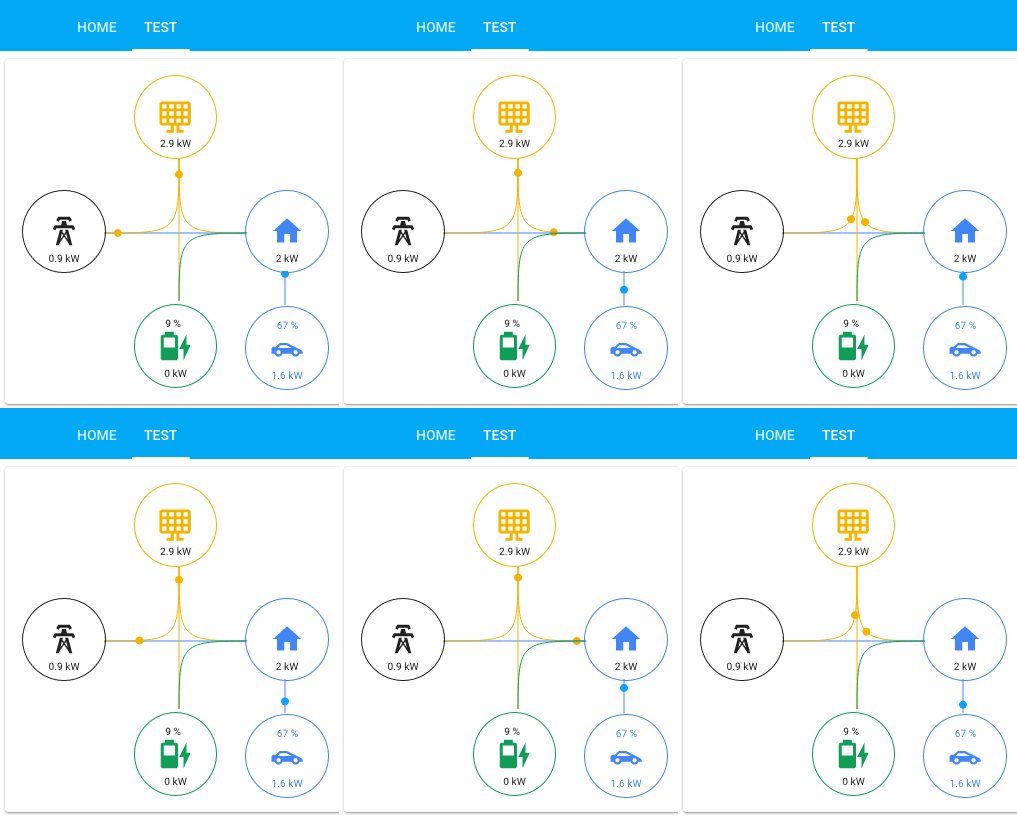
我试图使其尽可能通用,目前有6个带有4个主要图标和2个额外电器的气泡。四个主要图标值由来自和它们的流量的总和控制:
这两个可选的电器可以是房屋中的任何消费者,它们都附在房屋上。这两个是由他们的消费直接控制的。意味着未完成流量总和。
单击时可以将气泡/图标配置为具有实体,但是数字是根据流量计算的。您可以在气泡的顶部显示额外的实体文本/值。
有7个主要流和2个电器流。主要流量是:
您至少需要一个,暂时固定了主气泡的放置。有些将从一个气泡中提取值,并将值增加为另一个气泡。例如:
电池_TO_HOUSE将从电池气泡/图标中提取,并添加到房屋气泡/图标中。
可单击的实体可以通过这些实体进行配置,但是可选的:
该卡是根据Bessarabov动画消费卡的卡开始的,再次感谢您的工作。然后重写完全将样板卡作为起点,但使用打字稿。我还从电动轮卡中借了一些想法,可悲的是还没有我想要的那么多;)
在流量和可单击的实体上,每个气泡都可以在顶部具有额外的价值。为了定义您需要在任何论文实体中添加传感器的人:
我总是将电池电流充电作为电池_EXTRA_ENTITY。在这种情况下,电池图标也会随充电而变化。
目前,我没有最低配置,但是某些组合可能没有意义。我建议使用您想要的气泡以及与您正在使用的气泡相关的流量。这些示例的左侧是固定的,用自己的传感器更改右侧。没有必要的实体,尽管如果您遗漏了一些组合,则您的配置可能会显示出奇怪的结果。传感器可以称为您想要的任何东西,它们是瓦特或千瓦的Power -termeter传感器(选择所有人,它将从中创建KW)。所有传感器都需要是正值
一个简单的组合示例:
 type : ' custom:tesla-style-solar-power-card '
grid_consumption_entity : sensor.grid_consumption
house_consumption_entity : sensor.house_consumption
grid_to_house_entity : sensor.grid_consumption
这将使您拥有两个可单击的气泡,并且从网格到房屋的流量将决定图标下方的值。
 type : ' custom:tesla-style-solar-power-card '
name : My Flows
# 7 flows between bubbles
grid_to_house_entity : sensor.grid_consumption
grid_to_battery_entity : sensor.grid_battery_charge
generation_to_grid_entity : sensor.grid_feed_in
generation_to_battery_entity : sensor.battery_charging
generation_to_house_entity : sensor.solar_consumption
battery_to_house_entity : sensor.battery_consumption
battery_to_grid_entity : sensor.battery_to_grid
# extra values to show as text above icons
battery_extra_entity : sensor.battery_charge
house_extra_entity : sensor.current_temperature
generation_extra_entity : sensor.percent_cloud_coverage
grid_extra_entity : sensor.monthly_feed_in
# optional appliances with consumption and extra values
appliance1_consumption_entity : sensor.car_consumption
appliance1_extra_entity : sensor.car_battery_state_of_charge
appliance2_consumption_entity : sensor.heating_consumption
appliance2_extra_entity : sensor.heating_operation
# optional 4 main bubble icons for clickable entities
grid_entity : sensor.grid_consumption
house_entity : sensor.house_consumption
generation_entity : sensor.solar_yield
battery_entity : sensor.battery_consumption
如果将电池气泡的额外实体定义为具有充电状态的额外实体,则图标将被动态地替换为该实体的值,并覆盖上面的图标定义。
有一些更改行为的配置变量:标题:
name : ' My Tesla Power Card! '一个强制W(瓦)而不是kW,将其设置为1以使用它:
show_w_not_kw : 1一个为移动点设定不同速度的人,正常速度因子为0.04,因此首先保持接近该数字,0.2确实很快:
speed_factor : 0.03一个是将W转换为kW的阈值(下面的示例将从5000 W到千瓦):
threshold_in_k : 5threshold_in_k与show_w_not_kw不兼容,后者将覆盖threshold_in_k
一个可以隐藏不活跃的行,请确保在隐藏行之前,请确保所有内容都可以正常工作:
hide_inactive_lines : 1一个可以为电源线添加差距,就像HA的能量面板这样做的方式:
show_gap : true一个可以根据最高流量为房屋泡泡着色:
change_house_bubble_color_with_flow : 1一个不显示移动圆而,而是一个能量流digramm(流动较高时较厚的线):
energy_flow_diagramm : 1有一个因素使线更厚的因素,具体取决于您的流量正常,它是2:
energy_flow_diagramm_line_factor : 2您可以从房屋价值中减去设备值而不会影响线路流量:
house_without_appliances_values : 1然后有6个图标配置变量:
 grid_icon : ' mdi:transmission-tower '
generation_icon : ' mdi:solar-panel-large '
house_icon : ' mdi:home '
battery_icon : ' mdi:battery '
appliance1_icon : ' mdi:car-sports '
appliance2_icon : ' mdi:car-sports '请记住,如果您缺少Solar_Compumption和Grid_feed_in之类的太阳能产量,或者如果您缺少诸如home_conmaption之类的另一个,则可以创建模板传感器。一些逆变器具有正值和负值,在这里所有传感器都必须是正值,因此创建模板传感器,例如:
    battery_consumption :
        value_template : ' {% set batter_cons = sensor.powerwall_battery_now | int %}
                        {% if batter_cons > 0 %}
                            {{ batter_cons | int }}
                        {% else %}
                            0
                        {% endif %} '
        device_class : power
unit_of_measurement : W为了将此卡与Tesla PowerWall集成一起使用,您将需要首先创建一些其他传感器。该卡期望一个在屏幕上显示的每行正值值的实体。但是,特斯拉的PowerWall集成会产生传感器,这些传感器取决于是否从中消耗或进食该特定仪表。
幸运的是,通过添加一些模板传感器可以很容易地修复,您需要添加的模板传感器如下所示。请注意,这些传感器假设由Tesla PowerWall Integration创建的每个实体的默认名称,如果您更改了实体的名称,则需要相应地调整配置:
 # Templates for Actual Powerflow transfer charts (APF - Actual PowerFlow)
#
# For the math to add up a new Real House Load must be calculated and used, witch includes
# the inverter consumption and excludes rounding errors and corrects inaccurate power readings.
#
# It never made sense that inbound power sometimes does not equal outbound power. This fixes it!
#
# Developed by AviadorLP modified for powerwall by purcell-lab
# Correctly sets battery2grid & grid2battery flows
#
template :
  - sensor :
# grid sensor must be negative when importing and positive when exporting
    - name : APF Grid Entity
      device_class : power
      state_class : measurement
      unit_of_measurement : W
      state : " {{ (0 - states('sensor.powerwall_site_now')|float(0)*1000)|int(0) }} "

# sensor must always be 0 or positive (i think they always are)
    - name : APF House Entity
      device_class : power
      state_class : measurement
      unit_of_measurement : W
      state : " {{ (states('sensor.powerwall_load_now')|float(0)*1000)|int(0) }} "

# sensor must always be 0 or positive (i think they always are)
    - name : APF Generation Entity
      device_class : power
      state_class : measurement
      unit_of_measurement : W
      state : " {{ (states('sensor.powerwall_solar_now')|float(0)*1000)|int(0) }} "

# battery sensor must be positive when charging and negative when discharging
    - name : APF Battery Entity
      device_class : power
      state_class : measurement
      unit_of_measurement : W
      state : " {{ (0 - states('sensor.powerwall_battery_now')|float(0)*1000)|int(0) }} "


# Required to reduce code later on
    - name : APF Grid Import
      device_class : power
      state_class : measurement
      unit_of_measurement : W
      state : >
        {% if states('sensor.apf_grid_entity')|int(default=0) < 0 %}
          {{ states('sensor.apf_grid_entity')|int(default=0)|abs }}
        {% else %}
          0
        {% endif %}

#   Inverter consumption and power losses due to Inverter transfers and power conversions (AC/DC)
#   excludes rounding errors made worst by the fact that some inverters round all sensors readings to INT
#   Occasionally this might be negative probably due to cumulative errors in not so accurate power readings.
    - name : APF Inverter Power Consumption
      device_class : power
      state_class : measurement
      unit_of_measurement : W
      state : " {{ states('sensor.apf_generation_entity')|int(default=0) - states('sensor.apf_battery_entity')|int(default=0) - states('sensor.apf_house_entity')|int(default=0) - states('sensor.apf_grid_entity')|int(default=0) }} "

# Real House Load Includes Inverter consumption and transfer conversions and losses and rounding errors.
# It never made sense that inbound power sometimes does not equal outbound power. This fixes it!
    - name : APF Real House Load
      device_class : power
      state_class : measurement
      unit_of_measurement : W
      state : " {{ states('sensor.apf_house_entity')|int(default=0) + states('sensor.apf_inverter_power_consumption')|int(default=0) }} "
      icon : mdi:home-lightning-bolt

    - name : APF Grid2House
      device_class : power
      state_class : measurement
      unit_of_measurement : W
      state :  >
        {% if states('sensor.apf_grid_import')|int(default=0) > states('sensor.apf_real_house_load')|int(default=0) %}
          {{ states('sensor.apf_real_house_load')|int(default=0) }}
        {% else %}
          {{ states('sensor.apf_grid_import')|int(default=0) }}
        {% endif %}

    - name : APF Grid2Batt
      device_class : power
      state_class : measurement
      unit_of_measurement : W
      state : >
        {% if states('sensor.apf_grid_import')|int(default=0) > states('sensor.apf_real_house_load')|int(default=0) %}
          {{ states('sensor.apf_grid_import')|int(default=0) - states('sensor.apf_real_house_load')|int(default=0) }}
        {% else %}
          0
        {% endif %}

    - name : APF Batt2House
      device_class : power
      state_class : measurement
      unit_of_measurement : W
      state : >
        {% if states('sensor.apf_battery_entity')|int(default=0) < 0 %}
          {% if states('sensor.apf_battery_entity')|int(default=0)|abs > states('sensor.apf_real_house_load')|int(default=0) %}
            {{ states('sensor.apf_real_house_load')|int(default=0) }}
          {% else %}
            {{ states('sensor.apf_battery_entity')|int(default=0)|abs }}
          {% endif %}
        {% else %}
          0
        {% endif %}

# This might be called house to grid, and can happen in rare circumstances,
# like when the inverter is not able to do a precise adjustment of power fast enough
# or when you want to force a discharge of the battery or something...
# But it only happens with battery or other power generator users.
    - name : APF Batt2Grid
      device_class : power
      state_class : measurement
      unit_of_measurement : W
      state : >
        {% if states('sensor.apf_battery_entity')|int(default=0) < 0 %}
          {% if states('sensor.apf_battery_entity')|int(default=0)|abs > states('sensor.apf_real_house_load')|int(default=0) %}
            {{ states('sensor.apf_battery_entity')|int(default=0)|abs - states('sensor.apf_real_house_load')|int(default=0) }}
          {% else %}
            0
          {% endif %}
        {% else %}
          0
        {% endif %}

    - name : APF Solar2Grid
      device_class : power
      state_class : measurement
      unit_of_measurement : W
      state : >
        {% if states('sensor.apf_grid_entity')|int(default=0) > states('sensor.apf_batt2grid')|int(default=0) %}
          {{ states('sensor.apf_grid_entity')|int(default=0) - states('sensor.apf_batt2grid')|int(default=0) }}
        {% else %}
          0
        {% endif %}

    - name : APF Solar2House
      device_class : power
      state_class : measurement
      unit_of_measurement : W
      state : >
        {% if states('sensor.apf_generation_entity')|int(default=0) > 0 and states('sensor.apf_real_house_load')|int(default=0) > states('sensor.apf_batt2house')|int(default=0) + states('sensor.apf_grid_import')|int(default=0) %}
          {% if states('sensor.apf_generation_entity')|int(default=0) > states('sensor.apf_real_house_load')|int(default=0) - states('sensor.apf_batt2house')|int(default=0) - states('sensor.apf_grid2house')|int(default=0) %}
            {{ states('sensor.apf_real_house_load')|int(default=0) - states('sensor.apf_batt2house')|int(default=0) - states('sensor.apf_grid2house')|int(default=0) }}
          {% else %}
            {{ states('sensor.apf_generation_entity')|int(default=0) }}
          {% endif %}
        {% else %}
          0
        {% endif %}

    - name : APF Solar2Batt
      device_class : power
      state_class : measurement
      unit_of_measurement : W
      state : >
        {% if states('sensor.apf_generation_entity')|int(default=0) > 0 and states('sensor.apf_battery_entity')|int(default=0) > 0 %}
          {% if states('sensor.apf_battery_entity')|int(default=0) > states('sensor.apf_grid2batt')|int(default=0) %}
            {% if states('sensor.apf_generation_entity')|int(default=0) - states('sensor.apf_solar2house')|int(default=0) > states('sensor.apf_battery_entity')|int(default=0) - states('sensor.apf_grid2batt')|int(default=0) %}
              {{ states('sensor.apf_battery_entity')|int(default=0) - states('sensor.apf_grid2batt')|int(default=0) }}
            {% else %}
              {{ states('sensor.apf_generation_entity')|int(default=0) - states('sensor.apf_solar2house')|int(default=0) - states('sensor.apf_solar2grid')|int(default=0) }}
            {% endif %}
          {% else %}
            0
          {% endif %}
        {% else %}
          0
        {% endif %}
包含这些传感器后,您可以像这样配置卡:
 type : ' custom:tesla-style-solar-power-card '

grid_entity : sensor.apf_grid_entity
house_entity : sensor.apf_real_house_load
generation_entity : sensor.apf_generation_entity
battery_entity : sensor.apf_battery_entity

grid_to_house_entity : sensor.apf_grid2house
grid_to_battery_entity : sensor.apf_grid2batt
generation_to_grid_entity : sensor.apf_solar2grid
generation_to_battery_entity : sensor.apf_solar2batt
generation_to_house_entity : sensor.apf_solar2house
battery_to_house_entity : sensor.apf_batt2house
battery_to_grid_entity : sensor.apf_batt2grid

battery_extra_entity : sensor.powerwall_charge V0.9 V0.92 VBETA1.1。
欢迎拉动请求。对于重大更改,请先开设一个问题,以讨论您想更改的内容。
Apache许可证v 2.0





