tesla style solar power card
Corrected sizing for HA 2024.6.x

คำเตือน: การเปลี่ยนการกำหนดค่าการเปลี่ยนแปลง
คุณต้องกำหนดกระแสอีกครั้ง !!
หากไม่มีการกำหนดแต่ละโฟลว์จะไม่มีบรรทัดที่จะแสดงอ่านส่วนการใช้อย่างระมัดระวัง (ฟองสามารถคลิกได้ แต่เป็นทางเลือก)
นี่คือการ์ดช่วยเหลือที่บ้านสำหรับการติดตั้งพลังงานแสงอาทิตย์ มันมีกราฟิกสไตล์เทสลาเพื่อดูกระแสพลังงาน ((k) w)
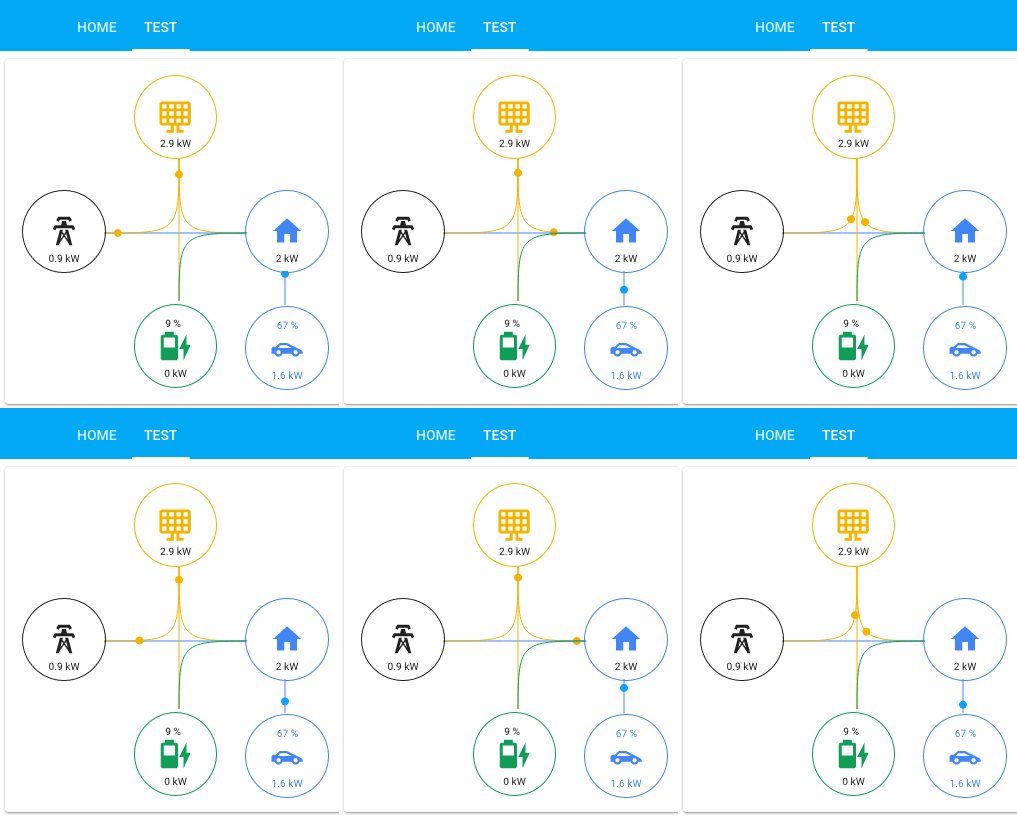
ฉันพยายามทำให้มันเป็นเรื่องธรรมดาที่สุดเท่าที่จะเป็นไปได้ตอนนี้มีฟอง 6 ฟองพร้อมไอคอนหลัก 4 ตัวและเครื่องใช้เพิ่มเติม 2 เครื่อง ค่าไอคอนหลักทั้งสี่ถูกควบคุมโดยผลรวมของกระแสจากและพวกเขา:
อุปกรณ์เสริมสองเครื่องสามารถเป็นผู้บริโภคในบ้านพวกเขาติดอยู่กับบ้าน ทั้งสองถูกควบคุมโดยตรงจากการบริโภค หมายถึงไม่มีผลรวมการไหล
ฟอง/ไอคอนสามารถกำหนดค่าให้มีเอนทิตีเมื่อคลิก แต่ตัวเลขจะถูกคำนวณจากกระแส คุณสามารถแสดงข้อความ/ค่าเอนทิตีพิเศษที่ส่วนบนของฟอง
มี 7 กระแสหลักและ 2 กระแสไฟฟ้า กระแสหลักคือ:
คุณต้องการอย่างน้อยหนึ่งตำแหน่งของฟองหลักได้รับการแก้ไขในตอนนี้ บางคนจะกระจายค่าจากฟองหนึ่งและจะเพิ่มค่าให้กับฟองอื่น ตัวอย่างเช่น:
battery_to_house จะกระจายจากฟอง/ไอคอนแบตเตอรี่และเพิ่มลงในบ้าน/ไอคอน
เอนทิตีที่คลิกได้สามารถกำหนดค่าผ่านเอนทิตีเหล่านี้ แต่เป็นทางเลือก:
การ์ดใบนี้เริ่มต้นจากการ์ดจากบัตรการบริโภคอนิเมชั่น Bessarabov ขอบคุณอีกครั้งสำหรับงานนั้น จากนั้นถูกเขียนใหม่อย่างสมบูรณ์โดยใช้การ์ด Boilerplate เป็นจุดเริ่มต้น แต่มี TypeScript ฉันยังยืมความคิดบางอย่างจากการ์ดล้อล้อที่น่าเศร้าที่ยังไม่มากเท่าที่ฉันต้องการ;)
ด้านบนของการไหลและเอนทิตีที่คลิกได้ทุกฟองสามารถมีค่าพิเศษด้านบน เพื่อกำหนดสิ่งที่คุณต้องการเพิ่มเซ็นเซอร์ให้กับหน่วยงานเหล่านี้:
ฉันมักจะมีการชาร์จกระแสแบตเตอรี่เป็น battery_extra_entity ในกรณีนี้ไอคอนแบตเตอรี่จะเปลี่ยนไปด้วยการชาร์จ
ขณะนี้ฉันไม่มีการกำหนดค่าขั้นต่ำ แต่ชุดค่าผสมบางอย่างอาจไม่สมเหตุสมผล ฉันจะแนะนำให้ใช้ฟองสบู่ที่คุณต้องการและกระแสที่เชื่อมโยงกับสิ่งที่คุณใช้ ส่วนซ้ายของตัวอย่างเหล่านี้ได้รับการแก้ไขเปลี่ยนส่วนที่เหมาะสมด้วยเซ็นเซอร์ของคุณเอง ไม่มีเอนทิตีที่จำเป็นแม้ว่าการกำหนดค่าของคุณสามารถแสดงผลลัพธ์ที่แปลกหากคุณทิ้งชุดค่าผสมออกไป เซ็นเซอร์สามารถเรียกได้ว่าสิ่งที่คุณต้องการพวกเขาเป็นเซ็นเซอร์ Powermeter ในวัตต์หรือกิโลวัตต์ (เลือกสิ่งเดียวกันสำหรับทุกคนมันจะสร้าง KW จากมัน) เซ็นเซอร์ทั้งหมดต้องเป็นค่าบวก
ตัวอย่างการรวมกันอย่างง่าย:
 type : ' custom:tesla-style-solar-power-card '
grid_consumption_entity : sensor.grid_consumption
house_consumption_entity : sensor.house_consumption
grid_to_house_entity : sensor.grid_consumption
สิ่งนี้จะช่วยให้คุณมีฟองสองฟองที่สามารถคลิกได้และการไหลจากกริดไปยังบ้านซึ่งจะกำหนดค่าที่อยู่ใต้ไอคอน
 type : ' custom:tesla-style-solar-power-card '
name : My Flows
# 7 flows between bubbles
grid_to_house_entity : sensor.grid_consumption
grid_to_battery_entity : sensor.grid_battery_charge
generation_to_grid_entity : sensor.grid_feed_in
generation_to_battery_entity : sensor.battery_charging
generation_to_house_entity : sensor.solar_consumption
battery_to_house_entity : sensor.battery_consumption
battery_to_grid_entity : sensor.battery_to_grid
# extra values to show as text above icons
battery_extra_entity : sensor.battery_charge
house_extra_entity : sensor.current_temperature
generation_extra_entity : sensor.percent_cloud_coverage
grid_extra_entity : sensor.monthly_feed_in
# optional appliances with consumption and extra values
appliance1_consumption_entity : sensor.car_consumption
appliance1_extra_entity : sensor.car_battery_state_of_charge
appliance2_consumption_entity : sensor.heating_consumption
appliance2_extra_entity : sensor.heating_operation
# optional 4 main bubble icons for clickable entities
grid_entity : sensor.grid_consumption
house_entity : sensor.house_consumption
generation_entity : sensor.solar_yield
battery_entity : sensor.battery_consumption
หากคุณกำหนดเอนทิตีพิเศษสำหรับฟองแบตเตอรี่ที่มีสถานะของการชาร์จไอคอนจะถูกแทนที่ด้วยค่าของเอนทิตีนั้นและจะแทนที่นิยามไอคอนด้านบน
มีตัวแปรการกำหนดค่าบางอย่างที่เปลี่ยนพฤติกรรม: หัวข้อ:
name : ' My Tesla Power Card! 'หนึ่งเพื่อบังคับ W (วัตต์) แทน kW ตั้งเป็น 1 เพื่อใช้:
show_w_not_kw : 1หนึ่งในการตั้งค่าความเร็วที่แตกต่างกันสำหรับจุดที่เคลื่อนที่ตัวประกอบความเร็วปกติคือ 0.04 ดังนั้นอยู่ใกล้จำนวนนั้นในตอนแรก 0.2 นั้นเร็วมาก:
speed_factor : 0.03หนึ่งสำหรับเกณฑ์ที่ W ถูกแปลงเป็น KW (ตัวอย่างด้านล่างจะเปลี่ยน W เป็นกิโลวัตต์จาก 5,000 วัตต์เป็นต้นไป):
threshold_in_k : 5threshold_in_k ไม่สามารถใช้งานร่วมกับ show_w_not_kw ได้หลังจะเอาชนะ threshold_in_k
หนึ่งในการซ่อนบรรทัดที่ไม่สามารถใช้งานได้โปรดตรวจสอบให้แน่ใจว่าทุกอย่างทำงานก่อนที่คุณจะซ่อนบรรทัด:
hide_inactive_lines : 1หนึ่งในการเพิ่มช่องว่างสำหรับสายไฟในแบบที่แผงพลังงานจาก HA ทำ:
show_gap : trueหนึ่งสีฟองสบู่บ้านขึ้นอยู่กับการไหลสูงสุด:
change_house_bubble_color_with_flow : 1หนึ่งที่จะไม่แสดงวงกลมที่เคลื่อนไหว แต่เป็นไดอะแกรมการไหลของพลังงาน (เส้นหนาเมื่อการไหลสูงขึ้น):
energy_flow_diagramm : 1มีปัจจัยที่จะทำให้เส้นหนาขึ้นอยู่กับการไหลของคุณปกติคือ 2:
energy_flow_diagramm_line_factor : 2คุณสามารถลบค่าเครื่องออกจากค่าบ้านโดยไม่ส่งผลกระทบต่อการไหลของเส้น:
house_without_appliances_values : 1จากนั้นมีตัวแปรการกำหนดค่าไอคอน 6 ตัว:
 grid_icon : ' mdi:transmission-tower '
generation_icon : ' mdi:solar-panel-large '
house_icon : ' mdi:home '
battery_icon : ' mdi:battery '
appliance1_icon : ' mdi:car-sports '
appliance2_icon : ' mdi:car-sports 'โปรดจำไว้ว่าคุณสามารถสร้างเซ็นเซอร์เทมเพลตได้หากคุณขาดหายไปเช่นเดียวกับพลังงานแสงอาทิตย์จาก Solar_Consumption และ grid_feed_in หรือถ้าคุณพลาดอีกตัวหนึ่งเช่น home_consumption อินเวอร์เตอร์บางตัวมีค่าบวกและลบที่นี่เซ็นเซอร์ทั้งหมดต้องเป็นค่าบวกดังนั้นสร้างเซ็นเซอร์แม่แบบเช่น:
    battery_consumption :
        value_template : ' {% set batter_cons = sensor.powerwall_battery_now | int %}
                        {% if batter_cons > 0 %}
                            {{ batter_cons | int }}
                        {% else %}
                            0
                        {% endif %} '
        device_class : power
unit_of_measurement : Wในการใช้การ์ดใบนี้กับการรวม Tesla Powerwall คุณจะต้องสร้างเซ็นเซอร์เพิ่มเติมก่อน การ์ดใบนี้คาดว่าเอนทิตีที่มีค่าตัวเลขบวกต่อบรรทัดที่แสดงบนหน้าจอ อย่างไรก็ตามการรวม Tesla Powerwall สร้างเซ็นเซอร์ที่เป็นลบหรือเป็นบวกขึ้นอยู่กับว่าพลังงานกำลังถูกบริโภคหรือป้อนเข้าสู่มิเตอร์นั้น
โชคดีที่สิ่งนี้สามารถแก้ไขได้อย่างง่ายดายด้วยการเพิ่มเซ็นเซอร์เทมเพลตสองสามตัวซึ่งเป็นสิ่งที่คุณต้องเพิ่มจะแสดงอยู่ด้านล่าง โปรดทราบว่าเซ็นเซอร์เหล่านี้ถือว่าชื่อเริ่มต้นสำหรับแต่ละเอนทิตีที่สร้างโดยการรวม Tesla PowerWall หากคุณเปลี่ยนชื่อเอนทิตีของคุณคุณจะต้องปรับการกำหนดค่าตาม:
 # Templates for Actual Powerflow transfer charts (APF - Actual PowerFlow)
#
# For the math to add up a new Real House Load must be calculated and used, witch includes
# the inverter consumption and excludes rounding errors and corrects inaccurate power readings.
#
# It never made sense that inbound power sometimes does not equal outbound power. This fixes it!
#
# Developed by AviadorLP modified for powerwall by purcell-lab
# Correctly sets battery2grid & grid2battery flows
#
template :
  - sensor :
# grid sensor must be negative when importing and positive when exporting
    - name : APF Grid Entity
      device_class : power
      state_class : measurement
      unit_of_measurement : W
      state : " {{ (0 - states('sensor.powerwall_site_now')|float(0)*1000)|int(0) }} "

# sensor must always be 0 or positive (i think they always are)
    - name : APF House Entity
      device_class : power
      state_class : measurement
      unit_of_measurement : W
      state : " {{ (states('sensor.powerwall_load_now')|float(0)*1000)|int(0) }} "

# sensor must always be 0 or positive (i think they always are)
    - name : APF Generation Entity
      device_class : power
      state_class : measurement
      unit_of_measurement : W
      state : " {{ (states('sensor.powerwall_solar_now')|float(0)*1000)|int(0) }} "

# battery sensor must be positive when charging and negative when discharging
    - name : APF Battery Entity
      device_class : power
      state_class : measurement
      unit_of_measurement : W
      state : " {{ (0 - states('sensor.powerwall_battery_now')|float(0)*1000)|int(0) }} "


# Required to reduce code later on
    - name : APF Grid Import
      device_class : power
      state_class : measurement
      unit_of_measurement : W
      state : >
        {% if states('sensor.apf_grid_entity')|int(default=0) < 0 %}
          {{ states('sensor.apf_grid_entity')|int(default=0)|abs }}
        {% else %}
          0
        {% endif %}

#   Inverter consumption and power losses due to Inverter transfers and power conversions (AC/DC)
#   excludes rounding errors made worst by the fact that some inverters round all sensors readings to INT
#   Occasionally this might be negative probably due to cumulative errors in not so accurate power readings.
    - name : APF Inverter Power Consumption
      device_class : power
      state_class : measurement
      unit_of_measurement : W
      state : " {{ states('sensor.apf_generation_entity')|int(default=0) - states('sensor.apf_battery_entity')|int(default=0) - states('sensor.apf_house_entity')|int(default=0) - states('sensor.apf_grid_entity')|int(default=0) }} "

# Real House Load Includes Inverter consumption and transfer conversions and losses and rounding errors.
# It never made sense that inbound power sometimes does not equal outbound power. This fixes it!
    - name : APF Real House Load
      device_class : power
      state_class : measurement
      unit_of_measurement : W
      state : " {{ states('sensor.apf_house_entity')|int(default=0) + states('sensor.apf_inverter_power_consumption')|int(default=0) }} "
      icon : mdi:home-lightning-bolt

    - name : APF Grid2House
      device_class : power
      state_class : measurement
      unit_of_measurement : W
      state :  >
        {% if states('sensor.apf_grid_import')|int(default=0) > states('sensor.apf_real_house_load')|int(default=0) %}
          {{ states('sensor.apf_real_house_load')|int(default=0) }}
        {% else %}
          {{ states('sensor.apf_grid_import')|int(default=0) }}
        {% endif %}

    - name : APF Grid2Batt
      device_class : power
      state_class : measurement
      unit_of_measurement : W
      state : >
        {% if states('sensor.apf_grid_import')|int(default=0) > states('sensor.apf_real_house_load')|int(default=0) %}
          {{ states('sensor.apf_grid_import')|int(default=0) - states('sensor.apf_real_house_load')|int(default=0) }}
        {% else %}
          0
        {% endif %}

    - name : APF Batt2House
      device_class : power
      state_class : measurement
      unit_of_measurement : W
      state : >
        {% if states('sensor.apf_battery_entity')|int(default=0) < 0 %}
          {% if states('sensor.apf_battery_entity')|int(default=0)|abs > states('sensor.apf_real_house_load')|int(default=0) %}
            {{ states('sensor.apf_real_house_load')|int(default=0) }}
          {% else %}
            {{ states('sensor.apf_battery_entity')|int(default=0)|abs }}
          {% endif %}
        {% else %}
          0
        {% endif %}

# This might be called house to grid, and can happen in rare circumstances,
# like when the inverter is not able to do a precise adjustment of power fast enough
# or when you want to force a discharge of the battery or something...
# But it only happens with battery or other power generator users.
    - name : APF Batt2Grid
      device_class : power
      state_class : measurement
      unit_of_measurement : W
      state : >
        {% if states('sensor.apf_battery_entity')|int(default=0) < 0 %}
          {% if states('sensor.apf_battery_entity')|int(default=0)|abs > states('sensor.apf_real_house_load')|int(default=0) %}
            {{ states('sensor.apf_battery_entity')|int(default=0)|abs - states('sensor.apf_real_house_load')|int(default=0) }}
          {% else %}
            0
          {% endif %}
        {% else %}
          0
        {% endif %}

    - name : APF Solar2Grid
      device_class : power
      state_class : measurement
      unit_of_measurement : W
      state : >
        {% if states('sensor.apf_grid_entity')|int(default=0) > states('sensor.apf_batt2grid')|int(default=0) %}
          {{ states('sensor.apf_grid_entity')|int(default=0) - states('sensor.apf_batt2grid')|int(default=0) }}
        {% else %}
          0
        {% endif %}

    - name : APF Solar2House
      device_class : power
      state_class : measurement
      unit_of_measurement : W
      state : >
        {% if states('sensor.apf_generation_entity')|int(default=0) > 0 and states('sensor.apf_real_house_load')|int(default=0) > states('sensor.apf_batt2house')|int(default=0) + states('sensor.apf_grid_import')|int(default=0) %}
          {% if states('sensor.apf_generation_entity')|int(default=0) > states('sensor.apf_real_house_load')|int(default=0) - states('sensor.apf_batt2house')|int(default=0) - states('sensor.apf_grid2house')|int(default=0) %}
            {{ states('sensor.apf_real_house_load')|int(default=0) - states('sensor.apf_batt2house')|int(default=0) - states('sensor.apf_grid2house')|int(default=0) }}
          {% else %}
            {{ states('sensor.apf_generation_entity')|int(default=0) }}
          {% endif %}
        {% else %}
          0
        {% endif %}

    - name : APF Solar2Batt
      device_class : power
      state_class : measurement
      unit_of_measurement : W
      state : >
        {% if states('sensor.apf_generation_entity')|int(default=0) > 0 and states('sensor.apf_battery_entity')|int(default=0) > 0 %}
          {% if states('sensor.apf_battery_entity')|int(default=0) > states('sensor.apf_grid2batt')|int(default=0) %}
            {% if states('sensor.apf_generation_entity')|int(default=0) - states('sensor.apf_solar2house')|int(default=0) > states('sensor.apf_battery_entity')|int(default=0) - states('sensor.apf_grid2batt')|int(default=0) %}
              {{ states('sensor.apf_battery_entity')|int(default=0) - states('sensor.apf_grid2batt')|int(default=0) }}
            {% else %}
              {{ states('sensor.apf_generation_entity')|int(default=0) - states('sensor.apf_solar2house')|int(default=0) - states('sensor.apf_solar2grid')|int(default=0) }}
            {% endif %}
          {% else %}
            0
          {% endif %}
        {% else %}
          0
        {% endif %}
หลังจากที่คุณรวมเซ็นเซอร์เหล่านี้แล้วคุณสามารถกำหนดค่าการ์ดเช่นนี้:
 type : ' custom:tesla-style-solar-power-card '

grid_entity : sensor.apf_grid_entity
house_entity : sensor.apf_real_house_load
generation_entity : sensor.apf_generation_entity
battery_entity : sensor.apf_battery_entity

grid_to_house_entity : sensor.apf_grid2house
grid_to_battery_entity : sensor.apf_grid2batt
generation_to_grid_entity : sensor.apf_solar2grid
generation_to_battery_entity : sensor.apf_solar2batt
generation_to_house_entity : sensor.apf_solar2house
battery_to_house_entity : sensor.apf_batt2house
battery_to_grid_entity : sensor.apf_batt2grid

battery_extra_entity : sensor.powerwall_charge V0.9 V0.92 VBETA1.1
ยินดีต้อนรับคำขอดึง สำหรับการเปลี่ยนแปลงครั้งใหญ่โปรดเปิดปัญหาก่อนเพื่อหารือเกี่ยวกับสิ่งที่คุณต้องการเปลี่ยนแปลง
ใบอนุญาต Apache v 2.0





