tesla style solar power card
Corrected sizing for HA 2024.6.x

경고 : 구성 변경 중단
당신은 흐름을 다시 정의해야합니다 !!
각 흐름을 정의하지 않으면 줄이 표시되지 않으면 사용 부분을주의 깊게 읽으십시오 (기포는 클릭 할 수 있지만 선택 사항입니다).
이것은 태양열 설치를위한 가정 보조 카드입니다. 에너지 흐름 ((k) W)를 볼 수있는 테슬라 스타일 그래픽을 제공합니다.
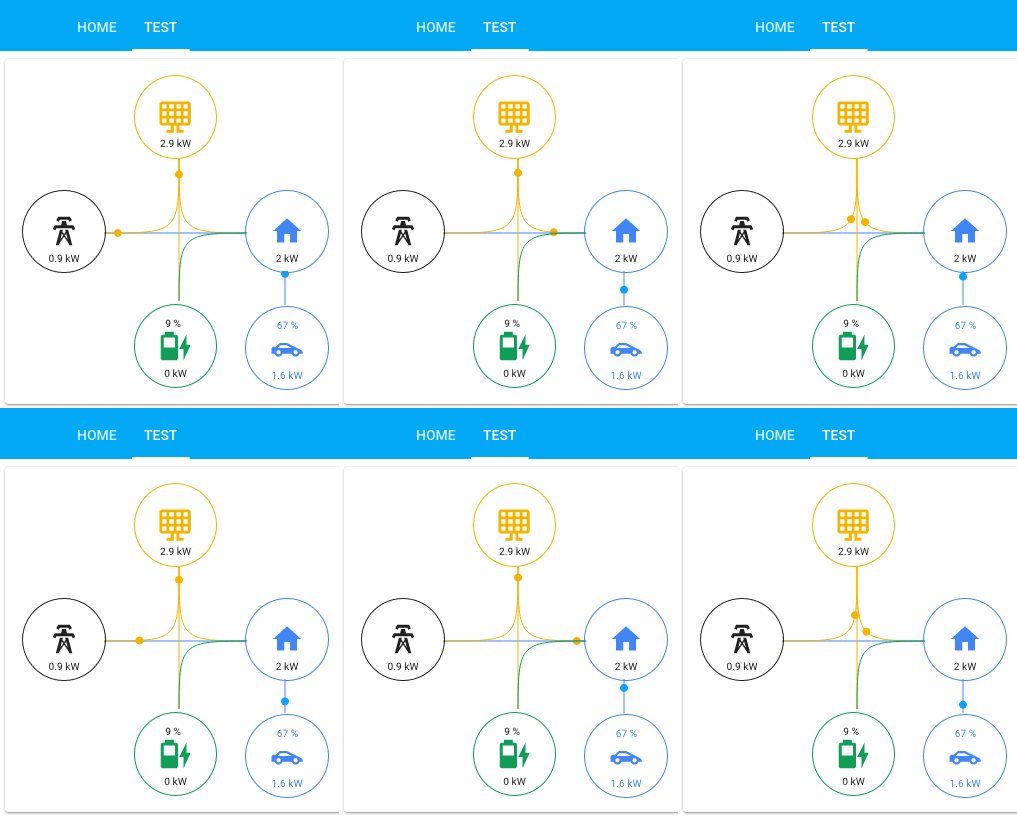
나는 가능한 한 일반적인 것을 만들려고 노력했지만, 현재 4 개의 주요 아이콘과 2 개의 추가 기기가있는 6 개의 거품이 있습니다. 네 가지 주요 아이콘 값은 흐름의 합으로 제어됩니다.
두 가지 선택적인 가전 제품은 집안의 소비자가 될 수 있으며 집에 붙어 있습니다. 이 두 사람은 소비에 의해 직접 제어됩니다. 흐름 합계가 수행되지 않음을 의미합니다.
버블/아이콘은 클릭하면 엔티티가 있도록 구성 할 수 있지만 숫자는 흐름에서 계산됩니다. 버블의 상단에 추가 엔티티 텍스트/값을 표시 할 수 있습니다.
7 개의 주요 흐름과 2 개의 기기 흐름이 있습니다. 주요 흐름은 다음과 같습니다.
당신은 하나 이상이 필요합니다. 메인 거품의 배치는 현재 고정되어 있습니다. 일부는 하나의 거품에서 값을 보증하고 다른 거품에 값을 추가합니다. 예를 들어:
Battery_to_house는 배터리 버블/아이콘에서 잠복하고 하우스 버블/아이콘에 추가됩니다.
클릭 가능한 엔티티는 이러한 엔티티를 통해 구성 할 수 있지만 선택 사항입니다.
이 카드는 Bessarabov 애니메이션 소비 카드의 카드를 기반으로 시작했습니다. 그 작업에 다시 한번 감사드립니다. 그런 다음 보일러 플레이트 카드를 시작점으로 완전히 다시 작성했지만 TypeScript로 다시 작성했습니다. 나는 또한 파워 휠 카드에서 몇 가지 아이디어를 빌려서 슬프게도 내가 원하는만큼 많지 않았습니다.)
흐름과 클릭 가능한 엔티티 외에 모든 버블은 상단에 추가 값을 가질 수 있습니다. 이 엔티티에 센서를 추가 해야하는 사람들을 정의하려면 다음과 같습니다.
나는 항상 배터리 전류 충전을 배터리 _extra_entity로 가지고 있습니다. 이 경우 배터리 아이콘도 충전으로 변경됩니다.
현재 최소 구성은 없지만 일부 조합은 의미가 없습니다. 나는 당신이 원하는 거품과 당신이 사용하는 사람과 연결된 흐름을 사용하도록 조언 할 것입니다. 이 예제의 왼쪽 부분은 고정되어 있으며 자신의 센서로 오른쪽 부분을 변경합니다. 필요한 엔티티는 없지만 조합을 남겨두면 구성에 이상한 결과가 표시 될 수 있습니다. 센서는 원하는대로 호출 할 수 있으며 Watt 또는 Kilowatt의 파워 미터 센서입니다 (모두 동일하게 선택하면 KW를 생성합니다). 모든 센서는 양수 값이어야합니다
간단한 조합 예 :
 type : ' custom:tesla-style-solar-power-card '
grid_consumption_entity : sensor.grid_consumption
house_consumption_entity : sensor.house_consumption
grid_to_house_entity : sensor.grid_consumption
이렇게하면 클릭 가능한 두 개의 거품과 그리드에서 하우스로의 흐름을 가질 수 있으므로 아이콘 아래의 값을 결정합니다.
 type : ' custom:tesla-style-solar-power-card '
name : My Flows
# 7 flows between bubbles
grid_to_house_entity : sensor.grid_consumption
grid_to_battery_entity : sensor.grid_battery_charge
generation_to_grid_entity : sensor.grid_feed_in
generation_to_battery_entity : sensor.battery_charging
generation_to_house_entity : sensor.solar_consumption
battery_to_house_entity : sensor.battery_consumption
battery_to_grid_entity : sensor.battery_to_grid
# extra values to show as text above icons
battery_extra_entity : sensor.battery_charge
house_extra_entity : sensor.current_temperature
generation_extra_entity : sensor.percent_cloud_coverage
grid_extra_entity : sensor.monthly_feed_in
# optional appliances with consumption and extra values
appliance1_consumption_entity : sensor.car_consumption
appliance1_extra_entity : sensor.car_battery_state_of_charge
appliance2_consumption_entity : sensor.heating_consumption
appliance2_extra_entity : sensor.heating_operation
# optional 4 main bubble icons for clickable entities
grid_entity : sensor.grid_consumption
house_entity : sensor.house_consumption
generation_entity : sensor.solar_yield
battery_entity : sensor.battery_consumption
충전 상태로 배터리 버블에 대한 추가 엔티티를 정의하면 아이콘이 해당 엔터티의 값으로 동적으로 대체되고 위의 아이콘 정의를 무시합니다.
동작을 변경하는 몇 가지 구성 변수가 있습니다 : 제목 :
name : ' My Tesla Power Card! 'KW 대신 W (Watt)를 강제로 사용하여 1로 설정하여 사용하십시오.
show_w_not_kw : 1움직이는 점에 대해 다른 속도를 설정하기 위해서는 정상 속도 계수가 0.04이므로 처음에는 그 숫자 근처에 머무르면 0.2는 정말 빠릅니다.
speed_factor : 0.03w가 KW로 변환되는 임계 값에 대한 하나 (아래 예제는 w가 5000 w 이후에서 킬로와트로 변경됩니다) :
threshold_in_k : 5threshold_in_k는 show_w_not_kw와 호환되지 않으며 후자는 threshold_in_k를 지배합니다.
사용하려면 활성화되지 않은 선을 숨기려면 선을 숨기기 전에 모든 것이 작동하는지 확인하십시오.
hide_inactive_lines : 1하나는 전력선에 대한 간격을 추가하여 HA의 에너지 패널이 수행하는 방식입니다.
show_gap : true하나는 가장 높은 흐름에 따라 집 거품을 색칠합니다.
change_house_bubble_color_with_flow : 1움직이는 원이 아니라 에너지 흐름도 (흐름이 높을 때 두꺼운 선)를 표시하는 하나 :
energy_flow_diagramm : 1흐름에 따라 선을 두껍게 만드는 요인이 있습니다.
energy_flow_diagramm_line_factor : 2라인 흐름에 영향을주지 않고 주택 값에서 기기 값을 빼낼 수 있습니다.
house_without_appliances_values : 1그런 다음 6 개의 아이콘 구성 변수가 있습니다.
 grid_icon : ' mdi:transmission-tower '
generation_icon : ' mdi:solar-panel-large '
house_icon : ' mdi:home '
battery_icon : ' mdi:battery '
appliance1_icon : ' mdi:car-sports '
appliance2_icon : ' mdi:car-sports 'Solar_Consumption 및 GRID_FEED_IN에서 태양 수율과 같은 템플릿 센서를 만들거나 HOME_CONSUMPTION과 같은 다른 사람이 누락 된 경우 템플릿 센서를 만들 수 있습니다. 일부 인버터는 양수 및 음수 값을 가지고 있습니다. 여기서 모든 센서는 양수 값이어야하므로 다음과 같은 템플릿 센서를 만듭니다.
    battery_consumption :
        value_template : ' {% set batter_cons = sensor.powerwall_battery_now | int %}
                        {% if batter_cons > 0 %}
                            {{ batter_cons | int }}
                        {% else %}
                            0
                        {% endif %} '
        device_class : power
unit_of_measurement : WTesla Powerwall 통합과 함께이 카드를 사용하려면 먼저 추가 센서를 작성해야합니다. 이 카드는 화면에 표시된 줄 당 긍정적 인 숫자 값이있는 엔티티를 기대합니다. 그러나 Tesla Powerwall 통합은 에너지가 특정 미터로 소비되는지 또는 공급되는지에 따라 부정적이거나 양수의 센서를 생성합니다.
다행히도 이것은 몇 개의 템플릿 센서를 추가하여 쉽게 고정 할 수 있습니다. 추가해야 할 템플릿 센서는 아래에 표시됩니다. 이 센서는 Tesla Powerwall 통합으로 생성 된 각 엔티티의 기본 이름을 가정합니다. 엔터티의 이름을 변경하면 구성을 조정해야합니다.
 # Templates for Actual Powerflow transfer charts (APF - Actual PowerFlow)
#
# For the math to add up a new Real House Load must be calculated and used, witch includes
# the inverter consumption and excludes rounding errors and corrects inaccurate power readings.
#
# It never made sense that inbound power sometimes does not equal outbound power. This fixes it!
#
# Developed by AviadorLP modified for powerwall by purcell-lab
# Correctly sets battery2grid & grid2battery flows
#
template :
  - sensor :
# grid sensor must be negative when importing and positive when exporting
    - name : APF Grid Entity
      device_class : power
      state_class : measurement
      unit_of_measurement : W
      state : " {{ (0 - states('sensor.powerwall_site_now')|float(0)*1000)|int(0) }} "

# sensor must always be 0 or positive (i think they always are)
    - name : APF House Entity
      device_class : power
      state_class : measurement
      unit_of_measurement : W
      state : " {{ (states('sensor.powerwall_load_now')|float(0)*1000)|int(0) }} "

# sensor must always be 0 or positive (i think they always are)
    - name : APF Generation Entity
      device_class : power
      state_class : measurement
      unit_of_measurement : W
      state : " {{ (states('sensor.powerwall_solar_now')|float(0)*1000)|int(0) }} "

# battery sensor must be positive when charging and negative when discharging
    - name : APF Battery Entity
      device_class : power
      state_class : measurement
      unit_of_measurement : W
      state : " {{ (0 - states('sensor.powerwall_battery_now')|float(0)*1000)|int(0) }} "


# Required to reduce code later on
    - name : APF Grid Import
      device_class : power
      state_class : measurement
      unit_of_measurement : W
      state : >
        {% if states('sensor.apf_grid_entity')|int(default=0) < 0 %}
          {{ states('sensor.apf_grid_entity')|int(default=0)|abs }}
        {% else %}
          0
        {% endif %}

#   Inverter consumption and power losses due to Inverter transfers and power conversions (AC/DC)
#   excludes rounding errors made worst by the fact that some inverters round all sensors readings to INT
#   Occasionally this might be negative probably due to cumulative errors in not so accurate power readings.
    - name : APF Inverter Power Consumption
      device_class : power
      state_class : measurement
      unit_of_measurement : W
      state : " {{ states('sensor.apf_generation_entity')|int(default=0) - states('sensor.apf_battery_entity')|int(default=0) - states('sensor.apf_house_entity')|int(default=0) - states('sensor.apf_grid_entity')|int(default=0) }} "

# Real House Load Includes Inverter consumption and transfer conversions and losses and rounding errors.
# It never made sense that inbound power sometimes does not equal outbound power. This fixes it!
    - name : APF Real House Load
      device_class : power
      state_class : measurement
      unit_of_measurement : W
      state : " {{ states('sensor.apf_house_entity')|int(default=0) + states('sensor.apf_inverter_power_consumption')|int(default=0) }} "
      icon : mdi:home-lightning-bolt

    - name : APF Grid2House
      device_class : power
      state_class : measurement
      unit_of_measurement : W
      state :  >
        {% if states('sensor.apf_grid_import')|int(default=0) > states('sensor.apf_real_house_load')|int(default=0) %}
          {{ states('sensor.apf_real_house_load')|int(default=0) }}
        {% else %}
          {{ states('sensor.apf_grid_import')|int(default=0) }}
        {% endif %}

    - name : APF Grid2Batt
      device_class : power
      state_class : measurement
      unit_of_measurement : W
      state : >
        {% if states('sensor.apf_grid_import')|int(default=0) > states('sensor.apf_real_house_load')|int(default=0) %}
          {{ states('sensor.apf_grid_import')|int(default=0) - states('sensor.apf_real_house_load')|int(default=0) }}
        {% else %}
          0
        {% endif %}

    - name : APF Batt2House
      device_class : power
      state_class : measurement
      unit_of_measurement : W
      state : >
        {% if states('sensor.apf_battery_entity')|int(default=0) < 0 %}
          {% if states('sensor.apf_battery_entity')|int(default=0)|abs > states('sensor.apf_real_house_load')|int(default=0) %}
            {{ states('sensor.apf_real_house_load')|int(default=0) }}
          {% else %}
            {{ states('sensor.apf_battery_entity')|int(default=0)|abs }}
          {% endif %}
        {% else %}
          0
        {% endif %}

# This might be called house to grid, and can happen in rare circumstances,
# like when the inverter is not able to do a precise adjustment of power fast enough
# or when you want to force a discharge of the battery or something...
# But it only happens with battery or other power generator users.
    - name : APF Batt2Grid
      device_class : power
      state_class : measurement
      unit_of_measurement : W
      state : >
        {% if states('sensor.apf_battery_entity')|int(default=0) < 0 %}
          {% if states('sensor.apf_battery_entity')|int(default=0)|abs > states('sensor.apf_real_house_load')|int(default=0) %}
            {{ states('sensor.apf_battery_entity')|int(default=0)|abs - states('sensor.apf_real_house_load')|int(default=0) }}
          {% else %}
            0
          {% endif %}
        {% else %}
          0
        {% endif %}

    - name : APF Solar2Grid
      device_class : power
      state_class : measurement
      unit_of_measurement : W
      state : >
        {% if states('sensor.apf_grid_entity')|int(default=0) > states('sensor.apf_batt2grid')|int(default=0) %}
          {{ states('sensor.apf_grid_entity')|int(default=0) - states('sensor.apf_batt2grid')|int(default=0) }}
        {% else %}
          0
        {% endif %}

    - name : APF Solar2House
      device_class : power
      state_class : measurement
      unit_of_measurement : W
      state : >
        {% if states('sensor.apf_generation_entity')|int(default=0) > 0 and states('sensor.apf_real_house_load')|int(default=0) > states('sensor.apf_batt2house')|int(default=0) + states('sensor.apf_grid_import')|int(default=0) %}
          {% if states('sensor.apf_generation_entity')|int(default=0) > states('sensor.apf_real_house_load')|int(default=0) - states('sensor.apf_batt2house')|int(default=0) - states('sensor.apf_grid2house')|int(default=0) %}
            {{ states('sensor.apf_real_house_load')|int(default=0) - states('sensor.apf_batt2house')|int(default=0) - states('sensor.apf_grid2house')|int(default=0) }}
          {% else %}
            {{ states('sensor.apf_generation_entity')|int(default=0) }}
          {% endif %}
        {% else %}
          0
        {% endif %}

    - name : APF Solar2Batt
      device_class : power
      state_class : measurement
      unit_of_measurement : W
      state : >
        {% if states('sensor.apf_generation_entity')|int(default=0) > 0 and states('sensor.apf_battery_entity')|int(default=0) > 0 %}
          {% if states('sensor.apf_battery_entity')|int(default=0) > states('sensor.apf_grid2batt')|int(default=0) %}
            {% if states('sensor.apf_generation_entity')|int(default=0) - states('sensor.apf_solar2house')|int(default=0) > states('sensor.apf_battery_entity')|int(default=0) - states('sensor.apf_grid2batt')|int(default=0) %}
              {{ states('sensor.apf_battery_entity')|int(default=0) - states('sensor.apf_grid2batt')|int(default=0) }}
            {% else %}
              {{ states('sensor.apf_generation_entity')|int(default=0) - states('sensor.apf_solar2house')|int(default=0) - states('sensor.apf_solar2grid')|int(default=0) }}
            {% endif %}
          {% else %}
            0
          {% endif %}
        {% else %}
          0
        {% endif %}
이 센서를 포함한 후에는 다음과 같은 카드를 구성 할 수 있습니다.
 type : ' custom:tesla-style-solar-power-card '

grid_entity : sensor.apf_grid_entity
house_entity : sensor.apf_real_house_load
generation_entity : sensor.apf_generation_entity
battery_entity : sensor.apf_battery_entity

grid_to_house_entity : sensor.apf_grid2house
grid_to_battery_entity : sensor.apf_grid2batt
generation_to_grid_entity : sensor.apf_solar2grid
generation_to_battery_entity : sensor.apf_solar2batt
generation_to_house_entity : sensor.apf_solar2house
battery_to_house_entity : sensor.apf_batt2house
battery_to_grid_entity : sensor.apf_batt2grid

battery_extra_entity : sensor.powerwall_charge V0.9 V0.92 VBETA1.1.
풀 요청을 환영합니다. 주요 변경 사항을 위해 먼저 문제를 열어 변경하고 싶은 것을 논의하십시오.
아파치 라이센스 v 2.0





