tesla style solar power card
Corrected sizing for HA 2024.6.x

警告:構成の破壊
フローをもう一度定義する必要があります!!
各フローを定義せずに、行は表示されません。使用法の部分を注意深く読み取ります(バブルはクリック可能ですが、これはオプションです)
これは、ソーラー設備用のホームアシスタントカードです。エネルギーの流れ((k)W)を見るためのテスラスタイルのグラフィックを提供します。
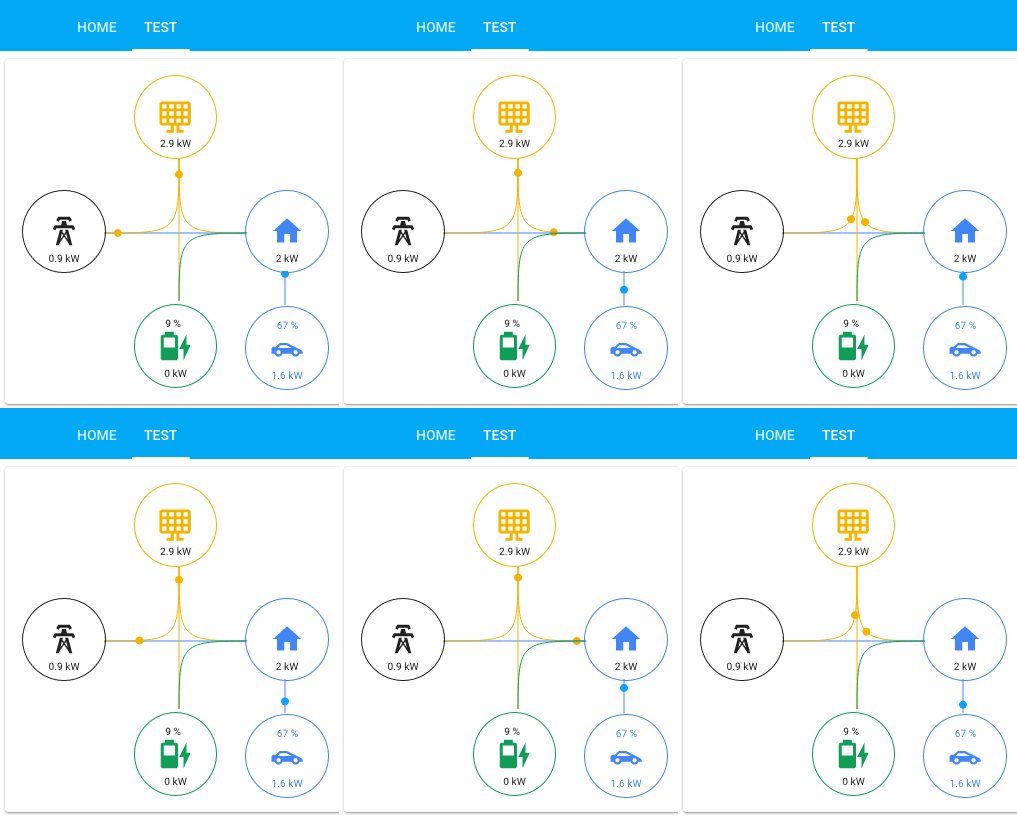
私はそれを可能な限り一般的にしようとしましたが、今のところ、4つのメインアイコンと2つの追加器具を備えた6つのバブルがあります。 4つの主要なアイコン値は、それらからのフローの合計によって制御されます。
2つのオプションのアプライアンスは、家の中のあらゆる消費者である可能性があり、家に取り付けられています。これら2つは、消費によって直接制御されます。意味のあるフローの合計は行われていません。
バブル/アイコンは、クリック時にエンティティを持つように構成できますが、数値はフローから計算されます。バブルの上部に追加のエンティティテキスト/値を表示できます。
7つの主要なフローと2つのアプライアンスフローがあります。主なフローは次のとおりです。
少なくとも1つが必要です。メインの泡の配置は今のところ修正されています。あるバブルから値を覆し、別のバブルに値を追加するものもあります。例えば:
Battery_to_houseは、バッテリーのバブル/アイコンから覆い、ハウスバブル/アイコンに追加されます。
クリック可能なエンティティは、これらのエンティティを通じて構成できますが、オプションです。
このカードは、Bessarabov Animated Consumption Cardのカードに基づいて開始されました。その後、ボイラープレートカードを出発点として完全に書き直しましたが、タイプスクリプトを使用しました。また、私はパワーホイールカードからいくつかのアイデアを借りました。
フローとクリック可能なエンティティの上に、すべてのバブルが上に追加の値を持つことができます。これらを定義するには、これらのエンティティのいずれかにセンサーを追加する必要があります。
私は常にバッテリーの電荷をBattery_extra_Entityとして持っています。この場合、バッテリーアイコンも充電とともに変更されます。
現在、最小設定はありませんが、いくつかの組み合わせが意味をなさない場合があります。私はあなたが望む泡とあなたが使用している自分にリンクされているフローを使用するようにアドバイスします。これらの例の左部分は固定されており、独自のセンサーで右の部分を変更します。必要なエンティティはありませんが、構成に組み合わせを省くと奇妙な結果が表示される可能性があります。センサーはあなたが望むものを何でも呼び出すことができ、それらはワットまたはキロワットのパワーメーターセンサーです(すべてに同じものを選択し、それからKWを作成します)。すべてのセンサーは正の値である必要があります
簡単な組み合わせ例:
 type : ' custom:tesla-style-solar-power-card '
grid_consumption_entity : sensor.grid_consumption
house_consumption_entity : sensor.house_consumption
grid_to_house_entity : sensor.grid_consumption
これにより、クリック可能な2つのバブルとグリッドからハウスへのフローがあり、アイコンの下の値が決定されます。
 type : ' custom:tesla-style-solar-power-card '
name : My Flows
# 7 flows between bubbles
grid_to_house_entity : sensor.grid_consumption
grid_to_battery_entity : sensor.grid_battery_charge
generation_to_grid_entity : sensor.grid_feed_in
generation_to_battery_entity : sensor.battery_charging
generation_to_house_entity : sensor.solar_consumption
battery_to_house_entity : sensor.battery_consumption
battery_to_grid_entity : sensor.battery_to_grid
# extra values to show as text above icons
battery_extra_entity : sensor.battery_charge
house_extra_entity : sensor.current_temperature
generation_extra_entity : sensor.percent_cloud_coverage
grid_extra_entity : sensor.monthly_feed_in
# optional appliances with consumption and extra values
appliance1_consumption_entity : sensor.car_consumption
appliance1_extra_entity : sensor.car_battery_state_of_charge
appliance2_consumption_entity : sensor.heating_consumption
appliance2_extra_entity : sensor.heating_operation
# optional 4 main bubble icons for clickable entities
grid_entity : sensor.grid_consumption
house_entity : sensor.house_consumption
generation_entity : sensor.solar_yield
battery_entity : sensor.battery_consumption
充電状態でバッテリーバブルの追加エンティティを定義すると、アイコンはそのエンティティの値に動的に置き換えられ、上記のアイコン定義をオーバーライドします。
動作を変更するいくつかの構成変数があります:見出し:
name : ' My Tesla Power Card! 'KWの代わりにW(watt)を強制する1つでは、使用するために1に設定します。
show_w_not_kw : 11つは移動ドットの速度を異なるため、通常の速度係数は0.04なので、最初はその数の近くにとどまります。0.2は非常に高速です。
speed_factor : 0.031つは、WがKWに変換されるしきい値(以下の例は5000 W以降からwをキロワットに変更します):
threshold_in_k : 5threhold_in_kはshow_w_not_kwと互換性がありません。
使用するためにアクティブではない行を隠すために、行を隠す前にすべてが機能していることを確認してください。
hide_inactive_lines : 1HAのエネルギーパネルがそれを行う方法で、電力線のギャップを追加する1つは次のとおりです。
show_gap : true最高の流れに応じてハウスバブルを着色するもの:
change_house_bubble_color_with_flow : 11つは、動く円を表示しないでください。
energy_flow_diagramm : 1フローに応じて線を厚くする要因が普通です。
energy_flow_diagramm_line_factor : 2ラインフローに影響を与えることなく、家の値からアプライアンスの値を差し引くことができます。
house_without_appliances_values : 1次に、6つのアイコン構成変数があります。
 grid_icon : ' mdi:transmission-tower '
generation_icon : ' mdi:solar-panel-large '
house_icon : ' mdi:home '
battery_icon : ' mdi:battery '
appliance1_icon : ' mdi:car-sports '
appliance2_icon : ' mdi:car-sports 'Solar_consumptionやgrid_feed_inのソーラー収量のようなものが欠落している場合、またはhome_consumptionのような別のものが欠落している場合は、テンプレートセンサーを作成できることを忘れないでください。一部のインバーターには正と負の値がありますが、ここではすべてのセンサーが正の値である必要があるため、次のようなテンプレートセンサーを作成します。
    battery_consumption :
        value_template : ' {% set batter_cons = sensor.powerwall_battery_now | int %}
                        {% if batter_cons > 0 %}
                            {{ batter_cons | int }}
                        {% else %}
                            0
                        {% endif %} '
        device_class : power
unit_of_measurement : WTesla Powerwall統合でこのカードを使用するには、最初に追加のセンサーを作成する必要があります。このカードは、画面に示されている行ごとに正の数値を持つエンティティを期待しています。ただし、Tesla Powerwall統合は、エネルギーがその特定のメーターから消費されているかフィードされているかに応じて、負または正のセンサーを作成します。
幸いなことに、これはいくつかのテンプレートセンサーを追加することで簡単に修正できます。追加する必要があるものを以下に示します。これらのセンサーは、Tesla Powerwall統合によって作成された各エンティティのデフォルト名を想定していることに注意してください。エンティティの名前を変更した場合、それに応じて構成を調整する必要があります。
 # Templates for Actual Powerflow transfer charts (APF - Actual PowerFlow)
#
# For the math to add up a new Real House Load must be calculated and used, witch includes
# the inverter consumption and excludes rounding errors and corrects inaccurate power readings.
#
# It never made sense that inbound power sometimes does not equal outbound power. This fixes it!
#
# Developed by AviadorLP modified for powerwall by purcell-lab
# Correctly sets battery2grid & grid2battery flows
#
template :
  - sensor :
# grid sensor must be negative when importing and positive when exporting
    - name : APF Grid Entity
      device_class : power
      state_class : measurement
      unit_of_measurement : W
      state : " {{ (0 - states('sensor.powerwall_site_now')|float(0)*1000)|int(0) }} "

# sensor must always be 0 or positive (i think they always are)
    - name : APF House Entity
      device_class : power
      state_class : measurement
      unit_of_measurement : W
      state : " {{ (states('sensor.powerwall_load_now')|float(0)*1000)|int(0) }} "

# sensor must always be 0 or positive (i think they always are)
    - name : APF Generation Entity
      device_class : power
      state_class : measurement
      unit_of_measurement : W
      state : " {{ (states('sensor.powerwall_solar_now')|float(0)*1000)|int(0) }} "

# battery sensor must be positive when charging and negative when discharging
    - name : APF Battery Entity
      device_class : power
      state_class : measurement
      unit_of_measurement : W
      state : " {{ (0 - states('sensor.powerwall_battery_now')|float(0)*1000)|int(0) }} "


# Required to reduce code later on
    - name : APF Grid Import
      device_class : power
      state_class : measurement
      unit_of_measurement : W
      state : >
        {% if states('sensor.apf_grid_entity')|int(default=0) < 0 %}
          {{ states('sensor.apf_grid_entity')|int(default=0)|abs }}
        {% else %}
          0
        {% endif %}

#   Inverter consumption and power losses due to Inverter transfers and power conversions (AC/DC)
#   excludes rounding errors made worst by the fact that some inverters round all sensors readings to INT
#   Occasionally this might be negative probably due to cumulative errors in not so accurate power readings.
    - name : APF Inverter Power Consumption
      device_class : power
      state_class : measurement
      unit_of_measurement : W
      state : " {{ states('sensor.apf_generation_entity')|int(default=0) - states('sensor.apf_battery_entity')|int(default=0) - states('sensor.apf_house_entity')|int(default=0) - states('sensor.apf_grid_entity')|int(default=0) }} "

# Real House Load Includes Inverter consumption and transfer conversions and losses and rounding errors.
# It never made sense that inbound power sometimes does not equal outbound power. This fixes it!
    - name : APF Real House Load
      device_class : power
      state_class : measurement
      unit_of_measurement : W
      state : " {{ states('sensor.apf_house_entity')|int(default=0) + states('sensor.apf_inverter_power_consumption')|int(default=0) }} "
      icon : mdi:home-lightning-bolt

    - name : APF Grid2House
      device_class : power
      state_class : measurement
      unit_of_measurement : W
      state :  >
        {% if states('sensor.apf_grid_import')|int(default=0) > states('sensor.apf_real_house_load')|int(default=0) %}
          {{ states('sensor.apf_real_house_load')|int(default=0) }}
        {% else %}
          {{ states('sensor.apf_grid_import')|int(default=0) }}
        {% endif %}

    - name : APF Grid2Batt
      device_class : power
      state_class : measurement
      unit_of_measurement : W
      state : >
        {% if states('sensor.apf_grid_import')|int(default=0) > states('sensor.apf_real_house_load')|int(default=0) %}
          {{ states('sensor.apf_grid_import')|int(default=0) - states('sensor.apf_real_house_load')|int(default=0) }}
        {% else %}
          0
        {% endif %}

    - name : APF Batt2House
      device_class : power
      state_class : measurement
      unit_of_measurement : W
      state : >
        {% if states('sensor.apf_battery_entity')|int(default=0) < 0 %}
          {% if states('sensor.apf_battery_entity')|int(default=0)|abs > states('sensor.apf_real_house_load')|int(default=0) %}
            {{ states('sensor.apf_real_house_load')|int(default=0) }}
          {% else %}
            {{ states('sensor.apf_battery_entity')|int(default=0)|abs }}
          {% endif %}
        {% else %}
          0
        {% endif %}

# This might be called house to grid, and can happen in rare circumstances,
# like when the inverter is not able to do a precise adjustment of power fast enough
# or when you want to force a discharge of the battery or something...
# But it only happens with battery or other power generator users.
    - name : APF Batt2Grid
      device_class : power
      state_class : measurement
      unit_of_measurement : W
      state : >
        {% if states('sensor.apf_battery_entity')|int(default=0) < 0 %}
          {% if states('sensor.apf_battery_entity')|int(default=0)|abs > states('sensor.apf_real_house_load')|int(default=0) %}
            {{ states('sensor.apf_battery_entity')|int(default=0)|abs - states('sensor.apf_real_house_load')|int(default=0) }}
          {% else %}
            0
          {% endif %}
        {% else %}
          0
        {% endif %}

    - name : APF Solar2Grid
      device_class : power
      state_class : measurement
      unit_of_measurement : W
      state : >
        {% if states('sensor.apf_grid_entity')|int(default=0) > states('sensor.apf_batt2grid')|int(default=0) %}
          {{ states('sensor.apf_grid_entity')|int(default=0) - states('sensor.apf_batt2grid')|int(default=0) }}
        {% else %}
          0
        {% endif %}

    - name : APF Solar2House
      device_class : power
      state_class : measurement
      unit_of_measurement : W
      state : >
        {% if states('sensor.apf_generation_entity')|int(default=0) > 0 and states('sensor.apf_real_house_load')|int(default=0) > states('sensor.apf_batt2house')|int(default=0) + states('sensor.apf_grid_import')|int(default=0) %}
          {% if states('sensor.apf_generation_entity')|int(default=0) > states('sensor.apf_real_house_load')|int(default=0) - states('sensor.apf_batt2house')|int(default=0) - states('sensor.apf_grid2house')|int(default=0) %}
            {{ states('sensor.apf_real_house_load')|int(default=0) - states('sensor.apf_batt2house')|int(default=0) - states('sensor.apf_grid2house')|int(default=0) }}
          {% else %}
            {{ states('sensor.apf_generation_entity')|int(default=0) }}
          {% endif %}
        {% else %}
          0
        {% endif %}

    - name : APF Solar2Batt
      device_class : power
      state_class : measurement
      unit_of_measurement : W
      state : >
        {% if states('sensor.apf_generation_entity')|int(default=0) > 0 and states('sensor.apf_battery_entity')|int(default=0) > 0 %}
          {% if states('sensor.apf_battery_entity')|int(default=0) > states('sensor.apf_grid2batt')|int(default=0) %}
            {% if states('sensor.apf_generation_entity')|int(default=0) - states('sensor.apf_solar2house')|int(default=0) > states('sensor.apf_battery_entity')|int(default=0) - states('sensor.apf_grid2batt')|int(default=0) %}
              {{ states('sensor.apf_battery_entity')|int(default=0) - states('sensor.apf_grid2batt')|int(default=0) }}
            {% else %}
              {{ states('sensor.apf_generation_entity')|int(default=0) - states('sensor.apf_solar2house')|int(default=0) - states('sensor.apf_solar2grid')|int(default=0) }}
            {% endif %}
          {% else %}
            0
          {% endif %}
        {% else %}
          0
        {% endif %}
これらのセンサーを含めた後、次のようなカードを構成できます。
 type : ' custom:tesla-style-solar-power-card '

grid_entity : sensor.apf_grid_entity
house_entity : sensor.apf_real_house_load
generation_entity : sensor.apf_generation_entity
battery_entity : sensor.apf_battery_entity

grid_to_house_entity : sensor.apf_grid2house
grid_to_battery_entity : sensor.apf_grid2batt
generation_to_grid_entity : sensor.apf_solar2grid
generation_to_battery_entity : sensor.apf_solar2batt
generation_to_house_entity : sensor.apf_solar2house
battery_to_house_entity : sensor.apf_batt2house
battery_to_grid_entity : sensor.apf_batt2grid

battery_extra_entity : sensor.powerwall_charge V0.9 V0.92 VBETA1.1。
プルリクエストは大歓迎です。大きな変更については、最初に問題を開いて、何を変えたいかを議論してください。
Apacheライセンスv 2.0





