pytorch_memlab
0.3.0

它是Pytorch的简单准确的CUDA内存管理实验室,由有关内存的不同部分组成:
特征:
line_profiler样式CUDA内存profiler。%mlrun / %%mlrun系列 /单元格命令支持IPYTHON。目录
pip install pytorch_memlabpip install git+https://github.com/stonesjtu/pytorch_memlabPytorch中的不可存储错误经常发生,对于新手和经验丰富的程序员。一个普遍的原因是,大多数人并没有真正学习Pytorch和GPU的基本记忆管理哲学。他们编写了记忆效率的代码,并抱怨Pytorch吃了太多的CUDA记忆。
在此存储库中,我将分享一些有用的工具来帮助调试OOM,或者如果有人感兴趣,请检查基本机制。
内存剖面是对Python的line_profiler的修改,它为指定函数/方法中的每一行代码提供了内存使用信息。
 import torch
from pytorch_memlab import LineProfiler

def inner ():
    torch . nn . Linear ( 100 , 100 ). cuda ()

def outer ():
    linear = torch . nn . Linear ( 100 , 100 ). cuda ()
    linear2 = torch . nn . Linear ( 100 , 100 ). cuda ()
    linear3 = torch . nn . Linear ( 100 , 100 ). cuda ()

work ()
脚本完成或被键盘中断后,如果您在Jupyter笔记本中,则提供以下分析信息:
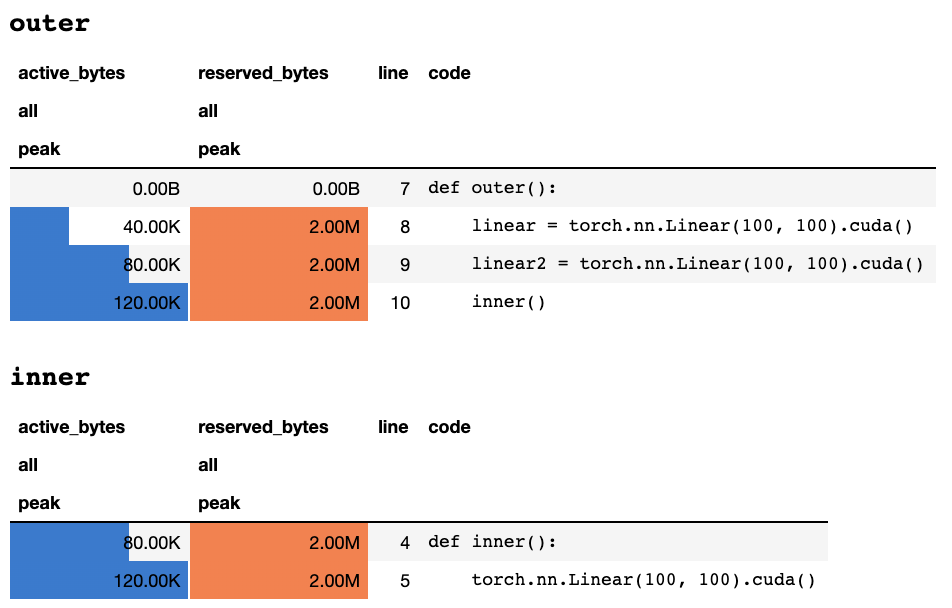
或以下信息,如果您在仅文本终端中:
 ## outer

active_bytes reserved_bytes line  code
         all            all
        peak           peak
       0.00B          0.00B    7  def outer():
      40.00K          2.00M    8      linear = torch.nn.Linear(100, 100).cuda()
      80.00K          2.00M    9      linear2 = torch.nn.Linear(100, 100).cuda()
     120.00K          2.00M   10      inner()


## inner

active_bytes reserved_bytes line  code
         all            all
        peak           peak
      80.00K          2.00M    4  def inner():
     120.00K          2.00M    5      torch.nn.Linear(100, 100).cuda()
对每列含义的解释都可以在火炬文档中找到。可以display() memory_stats()的任何字段的名称以查看相应的统计量。
如果使用profile装饰器,则在多次运行期间收集了内存统计信息,并且最多显示了最大值。我们还提供了一个更灵活的API,称为profile_every ,该API每次执行函数时都会打印内存信息。您只需用@profile_every(1)替换@profile即可打印每个执行的内存使用量。
也可以混合@profile和@profile_every ,以获得对调试粒度的更多控制。
 class Net ( torch . nn . Module ):
    def __init__ ( self ):
        super (). __init__ ()
    @ profile
    def forward ( self , inp ):
#do_somethingset_target_gpu将设备切换为配置文件。 GPU选择在全球范围内,这意味着您必须记住您在整个过程中正在分析的GPU: import torch
from pytorch_memlab import profile , set_target_gpu
@ profile
def func ():
net1 = torch . nn . Linear ( 1024 , 1024 ). cuda ( 0 )
set_target_gpu ( 1 )
net2 = torch . nn . Linear ( 1024 , 1024 ). cuda ( 1 )
set_target_gpu ( 0 )
net3 = torch . nn . Linear ( 1024 , 1024 ). cuda ( 0 )
func ()可以在test/test_line_profiler.py中找到更多样本
确保已安装了IPython ,或使用pip install pytorch-memlab[ipython]安装了pytorch-memlab 。
首先,加载扩展名:
% load_ext pytorch_memlab这使得%mlrun和%%mlrun系列/Cell Magics可供使用。例如,在新单元格中运行以下内容以介绍整个单元格
 % % mlrun - f func
import torch
from pytorch_memlab import profile , set_target_gpu
def func ():
    net1 = torch . nn . Linear ( 1024 , 1024 ). cuda ( 0 )
    set_target_gpu ( 1 )
    net2 = torch . nn . Linear ( 1024 , 1024 ). cuda ( 1 )
    set_target_gpu ( 0 )
net3 = torch . nn . Linear ( 1024 , 1024 ). cuda ( 0 )或者,您可以通过%mlrun单元格魔术调用Profiler进行单个语句。
 import torch
from pytorch_memlab import profile , set_target_gpu
def func ( input_size ):
    net1 = torch . nn . Linear ( input_size , 1024 ). cuda ( 0 )
% mlrun - f func func ( 2048 )看到%mlrun?在支持哪些论点方面提供帮助。您可以将GPU设备设置为配置文件,将结果转储到文件中,然后返回LineProfiler对象进行后填充检查。
通过查看演示Jupyter笔记本来了解更多信息
由于内存剖面仅通过行提供总体内存使用信息,因此可以通过内存记者获得更低级别的内存使用信息。
内存记者迭代所有Tensor对象,并获取基础的UntypedStorage (以前Storage )对象以获取实际的内存使用情况而不是表面Tensor.size 。
有关详细信息,请参见Untypedstorage
 import torch
from pytorch_memlab import MemReporter
linear = torch . nn . Linear ( 1024 , 1024 ). cuda ()
reporter = MemReporter ()
reporter . report ()
输出:
 Element type                                            Size  Used MEM
-------------------------------------------------------------------------------
Storage on cuda:0
Parameter0                                      (1024, 1024)     4.00M
Parameter1                                           (1024,)     4.00K
-------------------------------------------------------------------------------
Total Tensors: 1049600  Used Memory: 4.00M
The allocated memory on cuda:0: 4.00M
-------------------------------------------------------------------------------
 import torch
from pytorch_memlab import MemReporter

linear = torch . nn . Linear ( 1024 , 1024 ). cuda ()
inp = torch . Tensor ( 512 , 1024 ). cuda ()
# pass in a model to automatically infer the tensor names
reporter = MemReporter ( linear )
out = linear ( inp ). mean ()
print ( '========= before backward =========' )
reporter . report ()
out . backward ()
print ( '========= after backward =========' )
reporter . report ()
输出:
 ========= before backward =========
Element type                                            Size  Used MEM
-------------------------------------------------------------------------------
Storage on cuda:0
weight                                          (1024, 1024)     4.00M
bias                                                 (1024,)     4.00K
Tensor0                                          (512, 1024)     2.00M
Tensor1                                                 (1,)   512.00B
-------------------------------------------------------------------------------
Total Tensors: 1573889  Used Memory: 6.00M
The allocated memory on cuda:0: 6.00M
-------------------------------------------------------------------------------
========= after backward =========
Element type                                            Size  Used MEM
-------------------------------------------------------------------------------
Storage on cuda:0
weight                                          (1024, 1024)     4.00M
weight.grad                                     (1024, 1024)     4.00M
bias                                                 (1024,)     4.00K
bias.grad                                            (1024,)     4.00K
Tensor0                                          (512, 1024)     2.00M
Tensor1                                                 (1,)   512.00B
-------------------------------------------------------------------------------
Total Tensors: 2623489  Used Memory: 10.01M
The allocated memory on cuda:0: 10.01M
-------------------------------------------------------------------------------
 import torch
from pytorch_memlab import MemReporter

linear = torch . nn . Linear ( 1024 , 1024 ). cuda ()
linear2 = torch . nn . Linear ( 1024 , 1024 ). cuda ()
linear2 . weight = linear . weight
container = torch . nn . Sequential (
    linear , linear2
)
inp = torch . Tensor ( 512 , 1024 ). cuda ()
# pass in a model to automatically infer the tensor names

out = container ( inp ). mean ()
out . backward ()

# verbose shows how storage is shared across multiple Tensors
reporter = MemReporter ( container )
reporter . report ( verbose = True )
输出:
 Element type                                            Size  Used MEM
-------------------------------------------------------------------------------
Storage on cuda:0
0.weight                                        (1024, 1024)     4.00M
0.weight.grad                                   (1024, 1024)     4.00M
0.bias                                               (1024,)     4.00K
0.bias.grad                                          (1024,)     4.00K
1.bias                                               (1024,)     4.00K
1.bias.grad                                          (1024,)     4.00K
Tensor0                                          (512, 1024)     2.00M
Tensor1                                                 (1,)   512.00B
-------------------------------------------------------------------------------
Total Tensors: 2625537  Used Memory: 10.02M
The allocated memory on cuda:0: 10.02M
-------------------------------------------------------------------------------
 import torch
from pytorch_memlab import MemReporter

lstm = torch . nn . LSTM ( 1024 , 1024 ). cuda ()
reporter = MemReporter ( lstm )
reporter . report ( verbose = True )
inp = torch . Tensor ( 10 , 10 , 1024 ). cuda ()
out , _ = lstm ( inp )
out . mean (). backward ()
reporter . report ( verbose = True )
如下所示, (->)表示同一存储后端输出的重复使用:
 Element type                                            Size  Used MEM
-------------------------------------------------------------------------------
Storage on cuda:0
weight_ih_l0                                    (4096, 1024)    32.03M
weight_hh_l0(->weight_ih_l0)                    (4096, 1024)     0.00B
bias_ih_l0(->weight_ih_l0)                           (4096,)     0.00B
bias_hh_l0(->weight_ih_l0)                           (4096,)     0.00B
Tensor0                                       (10, 10, 1024)   400.00K
-------------------------------------------------------------------------------
Total Tensors: 8499200  Used Memory: 32.42M
The allocated memory on cuda:0: 32.52M
Memory differs due to the matrix alignment
-------------------------------------------------------------------------------
Element type                                            Size  Used MEM
-------------------------------------------------------------------------------
Storage on cuda:0
weight_ih_l0                                    (4096, 1024)    32.03M
weight_ih_l0.grad                               (4096, 1024)    32.03M
weight_hh_l0(->weight_ih_l0)                    (4096, 1024)     0.00B
weight_hh_l0.grad(->weight_ih_l0.grad)          (4096, 1024)     0.00B
bias_ih_l0(->weight_ih_l0)                           (4096,)     0.00B
bias_ih_l0.grad(->weight_ih_l0.grad)                 (4096,)     0.00B
bias_hh_l0(->weight_ih_l0)                           (4096,)     0.00B
bias_hh_l0.grad(->weight_ih_l0.grad)                 (4096,)     0.00B
Tensor0                                       (10, 10, 1024)   400.00K
Tensor1                                       (10, 10, 1024)   400.00K
Tensor2                                        (1, 10, 1024)    40.00K
Tensor3                                        (1, 10, 1024)    40.00K
-------------------------------------------------------------------------------
Total Tensors: 17018880         Used Memory: 64.92M
The allocated memory on cuda:0: 65.11M
Memory differs due to the matrix alignment
-------------------------------------------------------------------------------
注意:
当使用
grad_mode=True转发时,Pytorch将在C级别维护张量缓冲液以供将来的后传播。因此,这些缓冲区不会由Pytorch管理或收集。但是,如果将这些中间结果存储为Python变量,则将报告它们。
您还可以通过传递额外参数来过滤以进行报告: report(device=torch.device(0))
由于Pytorch的C侧张量缓冲区而导致的一个失败示例
在下面的示例中,在inp * (inp + 2)上创建了一个温度缓冲区以存储inp和inp + 2 ,不幸的是,Python只知道INP的存在,因此我们丢失了2M内存,这与张量inp相同。
 import torch
from pytorch_memlab import MemReporter

linear = torch . nn . Linear ( 1024 , 1024 ). cuda ()
inp = torch . Tensor ( 512 , 1024 ). cuda ()
# pass in a model to automatically infer the tensor names
reporter = MemReporter ( linear )
out = linear ( inp * ( inp + 2 )). mean ()
reporter . report ()
输出:
 Element type                                            Size  Used MEM
-------------------------------------------------------------------------------
Storage on cuda:0
weight                                          (1024, 1024)     4.00M
bias                                                 (1024,)     4.00K
Tensor0                                          (512, 1024)     2.00M
Tensor1                                                 (1,)   512.00B
-------------------------------------------------------------------------------
Total Tensors: 1573889  Used Memory: 6.00M
The allocated memory on cuda:0: 8.00M
Memory differs due to the matrix alignment or invisible gradient buffer tensors
-------------------------------------------------------------------------------
有时人们想抢占您的运行任务,但是您不想保存检查站然后加载,实际上他们所需要的只是GPU资源(通常是CPU资源和CPU内存始终在GPU簇中备用),因此您可以将所有工作区从GPU移动到CPU,然后将其停止到CPU,然后停止任务,直到启用了重新启动的信号,而不是从触发和加载和加载cooks和botspapps和bootspappss和bootspapppapping。
仍在发展.....但是您可以玩得开心:
 from pytorch_memlab import Courtesy

iamcourtesy = Courtesy ()
for i in range ( num_iteration ):
    if something_happens :
        iamcourtesy . yield_memory ()
        wait_for_restart_signal ()
iamcourtesy . restore ()Memory_Reporter中所述,中间张量未正确覆盖,因此您可能需要在backward或forward插入此类礼貌逻辑。在开发有效的深度学习模型的3年中,我遭受了很多调试,并从伟大的开源社区中学到了很多东西。
DataFrame.drop for pandas 1.5+ MemReporter中的名称映射(#24)MemReporter中的记忆泄漏line_profiler找不到







