pytorch_memlab
0.3.0

Pytorchのシンプルで正確なCUDAメモリ管理研究所は、メモリに関するさまざまな部分で構成されています。
特徴:
line_profilerスタイルのCUDAメモリプロファイラーが単純なAPIを備えています。%mlrun / %%mlrunライン /セルマジックコマンドを介したipythonサポート。目次
pip install pytorch_memlabpip install git+https://github.com/stonesjtu/pytorch_memlabPytorchのメモリ外のエラーは、新しい蜂や経験豊富なプログラマーで頻繁に発生します。よくある理由は、ほとんどの人がPytorchとGPUの根底にある記憶管理哲学を実際に学んでいないことです。彼らはメモリの効率的なコードを書き、PytorchがCudaの記憶をあまりにも多く食べることに不満を言いました。
このレポでは、OOMのデバッグを支援したり、誰かが興味を持っている場合に基礎となるメカニズムを検査するのに役立ついくつかの便利なツールを共有します。
メモリプロファイラーは、Pythonのline_profilerの変更であり、指定された関数/メソッドの各コード行のメモリ使用法情報を提供します。
 import torch
from pytorch_memlab import LineProfiler

def inner ():
    torch . nn . Linear ( 100 , 100 ). cuda ()

def outer ():
    linear = torch . nn . Linear ( 100 , 100 ). cuda ()
    linear2 = torch . nn . Linear ( 100 , 100 ). cuda ()
    linear3 = torch . nn . Linear ( 100 , 100 ). cuda ()

work ()
スクリプトがキーボードによって終了または中断された後、Jupyterノートブックにいる場合は、次のプロファイリング情報が提供されます。
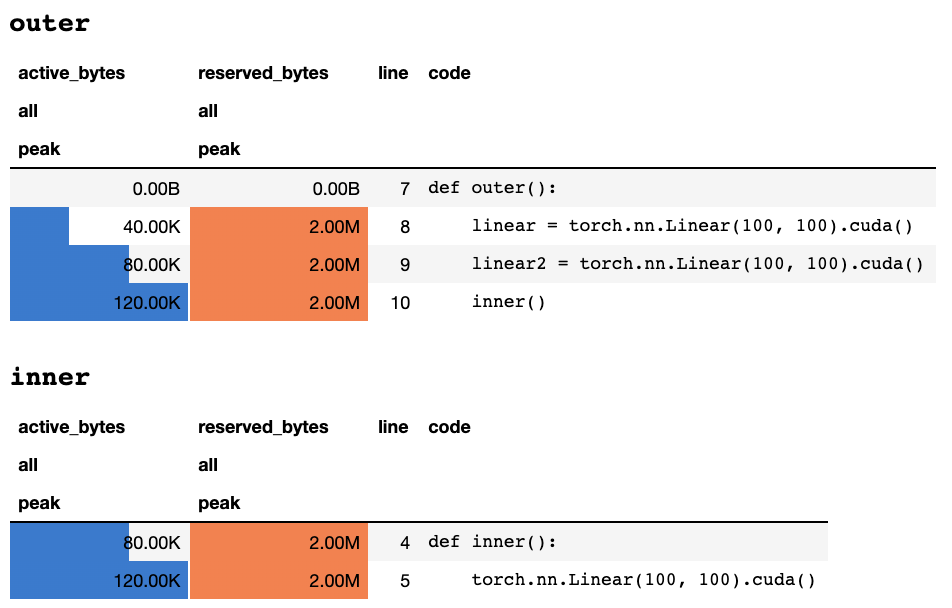
または、テキストのみの端末にいる場合は、次の情報を
 ## outer

active_bytes reserved_bytes line  code
         all            all
        peak           peak
       0.00B          0.00B    7  def outer():
      40.00K          2.00M    8      linear = torch.nn.Linear(100, 100).cuda()
      80.00K          2.00M    9      linear2 = torch.nn.Linear(100, 100).cuda()
     120.00K          2.00M   10      inner()


## inner

active_bytes reserved_bytes line  code
         all            all
        peak           peak
      80.00K          2.00M    4  def inner():
     120.00K          2.00M    5      torch.nn.Linear(100, 100).cuda()
各列の意味の説明は、トーチのドキュメントに記載されています。 memory_stats()からの任意のフィールドの名前をdisplay()に渡して、対応する統計を表示できます。
profileデコレータを使用する場合、メモリ統計は複数回の実行中に収集され、最後に最大値のみが表示されます。また、関数実行の毎回メモリ情報を印刷するprofile_everyと呼ばれるより柔軟なAPIを提供します。 @profile @profile_every(1)に置き換えるだけで、各実行のメモリ使用法を印刷できます。
@profileと@profile_everyを混合して、デバッグの粒度をより制御することもできます。
 class Net ( torch . nn . Module ):
    def __init__ ( self ):
        super (). __init__ ()
    @ profile
    def forward ( self , inp ):
#do_somethingset_target_gpuでデバイスをプロファイルに切り替えることができます。 GPUの選択はグローバルであるため、プロセス全体でプロファイリングするGPUを覚えておく必要があります。 import torch
from pytorch_memlab import profile , set_target_gpu
@ profile
def func ():
net1 = torch . nn . Linear ( 1024 , 1024 ). cuda ( 0 )
set_target_gpu ( 1 )
net2 = torch . nn . Linear ( 1024 , 1024 ). cuda ( 1 )
set_target_gpu ( 0 )
net3 = torch . nn . Linear ( 1024 , 1024 ). cuda ( 0 )
func ()より多くのサンプルは、 test/test_line_profiler.pyにあります
IPythonがインストールされていることを確認するか、 pytorch-memlab pip install pytorch-memlab[ipython]をインストールしていることを確認してください。
まず、拡張機能をロードします。
% load_ext pytorch_memlabこれにより、 %mlrunおよび%%mlrunライン/セルマジックが使用可能になります。たとえば、新しいセルで次のように実行して、セル全体をプロファイルします
 % % mlrun - f func
import torch
from pytorch_memlab import profile , set_target_gpu
def func ():
    net1 = torch . nn . Linear ( 1024 , 1024 ). cuda ( 0 )
    set_target_gpu ( 1 )
    net2 = torch . nn . Linear ( 1024 , 1024 ). cuda ( 1 )
    set_target_gpu ( 0 )
    net3 = torch . nn . Linear ( 1024 , 1024 ). cuda ( 0 )
または、 %mlrun Cell Magicを介して単一のステートメントのプロファイラーを呼び出すことができます。
 import torch
from pytorch_memlab import profile , set_target_gpu
def func ( input_size ):
    net1 = torch . nn . Linear ( input_size , 1024 ). cuda ( 0 )
% mlrun - f func func ( 2048 ) %mlrun?どの議論が裏付けられているかについての助けのために。 GPUデバイスをプロファイルに設定し、プロファイリング結果をファイルにダンプし、ポストプロファイル検査のためにLineProfilerオブジェクトを返すことができます。
デモjupyterノートをチェックして詳細を確認してください
メモリプロファイラーは、メモリ全体の使用情報をラインごとに提供するため、メモリレポーターがより低レベルのメモリ使用情報を取得できます。
メモリレポーターはすべてのTensorオブジェクトを反復し、根底にあるUntypedStorage (以前のStorage )オブジェクトを取得して、Surface Tensor.sizeの代わりに実際のメモリ使用量を取得します。
詳細については、UntypedStorageを参照してください
 import torch
from pytorch_memlab import MemReporter
linear = torch . nn . Linear ( 1024 , 1024 ). cuda ()
reporter = MemReporter ()
reporter . report ()
出力:
 Element type                                            Size  Used MEM
-------------------------------------------------------------------------------
Storage on cuda:0
Parameter0                                      (1024, 1024)     4.00M
Parameter1                                           (1024,)     4.00K
-------------------------------------------------------------------------------
Total Tensors: 1049600  Used Memory: 4.00M
The allocated memory on cuda:0: 4.00M
-------------------------------------------------------------------------------
 import torch
from pytorch_memlab import MemReporter

linear = torch . nn . Linear ( 1024 , 1024 ). cuda ()
inp = torch . Tensor ( 512 , 1024 ). cuda ()
# pass in a model to automatically infer the tensor names
reporter = MemReporter ( linear )
out = linear ( inp ). mean ()
print ( '========= before backward =========' )
reporter . report ()
out . backward ()
print ( '========= after backward =========' )
reporter . report ()
出力:
 ========= before backward =========
Element type                                            Size  Used MEM
-------------------------------------------------------------------------------
Storage on cuda:0
weight                                          (1024, 1024)     4.00M
bias                                                 (1024,)     4.00K
Tensor0                                          (512, 1024)     2.00M
Tensor1                                                 (1,)   512.00B
-------------------------------------------------------------------------------
Total Tensors: 1573889  Used Memory: 6.00M
The allocated memory on cuda:0: 6.00M
-------------------------------------------------------------------------------
========= after backward =========
Element type                                            Size  Used MEM
-------------------------------------------------------------------------------
Storage on cuda:0
weight                                          (1024, 1024)     4.00M
weight.grad                                     (1024, 1024)     4.00M
bias                                                 (1024,)     4.00K
bias.grad                                            (1024,)     4.00K
Tensor0                                          (512, 1024)     2.00M
Tensor1                                                 (1,)   512.00B
-------------------------------------------------------------------------------
Total Tensors: 2623489  Used Memory: 10.01M
The allocated memory on cuda:0: 10.01M
-------------------------------------------------------------------------------
 import torch
from pytorch_memlab import MemReporter

linear = torch . nn . Linear ( 1024 , 1024 ). cuda ()
linear2 = torch . nn . Linear ( 1024 , 1024 ). cuda ()
linear2 . weight = linear . weight
container = torch . nn . Sequential (
    linear , linear2
)
inp = torch . Tensor ( 512 , 1024 ). cuda ()
# pass in a model to automatically infer the tensor names

out = container ( inp ). mean ()
out . backward ()

# verbose shows how storage is shared across multiple Tensors
reporter = MemReporter ( container )
reporter . report ( verbose = True )
出力:
 Element type                                            Size  Used MEM
-------------------------------------------------------------------------------
Storage on cuda:0
0.weight                                        (1024, 1024)     4.00M
0.weight.grad                                   (1024, 1024)     4.00M
0.bias                                               (1024,)     4.00K
0.bias.grad                                          (1024,)     4.00K
1.bias                                               (1024,)     4.00K
1.bias.grad                                          (1024,)     4.00K
Tensor0                                          (512, 1024)     2.00M
Tensor1                                                 (1,)   512.00B
-------------------------------------------------------------------------------
Total Tensors: 2625537  Used Memory: 10.02M
The allocated memory on cuda:0: 10.02M
-------------------------------------------------------------------------------
 import torch
from pytorch_memlab import MemReporter

lstm = torch . nn . LSTM ( 1024 , 1024 ). cuda ()
reporter = MemReporter ( lstm )
reporter . report ( verbose = True )
inp = torch . Tensor ( 10 , 10 , 1024 ). cuda ()
out , _ = lstm ( inp )
out . mean (). backward ()
reporter . report ( verbose = True )
以下に示すように、 (->)は同じストレージバックエンド出力の再利用を示します。
 Element type                                            Size  Used MEM
-------------------------------------------------------------------------------
Storage on cuda:0
weight_ih_l0                                    (4096, 1024)    32.03M
weight_hh_l0(->weight_ih_l0)                    (4096, 1024)     0.00B
bias_ih_l0(->weight_ih_l0)                           (4096,)     0.00B
bias_hh_l0(->weight_ih_l0)                           (4096,)     0.00B
Tensor0                                       (10, 10, 1024)   400.00K
-------------------------------------------------------------------------------
Total Tensors: 8499200  Used Memory: 32.42M
The allocated memory on cuda:0: 32.52M
Memory differs due to the matrix alignment
-------------------------------------------------------------------------------
Element type                                            Size  Used MEM
-------------------------------------------------------------------------------
Storage on cuda:0
weight_ih_l0                                    (4096, 1024)    32.03M
weight_ih_l0.grad                               (4096, 1024)    32.03M
weight_hh_l0(->weight_ih_l0)                    (4096, 1024)     0.00B
weight_hh_l0.grad(->weight_ih_l0.grad)          (4096, 1024)     0.00B
bias_ih_l0(->weight_ih_l0)                           (4096,)     0.00B
bias_ih_l0.grad(->weight_ih_l0.grad)                 (4096,)     0.00B
bias_hh_l0(->weight_ih_l0)                           (4096,)     0.00B
bias_hh_l0.grad(->weight_ih_l0.grad)                 (4096,)     0.00B
Tensor0                                       (10, 10, 1024)   400.00K
Tensor1                                       (10, 10, 1024)   400.00K
Tensor2                                        (1, 10, 1024)    40.00K
Tensor3                                        (1, 10, 1024)    40.00K
-------------------------------------------------------------------------------
Total Tensors: 17018880         Used Memory: 64.92M
The allocated memory on cuda:0: 65.11M
Memory differs due to the matrix alignment
-------------------------------------------------------------------------------
知らせ:
grad_mode=Trueで転送する場合、pytorchは将来のバックプロパゲーションのテンソルバッファーをCレベルで維持します。したがって、これらのバッファーはPytorchによって管理または収集されることはありません。ただし、これらの中間結果をPython変数として保存すると、報告されます。
追加の引数を渡すことで、デバイスをフィルタリングしてレポートすることもできます: report(device=torch.device(0))
PytorchのCサイドテンソルバッファーによる失敗した例
次の例では、 inp * (inp + 2)でTEMPバッファーが作成され、 inpとinp + 2両方を保存します。残念ながら、PythonはINPの存在のみを知っているため、 2Mメモリが失われます。これは同じサイズのテンソルinpです。
 import torch
from pytorch_memlab import MemReporter

linear = torch . nn . Linear ( 1024 , 1024 ). cuda ()
inp = torch . Tensor ( 512 , 1024 ). cuda ()
# pass in a model to automatically infer the tensor names
reporter = MemReporter ( linear )
out = linear ( inp * ( inp + 2 )). mean ()
reporter . report ()
出力:
 Element type                                            Size  Used MEM
-------------------------------------------------------------------------------
Storage on cuda:0
weight                                          (1024, 1024)     4.00M
bias                                                 (1024,)     4.00K
Tensor0                                          (512, 1024)     2.00M
Tensor1                                                 (1,)   512.00B
-------------------------------------------------------------------------------
Total Tensors: 1573889  Used Memory: 6.00M
The allocated memory on cuda:0: 8.00M
Memory differs due to the matrix alignment or invisible gradient buffer tensors
-------------------------------------------------------------------------------
ランニングタスクを先取りしたい場合もありますが、チェックポイントを保存してロードしたくない場合、実際に必要なのはGPUリソース(通常はCPUリソースとCPUメモリは常にGPUクラスターではスペースがあります)して、すべてのワークスペースをGPUからCPUに移動してから、再起動信号がトリガーされるまでタスクを停止するまでタスクを停止します。
まだ発展しています.....しかし、あなたは:で楽しむことができます:
 from pytorch_memlab import Courtesy

iamcourtesy = Courtesy ()
for i in range ( num_iteration ):
    if something_happens :
        iamcourtesy . yield_memory ()
        wait_for_restart_signal ()
iamcourtesy . restore ()Memory_Reporterで述べているように、中間テンソルは適切にカバーされていないため、 backwardまたはforwardの前にそのような礼儀ロジックを挿入することをお勧めします。私は3年間の効率的なディープラーニングモデルを開発している間に、奇妙なメモリ使用量を多くデバッグすることに苦しみ、もちろん優れたオープンソースコミュニティから多くのことを学びました。
DataFrame.dropを修正しますMemReporterの名前マッピングを修正(#24)MemReporterのメモリリークを修正しますline_profilerが見つかりません







