pytorch_memlab
0.3.0

Pytorch를위한 간단하고 정확한 CUDA 메모리 관리 실험실은 메모리에 대한 다른 부분으로 구성됩니다.
특징:
line_profiler 스타일 CUDA 메모리 프로파일러.%mlrun / %%mlrun 라인 / 셀 마술 명령을 통한 ipython 지원.목차
pip install pytorch_memlabpip install git+https://github.com/stonesjtu/pytorch_memlabPytorch의 메모리 오류는 New-Bees 및 경험이 풍부한 프로그래머에게 자주 발생합니다. 일반적인 이유는 대부분의 사람들이 Pytorch와 GPU의 기본 메모리 관리 철학을 실제로 배우지 않기 때문입니다. 그들은 메모리 비효율적 인 코드를 썼고 Pytorch가 너무 많은 cuda 메모리를 먹는 것에 대해 불평했습니다.
이 저장소에서는 OOM을 디버깅하는 데 도움이되는 유용한 도구를 공유하거나 누군가가 관심이있는 경우 기본 메커니즘을 검사 할 것입니다.
메모리 프로파일러는 Python의 line_profiler 수정 한 것으로 지정된 함수/메소드의 각 코드 라인에 대한 메모리 사용 정보를 제공합니다.
 import torch
from pytorch_memlab import LineProfiler

def inner ():
    torch . nn . Linear ( 100 , 100 ). cuda ()

def outer ():
    linear = torch . nn . Linear ( 100 , 100 ). cuda ()
    linear2 = torch . nn . Linear ( 100 , 100 ). cuda ()
    linear3 = torch . nn . Linear ( 100 , 100 ). cuda ()

work ()
스크립트가 키보드로 완료되거나 중단 된 후 Jupyter 노트에있는 경우 다음 프로파일 링 정보를 제공합니다.
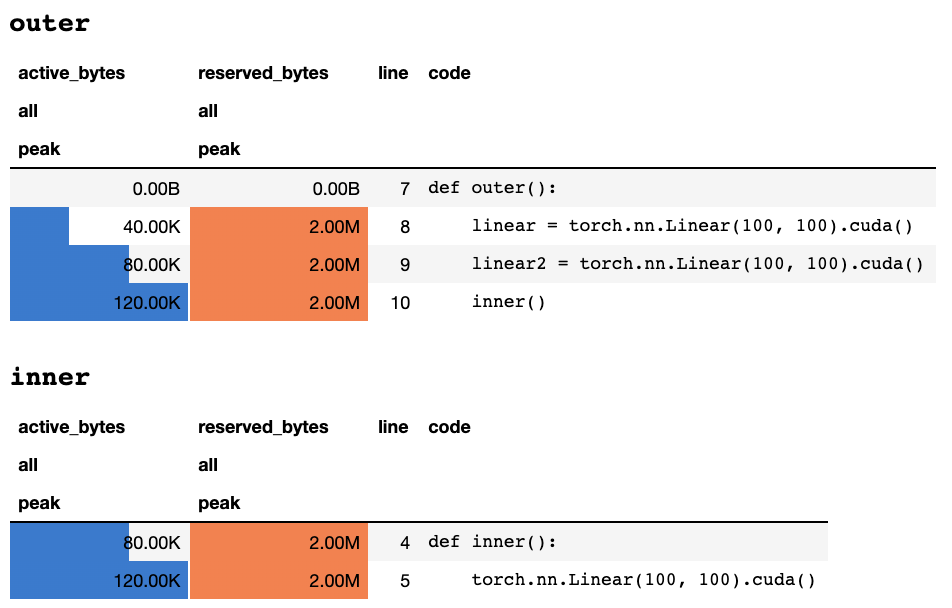
또는 텍스트 전용 터미널에있는 경우 다음 정보 :
 ## outer

active_bytes reserved_bytes line  code
         all            all
        peak           peak
       0.00B          0.00B    7  def outer():
      40.00K          2.00M    8      linear = torch.nn.Linear(100, 100).cuda()
      80.00K          2.00M    9      linear2 = torch.nn.Linear(100, 100).cuda()
     120.00K          2.00M   10      inner()


## inner

active_bytes reserved_bytes line  code
         all            all
        peak           peak
      80.00K          2.00M    4  def inner():
     120.00K          2.00M    5      torch.nn.Linear(100, 100).cuda()
각 열이 의미하는 바에 대한 설명은 토치 문서에서 찾을 수 있습니다. memory_stats() 의 모든 필드 이름은 해당 통계를보기 위해 display() 로 전달 될 수 있습니다.
profile 데코레이터를 사용하는 경우 여러 실행 중에 메모리 통계가 수집되며 최대 값 만 끝에 표시됩니다. 또한 기능 실행의 N 시간마다 메모리 정보를 인쇄하는 profile_every 라는보다 유연한 API를 제공합니다. @profile @profile_every(1) 로 교체하여 각 실행에 대한 메모리 사용량을 인쇄 할 수 있습니다.
@profile 및 @profile_every 혼합되어 디버깅 세분성을 더 많이 제어 할 수 있습니다.
 class Net ( torch . nn . Module ):
    def __init__ ( self ):
        super (). __init__ ()
    @ profile
    def forward ( self , inp ):
#do_somethingset_target_gpu 의 프로파일로 장치를 프로파일로 전환 할 수 있습니다. GPU 선택은 전 세계적으로 이루어 지므로 전체 프로세스에서 프로파일 링하는 GPU를 기억해야합니다. import torch
from pytorch_memlab import profile , set_target_gpu
@ profile
def func ():
net1 = torch . nn . Linear ( 1024 , 1024 ). cuda ( 0 )
set_target_gpu ( 1 )
net2 = torch . nn . Linear ( 1024 , 1024 ). cuda ( 1 )
set_target_gpu ( 0 )
net3 = torch . nn . Linear ( 1024 , 1024 ). cuda ( 0 )
func () 더 많은 샘플은 test/test_line_profiler.py 에서 찾을 수 있습니다
IPython 설치되었거나 pip install pytorch-memlab[ipython] 사용하여 pytorch-memlab 설치했는지 확인하십시오.
먼저 확장을로드하십시오.
% load_ext pytorch_memlab 이로 인해 %mlrun 및 %%mlrun 라인/셀 마법을 사용할 수 있습니다. 예를 들어, 새로운 셀에서 다음을 실행하여 전체 셀을 프로파일 링합니다.
 % % mlrun - f func
import torch
from pytorch_memlab import profile , set_target_gpu
def func ():
    net1 = torch . nn . Linear ( 1024 , 1024 ). cuda ( 0 )
    set_target_gpu ( 1 )
    net2 = torch . nn . Linear ( 1024 , 1024 ). cuda ( 1 )
    set_target_gpu ( 0 )
    net3 = torch . nn . Linear ( 1024 , 1024 ). cuda ( 0 )
또는 %mlrun Cell Magic을 통해 단일 진술에 대한 프로파일 러를 호출 할 수 있습니다.
 import torch
from pytorch_memlab import profile , set_target_gpu
def func ( input_size ):
    net1 = torch . nn . Linear ( input_size , 1024 ). cuda ( 0 )
% mlrun - f func func ( 2048 )
%mlrun? 어떤 주장이 뒷받침되는지에 대한 도움을 받으려면. GPU 장치를 프로파일로 설정하고 프로파일 링 결과를 파일에 덤프하고 Post-Profile 검사를 위해 LineProfiler 객체를 반환 할 수 있습니다.
데모 Jupyter 노트북을 확인하여 자세한 내용을 확인하십시오.
메모리 프로파일 러는 전반적인 메모리 사용 정보 만 라인별로 제공하므로 메모리 리포터가 보다 낮은 수준의 메모리 사용 정보를 얻을 수 있습니다.
메모리 리포터는 모든 Tensor 객체를 반복하고 표면 Tensor.size 대신 실제 메모리 사용량을 얻기 위해 기본 UntypedStorage (이전 Storage ) 객체를 가져옵니다.
자세한 정보는 UntypedStorage를 참조하십시오
 import torch
from pytorch_memlab import MemReporter
linear = torch . nn . Linear ( 1024 , 1024 ). cuda ()
reporter = MemReporter ()
reporter . report ()
출력 :
 Element type                                            Size  Used MEM
-------------------------------------------------------------------------------
Storage on cuda:0
Parameter0                                      (1024, 1024)     4.00M
Parameter1                                           (1024,)     4.00K
-------------------------------------------------------------------------------
Total Tensors: 1049600  Used Memory: 4.00M
The allocated memory on cuda:0: 4.00M
-------------------------------------------------------------------------------
 import torch
from pytorch_memlab import MemReporter

linear = torch . nn . Linear ( 1024 , 1024 ). cuda ()
inp = torch . Tensor ( 512 , 1024 ). cuda ()
# pass in a model to automatically infer the tensor names
reporter = MemReporter ( linear )
out = linear ( inp ). mean ()
print ( '========= before backward =========' )
reporter . report ()
out . backward ()
print ( '========= after backward =========' )
reporter . report ()
출력 :
 ========= before backward =========
Element type                                            Size  Used MEM
-------------------------------------------------------------------------------
Storage on cuda:0
weight                                          (1024, 1024)     4.00M
bias                                                 (1024,)     4.00K
Tensor0                                          (512, 1024)     2.00M
Tensor1                                                 (1,)   512.00B
-------------------------------------------------------------------------------
Total Tensors: 1573889  Used Memory: 6.00M
The allocated memory on cuda:0: 6.00M
-------------------------------------------------------------------------------
========= after backward =========
Element type                                            Size  Used MEM
-------------------------------------------------------------------------------
Storage on cuda:0
weight                                          (1024, 1024)     4.00M
weight.grad                                     (1024, 1024)     4.00M
bias                                                 (1024,)     4.00K
bias.grad                                            (1024,)     4.00K
Tensor0                                          (512, 1024)     2.00M
Tensor1                                                 (1,)   512.00B
-------------------------------------------------------------------------------
Total Tensors: 2623489  Used Memory: 10.01M
The allocated memory on cuda:0: 10.01M
-------------------------------------------------------------------------------
 import torch
from pytorch_memlab import MemReporter

linear = torch . nn . Linear ( 1024 , 1024 ). cuda ()
linear2 = torch . nn . Linear ( 1024 , 1024 ). cuda ()
linear2 . weight = linear . weight
container = torch . nn . Sequential (
    linear , linear2
)
inp = torch . Tensor ( 512 , 1024 ). cuda ()
# pass in a model to automatically infer the tensor names

out = container ( inp ). mean ()
out . backward ()

# verbose shows how storage is shared across multiple Tensors
reporter = MemReporter ( container )
reporter . report ( verbose = True )
출력 :
 Element type                                            Size  Used MEM
-------------------------------------------------------------------------------
Storage on cuda:0
0.weight                                        (1024, 1024)     4.00M
0.weight.grad                                   (1024, 1024)     4.00M
0.bias                                               (1024,)     4.00K
0.bias.grad                                          (1024,)     4.00K
1.bias                                               (1024,)     4.00K
1.bias.grad                                          (1024,)     4.00K
Tensor0                                          (512, 1024)     2.00M
Tensor1                                                 (1,)   512.00B
-------------------------------------------------------------------------------
Total Tensors: 2625537  Used Memory: 10.02M
The allocated memory on cuda:0: 10.02M
-------------------------------------------------------------------------------
 import torch
from pytorch_memlab import MemReporter

lstm = torch . nn . LSTM ( 1024 , 1024 ). cuda ()
reporter = MemReporter ( lstm )
reporter . report ( verbose = True )
inp = torch . Tensor ( 10 , 10 , 1024 ). cuda ()
out , _ = lstm ( inp )
out . mean (). backward ()
reporter . report ( verbose = True )
아래와 같이, (->) 는 동일한 스토리지 백엔드 출력의 재사용을 나타냅니다.
 Element type                                            Size  Used MEM
-------------------------------------------------------------------------------
Storage on cuda:0
weight_ih_l0                                    (4096, 1024)    32.03M
weight_hh_l0(->weight_ih_l0)                    (4096, 1024)     0.00B
bias_ih_l0(->weight_ih_l0)                           (4096,)     0.00B
bias_hh_l0(->weight_ih_l0)                           (4096,)     0.00B
Tensor0                                       (10, 10, 1024)   400.00K
-------------------------------------------------------------------------------
Total Tensors: 8499200  Used Memory: 32.42M
The allocated memory on cuda:0: 32.52M
Memory differs due to the matrix alignment
-------------------------------------------------------------------------------
Element type                                            Size  Used MEM
-------------------------------------------------------------------------------
Storage on cuda:0
weight_ih_l0                                    (4096, 1024)    32.03M
weight_ih_l0.grad                               (4096, 1024)    32.03M
weight_hh_l0(->weight_ih_l0)                    (4096, 1024)     0.00B
weight_hh_l0.grad(->weight_ih_l0.grad)          (4096, 1024)     0.00B
bias_ih_l0(->weight_ih_l0)                           (4096,)     0.00B
bias_ih_l0.grad(->weight_ih_l0.grad)                 (4096,)     0.00B
bias_hh_l0(->weight_ih_l0)                           (4096,)     0.00B
bias_hh_l0.grad(->weight_ih_l0.grad)                 (4096,)     0.00B
Tensor0                                       (10, 10, 1024)   400.00K
Tensor1                                       (10, 10, 1024)   400.00K
Tensor2                                        (1, 10, 1024)    40.00K
Tensor3                                        (1, 10, 1024)    40.00K
-------------------------------------------------------------------------------
Total Tensors: 17018880         Used Memory: 64.92M
The allocated memory on cuda:0: 65.11M
Memory differs due to the matrix alignment
-------------------------------------------------------------------------------
알아채다:
grad_mode=True로 전달할 때 Pytorch는 C 레벨에서 향후 역전을위한 텐서 버퍼를 유지합니다. 따라서 이러한 버퍼는 Pytorch가 관리하거나 수집하지 않습니다. 그러나 이러한 중간 결과를 파이썬 변수로 저장하면보고됩니다.
추가 인수를 전달하여보고하도록 장치를 필터링 할 수도 있습니다. report(device=torch.device(0))
Pytorch의 C 측 텐서 버퍼로 인한 실패한 예제
다음 예에서는 inp * (inp + 2) 에서 온도 버퍼가 생성되어 inp 및 inp + 2 모두 저장합니다. 불행히도 Python은 INP의 존재 만 알고 있으므로 2M 메모리가 손실되었으며 이는 같은 크기의 텐서 inp 입니다.
 import torch
from pytorch_memlab import MemReporter

linear = torch . nn . Linear ( 1024 , 1024 ). cuda ()
inp = torch . Tensor ( 512 , 1024 ). cuda ()
# pass in a model to automatically infer the tensor names
reporter = MemReporter ( linear )
out = linear ( inp * ( inp + 2 )). mean ()
reporter . report ()
출력 :
 Element type                                            Size  Used MEM
-------------------------------------------------------------------------------
Storage on cuda:0
weight                                          (1024, 1024)     4.00M
bias                                                 (1024,)     4.00K
Tensor0                                          (512, 1024)     2.00M
Tensor1                                                 (1,)   512.00B
-------------------------------------------------------------------------------
Total Tensors: 1573889  Used Memory: 6.00M
The allocated memory on cuda:0: 8.00M
Memory differs due to the matrix alignment or invisible gradient buffer tensors
-------------------------------------------------------------------------------
때때로 사람들은 실행중인 작업을 선점하고 싶지만 체크 포인트를 저장하고로드하고 싶지는 않습니다. 실제로 필요한 모든 것은 GPU 리소스 (일반적으로 CPU 리소스 및 CPU 메모리는 항상 GPU 클러스터에서 여유가 있습니다) 따라서 GPU에서 CPU로 모든 작업 공간을 이동 한 다음 재개 신호가 트리거되고 재배치 및로드 될 때까지 모든 작업 공간을 이동할 수 있습니다.
여전히 발전하고 있습니다 .....하지만 당신은 재미를 즐길 수 있습니다.
 from pytorch_memlab import Courtesy

iamcourtesy = Courtesy ()
for i in range ( num_iteration ):
    if something_happens :
        iamcourtesy . yield_memory ()
        wait_for_restart_signal ()
iamcourtesy . restore ()Memory_Reporter 에서 위에서 언급 한 바와 같이, 중간 텐서는 제대로 다루지 않으므로 backward 또는 앞으로 또는 forward 후에 그러한 예의 로직을 삽입 할 수 있습니다.3 년간 효율적인 딥 러닝 모델을 개발하는 동안 이상한 메모리 사용으로 인해 많은 디버깅을 겪었으며 물론 그레이트 오픈 소스 커뮤니티에서 많은 것을 배웠습니다.
DataFrame.drop 수정하십시오 MemReporter 에서 이름 매핑 수정 (#24)MemReporter 에서 메모리 누출을 수정하십시오 line_profiler 찾을 수 없습니다 







