pytorch_memlab
0.3.0

ห้องปฏิบัติการจัดการหน่วยความจำ CUDA ที่เรียบง่ายและแม่นยำสำหรับ Pytorch ประกอบด้วยส่วนต่าง ๆ เกี่ยวกับหน่วยความจำ:
คุณสมบัติ:
line_profiler สไตล์หน่วยความจำ cuda profiler พร้อม API แบบง่าย%mlrun / %%mlrun LINE / COLL MAGICสารบัญ
pip install pytorch_memlabpip install git+https://github.com/stonesjtu/pytorch_memlabข้อผิดพลาดนอกหน่วยความจำใน Pytorch เกิดขึ้นบ่อยครั้งสำหรับนักเขียนใหม่และโปรแกรมเมอร์ที่มีประสบการณ์ เหตุผลทั่วไปคือคนส่วนใหญ่ไม่ได้เรียนรู้ปรัชญาการจัดการหน่วยความจำพื้นฐานของ Pytorch และ GPU พวกเขาเขียนรหัสหน่วยความจำที่มีประสิทธิภาพและบ่นเกี่ยวกับ pytorch ที่กินหน่วยความจำ cuda มากเกินไป
ใน repo นี้ฉันจะแบ่งปันเครื่องมือที่มีประโยชน์บางอย่างเพื่อช่วยแก้ไขข้อบกพร่อง oom หรือเพื่อตรวจสอบกลไกพื้นฐานหากใครสนใจ
หน่วยความจำ profiler เป็นการปรับเปลี่ยน line_profiler ของ Python มันให้ข้อมูลการใช้งานหน่วยความจำสำหรับแต่ละบรรทัดของรหัสในฟังก์ชั่น/วิธีที่ระบุ
 import torch
from pytorch_memlab import LineProfiler

def inner ():
    torch . nn . Linear ( 100 , 100 ). cuda ()

def outer ():
    linear = torch . nn . Linear ( 100 , 100 ). cuda ()
    linear2 = torch . nn . Linear ( 100 , 100 ). cuda ()
    linear3 = torch . nn . Linear ( 100 , 100 ). cuda ()

work ()
หลังจากสคริปต์เสร็จสิ้นหรือถูกขัดจังหวะโดยแป้นพิมพ์มันจะให้ข้อมูลการทำโปรไฟล์ต่อไปนี้หากคุณอยู่ในสมุดบันทึก Jupyter:
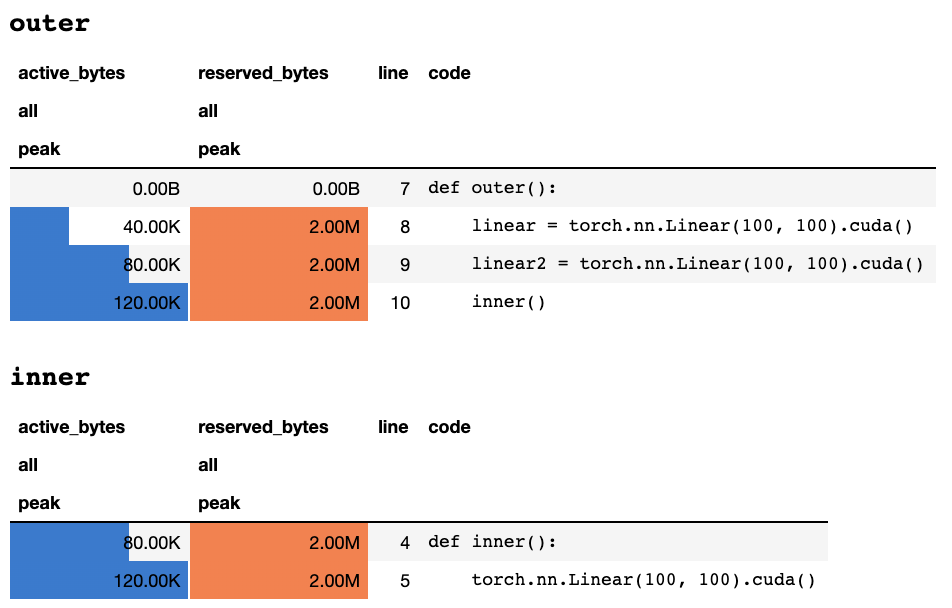
หรือข้อมูลต่อไปนี้หากคุณอยู่ในเทอร์มินัลข้อความเท่านั้น:
 ## outer

active_bytes reserved_bytes line  code
         all            all
        peak           peak
       0.00B          0.00B    7  def outer():
      40.00K          2.00M    8      linear = torch.nn.Linear(100, 100).cuda()
      80.00K          2.00M    9      linear2 = torch.nn.Linear(100, 100).cuda()
     120.00K          2.00M   10      inner()


## inner

active_bytes reserved_bytes line  code
         all            all
        peak           peak
      80.00K          2.00M    4  def inner():
     120.00K          2.00M    5      torch.nn.Linear(100, 100).cuda()
คำอธิบายของความหมายของแต่ละคอลัมน์สามารถพบได้ในเอกสารประกอบ ชื่อของฟิลด์ใด ๆ จาก memory_stats() สามารถส่งผ่านไปยัง display() เพื่อดูสถิติที่เกี่ยวข้อง
หากคุณใช้ Decorator profile สถิติหน่วยความจำจะถูกรวบรวมในระหว่างการรันหลายครั้งและมีเพียงหนึ่งเดียวเท่านั้นที่แสดงในตอนท้าย นอกจากนี้เรายังให้ API ที่มีความยืดหยุ่นมากขึ้นที่เรียกว่า profile_every ซึ่งพิมพ์ข้อมูลหน่วยความจำทุก ครั้ง ที่มีการดำเนินการฟังก์ชั่น คุณสามารถแทนที่ @profile ด้วย @profile_every(1) เพื่อพิมพ์การใช้หน่วยความจำสำหรับการดำเนินการแต่ละครั้ง
@profile และ @profile_every ยังสามารถผสมกันเพื่อควบคุมการดีบักได้มากขึ้น
 class Net ( torch . nn . Module ):
    def __init__ ( self ):
        super (). __init__ ()
    @ profile
    def forward ( self , inp ):
#do_somethingset_target_gpu การเลือก GPU นั้นทั่วโลกซึ่งหมายความว่าคุณต้องจำไว้ว่า GPU ใดที่คุณกำลังทำโปรไฟล์ในระหว่างกระบวนการทั้งหมด: import torch
from pytorch_memlab import profile , set_target_gpu
@ profile
def func ():
net1 = torch . nn . Linear ( 1024 , 1024 ). cuda ( 0 )
set_target_gpu ( 1 )
net2 = torch . nn . Linear ( 1024 , 1024 ). cuda ( 1 )
set_target_gpu ( 0 )
net3 = torch . nn . Linear ( 1024 , 1024 ). cuda ( 0 )
func () ตัวอย่างเพิ่มเติมสามารถพบได้ใน test/test_line_profiler.py
ตรวจสอบให้แน่ใจว่าคุณติดตั้ง IPython หรือติดตั้ง pytorch-memlab พร้อม pip install pytorch-memlab[ipython]
อันดับแรกโหลดส่วนขยาย:
% load_ext pytorch_memlab สิ่งนี้ทำให้ %mlrun และ %%mlrun MAGICS สามารถใช้งานได้ ตัวอย่างเช่นในเซลล์ใหม่ทำงานต่อไปนี้เพื่อโปรไฟล์เซลล์ทั้งหมด
 % % mlrun - f func
import torch
from pytorch_memlab import profile , set_target_gpu
def func ():
    net1 = torch . nn . Linear ( 1024 , 1024 ). cuda ( 0 )
    set_target_gpu ( 1 )
    net2 = torch . nn . Linear ( 1024 , 1024 ). cuda ( 1 )
    set_target_gpu ( 0 )
    net3 = torch . nn . Linear ( 1024 , 1024 ). cuda ( 0 )
หรือคุณสามารถเรียกใช้ Profiler สำหรับคำสั่งเดียวผ่านทาง MLRUN Magic %mlrun
 import torch
from pytorch_memlab import profile , set_target_gpu
def func ( input_size ):
    net1 = torch . nn . Linear ( input_size , 1024 ). cuda ( 0 )
% mlrun - f func func ( 2048 )
ดู %mlrun? สำหรับความช่วยเหลือเกี่ยวกับข้อโต้แย้งที่สนับสนุน คุณสามารถตั้งค่าอุปกรณ์ GPU เป็นโปรไฟล์ผลลัพธ์การทำโปรไฟล์ลงในไฟล์และส่งคืนวัตถุ LineProfiler สำหรับการตรวจสอบหลังโปรไฟล์
ค้นหาข้อมูลเพิ่มเติมได้โดยการตรวจสอบสมุดบันทึก Jupyter Demo
ในฐานะที่เป็น หน่วยความจำ Profiler ให้ข้อมูลการใช้หน่วยความจำโดยรวมโดยบรรทัดเท่านั้นข้อมูลการใช้หน่วยความจำระดับต่ำมากขึ้นสามารถรับได้โดย นักข่าวหน่วยความจำ
Reporter หน่วยความจำ ทำซ้ำวัตถุเท Tensor ทั้งหมดและได้รับวัตถุ UntypedStorage ( Storage ก่อนหน้านี้) พื้นฐานเพื่อให้ได้การใช้หน่วยความจำจริงแทน Tensor.size Surface.size
ดู UntypedStorage สำหรับข้อมูลโดยละเอียด
 import torch
from pytorch_memlab import MemReporter
linear = torch . nn . Linear ( 1024 , 1024 ). cuda ()
reporter = MemReporter ()
reporter . report ()
เอาต์พุต:
 Element type                                            Size  Used MEM
-------------------------------------------------------------------------------
Storage on cuda:0
Parameter0                                      (1024, 1024)     4.00M
Parameter1                                           (1024,)     4.00K
-------------------------------------------------------------------------------
Total Tensors: 1049600  Used Memory: 4.00M
The allocated memory on cuda:0: 4.00M
-------------------------------------------------------------------------------
 import torch
from pytorch_memlab import MemReporter

linear = torch . nn . Linear ( 1024 , 1024 ). cuda ()
inp = torch . Tensor ( 512 , 1024 ). cuda ()
# pass in a model to automatically infer the tensor names
reporter = MemReporter ( linear )
out = linear ( inp ). mean ()
print ( '========= before backward =========' )
reporter . report ()
out . backward ()
print ( '========= after backward =========' )
reporter . report ()
เอาต์พุต:
 ========= before backward =========
Element type                                            Size  Used MEM
-------------------------------------------------------------------------------
Storage on cuda:0
weight                                          (1024, 1024)     4.00M
bias                                                 (1024,)     4.00K
Tensor0                                          (512, 1024)     2.00M
Tensor1                                                 (1,)   512.00B
-------------------------------------------------------------------------------
Total Tensors: 1573889  Used Memory: 6.00M
The allocated memory on cuda:0: 6.00M
-------------------------------------------------------------------------------
========= after backward =========
Element type                                            Size  Used MEM
-------------------------------------------------------------------------------
Storage on cuda:0
weight                                          (1024, 1024)     4.00M
weight.grad                                     (1024, 1024)     4.00M
bias                                                 (1024,)     4.00K
bias.grad                                            (1024,)     4.00K
Tensor0                                          (512, 1024)     2.00M
Tensor1                                                 (1,)   512.00B
-------------------------------------------------------------------------------
Total Tensors: 2623489  Used Memory: 10.01M
The allocated memory on cuda:0: 10.01M
-------------------------------------------------------------------------------
 import torch
from pytorch_memlab import MemReporter

linear = torch . nn . Linear ( 1024 , 1024 ). cuda ()
linear2 = torch . nn . Linear ( 1024 , 1024 ). cuda ()
linear2 . weight = linear . weight
container = torch . nn . Sequential (
    linear , linear2
)
inp = torch . Tensor ( 512 , 1024 ). cuda ()
# pass in a model to automatically infer the tensor names

out = container ( inp ). mean ()
out . backward ()

# verbose shows how storage is shared across multiple Tensors
reporter = MemReporter ( container )
reporter . report ( verbose = True )
เอาต์พุต:
 Element type                                            Size  Used MEM
-------------------------------------------------------------------------------
Storage on cuda:0
0.weight                                        (1024, 1024)     4.00M
0.weight.grad                                   (1024, 1024)     4.00M
0.bias                                               (1024,)     4.00K
0.bias.grad                                          (1024,)     4.00K
1.bias                                               (1024,)     4.00K
1.bias.grad                                          (1024,)     4.00K
Tensor0                                          (512, 1024)     2.00M
Tensor1                                                 (1,)   512.00B
-------------------------------------------------------------------------------
Total Tensors: 2625537  Used Memory: 10.02M
The allocated memory on cuda:0: 10.02M
-------------------------------------------------------------------------------
 import torch
from pytorch_memlab import MemReporter

lstm = torch . nn . LSTM ( 1024 , 1024 ). cuda ()
reporter = MemReporter ( lstm )
reporter . report ( verbose = True )
inp = torch . Tensor ( 10 , 10 , 1024 ). cuda ()
out , _ = lstm ( inp )
out . mean (). backward ()
reporter . report ( verbose = True )
ดังที่แสดงด้านล่าง (->) บ่งชี้การใช้งานซ้ำของการจัดเก็บข้อมูลแบ็กเอนด์ที่เก็บกลับอีกครั้ง:
 Element type                                            Size  Used MEM
-------------------------------------------------------------------------------
Storage on cuda:0
weight_ih_l0                                    (4096, 1024)    32.03M
weight_hh_l0(->weight_ih_l0)                    (4096, 1024)     0.00B
bias_ih_l0(->weight_ih_l0)                           (4096,)     0.00B
bias_hh_l0(->weight_ih_l0)                           (4096,)     0.00B
Tensor0                                       (10, 10, 1024)   400.00K
-------------------------------------------------------------------------------
Total Tensors: 8499200  Used Memory: 32.42M
The allocated memory on cuda:0: 32.52M
Memory differs due to the matrix alignment
-------------------------------------------------------------------------------
Element type                                            Size  Used MEM
-------------------------------------------------------------------------------
Storage on cuda:0
weight_ih_l0                                    (4096, 1024)    32.03M
weight_ih_l0.grad                               (4096, 1024)    32.03M
weight_hh_l0(->weight_ih_l0)                    (4096, 1024)     0.00B
weight_hh_l0.grad(->weight_ih_l0.grad)          (4096, 1024)     0.00B
bias_ih_l0(->weight_ih_l0)                           (4096,)     0.00B
bias_ih_l0.grad(->weight_ih_l0.grad)                 (4096,)     0.00B
bias_hh_l0(->weight_ih_l0)                           (4096,)     0.00B
bias_hh_l0.grad(->weight_ih_l0.grad)                 (4096,)     0.00B
Tensor0                                       (10, 10, 1024)   400.00K
Tensor1                                       (10, 10, 1024)   400.00K
Tensor2                                        (1, 10, 1024)    40.00K
Tensor3                                        (1, 10, 1024)    40.00K
-------------------------------------------------------------------------------
Total Tensors: 17018880         Used Memory: 64.92M
The allocated memory on cuda:0: 65.11M
Memory differs due to the matrix alignment
-------------------------------------------------------------------------------
สังเกต:
เมื่อส่งต่อด้วย
grad_mode=TruePytorch จะรักษาบัฟเฟอร์เทนเซอร์สำหรับการแพร่กระจายกลับในอนาคตในระดับ C ดังนั้นบัฟเฟอร์เหล่านี้จะไม่ได้รับการจัดการหรือรวบรวมโดย Pytorch แต่ถ้าคุณเก็บผลลัพธ์ระดับกลางเหล่านี้เป็นตัวแปร Python พวกเขาจะได้รับการรายงาน
นอกจากนี้คุณยังสามารถกรองอุปกรณ์เพื่อรายงานโดยผ่านอาร์กิวเมนต์พิเศษ: report(device=torch.device(0))
ตัวอย่างที่ล้มเหลวเนื่องจากบัฟเฟอร์เทนเซอร์ด้าน C ของ Pytorch
ในตัวอย่างต่อไปนี้บัฟเฟอร์ TEMP ถูกสร้างขึ้นที่ inp * (inp + 2) เพื่อเก็บทั้ง inp และ inp + 2 แต่น่าเสียดายที่ Python เท่านั้นที่รู้ว่าการมีอยู่ของ INP ดังนั้นเราจึงสูญเสียหน่วยความจำ 2M ซึ่งเป็นขนาดเทนเซอร์ inp ขนาดเดียวกัน
 import torch
from pytorch_memlab import MemReporter

linear = torch . nn . Linear ( 1024 , 1024 ). cuda ()
inp = torch . Tensor ( 512 , 1024 ). cuda ()
# pass in a model to automatically infer the tensor names
reporter = MemReporter ( linear )
out = linear ( inp * ( inp + 2 )). mean ()
reporter . report ()
เอาต์พุต:
 Element type                                            Size  Used MEM
-------------------------------------------------------------------------------
Storage on cuda:0
weight                                          (1024, 1024)     4.00M
bias                                                 (1024,)     4.00K
Tensor0                                          (512, 1024)     2.00M
Tensor1                                                 (1,)   512.00B
-------------------------------------------------------------------------------
Total Tensors: 1573889  Used Memory: 6.00M
The allocated memory on cuda:0: 8.00M
Memory differs due to the matrix alignment or invisible gradient buffer tensors
-------------------------------------------------------------------------------
บางครั้งผู้คนก็ต้องการที่จะยึดครองงานของคุณ แต่คุณไม่ต้องการบันทึกจุดตรวจและจากนั้นโหลดจริง ๆ แล้วสิ่งที่พวกเขาต้องการคือทรัพยากร GPU (โดยทั่วไปแล้วทรัพยากร CPU และหน่วยความจำ CPU จะสำรองไว้ในกลุ่ม GPU เสมอ) เพื่อให้คุณสามารถย้ายพื้นที่ทำงานทั้งหมดจาก GPU ไปยัง CPU
ยังคงพัฒนา ..... แต่คุณสามารถสนุกกับ:
 from pytorch_memlab import Courtesy

iamcourtesy = Courtesy ()
for i in range ( num_iteration ):
    if something_happens :
        iamcourtesy . yield_memory ()
        wait_for_restart_signal ()
iamcourtesy . restore ()Memory_Reporter เทนเซอร์ระดับกลางจะไม่ครอบคลุมอย่างเหมาะสมดังนั้นคุณอาจต้องการแทรก logics ที่ได้รับความอนุเคราะห์ดังกล่าวหลังจาก backward หรือก่อน forwardฉันได้รับความทุกข์ทรมานจากการดีบักการใช้ความทรงจำแปลก ๆ ในช่วง 3 ปีของการพัฒนารูปแบบการเรียนรู้ที่มีประสิทธิภาพและแน่นอนว่าได้เรียนรู้มากมายจากชุมชนโอเพ่นซอร์สที่ยอดเยี่ยม
DataFrame.drop สำหรับ pandas 1.5+ MemReporter (#24)MemReporter line_profiler 







