version rocket
1.7.1

英语| 简体中文
用于Web应用程序版本检测和部署通知的工具库。
目录
版本高架包含两个功能模块: Web应用程序版本实时检测,自动部署消息给Lark或Wecom Group Chat
您可以根据需要分别使用模块,也可以一起使用
什么时候适合使用Web应用程序版本实时检测? - 场景:这种情况经常发生。当用户长时间在浏览器中打开Web应用程序并且没有刷新页面。当应用程序具有新版本更新或问题维修时,用户将不知道该版本的新版本将导致用户。继续使用旧版本来影响用户体验和后端数据准确性。
什么时候适用于自动向Lark或Wecom组聊天发送部署消息? - 场景:团队合作可能存在这样的情况。作为前端工程师,每次部署后,您都需要与团队成员进行口头交流。没有部署记录要遵循。
Webhook方法。在应用程序部署成功之后,通过小组聊天机器人,“成功部署”的新闻将自动推向组聊天。如果您有其他平台的推动需求,则可以提及问题
v1.7.0上的任何文件Web应用程序版本实时检测:
Web Worker API执行监控轮询,这不会影响浏览器渲染过程。Web Worker API执行监控轮询,这不会影响浏览器渲染过程。 v1.7.0自动将部署消息发送到Lark或Wecom组聊天: version-Rocket CALL CALL CALL the Webhook方法由协作Office软件提供的Webhook方法触发组聊天机器人发送消息。
 # Choose a package manager you prefer

# npm
npm install version-rocket --save

# yarn
yarn add version-rocket

# pnpm
pnpm install version-rocket
步骤1:导入checkVersion() ,并使用它
 // Entry file: such as App.vue or App.jsx, etc

import { checkVersion } from 'version-rocket'
// It is recommended to use the version field in package.json, or you can customize versions
import { version } from '../package.json'

checkVersion ( {
  localPackageVersion : version ,
  originVersionFileUrl : ` ${ location . origin } /version.json` ,
  // Refer to API for more configuration options
} )

// To terminate version detection, call the unCheckVersion method during the destruction life cycle. For details, see the API
unCheckVersion ( { closeDialog : false } )
步骤2:执行generate-version-file自定义命令后,生成version.json文件,用于部署到远程服务器
VERSION (可选):当需要自定义版本时,将传递。默认值为package.json版本字段
文件输出目录(可选):用户定义的版本。JSON输出目录,默认情况下是DIST目录
EXTERNAL (可选):当您想将更多信息保存到version.json时,例如当前版本的修改内容或需要在弹出窗口上显示的其他内容(inversionupdate custom UI中) v1.6.0
EXTERNAL_PATH (可选):接受文件路径,当需要将很多额外信息写入version.json 。当设置EXTERNAL和EXTERNAL_PATH时,优先级低于EXTERNAL custom ui) v1.6.1
版本使用
 // package.json

{
  "name" : "test" ,
  "description" : "test" ,
  "private" : true ,
  "version" : "0.0.1" ,
  "scripts" : {
    ...
    // Mac or Linux system
    "generate:version" : "VERSION=1.1.0-beta generate-version-file dist public"
    // Windows system: install cross-env first
    // npm install cross-env -D
     "generate:version" : "cross-env VERSION=1.1.0-beta generate-version-file dist public"
    . . .
  } ,
  ...
}外部v1.6.0和external_path v1.6.1用法
JSON格式请使用此工具逃脱单击此处
 // package.json

{
  "name" : "test" ,
  "description" : "test" ,
  "private" : true ,
  "version" : "0.0.1" ,
  "scripts" : {
    ...
    // Mac or Linux (simple text)
    "generate:version" : "EXTERNAL='some text' generate-version-file dist public"
    // Mac or Linux (JSON text)
    "generate:version" : "EXTERNAL='{"update":"fix bugs","content":"some tips"}' generate-version-file dist public"
    // Mac or Linux (JSON file, e.g. version-external.json)
    "generate:version" : "EXTERNAL_PATH=version-external.json generate-version-file dist public"
    // Windows (simple text)
    "generate:version" : "set EXTERNAL=some text && generate-version-file dist public"
    // Windows (JSON text)
    "generate:version" : "set EXTERNAL={"update":"fix bugs","content":"some tips"} && generate-version-file dist public"
    // Windows (JSON file, e.g. version-external.json)
    "generate:version" : "set EXTERNAL_PATH=version-external.json && generate-version-file dist public"
    . . .
  } ,
  ...
}
// version-external.json
{
"update" : [
"fix some bugs" ,
"improve home page" ,
"update docs"
] ,
"content" : "please update to latest version"
}// nginx example
server {
...
location / {
...
if ( $request_filename ~ * . * / version . (json)$) {
add_header Cache-Control " private, no-store, no-cache, must-revalidate, proxy-revalidate " ;
}
...
}
...
}完成上述两个步骤,可以正常使用版本监视功能(通过版本编号管理)?
v1.7.0
配x 友好的提醒:此方法不支持显示“当前版本更改或需要在提示窗口中显示的其他信息”。如果您有这样的要求,请使用“版本管理”方法。
导入checkVersion() ,并使用它
 // Entry file: such as App.vue or App.jsx, etc
import { checkVersion } from 'version-rocket'

// Call checkVersion in the lifecycle hook
checkVersion ( {
  // The list of files to be monitored usually includes the index.html file under a certain domain
  checkOriginSpecifiedFilesUrl : [ ` ${ location . origin } /index.html` ] ,
  // The validation mode for the list of monitored files: 'one' (default) or 'all'
  checkOriginSpecifiedFilesUrlMode : 'one' ,
  // Whether to enable version monitoring (default true)
  enable : process . env . NODE_ENV !== 'development'
} )

// If you need to terminate version checking, call the unCheckVersion method in the destroy lifecycle. For more details, see the API documentation
unCheckVersion ( { closeDialog : false } )
完成上述步骤后,可以正常使用版本监视功能(通过检测指定文件内容中的更新)?
 // Entry file: such as App.vue or App.jsx, etc
import { checkVersion } from 'version-rocket'
// It is recommended to use the version field in package.json, or you can customize versions
import { version } from '../package.json'

checkVersion (
  {
    localPackageVersion : version ,
    originVersionFileUrl : ` ${ location . origin } /version.json` ,
  } ,
  {
    title : 'Title' ,
    description : 'Description' ,
    primaryColor : '#758bfd' ,
    rocketColor : '#ff8600' ,
    buttonText : 'Button Text' ,
  }
)
或设置提示图片
 // Entry file: such as App.vue or App.jsx, etc

import { checkVersion } from 'version-rocket'
// It is recommended to use the version field in package.json, or you can customize versions
import { version } from '../package.json'

checkVersion (
  {
    localPackageVersion : version ,
    originVersionFileUrl : ` ${ location . origin } /version.json` ,
  } ,
  {
    imageUrl : 'https://avatars.githubusercontent.com/u/26329117' ,
  }
) 

步骤1:
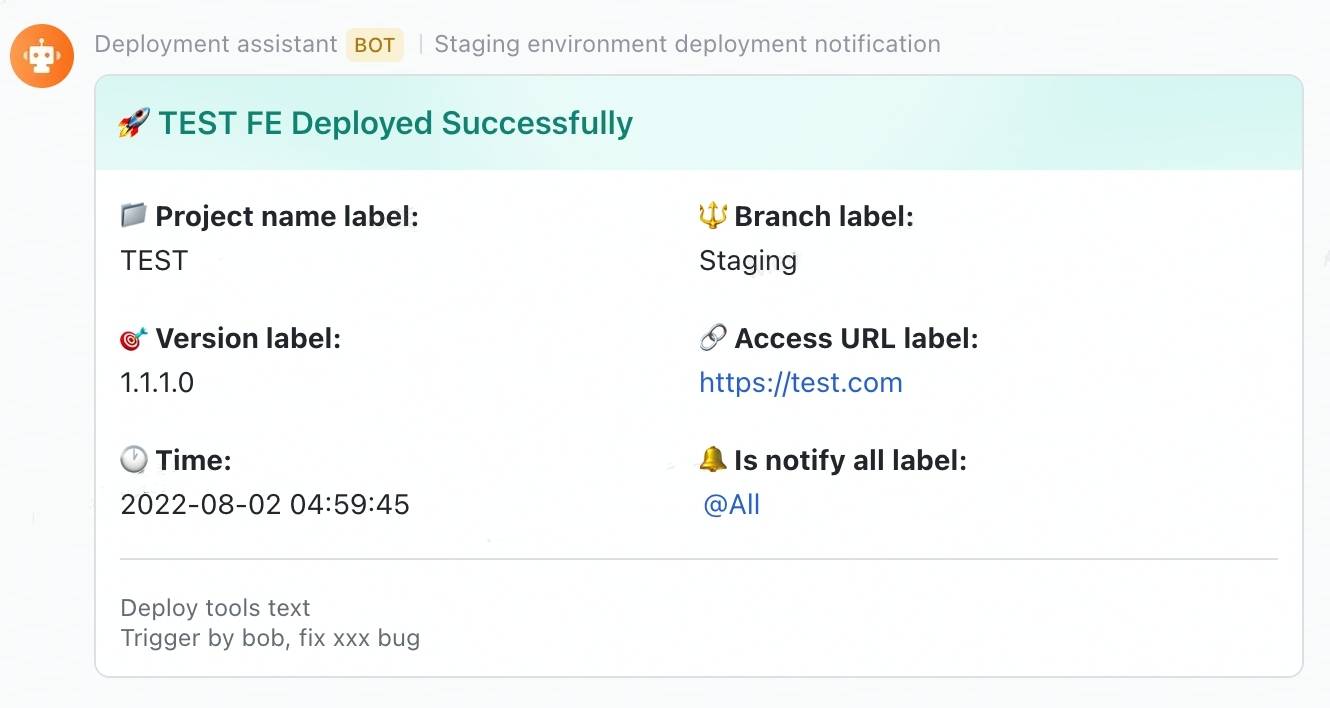
lark-message-config.json文件以设置消息卡的文本MESSAGE_PATH (可选):如果您需要自定义文件路径或文件名(如果需要区分部署环境,此参数很有用)。默认情况下,使用了根目录中的lark-message-config.json文件PACKAGE_JSON_PATH (可选):如果您需要自定义package.json文件的路径(此参数可能对MonorePo项目的部署很有用),则通过。默认值是在root路径中获取package.json文件 // package.json
{
"name" : "test" ,
"description" : "test" ,
"private" : true ,
"version" : "0.0.1" ,
"scripts" : {
...
// Mac or Linux system
"send-lark-message:test" : "MESSAGE_PATH=./lark-message-staging-config.json PACKAGE_JSON_PATH=./packages/test/package.json send-lark-message"
// Windows system: install cross-env first
// npm install cross-env -D
"send-lark-message:test" : "cross-env MESSAGE_PATH=./lark-message-staging-config.json PACKAGE_JSON_PATH=./packages/test/package.json send-lark-message"
. . .
} ,
...
}步骤2:设置lark-message-config.json
 // lark-message-config.json
{
  // optional: card header's background color, default is turquoise, v1.6.2
  // available values: blue | wathet | turquoise | green | yellow | orange | red | carmine | violet | purple | indigo | grey
  "headerBgColor" : "red" ,
  // card title
  "title" : "TEST FE Deployed Successfully" ,
  // project name label
  "projectNameLabel" : "Project name label" ,
  // deploy project name
  "projectName" : "TEST" ,
  // project branch label
  "branchLabel" : "Branch label" ,
  // deploy branch name
  "branch" : "Staging" ,
  // version label
  "versionLabel" : "Version label" ,
  // version
  "version" : "1.1.1.0" ,
  // project access url label
  "accessUrlLabel" : "Access URL label" ,
  // project access url
  "accessUrl" : "https://test.com" ,
  // remind group chat members label
  "isNotifyAllLabel" : "Is notify all label" ,
  // remind group chat members: true/false
  "isNotifyAll" : true ,
  // lark robot webhook url
  "larkWebHook" : "https://open.larksuite.com/open-apis/bot/v2/hook/xxxxxxxxxxxx" ,
  // deploy type description
  "deployToolsText" : "Deploy tools text" ,
  // deploy type
  "deployTools" : "Jenkins" ,
  // the deploy time zone that you want to display, default "Asia/Shanghai"
  "expectConvertToTimezone" : "America/New_York"
  // more information want to show
  "remark" : "Trigger by bob, fix xxx bug"
} 如果将根据条件生成您的卡副本,则可以通过MESSAGE_JSON字段进行自定义,例如版本,标题等
注意: MESSAGE_JSON需要逃脱
 // package.json

{
  "name" : "test" ,
  "description" : "test" ,
  "private" : true ,
  "version" : "0.0.1" ,
  "scripts" : {
    ...
    // Mac or Linux system
    "send-lark-message:test" : "MESSAGE_JSON='{"title":"This is a dynamically generated title","version":"1.1.0-beta","accessUrl":"http://test.example.com","isNotifyAll":true}' send-lark-message"
    // Windows system
    "send-lark-message:test" : "set MESSAGE_JSON={"title":"This is a dynamically generated title","version":"1.1.0-beta","accessUrl":"http://test.example.com","isNotifyAll":true} && send-lark-message"
    . . .
  } ,
  ...
}
或在导出变量后,引用package.json(不支持Windows)
 // ci file

sh "npm run build"
sh "export messageJSON='{"title": "This is a title"}'"


// package.json

{
  "name" : "test" ,
  "description" : "test" ,
  "private" : true ,
  "version" : "0.0.1" ,
  "scripts" : {
    ...
    "send-lark-message:test" : "MESSAGE_JSON=${messageJSON} send-lark-message"
    . . .
  } ,
  ...
} // lark-message-config.json
{
// Message card content
"message" : {
"msg_type" : "text" ,
"content" : {
"text" : "New message reminder"
}
} ,
// Lark robot's webhook link
"larkWebHook" : "https://open.larksuite.com/open-apis/bot/v2/hook/xxxxxxxxxxxx"
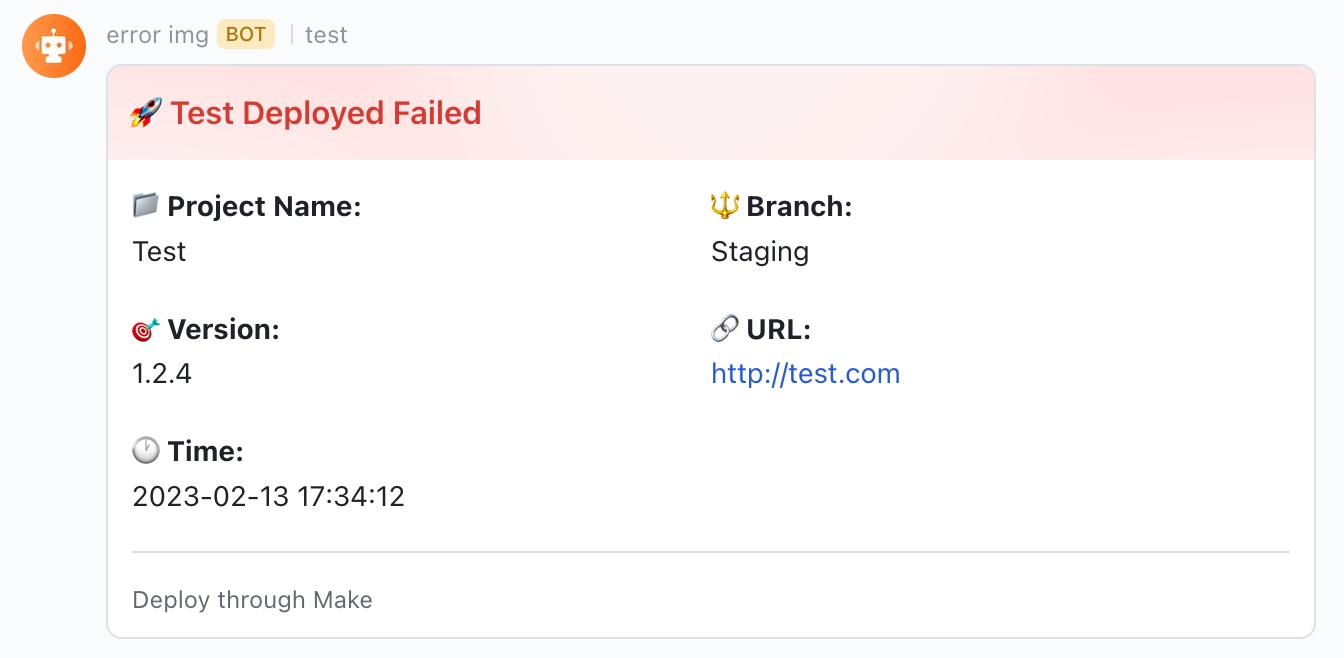
} 
步骤1:
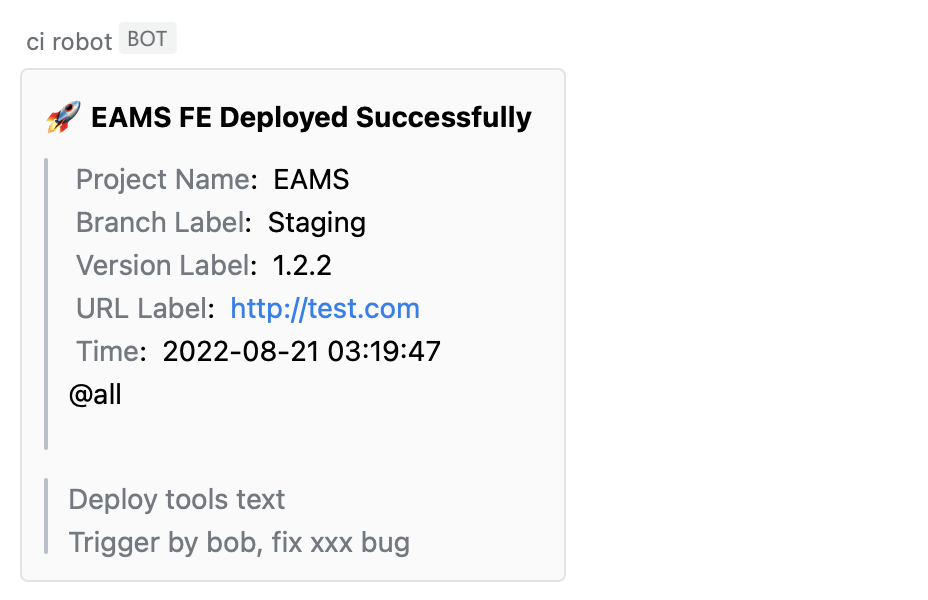
message-config.json文件以设置消息卡的文本MESSAGE_PATH (可选):当您需要自定义文件路径或文件名时传递(如果需要区分部署环境,则此参数很有用)。默认值是在根目录中使用Message-config.json文件PACKAGE_JSON_PATH (可选):当需要自定义路径到package.json文件时传递(此参数可能对MonorePo项目的部署很有用)。默认值是在root路径中获取package.json文件 // package.json
{
"name" : "test" ,
"description" : "test" ,
"private" : true ,
"version" : "0.0.1" ,
"scripts" : {
...
// Mac or Linux system
"send-wecom-message:test" : "MESSAGE_PATH=./message-config.json PACKAGE_JSON_PATH=./packages/test/package.json send-wecom-message"
// Windows system: install cross-env first
// npm install cross-env -D
"send-wecom-message:test" : "cross-env MESSAGE_PATH=./message-config.json PACKAGE_JSON_PATH=./packages/test/package.json send-wecom-message"
. . .
} ,
...
}步骤2:设置message-config.json
 {
  // card title
  "title" : "TEST FE Deployed Successfully" ,
  // project name label
  "projectNameLabel" : "Project name label" ,
  // deploy project name
  "projectName" : "TEST" ,
  // project branch label
  "branchLabel" : "Branch label" ,
  // deploy branch name
  "branch" : "Staging" ,
  // version label
  "versionLabel" : "Version label" ,
  // version
  "version" : "1.1.1.0" ,
  // project access url label
  "accessUrlLabel" : "Access URL label" ,
  // project access url
  "accessUrl" : "https://test.com" ,
  // remind group chat members label
  "isNotifyAllLabel" : "Is notify all label" ,
  // remind group chat members: true/false
  "isNotifyAll" : true ,
  // WeCom robot webhook url
  "webHook" : "https://qyapi.weixin.qq.com/cgi-bin/webhook/send?key=xxxxxxxxxxxxxxx" ,
  // deploy type description
  "deployToolsText" : "Deploy tools text" ,
  // deploy type
  "deployTools" : "Jenkins" ,
  // the deploy time zone that you want to display, default "Asia/Shanghai"
  "expectConvertToTimezone" : "America/New_York"
  // more information want to show
  "remark" : "Trigger by bob, fix xxx bug"
} 如果将根据条件生成您的卡副本,则可以通过MESSAGE_JSON字段进行自定义,例如版本,标题等
注意: MESSAGE_JSON需要逃脱
 // package.json

{
  "name" : "test" ,
  "description" : "test" ,
  "private" : true ,
  "version" : "0.0.1" ,
  "scripts" : {
    ...
    // Mac or Linux system
    "send-wecom-message:test" : "MESSAGE_JSON='{"title":"This is a dynamically generated title","version":"1.1.0-beta","accessUrl":"http://test.example.com","isNotifyAll":true}' send-wecom-message"
    // Windows system
    "send-wecom-message:test" : "set MESSAGE_JSON={"title":"This is a dynamically generated title","version":"1.1.0-beta","accessUrl":"http://test.example.com","isNotifyAll":true} && send-wecom-message"
    . . .
  } ,
  ...
}
或在导出变量后,引用package.json(不支持Windows)
 // ci file
sh "npm run build"
sh "export messageJSON='{"title": "This is a title"}'"

// package.json

{
  "name" : "test" ,
  "description" : "test" ,
  "private" : true ,
  "version" : "0.0.1" ,
  "scripts" : {
    ...
    "send-wecom-message:test" : "MESSAGE_JSON=${messageJSON} send-wecom-message"
    . . .
  } ,
  ...
} // message-config.json
{
// message card template content
"message" : {
"msgtype" : "text" ,
"text" : {
"content" : "This is a custom message"
}
}
// webhook link for the WeCom bot
" webHook ": "https://qyapi.weixin.qq.com/cgi-bin/webhook/send?key=xxxxxxxxxxxx"
} 
CheckVersion功能
启用实时应用程序检测
| 参数 | 类型 | 描述 | 默认 | 必需的 |
|---|---|---|---|---|
| config | 目的 | 版本监视配置项目 | 是的 | |
| config.originversionfileurl | 细绳 | 远程服务器上的version.json文件的路径 | 是的 | |
| config.localpackageversion | 细绳 | 当前应用程序的版本通常为package.json的版本字段。 | 是的 | |
| config.pollingtime | 数字 | 在MS中进行轮询监视的时间间隔 | 5000 | 不 |
| config.immediate | 布尔 | 在第一次访问时,将立即触发版本监视,然后进行轮询,以定制的时间间隔v1.5.0进行。 | 错误的 | 不 |
| config.checkoriginspecifiedfilesurl | 大批 | 设置此属性将使用“检测指定文件内容中的更新”,而不是“版本编号管理”来监视版本。传递要监视的文件地址列表,通常在某个域(自动重复数据删除) v1.7.0下的index.html文件 | 错误的 | |
| config.checkoriginspecifiedfilesurlmode | “一个” /“全部” | “一个”表示,如果列表中的任何文件地址的内容更改,则会显示更新的提示; “全部”意味着仅在列表中所有文件地址的内容更改时,才会显示更新的提示。 (仅在配置CheckOriginsPecifiedFilesUrl时才生效) v1.7.0 | '一' | 错误的 |
| config.enable | 布尔 | 是否启用版本监视。此配置项可用于仅在指定环境中启用版本监视v1.7.0 | 真的 | 否 |
| config.clearintervalondialog | 布尔 | 当出现新版本的提示对话框时,清除计时器v1.7.0 | 错误的 | 否 |
| config.onversionupdate | 功能(数据) | 自定义版本提示UI的回调函数(如果要自定义弹出式UI,则可以通过回调函数获取返回值以控制弹出窗口的外观) | 不 | |
| config.onrefresh | 功能(数据) | 确认更新:自定义刷新事件的回调功能,其中数据是最新版本v1.5.0 | 不 | |
| config.oncancel | 功能(数据) | 取消更新:自定义取消事件的回调功能,其中数据是最新版本v1.5.0 | 不 | |
| 选项 | 目的 | 弹出文本和主题的配置项目(不是自定义弹出式UI,但如果需要修改文本和主题,请使用它) | 不 | |
| options.title | 细绳 | 弹出标题 | 更新 | 不 |
| 选项。描述 | 细绳 | 弹出描述 | V XXX可用 | 不 |
| options.buttontext | 细绳 | 弹出按钮文字 | 刷新 | 不 |
| options.cancelbuttontext | 细绳 | 文本以关闭弹出按钮(如果希望允许弹出弹出窗口关闭,请添加此选项) v1.5.0 | 不 | |
| options.cancelmode | 忽略电流version /忽略 - today /忽略电流窗口 | 关闭弹出模式(设置CancelButTontext时会生效) v1.5.0 | 忽略电流变 | 不 |
| options.cancelupdateandstopworker | 布尔 | 取消弹出窗口时,工人也会停止(设置CancelButTontext时会生效) v1.5.0 | 错误的 | 否 |
| options.imageurl | 细绳 | 弹出图像 | 不 | |
| options.RocketColor | 细绳 | 弹出式图片的主题颜色,在设置选项之后。ImageUrl无效 | 不 | |
| options.primarycolor | 细绳 | 弹出窗口的主题颜色将影响提示图像背景颜色和按钮背景颜色,在设置ImageUrl无效之后 | 不 | |
| options.buttonStyle | 细绳 | 弹出按钮的CSS配置可以覆盖默认按钮样式 | 不 |
未选中功能
终止调用
checkVersionworker过程
| 参数 | 类型 | 描述 | 默认 | 必需的 |
|---|---|---|---|---|
| 封闭式 | 布尔 | 是否关闭版本更新提示弹出窗口 | - | 是的 |
| 近距离工作者 | 布尔 | 是否关闭工人 | 真的 | 不 |
npm run test 版本高速公路是带有Apache许可证2.0的开源软件
Web-authn-Completed-App
在线预览
一个基于WebAuthn API的完整应用程序,该应用程序允许网站使用浏览器/系统中的内置身份验证器(例如Apple TouchID和Windows Hello或移动设备的生物识别传感器)对用户进行身份验证。它将替换密码,这是在线身份验证的未来。







