version rocket
1.7.1

영어 | 简体中文
웹 애플리케이션 버전 탐지 및 배포 알림을위한 도구 라이브러리.
목록
버전 로켓 에는 두 가지 기능 모듈이 포함되어 있습니다 : 웹 애플리케이션 버전 실시간 감지 , LARK 또는 WECOM 그룹 채팅에 자동 배포 메시지
필요에 따라 모듈을 별도로 사용하거나 함께 사용할 수 있습니다.
웹 애플리케이션 버전 실시간 탐지를 사용하는 것이 언제 적합합니까? -장면 : 이런 종류의 상황은 종종 발생합니다. 사용자가 오랫동안 브라우저에서 웹 애플리케이션을 열고 페이지를 새로 고치지 않은 경우. 응용 프로그램에 새 버전 업데이트 또는 문제 수리가 있으면 사용자는 새 버전의 릴리스가 있음을 알지 못하므로 사용자로 이어질 것입니다. 오래된 버전을 사용하여 사용자 경험과 백엔드 데이터 정확도에 영향을 미칩니다.
LARK 또는 WECOM Group Chat에 배포 메시지를 자동으로 보내는 데 적합합니까? -장면 : 팀 협력에 그러한 상황이있을 수 있습니다. 프런트 엔드 엔지니어는 각 배포 후 팀원과 구두로 의사 소통해야합니다. 따라야 할 배포 기록이 없습니다.
Webhook 메소드를 사용합니다. 애플리케이션 배포가 성공하면 그룹 채팅 로봇을 통해 "성공적인 배포"라는 소식이 자동으로 그룹 채팅으로 푸시됩니다.다른 플랫폼의 푸시 요구가있는 경우 문제를 언급 할 수 있습니다.
v1.7.0 의 모든 파일이 지원됩니다.웹 애플리케이션 버전 실시간 탐지 :
Web Worker API 사용하여 모니터링 폴링을 수행하는데, 이는 브라우저 렌더링 프로세스에 영향을 미치지 않습니다.Web Worker API 사용하여 모니터링 폴링을 수행하는데, 이는 브라우저 렌더링 프로세스에 영향을 미치지 않습니다. v1.7.0LARK 또는 WECOM 그룹 채팅에 배포 메시지를 자동으로 보냅니다. 버전-로켓은 공동 사무실 소프트웨어가 제공 한 WebHook 메소드를 호출하여 그룹 채팅 로봇을 트리거하여 메시지를 전합니다.
 # Choose a package manager you prefer

# npm
npm install version-rocket --save

# yarn
yarn add version-rocket

# pnpm
pnpm install version-rocket
1 단계 : checkVersion() 가져 와서 사용하십시오
 // Entry file: such as App.vue or App.jsx, etc

import { checkVersion } from 'version-rocket'
// It is recommended to use the version field in package.json, or you can customize versions
import { version } from '../package.json'

checkVersion ( {
  localPackageVersion : version ,
  originVersionFileUrl : ` ${ location . origin } /version.json` ,
  // Refer to API for more configuration options
} )

// To terminate version detection, call the unCheckVersion method during the destruction life cycle. For details, see the API
unCheckVersion ( { closeDialog : false } )
2 단계 : generate-version-file 사용자 정의 명령을 실행 한 후 원격 서버에 배포하는 데 사용되는 version.json 파일을 생성하십시오.
VERSION (선택 사항) : 사용자 정의 버전이 필요한 경우 전달됩니다. 기본값은 package.json 버전 필드입니다.
파일 출력 디렉토리 (선택 사항) : 사용자 정의 버전.json 출력 디렉토리 , 기본적으로 Dist Directory입니다.
EXTERNAL (선택 사항) : 더 많은 정보를 version.json 에 저장하려면 현재 버전의 수정 된 컨텐츠 또는 팝업에 표시 해야하는 기타 사항 (Oversionupdate Custom UI에 사용) v1.6.0
EXTERNAL_PATH (선택 사항) : 파일 경로를 수락합니다. 많은 추가 정보를 version.json 에 작성 해야하는 경우 권장됩니다. EXTERNAL 및 EXTERNAL_PATH 모두 설정되면 우선 순위는 EXTERNAL 보다 낮습니다 (OversionupDate Custom UI에 사용됨 v1.6.1
버전 사용
 // package.json

{
  "name" : "test" ,
  "description" : "test" ,
  "private" : true ,
  "version" : "0.0.1" ,
  "scripts" : {
    ...
    // Mac or Linux system
    "generate:version" : "VERSION=1.1.0-beta generate-version-file dist public"
    // Windows system: install cross-env first
    // npm install cross-env -D
     "generate:version" : "cross-env VERSION=1.1.0-beta generate-version-file dist public"
    . . .
  } ,
  ...
}
외부 v1.6.0 및 external_path v1.6.1 사용
JSON 형식이 도구를 사용하여 탈출하십시오.
 // package.json

{
  "name" : "test" ,
  "description" : "test" ,
  "private" : true ,
  "version" : "0.0.1" ,
  "scripts" : {
    ...
    // Mac or Linux (simple text)
    "generate:version" : "EXTERNAL='some text' generate-version-file dist public"
    // Mac or Linux (JSON text)
    "generate:version" : "EXTERNAL='{"update":"fix bugs","content":"some tips"}' generate-version-file dist public"
    // Mac or Linux (JSON file, e.g. version-external.json)
    "generate:version" : "EXTERNAL_PATH=version-external.json generate-version-file dist public"
    // Windows (simple text)
    "generate:version" : "set EXTERNAL=some text && generate-version-file dist public"
    // Windows (JSON text)
    "generate:version" : "set EXTERNAL={"update":"fix bugs","content":"some tips"} && generate-version-file dist public"
    // Windows (JSON file, e.g. version-external.json)
    "generate:version" : "set EXTERNAL_PATH=version-external.json && generate-version-file dist public"
    . . .
  } ,
  ...
}
// version-external.json
{
"update" : [
"fix some bugs" ,
"improve home page" ,
"update docs"
] ,
"content" : "please update to latest version"
}// nginx example
server {
...
location / {
...
if ( $request_filename ~ * . * / version . (json)$) {
add_header Cache-Control " private, no-store, no-cache, must-revalidate, proxy-revalidate " ;
}
...
}
...
}위의 두 단계를 완료하면 버전 모니터링 기능 (버전 번호 관리를 통해)을 정상적으로 사용할 수 있습니까?
v1.7.0
켈 친절한 알림 :이 메소드는 "현재 버전 변경 또는 프롬프트 창에 표시 해야하는 기타 정보"표시를 지원하지 않습니다. 그러한 요구 사항이있는 경우 "버전 관리"방법을 사용하십시오.
checkVersion() 가져 와서 사용하십시오
 // Entry file: such as App.vue or App.jsx, etc
import { checkVersion } from 'version-rocket'

// Call checkVersion in the lifecycle hook
checkVersion ( {
  // The list of files to be monitored usually includes the index.html file under a certain domain
  checkOriginSpecifiedFilesUrl : [ ` ${ location . origin } /index.html` ] ,
  // The validation mode for the list of monitored files: 'one' (default) or 'all'
  checkOriginSpecifiedFilesUrlMode : 'one' ,
  // Whether to enable version monitoring (default true)
  enable : process . env . NODE_ENV !== 'development'
} )

// If you need to terminate version checking, call the unCheckVersion method in the destroy lifecycle. For more details, see the API documentation
unCheckVersion ( { closeDialog : false } )
위의 단계를 완료하면 버전 모니터링 기능 (지정된 파일 내용의 업데이트를 감지하여)을 정상적으로 사용할 수 있습니까?
 // Entry file: such as App.vue or App.jsx, etc
import { checkVersion } from 'version-rocket'
// It is recommended to use the version field in package.json, or you can customize versions
import { version } from '../package.json'

checkVersion (
  {
    localPackageVersion : version ,
    originVersionFileUrl : ` ${ location . origin } /version.json` ,
  } ,
  {
    title : 'Title' ,
    description : 'Description' ,
    primaryColor : '#758bfd' ,
    rocketColor : '#ff8600' ,
    buttonText : 'Button Text' ,
  }
)
또는 프롬프트 사진을 설정하십시오
 // Entry file: such as App.vue or App.jsx, etc

import { checkVersion } from 'version-rocket'
// It is recommended to use the version field in package.json, or you can customize versions
import { version } from '../package.json'

checkVersion (
  {
    localPackageVersion : version ,
    originVersionFileUrl : ` ${ location . origin } /version.json` ,
  } ,
  {
    imageUrl : 'https://avatars.githubusercontent.com/u/26329117' ,
  }
) 
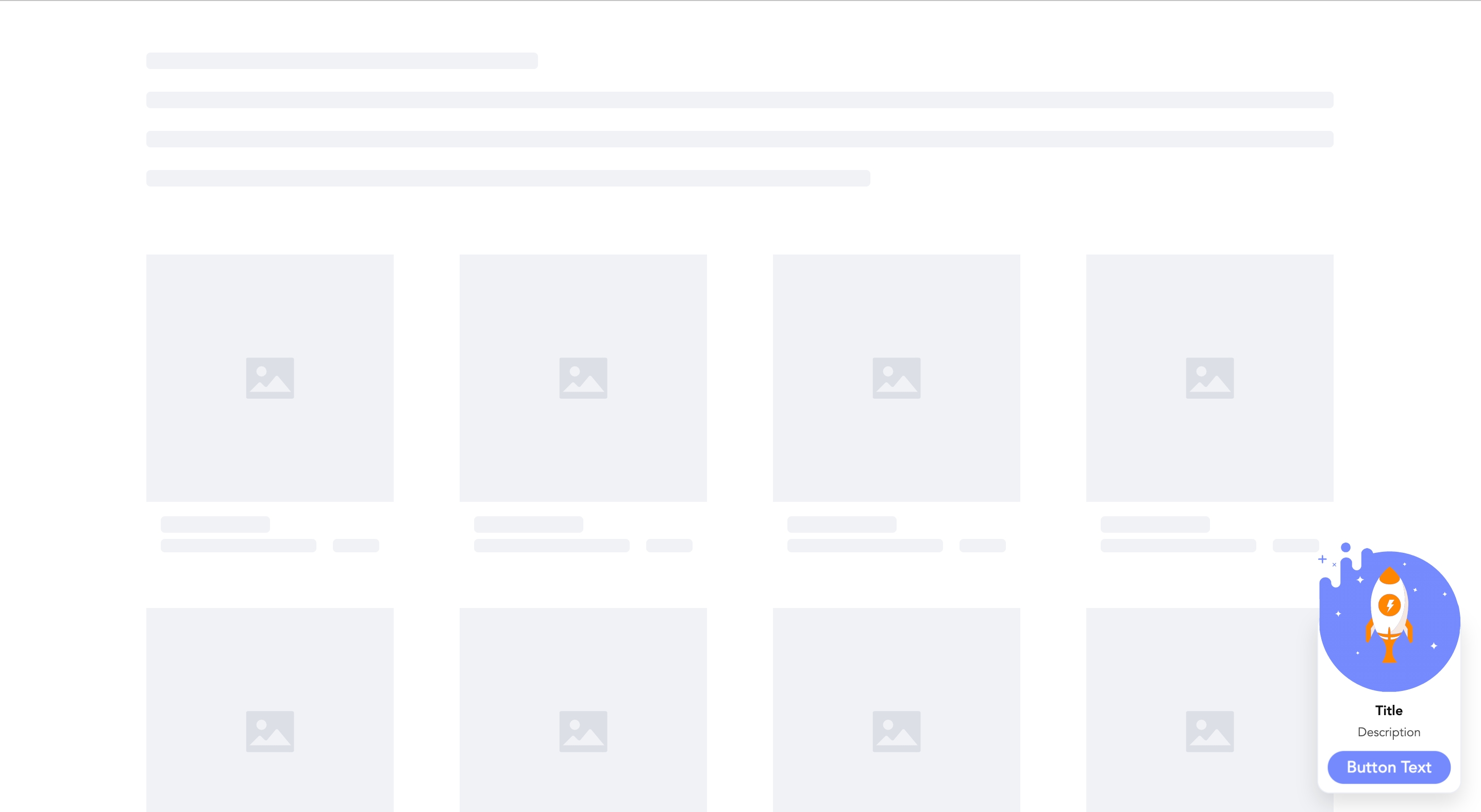
Step 1:
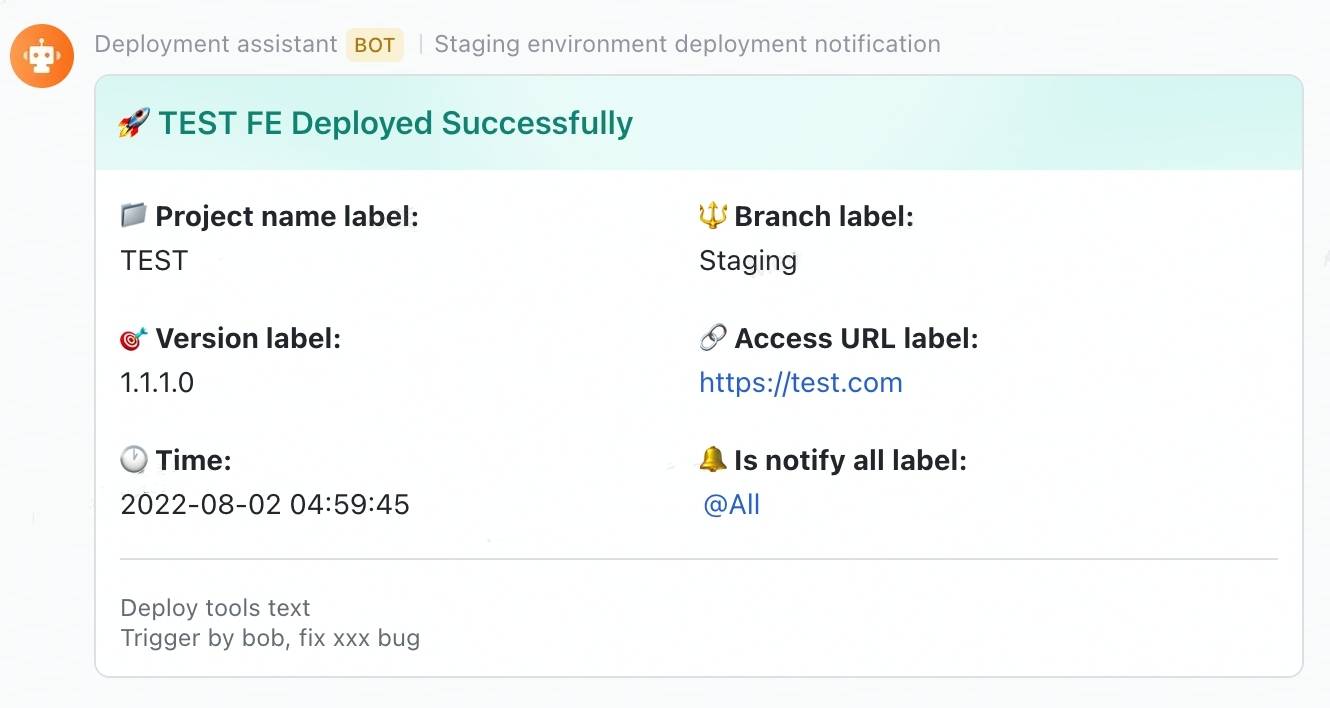
lark-message-config.json 파일 생성 메시지 카드의 텍스트를 설정하십시오.MESSAGE_PATH (선택 사항) : 파일 경로 또는 파일 이름을 사용자 정의 해야하는 경우 전달됩니다 (이 매개 변수는 배포 환경을 구별 해야하는 경우 유용합니다). 기본적으로 루트 디렉토리의 lark-message-config.json 파일이 사용됩니다.PACKAGE_JSON_PATH (선택 사항) : package.json 파일에 대한 경로를 사용자 정의 해야하는 경우 통과했습니다 (이 매개 변수는 Monorepo 프로젝트의 배포에 유용 할 수 있음). 기본값은 루트 경로에서 package.json 파일을 가져 오는 것입니다. // package.json
{
"name" : "test" ,
"description" : "test" ,
"private" : true ,
"version" : "0.0.1" ,
"scripts" : {
...
// Mac or Linux system
"send-lark-message:test" : "MESSAGE_PATH=./lark-message-staging-config.json PACKAGE_JSON_PATH=./packages/test/package.json send-lark-message"
// Windows system: install cross-env first
// npm install cross-env -D
"send-lark-message:test" : "cross-env MESSAGE_PATH=./lark-message-staging-config.json PACKAGE_JSON_PATH=./packages/test/package.json send-lark-message"
. . .
} ,
...
} 2 단계 : lark-message-config.json 설정합니다
 // lark-message-config.json
{
  // optional: card header's background color, default is turquoise, v1.6.2
  // available values: blue | wathet | turquoise | green | yellow | orange | red | carmine | violet | purple | indigo | grey
  "headerBgColor" : "red" ,
  // card title
  "title" : "TEST FE Deployed Successfully" ,
  // project name label
  "projectNameLabel" : "Project name label" ,
  // deploy project name
  "projectName" : "TEST" ,
  // project branch label
  "branchLabel" : "Branch label" ,
  // deploy branch name
  "branch" : "Staging" ,
  // version label
  "versionLabel" : "Version label" ,
  // version
  "version" : "1.1.1.0" ,
  // project access url label
  "accessUrlLabel" : "Access URL label" ,
  // project access url
  "accessUrl" : "https://test.com" ,
  // remind group chat members label
  "isNotifyAllLabel" : "Is notify all label" ,
  // remind group chat members: true/false
  "isNotifyAll" : true ,
  // lark robot webhook url
  "larkWebHook" : "https://open.larksuite.com/open-apis/bot/v2/hook/xxxxxxxxxxxx" ,
  // deploy type description
  "deployToolsText" : "Deploy tools text" ,
  // deploy type
  "deployTools" : "Jenkins" ,
  // the deploy time zone that you want to display, default "Asia/Shanghai"
  "expectConvertToTimezone" : "America/New_York"
  // more information want to show
  "remark" : "Trigger by bob, fix xxx bug"
} 조건에 따라 카드 사본이 생성되면 MESSAGE_JSON 필드를 전달할 수 있습니다. 버전, 제목 등과 같이 자체 정의됩니다.
참고 : MESSAGE_JSON 탈출해야합니다
 // package.json

{
  "name" : "test" ,
  "description" : "test" ,
  "private" : true ,
  "version" : "0.0.1" ,
  "scripts" : {
    ...
    // Mac or Linux system
    "send-lark-message:test" : "MESSAGE_JSON='{"title":"This is a dynamically generated title","version":"1.1.0-beta","accessUrl":"http://test.example.com","isNotifyAll":true}' send-lark-message"
    // Windows system
    "send-lark-message:test" : "set MESSAGE_JSON={"title":"This is a dynamically generated title","version":"1.1.0-beta","accessUrl":"http://test.example.com","isNotifyAll":true} && send-lark-message"
    . . .
  } ,
  ...
}
또는 변수 내보내기 후, package.json의 견적 (Windows를 지원하지 않음)
 // ci file

sh "npm run build"
sh "export messageJSON='{"title": "This is a title"}'"


// package.json

{
  "name" : "test" ,
  "description" : "test" ,
  "private" : true ,
  "version" : "0.0.1" ,
  "scripts" : {
    ...
    "send-lark-message:test" : "MESSAGE_JSON=${messageJSON} send-lark-message"
    . . .
  } ,
  ...
} // lark-message-config.json
{
// Message card content
"message" : {
"msg_type" : "text" ,
"content" : {
"text" : "New message reminder"
}
} ,
// Lark robot's webhook link
"larkWebHook" : "https://open.larksuite.com/open-apis/bot/v2/hook/xxxxxxxxxxxx"
} 
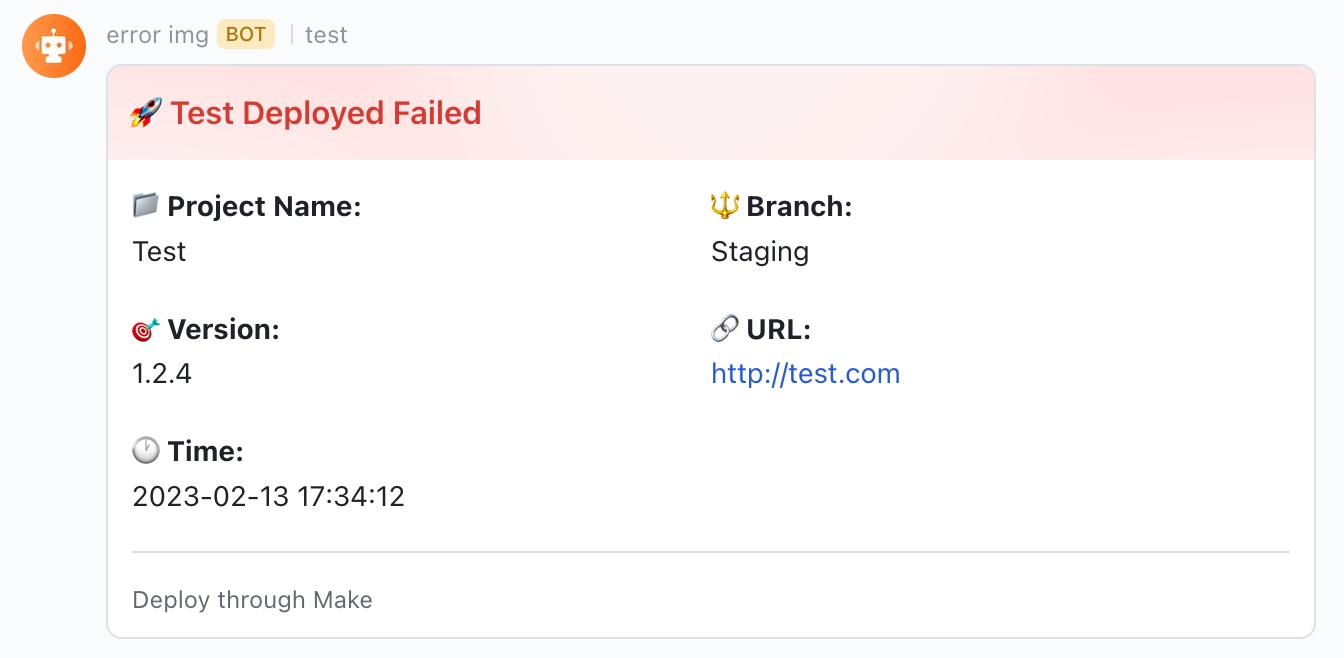
Step 1:
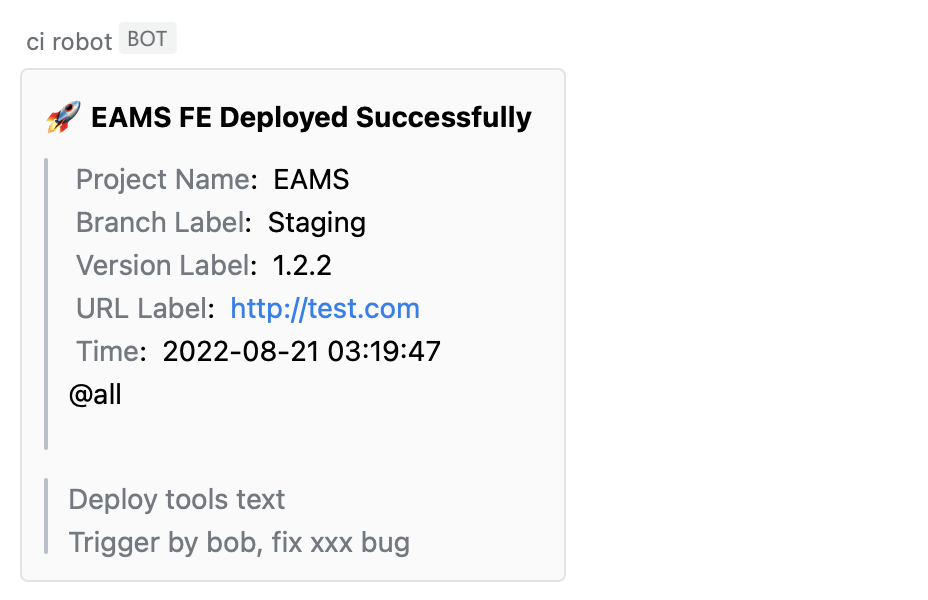
message-config.json 파일 작성 메시지 카드의 텍스트를 설정하십시오.MESSAGE_PATH (선택 사항) : 파일 경로 또는 파일 이름을 사용자 정의해야 할 때 전달됩니다 (이 매개 변수는 배포 환경을 구별 해야하는 경우 유용합니다). 기본값은 루트 디렉토리에서 Message-Config.json 파일을 사용하는 것입니다.PACKAGE_JSON_PATH (선택 사항) : package.json 파일에 대한 사용자 정의 경로가 필요할 때 전달됩니다 (이 매개 변수는 Monorepo 프로젝트의 배포에 유용 할 수 있음). 기본값은 루트 경로에서 package.json 파일을 가져 오는 것입니다. // package.json
{
"name" : "test" ,
"description" : "test" ,
"private" : true ,
"version" : "0.0.1" ,
"scripts" : {
...
// Mac or Linux system
"send-wecom-message:test" : "MESSAGE_PATH=./message-config.json PACKAGE_JSON_PATH=./packages/test/package.json send-wecom-message"
// Windows system: install cross-env first
// npm install cross-env -D
"send-wecom-message:test" : "cross-env MESSAGE_PATH=./message-config.json PACKAGE_JSON_PATH=./packages/test/package.json send-wecom-message"
. . .
} ,
...
} 2 단계 : message-config.json 설정합니다
 {
  // card title
  "title" : "TEST FE Deployed Successfully" ,
  // project name label
  "projectNameLabel" : "Project name label" ,
  // deploy project name
  "projectName" : "TEST" ,
  // project branch label
  "branchLabel" : "Branch label" ,
  // deploy branch name
  "branch" : "Staging" ,
  // version label
  "versionLabel" : "Version label" ,
  // version
  "version" : "1.1.1.0" ,
  // project access url label
  "accessUrlLabel" : "Access URL label" ,
  // project access url
  "accessUrl" : "https://test.com" ,
  // remind group chat members label
  "isNotifyAllLabel" : "Is notify all label" ,
  // remind group chat members: true/false
  "isNotifyAll" : true ,
  // WeCom robot webhook url
  "webHook" : "https://qyapi.weixin.qq.com/cgi-bin/webhook/send?key=xxxxxxxxxxxxxxx" ,
  // deploy type description
  "deployToolsText" : "Deploy tools text" ,
  // deploy type
  "deployTools" : "Jenkins" ,
  // the deploy time zone that you want to display, default "Asia/Shanghai"
  "expectConvertToTimezone" : "America/New_York"
  // more information want to show
  "remark" : "Trigger by bob, fix xxx bug"
} 조건에 따라 카드 사본이 생성되면 MESSAGE_JSON 필드를 전달할 수 있습니다. 버전, 제목 등과 같이 자체 정의됩니다.
참고 : MESSAGE_JSON 탈출해야합니다
 // package.json

{
  "name" : "test" ,
  "description" : "test" ,
  "private" : true ,
  "version" : "0.0.1" ,
  "scripts" : {
    ...
    // Mac or Linux system
    "send-wecom-message:test" : "MESSAGE_JSON='{"title":"This is a dynamically generated title","version":"1.1.0-beta","accessUrl":"http://test.example.com","isNotifyAll":true}' send-wecom-message"
    // Windows system
    "send-wecom-message:test" : "set MESSAGE_JSON={"title":"This is a dynamically generated title","version":"1.1.0-beta","accessUrl":"http://test.example.com","isNotifyAll":true} && send-wecom-message"
    . . .
  } ,
  ...
}
또는 변수 내보내기 후, package.json의 견적 (Windows를 지원하지 않음)
 // ci file
sh "npm run build"
sh "export messageJSON='{"title": "This is a title"}'"

// package.json

{
  "name" : "test" ,
  "description" : "test" ,
  "private" : true ,
  "version" : "0.0.1" ,
  "scripts" : {
    ...
    "send-wecom-message:test" : "MESSAGE_JSON=${messageJSON} send-wecom-message"
    . . .
  } ,
  ...
} // message-config.json
{
// message card template content
"message" : {
"msgtype" : "text" ,
"text" : {
"content" : "This is a custom message"
}
}
// webhook link for the WeCom bot
" webHook ": "https://qyapi.weixin.qq.com/cgi-bin/webhook/send?key=xxxxxxxxxxxx"
} 
체크 버션 함수
실시간 앱 버전 감지를 활성화하십시오
| 매개 변수 | 유형 | 설명 | 기본 | 필수의 |
|---|---|---|---|---|
| 구성 | 물체 | 버전 모니터링 구성 항목 | 예 | |
| config.originversionfileurl | 끈 | 원격 서버의 version.json 파일로가는 경로 | 예 | |
| config.localpackageversion | 끈 | 현재 응용 프로그램의 버전은 일반적으로 원격 서버의 version.json 파일과 비교하기 위해 Package.json의 버전 필드를 가져옵니다. | 예 | |
| config.pollingtime | 숫자 | MS에서 모니터링 모니터링을위한 시간 간격 | 5000 | 아니요 |
| config.immediate | 부울 | 첫 번째 방문시 버전 모니터링이 즉시 트리거되고 맞춤형 시간 간격 v1.5.0 으로 폴링이 수행됩니다. | 거짓 | 아니요 |
| config.checkoriginspecifiedfilesurl | 정렬 | 이 속성을 설정하면 버전을 모니터링하기 위해 '버전 번호 관리'대신 '지정된 파일 내용의 업데이트 감지'를 사용합니다. 모니터링 할 v1.7.0 주소 목록을 전달합니다. | 거짓 | |
| config.checkoriginspecifiedfilesurlmode | '하나' / '모두' | 'One'은 목록의 파일 주소의 내용이 변경되면 업데이트 프롬프트가 표시됨을 의미합니다. 'All'은 업데이트 프롬프트가 목록의 모든 파일 주소의 내용이 변경 될 때만 표시되는 것을 의미합니다. (이는 체크 모리 핀 스펙시 화 된 파일 url이 구성된 경우에만 적용됩니다) v1.7.0 | '하나' | 거짓 |
| config.enable | 부울 | 버전 모니터링을 활성화할지 여부. 이 구성 항목은 지정된 환경에서만 버전 모니터링을 활성화하는 데 사용될 수 있습니다 v1.7.0 | 진실 | 否 |
| config.clearintervalondialog | 부울 | 새 버전의 프롬프트 대화 상자가 나타나면 타이머 v1.7.0 지우십시오. | 거짓 | 否 |
| config.onversionupdate | 기능 (데이터) | 사용자 정의 버전의 콜백 함수 힌트 UI (팝업 UI를 사용자 정의하려면 콜백 함수를 통해 리턴 값을 얻으려면 팝업의 모양을 제어 할 수 있습니다). | 아니요 | |
| config.onrefresh | 기능 (데이터) | 업데이트 확인 : 사용자 정의 새로 고침 이벤트의 콜백 기능, 여기서 데이터는 최신 버전 v1.5.0 입니다. | 아니요 | |
| config.oncancel | 기능 (데이터) | 취소 업데이트 : 사용자 정의 취소 이벤트의 콜백 함수, 여기서 데이터는 최신 버전 v1.5.0 입니다. | 아니요 | |
| 옵션 | 물체 | 팝업 텍스트 및 테마의 구성 항목 (팝업 UI를 사용자 정의하지 않지만 텍스트 및 테마를 수정 해야하는 경우 사용) | 아니요 | |
| 옵션 | 끈 | 팝업 제목 | 업데이트 | 아니요 |
| 옵션. 설명 | 끈 | 팝업 설명 | V xxx를 사용할 수 있습니다 | 아니요 |
| 옵션 .buttontext | 끈 | 팝업 버튼 텍스트 | 새로 고치다 | 아니요 |
| 옵션 .cancelbuttontext | 끈 | 팝업 팝업 버튼을 닫습니다 (이 옵션 추가, 팝업을 닫을 수 있도록하려면) v1.5.0 | 아니요 | |
| 옵션 .cancelmode | 무시-전류 버전 / 무시-토이 / 무시-전류 창 | 팝업 모드 닫기 (cancelButtonText가 설정되면 적용됨) v1.5.0 | 전류 버전을 무시합니다 | 아니요 |
| 옵션 .cancelupdateandstopworker | 부울 | 팝업이 취소되면 작업자도 중지됩니다 (CancelButtonText가 설정되면 적용됩니다) v1.5.0 | 거짓 | 否 |
| 옵션. ImageUrl | 끈 | 팝업 이미지 | 아니요 | |
| 옵션 .RocketColor | 끈 | 옵션을 설정 한 후 로켓의 팝업 사진의 테마 색상 | 아니요 | |
| 옵션 .primarycolor | 끈 | 팝업의 테마 색상은 이미지를 설정 한 후 힌트 이미지 배경 색상 및 버튼 배경 색상에 영향을 미칩니다. | 아니요 | |
| 옵션 .buttonstyle | 끈 | 팝업 버튼의 CSS 구성은 기본 버튼 스타일을 대체 할 수 있습니다. | 아니요 |
확인 기능이 없습니다
checkVersion호출 한 후 생성 된worker프로세스를 종료하십시오
| 매개 변수 | 유형 | 설명 | 기본 | 필수의 |
|---|---|---|---|---|
| 폐쇄성 | 부울 | 버전 업데이트 프롬프트 팝업 창을 닫을지 여부 | - | 예 |
| Closworker | 부울 | 노동자를 폐쇄할지 여부 | 진실 | 아니요 |
npm run test 버전 로켓은 Apache License 2.0이있는 오픈 소스 소프트웨어입니다
Web-Authn-Completed-App
온라인 미리보기
WebAuthn API를 기반으로 한 완전한 응용 프로그램으로 웹 사이트 는 브라우저/시스템 (Apple T 온라인 인증의 미래 인 비밀번호를 대체 합니다.







