version rocket
1.7.1

英語| 简体中文
Webアプリケーションバージョンの検出および展開通知のためのツールライブラリ。
カタログ
バージョンロケットには、2つの機能モジュールが含まれています。Webアプリケーションバージョンのリアルタイム検出、 LARKまたはWECOMグループチャットへの自動展開メッセージ
ニーズに応じてモジュールを個別に使用するか、一緒に使用することもできます
Web Applicationバージョンのリアルタイム検出を使用するのに適したのはいつですか? - シーン:この種の状況はしばしば起こります。ユーザーが長い間ブラウザでWebアプリケーションを開いたときに、ページを更新していません。アプリケーションに新しいバージョンの更新または問題の修復がある場合、ユーザーはリリースの新しいバージョンがあることを知りません。古いバージョンを使用して、ユーザーエクスペリエンスとバックエンドデータの精度に影響を与えます。
展開メッセージをLarkまたはWECOMグループチャットに自動的に送信するために使用するのに適していますか? - シーン:チームの協力にはそのような状況があるかもしれません。フロントエンドエンジニアとして、展開するたびにチームメンバーと口頭で通信する必要があります。従うべき展開レコードはありません。
Webhookメソッドを使用します。アプリケーションの展開が成功した後、グループチャットロボットを通じて、「展開の成功」のニュースが自動的にグループチャットにプッシュされます。他のプラットフォームのプッシュニーズがある場合は、問題に言及できます
v1.7.0のファイルがサポートされますWebアプリケーションバージョンリアルタイム検出:
Web Worker API使用して、ブラウザレンダリングプロセスに影響しないモニタリングポーリングを実行します。Web Worker API使用して、ブラウザレンダリングプロセスに影響しないモニタリングポーリングを実行します。 v1.7.0展開メッセージをLarkまたはWECOMグループチャットに自動的に送信する:バージョンロケットCollaborative Officeソフトウェアが提供するWebhookメソッドを呼び出して、グループチャットロボットの送信メッセージをトリガーします。
 # Choose a package manager you prefer

# npm
npm install version-rocket --save

# yarn
yarn add version-rocket

# pnpm
pnpm install version-rocket
ステップ1: checkVersion()をインポートし、それを使用します
 // Entry file: such as App.vue or App.jsx, etc

import { checkVersion } from 'version-rocket'
// It is recommended to use the version field in package.json, or you can customize versions
import { version } from '../package.json'

checkVersion ( {
  localPackageVersion : version ,
  originVersionFileUrl : ` ${ location . origin } /version.json` ,
  // Refer to API for more configuration options
} )

// To terminate version detection, call the unCheckVersion method during the destruction life cycle. For details, see the API
unCheckVersion ( { closeDialog : false } )
ステップ2: generate-version-fileカスタムコマンドを実行した後、リモートサーバーに展開するために使用されるversion.jsonファイルを生成します
VERSION (オプション):カスタムバージョンが必要な場合、それは渡されます。デフォルト値はpackage.jsonバージョンフィールドです
ファイル出力ディレクトリ(オプション):ユーザー定義version.json出力ディレクトリ、これはデフォルトでDISTディレクトリです
EXTERNAL (オプション):現在のバージョンの変更されたコンテンツやポップアップに表示する必要がある他のもの(OnversionUpdate Custom UIで使用) v1.6.0など、より多くの情報をversion.jsonに保存する場合。
EXTERNAL_PATH (オプション):ファイルパスを受け入れます。これは、 version.jsonに多くの追加情報を書き込む必要がある場合に推奨されます。 EXTERNALとEXTERNAL_PATH両方が設定されている場合、優先度はEXTERNALよりも低いonversionupdateカスタムui) v1.6.1で使用されます
バージョンの使用
 // package.json

{
  "name" : "test" ,
  "description" : "test" ,
  "private" : true ,
  "version" : "0.0.1" ,
  "scripts" : {
    ...
    // Mac or Linux system
    "generate:version" : "VERSION=1.1.0-beta generate-version-file dist public"
    // Windows system: install cross-env first
    // npm install cross-env -D
     "generate:version" : "cross-env VERSION=1.1.0-beta generate-version-file dist public"
    . . .
  } ,
  ...
}外部v1.6.0およびexternal_path v1.6.1使用
JSON形式このツールを使用して脱出してくださいここをクリックしてください
 // package.json

{
  "name" : "test" ,
  "description" : "test" ,
  "private" : true ,
  "version" : "0.0.1" ,
  "scripts" : {
    ...
    // Mac or Linux (simple text)
    "generate:version" : "EXTERNAL='some text' generate-version-file dist public"
    // Mac or Linux (JSON text)
    "generate:version" : "EXTERNAL='{"update":"fix bugs","content":"some tips"}' generate-version-file dist public"
    // Mac or Linux (JSON file, e.g. version-external.json)
    "generate:version" : "EXTERNAL_PATH=version-external.json generate-version-file dist public"
    // Windows (simple text)
    "generate:version" : "set EXTERNAL=some text && generate-version-file dist public"
    // Windows (JSON text)
    "generate:version" : "set EXTERNAL={"update":"fix bugs","content":"some tips"} && generate-version-file dist public"
    // Windows (JSON file, e.g. version-external.json)
    "generate:version" : "set EXTERNAL_PATH=version-external.json && generate-version-file dist public"
    . . .
  } ,
  ...
}
// version-external.json
{
"update" : [
"fix some bugs" ,
"improve home page" ,
"update docs"
] ,
"content" : "please update to latest version"
}// nginx example
server {
...
location / {
...
if ( $request_filename ~ * . * / version . (json)$) {
add_header Cache-Control " private, no-store, no-cache, must-revalidate, proxy-revalidate " ;
}
...
}
...
}上記の2つの手順を完了します。バージョン監視機能(バージョン番号管理を介して)は通常使用できますか?
v1.7.0
ショ和 フレンドリーなリマインダー:この方法は、「現在のバージョンの変更またはプロンプトウィンドウに表示する必要があるその他の情報」の表示をサポートしていません。このような要件がある場合は、「バージョン管理」メソッドを使用してください。
checkVersion()をインポートし、それを使用します
 // Entry file: such as App.vue or App.jsx, etc
import { checkVersion } from 'version-rocket'

// Call checkVersion in the lifecycle hook
checkVersion ( {
  // The list of files to be monitored usually includes the index.html file under a certain domain
  checkOriginSpecifiedFilesUrl : [ ` ${ location . origin } /index.html` ] ,
  // The validation mode for the list of monitored files: 'one' (default) or 'all'
  checkOriginSpecifiedFilesUrlMode : 'one' ,
  // Whether to enable version monitoring (default true)
  enable : process . env . NODE_ENV !== 'development'
} )

// If you need to terminate version checking, call the unCheckVersion method in the destroy lifecycle. For more details, see the API documentation
unCheckVersion ( { closeDialog : false } )
上記の手順を完了した後、バージョン監視機能(指定されたファイルコンテンツの更新を検出することにより)を正常に使用できますか?
 // Entry file: such as App.vue or App.jsx, etc
import { checkVersion } from 'version-rocket'
// It is recommended to use the version field in package.json, or you can customize versions
import { version } from '../package.json'

checkVersion (
  {
    localPackageVersion : version ,
    originVersionFileUrl : ` ${ location . origin } /version.json` ,
  } ,
  {
    title : 'Title' ,
    description : 'Description' ,
    primaryColor : '#758bfd' ,
    rocketColor : '#ff8600' ,
    buttonText : 'Button Text' ,
  }
)
または迅速な画像を設定します
 // Entry file: such as App.vue or App.jsx, etc

import { checkVersion } from 'version-rocket'
// It is recommended to use the version field in package.json, or you can customize versions
import { version } from '../package.json'

checkVersion (
  {
    localPackageVersion : version ,
    originVersionFileUrl : ` ${ location . origin } /version.json` ,
  } ,
  {
    imageUrl : 'https://avatars.githubusercontent.com/u/26329117' ,
  }
) 

ステップ1:
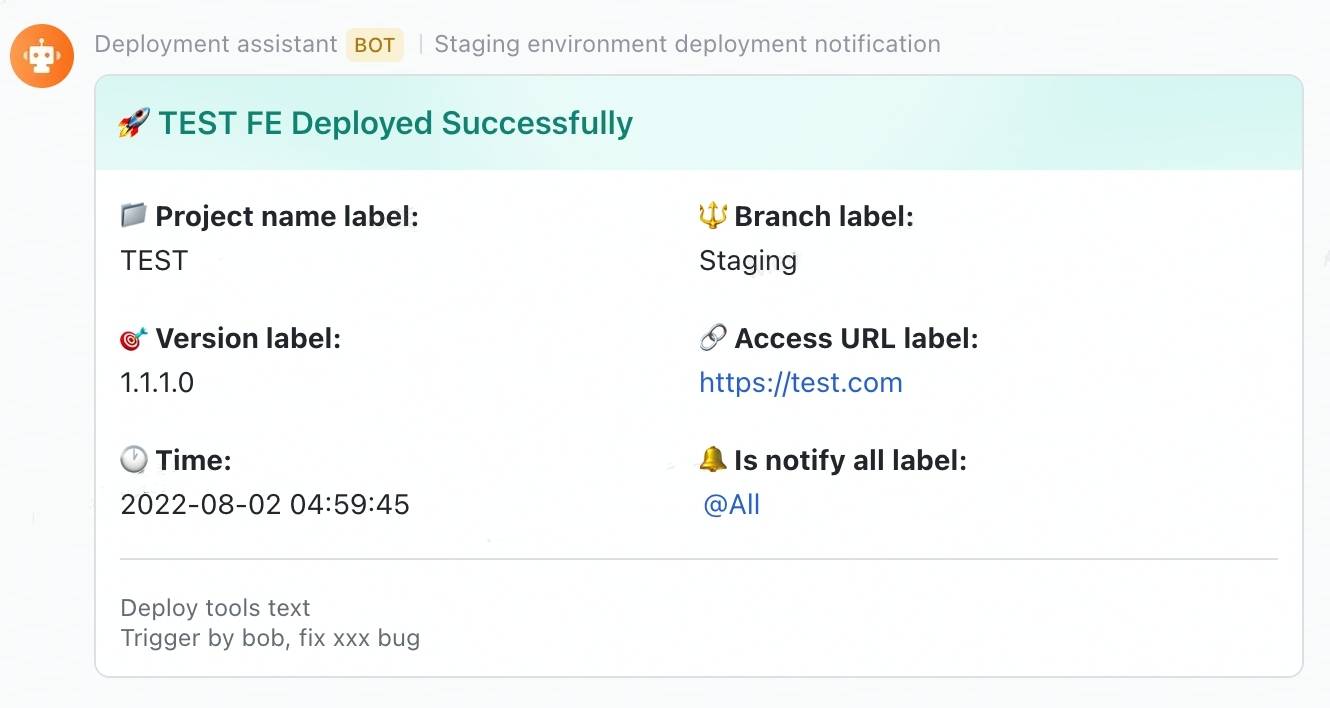
lark-message-config.jsonファイルを作成して、メッセージカードのテキストを設定するMESSAGE_PATH (オプション):ファイルパスまたはファイル名をカスタマイズする必要がある場合に渡されます(このパラメーターは、展開環境を区別する必要がある場合に役立ちます)。デフォルトでは、ルートディレクトリのLark-MessageConfig.jsonファイルが使用されていますPACKAGE_JSON_PATH (オプション):package.jsonファイルへのパスをカスタマイズする必要がある場合に渡されます(このパラメーターは、Monorepoプロジェクトの展開に役立つ場合があります)。デフォルトは、ルートパスでpackage.jsonファイルを取得することです // package.json
{
"name" : "test" ,
"description" : "test" ,
"private" : true ,
"version" : "0.0.1" ,
"scripts" : {
...
// Mac or Linux system
"send-lark-message:test" : "MESSAGE_PATH=./lark-message-staging-config.json PACKAGE_JSON_PATH=./packages/test/package.json send-lark-message"
// Windows system: install cross-env first
// npm install cross-env -D
"send-lark-message:test" : "cross-env MESSAGE_PATH=./lark-message-staging-config.json PACKAGE_JSON_PATH=./packages/test/package.json send-lark-message"
. . .
} ,
...
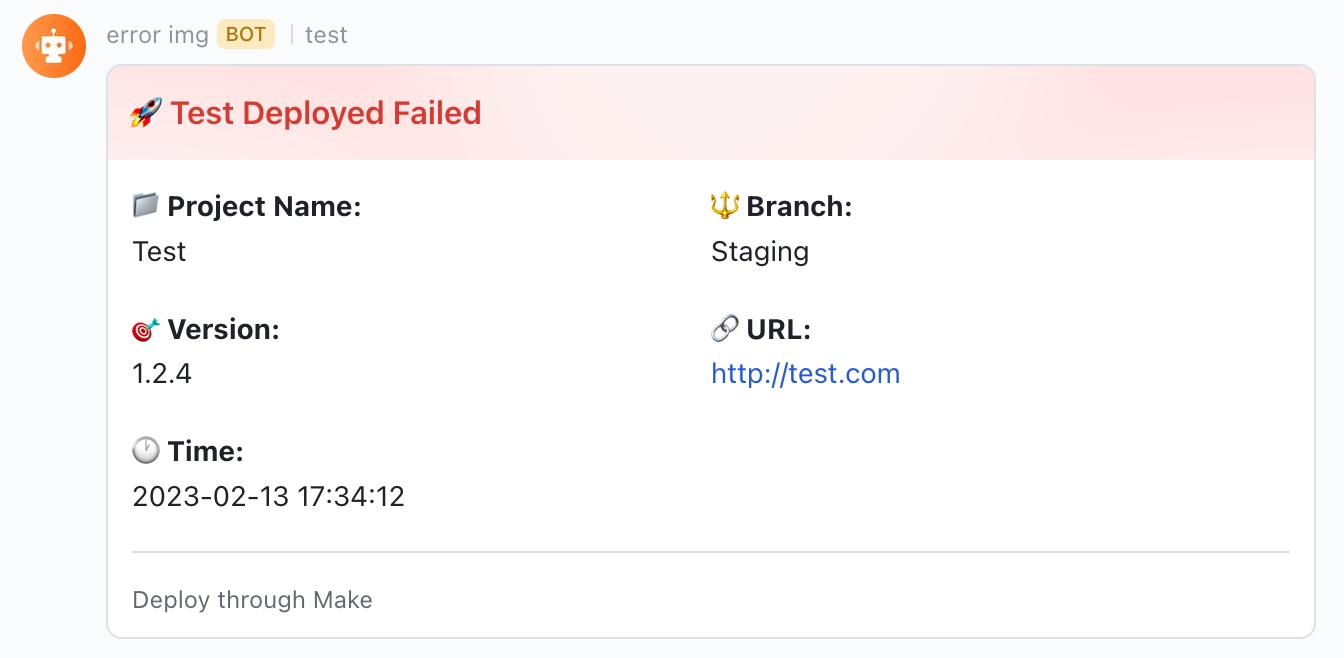
}ステップ2: lark-message-config.jsonを設定します
 // lark-message-config.json
{
  // optional: card header's background color, default is turquoise, v1.6.2
  // available values: blue | wathet | turquoise | green | yellow | orange | red | carmine | violet | purple | indigo | grey
  "headerBgColor" : "red" ,
  // card title
  "title" : "TEST FE Deployed Successfully" ,
  // project name label
  "projectNameLabel" : "Project name label" ,
  // deploy project name
  "projectName" : "TEST" ,
  // project branch label
  "branchLabel" : "Branch label" ,
  // deploy branch name
  "branch" : "Staging" ,
  // version label
  "versionLabel" : "Version label" ,
  // version
  "version" : "1.1.1.0" ,
  // project access url label
  "accessUrlLabel" : "Access URL label" ,
  // project access url
  "accessUrl" : "https://test.com" ,
  // remind group chat members label
  "isNotifyAllLabel" : "Is notify all label" ,
  // remind group chat members: true/false
  "isNotifyAll" : true ,
  // lark robot webhook url
  "larkWebHook" : "https://open.larksuite.com/open-apis/bot/v2/hook/xxxxxxxxxxxx" ,
  // deploy type description
  "deployToolsText" : "Deploy tools text" ,
  // deploy type
  "deployTools" : "Jenkins" ,
  // the deploy time zone that you want to display, default "Asia/Shanghai"
  "expectConvertToTimezone" : "America/New_York"
  // more information want to show
  "remark" : "Trigger by bob, fix xxx bug"
} カードのコピーが条件に応じて生成される場合、バージョン、タイトルなど、 MESSAGE_JSONフィールドに渡すことができます。
注: MESSAGE_JSON逃げる必要があります
 // package.json

{
  "name" : "test" ,
  "description" : "test" ,
  "private" : true ,
  "version" : "0.0.1" ,
  "scripts" : {
    ...
    // Mac or Linux system
    "send-lark-message:test" : "MESSAGE_JSON='{"title":"This is a dynamically generated title","version":"1.1.0-beta","accessUrl":"http://test.example.com","isNotifyAll":true}' send-lark-message"
    // Windows system
    "send-lark-message:test" : "set MESSAGE_JSON={"title":"This is a dynamically generated title","version":"1.1.0-beta","accessUrl":"http://test.example.com","isNotifyAll":true} && send-lark-message"
    . . .
  } ,
  ...
}
または、変数をエクスポートした後、package.jsonの引用(サポートウィンドウではありません)
 // ci file

sh "npm run build"
sh "export messageJSON='{"title": "This is a title"}'"


// package.json

{
  "name" : "test" ,
  "description" : "test" ,
  "private" : true ,
  "version" : "0.0.1" ,
  "scripts" : {
    ...
    "send-lark-message:test" : "MESSAGE_JSON=${messageJSON} send-lark-message"
    . . .
  } ,
  ...
} // lark-message-config.json
{
// Message card content
"message" : {
"msg_type" : "text" ,
"content" : {
"text" : "New message reminder"
}
} ,
// Lark robot's webhook link
"larkWebHook" : "https://open.larksuite.com/open-apis/bot/v2/hook/xxxxxxxxxxxx"
} 
ステップ1:
message-config.jsonファイルを作成して、メッセージカードのテキストを設定するMESSAGE_PATH (オプション):ファイルパスまたはファイル名をカスタマイズする必要がある場合に渡されます(このパラメーターは、展開環境を区別する必要がある場合に役立ちます)。デフォルトは、ルートディレクトリでメッセージconfig.jsonファイルを使用することですPACKAGE_JSON_PATH (オプション):package.jsonファイルへのカスタムパスが必要な場合に渡されます(このパラメーターは、モノレポプロジェクトの展開に役立つ場合があります)。デフォルトは、ルートパスでpackage.jsonファイルを取得することです // package.json
{
"name" : "test" ,
"description" : "test" ,
"private" : true ,
"version" : "0.0.1" ,
"scripts" : {
...
// Mac or Linux system
"send-wecom-message:test" : "MESSAGE_PATH=./message-config.json PACKAGE_JSON_PATH=./packages/test/package.json send-wecom-message"
// Windows system: install cross-env first
// npm install cross-env -D
"send-wecom-message:test" : "cross-env MESSAGE_PATH=./message-config.json PACKAGE_JSON_PATH=./packages/test/package.json send-wecom-message"
. . .
} ,
...
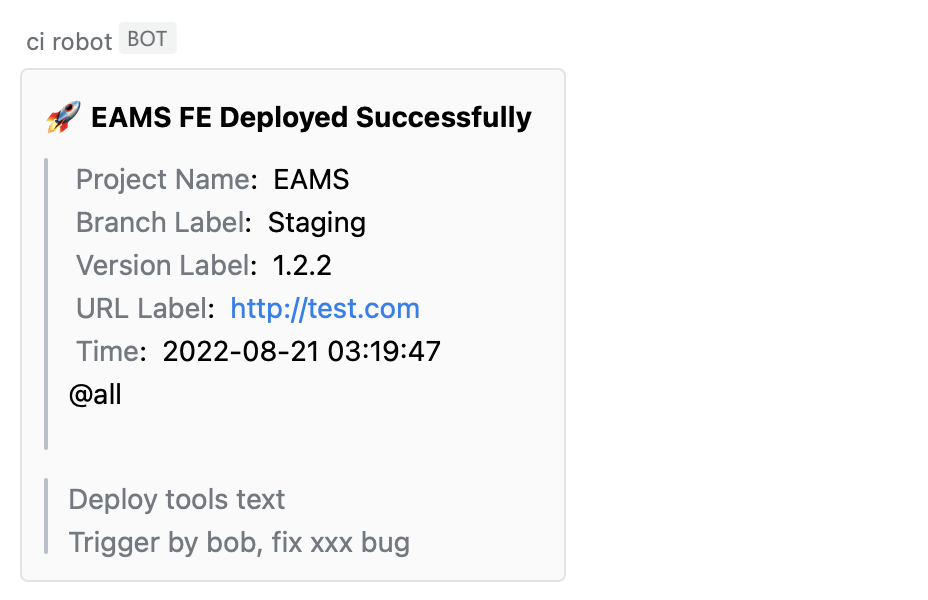
}ステップ2: message-config.jsonを設定します
 {
  // card title
  "title" : "TEST FE Deployed Successfully" ,
  // project name label
  "projectNameLabel" : "Project name label" ,
  // deploy project name
  "projectName" : "TEST" ,
  // project branch label
  "branchLabel" : "Branch label" ,
  // deploy branch name
  "branch" : "Staging" ,
  // version label
  "versionLabel" : "Version label" ,
  // version
  "version" : "1.1.1.0" ,
  // project access url label
  "accessUrlLabel" : "Access URL label" ,
  // project access url
  "accessUrl" : "https://test.com" ,
  // remind group chat members label
  "isNotifyAllLabel" : "Is notify all label" ,
  // remind group chat members: true/false
  "isNotifyAll" : true ,
  // WeCom robot webhook url
  "webHook" : "https://qyapi.weixin.qq.com/cgi-bin/webhook/send?key=xxxxxxxxxxxxxxx" ,
  // deploy type description
  "deployToolsText" : "Deploy tools text" ,
  // deploy type
  "deployTools" : "Jenkins" ,
  // the deploy time zone that you want to display, default "Asia/Shanghai"
  "expectConvertToTimezone" : "America/New_York"
  // more information want to show
  "remark" : "Trigger by bob, fix xxx bug"
} カードのコピーが条件に応じて生成される場合、バージョン、タイトルなど、 MESSAGE_JSONフィールドに渡すことができます。
注: MESSAGE_JSON逃げる必要があります
 // package.json

{
  "name" : "test" ,
  "description" : "test" ,
  "private" : true ,
  "version" : "0.0.1" ,
  "scripts" : {
    ...
    // Mac or Linux system
    "send-wecom-message:test" : "MESSAGE_JSON='{"title":"This is a dynamically generated title","version":"1.1.0-beta","accessUrl":"http://test.example.com","isNotifyAll":true}' send-wecom-message"
    // Windows system
    "send-wecom-message:test" : "set MESSAGE_JSON={"title":"This is a dynamically generated title","version":"1.1.0-beta","accessUrl":"http://test.example.com","isNotifyAll":true} && send-wecom-message"
    . . .
  } ,
  ...
}
または、変数をエクスポートした後、package.jsonの引用(サポートウィンドウではありません)
 // ci file
sh "npm run build"
sh "export messageJSON='{"title": "This is a title"}'"

// package.json

{
  "name" : "test" ,
  "description" : "test" ,
  "private" : true ,
  "version" : "0.0.1" ,
  "scripts" : {
    ...
    "send-wecom-message:test" : "MESSAGE_JSON=${messageJSON} send-wecom-message"
    . . .
  } ,
  ...
} // message-config.json
{
// message card template content
"message" : {
"msgtype" : "text" ,
"text" : {
"content" : "This is a custom message"
}
}
// webhook link for the WeCom bot
" webHook ": "https://qyapi.weixin.qq.com/cgi-bin/webhook/send?key=xxxxxxxxxxxx"
} 
チェックバージョン関数
リアルタイムアプリバージョンの検出を有効にします
| パラメージ | タイプ | 説明 | デフォルト | 必須 |
|---|---|---|---|---|
| config | 物体 | バージョン監視構成アイテム | はい | |
| config.originversionfileurl | 弦 | リモートサーバー上のversion.jsonファイルへのパス | はい | |
| config.localpackageversion | 弦 | 現在のアプリケーションのバージョンは通常、Package.jsonのバージョンフィールドを使用して、リモートサーバーのversion.jsonファイルと比較して取得します | はい | |
| config.pollingtime | 番号 | MSのポーリング監視の時間間隔 | 5000 | いいえ |
| config.immediate | ブール | 最初の訪問では、バージョンの監視がすぐにトリガーされ、その後、ポーリングはカスタマイズされた時間間隔v1.5.0で実施されます。 | 間違い | いいえ |
| config.CheckoriginspecifiedFilesurl | 配列 | このプロパティの設定では、「バージョン番号管理」の代わりに「指定されたファイルコンテンツで更新の検出」を使用してバージョンを監視します。監視するファイルアドレスのリストを渡す、通常は特定のドメイン(自動重複排除) v1.7.0の下のindex.htmlファイル | 間違い | |
| config.CheckoriginspecifiedFilesurlMode | 「1つ」 /「すべて」 | 「1つ」とは、リスト内のファイルアドレスのコンテンツが変更された場合、更新のプロンプトが表示されることを意味します。 「すべて」とは、リスト内のすべてのファイルアドレスのコンテンツが変更された場合にのみ、更新のプロンプトが表示されることを意味します。 (これは、CheckoriginspecifiedFilesurlが構成されている場合にのみ有効になります) v1.7.0 | '1つ' | 間違い |
| config.enable | ブール | バージョン監視を有効にするかどうか。この構成アイテムは、指定された環境v1.7.0でのみバージョン監視を有効にするために使用できます | 真実 | 否 |
| config.ClearInterValondialog | ブール | 新しいバージョンの[プロンプト]ダイアログが表示されたら、タイマーv1.7.0をクリアします | 間違い | 否 |
| config.onversionUpdate | 関数(データ) | カスタムバージョンのヒントUIのコールバック関数(ポップアップUIをカスタマイズする場合は、ポップアップの外観を制御するためにコールバック関数を介して戻り値を取得できます) | いいえ | |
| config.onrefresh | 関数(データ) | 更新の確認:カスタム更新イベントのコールバック関数。データは最新バージョンv1.5.0です | いいえ | |
| config.oncancel | 関数(データ) | キャンセルアップデート:カスタムキャンセルイベントのコールバック関数。データは最新バージョンv1.5.0です | いいえ | |
| オプション | 物体 | ポップアップテキストとテーマの構成アイテム(ポップアップUIをカスタマイズするのではなく、テキストとテーマを変更する必要がある場合は使用します) | いいえ | |
| options.title | 弦 | ポップアップタイトル | アップデート | いいえ |
| options.description | 弦 | ポップアップの説明 | v xxxが利用可能です | いいえ |
| options.buttontext | 弦 | ポップアップボタンテキスト | リフレッシュします | いいえ |
| options.cancelbuttontext | 弦 | ポップアップボタンを閉じるテキスト(このオプションを追加します。ポップアップを閉じることを許可したい場合) v1.5.0 | いいえ | |
| options.cancelmode | 無視 - 電流 - バージョン /無視 - today / agnore-current-window | 閉じるポップアップモード(CancelButtontextが設定されているときに有効になります) v1.5.0 | 電流のバージョンを無視します | いいえ |
| options.cancelupdateandstopworker | ブール | ポップアップがキャンセルされると、ワーカーも停止します(CancelButTontextが設定されている場合に有効になります) v1.5.0 | 間違い | 否 |
| options.imageurl | 弦 | ポップアップ画像 | いいえ | |
| options.rocketcolor | 弦 | オプションを設定した後のポップアップ画像のロケットのテーマの色。imageurlが無効です | いいえ | |
| options.primarycolor | 弦 | ポップアップのテーマの色で、ImageUrlの設定が無効である後、ヒント画像の背景色とボタンの背景色に影響します | いいえ | |
| options.buttonstyle | 弦 | ポップアップボタンのCSS構成は、デフォルトのボタンスタイルをオーバーライドできます | いいえ |
チェックバージョン機能
checkVersionを呼び出した後に作成されたworkerプロセスを終了します
| パラメージ | タイプ | 説明 | デフォルト | 必須 |
|---|---|---|---|---|
| closedialog | ブール | バージョンの更新プロンプトポップアップウィンドウを閉じるかどうか | - | はい |
| 近親者 | ブール | 労働者を閉鎖するかどうか | 真実 | いいえ |
npm run test バージョンロケットは、Apacheライセンス2.0を備えたオープンソースソフトウェアです
web-authn-completed-app
オンラインプレビュー
WebAuthn APIに基づく完全なアプリケーションにより、 Webサイトはブラウザ/システムに組み込みの認証機を持つユーザーを認証できます(Apple TechIDやWindows Helloやモバイルデバイスの生体認証センサーなど)。オンライン認証の将来であるパスワードを置き換えます。







