diktat
Release 2.0.0


Diktat是Kotlin的严格编码标准,由Kotlin代码样式规则的集合组成,该规则以抽象语法树(AST)的访问者为基础,该规则构成了Ktlint顶部的访问者。它的目的是在连续集成/连续部署(CI/CD)过程中检测并自动固定代码气味。您可以在此处找到受支持的规则和检查的全面列表。
Diktat已获得认可,并已添加到静态分析工具,Kotlin-Awsome和Kompar的列表中。我们对社区的支持表示感谢!
| CodeStyle | 检查 | 例子 | 演示 | 白皮书 | 一组检查 |
尽管还有其他工具,例如detekt和ktlint执行静态分析,但您可能会想知道为什么需要Diktat。这是关键原因:
更多检查: Diktat拥有100多次检查,并与其codeistyle紧密相结合。
唯一的检查: Diktat引入了其他衬里中找不到的独特检查。
高度可配置:每次检查都是高度可配置的,允许自定义和抑制。检查配置选项和抑制。
严格的CodeStyle: Diktat强制执行可以在您的项目中采用和应用的详细座谈。
手动下载diktat:在这里
或使用curl :
curl -sSLO https://github.com/saveourtool/diktat/releases/download/v2.0.0/diktat && chmod a+x diktat仅适用于Windows 。手动下载diktat.cmd:此处
最后,运行ktlint(注射diktat)以检查“ dir/your/your/dir”中的“*.kt”文件:
$ ./diktat " dir/your/dir/**/*.kt "在窗户上
diktat.bat "dir/your/dir/**/*.kt"
为了自动框架所有违反代码样式,请使用--mode fix选项。
您可以在我们的示例中查看如何配置它:
            < plugin >
                < groupId >com.saveourtool.diktat</ groupId >
                < artifactId >diktat-maven-plugin</ artifactId >
                < version >${diktat.version}</ version >
                < executions >
                    < execution >
                        < id >diktat</ id >
                        < phase >none</ phase >
                        < goals >
                            < goal >check</ goal >
                            < goal >fix</ goal >
                        </ goals >
                        < configuration >
                            < inputs >
                                < input >${project.basedir}/src/main/kotlin</ input >
                                < input >${project.basedir}/src/test/kotlin</ input >
                            </ inputs >
                            < diktatConfigFile >diktat-analysis.yml</ diktatConfigFile >
                           < excludes >
                              < exclude >${project.basedir}/src/test/kotlin/excluded</ exclude >
                           </ excludes >
                        </ configuration >
                    </ execution >
                </ executions >
</ plugin >要以仅检查模式运行diktat,请使用命令$ mvn diktat:check@diktat 。要在自动更正模式下运行Diktat,请使用命令$ mvn diktat:fix@diktat 。
在这些情况下,请求在命令行上要求特定的maven executionId (上述示例中的尾巴diktat )至关重要:
在您的pom.xml中,您有多个具有不同配置的执行(例如:多个规则集):
< executions >

    < execution >
        < id >diktat-basic</ id >
        < configuration >
            < diktatConfigFile >diktat-analysis.yml</ diktatConfigFile >
        </ configuration >
    </ execution >

    < execution >
        < id >diktat-advanced</ id >
        < configuration >
            < diktatConfigFile >diktat-analysis-advanced.yml</ diktatConfigFile >
        </ configuration >
    </ execution >

</ executions >
带有DIKTAT规则的YAML文件具有非默认名称和/或居住在非默认位置:
< executions >
    < execution >
        < id >diktat</ id >
        < configuration >
            < diktatConfigFile >/non/default/rule-set-file.yml</ diktatConfigFile >
        </ configuration >
    </ execution >
</ executions >diktatConfigFile ,或者如果指向不存在的文件,则Diktat以默认配置运行。如果您省略了executionId :
$ mvn diktat:check - 插件将使用默认配置并在项目目录中搜索diktat-analysis.yml文件(您仍然可以通过编辑YAML文件来自定义规则集)。
需要一个不低于7.0的Gradle版本
您可以在我们的示例中查看插件的配置方式:
plugins {
    id( " com.saveourtool.diktat " ) version " 2.0.0 "
}注意如果要将插件应用于多模块项目”
 import com.saveourtool.diktat.plugin.gradle.DiktatGradlePlugin

plugins {
    id( " com.saveourtool.diktat " ) version " 2.0.0 " apply false
}

allprojects {
    apply< DiktatGradlePlugin >()
}
然后,您可以使用diktat扩展名配置Diktat:
diktat {
    inputs {
        include( " src/**/*.kt " )  // path matching this pattern (per PatternFilterable) that will be checked by diktat
        exclude( " src/test/kotlin/excluded/** " )  // path matching this pattern will not be checked by diktat
    }
    debug = true  // turn on debug logging
}另外,在diktat扩展程序中,您可以配置不同的记者及其输出。您可以指定json , html , sarif , plain (默认)。如果设置output ,则应该是文件路径。如果未设置,结果将打印到Stdout。您可以指定多个记者。如果未指定记者,则将与stdout一起使用plain作为输出。
diktat {
    reporters {
        plain()
        json()
        html {
            output = file( " someFile.html " )
        }
        // checkstyle()
        // sarif()
        // gitHubActions()
    }
}您可以使用任务./gradlew diktatCheck运行diktat检查,并自动使用任务./gradlew diktatFix来修复错误。
一尘不染是衬里聚合器。
自版5.10.0以来,Diktat可以通过一尘不染的Gradle-Plugin运行
plugins {
   id( " com.diffplug.spotless " ) version " 5.10.0 "
}

spotless {
   kotlin {
      diktat()
   }
   kotlinGradle {
      diktat()
   }
}spotless {
kotlin {
diktat( " 2.0.0 " ).configFile( " full/path/to/diktat-analysis.yml " )
}
}自版2.8.0以来,Diktat可以通过一尘不染的武器运行
< plugin >
   < groupId >com.diffplug.spotless</ groupId >
   < artifactId >spotless-maven-plugin</ artifactId >
   < version >${spotless.version}</ version >
   < configuration >
      < kotlin >
         < diktat />
      </ kotlin >
   </ configuration >
</ plugin >< diktat >
< version >2.0.0</ version > <!-- optional -->
< configFile >full/path/to/diktat-analysis.yml</ configFile > <!-- optional, configuration file path -->
</ diktat >我们建议每个人都使用常见的“ sarif”格式作为CI/CD中的reporter 。 GitHub与SARIF格式有一个集成,并为您提供了拉动请求中Diktat问题的本机报告。
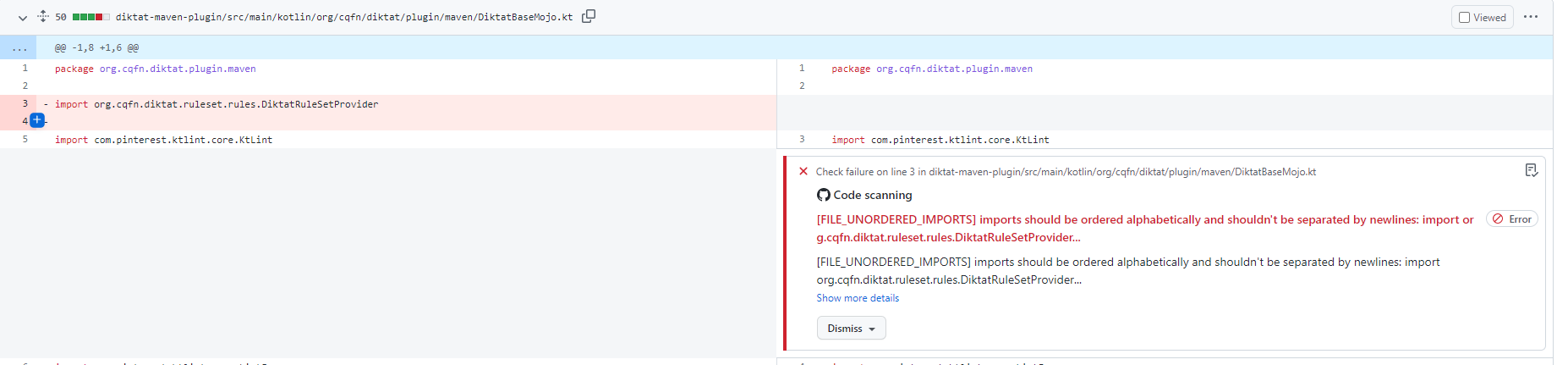
Gradle插件:
githubActions = true
Maven插件(pom.xml):
< githubActions >true</ githubActions >Maven插件(CLI选项):
mvn -B diktat:check@diktat -Ddiktat.githubActions=true
      - name : Upload SARIF to Github using the upload-sarif action
        uses : github/codeql-action/upload-sarif@v1
        if : ${{ always() }}
        with :
sarif_file : ${{ github.workspace }}注意: codeql-action/upload-sarif将上传文件的数量限制为15。如果您的项目具有超过15个子标记,则将超过限制,并且步骤将失败。为了解决此问题,可以合并SARIF报告。
diktat-gradle-plugin通过mergeDiktatReports任务提供了此功能。此任务汇总了所有Gradle项目的所有DIKTAT任务的报告,该项目产生了SARIF报告,并将合并报告输出到Root Project的Build Directory中。然后,这个单个文件可以用作GitHub操作的输入:
 with :
sarif_file : build/reports/diktat/diktat-merged.sarif diktat-analysis.yml进行自定义在Diktat中,我们支持了diktat-analysis.yml ,可以轻松更改并有助于自定义您自己的规则集。它具有简单的字段: name - 规则的名称, enabled (true/false) - 启用或禁用该规则(默认规则启用所有规则), configuration - 为此特定规则的一些额外独特配置的简单映射。例如:
- name : HEADER_MISSING_OR_WRONG_COPYRIGHT
  # all rules are enabled by the default. To disable add 'enabled: false' to the config.
  enabled : true
  configuration :
    isCopyrightMandatory : true
copyrightText : Copyright (c) Jeff Lebowski, 2012-2020. All rights reserved.请注意,您可以指定并放置diktat-analysis.yml ,其中包含diktat在项目的父目录中的配置,以存储build.gradle/pom.xml同一级别。
请参阅Diktat-Analysis.yml中的默认配置
另请参阅Diktat支持的所有规则的列表。
例如:
@Suppress( " FUNCTION_NAME_INCORRECT_CASE " )
class SomeClass {
    fun methODTREE (): String {

    }
}例如:
@Suppress( " diktat " )
class SomeClass {
    fun methODTREE (): String {

    }
}- name : HEADER_NOT_BEFORE_PACKAGE
enabled : true
ignoreAnnotated : [MyAnnotation, Compose, Controller]这些群体与CodeStyle章节有关。
要禁用章节,您需要将以下配置添加到常见配置( - name: DIKTAT_COMMON ):
disabledChapters : " 1, 2, 3 "将检查映射到章节可以在一组检查中找到。
在一个大型现有项目上设置代码样式分析时,通常没有能力一次修复所有发现。为了逐步采用,Diktat和Ktlint支持基线模式。首次使用Active基线运行KTLINT时,将生成基线文件。这是一个XML文件,该文件具有该工具的完整发现列表。在以后的调用中,仅报告基线文件中未的发现。基线可以用CLI标志激活:
./diktat --baseline=diktat-baseline.xml ** / * .kt或带有Maven或Gradle插件中的相应配置选项。基线报告旨在将其添加到VC中,但可以在需要时将其删除并重新生成。
查看我们的贡献政策和行为准则
我序言
1。命名
2。评论
3。一般格式(排版)
4。变量和类型
5。功能
6。类,接口和扩展功能
本文档的目的是提供一个规范,软件开发人员可以参考以增强其编写一致,易于阅读和高质量代码的能力。这样的规范最终将提高软件开发效率和产品竞争力。为了将代码视为高质量,它必须具有以下特征:
像其他现代编程语言一样,Kotlin是一种高级编程语言,符合以下一般原则:
另外,我们需要在Kotlin编程时考虑以下因素:
编写干净,简单的Kotlin代码
Kotlin结合了两个主要编程范式:功能和面向对象。这两个范式都是值得信赖和著名的软件工程实践。作为一种年轻的编程语言,Kotlin建立在诸如Java,C ++,C#和Scala之类的知名语言上。这使Kotlin能够引入许多功能,以帮助开发人员编写清洁程序,更可读的代码,同时还减少复杂的代码结构的数量。例如,类型和无效的安全性,扩展功能,infix语法,不变性,val/var分化,面向表达式的特征,“何时”语句,收集,类型自动转换和其他句法糖的工作更加容易。
遵循科特林成语
科特林(Kotlin)的作者安德烈·布雷斯拉夫(Andrey Breslav)提到,科特林既务实又实用,但不是学术。它的务实功能使想法可以轻松地转换为真正的工作软件。 Kotlin比其前辈更接近自然语言,并且实现了以下设计原则:可读性,可重复性,互操作性,安全性和工具友好性(https://blog.jetbrains.com/kotlin.com/kotlin/2018/2018/10/kotlinconf-2018-anncements/)。
有效地使用Kotlin
一些Kotlin功能可以帮助您编写更高的绩效代码:包括丰富的Coroutine库,序列,内联功能/类,基本类型的数组,TailRec和Conterin的呼叫。
规则- 编程时应遵循的约定。
建议- 编程时应考虑的惯例。
说明- 规则和建议的必要解释。
有效的例子- 建议的规则和建议示例。
无效的例子- 不推荐的规则和建议示例。
除非另有说明,否则此规范适用于Kotlin的1.3版和后期。
即使可能存在例外,必须了解为什么需要规则和建议。根据项目情况或个人习惯,您可以违反一些规则。但是,请记住,一个例外可能会导致许多例外,并最终可以破坏代码一致性。因此,应该很少有例外。修改开源代码或第三方代码时,您可以选择使用此开源项目(而不是使用现有规格)中的代码样式来维持一致性。直接基于Android本机操作系统接口(例如Android框架)的软件与Android样式保持一致。
在编程中,有意义和适当地命名变量,功能,类等并不总是那么容易。使用有意义的名称有助于清楚地表达您的代码的主要想法和功能,并避免误解,不必要的编码和解码,“魔术”数字以及不合适的缩写。
注意:源文件编码格式(包括注释)必须仅为UTF-8。 ASCII水平空间特征(即0x20,空间)是唯一允许的空格字符。标签不应用于凹痕。
本节介绍了命名标识符的一般规则。
对于标识符,请使用以下命名约定:
所有标识符都应仅使用ASCII字母或数字,并且名称应匹配正则表达式w{2,64} 。说明:每个有效的标识符名称应与正则表达式w{2,64}匹配。 {2,64}表示名称长度为2至64个字符,并且可变名称的长度应与其寿命范围,功能和责任成正比。通常建议使用小于31个字符的名称长度。但是,这取决于项目。否则,与超类的仿制药或继承的类声明可能会导致线路破裂。名称不得使用特殊的前缀或后缀。以下示例是不适当的名称:name_,mname,s_name和name。
选择可以描述内容的文件名。使用骆驼盒(pascalcase)和.kt扩展。
命名的典型例子:
| 意义 | 正确的 | 不正确 |
|---|---|---|
| “ XML HTTP请求” | xmlhttprequest | xmlhttprequest |
| “新客户ID” | newcustomerid | newcustomerid |
| “内部秒表” | Innerstopwatch | Innerstopwatch |
| “支持iOS上的IPv6” | 支持SIPV6ONIOS | 支持SIPV6ONIOS |
| “ YouTube进口商” | YouTubeImporter | YouTubeImporter |
val `my dummy name - with - minus` = " value "唯一的例外是Unit tests.
@Test fun `my test` () { /* ... */ }| 预期的 | 令人困惑的名称 | 建议的名字 |
|---|---|---|
| 0(零) | o,d | OBJ,DGT |
| 1(一个) | 我,l | 它,ln,线 |
| 2(两个) | z | N1,N2 |
| 5(五) | s | XS,str |
| 6(六) | e | 前,榆树 |
| 8(八) | b | BT,NXT |
| n,h | H,n | NR,头,高度 |
| RN,m | M,RN | MBR,项目 |
例外:
e变量可用于在捕获块中捕获异常: catch (e: Exception) {}| 类型 | 命名风格 |
|---|---|
| 接口,类,注释,枚举类型和对象类型名称 | 骆驼盒,从大写字母开始。测试类具有测试后缀。文件名是“ TopClassName'.kt。 |
| 类字段,本地变量,方法和方法参数 | 骆驼盒以低案例字母开头。可以用“ _”强调测试方法;唯一的例外是备份属性。 |
| 静态常数和枚举值 | 只有大写用“ _”强调 |
| 通用类型变量 | 单个大写字母,可以随后是一个数字,例如: E, T, U, X, T2 |
| 例外 | 与类名称相同,但有后缀异常,例如: AccessException和NullPointerException |
软件包名称在较低的情况下,并由点分开。您公司内开发的代码应从your.company.domain.允许在包名称中允许数字。每个文件都应具有package指令。软件包名称全部以小写字母编写,并且连续的单词被串联在一起(没有下划线)。软件包名称应包含产品或模块名称和部门(或团队)名称,以防止与其他团队发生冲突。不允许数字。例如: org.apache.commons.lang3 , xxx.yyy.v2 。
例外:
your.company.domain.com.example._123name 。org.example.hyphenated_name , int_.example ,有时会允许下划线。有效示例:
package your.company.domain.mobilecontrol.views本节介绍了命名类,枚举和接口的一般规则。
类,枚举和接口名称使用UpperCamelCase命名。遵循以下描述的命名规则:
类名称通常是使用骆驼盒命名法(例如UpperCamelcase)表示的名词(或名词短语)。例如: Character或ImmutableList 。接口名称也可以是名词或名词短语(例如List )或形容词或形容词短语(例如Readable )。请注意,动词不用于命名类。但是,可以使用名词(例如Customer , WikiPage和Account )。尽量避免使用模糊的单词,例如Manager和Process 。
测试课程从他们正在测试的类的名称开始,并以“测试”结尾。例如, HashTest或HashIntegrationTest 。
无效示例:
 class marcoPolo {}
class XMLService {}
interface TAPromotion {}
class info {}有效示例:
 class MarcoPolo {}
class XmlService {}
interface TaPromotion {}
class Order {}本节介绍了命名功能的一般规则。
功能名称应使用lowerCamelCase命名法。遵循以下描述的命名规则:
lowerCamelCase )表示的动词或动词短语。例如: sendMessage , stopProcess或calculateValue 。要命名函数,请使用以下格式规则:a)获取,修改或计算一个特定值:get + non-non-non-non-boolean field()。请注意,Kotlin编译器会自动为某些类生成getters,并为“ get”字段使用特殊语法:Kotlin Private Val字段:String get(){}。 kotlin私有val字段:字符串get(){}。
 private val field : String
get() {
}
注意:呼叫属性访问语法是直接调用getter的首选。在这种情况下,Kotlin编译器会自动调用相应的Getter。
b) is + boolean变量名称()
c) set +字段/属性名称()。但是,请注意,Kotlin的语法和代码生成与A点A中描述的语法和代码生成完全相同。
d) has +名词 /形容词()
e)动词()注意:注意:动词主要用于操作对象,例如document.print ()
f)动词 + noun()
g)回调函数允许使用介词 +动词格式的名称,例如: onCreate() , onDestroy() , toString() 。
无效示例:
 fun type (): String
fun Finished (): Boolean
fun visible (boolean)
fun DRAW ()
fun KeyListener ( Listener )有效示例:
 fun getType (): String
fun isFinished (): Boolean
fun setVisible (boolean)
fun draw ()
fun addKeyListener ( Listener )_ )可以包含在JUNIT测试功能名称中,应用作分离器。每个逻辑零件都在lowerCamelCase中表示,例如使用下划线的典型模式: pop_emptyStack 。本节介绍了命名约束的一般规则。
恒定名称应在上案例中,单词通过下划线分开。一般不变的命名约定如下:
const关键字或顶级/ val本地变量创建的属性。在大多数情况下,可以从object / companion object /文件顶级识别常数为const val属性。这些变量包含固定的常数值,程序员通常永远不应该更改。这包括基本类型,字符串,不变类型以及不变的类型的不变收藏。该值不是可以更改的对象的恒定值。val变量都是常数。Logger和Lock )可以在大写作为常数中,也可以作为常规变量的骆驼情况。magic numbers 。 SQL或记录字符串不应被视为魔术数字,也不应将其定义为字符串常数。魔术常数(例如NUM_FIVE = 5或NUM_5 = 5不应被视为常数。这是因为如果错误将其更改为NUM_5 = 50或55。这些常数通常代表业务逻辑值,例如算法中的测量,容量,范围,位置,位置,税率,税率,促销折扣和电源基础倍数。您可以避免使用以下方法使用魔术数字:isEmpty()函数,而不是检查该size == 0 。要随着time的推移,请使用java.time API的内置插件。无效示例:
 var int MAXUSERNUM = 200 ;
val String sL = " Launcher " ;有效示例:
 const val int MAX_USER_NUM = 200 ;
const val String APPLICATION_NAME = " Launcher " ;本节介绍了命名变量的一般规则。
非恒定字段的名称应使用骆驼盒,然后从小写字母开始。即使局部变量是最终且不可变的,也不能将其视为恒定。因此,它不应使用前面的规则。集合类型变量的名称(集合,列表等)应包含复数名词。例如: var namesList: List<String>
非恒定变量的名称应使用lowerCamelCase 。用于存储单例对象的最终不变字段的名称可以使用相同的骆驼盒符号。
无效示例:
customername : String
user : List < String > = listof()有效示例:
 var customerName : String
val users : List < String > = listOf ();
val mutableCollection : MutableSet < String > = HashSet ()避免使用具有负含义的布尔变量名称。当使用逻辑运算符和具有负含义的名称时,代码可能难以理解,这被称为“双负”。例如,不容易理解! Javabeans规范会自动生成布尔类属性的ISXXX()getters。但是,并非所有返回布尔类型的方法都有此符号。对于布尔局部变量或方法,强烈建议您添加非敏化前缀,包括IS(Javabeans通常使用),具有,可以,应该和必须。当您在Java生成Getters时,现代集成的开发环境(IDE)已经能够为您做到这一点。对于Kotlin而言,此过程更加简单,因为所有内容都在引擎盖下的字节代码级别上。
无效示例:
 val isNoError : Boolean
val isNotFound : Boolean
fun empty ()
fun next ();有效示例:
 val isError : Boolean
val isFound : Boolean
val hasLicense : Boolean
val canEvaluate : Boolean
val shouldAbort : Boolean
fun isEmpty ()
fun hasNext ()最好的做法是通过摘要开始您的代码,这可以是一个句子。尝试在完全没有评论和每条代码行的明显评论语句之间取得平衡。评论应准确,清晰地表达,而不重复类,接口或方法的名称。评论不是解决错误代码的解决方案。取而代之的是,您应该在注意到问题或计划修复该代码后立即修复代码(通过输入todo评论,包括jira号码)。评论应准确反映该代码的设计思想和逻辑,并进一步描述其业务逻辑。结果,其他程序员在尝试理解代码时可以节省时间。想象一下,您正在写评论,以帮助自己了解将来代码背后的原始想法。
KDOC是Javadoc的块标记语法(扩展以支持Kotlin的特定构造)和Markdown的Inline标记的组合。以下示例显示了KDOC的基本格式:
 /* *
 * There are multiple lines of KDoc text,
 * Other ...
 */
fun method ( arg : String ) {
    // ...
}
它也以以下单线形式显示:
/* * Short form of KDoc. */当您将整个KDOC块存储在一行中时,请使用单行形式(并且没有KDOC Mark @xxx)。有关如何使用KDOC的详细说明,请参阅官方文件。
至少应将KDOC用于每个公众,受保护或内部装饰类,界面,枚举,方法和成员字段(属性)。如果需要,其他代码块也可以具有KDOC。而不是在类的主要构造函数中使用属性之前使用注释或kDoc,而是在类的kDoc中使用@property标签。还应在具有@property标签的KDOC中记录主构造函数的所有属性。
不正确的示例:
 /* *
 * Class description
 */
class Example (
 /* *
  * property description
  */
  val foo : Foo ,
  // another property description
  val bar : Bar
)
正确的示例:
 /* *
 * Class description
 * @property foo property description
 * @property bar another property description
 */
class Example (
  val foo : Foo ,
  val bar : Bar
)不正确的示例:
 class Example {
  fun doGood () {
    /* *
     * wrong place for kdoc
     */
    1 + 2
  }
}
正确的示例:
 class Example {
  fun doGood () {
    /*
     * right place for block comment
    */
    1 + 2
  }
}
例外:
对于属性的设置/获取器,明显的注释(例如this getter returns field )是可选的。请注意,Kotlin在引擎盖下生成简单的get/set方法。
为简单的单行方法添加注释是可选的,如下所示:
 val isEmpty : Boolean
    get() = this .size == 0
或者
fun isEmptyList ( list : List < String >) = list.size == 0注意:如果方法与超类方法几乎相同,则可以跳过KDOC进行替代。
当该方法具有诸如参数,返回值或可以投掷异常之类的细节时,必须在KDOC块中进行描述(带有@param, @return,@throws等)。
有效示例:
 /* *
* This is the short overview comment for the example interface.
*     / * Add a blank line between the comment text and each KDoc tag underneath * /
* @since 1.6
*/
protected abstract class Sample {
   /* *
    * This is a long comment with whitespace that should be split in
    * comments on multiple lines if the line comment formatting is enabled.
    *     / * Add a blank line between the comment text and each KDoc tag underneath * /
    * @param fox A quick brown fox jumps over the lazy dog
    * @return battle between fox and dog
    */
   protected abstract fun foo ( Fox fox)
    /* *
     * These possibilities include: Formatting of header comments
     *     / * Add a blank line between the comment text and each KDoc tag underneath * /
     * @return battle between fox and dog
     * @throws ProblemException if lazy dog wins
     */
   protected fun bar () throws ProblemException {
       // Some comments / * No need to add a blank line here * /
       var aVar = .. .

       // Some comments  / * Add a blank line before the comment * /
       fun doSome ()
   }
}KDOC标签和内容之间应只有一个空间。标签按以下顺序排列:@param, @return和@throws。
因此,KDOC应包含以下内容:
implSpec , apiNote和implNote )在它们之后需要一个空线。@implSpec :与API实施相关的规范,它应该让实施者决定是否覆盖它。@apiNote :解释API预防措施,包括是否允许NULL以及该方法是否为线程安全,以及算法复杂性,输入和输出范围,异常等。@implNote :与API实现有关的注释,该注释应牢记实现者。@param , @return , @throws和其他评论。@param , @return , @throws 。 KDOC不应包含:*/符号)之间不应有空的线条。@author标签。当您可以使用git blame或您选择的VC来浏览“更改”历史记录时,谁最初创建了一个班级都没关系。重要说明:@deprecated标签。而是使用@Deprecated注释。@since标签仅用于版本。请勿在@since标签中使用日期,这是令人困惑且准确的。如果无法用一行描述标签块,则从@位置的四个空格缩进新线的内容以实现对齐( @计数为一个 +三个空格)。
例外:
When the descriptive text in a tag block is too long to wrap, you can indent the alignment with the descriptive text in the last line. The descriptive text of multiple tags does not need to be aligned. See 3.8 Horizontal space.
In Kotlin, compared to Java, you can put several classes inside one file, so each class should have a Kdoc formatted comment (as stated in rule 2.1). This comment should contain @since tag. The right style is to write the application version when its functionality is released. It should be entered after the @since tag.
示例:
 /* *
 * Description of functionality
 *
 * @since 1.6
 */
Other KDoc tags (such as @param type parameters and @see.) can be added as follows:
 /* *
 * Description of functionality
 *
 * @apiNote: Important information about API
 *
 * @since 1.6
*/This section describes the general rules of adding comments on the file header.
Comments on the file header should be placed before the package name and imports. If you need to add more content to the comment, subsequently add it in the same format.
Comments on the file header must include copyright information, without the creation date and author's name (use VCS for history management). Also, describe the content inside files that contain multiple or no classes.
The following examples for Huawei describe the format of the copyright license :
Chinese version:版权所有 (c) 华为技术有限公司 2012-2020
English version: Copyright (c) Huawei Technologies Co., Ltd. 2012-2020. All rights reserved. 2012 and 2020 are the years the file was first created and the current year, respectively.
Do not place release notes in header, use VCS to keep track of changes in file. Notable changes can be marked in individual KDocs using @since tag with version.
Invalid example:
 /* *
 * Release notes:
 * 2019-10-11: added class Foo
 */

class Foo
Valid example:
 /* *
 * @since 2.4.0
 */
class Foo
The copyright statement can use your company's subsidiaries, as shown in the below examples:
Chinese version:版权所有 (c) 海思半导体 2012-2020
English version: Copyright (c) Hisilicon Technologies Co., Ltd. 2012-2020. All rights reserved.
The copyright information should not be written in KDoc style or use single-line comments. It must start from the beginning of the file. The following example is a copyright statement for Huawei, without other functional comments:
 /*
 * Copyright (c) Huawei Technologies Co., Ltd. 2012-2020. All rights reserved.
 */
The following factors should be considered when writing the file header or comments for top-level classes:
*/ symbol. If it is a comment for a top-level class, the class declaration should start immediately without using a newline.@apiNote , the entire tag block should be deleted.Comments on the function header are placed above function declarations or definitions. A newline should not exist between a function declaration and its Kdoc. Use the preceding <<c2.1,KDoc>> style rules.
As stated in Chapter 1, the function name should reflect its functionality as much as possible. Therefore, in the Kdoc, try to describe the functionality that is not mentioned in the function name. Avoid unnecessary comments on dummy coding.
The function header comment's content is optional, but not limited to function description, return value, performance constraints, usage, memory conventions, algorithm implementation, reentrant requirements, etc.
This section describes the general rules of adding code comments.
It is a good practice to add a blank line between the body of the comment and Kdoc tag-blocks. Also, consider the following rules:
Valid Examples:
 /* *
 * This is the short overview comment for the example interface.
 *
 * @since 1.6
 */
 public interface Example {
    // Some comments  /* Since it is the first member definition in this code block, there is no need to add a blank line here */
    val aField : String = .. .
                     /* Add a blank line above the comment */
    // Some comments
    val bField : String = .. .
                      /* Add a blank line above the comment */
    /* *
     * This is a long comment with whitespace that should be split in
     * multiple line comments in case the line comment formatting is enabled.
     *                /* blank line between description and Kdoc tag */
     * @param fox A quick brown fox jumps over the lazy dog
     * @return the rounds of battle of fox and dog
     */
    fun foo ( Fox fox)
                      /* Add a blank line above the comment */
     /* *
      * These possibilities include: Formatting of header comments
      *
      * @return the rounds of battle of fox and dog
      * @throws ProblemException if lazy dog wins
      */
    fun bar () throws ProblemException {
        // Some comments  /* Since it is the first member definition in this range, there is no need to add a blank line here */
        var aVar = .. .

        // Some comments  /* Add a blank line above the comment */
        fun doSome ()
    }
}if-else-if scenario, put the comments inside the else-if branch or in the conditional block, but not before the else-if . This makes the code more understandable. When the if-block is used with curly braces, the comment should be placed on the next line after opening the curly braces. Compared to Java, the if statement in Kotlin statements returns a value. For this reason, a comment block can describe a whole if-statement .Valid examples:
 val foo = 100  // right-side comment
val bar = 200  /* right-side comment */

// general comment for the value and whole if-else condition
val someVal = if (nr % 15 == 0 ) {
    // when nr is a multiple of both 3 and 5
    println ( " fizzbuzz " )
} else if (nr % 3 == 0 ) {
    // when nr is a multiple of 3, but not 5
    // We print "fizz", only.
    println ( " fizz " )
} else if (nr % 5 == 0 ) {
    // when nr is a multiple of 5, but not 3
    // we print "buzz" only.
    println ( " buzz " )
} else {
    // otherwise, we print the number.
    println (x)
}// , /* , /** and * )Valid example:
val x = 0 // this is a comment Do not comment on unused code blocks, including imports. Delete these code blocks immediately. A code is not used to store history. Git, svn, or other VCS tools should be used for this purpose. Unused imports increase the coupling of the code and are not conducive to maintenance. The commented out code cannot be appropriately maintained. In an attempt to reuse the code, there is a high probability that you will introduce defects that are easily missed. The correct approach is to delete the unnecessary code directly and immediately when it is not used anymore. If you need the code again, consider porting or rewriting it as changes could have occurred since you first commented on the code.
The code officially delivered to the client typically should not contain TODO/FIXME comments. TODO comments are typically used to describe modification points that need to be improved and added. For example, refactoring FIXME comments are typically used to describe known defects and bugs that will be subsequently fixed and are not critical for an application. They should all have a unified style to facilitate unified text search processing.
例子:
 // TODO(<author-name>): Jira-XXX - support new json format
// FIXME: Jira-XXX - fix NPE in this code block
At a version development stage, these annotations can be used to highlight the issues in the code, but all of them should be fixed before a new product version is released.
This section describes the rules related to using files in your code.
If the file is too long and complicated, it should be split into smaller files, functions, or modules. Files should not exceed 2000 lines (non-empty and non-commented lines). It is recommended to horizontally or vertically split the file according to responsibilities or hierarchy of its parts. The only exception to this rule is code generation - the auto-generated files that are not manually modified can be longer.
A source file contains code blocks in the following order: copyright, package name, imports, and top-level classes. They should be separated by one blank line.
a) Code blocks should be in the following order:
@file annotationb) Each of the preceding code blocks should be separated by a blank line.
c) Import statements are alphabetically arranged, without using line breaks and wildcards ( wildcard imports - * ).
d) Recommendation : One .kt source file should contain only one class declaration, and its name should match the filename
e) Avoid empty files that do not contain the code or contain only imports/comments/package name
f) Unused imports should be removed
From top to bottom, the order is the following:
Each category should be alphabetically arranged. Each group should be separated by a blank line. This style is compatible with Android import order.
Valid example :
 import android.* // android
import androidx.* // android
import com.android.* // android

import com.your.company.* // your company's libs
import your.company.* // your company's libs

import com.fasterxml.jackson.databind.ObjectMapper // other third-party dependencies
import org.junit.jupiter.api.Assertions

import java.io.IOException // java core packages
import java.net.URL

import kotlin.system.exitProcess  // kotlin standard library
import kotlinx.coroutines.* // official kotlin extension library The declaration parts of class-like code structures (class, interface, etc.) should be in the following order: compile-time constants (for objects), class properties, late-init class properties, init-blocks, constructors, public methods, internal methods, protected methods, private methods, and companion object. Blank lines should separate their declaration.笔记:
const val ) in companion objects should be alphabetically arranged.The declaration part of a class or interface should be in the following order:
Exception: All variants of a private val logger should be placed at the beginning of the class ( private val log , LOG , logger , etc.).
Kotlin allows several top-level declaration types: classes, objects, interfaces, properties and functions. When declaring more than one class or zero classes (eg only functions), as per rule 2.2.1, you should document the whole file in the header KDoc. When declaring top-level structures, keep the following order:
const val , val , lateinit var , var )Note : Extension functions shouldn't have receivers declared in the same file according to rule 6.2.3
Valid example:
 package com.saveourtool.diktat.example

const val CONSTANT = 42

val topLevelProperty = " String constant "

internal typealias ExamplesHandler = ( IExample ) -> Unit

interface IExample

class Example : IExample

private class Internal

fun Other. asExample (): Example { /* ... */ }

private fun Other. asInternal (): Internal { /* ... */ }

fun doStuff () { /* ... */ }
Note : kotlin scripts (.kts) allow arbitrary code to be placed on the top level. When writing kotlin scripts, you should first declare all properties, classes and functions. Only then you should execute functions on top level. It is still recommended wrapping logic inside functions and avoid using top-level statements for function calls or wrapping blocks of code in top-level scope functions like run .
例子:
 /* class declarations */
/* function declarations */
run {
    // call functions here
}This section describes the general rules of using braces in your code.
Braces should always be used in if , else , for , do , and while statements, even if the program body is empty or contains only one statement. In special Kotlin when statements, you do not need to use braces for single-line statements.
Valid example:
 when (node.elementType) {
    FILE -> {
        checkTopLevelDoc(node)
        checkSomething()
     }
    CLASS -> checkClassElements(node)
}
Exception: The only exception is ternary operator in Kotlin (a single line if () <> else <> )
Invalid example:
 val value = if (string.isEmpty())  // WRONG!
                0
            else
                1
Valid example :
val value = if (string.isEmpty()) 0 else 1 // Okay if (condition) {
println ( " test " )
} else {
println ( 0 )
}For non-empty blocks and block structures, the opening brace is placed at the end of the line. Follow the K&R style (1TBS or OTBS) for non-empty code blocks with braces:
else , finally , and while (from do-while statement), or catch keywords. These keywords should not be split from the closing brace by a newline character.Exception cases :
-> ) (see point 5 of Rule 3.6.2). arg.map { value ->
foo(value)
}else / catch / finally / while (from do-while statement) keywords closing brace should stay on the same line: do {
if ( true ) {
x ++
} else {
x --
}
} while (x > 0 )Valid example:
       return arg.map { value ->
           while (condition()) {
               method()
           }
           value
       }

       return MyClass () {
           @Override
             fun method () {
               if (condition()) {
                   try {
                       something()
                   } catch (e : ProblemException ) {
                       recover()
                   }
               } else if (otherCondition()) {
                   somethingElse()
               } else {
                   lastThing()
               }
           }
} Only spaces are permitted for indentation, and each indentation should equal four spaces (tabs are not permitted). If you prefer using tabs, simply configure them to change to spaces in your IDE automatically. These code blocks should be indented if they are placed on the new line, and the following conditions are met:
+ / - / && / = /etc.)someObject
.map()
.filter()arg.map { value ->
foo(value)
}Exceptions :
Argument lists:
a) Eight spaces are used to indent argument lists (both in declarations and at call sites).
b) Arguments in argument lists can be aligned if they are on different lines.
Eight spaces are used if there is a newline after any binary operator.
Eight spaces are used for functional-like styles when the newline is placed before the dot.
Supertype lists:
a) Four spaces are used if the colon before the supertype list is on a new line.
b) Four spaces are used before each supertype, and eight spaces are used if the colon is on a new line.
Note: there should be an indentation after all statements such as if , for , etc. However, according to this code style, such statements require braces.
 if (condition)
    foo()
Exceptions :
8 spaces . A parameter that was moved to a new line can be on the same level as the previous argument: fun visit (
node : ASTNode ,
autoCorrect : Boolean ,
params : KtLint . ExperimentalParams ,
emit : (offset: Int , errorMessage: String , canBeAutoCorrected: Boolean ) -> Unit
) {
}+ / - / * can be indented with 8 spaces : val abcdef = " my splitted " +
" string "lintMethod(
"""
|val q = 1
|
""" .trimMargin()
)4 spaces if they are on different lines or with 8 spaces if the leading colon is also on a separate line class A :
B ()
class A
:
B () Avoid empty blocks, and ensure braces start on a new line. An empty code block can be closed immediately on the same line and the next line. However, a newline is recommended between opening and closing braces {} (see the examples below.)
Generally, empty code blocks are prohibited; using them is considered a bad practice (especially for catch block). They are appropriate for overridden functions, when the base class's functionality is not needed in the class-inheritor, for lambdas used as a function and for empty function in implementation of functional interface.
 override fun foo () {
}
Valid examples (note once again that generally empty blocks are prohibited):
 fun doNothing () {}

fun doNothingElse () {
}

fun foo ( bar : () -> Unit = {})
Invalid examples:
 try {
  doSomething()
} catch (e : Some ) {}
Use the following valid code instead:
 try {
   doSomething()
} catch (e : Some ) {
}Line length should be less than 120 symbols. Otherwise, it should be split.
If complex property initializing is too long, It should be split into priorities:
Invalid example:
val complexProperty = 1 + 2 + 3 + 4Valid example:
val complexProperty = 1 + 2 +
3 + 4Invalid example:
val complexProperty = ( 1 + 2 + 3 > 0 ) && ( 23 * 4 > 10 * 6 )Valid example:
val complexProperty = ( 1 + 2 + 3 > 0 ) &&
( 23 * 4 > 10 * 6 ) If long line should be split in Elvis Operator (?:), it`s done like this
Invalid example:
val value = first ? : secondValid example:
val value = first
? : second If long line in Dot Qualified Expression or Safe Access Expression , it`s done like this:
Invalid example:
val value = This . Is . Very . Long . Dot . Qualified . ExpressionValid example:
val value = This . Is . Very . Long
. Dot . Qualified . ExpressionInvalid example:
val value = This . Is ?. Very ?. Long? . Safe ?. Access ?. ExpressionValid example:
 val value = This . Is ?. Very ?. Long
    ?. Safe ?. Access ?. Expression
if value arguments list is too long, it also should be split:
Invalid example:
val result1 = ManyParamInFunction (firstArgument, secondArgument, thirdArgument, fourthArgument, fifthArguments)Valid example:
val result1 = ManyParamInFunction (firstArgument,
secondArgument, thirdArgument, fourthArgument,
fifthArguments) If annotation is too long, it also should be split:
Invalid example:
@Query(value = " select * from table where age = 10 " , nativeQuery = true )
fun foo () {}
Valid example:
@Query(
    value = " select * from table where age = 10 " ,
    nativeQuery = true )
fun foo () {}
Long one line function should be split:
Invalid example:
fun foo () = goo().write( " TooLong " )Valid example:
fun foo () =
goo().write( " TooLong " ) Long binary expression should be split into priorities:
Invalid example:
if (( x > 100 ) || y < 100 && ! isFoo()) {}Valid example:
if (( x > 100 ) ||
y < 100 && ! isFoo()) {} String template also can be split in white space in string text
Invalid example:
val nameString = " This is very long string template "Valid example:
 val nameString = " This is very long " +
        " string template "
Long Lambda argument should be split:
Invalid example:
val variable = a?.filter { it.elementType == true } ? : nullValid example:
val variable = a?.filter {
it.elementType == true
} ? : null Long one line When Entry should be split:
Invalid example:
 when (elem) {
    true -> long.argument.whenEntry
}
Valid example:
 when (elem) {
    true -> {
        long.argument.whenEntry
    }
}
If the examples above do not fit, but the line needs to be split and this in property , this is fixed like thisЖ
Invalid example:
val element = veryLongNameFunction(firstParam)Valid example:
 val element =
    varyLongNameFunction(firstParam)
Eol comment also can be split, but it depends on comment location. If this comment is on the same line with code it should be on line before:
Invalid example:
 fun foo () {
    val name = " Nick " // this comment is too long
}
Valid example:
 fun foo () {
    // this comment is too long
    val name = " Nick "
}
But if this comment is on new line - it should be split to several lines:
Invalid example:
 // This comment is too long. It should be on two lines.
fun foo () {}
Valid example:
 // This comment is too long.
// It should be on two lines.
fun foo () {}
The international code style prohibits non-Latin ( non-ASCII ) symbols. (See Identifiers) However, if you still intend on using them, follow the following convention:
One wide character occupies the width of two narrow characters. The "wide" and "narrow" parts of a character are defined by its east Asian width Unicode attribute. Typically, narrow characters are also called "half-width" characters. All characters in the ASCII character set include letters (such as a, A ), numbers (such as 0, 3 ), and punctuation spaces (such as , , { ), all of which are narrow characters. Wide characters are also called "full-width" characters. Chinese characters (such as中, 文), Chinese punctuation ( , , ; ), full-width letters and numbers (such as A、3 ) are "full-width" characters. Each one of these characters represents two narrow characters.
Any line that exceeds this limit ( 120 narrow symbols ) should be wrapped, as described in the Newline section.
例外:
package and import statements.This section contains the rules and recommendations on using line breaks.
Each line can have a maximum of one code statement. This recommendation prohibits the use of code with ; because it decreases code visibility.
Invalid example:
val a = " " ; val b = " "Valid example:
 val a = " "
val b = " " ; ) after each statement separated by a newline character. There should be no redundant semicolon at the end of the lines. When a newline character is needed to split the line, it should be placed after such operators as && / || / + /etc. and all infix functions (for example, xor ). However, the newline character should be placed before operators such as . , ?. , ?: , 和:: 。
Note that all comparison operators, such as == , > , < , should not be split.
Invalid example :
     if (node !=
             null && test != null ) {}
Valid example :
         if (node != null &&
                 test != null ) {
         }
Note: You need to follow the functional style, meaning each function call in a chain with . should start at a new line if the chain of functions contains more than one call:
  val value = otherValue !!
          .map { x -> x }
          .filter {
              val a = true
              true
          }
          .size
Note: The parser prohibits the separation of the !! operator from the value it is checking.
Exception : If a functional chain is used inside the branches of a ternary operator, it does not need to be split with newlines.
Valid example :
if (condition) list.map { foo(it) }.filter { bar(it) } else list.drop( 1 )Note: If dot qualified expression is inside condition or passed as an argument - it should be replaced with new variable.
Invalid example :
if (node.treeParent.treeParent?.treeParent.findChildByType( IDENTIFIER ) != null ) {}Valid example :
        val grandIdentifier = node
            .treeParent
            .treeParent
            ?.treeParent
            .findChildByType( IDENTIFIER )
        if (grandIdentifier != null ) {}
Second valid example :
        val grandIdentifier = node.treeParent
            .treeParent
            ?.treeParent
            .findChildByType( IDENTIFIER )
if (grandIdentifier != null ) {}= ).( . A brace should be placed immediately after the name without any spaces in declarations or at call sites., ).it ), the newline character should be placed after the opening brace ( { ). The following examples illustrate this rule:Invalid example:
    value.map { name -> foo()
        bar()
    }
Valid example:
value.map { name ->
    foo()
    bar()
}

val someValue = { node : String -> node }而不是:
override fun toString (): String { return " hi " }使用:
override fun toString () = " hi "Valid example:
 class Foo ( val a : String ,
         b : String ,
         val c : String ) {
}

fun foo (
       a : String ,
       b : String ,
       c : String
) {

}
If and only if the first parameter is on the same line as an opening parenthesis, all parameters can be horizontally aligned by the first parameter. Otherwise, there should be a line break after an opening parenthesis.
Kotlin 1.4 introduced a trailing comma as an optional feature, so it is generally recommended to place all parameters on a separate line and append trailing comma. It makes the resolving of merge conflicts easier.
Valid example:
 fun foo (
       a : String ,
       b : String ,
) {

}
same should be done for function calls/constructor arguments/etc
Kotlin supports trailing commas in the following cases:
Enumerations Value arguments Class properties and parameters Function value parameters Parameters with optional type (including setters) Indexing suffix Lambda parameters when entry Collection literals (in annotations) Type arguments Type parameters Destructuring declarations
Valid example:
 class MyFavouriteVeryLongClassHolder :
    MyLongHolder < MyFavouriteVeryLongClass >(),
    SomeOtherInterface ,
AndAnotherOne { }Reduce unnecessary blank lines and maintain a compact code size. By reducing unnecessary blank lines, you can display more code on one screen, which improves code readability.
init blocks, and objects (see 3.1.2).Valid example:
 fun baz () {

    doSomething()  // No need to add blank lines at the beginning and end of the code block
    // ...

}This section describes general rules and recommendations for using spaces in the code.
Follow the recommendations below for using space to separate keywords:
Note: These recommendations are for cases where symbols are located on the same line. However, in some cases, a line break could be used instead of a space.
Separate keywords (such as if , when , for ) from the opening parenthesis with single whitespace. The only exception is the constructor keyword, which should not be separated from the opening parenthesis.
Separate keywords like else or try from the opening brace ( { ) with single whitespace. If else is used in a ternary-style statement without braces, there should be a single space between else and the statement after: if (condition) foo() else bar()
Use a single whitespace before all opening braces ( { ). The only exception is the passing of a lambda as a parameter inside parentheses:
    private fun foo ( a : ( Int ) -> Int , b : Int ) {}
foo({x : Int -> x}, 5 ) // no space before '{'where keyword: where T : Type(str: String) -> str.length()例外:
:: ) are written without spaces:Object::toString. ) that stays on the same line with an object name:object.toString()?.和!! that stay on the same line with an object name:object?.toString().. for creating ranges:1..100 Use spaces after ( , ), ( : ), and ( ; ), except when the symbol is at the end of the line. However, note that this code style prohibits the use of ( ; ) in the middle of a line (see 3.3.2). There should be no whitespaces at the end of a line. The only scenario where there should be no space after a colon is when the colon is used in the annotation to specify a use-site target (for example, @param:JsonProperty ). There should be no spaces before , , : and ; 。
Exceptions for spaces and colons:
: is used to separate a type and a supertype, including an anonymous object (after object keyword)Valid example:
  abstract class Foo < out T : Any > : IFoo { }

  class FooImpl : Foo () {
      constructor (x : String ) : this (x) { /* ... */ }

      val x = object : IFoo { /* ... */ }
  }
There should be only one space between the identifier and its type: list: List<String> If the type is nullable, there should be no space before ? 。
When using [] operator ( get/set ) there should be no spaces between identifier and [ : someList[0] .
There should be no space between a method or constructor name (both at declaration and at call site) and a parenthesis: foo() {} . Note that this sub-rule is related only to spaces; the rules for whitespaces are described in see 3.6.2. This rule does not prohibit, for example, the following code:
 fun foo
(
    a : String
)
Never put a space after ( , [ , < (when used as a bracket in templates) or before ) , ] , > (when used as a bracket in templates).
There should be no spaces between a prefix/postfix operator (like !! or ++ ) and its operand.
Horizontal alignment refers to aligning code blocks by adding space to the code. Horizontal alignment should not be used because:
Recommendation: Alignment only looks suitable for enum class , where it can be used in table format to improve code readability:
 enum class Warnings ( private val id : Int , private val canBeAutoCorrected : Boolean , private val warn : String ) : Rule {
    PACKAGE_NAME_MISSING         ( 1 , true ,  " no package name declared in a file " ),
    PACKAGE_NAME_INCORRECT_CASE  ( 2 , true ,  " package name should be completely in a lower case " ),
    PACKAGE_NAME_INCORRECT_PREFIX ( 3 , false , " package name should start from the company's domain " )
    ;
}
Valid example:
 private val nr : Int // no alignment, but looks fine
private var color : Color // no alignment
Invalid example :
 private val    nr : Int    // aligned comment with extra spaces
private val color : Color // alignment for a comment and alignment for identifier nameEnum values are separated by a comma and line break, with ';' placed on the new line.
; on the new line: enum class Warnings {
A ,
B ,
C ,
;
}This will help to resolve conflicts and reduce the number of conflicts during merging pull requests. Also, use trailing comma.
enum class Suit { CLUBS , HEARTS , SPADES , DIAMONDS } val isCelsius = true
val isFahrenheit = falseuse enum class:
enum class TemperatureScale { CELSIUS , FAHRENHEIT }-1, 0, and 1 ; use enums instead. enum class ComparisonResult {
ORDERED_ASCENDING ,
ORDERED_SAME ,
ORDERED_DESCENDING ,
;
}This section describes rules for the declaration of variables.
Each property or variable must be declared on a separate line.
Invalid example :
val n1 : Int ; val n2 : Int Declare local variables close to the point where they are first used to minimize their scope. This will also increase the readability of the code. Local variables are usually initialized during their declaration or immediately after. The member fields of the class should be declared collectively (see Rule 3.1.2 for details on the class structure).
The when statement must have an 'else' branch unless the condition variable is enumerated or a sealed type. Each when statement should contain an else statement group, even if it does not contain any code.
Exception: If 'when' statement of the enum or sealed type contains all enum values, there is no need to have an "else" branch. The compiler can issue a warning when it is missing.
Each annotation applied to a class, method or constructor should be placed on its own line. Consider the following examples:
Valid example :
@MustBeDocumented
@CustomAnnotation
fun getNameIfPresent () { /* ... */ }Valid example :
@CustomAnnotation class Foo {}Valid example :
@MustBeDocumented @CustomAnnotation val loader : DataLoaderBlock comments should be placed at the same indentation level as the surrounding code.请参见下面的示例。
Valid example :
 class SomeClass {
    /*
     * This is
     * okay
     */
     fun foo () {}
}
Note : Use /*...*/ block comments to enable automatic formatting by IDEs.
This section contains recommendations regarding modifiers and constant values.
If a declaration has multiple modifiers, always follow the proper sequence. Valid sequence:
public / internal / protected / private
expect / actual
final / open / abstract / sealed / const
external
override
lateinit
tailrec
crossinline
vararg
suspend
inner
out
enum / annotation
companion
inline / noinline
reified
infix
operator
dataAn underscore character should separate long numerical values. Note: Using underscores simplifies reading and helps to find errors in numeric constants.
 val oneMillion = 1_000_000
val creditCardNumber = 1234_5678_9012_3456L
val socialSecurityNumber = 999_99_9999L
val hexBytes = 0xFF_EC_DE_5E
val bytes = 0b11010010_01101001_10010100_10010010 Prefer defining constants with clear names describing what the magic number means. Valid example :
 class Person () {
    fun isAdult ( age : Int ): Boolean = age >= majority

    companion object {
        private const val majority = 18
    }
}
Invalid example :
 class Person () {
    fun isAdult ( age : Int ): Boolean = age >= 18
}This section describes the general rules of using strings.
String concatenation is prohibited if the string can fit on one line. Use raw strings and string templates instead. Kotlin has significantly improved the use of Strings: String templates, Raw strings. Therefore, compared to using explicit concatenation, code looks much better when proper Kotlin strings are used for short lines, and you do not need to split them with newline characters.
Invalid example :
 val myStr = " Super string "
val value = myStr + " concatenated "
Valid example :
 val myStr = " Super string "
val value = " $myStr concatenated " Redundant curly braces in string templates
If there is only one variable in a string template, there is no need to use such a template. Use this variable directly. Invalid example :
val someString = " ${myArgument} ${myArgument.foo()} "Valid example :
val someString = " $myArgument ${myArgument.foo()} "Redundant string template
In case a string template contains only one variable - there is no need to use the string template. Use this variable directly.
Invalid example :
val someString = " $myArgument "Valid example :
val someString = myArgumentThis section describes the general rules related to the сonditional statements.
The nested if-statements, when possible, should be collapsed into a single one by concatenating their conditions with the infix operator &&.
This improves the readability by reducing the number of the nested language constructs.
Invalid example :
 if (cond1) {
    if (cond2) {
        doSomething()
    }
}
Valid example :
 if (cond1 && cond2) {
    doSomething()
}Invalid example :
 if (cond1) {
    if (cond2 || cond3) {
        doSomething()
    }
}
Valid example :
 if (cond1 && (cond2 || cond3)) {
    doSomething()
}Too complex conditions should be simplified according to boolean algebra rules, if it is possible. The following rules are considered when simplifying an expression:
foo() || false -> foo() )!(!a) -> a )a && b && a -> a && b )a || (a && b) -> a )a && (a || b) -> a )!(a || b) -> !a && !b )Valid example
 if (condition1 && condition2) {
    foo()
}
Invalid example
 if (condition1 && condition2 && condition1) {
    foo()
}This section is dedicated to the rules and recommendations for using variables and types in your code.
The rules of using variables are explained in the below topics.
Floating-point numbers provide a good approximation over a wide range of values, but they cannot produce accurate results in some cases. Binary floating-point numbers are unsuitable for precise calculations because it is impossible to represent 0.1 or any other negative power of 10 in a binary representation with a finite length.
The following code example seems to be obvious:
    val myValue = 2.0 - 1.1
    println (myValue)
However, it will print the following value: 0.8999999999999999
Therefore, for precise calculations (for example, in finance or exact sciences), using such types as Int , Long , BigDecimal are recommended. The BigDecimal type should serve as a good choice.
Invalid example : Float values containing more than six or seven decimal numbers will be rounded.
val eFloat = 2.7182818284f // Float, will be rounded to 2.7182817Valid example : (when precise calculations are needed):
   val income = BigDecimal ( " 2.0 " )
   val expense = BigDecimal ( " 1.1 " )
println (income.subtract(expense)) // you will obtain 0.9 here Numeric float type values should not be directly compared with the equality operator (==) or other methods, such as compareTo() and equals() . Since floating-point numbers involve precision problems in computer representation, it is better to use BigDecimal as recommended in Rule 4.1.1 to make accurate computations and comparisons. The following code describes these problems.
Invalid example :
 val f1 = 1.0f - 0.9f
val f2 = 0.9f - 0.8f
if (f1 == f2) {
   println ( " Expected to enter here " )
} else {
   println ( " But this block will be reached " )
}

val flt1 = f1;
val flt2 = f2;
if (flt1.equals(flt2)) {
   println ( " Expected to enter here " )
} else {
   println ( " But this block will be reached " )
}
Valid example :
 val foo = 1.03f
val bar = 0.42f
if (abs(foo - bar) > 1e - 6f ) {
    println ( " Ok " )
} else {
    println ( " Not " )
} Variables with the val modifier are immutable (read-only). Using val variables instead of var variables increases code robustness and readability. This is because var variables can be reassigned several times in the business logic. However, in some scenarios with loops or accumulators, only var s are permitted.
This section provides recommendations for using types.
The Kotlin compiler has introduced Smart Casts that help reduce the size of code.
Invalid example :
    if (x is String ) {
        print ((x as String ).length) // x was already automatically cast to String - no need to use 'as' keyword here
    }
Valid example :
    if (x is String ) {
        print (x.length) // x was already automatically cast to String - no need to use 'as' keyword here
    }
Also, Kotlin 1.3 introduced Contracts that provide enhanced logic for smart-cast. Contracts are used and are very stable in stdlib , for example:
 fun bar ( x : String? ) {
    if ( ! x.isNullOrEmpty()) {
        println ( " length of ' $x ' is ${x.length} " ) // smartcasted to not-null
    }
}
Smart cast and contracts are a better choice because they reduce boilerplate code and features forced type conversion.
Invalid example :
 fun String?. isNotNull (): Boolean = this != null

fun foo ( s : String? ) {
    if (s.isNotNull()) s !! .length // No smartcast here and !! operator is used
}
Valid example :
 fun foo ( s : String? ) {
    if (s.isNotNull()) s.length // We have used a method with contract from stdlib that helped compiler to execute smart cast
} Type aliases provide alternative names for existing types. If the type name is too long, you can replace it with a shorter name, which helps to shorten long generic types. For example, code looks much more readable if you introduce a typealias instead of a long chain of nested generic types. We recommend using a typealias if the type contains more than two nested generic types and is longer than 25 chars .
Invalid example :
val b : MutableMap < String , MutableList < String >>Valid example :
 typealias FileTable = MutableMap < String , MutableList < String >>
val b : FileTable
You can also provide additional aliases for function (lambda-like) types:
 typealias MyHandler = ( Int , String , Any ) -> Unit

typealias Predicate < T > = ( T ) -> BooleanKotlin is declared as a null-safe programming language. However, to achieve compatibility with Java, it still supports nullable types.
To avoid NullPointerException and help the compiler prevent Null Pointer Exceptions, avoid using nullable types (with ? symbol).
Invalid example :
val a : Int? = 0Valid example :
val a : Int = 0 Nevertheless, when using Java libraries extensively, you have to use nullable types and enrich the code with !!和? symbols. Avoid using nullable types for Kotlin stdlib (declared in official documentation). Try to use initializers for empty collections. For example, if you want to initialize a list instead of null , use emptyList() .
Invalid example :
val a : List < Int > ? = nullValid example :
val a : List < Int > = emptyList()Like in Java, classes in Kotlin may have type parameters. To create an instance of such a class, we typically need to provide type arguments:
val myVariable : Map < Int , String > = emptyMap< Int , String >()However, the compiler can inherit type parameters from the r-value (value assigned to a variable). Therefore, it will not force users to declare the type explicitly. These declarations are not recommended because programmers would need to find the return value and understand the variable type by looking at the method.
Invalid example :
val myVariable = emptyMap< Int , String >()Valid example :
val myVariable : Map < Int , String > = emptyMap() Try to avoid explicit null checks (explicit comparison with null ) Kotlin is declared as Null-safe language. However, Kotlin architects wanted Kotlin to be fully compatible with Java; that's why the null keyword was also introduced in Kotlin.
There are several code-structures that can be used in Kotlin to avoid null-checks. For example: ?: , .let {} , .also {} , etc
Invalid example:
 // example 1
var myVar : Int? = null
if (myVar == null ) {
    println ( " null " )
    return
}

// example 2
if (myVar != null ) {
    println ( " not null " )
    return
}

// example 3
val anotherVal = if (myVar != null ) {
                     println ( " not null " )
                     1
                 } else {
                     2
                 }
// example 4
if (myVar == null ) {
    println ( " null " )
} else {
    println ( " not null " )
}
Valid example:
 // example 1
var myVar : Int? = null
myVar ? : run {
    println ( " null " )
    return
}

// example 2
myVar?. let {
    println ( " not null " )
    return
}

// example 3
val anotherVal = myVar?. also {
                     println ( " not null " )
                     1
                 } ? : 2

// example 4
myVar?. let {
    println ( " not null " )
} ? : run { println ( " null " ) }
例外:
In the case of complex expressions, such as multiple else-if structures or long conditional statements, there is common sense to use explicit comparison with null .
Valid examples:
 if (myVar != null ) {
    println ( " not null " )
} else if (anotherCondition) {
    println ( " Other condition " )
}
if (myVar == null || otherValue == 5 && isValid) {} Please also note, that instead of using require(a != null) with a not null check - you should use a special Kotlin function called requireNotNull(a) .
This section describes the rules of using functions in your code.
Developers can write clean code by gaining knowledge of how to build design patterns and avoid code smells. You should utilize this approach, along with functional style, when writing Kotlin code. The concepts behind functional style are as follows: Functions are the smallest unit of combinable and reusable code. They should have clean logic, high cohesion , and low coupling to organize the code effectively. The code in functions should be simple and not conceal the author's original intentions.
Additionally, it should have a clean abstraction, and control statements should be used straightforwardly. The side effects (code that does not affect a function's return value but affects global/object instance variables) should not be used for state changes of an object. The only exceptions to this are state machines.
Kotlin is designed to support and encourage functional programming, featuring the corresponding built-in mechanisms. Also, it supports standard collections and sequences feature methods that enable functional programming (for example, apply , with , let , and run ), Kotlin Higher-Order functions, function types, lambdas, and default function arguments. As previously discussed, Kotlin supports and encourages the use of immutable types, which in turn motivates programmers to write pure functions that avoid side effects and have a corresponding output for specific input. The pipeline data flow for the pure function comprises a functional paradigm. It is easy to implement concurrent programming when you have chains of function calls, where each step features the following characteristics:
There can be only one side effect in this data stream, which can be placed only at the end of the execution queue.
The function should be displayable on one screen and only implement one certain logic. If a function is too long, it often means complex and could be split or simplified. Functions should consist of 30 lines (non-empty and non-comment) in total.
Exception: Some functions that implement complex algorithms may exceed 30 lines due to aggregation and comprehensiveness. Linter warnings for such functions can be suppressed .
Even if a long function works well, new problems or bugs may appear due to the function's complex logic once it is modified by someone else. Therefore, it is recommended to split such functions into several separate and shorter functions that are easier to manage. This approach will enable other programmers to read and modify the code properly.
The nesting depth of a function's code block is the depth of mutual inclusion between the code control blocks in the function (for example: if, for, while, and when). Each nesting level will increase the amount of effort needed to read the code because you need to remember the current "stack" (for example, entering conditional statements and loops). Exception: The nesting levels of the lambda expressions, local classes, and anonymous classes in functions are calculated based on the innermost function. The nesting levels of enclosing methods are not accumulated. Functional decomposition should be implemented to avoid confusion for the developer who reads the code. This will help the reader switch between contexts.
Nested functions create a more complex function context, thereby confusing readers. With nested functions, the visibility context may not be evident to the code reader.
Invalid example :
 fun foo () {
    fun nested (): String {
        return " String from nested function "
    }
    println ( " Nested Output: ${nested()} " )
}Don't use negated function calls if it can be replaced with negated version of this function
Invalid example :
 fun foo () {
    val list = listOf ( 1 , 2 , 3 )

    if ( ! list.isEmpty()) {
        // Some cool logic
    }
}
Valid example :
 fun foo () {
    val list = listOf ( 1 , 2 , 3 )

    if (list.isNotEmpty()) {
        // Some cool logic
    }
}The rules for using function arguments are described in the below topics.
With such notation, it is easier to use curly brackets, leading to better code readability.
Valid example :
 // declaration
fun myFoo ( someArg : Int , myLambda : () -> Unit ) {
// ...
}

// usage
myFoo( 1 ) {
println ( " hey " )
}A long argument list is a code smell that leads to less reliable code. It is recommended to reduce the number of parameters. Having more than five parameters leads to difficulties in maintenance and conflicts merging. If parameter groups appear in different functions multiple times, these parameters are closely related and can be encapsulated into a single Data Class. It is recommended that you use Data Classes and Maps to unify these function arguments.
In Java, default values for function arguments are prohibited. That is why the function should be overloaded when you need to create a function with fewer arguments. In Kotlin, you can use default arguments instead.
Invalid example :
 private fun foo ( arg : Int ) {
    // ...
}

private fun foo () {
    // ...
}
Valid example :
 private fun foo ( arg : Int = 0) {
     // ...
} Try to avoid using runBlocking in asynchronous code
Invalid example :
 GlobalScope .async {
    runBlocking {
        count ++
    }
}The lambda without parameters shouldn't be too long. If a lambda is too long, it can confuse the user. Lambda without parameters should consist of 10 lines (non-empty and non-comment) in total.
Expressions with unnecessary, custom labels generally increase complexity and worsen the maintainability of the code.
Invalid example :
run lab@ {
    list.forEach {
        return @lab
    }
}
Valid example :
list.forEachIndexed { index, i ->
    return @forEachIndexed
}

lab@ for (i : Int in q) {
    for (j : Int in q) {
        println (i)
        break @lab
    }
}This section describes the rules of denoting classes in your code.
When a class has a single constructor, it should be defined as a primary constructor in the declaration of the class. If the class contains only one explicit constructor, it should be converted to a primary constructor.
Invalid example :
 class Test {
    var a : Int
    constructor (a : Int ) {
        this .a = a
    }
}
Valid example :
 class Test ( var a : Int ) {
    // ...
}

// in case of any annotations or modifiers used on a constructor:
class Test private constructor( var a : Int ) {
    // ...
} Some people say that the data class is a code smell. However, if you need to use it (which makes your code more simple), you can utilize the Kotlin data class . The main purpose of this class is to hold data, but also data class will automatically generate several useful methods:
Therefore, instead of using normal classes:
 class Test {
    var a : Int = 0
        get() = field
        set(value : Int ) { field = value}
}

class Test {
    var a : Int = 0
    var b : Int = 0

    constructor (a : Int , b : Int ) {
        this .a = a
        this .b = b
    }
}

// or
class Test ( var a : Int = 0 , var b : Int = 0 )

// or
class Test () {
    var a : Int = 0
    var b : Int = 0
}
prefer data classes:
data class Test1 ( var a : Int = 0 , var b : Int = 0 )Exception 1 : Note that data classes cannot be abstract, open, sealed, or inner; that is why these types of classes cannot be changed to a data class.
Exception 2 : No need to convert a class to a data class if this class extends some other class or implements an interface.
The primary constructor is a part of the class header; it is placed after the class name and type parameters (optional) but can be omitted if it is not used.
Invalid example :
 // simple case that does not need a primary constructor
class Test () {
    var a : Int = 0
    var b : Int = 0
}

// empty primary constructor is not needed here
// it can be replaced with a primary contructor with one argument or removed
class Test () {
    var a  = " Property "

    init {
        println ( " some init " )
    }

    constructor (a : String ) : this () {
        this .a = a
    }
}
Valid example :
 // the good example here is a data class; this example also shows that you should get rid of braces for the primary constructor
class Test {
    var a : Int = 0
    var b : Int = 0
} Several init blocks are redundant and generally should not be used in your class. The primary constructor cannot contain any code. That is why Kotlin has introduced init blocks. These blocks store the code to be run during the class initialization. Kotlin allows writing multiple initialization blocks executed in the same order as they appear in the class body. Even when you follow (rule 3.2)[#r3.2], this makes your code less readable as the programmer needs to keep in mind all init blocks and trace the execution of the code. Therefore, you should try to use a single init block to reduce the code's complexity. If you need to do some logging or make some calculations before the class property assignment, you can use powerful functional programming. This will reduce the possibility of the error if your init blocks' order is accidentally changed and make the code logic more coupled. It is always enough to use one init block to implement your idea in Kotlin.
Invalid example :
 class YourClass ( var name : String ) {
    init {
        println ( " First initializer block that prints ${name} " )
    }

    val property = " Property: ${name.length} " . also (::println)

    init {
        println ( " Second initializer block that prints ${name.length} " )
    }
}
Valid example :
 class YourClass ( var name : String ) {
    init {
        println ( " First initializer block that prints ${name} " )
    }

    val property = " Property: ${name.length} " . also { prop ->
        println (prop)
        println ( " Second initializer block that prints ${name.length} " )
    }
}
The init block was not added to Kotlin to help you initialize your properties; it is needed for more complex tasks. Therefore if the init block contains only assignments of variables - move it directly to properties to be correctly initialized near the declaration. In some cases, this rule can be in clash with 6.1.1, but that should not stop you.
Invalid example :
 class A ( baseUrl : String ) {
    private val customUrl : String
    init {
        customUrl = " $baseUrl /myUrl "
    }
}
Valid example :
 class A ( baseUrl : String ) {
    private val customUrl = " $baseUrl /myUrl "
}The explicit supertype qualification should not be used if there is no clash between called methods. This rule is applicable to both interfaces and classes.
Invalid example :
 open class Rectangle {
    open fun draw () { /* ... */ }
}

class Square () : Rectangle() {
    override fun draw () {
        super < Rectangle >.draw() // no need in super<Rectangle> here
    }
} Abstract classes are used to force a developer to implement some of its parts in their inheritors. When the abstract class has no abstract methods, it was set abstract incorrectly and can be converted to a regular class.
Invalid example :
 abstract class NotAbstract {
    fun foo () {}

    fun test () {}
}
Valid example :
 abstract class NotAbstract {
    abstract fun foo ()

    fun test () {}
}

// OR
class NotAbstract {
    fun foo () {}

    fun test () {}
}Kotlin has a mechanism of backing properties. In some cases, implicit backing is not enough and it should be done explicitly:
 private var _table : Map < String , Int > ? = null
val table : Map < String , Int >
    get() {
        if ( _table == null ) {
            _table = HashMap () // Type parameters are inferred
        }
        return _table ? : throw AssertionError ( " Set to null by another thread " )
    }
In this case, the name of the backing property ( _table ) should be the same as the name of the real property ( table ) but should have an underscore ( _ ) prefix. It is one of the exceptions from the identifier names rule
Kotlin has a perfect mechanism of properties. Kotlin compiler automatically generates get and set methods for properties and can override them.
Invalid example:
 class A {
    var size : Int = 0
        set(value) {
            println ( " Side effect " )
            field = value
        }
        // user of this class does not expect calling A.size receive size * 2
        get() = field * 2
}
From the callee code, these methods look like access to this property: A().isEmpty = true for setter and A().isEmpty for getter.
However, when get and set are overridden, it isn't very clear for a developer who uses this particular class. The developer expects to get the property value but receives some unknown value and some extra side-effect hidden by the custom getter/setter. Use extra functions instead to avoid confusion.
Valid example :
 class A {
    var size : Int = 0
    fun initSize ( value : Int ) {
        // some custom logic
    }

    // this will not confuse developer and he will get exactly what he expects
    fun goodNameThatDescribesThisGetter () = this .size * 2
}
Exception: Private setters are only exceptions that are not prohibited by this rule.
If you ignored recommendation 6.1.8, be careful with using the name of the property in your custom getter/setter as it can accidentally cause a recursive call and a StackOverflow Error . Use the field keyword instead.
Invalid example (very bad) :
 var isEmpty : Boolean
    set(value) {
        println ( " Side effect " )
        isEmpty = value
    }
get() = isEmptyIn Java, trivial getters - are the getters that are just returning the field value. Trivial setters - are merely setting the field with a value without any transformation. However, in Kotlin, trivial getters/setters are generated by default. There is no need to use it explicitly for all types of data structures in Kotlin.
Invalid example :
 class A {
    var a : Int = 0
    get() = field
    set(value : Int ) { field = value }

    //
}
Valid example :
 class A {
    var a : Int = 0
    get() = field
    set(value : Int ) { field = value }

    //
} In Java, before functional programming became popular, many classes from common libraries used the configuration paradigm. To use these classes, you had to create an object with the constructor with 0-2 arguments and set the fields needed to run the object. In Kotlin, to reduce the number of dummy code line and to group objects apply extension was added:
Invalid example :
 class HttpClient ( var name : String ) {
    var url : String = " "
    var port : String = " "
    var timeout = 0

    fun doRequest () {}
}

fun main () {
    val httpClient = HttpClient ( " myConnection " )
    httpClient.url = " http://example.com "
    httpClient.port = " 8080 "
    httpClient.timeout = 100

    httpCLient.doRequest()
}
Valid example :
 class HttpClient ( var name : String ) {
    var url : String = " "
    var port : String = " "
    var timeout = 0

    fun doRequest () {}
}

fun main () {
    val httpClient = HttpClient ( " myConnection " )
            . apply {
                url = " http://example.com "
                port = " 8080 "
                timeout = 100
            }
    httpClient.doRequest()
}If a class has only one immutable property, then it can be converted to the inline class.
Sometimes it is necessary for business logic to create a wrapper around some type. However, it introduces runtime overhead due to additional heap allocations. Moreover, if the wrapped type is primitive, the performance hit is terrible, because primitive types are usually heavily optimized by the runtime, while their wrappers don't get any special treatment.
Invalid example :
 class Password {
    val value : String
}
Valid example :
inline class Password ( val value : String )This section describes the rules of using extension functions in your code.
Extension functions is a killer-feature in Kotlin. It gives you a chance to extend classes that were already implemented in external libraries and helps you to make classes less heavy. Extension functions are resolved statically.
It is recommended that for classes, the non-tightly coupled functions, which are rarely used in the class, should be implemented as extension functions where possible. They should be implemented in the same class/file where they are used. This is a non-deterministic rule, so the code cannot be checked or fixed automatically by a static analyzer.
You should avoid declaring extension functions with the same name and signature if their receivers are base and inheritor classes (possible_bug), as extension functions are resolved statically. There could be a situation when a developer implements two extension functions: one is for the base class and another for the inheritor. This can lead to an issue when an incorrect method is used.
Invalid example :
 open class A
class B : A ()

// two extension functions with the same signature
fun A. foo () = " A "
fun B. foo () = " B "

fun printClassName ( s : A ) { println (s.foo()) }

// this call will run foo() method from the base class A, but
// programmer can expect to run foo() from the class inheritor B
fun main () { printClassName( B ()) }You should not use extension functions for the class in the same file, where it is defined.
Invalid example :
 class SomeClass {

}

fun SomeClass. deleteAllSpaces () {

}You should not use property length with operation - 1, you can change this to lastIndex
Invalid example :
 val A = " name "
val B = A .length - 1
val C = A [ A .length - 1 ]
Valid example :
 val A = " name "
val B = A .lastIndex
val C = A [ A .lastIndex] An Interface in Kotlin can contain declarations of abstract methods, as well as method implementations. What makes them different from abstract classes is that interfaces cannot store state. They can have properties, but these need to be abstract or to provide accessor implementations.
Kotlin's interfaces can define attributes and functions. In Kotlin and Java, the interface is the main presentation means of application programming interface (API) design and should take precedence over the use of (abstract) classes.
This section describes the rules of using objects in code.
Avoid using utility classes/objects; use extensions instead. As described in 6.2 Extension functions, using extension functions is a powerful method. This enables you to avoid unnecessary complexity and class/object wrapping and use top-level functions instead.
Invalid example :
 object StringUtil {
    fun stringInfo ( myString : String ): Int {
        return myString.count{ " something " .contains(it) }
    }
}
StringUtil .stringInfo( " myStr " )
Valid example :
 fun String. stringInfo (): Int {
    return this .count{ " something " .contains(it) }
}

" myStr " .stringInfo()Kotlin's objects are extremely useful when you need to implement some interface from an external library that does not have any state. There is no need to use classes for such structures.
Valid example :
 interface I {
    fun foo()
}

object O: I {
    override fun foo() {}
}
This section describes general rules for .kts files
It is still recommended wrapping logic inside functions and avoid using top-level statements for function calls or wrapping blocks of code in top-level scope functions like run .
Valid example :
 run {
    // some code
}

fun foo() {

}







