diktat
Release 2.0.0


O Diktat é um padrão rigoroso de codificação para Kotlin, que consiste em uma coleção de regras de estilo de código Kotlin implementadas como visitantes abstratos de Sintaxe (AST) construídos sobre o KTLINT. Ele serve ao objetivo de detectar e corrigir automaticamente o código do código no processo de integração contínua/implantação contínua (CI/CD). Você pode encontrar a lista abrangente de regras e inspeções suportadas aqui.
O Diktat ganhou reconhecimento e foi adicionado às listas de ferramentas de análise estática, Kotlin-Awomome e Kompar. Estendemos nossa gratidão à comunidade por esse apoio!
| Codestyle | Inspeções | Exemplos | Demonstração | Papel branco | Grupos de inspeções |
Embora existam outras ferramentas como detekt e ktlint com análise estática, você pode se perguntar por que o Diktat é necessário. Aqui estão os principais motivos:
Mais inspeções: o Diktat possui mais de 100 inspeções, juntamente com o seu codésimo.
Inspeções únicas: o Diktat apresenta inspeções exclusivas não encontradas em outros linters.
Altamente configurável: toda inspeção é altamente configurável, permitindo personalização e supressão. Verifique as opções de configuração e a supressão.
Codésico rigoroso: o Diktat aplica um codésimo detalhado que pode ser adotado e aplicado em seu projeto.
Baixe Diktat manualmente: aqui
Ou use curl :
curl -sSLO https://github.com/saveourtool/diktat/releases/download/v2.0.0/diktat && chmod a+x diktatApenas para Windows . Baixe Diktat.cmd manualmente: aqui
Por fim, execute o KTLINT (com Diktat injetado) para verificar seus arquivos '*.kt' em 'dir/your/dir':
$ ./diktat " dir/your/dir/**/*.kt "Nas janelas
diktat.bat "dir/your/dir/**/*.kt"
Para autofixar todas as violações do estilo de código, use -Opção --mode fix .
Você pode ver como é configurado em nossos exemplos:
            < plugin >
                < groupId >com.saveourtool.diktat</ groupId >
                < artifactId >diktat-maven-plugin</ artifactId >
                < version >${diktat.version}</ version >
                < executions >
                    < execution >
                        < id >diktat</ id >
                        < phase >none</ phase >
                        < goals >
                            < goal >check</ goal >
                            < goal >fix</ goal >
                        </ goals >
                        < configuration >
                            < inputs >
                                < input >${project.basedir}/src/main/kotlin</ input >
                                < input >${project.basedir}/src/test/kotlin</ input >
                            </ inputs >
                            < diktatConfigFile >diktat-analysis.yml</ diktatConfigFile >
                           < excludes >
                              < exclude >${project.basedir}/src/test/kotlin/excluded</ exclude >
                           </ excludes >
                        </ configuration >
                    </ execution >
                </ executions >
            </ plugin >
Para executar o diktat no modo de verificação apenas, use o comando $ mvn diktat:check@diktat . Para executar o diktat no modo autocorreto, use o comando $ mvn diktat:fix@diktat .
Solicitar um executionId específico do Maven na linha de comando (o diktat à direita no exemplo acima) pode ser essencial nesses casos:
No seu pom.xml , você tem várias execuções com diferentes configurações (por exemplo: conjuntos de regras múltiplas):
< executions >

    < execution >
        < id >diktat-basic</ id >
        < configuration >
            < diktatConfigFile >diktat-analysis.yml</ diktatConfigFile >
        </ configuration >
    </ execution >

    < execution >
        < id >diktat-advanced</ id >
        < configuration >
            < diktatConfigFile >diktat-analysis-advanced.yml</ diktatConfigFile >
        </ configuration >
    </ execution >

</ executions >
Seu arquivo YAML com regras Diktat possui um nome não-defensor e/ou reside em um local não padrão:
< executions >
    < execution >
        < id >diktat</ id >
        < configuration >
            < diktatConfigFile >/non/default/rule-set-file.yml</ diktatConfigFile >
        </ configuration >
    </ execution >
</ executions >diktatConfigFile ou, se ele apontar para o arquivo não existente, o DIKTAT é executado com a configuração padrão. Se você omitir o executionId :
$ mvn diktat:check -O plug-in usará a configuração padrão e pesquisará o arquivo diktat-analysis.yml no diretório do projeto (você ainda pode personalizar os conjuntos de regras editando o arquivo YAML).
Requer uma versão gradle não inferior a 7,0
Você pode ver como o plug -in está configurado em nossos exemplos:
plugins {
    id( " com.saveourtool.diktat " ) version " 2.0.0 "
}
NOTA Se você deseja aplicar o plugin a projetos de vários módulos "
 import com.saveourtool.diktat.plugin.gradle.DiktatGradlePlugin

plugins {
    id( " com.saveourtool.diktat " ) version " 2.0.0 " apply false
}

allprojects {
    apply< DiktatGradlePlugin >()
}
Você pode configurar o Diktat usando a extensão diktat :
diktat {
    inputs {
        include( " src/**/*.kt " )  // path matching this pattern (per PatternFilterable) that will be checked by diktat
        exclude( " src/test/kotlin/excluded/** " )  // path matching this pattern will not be checked by diktat
    }
    debug = true  // turn on debug logging
}
Também na extensão diktat , você pode configurar diferentes repórteres e sua saída. Você pode especificar json , html , sarif , plain (PADRÃO). Se output estiver definida, deve ser um caminho de arquivo. Se não estiver definido, os resultados serão impressos para Stdout. Você pode especificar vários repórteres. Se nenhum repórter for especificado, plain será usada com stdout como saída.
diktat {
    reporters {
        plain()
        json()
        html {
            output = file( " someFile.html " )
        }
        // checkstyle()
        // sarif()
        // gitHubActions()
    }
}
Você pode executar verificações diktat usando a tarefa ./gradlew diktatCheck e corrigir automaticamente erros com a tarefa ./gradlew diktatFix .
Spotless é um agregador de Liner.
O Diktat pode ser executado via plugina de grau sem spotless desde a versão 5.10.0
plugins {
   id( " com.diffplug.spotless " ) version " 5.10.0 "
}

spotless {
   kotlin {
      diktat()
   }
   kotlinGradle {
      diktat()
   }
}spotless {
kotlin {
diktat( " 2.0.0 " ).configFile( " full/path/to/diktat-analysis.yml " )
}
}O Diktat pode ser executado via Plugin Spotless-Maven desde a versão 2.8.0
< plugin >
   < groupId >com.diffplug.spotless</ groupId >
   < artifactId >spotless-maven-plugin</ artifactId >
   < version >${spotless.version}</ version >
   < configuration >
      < kotlin >
         < diktat />
      </ kotlin >
   </ configuration >
</ plugin >< diktat >
< version >2.0.0</ version > <!-- optional -->
< configFile >full/path/to/diktat-analysis.yml</ configFile > <!-- optional, configuration file path -->
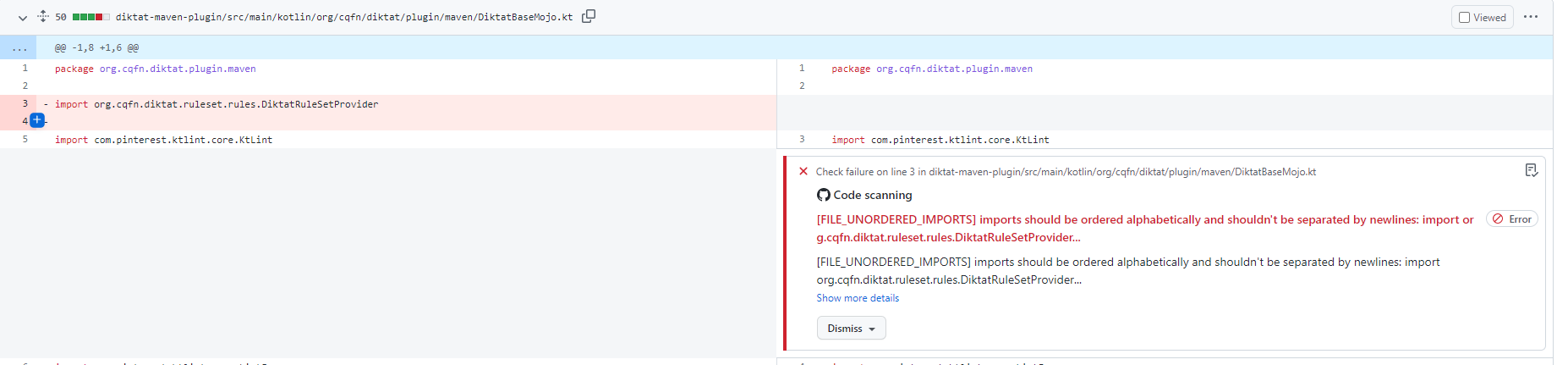
</ diktat > Sugerimos que todos usem o formato "sarif" comum como reporter no CI/CD. O GitHub tem uma integração com o formato SARIF e fornece uma relatórios nativos de problemas de diktat nas solicitações de tração.
Plugin gradle:
githubActions = true
Plugin maven (pom.xml):
< githubActions >true</ githubActions >Plug -in maven (opções da CLI):
mvn -B diktat:check@diktat -Ddiktat.githubActions=true
      - name : Upload SARIF to Github using the upload-sarif action
        uses : github/codeql-action/upload-sarif@v1
        if : ${{ always() }}
        with :
          sarif_file : ${{ github.workspace }}
NOTA : codeql-action/upload-sarif limita o número de arquivos carregados em 15. Se o seu projeto tiver mais de 15 subprojetos, o limite será excedido e a etapa falhará. Para resolver esse problema, pode -se mesclar relatórios SARIF.
diktat-gradle-plugin fornece essa capacidade com a tarefa mergeDiktatReports . Esta tarefa agrega relatórios de todas as tarefas do Diktat de todo o projeto Gradle, que produzem relatórios do SARIF e produz o relatório mesclado no diretório de construção do ROOT Project. Em seguida, este único arquivo pode ser usado como uma entrada para a ação do GitHub:
 with :
sarif_file : build/reports/diktat/diktat-merged.sarif diktat-analysis.yml No Diktat, apoiamos diktat-analysis.yml que pode ser facilmente alterado e ajudando na personalização do seu próprio conjunto de regras. Possui campos simples: name - nome da regra, enabled (true/false) - para ativar ou desativar essa regra (todas as regras são ativadas pelo padrão), configuration - um mapa simples de algumas configurações extra exclusivas para esta regra específica. Por exemplo:
- name : HEADER_MISSING_OR_WRONG_COPYRIGHT
  # all rules are enabled by the default. To disable add 'enabled: false' to the config.
  enabled : true
  configuration :
    isCopyrightMandatory : true
    copyrightText : Copyright (c) Jeff Lebowski, 2012-2020. All rights reserved.
Observe que você pode especificar e colocar diktat-analysis.yml que contém a configuração do DIKTAT no diretório pai do seu projeto no mesmo nível em que build.gradle/pom.xml é armazenado.
Consulte Configuração padrão em diktat-analysis.yml
Veja também a lista de todas as regras suportadas pelo Diktat.
Por exemplo:
@Suppress( " FUNCTION_NAME_INCORRECT_CASE " )
class SomeClass {
    fun methODTREE (): String {

    }
}Por exemplo:
@Suppress( " diktat " )
class SomeClass {
    fun methODTREE (): String {

    }
}- name : HEADER_NOT_BEFORE_PACKAGE
enabled : true
ignoreAnnotated : [MyAnnotation, Compose, Controller]Esses grupos estão ligados a capítulos de codestão.
Para desativar os capítulos, você precisará adicionar a seguinte configuração à configuração comum ( - name: DIKTAT_COMMON ):
disabledChapters : " 1, 2, 3 "O mapeamento de inspeções para os capítulos pode ser encontrado em grupos de inspeções.
Ao configurar a análise de estilo de código em um grande projeto existente, geralmente não se pode ter a capacidade de corrigir todas as descobertas de uma só vez. Para permitir a adoção gradual, o modo de linha de linha de base Diktat e Ktlint suporta. Ao executar o KTLINT pela primeira vez com a linha de base ativa, o arquivo de linha de base será gerado. É um arquivo XML com uma lista completa de descobertas pela ferramenta. Em invocações posteriores, apenas as descobertas que não estão no arquivo de linha de base serão relatadas. A linha de base pode ser ativada com a bandeira da CLI:
./diktat --baseline=diktat-baseline.xml ** / * .ktou com as opções de configuração correspondentes nos plugins Maven ou Gradle. O relatório da linha de base deve ser adicionado ao VCS, mas pode ser removido e re-gerado posteriormente, se necessário.
Veja nossa política contribuinte e código de conduta
Eu prefácio
1. Nomeação
2. Comentários
3. Formatação geral (composição)
4. Variáveis e tipos
5 funções
6. Classes, interfaces e funções de extensão
O objetivo deste documento é fornecer uma especificação de que os desenvolvedores de software possam fazer referência para aprimorar sua capacidade de escrever um código consistente, fácil de ler e de alta qualidade. Essa especificação melhorará a eficiência do desenvolvimento de software e a competitividade do produto. Para que o código seja considerado de alta qualidade, deve implicar as seguintes características:
Como outras linguagens de programação modernas, Kotlin é uma linguagem de programação avançada que cumpre os seguintes princípios gerais:
Além disso, precisamos considerar os seguintes fatores ao programar em Kotlin:
Escrevendo código Kotlin limpo e simples
Kotlin combina dois dos principais paradigmas de programação: funcional e orientados a objetos. Ambos os paradigmas são confiáveis e conhecidas práticas de engenharia de software. Como uma linguagem de programação jovem, Kotlin é construído sobre os idiomas bem estabelecidos, como Java, C ++, C#e Scala. Isso permite que a Kotlin introduza muitos recursos que ajudam um desenvolvedor a escrever um código mais legível, além de reduzir o número de estruturas de código complexas. Por exemplo, segurança de tipo e nulo, funções de extensão, sintaxe de infix, imutabilidade, diferenciação Val/Var, características orientadas para a expressão, "quando" declarações, trabalhos muito mais fáceis com coleções, conversão automática de tipo e outros açúcar sintático.
Seguindo idiomas de Kotlin
O autor de Kotlin, Andrey Breslav, mencionou que Kotlin é pragmático e prático, mas não acadêmico. Seus recursos pragmáticos permitem que as idéias sejam transformadas em software de trabalho real facilmente. A Kotlin está mais próxima de idiomas naturais do que seus antecessores e implementa os seguintes princípios de design: legibilidade, reutilização, interoperabilidade, segurança e frias da ferramenta (https://blog.jetbrains.com/kotlin/2018/10/kotlinconf-2018-anouncements/).
Usando Kotlin com eficiência
Alguns recursos de Kotlin podem ajudá-lo a escrever um código de maior desempenho: incluindo rich biblioteca de coroutina, sequências, funções/classes embutidas, matrizes de tipos básicos, tailrec e chamadas no local do contrato.
Regras - Convenções que devem ser seguidas ao programar.
Recomendações - Convenções que devem ser consideradas ao programar.
Explicação - Explicações necessárias sobre regras e recomendações.
Exemplo válido - exemplos recomendados de regras e recomendações.
Exemplo inválido - Exemplos não recomendados de regras e recomendações.
Salvo indicação em contrário, esta especificação se aplica às versões 1.3 e posteriormente de Kotlin.
Embora as exceções possam existir, é essencial entender por que regras e recomendações são necessárias. Dependendo de uma situação de projeto ou hábitos pessoais, você pode quebrar algumas das regras. No entanto, lembre -se de que uma exceção pode levar a muitos e, eventualmente, pode destruir a consistência do código. Como tal, deve haver muito poucas exceções. Ao modificar o código de código aberto ou o código de terceiros, você pode optar por usar o estilo de código deste projeto de código aberto (em vez de usar as especificações existentes) para manter a consistência. O software que é diretamente baseado na interface do sistema operacional nativo do Android, como a estrutura do Android, permanece consistente com o estilo Android.
Na programação, nem sempre é fácil de nomear de maneira significativa e adequada variáveis, funções, aulas etc. O uso de nomes significativos ajuda a expressar claramente as principais idéias e funcionalidade do seu código e evitar interpretação errônea, codificação e decodificação desnecessários, números "mágicos" e abreviações inadequadas.
Nota: O formato de codificação do arquivo de origem (incluindo comentários) deve ser apenas UTF-8. O caractere do espaço horizontal ASCII (0x20, ou seja, espaço) é o único caractere de espaço em branco permitido. As guias não devem ser usadas para recuo.
Esta seção descreve as regras gerais para nomear identificadores.
Para identificadores, use as seguintes convenções de nomenclatura:
Todos os identificadores devem usar apenas letras ou dígitos ASCII, e os nomes devem corresponder às expressões regulares w{2,64} . Explicação: Cada nome de identificador válido deve corresponder à expressão regular w{2,64} . {2,64} significa que o comprimento do nome é de 2 a 64 caracteres, e o comprimento do nome da variável deve ser proporcional à sua faixa de vida, funcionalidade e responsabilidade. Os comprimentos do nome inferior a 31 caracteres geralmente são recomendados. No entanto, isso depende do projeto. Caso contrário, uma declaração de classe com genéricos ou herança de uma superclasse pode causar quebra de linha. Nenhum prefixo ou sufixo especial deve ser usado em nomes. Os seguintes exemplos são nomes inadequados: nome_, mname, s_name e kname.
Escolha nomes de arquivos que descrevam o conteúdo. Use a caixa de camelo (pascalcase) e .kt extensão.
Exemplos típicos de nomeação:
| Significado | Correto | Incorreto |
|---|---|---|
| "Solicitação XML HTTP" | XmlHttPrequest | XmlHttPrequest |
| "Novo ID do cliente" | newcustomerid | newcustomerid |
| "Stopwatch interno" | entusiasmo | entusiasmo |
| "Suporta IPv6 no iOS" | suportapv6onios | suportapv6onios |
| "Importador do YouTube" | YouTubeIMPORTER | YouTubeIMPORTER |
val `my dummy name - with - minus` = " value " A única exceção são os nomes de funções nos Unit tests.
@Test fun `my test` () { /* ... */ }| Esperado | Nome confuso | Nome sugerido |
|---|---|---|
| 0 (zero) | O, d | OBJ, DGT |
| 1 (um) | Eu, l | ele, ln, linha |
| 2 (dois) | Z | n1, n2 |
| 5 (cinco) | S | xs, str |
| 6 (seis) | e | ex, Elm |
| 8 (oito) | B | bt, nxt |
| n, h | h, n | nr, cabeça, altura |
| rn, m | M, RN | mbr, item |
Exceções:
e pode ser usada para capturar exceções no bloco de captura: catch (e: Exception) {}| Tipo | Estilo de nomeação |
|---|---|
| Interfaces, classes, anotações, tipos enumerados e nomes de tipo de objeto | Case de camelo, começando com uma letra maiúscula. As aulas de teste têm um sufixo de teste. O nome do arquivo é 'topClassName'.kt. |
| Campos de classe, variáveis locais, métodos e parâmetros de método | CASE CAMEL Começando com uma letra baixa. Os métodos de teste podem ser sublinhados com '_'; A única exceção são as propriedades de apoio. |
| Constantes estáticas e valores enumerados | Apenas maiúsculas sublinhadas com '_' |
| Variável do tipo genérico | Letra maiúscula única, que pode ser seguida por um número, por exemplo: E, T, U, X, T2 |
| Exceções | O mesmo que os nomes das classes, mas com uma exceção do sufixo, por exemplo: AccessException e NullPointerException |
Os nomes dos pacotes estão em minúsculos e separados por pontos. O código desenvolvido em sua empresa deve começar com your.company.domain. Os números são permitidos em nomes de pacotes. Cada arquivo deve ter uma diretiva package . Os nomes dos pacotes são todos escritos em minúsculos e palavras consecutivas são concatenadas juntas (sem sublinhas). Os nomes dos pacotes devem conter os nomes do produto ou do módulo e o nome do departamento (ou equipe) para evitar conflitos com outras equipes. Os números não são permitidos. Por exemplo: org.apache.commons.lang3 , xxx.yyy.v2 .
Exceções:
your.company.domain.com.example._123name .org.example.hyphenated_name , int_.example .Exemplo válido :
package your.company.domain.mobilecontrol.viewsEsta seção descreve as regras gerais para nomear classes, enumerações e interfaces.
Classes, enumerações e nomes de interface usam nomenclatura UpperCamelCase . Siga as regras de nomeação descritas abaixo:
Um nome de classe é geralmente um substantivo (ou uma frase substantiva) denotada usando a nomenclatura da caixa de camelo, como a uppercamelcase. Por exemplo: Character ou ImmutableList . Um nome de interface também pode ser uma frase substantiva ou substantiva (como List ) ou uma frase adjetiva ou adjetiva (como Readable ). Observe que os verbos não são usados para nomear classes. No entanto, substantivos (como Customer , WikiPage e Account ) podem ser usados. Tente evitar o uso de palavras vagas, como Manager e Process .
As aulas de teste começam com o nome da classe que estão testando e terminam com 'teste'. Por exemplo, HashTest ou HashIntegrationTest .
Exemplo inválido :
 class marcoPolo {}
class XMLService {}
interface TAPromotion {}
class info {}
Exemplo válido :
 class MarcoPolo {}
class XmlService {}
interface TaPromotion {}
class Order {}Esta seção descreve as regras gerais para nomear funções.
Os nomes de funções devem usar a nomenclatura lowerCamelCase . Siga as regras de nomeação descritas abaixo:
lowerCamelCase ). Por exemplo: sendMessage , stopProcess ou calculateValue . Para nomear funções, use as seguintes regras de formatação:a) Para obter, modificar ou calcular um determinado valor: obtenha + campo não-booleano (). Observe que o compilador Kotlin gera automaticamente getters para algumas classes, aplicando a sintaxe especial preferida para os campos 'Get': Kotlin Private Val Field: String get () {}. Kotlin Private Val Field: String get () {}.
 private val field : String
get() {
}
NOTA: A sintaxe de acesso à propriedade Calling é preferida para chamar Getter diretamente. Nesse caso, o compilador Kotlin chama automaticamente o getter correspondente.
b) is + nome da variável booleana ()
c) set + Nome do campo/atributo (). No entanto, observe que a sintaxe e a geração de código para Kotlin são completamente os mesmos que os descritos para os getters no ponto a.
d) has + substantivo / adjetivo ()
e) verbo () Nota: Nota: Verbo são usados principalmente para os objetos de ação, como document.print ()
f) Verbo + substantivo ()
g) A função de retorno de chamada permite os nomes que usam o formato de preposição + verbal, como: onCreate() , onDestroy() , toString() .
Exemplo inválido :
 fun type (): String
fun Finished (): Boolean
fun visible (boolean)
fun DRAW ()
fun KeyListener ( Listener )
Exemplo válido :
 fun getType (): String
fun isFinished (): Boolean
fun setVisible (boolean)
fun draw ()
fun addKeyListener ( Listener )_ ) pode ser incluído no nome da função de teste JUNIT e deve ser usado como separador. Cada parte lógica é indicada no lowerCamelCase , por exemplo, um padrão típico de usar sublinhado: pop_emptyStack .Esta seção descreve as regras gerais para restrições de nomeação.
Os nomes constantes devem estar na caixa, palavras separadas pelo sublinhamento. As convenções gerais de nomeação constante estão listadas abaixo:
const ou variáveis locais de nível superior/ val de um objeto que contém dados imutáveis. Na maioria dos casos, as constantes podem ser identificadas como uma propriedade const val do object / nível superior do companion object / arquivo. Essas variáveis contêm valores constantes fixos que normalmente nunca devem ser alterados pelos programadores. Isso inclui tipos básicos, cordas, tipos imutáveis e coleções imutáveis de tipos imutáveis. O valor não é constante para o objeto, cujo estado pode ser alterado.val são constantes.Logger e Lock , podem estar na maçaneta como constantes ou ter case de camelo como variáveis regulares.magic numbers . SQL ou cadeias de registro não devem ser tratadas como números mágicos, nem devem ser definidos como constantes de string. Constantes mágicas, como NUM_FIVE = 5 ou NUM_5 = 5 não devem ser tratadas como constantes. Isso ocorre porque os erros serão cometidos facilmente se forem alterados para NUM_5 = 50 ou 55. Essas constantes normalmente representam valores lógicos de negócios, como medidas, capacidade, escopo, localização, taxa de imposto, descontos promocionais e múltiplos base de base em algoritmos. Você pode evitar o uso de números mágicos com o seguinte método:size == 0 , use a função isEmpty() . Para trabalhar com time , use Build-ins da java.time API .Exemplo inválido :
 var int MAXUSERNUM = 200 ;
val String sL = " Launcher " ;
Exemplo válido :
 const val int MAX_USER_NUM = 200 ;
const val String APPLICATION_NAME = " Launcher " ;Esta seção descreve as regras gerais para nomear variáveis.
Os nomes de campos não constantes devem usar o estojo de camelo e começar com uma letra minúscula. Uma variável local não pode ser tratada como constante, mesmo que seja final e imutável. Portanto, não deve usar as regras anteriores. Os nomes das variáveis do tipo de coleção (conjuntos, listas, etc.) devem conter substantivos plurais. Por exemplo: var namesList: List<String>
Os nomes de variáveis não constantes devem usar lowerCamelCase . O nome do campo imutável final usado para armazenar o objeto Singleton pode usar a mesma notação de caixa de camelo.
Exemplo inválido :
customername : String
user : List < String > = listof()
Exemplo válido :
 var customerName : String
val users : List < String > = listOf ();
val mutableCollection : MutableSet < String > = HashSet ()Evite usar nomes variáveis booleanos com um significado negativo. Ao usar um operador lógico e nome com um significado negativo, o código pode ser difícil de entender, que é chamado de "duplo negativo". Por exemplo, não é fácil entender o significado de! IsNoTerror. A especificação Javabeans gera automaticamente getters iSxxx () para atributos de classes booleanas. No entanto, nem todos os métodos que retornam o tipo booleano têm essa notação. Para variáveis ou métodos locais booleanos, é altamente recomendável que você adicione prefixos não-intencionais, incluindo IS (comumente usado por Javabeans), tem, pode, deve e deve. Ambientes modernos de desenvolvimento integrado (IDEs), como o Intellij, já são capazes de fazer isso por você quando você gerar getters em Java. Para Kotlin, esse processo é ainda mais direto, pois tudo está no nível do código de bytes sob o capô.
Exemplo inválido :
 val isNoError : Boolean
val isNotFound : Boolean
fun empty ()
fun next ();
Exemplo válido :
 val isError : Boolean
val isFound : Boolean
val hasLicense : Boolean
val canEvaluate : Boolean
val shouldAbort : Boolean
fun isEmpty ()
fun hasNext ()A melhor prática é iniciar seu código com um resumo, que pode ser uma frase. Tente equilibrar -se entre escrever nenhum comentário e declarações de comentários óbvios para cada linha de código. Os comentários devem ser expressos com precisão e clareza, sem repetir o nome da classe, interface ou método. Os comentários não são uma solução para o código errado. Em vez disso, você deve corrigir o código assim que notar um problema ou planejar para corrigi -lo (digitando um comentário de TODO, incluindo um número JIRA). Os comentários devem refletir com precisão as idéias de design e a lógica do código e descrever ainda mais sua lógica de negócios. Como resultado, outros programadores poderão economizar tempo ao tentar entender o código. Imagine que você está escrevendo os comentários para ajudar a entender as idéias originais por trás do código no futuro.
O KDOC é uma combinação da sintaxe de tags de bloco de Javadoc (estendida para apoiar construções específicas de Kotlin) e a marcação em linha de Markdown. O formato básico do KDOC é mostrado no exemplo a seguir:
 /* *
 * There are multiple lines of KDoc text,
 * Other ...
 */
fun method ( arg : String ) {
    // ...
}
Também é mostrado no seguinte formulário de linha única:
/* * Short form of KDoc. */Use um formulário de linha única ao armazenar todo o bloco KDOC em uma linha (e não há marca KDOC @XXX). Para obter instruções detalhadas sobre como usar o KDOC, consulte o documento oficial.
No mínimo, o KDOC deve ser usado para todas as classes públicas, protegidas ou de decoração interna, interface, enumeração, método e campo de membros (propriedade). Outros blocos de código também podem ter KDOCs, se necessário. Em vez de usar comentários ou kdocs antes das propriedades no construtor primário de uma classe - use a tag @property em um KDOC de uma classe. Todas as propriedades do construtor principal também devem ser documentadas em um KDOC com uma tag @property .
Exemplo incorreto:
 /* *
 * Class description
 */
class Example (
 /* *
  * property description
  */
  val foo : Foo ,
  // another property description
  val bar : Bar
)
Exemplo correto:
 /* *
 * Class description
 * @property foo property description
 * @property bar another property description
 */
class Example (
  val foo : Foo ,
  val bar : Bar
)Exemplo incorreto:
 class Example {
  fun doGood () {
    /* *
     * wrong place for kdoc
     */
    1 + 2
  }
}
Exemplo correto:
 class Example {
  fun doGood () {
    /*
     * right place for block comment
    */
    1 + 2
  }
}
Exceções:
Para setters/getters de propriedades, comentários óbvios (como this getter returns field ) são opcionais. Observe que o Kotlin gera métodos simples get/set sob o capô.
É opcional adicionar comentários para métodos simples de uma linha, como mostrado no exemplo abaixo:
 val isEmpty : Boolean
    get() = this .size == 0
ou
fun isEmptyList ( list : List < String >) = list.size == 0Nota: Você pode pular KDOCs para a substituição de um método se for quase o mesmo que o método da superclasse.
Quando o método tem detalhes como argumentos, valor de retorno ou pode lançar exceções, ele deve ser descrito no bloco KDOC (com @param, @return, @throws, etc.).
Exemplos válidos:
 /* *
* This is the short overview comment for the example interface.
*     / * Add a blank line between the comment text and each KDoc tag underneath * /
* @since 1.6
*/
protected abstract class Sample {
   /* *
    * This is a long comment with whitespace that should be split in
    * comments on multiple lines if the line comment formatting is enabled.
    *     / * Add a blank line between the comment text and each KDoc tag underneath * /
    * @param fox A quick brown fox jumps over the lazy dog
    * @return battle between fox and dog
    */
   protected abstract fun foo ( Fox fox)
    /* *
     * These possibilities include: Formatting of header comments
     *     / * Add a blank line between the comment text and each KDoc tag underneath * /
     * @return battle between fox and dog
     * @throws ProblemException if lazy dog wins
     */
   protected fun bar () throws ProblemException {
       // Some comments / * No need to add a blank line here * /
       var aVar = .. .

       // Some comments  / * Add a blank line before the comment * /
       fun doSome ()
   }
}Deve haver apenas um espaço entre a tag KDOC e o conteúdo. As tags são organizadas na seguinte ordem: @param, @return e @throws.
Portanto, o KDOC deve conter o seguinte:
implSpec , apiNote e implNote ) requerem uma linha vazia após eles.@implSpec : uma especificação relacionada à implementação da API e deve permitir que o implementador decida se deve substituí -lo.@apiNote : Explique as precauções da API, incluindo se deve permitir nulo e se o método é seguro para roscas, bem como a complexidade do algoritmo, a faixa de entrada e saída, exceções etc.@implNote : uma nota relacionada à implementação da API, que os implementadores devem ter em mente.@param , @return , @throws e outros comentários regulares.@param , @return , @throws . KDOC não deve conter:*/ símbolos).@author . Não importa quem criou originalmente uma classe quando você pode usar git blame ou os VCs de sua escolha para examinar o histórico de mudanças. Notas importantes:@deprecated . Em vez disso, use a anotação @Deprecated .@since deve ser usada apenas para versões. Não use datas na tag @since , é confuso e menos preciso. Se um bloco de tag não puder ser descrito em uma linha, recupere o conteúdo da nova linha por quatro espaços da posição @ para obter o alinhamento ( @ contagem como um + três espaços).
Exceção:
When the descriptive text in a tag block is too long to wrap, you can indent the alignment with the descriptive text in the last line. The descriptive text of multiple tags does not need to be aligned. See 3.8 Horizontal space.
In Kotlin, compared to Java, you can put several classes inside one file, so each class should have a Kdoc formatted comment (as stated in rule 2.1). This comment should contain @since tag. The right style is to write the application version when its functionality is released. It should be entered after the @since tag.
Exemplos:
 /* *
 * Description of functionality
 *
 * @since 1.6
 */
Other KDoc tags (such as @param type parameters and @see.) can be added as follows:
 /* *
 * Description of functionality
 *
 * @apiNote: Important information about API
 *
 * @since 1.6
*/This section describes the general rules of adding comments on the file header.
Comments on the file header should be placed before the package name and imports. If you need to add more content to the comment, subsequently add it in the same format.
Comments on the file header must include copyright information, without the creation date and author's name (use VCS for history management). Also, describe the content inside files that contain multiple or no classes.
The following examples for Huawei describe the format of the copyright license :
Chinese version:版权所有 (c) 华为技术有限公司 2012-2020
English version: Copyright (c) Huawei Technologies Co., Ltd. 2012-2020. All rights reserved. 2012 and 2020 are the years the file was first created and the current year, respectively.
Do not place release notes in header, use VCS to keep track of changes in file. Notable changes can be marked in individual KDocs using @since tag with version.
Invalid example:
 /* *
 * Release notes:
 * 2019-10-11: added class Foo
 */

class Foo
Valid example:
 /* *
 * @since 2.4.0
 */
class Foo
The copyright statement can use your company's subsidiaries, as shown in the below examples:
Chinese version:版权所有 (c) 海思半导体 2012-2020
English version: Copyright (c) Hisilicon Technologies Co., Ltd. 2012-2020. All rights reserved.
The copyright information should not be written in KDoc style or use single-line comments. It must start from the beginning of the file. The following example is a copyright statement for Huawei, without other functional comments:
 /*
 * Copyright (c) Huawei Technologies Co., Ltd. 2012-2020. All rights reserved.
 */
The following factors should be considered when writing the file header or comments for top-level classes:
*/ symbol. If it is a comment for a top-level class, the class declaration should start immediately without using a newline.@apiNote , the entire tag block should be deleted.Comments on the function header are placed above function declarations or definitions. A newline should not exist between a function declaration and its Kdoc. Use the preceding <<c2.1,KDoc>> style rules.
As stated in Chapter 1, the function name should reflect its functionality as much as possible. Therefore, in the Kdoc, try to describe the functionality that is not mentioned in the function name. Avoid unnecessary comments on dummy coding.
The function header comment's content is optional, but not limited to function description, return value, performance constraints, usage, memory conventions, algorithm implementation, reentrant requirements, etc.
This section describes the general rules of adding code comments.
It is a good practice to add a blank line between the body of the comment and Kdoc tag-blocks. Also, consider the following rules:
Valid Examples:
 /* *
 * This is the short overview comment for the example interface.
 *
 * @since 1.6
 */
 public interface Example {
    // Some comments  /* Since it is the first member definition in this code block, there is no need to add a blank line here */
    val aField : String = .. .
                     /* Add a blank line above the comment */
    // Some comments
    val bField : String = .. .
                      /* Add a blank line above the comment */
    /* *
     * This is a long comment with whitespace that should be split in
     * multiple line comments in case the line comment formatting is enabled.
     *                /* blank line between description and Kdoc tag */
     * @param fox A quick brown fox jumps over the lazy dog
     * @return the rounds of battle of fox and dog
     */
    fun foo ( Fox fox)
                      /* Add a blank line above the comment */
     /* *
      * These possibilities include: Formatting of header comments
      *
      * @return the rounds of battle of fox and dog
      * @throws ProblemException if lazy dog wins
      */
    fun bar () throws ProblemException {
        // Some comments  /* Since it is the first member definition in this range, there is no need to add a blank line here */
        var aVar = .. .

        // Some comments  /* Add a blank line above the comment */
        fun doSome ()
    }
}if-else-if scenario, put the comments inside the else-if branch or in the conditional block, but not before the else-if . This makes the code more understandable. When the if-block is used with curly braces, the comment should be placed on the next line after opening the curly braces. Compared to Java, the if statement in Kotlin statements returns a value. For this reason, a comment block can describe a whole if-statement .Valid examples:
 val foo = 100  // right-side comment
val bar = 200  /* right-side comment */

// general comment for the value and whole if-else condition
val someVal = if (nr % 15 == 0 ) {
    // when nr is a multiple of both 3 and 5
    println ( " fizzbuzz " )
} else if (nr % 3 == 0 ) {
    // when nr is a multiple of 3, but not 5
    // We print "fizz", only.
    println ( " fizz " )
} else if (nr % 5 == 0 ) {
    // when nr is a multiple of 5, but not 3
    // we print "buzz" only.
    println ( " buzz " )
} else {
    // otherwise, we print the number.
    println (x)
}// , /* , /** and * )Valid example:
val x = 0 // this is a comment Do not comment on unused code blocks, including imports. Delete these code blocks immediately. A code is not used to store history. Git, svn, or other VCS tools should be used for this purpose. Unused imports increase the coupling of the code and are not conducive to maintenance. The commented out code cannot be appropriately maintained. In an attempt to reuse the code, there is a high probability that you will introduce defects that are easily missed. The correct approach is to delete the unnecessary code directly and immediately when it is not used anymore. If you need the code again, consider porting or rewriting it as changes could have occurred since you first commented on the code.
The code officially delivered to the client typically should not contain TODO/FIXME comments. TODO comments are typically used to describe modification points that need to be improved and added. For example, refactoring FIXME comments are typically used to describe known defects and bugs that will be subsequently fixed and are not critical for an application. They should all have a unified style to facilitate unified text search processing.
Exemplo:
 // TODO(<author-name>): Jira-XXX - support new json format
// FIXME: Jira-XXX - fix NPE in this code block
At a version development stage, these annotations can be used to highlight the issues in the code, but all of them should be fixed before a new product version is released.
This section describes the rules related to using files in your code.
If the file is too long and complicated, it should be split into smaller files, functions, or modules. Files should not exceed 2000 lines (non-empty and non-commented lines). It is recommended to horizontally or vertically split the file according to responsibilities or hierarchy of its parts. The only exception to this rule is code generation - the auto-generated files that are not manually modified can be longer.
A source file contains code blocks in the following order: copyright, package name, imports, and top-level classes. They should be separated by one blank line.
a) Code blocks should be in the following order:
@file annotationb) Each of the preceding code blocks should be separated by a blank line.
c) Import statements are alphabetically arranged, without using line breaks and wildcards ( wildcard imports - * ).
d) Recommendation : One .kt source file should contain only one class declaration, and its name should match the filename
e) Avoid empty files that do not contain the code or contain only imports/comments/package name
f) Unused imports should be removed
From top to bottom, the order is the following:
Each category should be alphabetically arranged. Each group should be separated by a blank line. This style is compatible with Android import order.
Valid example :
 import android.* // android
import androidx.* // android
import com.android.* // android

import com.your.company.* // your company's libs
import your.company.* // your company's libs

import com.fasterxml.jackson.databind.ObjectMapper // other third-party dependencies
import org.junit.jupiter.api.Assertions

import java.io.IOException // java core packages
import java.net.URL

import kotlin.system.exitProcess  // kotlin standard library
import kotlinx.coroutines.* // official kotlin extension library The declaration parts of class-like code structures (class, interface, etc.) should be in the following order: compile-time constants (for objects), class properties, late-init class properties, init-blocks, constructors, public methods, internal methods, protected methods, private methods, and companion object. Blank lines should separate their declaration. Notas:
const val ) in companion objects should be alphabetically arranged.The declaration part of a class or interface should be in the following order:
Exception: All variants of a private val logger should be placed at the beginning of the class ( private val log , LOG , logger , etc.).
Kotlin allows several top-level declaration types: classes, objects, interfaces, properties and functions. When declaring more than one class or zero classes (eg only functions), as per rule 2.2.1, you should document the whole file in the header KDoc. When declaring top-level structures, keep the following order:
const val , val , lateinit var , var )Note : Extension functions shouldn't have receivers declared in the same file according to rule 6.2.3
Valid example:
 package com.saveourtool.diktat.example

const val CONSTANT = 42

val topLevelProperty = " String constant "

internal typealias ExamplesHandler = ( IExample ) -> Unit

interface IExample

class Example : IExample

private class Internal

fun Other. asExample (): Example { /* ... */ }

private fun Other. asInternal (): Internal { /* ... */ }

fun doStuff () { /* ... */ }
Note : kotlin scripts (.kts) allow arbitrary code to be placed on the top level. When writing kotlin scripts, you should first declare all properties, classes and functions. Only then you should execute functions on top level. It is still recommended wrapping logic inside functions and avoid using top-level statements for function calls or wrapping blocks of code in top-level scope functions like run .
Exemplo:
 /* class declarations */
/* function declarations */
run {
    // call functions here
}This section describes the general rules of using braces in your code.
Braces should always be used in if , else , for , do , and while statements, even if the program body is empty or contains only one statement. In special Kotlin when statements, you do not need to use braces for single-line statements.
Valid example:
 when (node.elementType) {
    FILE -> {
        checkTopLevelDoc(node)
        checkSomething()
     }
    CLASS -> checkClassElements(node)
}
Exception: The only exception is ternary operator in Kotlin (a single line if () <> else <> )
Invalid example:
 val value = if (string.isEmpty())  // WRONG!
                0
            else
                1
Valid example :
val value = if (string.isEmpty()) 0 else 1 // Okay if (condition) {
println ( " test " )
} else {
println ( 0 )
}For non-empty blocks and block structures, the opening brace is placed at the end of the line. Follow the K&R style (1TBS or OTBS) for non-empty code blocks with braces:
else , finally , and while (from do-while statement), or catch keywords. These keywords should not be split from the closing brace by a newline character.Exception cases :
-> ) (see point 5 of Rule 3.6.2). arg.map { value ->
foo(value)
}else / catch / finally / while (from do-while statement) keywords closing brace should stay on the same line: do {
if ( true ) {
x ++
} else {
x --
}
} while (x > 0 )Valid example:
       return arg.map { value ->
           while (condition()) {
               method()
           }
           value
       }

       return MyClass () {
           @Override
             fun method () {
               if (condition()) {
                   try {
                       something()
                   } catch (e : ProblemException ) {
                       recover()
                   }
               } else if (otherCondition()) {
                   somethingElse()
               } else {
                   lastThing()
               }
           }
} Only spaces are permitted for indentation, and each indentation should equal four spaces (tabs are not permitted). If you prefer using tabs, simply configure them to change to spaces in your IDE automatically. These code blocks should be indented if they are placed on the new line, and the following conditions are met:
+ / - / && / = /etc.)someObject
.map()
.filter()arg.map { value ->
foo(value)
}Exceptions :
Argument lists:
a) Eight spaces are used to indent argument lists (both in declarations and at call sites).
b) Arguments in argument lists can be aligned if they are on different lines.
Eight spaces are used if there is a newline after any binary operator.
Eight spaces are used for functional-like styles when the newline is placed before the dot.
Supertype lists:
a) Four spaces are used if the colon before the supertype list is on a new line.
b) Four spaces are used before each supertype, and eight spaces are used if the colon is on a new line.
Note: there should be an indentation after all statements such as if , for , etc. However, according to this code style, such statements require braces.
 if (condition)
    foo()
Exceptions :
8 spaces . A parameter that was moved to a new line can be on the same level as the previous argument: fun visit (
node : ASTNode ,
autoCorrect : Boolean ,
params : KtLint . ExperimentalParams ,
emit : (offset: Int , errorMessage: String , canBeAutoCorrected: Boolean ) -> Unit
) {
}+ / - / * can be indented with 8 spaces : val abcdef = " my splitted " +
" string "lintMethod(
"""
|val q = 1
|
""" .trimMargin()
)4 spaces if they are on different lines or with 8 spaces if the leading colon is also on a separate line class A :
B ()
class A
:
B () Avoid empty blocks, and ensure braces start on a new line. An empty code block can be closed immediately on the same line and the next line. However, a newline is recommended between opening and closing braces {} (see the examples below.)
Generally, empty code blocks are prohibited; using them is considered a bad practice (especially for catch block). They are appropriate for overridden functions, when the base class's functionality is not needed in the class-inheritor, for lambdas used as a function and for empty function in implementation of functional interface.
 override fun foo () {
}
Valid examples (note once again that generally empty blocks are prohibited):
 fun doNothing () {}

fun doNothingElse () {
}

fun foo ( bar : () -> Unit = {})
Invalid examples:
 try {
  doSomething()
} catch (e : Some ) {}
Use the following valid code instead:
 try {
   doSomething()
} catch (e : Some ) {
}Line length should be less than 120 symbols. Otherwise, it should be split.
If complex property initializing is too long, It should be split into priorities:
Invalid example:
val complexProperty = 1 + 2 + 3 + 4Valid example:
val complexProperty = 1 + 2 +
3 + 4Invalid example:
val complexProperty = ( 1 + 2 + 3 > 0 ) && ( 23 * 4 > 10 * 6 )Valid example:
val complexProperty = ( 1 + 2 + 3 > 0 ) &&
( 23 * 4 > 10 * 6 ) If long line should be split in Elvis Operator (?:), it`s done like this
Invalid example:
val value = first ? : secondValid example:
val value = first
? : second If long line in Dot Qualified Expression or Safe Access Expression , it`s done like this:
Invalid example:
val value = This . Is . Very . Long . Dot . Qualified . ExpressionValid example:
val value = This . Is . Very . Long
. Dot . Qualified . ExpressionInvalid example:
val value = This . Is ?. Very ?. Long? . Safe ?. Access ?. ExpressionValid example:
 val value = This . Is ?. Very ?. Long
    ?. Safe ?. Access ?. Expression
if value arguments list is too long, it also should be split:
Invalid example:
val result1 = ManyParamInFunction (firstArgument, secondArgument, thirdArgument, fourthArgument, fifthArguments)Valid example:
val result1 = ManyParamInFunction (firstArgument,
secondArgument, thirdArgument, fourthArgument,
fifthArguments) If annotation is too long, it also should be split:
Invalid example:
@Query(value = " select * from table where age = 10 " , nativeQuery = true )
fun foo () {}
Valid example:
@Query(
    value = " select * from table where age = 10 " ,
    nativeQuery = true )
fun foo () {}
Long one line function should be split:
Invalid example:
fun foo () = goo().write( " TooLong " )Valid example:
fun foo () =
goo().write( " TooLong " ) Long binary expression should be split into priorities:
Invalid example:
if (( x > 100 ) || y < 100 && ! isFoo()) {}Valid example:
if (( x > 100 ) ||
y < 100 && ! isFoo()) {} String template also can be split in white space in string text
Invalid example:
val nameString = " This is very long string template "Valid example:
 val nameString = " This is very long " +
        " string template "
Long Lambda argument should be split:
Invalid example:
val variable = a?.filter { it.elementType == true } ? : nullValid example:
val variable = a?.filter {
it.elementType == true
} ? : null Long one line When Entry should be split:
Invalid example:
 when (elem) {
    true -> long.argument.whenEntry
}
Valid example:
 when (elem) {
    true -> {
        long.argument.whenEntry
    }
}
If the examples above do not fit, but the line needs to be split and this in property , this is fixed like thisЖ
Invalid example:
val element = veryLongNameFunction(firstParam)Valid example:
 val element =
    varyLongNameFunction(firstParam)
Eol comment also can be split, but it depends on comment location. If this comment is on the same line with code it should be on line before:
Invalid example:
 fun foo () {
    val name = " Nick " // this comment is too long
}
Valid example:
 fun foo () {
    // this comment is too long
    val name = " Nick "
}
But if this comment is on new line - it should be split to several lines:
Invalid example:
 // This comment is too long. It should be on two lines.
fun foo () {}
Valid example:
 // This comment is too long.
// It should be on two lines.
fun foo () {}
The international code style prohibits non-Latin ( non-ASCII ) symbols. (See Identifiers) However, if you still intend on using them, follow the following convention:
One wide character occupies the width of two narrow characters. The "wide" and "narrow" parts of a character are defined by its east Asian width Unicode attribute. Typically, narrow characters are also called "half-width" characters. All characters in the ASCII character set include letters (such as a, A ), numbers (such as 0, 3 ), and punctuation spaces (such as , , { ), all of which are narrow characters. Wide characters are also called "full-width" characters. Chinese characters (such as中, 文), Chinese punctuation ( , , ; ), full-width letters and numbers (such as A、3 ) are "full-width" characters. Each one of these characters represents two narrow characters.
Any line that exceeds this limit ( 120 narrow symbols ) should be wrapped, as described in the Newline section.
Exceptions:
package and import statements.This section contains the rules and recommendations on using line breaks.
Each line can have a maximum of one code statement. This recommendation prohibits the use of code with ; because it decreases code visibility.
Invalid example:
val a = " " ; val b = " "Valid example:
 val a = " "
val b = " " ; ) after each statement separated by a newline character. There should be no redundant semicolon at the end of the lines. When a newline character is needed to split the line, it should be placed after such operators as && / || / + /etc. and all infix functions (for example, xor ). However, the newline character should be placed before operators such as . , ?. , ?: , e :: .
Note that all comparison operators, such as == , > , < , should not be split.
Invalid example :
     if (node !=
             null && test != null ) {}
Valid example :
         if (node != null &&
                 test != null ) {
         }
Note: You need to follow the functional style, meaning each function call in a chain with . should start at a new line if the chain of functions contains more than one call:
  val value = otherValue !!
          .map { x -> x }
          .filter {
              val a = true
              true
          }
          .size
Note: The parser prohibits the separation of the !! operator from the value it is checking.
Exception : If a functional chain is used inside the branches of a ternary operator, it does not need to be split with newlines.
Valid example :
if (condition) list.map { foo(it) }.filter { bar(it) } else list.drop( 1 )Note: If dot qualified expression is inside condition or passed as an argument - it should be replaced with new variable.
Invalid example :
if (node.treeParent.treeParent?.treeParent.findChildByType( IDENTIFIER ) != null ) {}Valid example :
        val grandIdentifier = node
            .treeParent
            .treeParent
            ?.treeParent
            .findChildByType( IDENTIFIER )
        if (grandIdentifier != null ) {}
Second valid example :
        val grandIdentifier = node.treeParent
            .treeParent
            ?.treeParent
            .findChildByType( IDENTIFIER )
if (grandIdentifier != null ) {}= ).( . A brace should be placed immediately after the name without any spaces in declarations or at call sites., ).it ), the newline character should be placed after the opening brace ( { ). The following examples illustrate this rule:Invalid example:
    value.map { name -> foo()
        bar()
    }
Valid example:
value.map { name ->
    foo()
    bar()
}

val someValue = { node : String -> node }Em vez de:
override fun toString (): String { return " hi " }usar:
override fun toString () = " hi "Valid example:
 class Foo ( val a : String ,
         b : String ,
         val c : String ) {
}

fun foo (
       a : String ,
       b : String ,
       c : String
) {

}
If and only if the first parameter is on the same line as an opening parenthesis, all parameters can be horizontally aligned by the first parameter. Otherwise, there should be a line break after an opening parenthesis.
Kotlin 1.4 introduced a trailing comma as an optional feature, so it is generally recommended to place all parameters on a separate line and append trailing comma. It makes the resolving of merge conflicts easier.
Valid example:
 fun foo (
       a : String ,
       b : String ,
) {

}
same should be done for function calls/constructor arguments/etc
Kotlin supports trailing commas in the following cases:
Enumerations Value arguments Class properties and parameters Function value parameters Parameters with optional type (including setters) Indexing suffix Lambda parameters when entry Collection literals (in annotations) Type arguments Type parameters Destructuring declarations
Valid example:
 class MyFavouriteVeryLongClassHolder :
    MyLongHolder < MyFavouriteVeryLongClass >(),
    SomeOtherInterface ,
AndAnotherOne { }Reduce unnecessary blank lines and maintain a compact code size. By reducing unnecessary blank lines, you can display more code on one screen, which improves code readability.
init blocks, and objects (see 3.1.2).Valid example:
 fun baz () {

    doSomething()  // No need to add blank lines at the beginning and end of the code block
    // ...

}This section describes general rules and recommendations for using spaces in the code.
Follow the recommendations below for using space to separate keywords:
Note: These recommendations are for cases where symbols are located on the same line. However, in some cases, a line break could be used instead of a space.
Separate keywords (such as if , when , for ) from the opening parenthesis with single whitespace. The only exception is the constructor keyword, which should not be separated from the opening parenthesis.
Separate keywords like else or try from the opening brace ( { ) with single whitespace. If else is used in a ternary-style statement without braces, there should be a single space between else and the statement after: if (condition) foo() else bar()
Use a single whitespace before all opening braces ( { ). The only exception is the passing of a lambda as a parameter inside parentheses:
    private fun foo ( a : ( Int ) -> Int , b : Int ) {}
foo({x : Int -> x}, 5 ) // no space before '{'where keyword: where T : Type(str: String) -> str.length()Exceptions:
:: ) are written without spaces:Object::toString. ) that stays on the same line with an object name:object.toString()?. e !! that stay on the same line with an object name:object?.toString().. for creating ranges:1..100 Use spaces after ( , ), ( : ), and ( ; ), except when the symbol is at the end of the line. However, note that this code style prohibits the use of ( ; ) in the middle of a line (see 3.3.2). There should be no whitespaces at the end of a line. The only scenario where there should be no space after a colon is when the colon is used in the annotation to specify a use-site target (for example, @param:JsonProperty ). There should be no spaces before , , : and ; .
Exceptions for spaces and colons:
: is used to separate a type and a supertype, including an anonymous object (after object keyword)Valid example:
  abstract class Foo < out T : Any > : IFoo { }

  class FooImpl : Foo () {
      constructor (x : String ) : this (x) { /* ... */ }

      val x = object : IFoo { /* ... */ }
  }
There should be only one space between the identifier and its type: list: List<String> If the type is nullable, there should be no space before ? .
When using [] operator ( get/set ) there should be no spaces between identifier and [ : someList[0] .
There should be no space between a method or constructor name (both at declaration and at call site) and a parenthesis: foo() {} . Note that this sub-rule is related only to spaces; the rules for whitespaces are described in see 3.6.2. This rule does not prohibit, for example, the following code:
 fun foo
(
    a : String
)
Never put a space after ( , [ , < (when used as a bracket in templates) or before ) , ] , > (when used as a bracket in templates).
There should be no spaces between a prefix/postfix operator (like !! or ++ ) and its operand.
Horizontal alignment refers to aligning code blocks by adding space to the code. Horizontal alignment should not be used because:
Recommendation: Alignment only looks suitable for enum class , where it can be used in table format to improve code readability:
 enum class Warnings ( private val id : Int , private val canBeAutoCorrected : Boolean , private val warn : String ) : Rule {
    PACKAGE_NAME_MISSING         ( 1 , true ,  " no package name declared in a file " ),
    PACKAGE_NAME_INCORRECT_CASE  ( 2 , true ,  " package name should be completely in a lower case " ),
    PACKAGE_NAME_INCORRECT_PREFIX ( 3 , false , " package name should start from the company's domain " )
    ;
}
Valid example:
 private val nr : Int // no alignment, but looks fine
private var color : Color // no alignment
Invalid example :
 private val    nr : Int    // aligned comment with extra spaces
private val color : Color // alignment for a comment and alignment for identifier nameEnum values are separated by a comma and line break, with ';' placed on the new line.
; on the new line: enum class Warnings {
A ,
B ,
C ,
;
}This will help to resolve conflicts and reduce the number of conflicts during merging pull requests. Also, use trailing comma.
enum class Suit { CLUBS , HEARTS , SPADES , DIAMONDS } val isCelsius = true
val isFahrenheit = falseuse enum class:
enum class TemperatureScale { CELSIUS , FAHRENHEIT }-1, 0, and 1 ; use enums instead. enum class ComparisonResult {
ORDERED_ASCENDING ,
ORDERED_SAME ,
ORDERED_DESCENDING ,
;
}This section describes rules for the declaration of variables.
Each property or variable must be declared on a separate line.
Invalid example :
val n1 : Int ; val n2 : Int Declare local variables close to the point where they are first used to minimize their scope. This will also increase the readability of the code. Local variables are usually initialized during their declaration or immediately after. The member fields of the class should be declared collectively (see Rule 3.1.2 for details on the class structure).
The when statement must have an 'else' branch unless the condition variable is enumerated or a sealed type. Each when statement should contain an else statement group, even if it does not contain any code.
Exception: If 'when' statement of the enum or sealed type contains all enum values, there is no need to have an "else" branch. The compiler can issue a warning when it is missing.
Each annotation applied to a class, method or constructor should be placed on its own line. Consider the following examples:
Valid example :
@MustBeDocumented
@CustomAnnotation
fun getNameIfPresent () { /* ... */ }Valid example :
@CustomAnnotation class Foo {}Valid example :
@MustBeDocumented @CustomAnnotation val loader : DataLoaderBlock comments should be placed at the same indentation level as the surrounding code. Veja os exemplos abaixo.
Valid example :
 class SomeClass {
    /*
     * This is
     * okay
     */
     fun foo () {}
}
Note : Use /*...*/ block comments to enable automatic formatting by IDEs.
This section contains recommendations regarding modifiers and constant values.
If a declaration has multiple modifiers, always follow the proper sequence. Valid sequence:
public / internal / protected / private
expect / actual
final / open / abstract / sealed / const
external
override
lateinit
tailrec
crossinline
vararg
suspend
inner
out
enum / annotation
companion
inline / noinline
reified
infix
operator
dataAn underscore character should separate long numerical values. Note: Using underscores simplifies reading and helps to find errors in numeric constants.
 val oneMillion = 1_000_000
val creditCardNumber = 1234_5678_9012_3456L
val socialSecurityNumber = 999_99_9999L
val hexBytes = 0xFF_EC_DE_5E
val bytes = 0b11010010_01101001_10010100_10010010 Prefer defining constants with clear names describing what the magic number means. Valid example :
 class Person () {
    fun isAdult ( age : Int ): Boolean = age >= majority

    companion object {
        private const val majority = 18
    }
}
Invalid example :
 class Person () {
    fun isAdult ( age : Int ): Boolean = age >= 18
}This section describes the general rules of using strings.
String concatenation is prohibited if the string can fit on one line. Use raw strings and string templates instead. Kotlin has significantly improved the use of Strings: String templates, Raw strings. Therefore, compared to using explicit concatenation, code looks much better when proper Kotlin strings are used for short lines, and you do not need to split them with newline characters.
Invalid example :
 val myStr = " Super string "
val value = myStr + " concatenated "
Valid example :
 val myStr = " Super string "
val value = " $myStr concatenated " Redundant curly braces in string templates
If there is only one variable in a string template, there is no need to use such a template. Use this variable directly. Invalid example :
val someString = " ${myArgument} ${myArgument.foo()} "Valid example :
val someString = " $myArgument ${myArgument.foo()} "Redundant string template
In case a string template contains only one variable - there is no need to use the string template. Use this variable directly.
Invalid example :
val someString = " $myArgument "Valid example :
val someString = myArgumentThis section describes the general rules related to the сonditional statements.
The nested if-statements, when possible, should be collapsed into a single one by concatenating their conditions with the infix operator &&.
This improves the readability by reducing the number of the nested language constructs.
Invalid example :
 if (cond1) {
    if (cond2) {
        doSomething()
    }
}
Valid example :
 if (cond1 && cond2) {
    doSomething()
}Invalid example :
 if (cond1) {
    if (cond2 || cond3) {
        doSomething()
    }
}
Valid example :
 if (cond1 && (cond2 || cond3)) {
    doSomething()
}Too complex conditions should be simplified according to boolean algebra rules, if it is possible. The following rules are considered when simplifying an expression:
foo() || false -> foo() )!(!a) -> a )a && b && a -> a && b )a || (a && b) -> a )a && (a || b) -> a )!(a || b) -> !a && !b )Valid example
 if (condition1 && condition2) {
    foo()
}
Invalid example
 if (condition1 && condition2 && condition1) {
    foo()
}This section is dedicated to the rules and recommendations for using variables and types in your code.
The rules of using variables are explained in the below topics.
Floating-point numbers provide a good approximation over a wide range of values, but they cannot produce accurate results in some cases. Binary floating-point numbers are unsuitable for precise calculations because it is impossible to represent 0.1 or any other negative power of 10 in a binary representation with a finite length.
The following code example seems to be obvious:
    val myValue = 2.0 - 1.1
    println (myValue)
However, it will print the following value: 0.8999999999999999
Therefore, for precise calculations (for example, in finance or exact sciences), using such types as Int , Long , BigDecimal are recommended. The BigDecimal type should serve as a good choice.
Invalid example : Float values containing more than six or seven decimal numbers will be rounded.
val eFloat = 2.7182818284f // Float, will be rounded to 2.7182817Valid example : (when precise calculations are needed):
   val income = BigDecimal ( " 2.0 " )
   val expense = BigDecimal ( " 1.1 " )
println (income.subtract(expense)) // you will obtain 0.9 here Numeric float type values should not be directly compared with the equality operator (==) or other methods, such as compareTo() and equals() . Since floating-point numbers involve precision problems in computer representation, it is better to use BigDecimal as recommended in Rule 4.1.1 to make accurate computations and comparisons. The following code describes these problems.
Invalid example :
 val f1 = 1.0f - 0.9f
val f2 = 0.9f - 0.8f
if (f1 == f2) {
   println ( " Expected to enter here " )
} else {
   println ( " But this block will be reached " )
}

val flt1 = f1;
val flt2 = f2;
if (flt1.equals(flt2)) {
   println ( " Expected to enter here " )
} else {
   println ( " But this block will be reached " )
}
Valid example :
 val foo = 1.03f
val bar = 0.42f
if (abs(foo - bar) > 1e - 6f ) {
    println ( " Ok " )
} else {
    println ( " Not " )
} Variables with the val modifier are immutable (read-only). Using val variables instead of var variables increases code robustness and readability. This is because var variables can be reassigned several times in the business logic. However, in some scenarios with loops or accumulators, only var s are permitted.
This section provides recommendations for using types.
The Kotlin compiler has introduced Smart Casts that help reduce the size of code.
Invalid example :
    if (x is String ) {
        print ((x as String ).length) // x was already automatically cast to String - no need to use 'as' keyword here
    }
Valid example :
    if (x is String ) {
        print (x.length) // x was already automatically cast to String - no need to use 'as' keyword here
    }
Also, Kotlin 1.3 introduced Contracts that provide enhanced logic for smart-cast. Contracts are used and are very stable in stdlib , for example:
 fun bar ( x : String? ) {
    if ( ! x.isNullOrEmpty()) {
        println ( " length of ' $x ' is ${x.length} " ) // smartcasted to not-null
    }
}
Smart cast and contracts are a better choice because they reduce boilerplate code and features forced type conversion.
Invalid example :
 fun String?. isNotNull (): Boolean = this != null

fun foo ( s : String? ) {
    if (s.isNotNull()) s !! .length // No smartcast here and !! operator is used
}
Valid example :
 fun foo ( s : String? ) {
    if (s.isNotNull()) s.length // We have used a method with contract from stdlib that helped compiler to execute smart cast
} Type aliases provide alternative names for existing types. If the type name is too long, you can replace it with a shorter name, which helps to shorten long generic types. For example, code looks much more readable if you introduce a typealias instead of a long chain of nested generic types. We recommend using a typealias if the type contains more than two nested generic types and is longer than 25 chars .
Invalid example :
val b : MutableMap < String , MutableList < String >>Valid example :
 typealias FileTable = MutableMap < String , MutableList < String >>
val b : FileTable
You can also provide additional aliases for function (lambda-like) types:
 typealias MyHandler = ( Int , String , Any ) -> Unit

typealias Predicate < T > = ( T ) -> BooleanKotlin is declared as a null-safe programming language. However, to achieve compatibility with Java, it still supports nullable types.
To avoid NullPointerException and help the compiler prevent Null Pointer Exceptions, avoid using nullable types (with ? symbol).
Invalid example :
val a : Int? = 0Valid example :
val a : Int = 0 Nevertheless, when using Java libraries extensively, you have to use nullable types and enrich the code with !! e ? symbols. Avoid using nullable types for Kotlin stdlib (declared in official documentation). Try to use initializers for empty collections. For example, if you want to initialize a list instead of null , use emptyList() .
Invalid example :
val a : List < Int > ? = nullValid example :
val a : List < Int > = emptyList()Like in Java, classes in Kotlin may have type parameters. To create an instance of such a class, we typically need to provide type arguments:
val myVariable : Map < Int , String > = emptyMap< Int , String >()However, the compiler can inherit type parameters from the r-value (value assigned to a variable). Therefore, it will not force users to declare the type explicitly. These declarations are not recommended because programmers would need to find the return value and understand the variable type by looking at the method.
Invalid example :
val myVariable = emptyMap< Int , String >()Valid example :
val myVariable : Map < Int , String > = emptyMap() Try to avoid explicit null checks (explicit comparison with null ) Kotlin is declared as Null-safe language. However, Kotlin architects wanted Kotlin to be fully compatible with Java; that's why the null keyword was also introduced in Kotlin.
There are several code-structures that can be used in Kotlin to avoid null-checks. For example: ?: , .let {} , .also {} , etc
Invalid example:
 // example 1
var myVar : Int? = null
if (myVar == null ) {
    println ( " null " )
    return
}

// example 2
if (myVar != null ) {
    println ( " not null " )
    return
}

// example 3
val anotherVal = if (myVar != null ) {
                     println ( " not null " )
                     1
                 } else {
                     2
                 }
// example 4
if (myVar == null ) {
    println ( " null " )
} else {
    println ( " not null " )
}
Valid example:
 // example 1
var myVar : Int? = null
myVar ? : run {
    println ( " null " )
    return
}

// example 2
myVar?. let {
    println ( " not null " )
    return
}

// example 3
val anotherVal = myVar?. also {
                     println ( " not null " )
                     1
                 } ? : 2

// example 4
myVar?. let {
    println ( " not null " )
} ? : run { println ( " null " ) }
Exceptions:
In the case of complex expressions, such as multiple else-if structures or long conditional statements, there is common sense to use explicit comparison with null .
Valid examples:
 if (myVar != null ) {
    println ( " not null " )
} else if (anotherCondition) {
    println ( " Other condition " )
}
if (myVar == null || otherValue == 5 && isValid) {} Please also note, that instead of using require(a != null) with a not null check - you should use a special Kotlin function called requireNotNull(a) .
This section describes the rules of using functions in your code.
Developers can write clean code by gaining knowledge of how to build design patterns and avoid code smells. You should utilize this approach, along with functional style, when writing Kotlin code. The concepts behind functional style are as follows: Functions are the smallest unit of combinable and reusable code. They should have clean logic, high cohesion , and low coupling to organize the code effectively. The code in functions should be simple and not conceal the author's original intentions.
Additionally, it should have a clean abstraction, and control statements should be used straightforwardly. The side effects (code that does not affect a function's return value but affects global/object instance variables) should not be used for state changes of an object. The only exceptions to this are state machines.
Kotlin is designed to support and encourage functional programming, featuring the corresponding built-in mechanisms. Also, it supports standard collections and sequences feature methods that enable functional programming (for example, apply , with , let , and run ), Kotlin Higher-Order functions, function types, lambdas, and default function arguments. As previously discussed, Kotlin supports and encourages the use of immutable types, which in turn motivates programmers to write pure functions that avoid side effects and have a corresponding output for specific input. The pipeline data flow for the pure function comprises a functional paradigm. It is easy to implement concurrent programming when you have chains of function calls, where each step features the following characteristics:
There can be only one side effect in this data stream, which can be placed only at the end of the execution queue.
The function should be displayable on one screen and only implement one certain logic. If a function is too long, it often means complex and could be split or simplified. Functions should consist of 30 lines (non-empty and non-comment) in total.
Exception: Some functions that implement complex algorithms may exceed 30 lines due to aggregation and comprehensiveness. Linter warnings for such functions can be suppressed .
Even if a long function works well, new problems or bugs may appear due to the function's complex logic once it is modified by someone else. Therefore, it is recommended to split such functions into several separate and shorter functions that are easier to manage. This approach will enable other programmers to read and modify the code properly.
The nesting depth of a function's code block is the depth of mutual inclusion between the code control blocks in the function (for example: if, for, while, and when). Each nesting level will increase the amount of effort needed to read the code because you need to remember the current "stack" (for example, entering conditional statements and loops). Exception: The nesting levels of the lambda expressions, local classes, and anonymous classes in functions are calculated based on the innermost function. The nesting levels of enclosing methods are not accumulated. Functional decomposition should be implemented to avoid confusion for the developer who reads the code. This will help the reader switch between contexts.
Nested functions create a more complex function context, thereby confusing readers. With nested functions, the visibility context may not be evident to the code reader.
Invalid example :
 fun foo () {
    fun nested (): String {
        return " String from nested function "
    }
    println ( " Nested Output: ${nested()} " )
}Don't use negated function calls if it can be replaced with negated version of this function
Invalid example :
 fun foo () {
    val list = listOf ( 1 , 2 , 3 )

    if ( ! list.isEmpty()) {
        // Some cool logic
    }
}
Valid example :
 fun foo () {
    val list = listOf ( 1 , 2 , 3 )

    if (list.isNotEmpty()) {
        // Some cool logic
    }
}The rules for using function arguments are described in the below topics.
With such notation, it is easier to use curly brackets, leading to better code readability.
Valid example :
 // declaration
fun myFoo ( someArg : Int , myLambda : () -> Unit ) {
// ...
}

// usage
myFoo( 1 ) {
println ( " hey " )
}A long argument list is a code smell that leads to less reliable code. It is recommended to reduce the number of parameters. Having more than five parameters leads to difficulties in maintenance and conflicts merging. If parameter groups appear in different functions multiple times, these parameters are closely related and can be encapsulated into a single Data Class. It is recommended that you use Data Classes and Maps to unify these function arguments.
In Java, default values for function arguments are prohibited. That is why the function should be overloaded when you need to create a function with fewer arguments. In Kotlin, you can use default arguments instead.
Invalid example :
 private fun foo ( arg : Int ) {
    // ...
}

private fun foo () {
    // ...
}
Valid example :
 private fun foo ( arg : Int = 0) {
     // ...
} Try to avoid using runBlocking in asynchronous code
Invalid example :
 GlobalScope .async {
    runBlocking {
        count ++
    }
}The lambda without parameters shouldn't be too long. If a lambda is too long, it can confuse the user. Lambda without parameters should consist of 10 lines (non-empty and non-comment) in total.
Expressions with unnecessary, custom labels generally increase complexity and worsen the maintainability of the code.
Invalid example :
run lab@ {
    list.forEach {
        return @lab
    }
}
Valid example :
list.forEachIndexed { index, i ->
    return @forEachIndexed
}

lab@ for (i : Int in q) {
    for (j : Int in q) {
        println (i)
        break @lab
    }
}This section describes the rules of denoting classes in your code.
When a class has a single constructor, it should be defined as a primary constructor in the declaration of the class. If the class contains only one explicit constructor, it should be converted to a primary constructor.
Invalid example :
 class Test {
    var a : Int
    constructor (a : Int ) {
        this .a = a
    }
}
Valid example :
 class Test ( var a : Int ) {
    // ...
}

// in case of any annotations or modifiers used on a constructor:
class Test private constructor( var a : Int ) {
    // ...
} Some people say that the data class is a code smell. However, if you need to use it (which makes your code more simple), you can utilize the Kotlin data class . The main purpose of this class is to hold data, but also data class will automatically generate several useful methods:
Therefore, instead of using normal classes:
 class Test {
    var a : Int = 0
        get() = field
        set(value : Int ) { field = value}
}

class Test {
    var a : Int = 0
    var b : Int = 0

    constructor (a : Int , b : Int ) {
        this .a = a
        this .b = b
    }
}

// or
class Test ( var a : Int = 0 , var b : Int = 0 )

// or
class Test () {
    var a : Int = 0
    var b : Int = 0
}
prefer data classes:
data class Test1 ( var a : Int = 0 , var b : Int = 0 )Exception 1 : Note that data classes cannot be abstract, open, sealed, or inner; that is why these types of classes cannot be changed to a data class.
Exception 2 : No need to convert a class to a data class if this class extends some other class or implements an interface.
The primary constructor is a part of the class header; it is placed after the class name and type parameters (optional) but can be omitted if it is not used.
Invalid example :
 // simple case that does not need a primary constructor
class Test () {
    var a : Int = 0
    var b : Int = 0
}

// empty primary constructor is not needed here
// it can be replaced with a primary contructor with one argument or removed
class Test () {
    var a  = " Property "

    init {
        println ( " some init " )
    }

    constructor (a : String ) : this () {
        this .a = a
    }
}
Valid example :
 // the good example here is a data class; this example also shows that you should get rid of braces for the primary constructor
class Test {
    var a : Int = 0
    var b : Int = 0
} Several init blocks are redundant and generally should not be used in your class. The primary constructor cannot contain any code. That is why Kotlin has introduced init blocks. These blocks store the code to be run during the class initialization. Kotlin allows writing multiple initialization blocks executed in the same order as they appear in the class body. Even when you follow (rule 3.2)[#r3.2], this makes your code less readable as the programmer needs to keep in mind all init blocks and trace the execution of the code. Therefore, you should try to use a single init block to reduce the code's complexity. If you need to do some logging or make some calculations before the class property assignment, you can use powerful functional programming. This will reduce the possibility of the error if your init blocks' order is accidentally changed and make the code logic more coupled. It is always enough to use one init block to implement your idea in Kotlin.
Invalid example :
 class YourClass ( var name : String ) {
    init {
        println ( " First initializer block that prints ${name} " )
    }

    val property = " Property: ${name.length} " . also (::println)

    init {
        println ( " Second initializer block that prints ${name.length} " )
    }
}
Valid example :
 class YourClass ( var name : String ) {
    init {
        println ( " First initializer block that prints ${name} " )
    }

    val property = " Property: ${name.length} " . also { prop ->
        println (prop)
        println ( " Second initializer block that prints ${name.length} " )
    }
}
The init block was not added to Kotlin to help you initialize your properties; it is needed for more complex tasks. Therefore if the init block contains only assignments of variables - move it directly to properties to be correctly initialized near the declaration. In some cases, this rule can be in clash with 6.1.1, but that should not stop you.
Invalid example :
 class A ( baseUrl : String ) {
    private val customUrl : String
    init {
        customUrl = " $baseUrl /myUrl "
    }
}
Valid example :
 class A ( baseUrl : String ) {
    private val customUrl = " $baseUrl /myUrl "
}The explicit supertype qualification should not be used if there is no clash between called methods. This rule is applicable to both interfaces and classes.
Invalid example :
 open class Rectangle {
    open fun draw () { /* ... */ }
}

class Square () : Rectangle() {
    override fun draw () {
        super < Rectangle >.draw() // no need in super<Rectangle> here
    }
} Abstract classes are used to force a developer to implement some of its parts in their inheritors. When the abstract class has no abstract methods, it was set abstract incorrectly and can be converted to a regular class.
Invalid example :
 abstract class NotAbstract {
    fun foo () {}

    fun test () {}
}
Valid example :
 abstract class NotAbstract {
    abstract fun foo ()

    fun test () {}
}

// OR
class NotAbstract {
    fun foo () {}

    fun test () {}
}Kotlin has a mechanism of backing properties. In some cases, implicit backing is not enough and it should be done explicitly:
 private var _table : Map < String , Int > ? = null
val table : Map < String , Int >
    get() {
        if ( _table == null ) {
            _table = HashMap () // Type parameters are inferred
        }
        return _table ? : throw AssertionError ( " Set to null by another thread " )
    }
In this case, the name of the backing property ( _table ) should be the same as the name of the real property ( table ) but should have an underscore ( _ ) prefix. It is one of the exceptions from the identifier names rule
Kotlin has a perfect mechanism of properties. Kotlin compiler automatically generates get and set methods for properties and can override them.
Invalid example:
 class A {
    var size : Int = 0
        set(value) {
            println ( " Side effect " )
            field = value
        }
        // user of this class does not expect calling A.size receive size * 2
        get() = field * 2
}
From the callee code, these methods look like access to this property: A().isEmpty = true for setter and A().isEmpty for getter.
However, when get and set are overridden, it isn't very clear for a developer who uses this particular class. The developer expects to get the property value but receives some unknown value and some extra side-effect hidden by the custom getter/setter. Use extra functions instead to avoid confusion.
Valid example :
 class A {
    var size : Int = 0
    fun initSize ( value : Int ) {
        // some custom logic
    }

    // this will not confuse developer and he will get exactly what he expects
    fun goodNameThatDescribesThisGetter () = this .size * 2
}
Exception: Private setters are only exceptions that are not prohibited by this rule.
If you ignored recommendation 6.1.8, be careful with using the name of the property in your custom getter/setter as it can accidentally cause a recursive call and a StackOverflow Error . Use the field keyword instead.
Invalid example (very bad) :
 var isEmpty : Boolean
    set(value) {
        println ( " Side effect " )
        isEmpty = value
    }
get() = isEmptyIn Java, trivial getters - are the getters that are just returning the field value. Trivial setters - are merely setting the field with a value without any transformation. However, in Kotlin, trivial getters/setters are generated by default. There is no need to use it explicitly for all types of data structures in Kotlin.
Invalid example :
 class A {
    var a : Int = 0
    get() = field
    set(value : Int ) { field = value }

    //
}
Valid example :
 class A {
    var a : Int = 0
    get() = field
    set(value : Int ) { field = value }

    //
} In Java, before functional programming became popular, many classes from common libraries used the configuration paradigm. To use these classes, you had to create an object with the constructor with 0-2 arguments and set the fields needed to run the object. In Kotlin, to reduce the number of dummy code line and to group objects apply extension was added:
Invalid example :
 class HttpClient ( var name : String ) {
    var url : String = " "
    var port : String = " "
    var timeout = 0

    fun doRequest () {}
}

fun main () {
    val httpClient = HttpClient ( " myConnection " )
    httpClient.url = " http://example.com "
    httpClient.port = " 8080 "
    httpClient.timeout = 100

    httpCLient.doRequest()
}
Valid example :
 class HttpClient ( var name : String ) {
    var url : String = " "
    var port : String = " "
    var timeout = 0

    fun doRequest () {}
}

fun main () {
    val httpClient = HttpClient ( " myConnection " )
            . apply {
                url = " http://example.com "
                port = " 8080 "
                timeout = 100
            }
    httpClient.doRequest()
}If a class has only one immutable property, then it can be converted to the inline class.
Sometimes it is necessary for business logic to create a wrapper around some type. However, it introduces runtime overhead due to additional heap allocations. Moreover, if the wrapped type is primitive, the performance hit is terrible, because primitive types are usually heavily optimized by the runtime, while their wrappers don't get any special treatment.
Invalid example :
 class Password {
    val value : String
}
Valid example :
inline class Password ( val value : String )This section describes the rules of using extension functions in your code.
Extension functions is a killer-feature in Kotlin. It gives you a chance to extend classes that were already implemented in external libraries and helps you to make classes less heavy. Extension functions are resolved statically.
It is recommended that for classes, the non-tightly coupled functions, which are rarely used in the class, should be implemented as extension functions where possible. They should be implemented in the same class/file where they are used. This is a non-deterministic rule, so the code cannot be checked or fixed automatically by a static analyzer.
You should avoid declaring extension functions with the same name and signature if their receivers are base and inheritor classes (possible_bug), as extension functions are resolved statically. There could be a situation when a developer implements two extension functions: one is for the base class and another for the inheritor. This can lead to an issue when an incorrect method is used.
Invalid example :
 open class A
class B : A ()

// two extension functions with the same signature
fun A. foo () = " A "
fun B. foo () = " B "

fun printClassName ( s : A ) { println (s.foo()) }

// this call will run foo() method from the base class A, but
// programmer can expect to run foo() from the class inheritor B
fun main () { printClassName( B ()) }You should not use extension functions for the class in the same file, where it is defined.
Invalid example :
 class SomeClass {

}

fun SomeClass. deleteAllSpaces () {

}You should not use property length with operation - 1, you can change this to lastIndex
Invalid example :
 val A = " name "
val B = A .length - 1
val C = A [ A .length - 1 ]
Valid example :
 val A = " name "
val B = A .lastIndex
val C = A [ A .lastIndex] An Interface in Kotlin can contain declarations of abstract methods, as well as method implementations. What makes them different from abstract classes is that interfaces cannot store state. They can have properties, but these need to be abstract or to provide accessor implementations.
Kotlin's interfaces can define attributes and functions. In Kotlin and Java, the interface is the main presentation means of application programming interface (API) design and should take precedence over the use of (abstract) classes.
This section describes the rules of using objects in code.
Avoid using utility classes/objects; use extensions instead. As described in 6.2 Extension functions, using extension functions is a powerful method. This enables you to avoid unnecessary complexity and class/object wrapping and use top-level functions instead.
Invalid example :
 object StringUtil {
    fun stringInfo ( myString : String ): Int {
        return myString.count{ " something " .contains(it) }
    }
}
StringUtil .stringInfo( " myStr " )
Valid example :
 fun String. stringInfo (): Int {
    return this .count{ " something " .contains(it) }
}

" myStr " .stringInfo()Kotlin's objects are extremely useful when you need to implement some interface from an external library that does not have any state. There is no need to use classes for such structures.
Valid example :
 interface I {
    fun foo()
}

object O: I {
    override fun foo() {}
}
This section describes general rules for .kts files
It is still recommended wrapping logic inside functions and avoid using top-level statements for function calls or wrapping blocks of code in top-level scope functions like run .
Valid example :
 run {
    // some code
}

fun foo() {

}







