diktat
Release 2.0.0


Diktat est une norme de codage stricte pour Kotlin, composé d'une collection de règles de style de code Kotlin implémentées en tant que visiteurs de syntaxe abstraits (AST) construits au-dessus de Ktlint. Il sert à détecter et à réparer automatiquement les odeurs de code dans le processus d'intégration continue / déploiement continu (CI / CD). Vous pouvez trouver la liste complète des règles et inspections prises en charge ici.
Diktat a gagné en reconnaissance et a été ajouté aux listes d'outils d'analyse statique, Kotlin-Awesome et Kompar. Nous étendons notre gratitude à la communauté pour ce soutien!
| Codestation | Inspections | Exemples | Démo | Du papier blanc | Groupes d'inspections |
Bien qu'il existe d'autres outils comme detekt et ktlint effectuant une analyse statique, vous vous demandez peut-être pourquoi Diktat est nécessaire. Voici les principales raisons:
Plus d'inspections: Diktat possède plus de 100 inspections étroitement associées à son codestyle.
Inspections uniques: Diktat introduit des inspections uniques que l'on trouve dans d'autres liners.
Très configurable: chaque inspection est hautement configurable, permettant la personnalisation et la suppression. Vérifiez les options de configuration et la suppression.
Codestyle strict: Diktat applique un codestyle détaillé qui peut être adopté et appliqué dans votre projet.
Télécharger Diktat manuellement: ici
Ou utilisez curl :
curl -sSLO https://github.com/saveourtool/diktat/releases/download/v2.0.0/diktat && chmod a+x diktatPour Windows uniquement . Télécharger diktat.cmd manuellement: ici
Enfin, exécutez Ktlint (avec diktat injecté) pour vérifier vos fichiers '* .kt' dans 'dir / your / dir':
$ ./diktat " dir/your/dir/**/*.kt "Sous les fenêtres
diktat.bat "dir/your/dir/**/*.kt"
Pour AutoFix toutes les violations du style de code, utilisez --mode fix .
Vous pouvez voir comment il est configuré dans nos exemples:
            < plugin >
                < groupId >com.saveourtool.diktat</ groupId >
                < artifactId >diktat-maven-plugin</ artifactId >
                < version >${diktat.version}</ version >
                < executions >
                    < execution >
                        < id >diktat</ id >
                        < phase >none</ phase >
                        < goals >
                            < goal >check</ goal >
                            < goal >fix</ goal >
                        </ goals >
                        < configuration >
                            < inputs >
                                < input >${project.basedir}/src/main/kotlin</ input >
                                < input >${project.basedir}/src/test/kotlin</ input >
                            </ inputs >
                            < diktatConfigFile >diktat-analysis.yml</ diktatConfigFile >
                           < excludes >
                              < exclude >${project.basedir}/src/test/kotlin/excluded</ exclude >
                           </ excludes >
                        </ configuration >
                    </ execution >
                </ executions >
            </ plugin >
Pour exécuter diktat en mode uniquement, utilisez la commande $ mvn diktat:check@diktat . Pour exécuter Diktat en mode autocorrect , utilisez la commande $ mvn diktat:fix@diktat .
Demander une executionId Maven spécifique sur la ligne de commande (le diktat de fuite dans l'exemple ci-dessus) peut être essentiel dans ces cas:
Dans votre pom.xml , vous avez plusieurs exécutions avec différentes configurations (par exemple: plusieurs ensembles de règles):
< executions >

    < execution >
        < id >diktat-basic</ id >
        < configuration >
            < diktatConfigFile >diktat-analysis.yml</ diktatConfigFile >
        </ configuration >
    </ execution >

    < execution >
        < id >diktat-advanced</ id >
        < configuration >
            < diktatConfigFile >diktat-analysis-advanced.yml</ diktatConfigFile >
        </ configuration >
    </ execution >

</ executions >
Votre fichier YAML avec DIKTAT Rules a un nom non défaut et / ou réside dans un emplacement non défaut:
< executions >
    < execution >
        < id >diktat</ id >
        < configuration >
            < diktatConfigFile >/non/default/rule-set-file.yml</ diktatConfigFile >
        </ configuration >
    </ execution >
</ executions >diktatConfigFile ou s'il pointe vers un fichier non existant, DikTat s'exécute avec la configuration par défaut. Si vous omettez l' executionId :
$ mvn diktat:check - Le plug-in utilisera la configuration par défaut et recherchera le fichier diktat-analysis.yml dans le répertoire du projet (vous pouvez toujours personnaliser les ensembles de règles en modifiant le fichier YAML).
Nécessite une version gradle pas inférieure à 7,0
Vous pouvez voir comment le plugin est configuré dans nos exemples:
plugins {
    id( " com.saveourtool.diktat " ) version " 2.0.0 "
}
Remarque Si vous souhaitez appliquer le plugin sur des projets multi-modules "
 import com.saveourtool.diktat.plugin.gradle.DiktatGradlePlugin

plugins {
    id( " com.saveourtool.diktat " ) version " 2.0.0 " apply false
}

allprojects {
    apply< DiktatGradlePlugin >()
}
Vous pouvez ensuite configurer Diktat à l'aide d'une extension diktat :
diktat {
    inputs {
        include( " src/**/*.kt " )  // path matching this pattern (per PatternFilterable) that will be checked by diktat
        exclude( " src/test/kotlin/excluded/** " )  // path matching this pattern will not be checked by diktat
    }
    debug = true  // turn on debug logging
}
Dans l'extension diktat , vous pouvez également configurer différents journalistes et leur sortie. Vous pouvez spécifier json , html , sarif , plain (par défaut). Si output est définie, ce doit être un chemin de fichier. S'il n'est pas défini, les résultats seront imprimés sur stdout. Vous pouvez spécifier plusieurs journalistes. Si aucun journaliste n'est spécifié, plain sera utilisé avec stdout comme sortie.
diktat {
    reporters {
        plain()
        json()
        html {
            output = file( " someFile.html " )
        }
        // checkstyle()
        // sarif()
        // gitHubActions()
    }
}
Vous pouvez exécuter des vérifications de diktat à l'aide de la tâche ./gradlew diktatCheck et corriger automatiquement les erreurs avec la tâche ./gradlew diktatFix .
Spotless est un agrégateur Linter.
Diktat peut être exécuté via Spotless-Gradle-Plugin depuis la version 5.10.0
plugins {
   id( " com.diffplug.spotless " ) version " 5.10.0 "
}

spotless {
   kotlin {
      diktat()
   }
   kotlinGradle {
      diktat()
   }
}spotless {
kotlin {
diktat( " 2.0.0 " ).configFile( " full/path/to/diktat-analysis.yml " )
}
}Diktat peut être exécuté via Spotless-Maven-Plugin depuis la version 2.8.0
< plugin >
   < groupId >com.diffplug.spotless</ groupId >
   < artifactId >spotless-maven-plugin</ artifactId >
   < version >${spotless.version}</ version >
   < configuration >
      < kotlin >
         < diktat />
      </ kotlin >
   </ configuration >
</ plugin >< diktat >
< version >2.0.0</ version > <!-- optional -->
< configFile >full/path/to/diktat-analysis.yml</ configFile > <!-- optional, configuration file path -->
</ diktat > Nous suggérons à tout le monde d'utiliser le format "Sarif" commun en tant que reporter dans CI / CD. GitHub a une intégration au format SARIF et vous fournit un rapport natif des problèmes de diktat dans les demandes de traction.
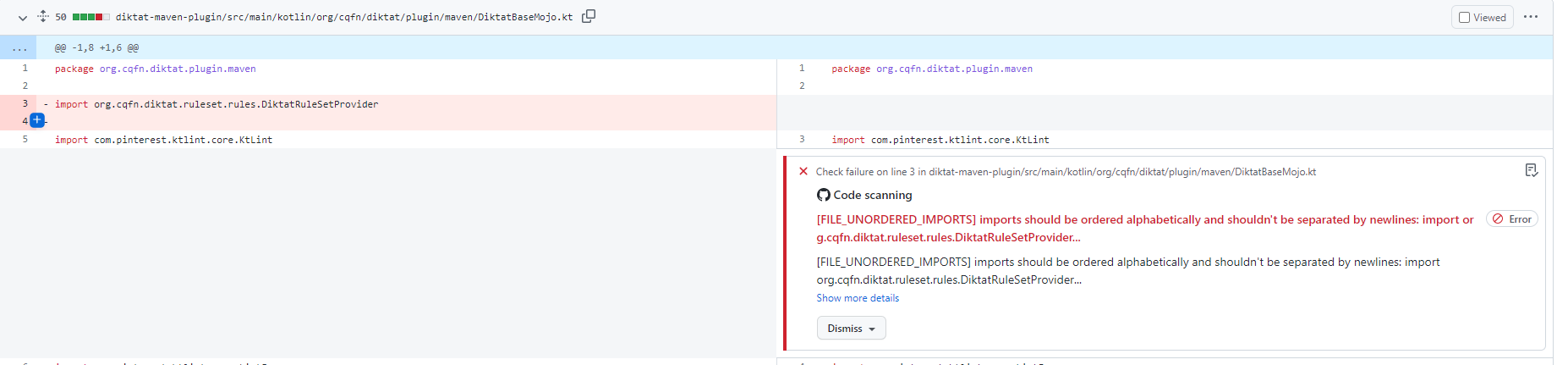
Plugin Gradle:
githubActions = true
Plugin Maven (Pom.xml):
< githubActions >true</ githubActions >Plugin Maven (options CLI):
mvn -B diktat:check@diktat -Ddiktat.githubActions=true
      - name : Upload SARIF to Github using the upload-sarif action
        uses : github/codeql-action/upload-sarif@v1
        if : ${{ always() }}
        with :
          sarif_file : ${{ github.workspace }}
Remarque : codeql-action/upload-sarif limite le nombre de fichiers téléchargés à 15. Si votre projet a plus de 15 sous-projets, la limite sera dépassée et que l'étape échoue. Pour résoudre ce problème, on peut fusionner les rapports Sarif.
diktat-gradle-plugin fournit cette capacité avec la tâche mergeDiktatReports . Cette tâche regroupe les rapports de toutes les tâches de diktat de tous les projets Gradle, qui produisent des rapports SARIF et publie le rapport fusionné dans le répertoire de construction du projet Root. Ensuite, ce fichier unique peut être utilisé comme entrée pour l'action GitHub:
 with :
sarif_file : build/reports/diktat/diktat-merged.sarif diktat-analysis.yml Dans Diktat, nous avons pris en charge diktat-analysis.yml qui peut être facilement modifié et aider à personnaliser votre propre ensemble de règles. Il a des champs simples: name - nom de la règle, enabled (true / false) - pour activer ou désactiver cette règle (toutes les règles sont activées par défaut), configuration - une carte simple de quelques configurations supplémentaires uniques pour cette règle particulière. Par exemple:
- name : HEADER_MISSING_OR_WRONG_COPYRIGHT
  # all rules are enabled by the default. To disable add 'enabled: false' to the config.
  enabled : true
  configuration :
    isCopyrightMandatory : true
    copyrightText : Copyright (c) Jeff Lebowski, 2012-2020. All rights reserved.
Remarquez que vous pouvez spécifier et placer diktat-analysis.yml qui contient la configuration de Diktat dans le répertoire parent de votre projet au même niveau où build.gradle/pom.xml est stocké.
Voir Configuration par défaut dans Diktat-Analysis.yml
Voir également la liste de toutes les règles prises en charge par Diktat.
Par exemple:
@Suppress( " FUNCTION_NAME_INCORRECT_CASE " )
class SomeClass {
    fun methODTREE (): String {

    }
}Par exemple:
@Suppress( " diktat " )
class SomeClass {
    fun methODTREE (): String {

    }
}- name : HEADER_NOT_BEFORE_PACKAGE
enabled : true
ignoreAnnotated : [MyAnnotation, Compose, Controller]Ces groupes sont liés à des chapitres du codestyle.
Pour désactiver les chapitres, vous devrez ajouter la configuration suivante à la configuration commune ( - name: DIKTAT_COMMON ):
disabledChapters : " 1, 2, 3 "La cartographie des inspections aux chapitres peut être trouvée dans des groupes d'inspections.
Lors de la configuration de l'analyse du style de code sur un grand projet existant, on n'a souvent pas la possibilité de corriger toutes les résultats à la fois. Pour permettre une adoption progressive, le mode de base de la diktat et de KTLINT. Lors de l'exécution de Ktlint pour la première fois avec une ligne de base active, le fichier de base sera généré. Il s'agit d'un fichier XML avec une liste complète des résultats par l'outil. Lors des invocations ultérieures, seules les résultats qui ne sont pas dans le fichier de référence seront signalés. La ligne de base peut être activée avec le drapeau CLI:
./diktat --baseline=diktat-baseline.xml ** / * .ktou avec des options de configuration correspondantes dans les plugins Maven ou Gradle. Le rapport de base est destiné à être ajouté dans le VCS, mais il peut être supprimé et re-généré plus tard, si nécessaire.
Voir notre politique et notre code de conduite contribuant
Je préface
1. Nommer
2. Commentaires
3. Formatage général (composition)
4. Variables et types
5. Fonctions
6. Classes, interfaces et fonctions d'extension
Le but de ce document est de fournir une spécification que les développeurs de logiciels pourraient faire référence pour améliorer leur capacité à rédiger du code cohérent, facile à lire et de haute qualité. Une telle spécification améliorera finalement l'efficacité du développement des logiciels et la compétitivité des produits. Pour que le code soit considéré comme de haute qualité, il doit impliquer les caractéristiques suivantes:
Comme les autres langages de programmation modernes, Kotlin est un langage de programmation avancé conforme aux principes généraux suivants:
Nous devons également prendre en compte les facteurs suivants lors de la programmation sur Kotlin:
Écriture de code Kotlin propre et simple
Kotlin combine deux des principaux paradigmes de programmation: fonctionnel et orienté objet. Ces deux paradigmes sont de confiance et des pratiques de génie logiciel bien connues. En tant que jeune langage de programmation, Kotlin est construit sur des langages bien établis tels que Java, C ++, C # et Scala. Cela permet à Kotlin d'introduire de nombreuses fonctionnalités qui aident un développeur à écrire du code plus nettoyant et plus lisible tout en réduisant le nombre de structures de code complexes. Par exemple, la sécurité de type et nul, les fonctions d'extension, la syntaxe infixe, l'immuabilité, la différenciation VAL / VAR, les caractéristiques axées sur l'expression, "lorsque" les instructions, le travail beaucoup plus facile avec les collections, la conversion automatique de type et d'autres sucre syntaxiques.
Suivre les idiomes de Kotlin
L'auteur de Kotlin, Andrey Breslav, a mentionné que Kotlin est à la fois pragmatique et pratique, mais pas académique. Ses fonctionnalités pragmatiques permettent de transformer facilement les idées en logiciels de travail réels. Kotlin est plus proche des langues naturelles que ses prédécesseurs, et il met en œuvre les principes de conception suivants: lisibilité, réutilisabilité, interopérabilité, sécurité et adhérence à l'outil (https://blog.Jetbrains.com/kotlin/2018/10/kotlinconf-2018-annuncations/).
Utilisation efficace de Kotlin
Certaines fonctionnalités de Kotlin peuvent vous aider à rédiger du code de performance supérieure: y compris la bibliothèque coroutine riche, les séquences, les fonctions / classes en ligne, les tableaux de types de base, le tailrec et le lieu d'appel du contrat.
Règles - Conventions qui doivent être suivies lors de la programmation.
Recommandations - Conventions qui doivent être prises en compte lors de la programmation.
Explication - Explications nécessaires des règles et recommandations.
Exemple valide - Exemples recommandés de règles et recommandations.
Exemple non valide - Exemples non recommandés de règles et de recommandations.
Sauf indication contraire, cette spécification s'applique aux versions 1.3 et ultérieurement de Kotlin.
Même si des exceptions peuvent exister, il est essentiel de comprendre pourquoi des règles et des recommandations sont nécessaires. Selon une situation de projet ou des habitudes personnelles, vous pouvez enfreindre certaines règles. Cependant, n'oubliez pas qu'une exception peut conduire à plusieurs et peut éventuellement détruire la cohérence du code. En tant que tel, il devrait y avoir très près d'exceptions. Lors de la modification du code open-source ou du code tiers, vous pouvez choisir d'utiliser le style de code à partir de ce projet open source (au lieu d'utiliser les spécifications existantes) pour maintenir la cohérence. Le logiciel qui est directement basé sur l'interface du système d'exploitation natif Android, tel que le framework Android, reste cohérent avec le style Android.
Dans la programmation, il n'est pas toujours facile de nommer de manière significative et appropriée des variables, des fonctions, des classes, etc. L'utilisation de noms significatifs aide à exprimer clairement les principales idées et les fonctionnalités de votre code et à éviter une mauvaise interprétation, un codage et un décodage inutiles, des nombres "magiques" et des abréviations inappropriées.
Remarque: Le format d'encodage du fichier source (y compris les commentaires) doit être UTF-8 uniquement. Le caractère d'espace horizontal ASCII (0x20, c'est-à-dire l'espace) est le seul caractère blanc autorisé. Les onglets ne doivent pas être utilisés pour l'indentation.
Cette section décrit les règles générales pour la dénomination des identifiants.
Pour les identifiants, utilisez les conventions de dénomination suivantes:
Tous les identifiants ne doivent utiliser que des lettres ou des chiffres ASCII, et les noms doivent correspondre aux expressions régulières w{2,64} . Explication: Chaque nom d'identifiant valide doit correspondre à l'expression régulière w{2,64} . {2,64} signifie que la longueur du nom est de 2 à 64 caractères, et la longueur du nom de la variable doit être proportionnelle à sa gamme de vie, à sa fonctionnalité et à sa responsabilité. Des longueurs de nom de moins de 31 caractères sont généralement recommandées. Cependant, cela dépend du projet. Sinon, une déclaration de classe avec des génériques ou l'héritage d'une superclasse peut provoquer une rupture de ligne. Aucun préfixe ou suffixe spécial ne doit être utilisé dans les noms. Les exemples suivants sont des noms inappropriés: name_, mname, s_name et kname.
Choisissez des noms de fichiers qui décriraient le contenu. Utilisez le boîtier de chameau (Pascalcase) et l'extension .kt .
Exemples typiques de dénomination:
| Signification | Correct | Incorrect |
|---|---|---|
| "Demande XML HTTP" | Xmlhttprequest | Xmlhttprequest |
| "Nouvel ID client" | newCustomerid | newCustomerid |
| "chronomètre intérieur" | intérieurewatch | intérieurewatch |
| "prend en charge IPv6 sur iOS" | SupportSipv6onios | SupportSipv6onios |
| "Importateur YouTube" | Youtubemporteur | Youtubemporteur |
val `my dummy name - with - minus` = " value " La seule exception est les noms de fonction dans Unit tests.
@Test fun `my test` () { /* ... */ }| Attendu | Nom déroutant | Nom suggéré |
|---|---|---|
| 0 (zéro) | O, D | OBJ, DGT |
| 1 (un) | I, l | il, ln, ligne |
| 2 (deux) | Z | n1, n2 |
| 5 (cinq) | S | xs, str |
| 6 (six) | e | Ex, orme |
| 8 (huit) | B | bt, nxt |
| n, h | H, n | NR, tête, hauteur |
| RN, m | M, RN | MBR, article |
Exceptions:
e peut être utilisée pour attraper des exceptions dans Catch Block: catch (e: Exception) {}| Taper | Style de dénomination |
|---|---|
| Interfaces, classes, annotations, types énumérés et noms de types d'objets | Cas de chameau, en commençant par une majuscule. Les classes de test ont un suffixe de test. Le nom de fichier est 'topclassname'.kt. |
| Champs de classe, variables locales, méthodes et paramètres de méthode | Cas de chameau commençant par une lettre de cas bas. Les méthodes de test peuvent être soulignées avec «_»; La seule exception est de sauvegarder les propriétés. |
| Constantes statiques et valeurs énumérées | Seule majuscule soulignée avec '_' |
| Variable de type générique | Lettre de majuscule unique, qui peut être suivie d'un nombre, par exemple: E, T, U, X, T2 |
| Exceptions | Identique aux noms de classe, mais avec une exception de suffixe, par exemple: AccessException et NullPointerException |
Les noms de colis sont en minuscules et séparés par des points. Le code développé au sein de votre entreprise devrait commencer par your.company.domain. Les numéros sont autorisés dans les noms de colis. Chaque fichier doit avoir une directive package . Les noms de colis sont tous écrits en minuscules et les mots consécutifs sont concaténés ensemble (pas de soulignements). Les noms de colis doivent contenir à la fois les noms du produit ou du module et le nom du ministère (ou de l'équipe) pour éviter les conflits avec d'autres équipes. Les chiffres ne sont pas autorisés. Par exemple: org.apache.commons.lang3 , xxx.yyy.v2 .
Exceptions:
your.company.domain.com.example._123name .org.example.hyphenated_name , int_.example .Exemple valide :
package your.company.domain.mobilecontrol.viewsCette section décrit les règles générales pour la dénomination des classes, les énumérations et les interfaces.
Les classes, les énumérations et les noms d'interface utilisent la nomenclature UpperCamelCase . Suivez les règles de dénomination décrites ci-dessous:
Un nom de classe est généralement un nom (ou une phrase de nom) désignée à l'aide de la nomenclature de cas de camel, comme UppercamelCase. Par exemple: Character ou ImmutableList . Un nom d'interface peut également être une phrase de nom ou de nom (telle que List ) ou une phrase adjective ou adjectif (comme Readable ). Notez que les verbes ne sont pas utilisés pour nommer des classes. Cependant, les noms (tels que Customer , WikiPage et Account ) peuvent être utilisés. Essayez d'éviter d'utiliser des mots vagues tels que Manager et Process .
Les classes de test commencent par le nom de la classe qu'ils testent et se terminent par «test». Par exemple, HashTest ou HashIntegrationTest .
Exemple non valide :
 class marcoPolo {}
class XMLService {}
interface TAPromotion {}
class info {}
Exemple valide :
 class MarcoPolo {}
class XmlService {}
interface TaPromotion {}
class Order {}Cette section décrit les règles générales pour les fonctions de dénomination.
Les noms de fonction doivent utiliser lowerCamelCase Nomenclature. Suivez les règles de dénomination décrites ci-dessous:
lowerCamelCase ). Par exemple: sendMessage , stopProcess ou calculateValue . Pour nommer des fonctions, utilisez les règles de formatage suivantes:a) Pour obtenir, modifier ou calculer une certaine valeur: Obtenez + champ non boléen (). Notez que le compilateur Kotlin génère automatiquement des Getters pour certaines classes, en appliquant la syntaxe spéciale préférée pour les champs 'Get': Kotlin Private Val Field: String get () {}. Kotlin Private Val Field: String get () {}.
 private val field : String
get() {
}
Remarque: La syntaxe d'accès à la propriété d'appel est préférée pour appeler Getter directement. Dans ce cas, le compilateur Kotlin appelle automatiquement le Getter correspondant.
b) is + booléen name de variable ()
C) set + Field / Attribut Name (). Cependant, notez que la syntaxe et la génération de code pour Kotlin sont complètement les mêmes que celles décrites pour les Getters au point a.
d) has + nom / adjectif ()
e) verbe () Remarque: Remarque: Verbe est principalement utilisé pour les objets d'action, tels que document.print ()
f) Verbe + nom ()
g) La fonction de rappel permet aux noms qui utilisent le format de préposition + verbe, tels que: onCreate() , onDestroy() , toString() .
Exemple non valide :
 fun type (): String
fun Finished (): Boolean
fun visible (boolean)
fun DRAW ()
fun KeyListener ( Listener )
Exemple valide :
 fun getType (): String
fun isFinished (): Boolean
fun setVisible (boolean)
fun draw ()
fun addKeyListener ( Listener )_ ) peut être inclus dans le nom de la fonction de test JUnit et doit être utilisé comme séparateur. Chaque partie logique est indiquée dans lowerCamelCase , par exemple, un modèle typique d'utilisation de soulignement: pop_emptyStack .Cette section décrit les règles générales pour la dénomination des contraintes.
Les noms constants doivent être dans le haut du cas, des mots séparés par soulignement. Les conventions générales de dénomination constante sont répertoriées ci-dessous:
const ou les variables locales de niveau supérieur / val d'un objet qui contient des données immuables. Dans la plupart des cas, les constantes peuvent être identifiées comme une propriété const val à partir du niveau supérieur object / companion object / fichier. Ces variables contiennent des valeurs constantes fixes qui ne doivent généralement jamais être modifiées par les programmeurs. Cela comprend les types de base, les chaînes, les types immuables et les collections immuables de types immuables. La valeur n'est pas constante pour l'objet, quel état peut être modifié.val ne sont pas des constantes.Logger et Lock , peuvent être en majuscules sous forme de constantes ou ont un boîtier de chameau comme variables régulières.magic numbers . Les chaînes SQL ou de journalisation ne doivent pas être traitées comme des numéros magiques, et ils ne doivent pas être définis comme des constantes de chaîne. Les constantes magiques, telles que NUM_FIVE = 5 ou NUM_5 = 5 ne doivent pas être traitées comme des constantes. En effet, les erreurs seront facilement commises si elles sont modifiées en NUM_5 = 50 ou 55. Ces constantes représentent généralement des valeurs de logique métier, telles que les mesures, la capacité, la portée, l'emplacement, le taux d'imposition, les remises promotionnelles et les multiples de base de puissance dans les algorithmes. Vous pouvez éviter d'utiliser des numéros magiques avec la méthode suivante:size == 0 , utilisez la fonction isEmpty() . Pour travailler avec time , utilisez des intégrés à partir de java.time API .Exemple non valide :
 var int MAXUSERNUM = 200 ;
val String sL = " Launcher " ;
Exemple valide :
 const val int MAX_USER_NUM = 200 ;
const val String APPLICATION_NAME = " Launcher " ;Cette section décrit les règles générales pour la dénomination des variables.
Les noms de champ non constants doivent utiliser le boîtier de chameau et commencer par une lettre minuscule. Une variable locale ne peut pas être traitée comme constante même si elle est finale et immuable. Par conséquent, il ne devrait pas utiliser les règles précédentes. Les noms des variables de type de collection (ensembles, listes, etc.) doivent contenir des noms pluriels. Par exemple: var namesList: List<String>
Les noms des variables non constructeurs doivent utiliser lowerCamelCase . Le nom du champ immuable final utilisé pour stocker l'objet Singleton peut utiliser la même notation de cas de chameau.
Exemple non valide :
customername : String
user : List < String > = listof()
Exemple valide :
 var customerName : String
val users : List < String > = listOf ();
val mutableCollection : MutableSet < String > = HashSet ()Évitez d'utiliser des noms de variables booléennes avec une signification négative. Lorsque vous utilisez un opérateur logique et un nom avec un sens négatif, le code peut être difficile à comprendre, qui est appelé "double négatif". Par exemple, il n'est pas facile de comprendre la signification de! IsNoterror. La spécification JavaBeans génère automatiquement des getters ISXXX () pour les attributs des classes booléennes. Cependant, toutes les méthodes de retour de type booléen n'ont pas cette notation. Pour les variables ou méthodes locales booléennes, il est fortement recommandé d'ajouter des préfixes non réseaux, y compris l'IS (couramment utilisé par les Javabeans), a, peut, devrait, et doit. Les environnements de développement intégrés modernes (IDE) tels que IntelliJ sont déjà capables de le faire pour vous lorsque vous générez des getters en Java. Pour Kotlin, ce processus est encore plus simple car tout est au niveau du code d'octets sous le capot.
Exemple non valide :
 val isNoError : Boolean
val isNotFound : Boolean
fun empty ()
fun next ();
Exemple valide :
 val isError : Boolean
val isFound : Boolean
val hasLicense : Boolean
val canEvaluate : Boolean
val shouldAbort : Boolean
fun isEmpty ()
fun hasNext ()La meilleure pratique consiste à commencer votre code par un résumé, qui peut être une phrase. Essayez d'équilibrer entre écrire aucun commentaire et des instructions de commentaires évidentes pour chaque ligne de code. Les commentaires doivent être exprimés avec précision et clairement, sans répéter le nom de la classe, de l'interface ou de la méthode. Les commentaires ne sont pas une solution au mauvais code. Au lieu de cela, vous devez corriger le code dès que vous remarquez un problème ou prévoyez de le résoudre (en entrant un commentaire TODO, y compris un numéro Jira). Les commentaires devraient refléter avec précision les idées de conception du code et la logique et décrire davantage sa logique métier. En conséquence, d'autres programmeurs pourront gagner du temps lorsque vous essayez de comprendre le code. Imaginez que vous écrivez les commentaires pour vous aider à comprendre les idées originales derrière le code à l'avenir.
KDOC est une combinaison de la syntaxe des balises de blocs de Javadoc (étendue pour prendre en charge les constructions spécifiques de Kotlin) et le balisage en ligne de Markdown. Le format de base de KDOC est illustré dans l'exemple suivant:
 /* *
 * There are multiple lines of KDoc text,
 * Other ...
 */
fun method ( arg : String ) {
    // ...
}
Il est également montré sous la forme unique suivante:
/* * Short form of KDoc. */Utilisez un formulaire unique lorsque vous stockez l'ensemble du bloc KDOC en une seule ligne (et il n'y a pas de marque KDOC @xxx). Pour des instructions détaillées sur la façon d'utiliser KDOC, reportez-vous au document officiel.
Au minimum, KDOC doit être utilisé pour chaque classe publique, protégée ou interne décorée, interface, énumération, méthode et champ membre (propriété). D'autres blocs de code peuvent également avoir des KDOC si nécessaire. Au lieu d'utiliser des commentaires ou des KDOC avant les propriétés dans le constructeur principal d'une classe - utilisez la balise @property dans un KDOC d'une classe. Toutes les propriétés du constructeur principal doivent également être documentées dans un KDOC avec une balise @property .
Exemple incorrect:
 /* *
 * Class description
 */
class Example (
 /* *
  * property description
  */
  val foo : Foo ,
  // another property description
  val bar : Bar
)
Exemple correct:
 /* *
 * Class description
 * @property foo property description
 * @property bar another property description
 */
class Example (
  val foo : Foo ,
  val bar : Bar
)Exemple incorrect:
 class Example {
  fun doGood () {
    /* *
     * wrong place for kdoc
     */
    1 + 2
  }
}
Exemple correct:
 class Example {
  fun doGood () {
    /*
     * right place for block comment
    */
    1 + 2
  }
}
Exceptions:
Pour les sets / getters des propriétés, les commentaires évidents (comme this getter returns field ) sont facultatifs. Notez que Kotlin génère des méthodes get/set simples sous le capot.
Il est facultatif d'ajouter des commentaires pour des méthodes simples en une ligne, comme indiqué dans l'exemple ci-dessous:
 val isEmpty : Boolean
    get() = this .size == 0
ou
fun isEmptyList ( list : List < String >) = list.size == 0Remarque: vous pouvez ignorer les KDOC pour la remplacement d'une méthode si elle est presque la même que la méthode Superclass.
Lorsque la méthode a des détails tels que les arguments, la valeur de retour ou peut lancer des exceptions, il doit être décrit dans le bloc KDOC (avec @param, @return, @throws, etc.).
Exemples valides:
 /* *
* This is the short overview comment for the example interface.
*     / * Add a blank line between the comment text and each KDoc tag underneath * /
* @since 1.6
*/
protected abstract class Sample {
   /* *
    * This is a long comment with whitespace that should be split in
    * comments on multiple lines if the line comment formatting is enabled.
    *     / * Add a blank line between the comment text and each KDoc tag underneath * /
    * @param fox A quick brown fox jumps over the lazy dog
    * @return battle between fox and dog
    */
   protected abstract fun foo ( Fox fox)
    /* *
     * These possibilities include: Formatting of header comments
     *     / * Add a blank line between the comment text and each KDoc tag underneath * /
     * @return battle between fox and dog
     * @throws ProblemException if lazy dog wins
     */
   protected fun bar () throws ProblemException {
       // Some comments / * No need to add a blank line here * /
       var aVar = .. .

       // Some comments  / * Add a blank line before the comment * /
       fun doSome ()
   }
}Il ne devrait y avoir qu'un seul espace entre la balise KDOC et le contenu. Les balises sont organisées dans l'ordre suivant: @param, @return et @throws.
Par conséquent, KDOC doit contenir les éléments suivants:
implSpec , apiNote et implNote ) nécessitent une ligne vide après elles.@implSpec : une spécification liée à l'implémentation de l'API, et il devrait permettre à l'implémentation de décider de la remplacer.@apiNote : Expliquez les précautions de l'API, y compris l'opportunité de permettre NULL et si la méthode est en file d'attente, ainsi que la complexité de l'algorithme, la plage d'entrée et de sortie, les exceptions, etc.@implNote : une note liée à l'implémentation de l'API, que les implémenteurs doivent garder à l'esprit.@param , @return , @throws et d'autres commentaires ordinaires.@param , @return , @throws . KDOC ne doit pas contenir:*/ symboles).@author tag. Peu importe qui a créé à l'origine une classe lorsque vous pouvez utiliser git blame ou VCS de votre choix pour parcourir l'historique des changements. Remarques importantes:@deprecated . Au lieu de cela, utilisez l'annotation @Deprecated .@since doit être utilisée uniquement pour les versions. N'utilisez pas de dates dans @since Tag, c'est déroutant et moins précis. Si un bloc de balises ne peut pas être décrit en une seule ligne, liez le contenu de la nouvelle ligne par quatre espaces de la position @ pour obtenir l'alignement ( @ compte comme un + trois espaces).
Exception:
When the descriptive text in a tag block is too long to wrap, you can indent the alignment with the descriptive text in the last line. The descriptive text of multiple tags does not need to be aligned. See 3.8 Horizontal space.
In Kotlin, compared to Java, you can put several classes inside one file, so each class should have a Kdoc formatted comment (as stated in rule 2.1). This comment should contain @since tag. The right style is to write the application version when its functionality is released. It should be entered after the @since tag.
Exemples:
 /* *
 * Description of functionality
 *
 * @since 1.6
 */
Other KDoc tags (such as @param type parameters and @see.) can be added as follows:
 /* *
 * Description of functionality
 *
 * @apiNote: Important information about API
 *
 * @since 1.6
*/This section describes the general rules of adding comments on the file header.
Comments on the file header should be placed before the package name and imports. If you need to add more content to the comment, subsequently add it in the same format.
Comments on the file header must include copyright information, without the creation date and author's name (use VCS for history management). Also, describe the content inside files that contain multiple or no classes.
The following examples for Huawei describe the format of the copyright license :
Chinese version:版权所有 (c) 华为技术有限公司 2012-2020
English version: Copyright (c) Huawei Technologies Co., Ltd. 2012-2020. All rights reserved. 2012 and 2020 are the years the file was first created and the current year, respectively.
Do not place release notes in header, use VCS to keep track of changes in file. Notable changes can be marked in individual KDocs using @since tag with version.
Invalid example:
 /* *
 * Release notes:
 * 2019-10-11: added class Foo
 */

class Foo
Valid example:
 /* *
 * @since 2.4.0
 */
class Foo
The copyright statement can use your company's subsidiaries, as shown in the below examples:
Chinese version:版权所有 (c) 海思半导体 2012-2020
English version: Copyright (c) Hisilicon Technologies Co., Ltd. 2012-2020. All rights reserved.
The copyright information should not be written in KDoc style or use single-line comments. It must start from the beginning of the file. The following example is a copyright statement for Huawei, without other functional comments:
 /*
 * Copyright (c) Huawei Technologies Co., Ltd. 2012-2020. All rights reserved.
 */
The following factors should be considered when writing the file header or comments for top-level classes:
*/ symbol. If it is a comment for a top-level class, the class declaration should start immediately without using a newline.@apiNote , the entire tag block should be deleted.Comments on the function header are placed above function declarations or definitions. A newline should not exist between a function declaration and its Kdoc. Use the preceding <<c2.1,KDoc>> style rules.
As stated in Chapter 1, the function name should reflect its functionality as much as possible. Therefore, in the Kdoc, try to describe the functionality that is not mentioned in the function name. Avoid unnecessary comments on dummy coding.
The function header comment's content is optional, but not limited to function description, return value, performance constraints, usage, memory conventions, algorithm implementation, reentrant requirements, etc.
This section describes the general rules of adding code comments.
It is a good practice to add a blank line between the body of the comment and Kdoc tag-blocks. Also, consider the following rules:
Valid Examples:
 /* *
 * This is the short overview comment for the example interface.
 *
 * @since 1.6
 */
 public interface Example {
    // Some comments  /* Since it is the first member definition in this code block, there is no need to add a blank line here */
    val aField : String = .. .
                     /* Add a blank line above the comment */
    // Some comments
    val bField : String = .. .
                      /* Add a blank line above the comment */
    /* *
     * This is a long comment with whitespace that should be split in
     * multiple line comments in case the line comment formatting is enabled.
     *                /* blank line between description and Kdoc tag */
     * @param fox A quick brown fox jumps over the lazy dog
     * @return the rounds of battle of fox and dog
     */
    fun foo ( Fox fox)
                      /* Add a blank line above the comment */
     /* *
      * These possibilities include: Formatting of header comments
      *
      * @return the rounds of battle of fox and dog
      * @throws ProblemException if lazy dog wins
      */
    fun bar () throws ProblemException {
        // Some comments  /* Since it is the first member definition in this range, there is no need to add a blank line here */
        var aVar = .. .

        // Some comments  /* Add a blank line above the comment */
        fun doSome ()
    }
}if-else-if scenario, put the comments inside the else-if branch or in the conditional block, but not before the else-if . This makes the code more understandable. When the if-block is used with curly braces, the comment should be placed on the next line after opening the curly braces. Compared to Java, the if statement in Kotlin statements returns a value. For this reason, a comment block can describe a whole if-statement .Valid examples:
 val foo = 100  // right-side comment
val bar = 200  /* right-side comment */

// general comment for the value and whole if-else condition
val someVal = if (nr % 15 == 0 ) {
    // when nr is a multiple of both 3 and 5
    println ( " fizzbuzz " )
} else if (nr % 3 == 0 ) {
    // when nr is a multiple of 3, but not 5
    // We print "fizz", only.
    println ( " fizz " )
} else if (nr % 5 == 0 ) {
    // when nr is a multiple of 5, but not 3
    // we print "buzz" only.
    println ( " buzz " )
} else {
    // otherwise, we print the number.
    println (x)
}// , /* , /** and * )Valid example:
val x = 0 // this is a comment Do not comment on unused code blocks, including imports. Delete these code blocks immediately. A code is not used to store history. Git, svn, or other VCS tools should be used for this purpose. Unused imports increase the coupling of the code and are not conducive to maintenance. The commented out code cannot be appropriately maintained. In an attempt to reuse the code, there is a high probability that you will introduce defects that are easily missed. The correct approach is to delete the unnecessary code directly and immediately when it is not used anymore. If you need the code again, consider porting or rewriting it as changes could have occurred since you first commented on the code.
The code officially delivered to the client typically should not contain TODO/FIXME comments. TODO comments are typically used to describe modification points that need to be improved and added. For example, refactoring FIXME comments are typically used to describe known defects and bugs that will be subsequently fixed and are not critical for an application. They should all have a unified style to facilitate unified text search processing.
Exemple:
 // TODO(<author-name>): Jira-XXX - support new json format
// FIXME: Jira-XXX - fix NPE in this code block
At a version development stage, these annotations can be used to highlight the issues in the code, but all of them should be fixed before a new product version is released.
This section describes the rules related to using files in your code.
If the file is too long and complicated, it should be split into smaller files, functions, or modules. Files should not exceed 2000 lines (non-empty and non-commented lines). It is recommended to horizontally or vertically split the file according to responsibilities or hierarchy of its parts. The only exception to this rule is code generation - the auto-generated files that are not manually modified can be longer.
A source file contains code blocks in the following order: copyright, package name, imports, and top-level classes. They should be separated by one blank line.
a) Code blocks should be in the following order:
@file annotationb) Each of the preceding code blocks should be separated by a blank line.
c) Import statements are alphabetically arranged, without using line breaks and wildcards ( wildcard imports - * ).
d) Recommendation : One .kt source file should contain only one class declaration, and its name should match the filename
e) Avoid empty files that do not contain the code or contain only imports/comments/package name
f) Unused imports should be removed
From top to bottom, the order is the following:
Each category should be alphabetically arranged. Each group should be separated by a blank line. This style is compatible with Android import order.
Valid example :
 import android.* // android
import androidx.* // android
import com.android.* // android

import com.your.company.* // your company's libs
import your.company.* // your company's libs

import com.fasterxml.jackson.databind.ObjectMapper // other third-party dependencies
import org.junit.jupiter.api.Assertions

import java.io.IOException // java core packages
import java.net.URL

import kotlin.system.exitProcess  // kotlin standard library
import kotlinx.coroutines.* // official kotlin extension library The declaration parts of class-like code structures (class, interface, etc.) should be in the following order: compile-time constants (for objects), class properties, late-init class properties, init-blocks, constructors, public methods, internal methods, protected methods, private methods, and companion object. Blank lines should separate their declaration. Notes:
const val ) in companion objects should be alphabetically arranged.The declaration part of a class or interface should be in the following order:
Exception: All variants of a private val logger should be placed at the beginning of the class ( private val log , LOG , logger , etc.).
Kotlin allows several top-level declaration types: classes, objects, interfaces, properties and functions. When declaring more than one class or zero classes (eg only functions), as per rule 2.2.1, you should document the whole file in the header KDoc. When declaring top-level structures, keep the following order:
const val , val , lateinit var , var )Note : Extension functions shouldn't have receivers declared in the same file according to rule 6.2.3
Valid example:
 package com.saveourtool.diktat.example

const val CONSTANT = 42

val topLevelProperty = " String constant "

internal typealias ExamplesHandler = ( IExample ) -> Unit

interface IExample

class Example : IExample

private class Internal

fun Other. asExample (): Example { /* ... */ }

private fun Other. asInternal (): Internal { /* ... */ }

fun doStuff () { /* ... */ }
Note : kotlin scripts (.kts) allow arbitrary code to be placed on the top level. When writing kotlin scripts, you should first declare all properties, classes and functions. Only then you should execute functions on top level. It is still recommended wrapping logic inside functions and avoid using top-level statements for function calls or wrapping blocks of code in top-level scope functions like run .
Exemple:
 /* class declarations */
/* function declarations */
run {
    // call functions here
}This section describes the general rules of using braces in your code.
Braces should always be used in if , else , for , do , and while statements, even if the program body is empty or contains only one statement. In special Kotlin when statements, you do not need to use braces for single-line statements.
Valid example:
 when (node.elementType) {
    FILE -> {
        checkTopLevelDoc(node)
        checkSomething()
     }
    CLASS -> checkClassElements(node)
}
Exception: The only exception is ternary operator in Kotlin (a single line if () <> else <> )
Invalid example:
 val value = if (string.isEmpty())  // WRONG!
                0
            else
                1
Valid example :
val value = if (string.isEmpty()) 0 else 1 // Okay if (condition) {
println ( " test " )
} else {
println ( 0 )
}For non-empty blocks and block structures, the opening brace is placed at the end of the line. Follow the K&R style (1TBS or OTBS) for non-empty code blocks with braces:
else , finally , and while (from do-while statement), or catch keywords. These keywords should not be split from the closing brace by a newline character.Exception cases :
-> ) (see point 5 of Rule 3.6.2). arg.map { value ->
foo(value)
}else / catch / finally / while (from do-while statement) keywords closing brace should stay on the same line: do {
if ( true ) {
x ++
} else {
x --
}
} while (x > 0 )Valid example:
       return arg.map { value ->
           while (condition()) {
               method()
           }
           value
       }

       return MyClass () {
           @Override
             fun method () {
               if (condition()) {
                   try {
                       something()
                   } catch (e : ProblemException ) {
                       recover()
                   }
               } else if (otherCondition()) {
                   somethingElse()
               } else {
                   lastThing()
               }
           }
} Only spaces are permitted for indentation, and each indentation should equal four spaces (tabs are not permitted). If you prefer using tabs, simply configure them to change to spaces in your IDE automatically. These code blocks should be indented if they are placed on the new line, and the following conditions are met:
+ / - / && / = /etc.)someObject
.map()
.filter()arg.map { value ->
foo(value)
}Exceptions :
Argument lists:
a) Eight spaces are used to indent argument lists (both in declarations and at call sites).
b) Arguments in argument lists can be aligned if they are on different lines.
Eight spaces are used if there is a newline after any binary operator.
Eight spaces are used for functional-like styles when the newline is placed before the dot.
Supertype lists:
a) Four spaces are used if the colon before the supertype list is on a new line.
b) Four spaces are used before each supertype, and eight spaces are used if the colon is on a new line.
Note: there should be an indentation after all statements such as if , for , etc. However, according to this code style, such statements require braces.
 if (condition)
    foo()
Exceptions :
8 spaces . A parameter that was moved to a new line can be on the same level as the previous argument: fun visit (
node : ASTNode ,
autoCorrect : Boolean ,
params : KtLint . ExperimentalParams ,
emit : (offset: Int , errorMessage: String , canBeAutoCorrected: Boolean ) -> Unit
) {
}+ / - / * can be indented with 8 spaces : val abcdef = " my splitted " +
" string "lintMethod(
"""
|val q = 1
|
""" .trimMargin()
)4 spaces if they are on different lines or with 8 spaces if the leading colon is also on a separate line class A :
B ()
class A
:
B () Avoid empty blocks, and ensure braces start on a new line. An empty code block can be closed immediately on the same line and the next line. However, a newline is recommended between opening and closing braces {} (see the examples below.)
Generally, empty code blocks are prohibited; using them is considered a bad practice (especially for catch block). They are appropriate for overridden functions, when the base class's functionality is not needed in the class-inheritor, for lambdas used as a function and for empty function in implementation of functional interface.
 override fun foo () {
}
Valid examples (note once again that generally empty blocks are prohibited):
 fun doNothing () {}

fun doNothingElse () {
}

fun foo ( bar : () -> Unit = {})
Invalid examples:
 try {
  doSomething()
} catch (e : Some ) {}
Use the following valid code instead:
 try {
   doSomething()
} catch (e : Some ) {
}Line length should be less than 120 symbols. Otherwise, it should be split.
If complex property initializing is too long, It should be split into priorities:
Invalid example:
val complexProperty = 1 + 2 + 3 + 4Valid example:
val complexProperty = 1 + 2 +
3 + 4Invalid example:
val complexProperty = ( 1 + 2 + 3 > 0 ) && ( 23 * 4 > 10 * 6 )Valid example:
val complexProperty = ( 1 + 2 + 3 > 0 ) &&
( 23 * 4 > 10 * 6 ) If long line should be split in Elvis Operator (?:), it`s done like this
Invalid example:
val value = first ? : secondValid example:
val value = first
? : second If long line in Dot Qualified Expression or Safe Access Expression , it`s done like this:
Invalid example:
val value = This . Is . Very . Long . Dot . Qualified . ExpressionValid example:
val value = This . Is . Very . Long
. Dot . Qualified . ExpressionInvalid example:
val value = This . Is ?. Very ?. Long? . Safe ?. Access ?. ExpressionValid example:
 val value = This . Is ?. Very ?. Long
    ?. Safe ?. Access ?. Expression
if value arguments list is too long, it also should be split:
Invalid example:
val result1 = ManyParamInFunction (firstArgument, secondArgument, thirdArgument, fourthArgument, fifthArguments)Valid example:
val result1 = ManyParamInFunction (firstArgument,
secondArgument, thirdArgument, fourthArgument,
fifthArguments) If annotation is too long, it also should be split:
Invalid example:
@Query(value = " select * from table where age = 10 " , nativeQuery = true )
fun foo () {}
Valid example:
@Query(
    value = " select * from table where age = 10 " ,
    nativeQuery = true )
fun foo () {}
Long one line function should be split:
Invalid example:
fun foo () = goo().write( " TooLong " )Valid example:
fun foo () =
goo().write( " TooLong " ) Long binary expression should be split into priorities:
Invalid example:
if (( x > 100 ) || y < 100 && ! isFoo()) {}Valid example:
if (( x > 100 ) ||
y < 100 && ! isFoo()) {} String template also can be split in white space in string text
Invalid example:
val nameString = " This is very long string template "Valid example:
 val nameString = " This is very long " +
        " string template "
Long Lambda argument should be split:
Invalid example:
val variable = a?.filter { it.elementType == true } ? : nullValid example:
val variable = a?.filter {
it.elementType == true
} ? : null Long one line When Entry should be split:
Invalid example:
 when (elem) {
    true -> long.argument.whenEntry
}
Valid example:
 when (elem) {
    true -> {
        long.argument.whenEntry
    }
}
If the examples above do not fit, but the line needs to be split and this in property , this is fixed like thisЖ
Invalid example:
val element = veryLongNameFunction(firstParam)Valid example:
 val element =
    varyLongNameFunction(firstParam)
Eol comment also can be split, but it depends on comment location. If this comment is on the same line with code it should be on line before:
Invalid example:
 fun foo () {
    val name = " Nick " // this comment is too long
}
Valid example:
 fun foo () {
    // this comment is too long
    val name = " Nick "
}
But if this comment is on new line - it should be split to several lines:
Invalid example:
 // This comment is too long. It should be on two lines.
fun foo () {}
Valid example:
 // This comment is too long.
// It should be on two lines.
fun foo () {}
The international code style prohibits non-Latin ( non-ASCII ) symbols. (See Identifiers) However, if you still intend on using them, follow the following convention:
One wide character occupies the width of two narrow characters. The "wide" and "narrow" parts of a character are defined by its east Asian width Unicode attribute. Typically, narrow characters are also called "half-width" characters. All characters in the ASCII character set include letters (such as a, A ), numbers (such as 0, 3 ), and punctuation spaces (such as , , { ), all of which are narrow characters. Wide characters are also called "full-width" characters. Chinese characters (such as中, 文), Chinese punctuation ( , , ; ), full-width letters and numbers (such as A、3 ) are "full-width" characters. Each one of these characters represents two narrow characters.
Any line that exceeds this limit ( 120 narrow symbols ) should be wrapped, as described in the Newline section.
Exceptions:
package and import statements.This section contains the rules and recommendations on using line breaks.
Each line can have a maximum of one code statement. This recommendation prohibits the use of code with ; because it decreases code visibility.
Invalid example:
val a = " " ; val b = " "Valid example:
 val a = " "
val b = " " ; ) after each statement separated by a newline character. There should be no redundant semicolon at the end of the lines. When a newline character is needed to split the line, it should be placed after such operators as && / || / + /etc. and all infix functions (for example, xor ). However, the newline character should be placed before operators such as . , ?. , ?: , et :: .
Note that all comparison operators, such as == , > , < , should not be split.
Invalid example :
     if (node !=
             null && test != null ) {}
Valid example :
         if (node != null &&
                 test != null ) {
         }
Note: You need to follow the functional style, meaning each function call in a chain with . should start at a new line if the chain of functions contains more than one call:
  val value = otherValue !!
          .map { x -> x }
          .filter {
              val a = true
              true
          }
          .size
Note: The parser prohibits the separation of the !! operator from the value it is checking.
Exception : If a functional chain is used inside the branches of a ternary operator, it does not need to be split with newlines.
Valid example :
if (condition) list.map { foo(it) }.filter { bar(it) } else list.drop( 1 )Note: If dot qualified expression is inside condition or passed as an argument - it should be replaced with new variable.
Invalid example :
if (node.treeParent.treeParent?.treeParent.findChildByType( IDENTIFIER ) != null ) {}Valid example :
        val grandIdentifier = node
            .treeParent
            .treeParent
            ?.treeParent
            .findChildByType( IDENTIFIER )
        if (grandIdentifier != null ) {}
Second valid example :
        val grandIdentifier = node.treeParent
            .treeParent
            ?.treeParent
            .findChildByType( IDENTIFIER )
if (grandIdentifier != null ) {}= ).( . A brace should be placed immediately after the name without any spaces in declarations or at call sites., ).it ), the newline character should be placed after the opening brace ( { ). The following examples illustrate this rule:Invalid example:
    value.map { name -> foo()
        bar()
    }
Valid example:
value.map { name ->
    foo()
    bar()
}

val someValue = { node : String -> node }Au lieu de:
override fun toString (): String { return " hi " }utiliser:
override fun toString () = " hi "Valid example:
 class Foo ( val a : String ,
         b : String ,
         val c : String ) {
}

fun foo (
       a : String ,
       b : String ,
       c : String
) {

}
If and only if the first parameter is on the same line as an opening parenthesis, all parameters can be horizontally aligned by the first parameter. Otherwise, there should be a line break after an opening parenthesis.
Kotlin 1.4 introduced a trailing comma as an optional feature, so it is generally recommended to place all parameters on a separate line and append trailing comma. It makes the resolving of merge conflicts easier.
Valid example:
 fun foo (
       a : String ,
       b : String ,
) {

}
same should be done for function calls/constructor arguments/etc
Kotlin supports trailing commas in the following cases:
Enumerations Value arguments Class properties and parameters Function value parameters Parameters with optional type (including setters) Indexing suffix Lambda parameters when entry Collection literals (in annotations) Type arguments Type parameters Destructuring declarations
Valid example:
 class MyFavouriteVeryLongClassHolder :
    MyLongHolder < MyFavouriteVeryLongClass >(),
    SomeOtherInterface ,
AndAnotherOne { }Reduce unnecessary blank lines and maintain a compact code size. By reducing unnecessary blank lines, you can display more code on one screen, which improves code readability.
init blocks, and objects (see 3.1.2).Valid example:
 fun baz () {

    doSomething()  // No need to add blank lines at the beginning and end of the code block
    // ...

}This section describes general rules and recommendations for using spaces in the code.
Follow the recommendations below for using space to separate keywords:
Note: These recommendations are for cases where symbols are located on the same line. However, in some cases, a line break could be used instead of a space.
Separate keywords (such as if , when , for ) from the opening parenthesis with single whitespace. The only exception is the constructor keyword, which should not be separated from the opening parenthesis.
Separate keywords like else or try from the opening brace ( { ) with single whitespace. If else is used in a ternary-style statement without braces, there should be a single space between else and the statement after: if (condition) foo() else bar()
Use a single whitespace before all opening braces ( { ). The only exception is the passing of a lambda as a parameter inside parentheses:
    private fun foo ( a : ( Int ) -> Int , b : Int ) {}
foo({x : Int -> x}, 5 ) // no space before '{'where keyword: where T : Type(str: String) -> str.length()Exceptions:
:: ) are written without spaces:Object::toString. ) that stays on the same line with an object name:object.toString()?. et !! that stay on the same line with an object name:object?.toString().. for creating ranges:1..100 Use spaces after ( , ), ( : ), and ( ; ), except when the symbol is at the end of the line. However, note that this code style prohibits the use of ( ; ) in the middle of a line (see 3.3.2). There should be no whitespaces at the end of a line. The only scenario where there should be no space after a colon is when the colon is used in the annotation to specify a use-site target (for example, @param:JsonProperty ). There should be no spaces before , , : and ; .
Exceptions for spaces and colons:
: is used to separate a type and a supertype, including an anonymous object (after object keyword)Valid example:
  abstract class Foo < out T : Any > : IFoo { }

  class FooImpl : Foo () {
      constructor (x : String ) : this (x) { /* ... */ }

      val x = object : IFoo { /* ... */ }
  }
There should be only one space between the identifier and its type: list: List<String> If the type is nullable, there should be no space before ? .
When using [] operator ( get/set ) there should be no spaces between identifier and [ : someList[0] .
There should be no space between a method or constructor name (both at declaration and at call site) and a parenthesis: foo() {} . Note that this sub-rule is related only to spaces; the rules for whitespaces are described in see 3.6.2. This rule does not prohibit, for example, the following code:
 fun foo
(
    a : String
)
Never put a space after ( , [ , < (when used as a bracket in templates) or before ) , ] , > (when used as a bracket in templates).
There should be no spaces between a prefix/postfix operator (like !! or ++ ) and its operand.
Horizontal alignment refers to aligning code blocks by adding space to the code. Horizontal alignment should not be used because:
Recommendation: Alignment only looks suitable for enum class , where it can be used in table format to improve code readability:
 enum class Warnings ( private val id : Int , private val canBeAutoCorrected : Boolean , private val warn : String ) : Rule {
    PACKAGE_NAME_MISSING         ( 1 , true ,  " no package name declared in a file " ),
    PACKAGE_NAME_INCORRECT_CASE  ( 2 , true ,  " package name should be completely in a lower case " ),
    PACKAGE_NAME_INCORRECT_PREFIX ( 3 , false , " package name should start from the company's domain " )
    ;
}
Valid example:
 private val nr : Int // no alignment, but looks fine
private var color : Color // no alignment
Invalid example :
 private val    nr : Int    // aligned comment with extra spaces
private val color : Color // alignment for a comment and alignment for identifier nameEnum values are separated by a comma and line break, with ';' placed on the new line.
; on the new line: enum class Warnings {
A ,
B ,
C ,
;
}This will help to resolve conflicts and reduce the number of conflicts during merging pull requests. Also, use trailing comma.
enum class Suit { CLUBS , HEARTS , SPADES , DIAMONDS } val isCelsius = true
val isFahrenheit = falseuse enum class:
enum class TemperatureScale { CELSIUS , FAHRENHEIT }-1, 0, and 1 ; use enums instead. enum class ComparisonResult {
ORDERED_ASCENDING ,
ORDERED_SAME ,
ORDERED_DESCENDING ,
;
}This section describes rules for the declaration of variables.
Each property or variable must be declared on a separate line.
Invalid example :
val n1 : Int ; val n2 : Int Declare local variables close to the point where they are first used to minimize their scope. This will also increase the readability of the code. Local variables are usually initialized during their declaration or immediately after. The member fields of the class should be declared collectively (see Rule 3.1.2 for details on the class structure).
The when statement must have an 'else' branch unless the condition variable is enumerated or a sealed type. Each when statement should contain an else statement group, even if it does not contain any code.
Exception: If 'when' statement of the enum or sealed type contains all enum values, there is no need to have an "else" branch. The compiler can issue a warning when it is missing.
Each annotation applied to a class, method or constructor should be placed on its own line. Consider the following examples:
Valid example :
@MustBeDocumented
@CustomAnnotation
fun getNameIfPresent () { /* ... */ }Valid example :
@CustomAnnotation class Foo {}Valid example :
@MustBeDocumented @CustomAnnotation val loader : DataLoaderBlock comments should be placed at the same indentation level as the surrounding code. See examples below.
Valid example :
 class SomeClass {
    /*
     * This is
     * okay
     */
     fun foo () {}
}
Note : Use /*...*/ block comments to enable automatic formatting by IDEs.
This section contains recommendations regarding modifiers and constant values.
If a declaration has multiple modifiers, always follow the proper sequence. Valid sequence:
public / internal / protected / private
expect / actual
final / open / abstract / sealed / const
external
override
lateinit
tailrec
crossinline
vararg
suspend
inner
out
enum / annotation
companion
inline / noinline
reified
infix
operator
dataAn underscore character should separate long numerical values. Note: Using underscores simplifies reading and helps to find errors in numeric constants.
 val oneMillion = 1_000_000
val creditCardNumber = 1234_5678_9012_3456L
val socialSecurityNumber = 999_99_9999L
val hexBytes = 0xFF_EC_DE_5E
val bytes = 0b11010010_01101001_10010100_10010010 Prefer defining constants with clear names describing what the magic number means. Valid example :
 class Person () {
    fun isAdult ( age : Int ): Boolean = age >= majority

    companion object {
        private const val majority = 18
    }
}
Invalid example :
 class Person () {
    fun isAdult ( age : Int ): Boolean = age >= 18
}This section describes the general rules of using strings.
String concatenation is prohibited if the string can fit on one line. Use raw strings and string templates instead. Kotlin has significantly improved the use of Strings: String templates, Raw strings. Therefore, compared to using explicit concatenation, code looks much better when proper Kotlin strings are used for short lines, and you do not need to split them with newline characters.
Invalid example :
 val myStr = " Super string "
val value = myStr + " concatenated "
Valid example :
 val myStr = " Super string "
val value = " $myStr concatenated " Redundant curly braces in string templates
If there is only one variable in a string template, there is no need to use such a template. Use this variable directly. Invalid example :
val someString = " ${myArgument} ${myArgument.foo()} "Valid example :
val someString = " $myArgument ${myArgument.foo()} "Redundant string template
In case a string template contains only one variable - there is no need to use the string template. Use this variable directly.
Invalid example :
val someString = " $myArgument "Valid example :
val someString = myArgumentThis section describes the general rules related to the сonditional statements.
The nested if-statements, when possible, should be collapsed into a single one by concatenating their conditions with the infix operator &&.
This improves the readability by reducing the number of the nested language constructs.
Invalid example :
 if (cond1) {
    if (cond2) {
        doSomething()
    }
}
Valid example :
 if (cond1 && cond2) {
    doSomething()
}Invalid example :
 if (cond1) {
    if (cond2 || cond3) {
        doSomething()
    }
}
Valid example :
 if (cond1 && (cond2 || cond3)) {
    doSomething()
}Too complex conditions should be simplified according to boolean algebra rules, if it is possible. The following rules are considered when simplifying an expression:
foo() || false -> foo() )!(!a) -> a )a && b && a -> a && b )a || (a && b) -> a )a && (a || b) -> a )!(a || b) -> !a && !b )Valid example
 if (condition1 && condition2) {
    foo()
}
Invalid example
 if (condition1 && condition2 && condition1) {
    foo()
}This section is dedicated to the rules and recommendations for using variables and types in your code.
The rules of using variables are explained in the below topics.
Floating-point numbers provide a good approximation over a wide range of values, but they cannot produce accurate results in some cases. Binary floating-point numbers are unsuitable for precise calculations because it is impossible to represent 0.1 or any other negative power of 10 in a binary representation with a finite length.
The following code example seems to be obvious:
    val myValue = 2.0 - 1.1
    println (myValue)
However, it will print the following value: 0.8999999999999999
Therefore, for precise calculations (for example, in finance or exact sciences), using such types as Int , Long , BigDecimal are recommended. The BigDecimal type should serve as a good choice.
Invalid example : Float values containing more than six or seven decimal numbers will be rounded.
val eFloat = 2.7182818284f // Float, will be rounded to 2.7182817Valid example : (when precise calculations are needed):
   val income = BigDecimal ( " 2.0 " )
   val expense = BigDecimal ( " 1.1 " )
println (income.subtract(expense)) // you will obtain 0.9 here Numeric float type values should not be directly compared with the equality operator (==) or other methods, such as compareTo() and equals() . Since floating-point numbers involve precision problems in computer representation, it is better to use BigDecimal as recommended in Rule 4.1.1 to make accurate computations and comparisons. The following code describes these problems.
Invalid example :
 val f1 = 1.0f - 0.9f
val f2 = 0.9f - 0.8f
if (f1 == f2) {
   println ( " Expected to enter here " )
} else {
   println ( " But this block will be reached " )
}

val flt1 = f1;
val flt2 = f2;
if (flt1.equals(flt2)) {
   println ( " Expected to enter here " )
} else {
   println ( " But this block will be reached " )
}
Valid example :
 val foo = 1.03f
val bar = 0.42f
if (abs(foo - bar) > 1e - 6f ) {
    println ( " Ok " )
} else {
    println ( " Not " )
} Variables with the val modifier are immutable (read-only). Using val variables instead of var variables increases code robustness and readability. This is because var variables can be reassigned several times in the business logic. However, in some scenarios with loops or accumulators, only var s are permitted.
This section provides recommendations for using types.
The Kotlin compiler has introduced Smart Casts that help reduce the size of code.
Invalid example :
    if (x is String ) {
        print ((x as String ).length) // x was already automatically cast to String - no need to use 'as' keyword here
    }
Valid example :
    if (x is String ) {
        print (x.length) // x was already automatically cast to String - no need to use 'as' keyword here
    }
Also, Kotlin 1.3 introduced Contracts that provide enhanced logic for smart-cast. Contracts are used and are very stable in stdlib , for example:
 fun bar ( x : String? ) {
    if ( ! x.isNullOrEmpty()) {
        println ( " length of ' $x ' is ${x.length} " ) // smartcasted to not-null
    }
}
Smart cast and contracts are a better choice because they reduce boilerplate code and features forced type conversion.
Invalid example :
 fun String?. isNotNull (): Boolean = this != null

fun foo ( s : String? ) {
    if (s.isNotNull()) s !! .length // No smartcast here and !! operator is used
}
Valid example :
 fun foo ( s : String? ) {
    if (s.isNotNull()) s.length // We have used a method with contract from stdlib that helped compiler to execute smart cast
} Type aliases provide alternative names for existing types. If the type name is too long, you can replace it with a shorter name, which helps to shorten long generic types. For example, code looks much more readable if you introduce a typealias instead of a long chain of nested generic types. We recommend using a typealias if the type contains more than two nested generic types and is longer than 25 chars .
Invalid example :
val b : MutableMap < String , MutableList < String >>Valid example :
 typealias FileTable = MutableMap < String , MutableList < String >>
val b : FileTable
You can also provide additional aliases for function (lambda-like) types:
 typealias MyHandler = ( Int , String , Any ) -> Unit

typealias Predicate < T > = ( T ) -> BooleanKotlin is declared as a null-safe programming language. However, to achieve compatibility with Java, it still supports nullable types.
To avoid NullPointerException and help the compiler prevent Null Pointer Exceptions, avoid using nullable types (with ? symbol).
Invalid example :
val a : Int? = 0Valid example :
val a : Int = 0 Nevertheless, when using Java libraries extensively, you have to use nullable types and enrich the code with !! et ? symbols. Avoid using nullable types for Kotlin stdlib (declared in official documentation). Try to use initializers for empty collections. For example, if you want to initialize a list instead of null , use emptyList() .
Invalid example :
val a : List < Int > ? = nullValid example :
val a : List < Int > = emptyList()Like in Java, classes in Kotlin may have type parameters. To create an instance of such a class, we typically need to provide type arguments:
val myVariable : Map < Int , String > = emptyMap< Int , String >()However, the compiler can inherit type parameters from the r-value (value assigned to a variable). Therefore, it will not force users to declare the type explicitly. These declarations are not recommended because programmers would need to find the return value and understand the variable type by looking at the method.
Invalid example :
val myVariable = emptyMap< Int , String >()Valid example :
val myVariable : Map < Int , String > = emptyMap() Try to avoid explicit null checks (explicit comparison with null ) Kotlin is declared as Null-safe language. However, Kotlin architects wanted Kotlin to be fully compatible with Java; that's why the null keyword was also introduced in Kotlin.
There are several code-structures that can be used in Kotlin to avoid null-checks. For example: ?: , .let {} , .also {} , etc
Invalid example:
 // example 1
var myVar : Int? = null
if (myVar == null ) {
    println ( " null " )
    return
}

// example 2
if (myVar != null ) {
    println ( " not null " )
    return
}

// example 3
val anotherVal = if (myVar != null ) {
                     println ( " not null " )
                     1
                 } else {
                     2
                 }
// example 4
if (myVar == null ) {
    println ( " null " )
} else {
    println ( " not null " )
}
Valid example:
 // example 1
var myVar : Int? = null
myVar ? : run {
    println ( " null " )
    return
}

// example 2
myVar?. let {
    println ( " not null " )
    return
}

// example 3
val anotherVal = myVar?. also {
                     println ( " not null " )
                     1
                 } ? : 2

// example 4
myVar?. let {
    println ( " not null " )
} ? : run { println ( " null " ) }
Exceptions:
In the case of complex expressions, such as multiple else-if structures or long conditional statements, there is common sense to use explicit comparison with null .
Valid examples:
 if (myVar != null ) {
    println ( " not null " )
} else if (anotherCondition) {
    println ( " Other condition " )
}
if (myVar == null || otherValue == 5 && isValid) {} Please also note, that instead of using require(a != null) with a not null check - you should use a special Kotlin function called requireNotNull(a) .
This section describes the rules of using functions in your code.
Developers can write clean code by gaining knowledge of how to build design patterns and avoid code smells. You should utilize this approach, along with functional style, when writing Kotlin code. The concepts behind functional style are as follows: Functions are the smallest unit of combinable and reusable code. They should have clean logic, high cohesion , and low coupling to organize the code effectively. The code in functions should be simple and not conceal the author's original intentions.
Additionally, it should have a clean abstraction, and control statements should be used straightforwardly. The side effects (code that does not affect a function's return value but affects global/object instance variables) should not be used for state changes of an object. The only exceptions to this are state machines.
Kotlin is designed to support and encourage functional programming, featuring the corresponding built-in mechanisms. Also, it supports standard collections and sequences feature methods that enable functional programming (for example, apply , with , let , and run ), Kotlin Higher-Order functions, function types, lambdas, and default function arguments. As previously discussed, Kotlin supports and encourages the use of immutable types, which in turn motivates programmers to write pure functions that avoid side effects and have a corresponding output for specific input. The pipeline data flow for the pure function comprises a functional paradigm. It is easy to implement concurrent programming when you have chains of function calls, where each step features the following characteristics:
There can be only one side effect in this data stream, which can be placed only at the end of the execution queue.
The function should be displayable on one screen and only implement one certain logic. If a function is too long, it often means complex and could be split or simplified. Functions should consist of 30 lines (non-empty and non-comment) in total.
Exception: Some functions that implement complex algorithms may exceed 30 lines due to aggregation and comprehensiveness. Linter warnings for such functions can be suppressed .
Even if a long function works well, new problems or bugs may appear due to the function's complex logic once it is modified by someone else. Therefore, it is recommended to split such functions into several separate and shorter functions that are easier to manage. This approach will enable other programmers to read and modify the code properly.
The nesting depth of a function's code block is the depth of mutual inclusion between the code control blocks in the function (for example: if, for, while, and when). Each nesting level will increase the amount of effort needed to read the code because you need to remember the current "stack" (for example, entering conditional statements and loops). Exception: The nesting levels of the lambda expressions, local classes, and anonymous classes in functions are calculated based on the innermost function. The nesting levels of enclosing methods are not accumulated. Functional decomposition should be implemented to avoid confusion for the developer who reads the code. This will help the reader switch between contexts.
Nested functions create a more complex function context, thereby confusing readers. With nested functions, the visibility context may not be evident to the code reader.
Invalid example :
 fun foo () {
    fun nested (): String {
        return " String from nested function "
    }
    println ( " Nested Output: ${nested()} " )
}Don't use negated function calls if it can be replaced with negated version of this function
Invalid example :
 fun foo () {
    val list = listOf ( 1 , 2 , 3 )

    if ( ! list.isEmpty()) {
        // Some cool logic
    }
}
Valid example :
 fun foo () {
    val list = listOf ( 1 , 2 , 3 )

    if (list.isNotEmpty()) {
        // Some cool logic
    }
}The rules for using function arguments are described in the below topics.
With such notation, it is easier to use curly brackets, leading to better code readability.
Valid example :
 // declaration
fun myFoo ( someArg : Int , myLambda : () -> Unit ) {
// ...
}

// usage
myFoo( 1 ) {
println ( " hey " )
}A long argument list is a code smell that leads to less reliable code. It is recommended to reduce the number of parameters. Having more than five parameters leads to difficulties in maintenance and conflicts merging. If parameter groups appear in different functions multiple times, these parameters are closely related and can be encapsulated into a single Data Class. It is recommended that you use Data Classes and Maps to unify these function arguments.
In Java, default values for function arguments are prohibited. That is why the function should be overloaded when you need to create a function with fewer arguments. In Kotlin, you can use default arguments instead.
Invalid example :
 private fun foo ( arg : Int ) {
    // ...
}

private fun foo () {
    // ...
}
Valid example :
 private fun foo ( arg : Int = 0) {
     // ...
} Try to avoid using runBlocking in asynchronous code
Invalid example :
 GlobalScope .async {
    runBlocking {
        count ++
    }
}The lambda without parameters shouldn't be too long. If a lambda is too long, it can confuse the user. Lambda without parameters should consist of 10 lines (non-empty and non-comment) in total.
Expressions with unnecessary, custom labels generally increase complexity and worsen the maintainability of the code.
Invalid example :
run lab@ {
    list.forEach {
        return @lab
    }
}
Valid example :
list.forEachIndexed { index, i ->
    return @forEachIndexed
}

lab@ for (i : Int in q) {
    for (j : Int in q) {
        println (i)
        break @lab
    }
}This section describes the rules of denoting classes in your code.
When a class has a single constructor, it should be defined as a primary constructor in the declaration of the class. If the class contains only one explicit constructor, it should be converted to a primary constructor.
Invalid example :
 class Test {
    var a : Int
    constructor (a : Int ) {
        this .a = a
    }
}
Valid example :
 class Test ( var a : Int ) {
    // ...
}

// in case of any annotations or modifiers used on a constructor:
class Test private constructor( var a : Int ) {
    // ...
} Some people say that the data class is a code smell. However, if you need to use it (which makes your code more simple), you can utilize the Kotlin data class . The main purpose of this class is to hold data, but also data class will automatically generate several useful methods:
Therefore, instead of using normal classes:
 class Test {
    var a : Int = 0
        get() = field
        set(value : Int ) { field = value}
}

class Test {
    var a : Int = 0
    var b : Int = 0

    constructor (a : Int , b : Int ) {
        this .a = a
        this .b = b
    }
}

// or
class Test ( var a : Int = 0 , var b : Int = 0 )

// or
class Test () {
    var a : Int = 0
    var b : Int = 0
}
prefer data classes:
data class Test1 ( var a : Int = 0 , var b : Int = 0 )Exception 1 : Note that data classes cannot be abstract, open, sealed, or inner; that is why these types of classes cannot be changed to a data class.
Exception 2 : No need to convert a class to a data class if this class extends some other class or implements an interface.
The primary constructor is a part of the class header; it is placed after the class name and type parameters (optional) but can be omitted if it is not used.
Invalid example :
 // simple case that does not need a primary constructor
class Test () {
    var a : Int = 0
    var b : Int = 0
}

// empty primary constructor is not needed here
// it can be replaced with a primary contructor with one argument or removed
class Test () {
    var a  = " Property "

    init {
        println ( " some init " )
    }

    constructor (a : String ) : this () {
        this .a = a
    }
}
Valid example :
 // the good example here is a data class; this example also shows that you should get rid of braces for the primary constructor
class Test {
    var a : Int = 0
    var b : Int = 0
} Several init blocks are redundant and generally should not be used in your class. The primary constructor cannot contain any code. That is why Kotlin has introduced init blocks. These blocks store the code to be run during the class initialization. Kotlin allows writing multiple initialization blocks executed in the same order as they appear in the class body. Even when you follow (rule 3.2)[#r3.2], this makes your code less readable as the programmer needs to keep in mind all init blocks and trace the execution of the code. Therefore, you should try to use a single init block to reduce the code's complexity. If you need to do some logging or make some calculations before the class property assignment, you can use powerful functional programming. This will reduce the possibility of the error if your init blocks' order is accidentally changed and make the code logic more coupled. It is always enough to use one init block to implement your idea in Kotlin.
Invalid example :
 class YourClass ( var name : String ) {
    init {
        println ( " First initializer block that prints ${name} " )
    }

    val property = " Property: ${name.length} " . also (::println)

    init {
        println ( " Second initializer block that prints ${name.length} " )
    }
}
Valid example :
 class YourClass ( var name : String ) {
    init {
        println ( " First initializer block that prints ${name} " )
    }

    val property = " Property: ${name.length} " . also { prop ->
        println (prop)
        println ( " Second initializer block that prints ${name.length} " )
    }
}
The init block was not added to Kotlin to help you initialize your properties; it is needed for more complex tasks. Therefore if the init block contains only assignments of variables - move it directly to properties to be correctly initialized near the declaration. In some cases, this rule can be in clash with 6.1.1, but that should not stop you.
Invalid example :
 class A ( baseUrl : String ) {
    private val customUrl : String
    init {
        customUrl = " $baseUrl /myUrl "
    }
}
Valid example :
 class A ( baseUrl : String ) {
    private val customUrl = " $baseUrl /myUrl "
}The explicit supertype qualification should not be used if there is no clash between called methods. This rule is applicable to both interfaces and classes.
Invalid example :
 open class Rectangle {
    open fun draw () { /* ... */ }
}

class Square () : Rectangle() {
    override fun draw () {
        super < Rectangle >.draw() // no need in super<Rectangle> here
    }
} Abstract classes are used to force a developer to implement some of its parts in their inheritors. When the abstract class has no abstract methods, it was set abstract incorrectly and can be converted to a regular class.
Invalid example :
 abstract class NotAbstract {
    fun foo () {}

    fun test () {}
}
Valid example :
 abstract class NotAbstract {
    abstract fun foo ()

    fun test () {}
}

// OR
class NotAbstract {
    fun foo () {}

    fun test () {}
}Kotlin has a mechanism of backing properties. In some cases, implicit backing is not enough and it should be done explicitly:
 private var _table : Map < String , Int > ? = null
val table : Map < String , Int >
    get() {
        if ( _table == null ) {
            _table = HashMap () // Type parameters are inferred
        }
        return _table ? : throw AssertionError ( " Set to null by another thread " )
    }
In this case, the name of the backing property ( _table ) should be the same as the name of the real property ( table ) but should have an underscore ( _ ) prefix. It is one of the exceptions from the identifier names rule
Kotlin has a perfect mechanism of properties. Kotlin compiler automatically generates get and set methods for properties and can override them.
Invalid example:
 class A {
    var size : Int = 0
        set(value) {
            println ( " Side effect " )
            field = value
        }
        // user of this class does not expect calling A.size receive size * 2
        get() = field * 2
}
From the callee code, these methods look like access to this property: A().isEmpty = true for setter and A().isEmpty for getter.
However, when get and set are overridden, it isn't very clear for a developer who uses this particular class. The developer expects to get the property value but receives some unknown value and some extra side-effect hidden by the custom getter/setter. Use extra functions instead to avoid confusion.
Valid example :
 class A {
    var size : Int = 0
    fun initSize ( value : Int ) {
        // some custom logic
    }

    // this will not confuse developer and he will get exactly what he expects
    fun goodNameThatDescribesThisGetter () = this .size * 2
}
Exception: Private setters are only exceptions that are not prohibited by this rule.
If you ignored recommendation 6.1.8, be careful with using the name of the property in your custom getter/setter as it can accidentally cause a recursive call and a StackOverflow Error . Use the field keyword instead.
Invalid example (very bad) :
 var isEmpty : Boolean
    set(value) {
        println ( " Side effect " )
        isEmpty = value
    }
get() = isEmptyIn Java, trivial getters - are the getters that are just returning the field value. Trivial setters - are merely setting the field with a value without any transformation. However, in Kotlin, trivial getters/setters are generated by default. There is no need to use it explicitly for all types of data structures in Kotlin.
Invalid example :
 class A {
    var a : Int = 0
    get() = field
    set(value : Int ) { field = value }

    //
}
Valid example :
 class A {
    var a : Int = 0
    get() = field
    set(value : Int ) { field = value }

    //
} In Java, before functional programming became popular, many classes from common libraries used the configuration paradigm. To use these classes, you had to create an object with the constructor with 0-2 arguments and set the fields needed to run the object. In Kotlin, to reduce the number of dummy code line and to group objects apply extension was added:
Invalid example :
 class HttpClient ( var name : String ) {
    var url : String = " "
    var port : String = " "
    var timeout = 0

    fun doRequest () {}
}

fun main () {
    val httpClient = HttpClient ( " myConnection " )
    httpClient.url = " http://example.com "
    httpClient.port = " 8080 "
    httpClient.timeout = 100

    httpCLient.doRequest()
}
Valid example :
 class HttpClient ( var name : String ) {
    var url : String = " "
    var port : String = " "
    var timeout = 0

    fun doRequest () {}
}

fun main () {
    val httpClient = HttpClient ( " myConnection " )
            . apply {
                url = " http://example.com "
                port = " 8080 "
                timeout = 100
            }
    httpClient.doRequest()
}If a class has only one immutable property, then it can be converted to the inline class.
Sometimes it is necessary for business logic to create a wrapper around some type. However, it introduces runtime overhead due to additional heap allocations. Moreover, if the wrapped type is primitive, the performance hit is terrible, because primitive types are usually heavily optimized by the runtime, while their wrappers don't get any special treatment.
Invalid example :
 class Password {
    val value : String
}
Valid example :
inline class Password ( val value : String )This section describes the rules of using extension functions in your code.
Extension functions is a killer-feature in Kotlin. It gives you a chance to extend classes that were already implemented in external libraries and helps you to make classes less heavy. Extension functions are resolved statically.
It is recommended that for classes, the non-tightly coupled functions, which are rarely used in the class, should be implemented as extension functions where possible. They should be implemented in the same class/file where they are used. This is a non-deterministic rule, so the code cannot be checked or fixed automatically by a static analyzer.
You should avoid declaring extension functions with the same name and signature if their receivers are base and inheritor classes (possible_bug), as extension functions are resolved statically. There could be a situation when a developer implements two extension functions: one is for the base class and another for the inheritor. This can lead to an issue when an incorrect method is used.
Invalid example :
 open class A
class B : A ()

// two extension functions with the same signature
fun A. foo () = " A "
fun B. foo () = " B "

fun printClassName ( s : A ) { println (s.foo()) }

// this call will run foo() method from the base class A, but
// programmer can expect to run foo() from the class inheritor B
fun main () { printClassName( B ()) }You should not use extension functions for the class in the same file, where it is defined.
Invalid example :
 class SomeClass {

}

fun SomeClass. deleteAllSpaces () {

}You should not use property length with operation - 1, you can change this to lastIndex
Invalid example :
 val A = " name "
val B = A .length - 1
val C = A [ A .length - 1 ]
Valid example :
 val A = " name "
val B = A .lastIndex
val C = A [ A .lastIndex] An Interface in Kotlin can contain declarations of abstract methods, as well as method implementations. What makes them different from abstract classes is that interfaces cannot store state. They can have properties, but these need to be abstract or to provide accessor implementations.
Kotlin's interfaces can define attributes and functions. In Kotlin and Java, the interface is the main presentation means of application programming interface (API) design and should take precedence over the use of (abstract) classes.
This section describes the rules of using objects in code.
Avoid using utility classes/objects; use extensions instead. As described in 6.2 Extension functions, using extension functions is a powerful method. This enables you to avoid unnecessary complexity and class/object wrapping and use top-level functions instead.
Invalid example :
 object StringUtil {
    fun stringInfo ( myString : String ): Int {
        return myString.count{ " something " .contains(it) }
    }
}
StringUtil .stringInfo( " myStr " )
Valid example :
 fun String. stringInfo (): Int {
    return this .count{ " something " .contains(it) }
}

" myStr " .stringInfo()Kotlin's objects are extremely useful when you need to implement some interface from an external library that does not have any state. There is no need to use classes for such structures.
Valid example :
 interface I {
    fun foo()
}

object O: I {
    override fun foo() {}
}
This section describes general rules for .kts files
It is still recommended wrapping logic inside functions and avoid using top-level statements for function calls or wrapping blocks of code in top-level scope functions like run .
Valid example :
 run {
    // some code
}

fun foo() {

}







