bogrep
1.0.0

Bogrep下载并以明文为您的书签,而无需图像或视频。在全文搜索中,使用Bogrep CLI通过缓存的书签进行抓取。
bogrep -i " reed-solomon code " 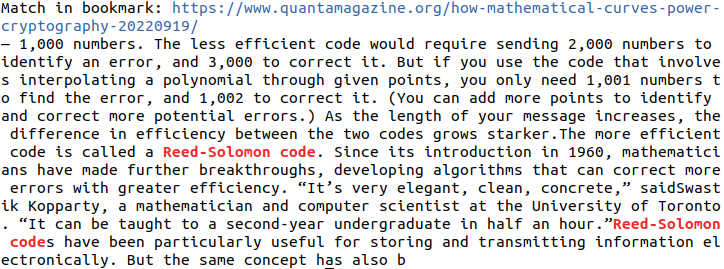
 # Build and install bogrep binary to ~/.cargo/bin
cargo install bogrep要将Bogrep更新为新版本,请再次运行cargo install bogrep 。版本0.x不会向后兼容,并且预期破坏了变化。如果您在运行Bogrep时遇到问题,请删除Bogrep的配置目录(请参阅支持的操作系统)。
git clone [email protected]:quambene/bogrep.git
cd bogrep

# Build and install bogrep binary to ~/.cargo/bin
cargo install --path . 在Bogrep首次运行后,将设置和缓存安装到配置路径上。配置路径取决于您的操作系统(请参阅支持的操作系统)。
 # Initialize bookmark sources
bogrep init

# Import bookmarks from selected sources
bogrep import

# Fetch and cache bookmarks
bogrep fetch

# Search your bookmarks in full-text search
bogrep < pattern >要模拟书签的导入,请使用bogrep import --dry-run 。
bogrep [OPTIONS] [PATTERN]Options:
-v, --verbose...
-m, --mode <MODE> Search the cached bookmarks in HTML or plaintext format [possible values: html, text]
-i, --ignore-case Ignore case distinctions in patterns
-l, --files-with-matches Print only URLs of bookmarks with matched lines
-h, --help Print help
-V, --version Print version # Check version
bogrep --version
# Print help
bogrep --help
# Print help for subcommands
bogrep config --help
bogrep import --help
bogrep fetch --help从以下浏览器中支持书签的导入:
.json和.jsonlz4格式).json格式).json格式).json格式).plist格式)如果bogrep import未检测到书签文件,则可以使用以下方式手动配置它们:
bogrep config --source ~ /path/to/bookmarks/file过滤哪个书签文件夹已导入。多个文件夹被白色空间分开:
bogrep config --source " my/path/to/bookmarks_file.json " --folders dev science articles忽略特定的URL。这些URL的内容不会被获取和缓存。
忽略通常不包含与GREP相关文本的视频或音乐平台的URL可能很有用。
 # Ignore one or more urls
bogrep config --ignore < url 1> < url 2> ...获取支持网站的基础网址:
bogrep config --underlying < url 1> < url 2> ...例如,如果将特定的URL(例如https://news.ycombinator.com/item?id=00000000 )添加为书签,则基础文章将被获取和缓存。
受支持的域是:
用于多个URL的缓存和获取网站之间的差异,并显示更改:
bogrep fetch --diff < url 1> < url 2> ...如果您需要在搜索索引中添加特定的URL,请使用bogrep add子命令。
 # Add URLs to search index
bogrep add < url 1> < url 2> ...

# Remove URLs from search index
bogrep remove < url 1> < url 2> ...

# Add URLs to search index and fetch content from URLs
bogrep fetch < url 1> < url 2> ...从同一主机中获取书签是保守的,但也可以在settings.json中配置。JSON通常位于主目录中的~/.config/bogrep :
{
    "cache_mode" : " text " ,
    "max_concurrent_requests" : 100 ,
    "request_timeout" : 60000 ,
    "request_throttling" : 3000 ,
    "max_idle_connections_per_host" : 10 ,
    "idle_connections_timeout" : 5000
} request_throttling是毫秒中同一主机的请求之间的等待时间。
太速度提取了,将max_concurrent_requests设置为例如1000。可用套接字的最大数量取决于您的操作系统。运行ulimit -n以显示系统上允许的最大插座数。
有关可用的设置,请参见https://docs.rs/bogrep/latest/bogrep/sonstruct.settings.html。
Bogrep假设并创建了一个配置路径
$HOME/.config/bogrep for Linux,$HOME/Library/Application Support/bogrep ,C:Users<Username>AppDataRoaming/bogrep ,在您的主目录中cache settings.json bookmarks.json
您可以通过环境变量BOGREP_HOME配置配置路径。
如果Bogrep缺少文件权限,请允许CLI应用程序访问系统首选项中的文件系统。
默认的Bogrep搜索对病例敏感。尝试bogrep -i进行病例不敏感的搜索。
 # Run unit tests and integration tests
cargo test

# Run unit tests
cargo test --lib

# Run integration tests
cargo test --test ' * '




