bogrep
1.0.0

การดาวน์โหลด bogrep และแคชบุ๊กมาร์กของคุณใน plaintext โดยไม่มีรูปภาพหรือวิดีโอ ใช้ Bogrep CLI เพื่อ GREP ผ่านบุ๊กมาร์กแคชของคุณในการค้นหาข้อความแบบเต็ม
bogrep -i " reed-solomon code " 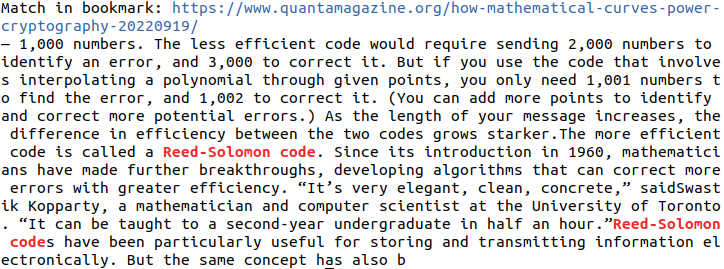
 # Build and install bogrep binary to ~/.cargo/bin
cargo install bogrep
หากต้องการอัปเดต Bogrep เป็นเวอร์ชันใหม่ให้เรียกใช้ cargo install bogrep อีกครั้ง เวอร์ชัน 0.x จะไม่สามารถใช้งานได้ย้อนหลังและคาดว่าจะมีการเปลี่ยนแปลง ลบไดเรกทอรีการกำหนดค่าของ Bogrep (ดูระบบปฏิบัติการที่รองรับ) หากคุณประสบปัญหาเมื่อเรียกใช้ Bogrep
git clone [email protected]:quambene/bogrep.git
cd bogrep

# Build and install bogrep binary to ~/.cargo/bin
cargo install --path . การตั้งค่าและแคชถูกติดตั้งไปยังเส้นทางการกำหนดค่าหลังจาก Bogrep ทำงานเป็นครั้งแรก เส้นทางการกำหนดค่าขึ้นอยู่กับระบบปฏิบัติการของคุณ (ดูระบบปฏิบัติการที่รองรับ)
 # Initialize bookmark sources
bogrep init

# Import bookmarks from selected sources
bogrep import

# Fetch and cache bookmarks
bogrep fetch

# Search your bookmarks in full-text search
bogrep < pattern >
ในการจำลองการนำเข้าบุ๊กมาร์กให้ใช้ bogrep import --dry-run
bogrep [OPTIONS] [PATTERN]Options:
-v, --verbose...
-m, --mode <MODE> Search the cached bookmarks in HTML or plaintext format [possible values: html, text]
-i, --ignore-case Ignore case distinctions in patterns
-l, --files-with-matches Print only URLs of bookmarks with matched lines
-h, --help Print help
-V, --version Print version # Check version
bogrep --version
# Print help
bogrep --help
# Print help for subcommands
bogrep config --help
bogrep import --help
bogrep fetch --helpนำเข้าบุ๊กมาร์กได้รับการสนับสนุนจากเบราว์เซอร์ต่อไปนี้:
.json และ .jsonlz4 ).json ).json ).json ).plist ) หากไม่พบไฟล์บุ๊คมาร์คโดย bogrep import คุณสามารถกำหนดค่าได้ด้วยตนเองโดยใช้:
bogrep config --source ~ /path/to/bookmarks/fileตัวกรองนำเข้าโฟลเดอร์บุ๊คมาร์คใด หลายโฟลเดอร์ถูกคั่นด้วยช่องว่าง:
bogrep config --source " my/path/to/bookmarks_file.json " --folders dev science articlesไม่สนใจ URL ที่เฉพาะเจาะจง เนื้อหาสำหรับ URL เหล่านี้จะไม่ถูกดึงและแคช
มันจะเป็นประโยชน์ในการละเว้น URL สำหรับวิดีโอหรือแพลตฟอร์มเพลงซึ่งมักจะไม่รวมข้อความที่เกี่ยวข้องกับ GREP
 # Ignore one or more urls
bogrep config --ignore < url 1> < url 2> ...
ดึง URL พื้นฐานของเว็บไซต์ที่รองรับ:
bogrep config --underlying < url 1> < url 2> ... ตัวอย่างเช่นหาก URL เฉพาะเช่น https://news.ycombinator.com/item?id=00000000 เป็นบุ๊กมาร์กบทความพื้นฐานจะถูกดึงและแคช
โดเมนที่รองรับคือ:
ดึงความแตกต่างระหว่างเว็บไซต์ที่แคชและดึงข้อมูลสำหรับ URL หลายรายการและการเปลี่ยนแปลงการแสดงผล:
bogrep fetch --diff < url 1> < url 2> ... หากคุณต้องการเพิ่ม URL เฉพาะลงในดัชนีการค้นหาให้ใช้คำสั่งย่อย bogrep add
 # Add URLs to search index
bogrep add < url 1> < url 2> ...

# Remove URLs from search index
bogrep remove < url 1> < url 2> ...

# Add URLs to search index and fetch content from URLs
bogrep fetch < url 1> < url 2> ... การดึงบุ๊กมาร์กจากโฮสต์เดียวกันนั้นมีการควบคุมอย่างระมัดระวัง แต่ยังสามารถกำหนดค่าใน settings.json json มักจะวางไว้ที่ ~/.config/bogrep ในไดเรกทอรีที่บ้านของคุณ:
{
    "cache_mode" : " text " ,
    "max_concurrent_requests" : 100 ,
    "request_timeout" : 60000 ,
    "request_throttling" : 3000 ,
    "max_idle_connections_per_host" : 10 ,
    "idle_connections_timeout" : 5000
}
ที่ request_throttling เป็นเวลารอระหว่างคำขอสำหรับโฮสต์เดียวกันในมิลลิวินาที
เพิ่มความเร็วในการดึงขึ้นมาตั้งค่า max_concurrent_requests เป็น 1000 จำนวนซ็อกเก็ตที่มีอยู่สูงสุดขึ้นอยู่กับระบบปฏิบัติการของคุณ เรียกใช้ ulimit -n เพื่อแสดงจำนวนซ็อกเก็ตเปิดสูงสุดที่อนุญาตในระบบของคุณ
สำหรับการตั้งค่าที่มีอยู่ให้ดูที่ https://docs.rs/bogrep/latest/bogrep/struct.settings.html
Bogrep ถือว่าและสร้างเส้นทางการกำหนดค่าที่
$HOME/.config/bogrep สำหรับ linux$HOME/Library/Application Support/bogrep สำหรับ macOSC:Users<Username>AppDataRoaming/bogrep สำหรับ Windows ในโฮมไดเร็กตอรี่ของคุณสำหรับการจัดเก็บ settings.json , bookmarks.json และโฟลเดอร์ cache
คุณสามารถกำหนดค่าเส้นทางการกำหนดค่าผ่านตัวแปรสภาพแวดล้อม BOGREP_HOME
หากสิทธิ์ไฟล์หายไปสำหรับ Bogrep ให้แอปพลิเคชัน CLI เข้าถึงระบบไฟล์ในการตั้งค่าระบบ
การค้นหา bogrep เริ่มต้นเป็นตัวพิมพ์ใหญ่ ลองใช้ bogrep -i สำหรับการค้นหาที่ไม่รู้สึกตัว
 # Run unit tests and integration tests
cargo test

# Run unit tests
cargo test --lib

# Run integration tests
cargo test --test ' * '




