bogrep
1.0.0

Bogrep는 이미지 나 비디오없이 책갈피를 일반 텍스트로 다운로드하고 캐시합니다. Bogrep CLI를 사용하여 전체 텍스트 검색에서 캐시 된 북마크를 통해 Grep을 사용하십시오.
bogrep -i " reed-solomon code " 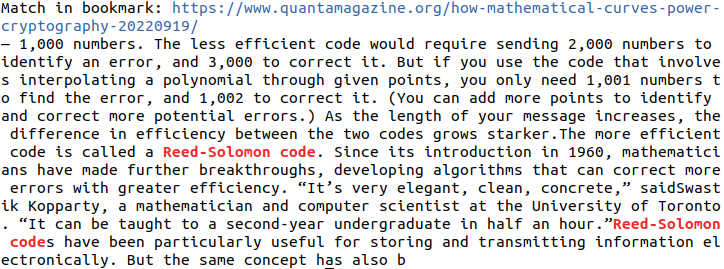
 # Build and install bogrep binary to ~/.cargo/bin
cargo install bogrep
Bogrep를 새 버전으로 업데이트하려면 cargo install bogrep 다시 실행하십시오. 버전 0.x는 거꾸로 호환되지 않으며 깨진 변경이 예상됩니다. Bogrep를 실행할 때 문제가 발생하면 Bogrep의 구성 디렉토리를 제거하십시오 (지원되는 운영 체제 참조).
git clone [email protected]:quambene/bogrep.git
cd bogrep

# Build and install bogrep binary to ~/.cargo/bin
cargo install --path . Bogrep가 처음으로 실행 된 후 설정 및 캐시가 구성 경로에 설치됩니다. 구성 경로는 운영 체제에 따라 다릅니다 (지원되는 운영 체제 참조).
 # Initialize bookmark sources
bogrep init

# Import bookmarks from selected sources
bogrep import

# Fetch and cache bookmarks
bogrep fetch

# Search your bookmarks in full-text search
bogrep < pattern >
북마크의 가져 오기를 시뮬레이션하려면 bogrep import --dry-run 사용하십시오.
bogrep [OPTIONS] [PATTERN]Options:
-v, --verbose...
-m, --mode <MODE> Search the cached bookmarks in HTML or plaintext format [possible values: html, text]
-i, --ignore-case Ignore case distinctions in patterns
-l, --files-with-matches Print only URLs of bookmarks with matched lines
-h, --help Print help
-V, --version Print version # Check version
bogrep --version
# Print help
bogrep --help
# Print help for subcommands
bogrep config --help
bogrep import --help
bogrep fetch --help북마크 가져 오기는 다음 브라우저에서 지원됩니다.
.json 및 .jsonlz4 형식).json 형식).json 형식).json 형식).plist 형식) bogrep import 에서 북마크 파일을 감지하지 않으면 다음을 사용하여 수동으로 구성 할 수 있습니다.
bogrep config --source ~ /path/to/bookmarks/file필터 북마크 폴더가 가져 오는 필터. 여러 폴더가 공백으로 분리됩니다.
bogrep config --source " my/path/to/bookmarks_file.json " --folders dev science articles특정 URL을 무시하십시오. 이 URL의 내용은 가져 오거나 캐시되지 않습니다.
일반적으로 관련 텍스트를 GREP에 포함시키지 않는 비디오 또는 음악 플랫폼의 URL을 무시하는 것이 유용 할 수 있습니다.
 # Ignore one or more urls
bogrep config --ignore < url 1> < url 2> ...지원되는 웹 사이트의 기본 URL을 가져 오십시오.
bogrep config --underlying < url 1> < url 2> ... 예를 들어, https://news.ycombinator.com/item?id=00000000 과 같은 특정 URL이 북마크되면 기본 기사가 가져 와서 캐시됩니다.
지원되는 도메인은 다음과 같습니다.
여러 URL에 대한 캐시와 페치 된 웹 사이트의 차이를 가져오고 표시 변경을 표시합니다.
bogrep fetch --diff < url 1> < url 2> ... 검색 인덱스에 특정 URL을 추가 해야하는 경우 bogrep add 하위 명령을 사용하십시오.
 # Add URLs to search index
bogrep add < url 1> < url 2> ...

# Remove URLs from search index
bogrep remove < url 1> < url 2> ...

# Add URLs to search index and fetch content from URLs
bogrep fetch < url 1> < url 2> ... 동일한 호스트에서 북마크를 가져 오는 것은 보수적으로 조절되지만 settings.json 에서도 구성 할 수 있습니다 .JSON은 일반적으로 홈 디렉토리에 ~/.config/bogrep 에 배치됩니다.
{
    "cache_mode" : " text " ,
    "max_concurrent_requests" : 100 ,
    "request_timeout" : 60000 ,
    "request_throttling" : 3000 ,
    "max_idle_connections_per_host" : 10 ,
    "idle_connections_timeout" : 5000
}
여기서 request_throttling 밀리 초의 동일한 호스트 요청 사이의 대기 시간입니다.
너무 속도를 높이고, max_concurrent_requests 예를 들어 1000으로 설정하십시오. 사용 가능한 소켓의 최대 수는 운영 체제에 따라 다릅니다. ulimit -n 실행하여 시스템에 허용되는 최대 개방 소켓 수를 표시하십시오.
사용 가능한 설정은 https://docs.rs/bogrep/latest/bogrep/struct.settings.html을 참조하십시오.
Bogrep은에서 구성 경로를 가정하고 작성합니다
$HOME/.config/bogrep for linux,$HOME/Library/Application Support/bogrep ,C:Users<Username>AppDataRoaming/bogrep , home directory에서 settings.json , bookmarks.json 및 cache 폴더를 저장하기위한 홈 디렉토리에서.
환경 변수 BOGREP_HOME 통해 구성 경로를 구성 할 수 있습니다.
Bogrep에 대한 파일 권한이 없으면 CLI 응용 프로그램이 시스템 환경 설정에서 파일 시스템에 액세스하도록 허용하십시오.
기본 Bogrep 검색은 대소 문자에 민감합니다. 사례에 민감한 검색을 위해 bogrep -i 사용해보십시오.
 # Run unit tests and integration tests
cargo test

# Run unit tests
cargo test --lib

# Run integration tests
cargo test --test ' * '




