bogrep
1.0.0

BOGREPのダウンロードとキャッシュ画像やビデオなしでブックマークをプレーンテキストでキャッシュします。 BOGREP CLIを使用して、フルテキスト検索でキャッシュされたブックマークをグレップします。
bogrep -i " reed-solomon code " 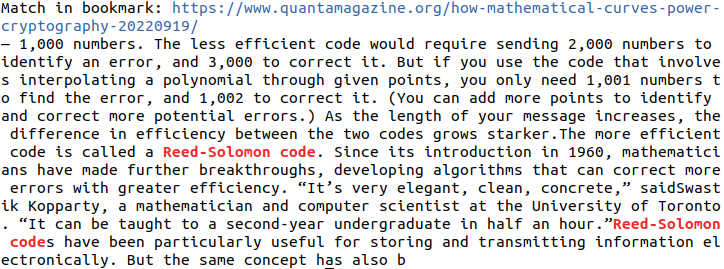
 # Build and install bogrep binary to ~/.cargo/bin
cargo install bogrep
BOGREPを新しいバージョンに更新するには、 cargo install bogrep再度実行します。バージョン0.xは逆方向に互換性があり、壊れた変更が予想されます。 BOGREPを実行しているときに問題が発生した場合は、BOGREPの構成ディレクトリを削除します(サポートされているオペレーティングシステムを参照)。
git clone [email protected]:quambene/bogrep.git
cd bogrep

# Build and install bogrep binary to ~/.cargo/bin
cargo install --path . BOGREPが初めて実行された後、設定とキャッシュが構成パスにインストールされます。構成パスはオペレーティングシステムによって異なります(サポートされているオペレーティングシステムを参照)。
 # Initialize bookmark sources
bogrep init

# Import bookmarks from selected sources
bogrep import

# Fetch and cache bookmarks
bogrep fetch

# Search your bookmarks in full-text search
bogrep < pattern >
ブックマークのインポートをシミュレートするには、 bogrep import --dry-runを使用します。
bogrep [OPTIONS] [PATTERN]Options:
-v, --verbose...
-m, --mode <MODE> Search the cached bookmarks in HTML or plaintext format [possible values: html, text]
-i, --ignore-case Ignore case distinctions in patterns
-l, --files-with-matches Print only URLs of bookmarks with matched lines
-h, --help Print help
-V, --version Print version # Check version
bogrep --version
# Print help
bogrep --help
# Print help for subcommands
bogrep config --help
bogrep import --help
bogrep fetch --helpブックマークのインポートは、次のブラウザからサポートされています。
.jsonおよび.jsonlz4形式).json形式).json形式).json形式).plist形式)ブックマークファイルがbogrep importで検出されない場合、次を使用して手動で構成できます。
bogrep config --source ~ /path/to/bookmarks/fileブックマークフォルダーがインポートされるフィルター。複数のフォルダーが空白で区切られています。
bogrep config --source " my/path/to/bookmarks_file.json " --folders dev science articles特定のURLを無視します。これらのURLのコンテンツはフェッチされ、キャッシュされません。
通常、GREPに関連するテキストを含めないビデオまたは音楽プラットフォームのURLを無視すると便利です。
 # Ignore one or more urls
bogrep config --ignore < url 1> < url 2> ...サポートされているWebサイトの基礎となるURLを取得します。
bogrep config --underlying < url 1> < url 2> ...たとえば、 https://news.ycombinator.com/item?id=00000000 id=00000000のような特定のURLがブックマークされている場合、基礎となる記事がフェッチされ、キャッシュされます。
サポートされているドメインは次のとおりです。
複数のURLのキャッシュされたWebサイトとフェッチされたWebサイトの違いをフェッチし、変更を表示します。
bogrep fetch --diff < url 1> < url 2> ...検索インデックスに特定のURLを追加する必要がある場合は、 bogrep add Subcommandを使用します。
 # Add URLs to search index
bogrep add < url 1> < url 2> ...

# Remove URLs from search index
bogrep remove < url 1> < url 2> ...

# Add URLs to search index and fetch content from URLs
bogrep fetch < url 1> < url 2> ...同じホストからのブックマークの取得~/.config/bogrep控えめにスロットルされますが、 settings.jsonで設定することもできます。
{
    "cache_mode" : " text " ,
    "max_concurrent_requests" : 100 ,
    "request_timeout" : 60000 ,
    "request_throttling" : 3000 ,
    "max_idle_connections_per_host" : 10 ,
    "idle_connections_timeout" : 5000
} request_throttlingは、Millisecondsで同じホストのリクエストの間の待ち時間です。
速度を上げて、 max_concurrent_requestsを例えば1000に設定します。利用可能なソケットの最大数はオペレーティングシステムに依存します。 ulimit -nを実行して、システムで許可されているオープンソケットの最大数を表示します。
使用可能な設定については、https://docs.rs/bogrep/latest/bogrep/struct.settings.htmlを参照してください。
BOGREPは、で構成パスを想定して作成します
$HOME/.config/bogrep for linux、$HOME/Library/Application Support/bogrep for macos、C:Users<Username>AppDataRoaming/bogrep for windows、 settings.json 、 bookmarks.json 、およびcacheフォルダーを保存するためのホームディレクトリに。
環境変数BOGREP_HOMEを介して構成パスを構成できます。
BOGREPのファイル権限が欠落している場合は、CLIアプリケーションがシステム設定のファイルシステムにアクセスできるようにします。
デフォルトのBOGREP検索はケースに敏感です。ケース非感受性検索のためにbogrep -i試してください。
 # Run unit tests and integration tests
cargo test

# Run unit tests
cargo test --lib

# Run integration tests
cargo test --test ' * '




