maui role based data access
1.0.0

此示例使用我们的免费.NET应用程序安全和Web API服务来实现身份验证和基于角色的数据访问。我们运行了一个内置的向导来生成现成的身份验证服务。该服务使用实体框架核心访问数据库。 .NET MAUI应用程序将请求发送到Web API服务以获取或修改数据。
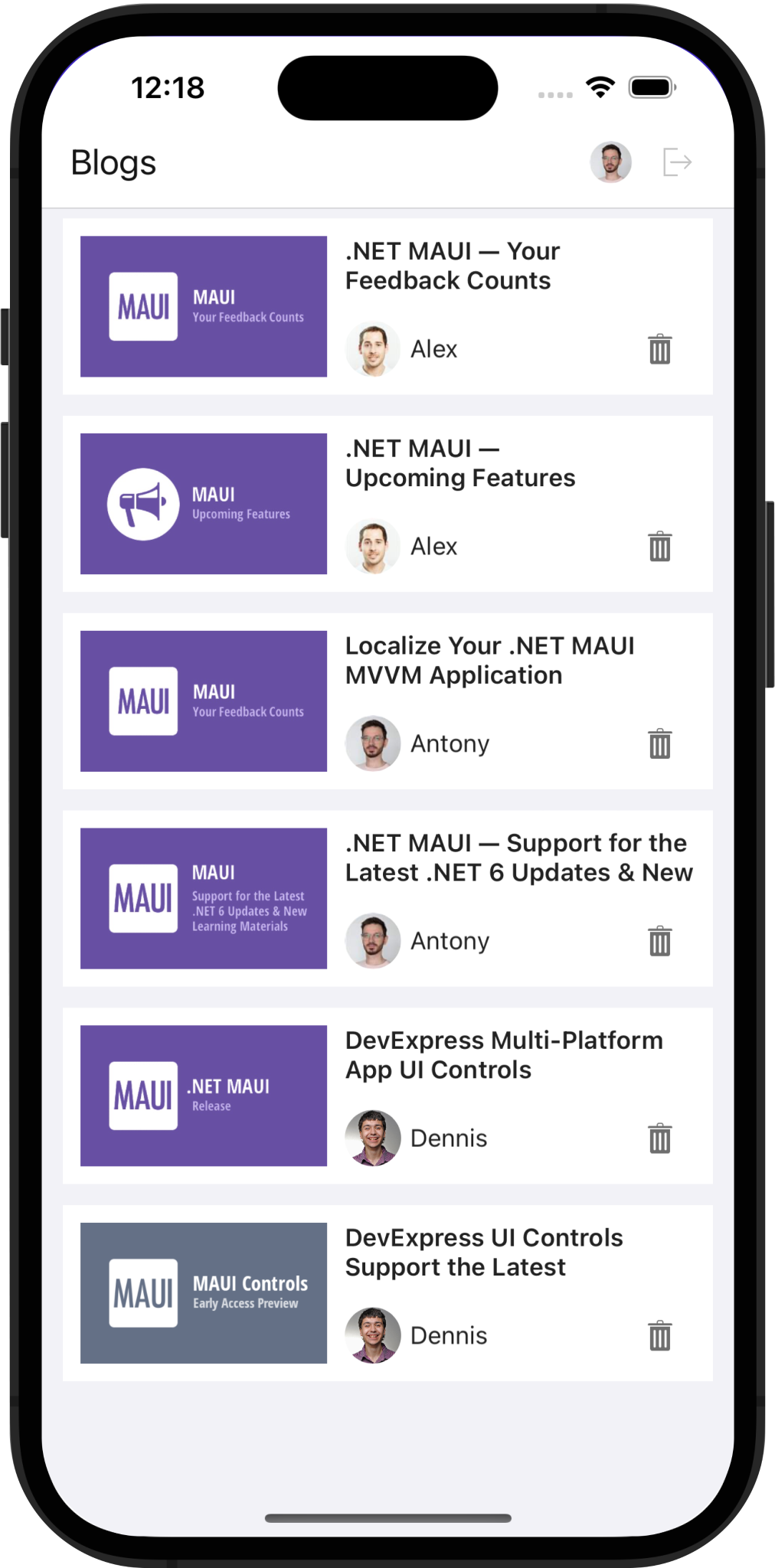
如果您是DEVEXPRESS .NET应用程序安全和Web API服务的新手,则可能需要查看以下资源:
创建一个独立的Web API应用程序
通过EF Core&ASP.NET进行基于角色的访问控制的CRUD Web API的1键解决方案
SQL Server,如果您在Windows上运行此解决方案。
作为管理员运行Visual Studio并打开解决方案。管理员特权允许IDE运行Web服务项目时创建数据库。
在“调试下拉菜单”中选择WebAPI 。此选择使Kestrel成为用于调试的Web服务器。
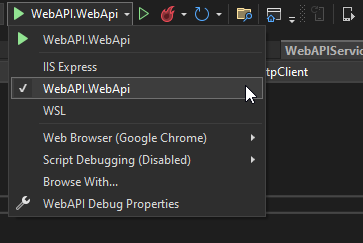
如果您更喜欢IIS Express而不是Kestrel,请在“调试下拉菜单”中选择IIS Express 。使用外部文本编辑器将以下代码添加到.vsMAUI_WebAPIconfigapplicationhost.config :
< sites >
    < site name = " WebSite1 " id = " 1 " serverAutoStart = " true " >
    <!-* ... -->
        < bindings >
            < binding protocol = " http " bindingInformation = " *:65201:* " />
            < binding protocol = " https " bindingInformation = " *:44317:* " />
            < binding protocol = " https " bindingInformation = " *:44317:localhost " />
            < binding protocol = " http " bindingInformation = " *:65201:localhost " />
        </ bindings >
    </ site >
    <!-* ... -->
</ sites >右键单击MAUI项目,选择Set as Startup Project ,然后选择模拟器。请注意,在USB上附加的物理设备无法访问机器的本地主机。
右键单击WebAPI项目,然后选择Debug > Start new instance 。
右键单击MAUI项目,然后选择Debug > Start new instance 。
DeVexpress Web API服务使用JSON Web令牌(JWT)授权用户。要获取令牌,请将用户名和密码传递到身份验证的端点。在此示例中,令牌生成逻辑在WebAPIService.RequestTokenAsync方法中实现:
  private async Task < HttpResponseMessage > RequestTokenAsync ( string userName , string password ) {
        return await HttpClient . PostAsync ( $ " { ApiUrl } Authentication/Authenticate" ,
                                            new StringContent ( JsonSerializer . Serialize ( new { userName , password = $ " { password } " } ) , Encoding . UTF8 ,
                                            ApplicationJson ) ) ;
  }
将令牌包括在httpclient.defaultrequestheaders.uthorization中。然后,所有后续请求都可以访问私人端点和数据:
HttpClient . DefaultRequestHeaders . Authorization = new AuthenticationHeaderValue ( "Bearer" , await tokenResponse . Content . ReadAsStringAsync ( ) ) ;文件要查看:webApiservice.cs
我们在WebApi服务中实现了以下自定义端点:
CanteletPost端点使您可以将请求从移动设备发送到服务,并检查当前用户是否可以删除帖子。这使您可以在UI中显示/隐藏删除按钮。
文件要查看:updater.cs
当前使用者端点返回有关身份验证用户的信息。
文件要查看:updater.cs
getAuthorimage端点通过用户ID检索作者图像。
文件要查看:updater.cs
getPostImage端点通过POST ID检索图像。
文件要查看:updater.cs
Updater.UpdateDatabaseAfterUpdateSchema方法生成用户并指定其登录凭据。您可以直接在数据库中修改用户密码。注意:我们的跨平台.NET应用程序框架(XAF UI)允许您快速构建访问同一数据库的桌面或Web UI。
文件要查看:updater.cs
Updater类中的PermissionPolicyRole对象添加用户权限。以下代码段调用AddObjectPermissionFromLambda方法以配置“查看器”角色(允许用户读取已发布的帖子):
role . AddObjectPermissionFromLambda ( SecurityOperations . Read , p => p . IsPublished , SecurityPermissionState . Allow ) ;文件要查看:updater.cs
AddTypePermissionsRecursively firmitional Adderional方法修改了“编辑”角色的特权(Alex,Antony和Dennis)。该方法为Post类型添加了CRUD权限(创建,读取,更新,删除):
role . AddTypePermissionsRecursively < Post > ( SecurityOperations . Read | SecurityOperations . Write | SecurityOperations . Create | SecurityOperations . DeleteObject , SecurityPermissionState . Allow ) ;文件要查看:updater.cs
使用textedit.starticon和passwordEdit.starticon属性在TextEdit和passwandEdit控件中显示图标。
< dxe : TextEdit LabelText = " Login " StartIcon = " editorsname " .../>
< dxe : PasswordEdit LabelText = " Password " StartIcon = " editorspassword " .../>
文件要查看:loginpage.xaml
要验证密码eDIT控件中的用户输入,请使用editbase.haserror和editbase.Errortext.Sinarted属性。
< dxe : PasswordEdit ... HasError = " {Binding HasError} " ErrorText = " {Binding ErrorText} " />文件要查看:loginpage.xaml
 public class LoginViewModel : BaseViewModel {
    // ...
    string errorText ;
    bool hasError ;
    // ...

    public string ErrorText {
        get => errorText ;
        set => SetProperty ( ref errorText , value ) ;
    }

    public bool HasError {
        get => hasError ;
        set => SetProperty ( ref hasError , value ) ;
    }
    async void OnLoginClicked ( ) {
        /// ...
        string response = await DataStore . Authenticate ( userName , password ) ;
        if ( ! string . IsNullOrEmpty ( response ) ) {
            ErrorText = response ;
            HasError = true ;
            return ;
        }
        HasError = false ;
        await Navigation . NavigateToAsync < SuccessViewModel > ( ) ;
    }
}
文件要查看:loginviewmodel.cs
指定textEdit.ReturnType继承的属性,以在编辑TextEdIt Control的值之后将possedeDit控件聚焦。
使用passwordEdit.turncommand属性指定用户输入密码时运行的命令(登录):
< dxe : PasswordEdit ReturnCommand = " {Binding LoginCommand} " />文件要查看:loginpage.xaml
 public class LoginViewModel : BaseViewModel {
    // ...
    public LoginViewModel ( ) {
        LoginCommand = new Command ( OnLoginClicked ) ;
        SignUpCommand = new Command ( OnSignUpClicked ) ;
        PropertyChanged +=
            ( _ , __ ) => LoginCommand . ChangeCanExecute ( ) ;

    }
    // ...
    public Command LoginCommand { get ; }
    public Command SignUpCommand { get ; }
    // ...
}
文件要查看:loginviewmodel.cs
我们在此项目中启用了图像缓存。为了实现这一目标,我们需要通过其URI识别图像。为了创建URI,我们使用获得主机名和作者/帖子ID的多点。有关图像缓存的其他信息,请参阅MAUI文档。
< dx : DXImage >
    < dx : DXImage .Source>
        < MultiBinding StringFormat = " {}{0}PublicEndpoint/PostImage/{1} " >
            < Binding Source = " {x:Static webService:WebAPIService.ApiUrl} " />
            < Binding Path = " PostId " />
        </ MultiBinding >
    </ dx : DXImage .Source>
</ dx : DXImage >
档案查看:itemspage.xaml
Android模拟器和iOS模拟器请求证书以通过HTTPS访问服务。在此示例中,我们以调试模式切换到HTTP:
#if ! DEBUG
    app . UseHttpsRedirection ( ) ;
#endif< network-security-config >
< domain-config cleartextTrafficPermitted = " true " >
< domain includeSubdomains = " true " >10.0.2.2</ domain >
</ domain-config >
</ network-security-config >< key >NSAppTransportSecurity</ key >
< dict >
< key >NSAllowsLocalNetworking</ key >
< true />
</ dict >这使您无需创建开发证书或实现HTTPCLIENT处理程序即可绕过证书检查。
有关更多信息,请参阅来自Android模拟器和iOS模拟器的本地Web服务的连接。
我们建议您仅在开发/调试应用程序时才使用HTTP。在生产中,出于安全原因使用HTTP。
(您将被重定向到devexpress.com提交您的答复)





