maui role based data access
1.0.0

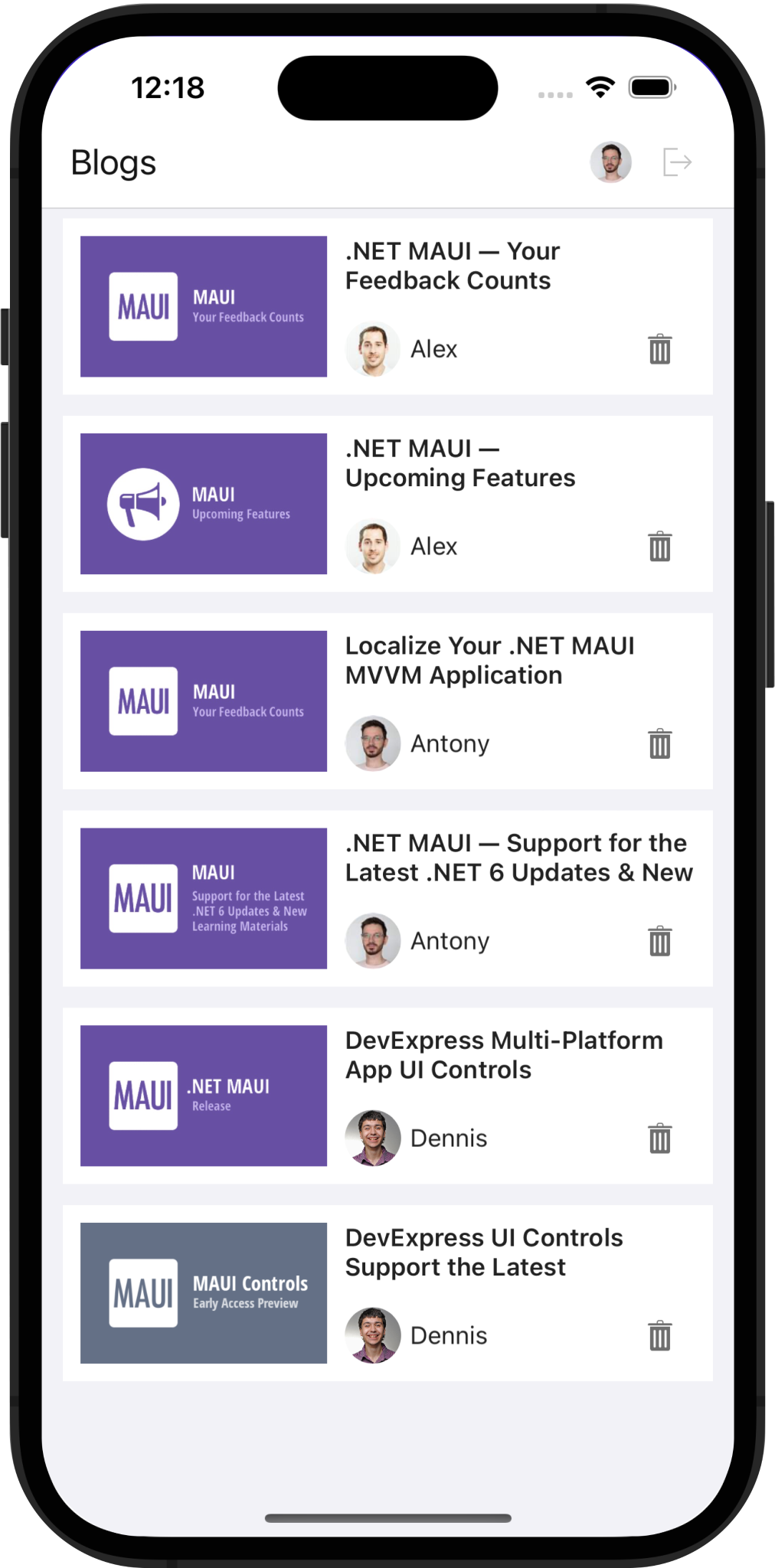
이 예제는 무료 .NET App Security & Web API 서비스를 사용하여 인증 및 역할 기반 데이터 액세스를 구현합니다. 우리는 즉시 사용 가능한 인증 서비스를 생성하기 위해 내장 마법사를 운영했습니다. 이 서비스는 엔티티 프레임 워크 코어를 사용하여 데이터베이스에 액세스합니다. .NET MAUI 응용 프로그램은 데이터를 얻거나 수정하기 위해 웹 API 서비스에 요청을 보냅니다.
DeVexpress .NET App Security & Web API 서비스를 처음 사용하는 경우 다음 리소스를 검토 할 수 있습니다.
독립형 웹 API 응용 프로그램을 만듭니다
EF Core & ASP.Net을 통한 역할 기반 액세스 제어 기능을 갖춘 CRUD 웹 API 용 1 클릭 솔루션
SQL Server,이 솔루션을 Windows에서 실행하면 Windows에서 실행됩니다.
Visual Studio를 관리자로 실행하고 솔루션을 엽니 다. 관리자 권한을 사용하면 웹 서비스 프로젝트를 실행할 때 IDE가 데이터베이스를 만들 수 있습니다.
디버그 드롭 다운 메뉴에서 webapi를 선택하십시오. 이 선택을 통해 Kestrel은 디버그 실행을위한 웹 서버로서 사용할 수 있습니다.
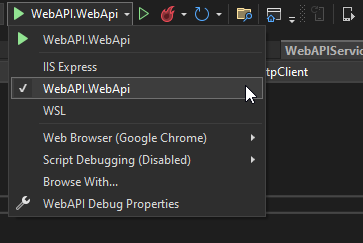
Kestrel에 IIS Express를 선호하는 경우 디버그 드롭 다운 메뉴에서 IIS Express를 선택하십시오. 외부 텍스트 편집기를 사용하여 다음 코드를 .vsMAUI_WebAPIconfigapplicationhost.config 에 추가하십시오.
< sites >
    < site name = " WebSite1 " id = " 1 " serverAutoStart = " true " >
    <!-* ... -->
        < bindings >
            < binding protocol = " http " bindingInformation = " *:65201:* " />
            < binding protocol = " https " bindingInformation = " *:44317:* " />
            < binding protocol = " https " bindingInformation = " *:44317:localhost " />
            < binding protocol = " http " bindingInformation = " *:65201:localhost " />
        </ bindings >
    </ site >
    <!-* ... -->
</ sites >
MAUI 프로젝트를 마우스 오른쪽 버튼으로 클릭하고 Set as Startup Project 한 다음 에뮬레이터를 선택하십시오. USB에 부착 된 물리 장치는 기계의 로컬 호스트에 액세스 할 수 없습니다.
WebAPI 프로젝트를 마우스 오른쪽 버튼으로 클릭하고 Debug > Start new instance 선택하십시오.
MAUI 프로젝트를 마우스 오른쪽 버튼으로 클릭하고 Debug > Start new instance 선택하십시오.
Devexpress Web API 서비스는 JSON Web Tokens (JWT)를 사용하여 사용자를 승인합니다. 토큰을 얻으려면 사용자 이름과 비밀번호를 인증 엔드 포인트로 전달하십시오. 이 예에서는 Token Generation Logic이 WebAPIService.RequestTokenAsync 메소드에서 구현됩니다.
  private async Task < HttpResponseMessage > RequestTokenAsync ( string userName , string password ) {
        return await HttpClient . PostAsync ( $ " { ApiUrl } Authentication/Authenticate" ,
                                            new StringContent ( JsonSerializer . Serialize ( new { userName , password = $ " { password } " } ) , Encoding . UTF8 ,
                                            ApplicationJson ) ) ;
  }
httpclient.defaultrequestheaders.authorization에 토큰을 포함하십시오. 그런 다음 모든 후속 요청은 개인 엔드 포인트 및 데이터에 액세스 할 수 있습니다.
HttpClient . DefaultRequestHeaders . Authorization = new AuthenticationHeaderValue ( "Bearer" , await tokenResponse . Content . ReadAsStringAsync ( ) ) ;살펴볼 파일 : webapiservice.cs
WebApi 서비스에서 다음과 같은 사용자 정의 엔드 포인트를 구현했습니다.
CandeletePost Endpoint를 사용하면 모바일 장치에서 요청을 서비스로 보내고 현재 사용자가 게시물을 삭제할 수 있는지 확인할 수 있습니다. 이를 통해 UI에서 삭제 버튼을 표시/숨길 수 있습니다.
볼 파일 : updater.cs
CurrentUser endpoint는 인증 된 사용자에 대한 정보를 반환합니다.
볼 파일 : updater.cs
getAuthorimage endpoint는 사용자 ID별로 저자 이미지를 검색합니다.
볼 파일 : updater.cs
getPostimage endpoint는 Post ID별로 이미지를 검색합니다.
볼 파일 : updater.cs
Updater.UpdateDatabaseAfterUpdateSchema 메소드는 사용자를 생성하고 로그인 자격 증명을 지정합니다. 데이터베이스에서 직접 사용자의 암호를 수정할 수 있습니다. 참고 : Cross-Platform .NET Application Framework (XAF UI)를 사용하면 동일한 데이터베이스에 액세스하는 데스크탑 또는 웹 UI를 신속하게 구축 할 수 있습니다.
볼 파일 : updater.cs
PermissionPolicyRole 객체 Updater 클래스의 객체는 사용자 권한을 추가합니다. 다음 코드 스 니펫은 AddObjectPermissionFromLambda 호출하여 "뷰어"역할을 구성합니다 (사용자가 게시 된 게시물을 읽도록 허용).
role . AddObjectPermissionFromLambda ( SecurityOperations . Read , p => p . IsPublished , SecurityPermissionState . Allow ) ;볼 파일 : updater.cs
AddTypePermissionsRecursively 방법은 "편집자"역할 (Alex, Antony 및 Dennis)에 대한 권한을 수정합니다. 이 메소드는 Post 유형에 대한 CRUD 권한 (작성, 읽기, 업데이트, 삭제)을 추가합니다.
role . AddTypePermissionsRecursively < Post > ( SecurityOperations . Read | SecurityOperations . Write | SecurityOperations . Create | SecurityOperations . DeleteObject , SecurityPermissionState . Allow ) ;볼 파일 : updater.cs
textedit.starticon 및 passwordedit.starticon 속성을 사용하여 텍스트 및 비밀번호 컨트롤에 아이콘을 표시하십시오.
< dxe : TextEdit LabelText = " Login " StartIcon = " editorsname " .../>
< dxe : PasswordEdit LabelText = " Password " StartIcon = " editorspassword " .../>
볼 파일 : loginpage.xaml
PasswordEdit 컨트롤에서 사용자 입력을 확인하려면 editbase.haserror 및 editbase.errortext 속성을 사용하십시오.
< dxe : PasswordEdit ... HasError = " {Binding HasError} " ErrorText = " {Binding ErrorText} " />볼 파일 : loginpage.xaml
 public class LoginViewModel : BaseViewModel {
    // ...
    string errorText ;
    bool hasError ;
    // ...

    public string ErrorText {
        get => errorText ;
        set => SetProperty ( ref errorText , value ) ;
    }

    public bool HasError {
        get => hasError ;
        set => SetProperty ( ref hasError , value ) ;
    }
    async void OnLoginClicked ( ) {
        /// ...
        string response = await DataStore . Authenticate ( userName , password ) ;
        if ( ! string . IsNullOrEmpty ( response ) ) {
            ErrorText = response ;
            HasError = true ;
            return ;
        }
        HasError = false ;
        await Navigation . NavigateToAsync < SuccessViewModel > ( ) ;
    }
}
볼 파일 : loginViewModel.cs
TextedIt 컨트롤의 값이 편집 된 후 packettedit.returnType 상속 된 속성을 지정하십시오.
PasswordEdit.returnCommand 속성을 사용하여 사용자가 암호를 입력 할 때 실행되는 명령 ( 로그인 )을 지정하십시오.
< dxe : PasswordEdit ReturnCommand = " {Binding LoginCommand} " />볼 파일 : loginpage.xaml
 public class LoginViewModel : BaseViewModel {
    // ...
    public LoginViewModel ( ) {
        LoginCommand = new Command ( OnLoginClicked ) ;
        SignUpCommand = new Command ( OnSignUpClicked ) ;
        PropertyChanged +=
            ( _ , __ ) => LoginCommand . ChangeCanExecute ( ) ;

    }
    // ...
    public Command LoginCommand { get ; }
    public Command SignUpCommand { get ; }
    // ...
}
볼 파일 : loginViewModel.cs
이 프로젝트에서 이미지 캐싱을 활성화했습니다. 이를 달성하기 위해서는 URI의 이미지를 식별해야했습니다. URI를 만들려면 호스트 이름과 저자/게시물 ID를 얻는 멀티 핀딩을 사용합니다. 이미지 캐싱에 대한 추가 정보는 Maui 문서를 참조하십시오.
< dx : DXImage >
    < dx : DXImage .Source>
        < MultiBinding StringFormat = " {}{0}PublicEndpoint/PostImage/{1} " >
            < Binding Source = " {x:Static webService:WebAPIService.ApiUrl} " />
            < Binding Path = " PostId " />
        </ MultiBinding >
    </ dx : DXImage .Source>
</ dx : DXImage >
볼 파일 : itemspage.xaml
안드로이드 에뮬레이터 및 iOS 시뮬레이터는 HTTPS를 통해 서비스에 액세스하기 위해 인증서를 요청합니다. 이 예에서는 디버그 모드에서 HTTP로 전환합니다.
#if ! DEBUG
    app . UseHttpsRedirection ( ) ;
#endif< network-security-config >
< domain-config cleartextTrafficPermitted = " true " >
< domain includeSubdomains = " true " >10.0.2.2</ domain >
</ domain-config >
</ network-security-config >< key >NSAppTransportSecurity</ key >
< dict >
< key >NSAllowsLocalNetworking</ key >
< true />
</ dict >이를 통해 개발 인증서를 만들거나 HTTPClient 핸들러를 구현할 필요없이 인증서 검사를 우회 할 수 있습니다.
자세한 내용은 Android 에뮬레이터 및 iOS 시뮬레이터의 로컬 웹 서비스에 연결하도록 참조하십시오.
응용 프로그램을 개발/디버깅 할 때만 HTTP를 사용하는 것이 좋습니다. 생산시 보안상의 이유로 HTTP를 사용하십시오.
(응답을 제출하려면 devexpress.com으로 리디렉션됩니다)





