tinybuild
1.0.0


npm i -g tinybuild或npm i tinybuild在本地项目中。
如果您对自己的工作流程自动化感兴趣,请做出贡献,目前,我们根据自己的开发进行编辑和打破并解决此问题,因此绝对没有源控制,但是我们会尽力使其尽可能多地通用。
 |  |  |  |  |
这是您一直想要的捆绑器和开发服务器组合。再见深奥的说明,再见笨拙的依赖关系,再见时间浪费了盯着您的编译器运行!越过Webpack,包裹和Vite,镇上有一款新游戏。
先决条件:最新的Nodejs LTS
npm i -g tinybuild
tinybuild
您准备开发应用程序或库!
修改tinybuild.config.js和package.json的需求。您可以添加build:true或set server:false在配置中以禁用开发服务器。
TinyBuild还可以作为本地依赖关系,例如npx tinybuild或通过自定义脚本中的Node.js执行Packager脚本。有关更多详细信息,请参见文档并查看源代码。
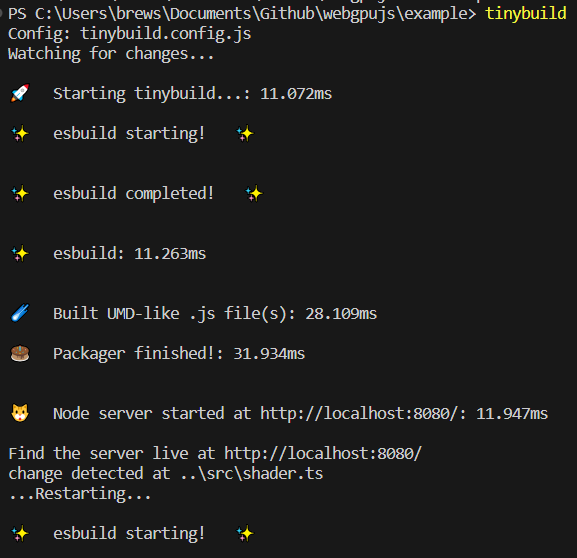
Bundler和Server预设包括用于Esbuild和Server自定义的完整CLI,配置文件或功能性(INScriptional)包装器,以及从单个配置中创建多个发行版(例如,用于浏览器,ESM,Node)。捆绑并在毫秒内提供复杂的图书馆和程序,并具有热加载的测试环境,并更容易扩展生产。
在带有npm init的项目文件夹中。
像这样创建一个tinybuild.config.js文件(复制/粘贴或tinybuild可以通过简单地运行为您生成一个文件):
 //import {defaultBundler, defaultServer, packager} from 'tinybuild'

const config = {
    //build:true, //enable this to skip serve step (same as cli)
    //serve:true //or enable this to skip build step (same as cli)
    bundler : { //esbuild settings, set false to skip build step or add bundle:true to config object to only bundle (alt methods)
        entryPoints : [ //entry point file(s). These can include .js, .mjs, .ts, .jsx, .tsx, or other javascript files. Make sure your entry point is a ts file if you want to generate types
        "index.js"
        ] ,
        outfile : "dist/index" , //exit point file, will append .js as well as indicators like .esm.js, .node.js for other build flags
        //outdir:'dist'               //exit point folder, define for multiple entryPoints
        bundleBrowser : true , //create plain js build? Can include globals and init scripts
        bundleESM : false , //create esm module js files // { platform:'node' } //etc you can also supply an object here to add more specific esbuild settings
        bundleTypes : false , //create .d.ts files, //you need a .tsconfig for this to work, tinybuild will create one for you when you set this true, however, and has typescript support built in
        bundleNode : false , //create node platform plain js build, specify platform:'node' to do the rest of the files
        bundleHTML : false , //wrap the first entry point file as a plain js script in a boilerplate html file, frontend scripts can be run standalone like a .exe! Server serves this as start page if set to true.
        //bundleIIFE:false,   //create an iife build, this is compiled temporarily to create the types files and only saved with bundleIIFE:true
        //bundleCommonJS:false, //cjs format outputted as .cjs
        minify : true ,
        sourcemap : false ,
        //plugins:[] //custom esbuild plugins? e.g. esbuild-sass-plugin for scss support
        //includeDefaultPlugins:true //true by default, includes the presets for the streaming imports, worker bundling, and auto npm install
        //blobWorkers:true, //package workers as blobs or files? blobs are faster but inflate the main package size
        //workerBundler:{minifyWhitespace:true} //bundler settings specific to the worker. e.g. apply platform:'node' when bundling node workers, default is minifyWhitespace:true as full minifying may cause unforeseen errors
        //globalThis:null //'mymodule'
        //globals:{'index.js':['Graph']}
        //init:{'index.js':function(bundle) { console.log('prepackaged bundle script!', bundle); }.toString(); }
        //  outputs:{ //overwrites main config settings for specific use cases
        //     node:{ //e.g. for bundleNode
        //     // external:[] //externals for node environment builds
        //     },
        //     //commonjs:{} //bundleCommonJS
        //     //browser:{}
        //     //esm:{}
        //     iife:{
        //     // external:[] //we only use the iife for types so it doesn't really matter if it bundles node, just note otherwise if you need iife for some obscure reason
        //     }
        // },
        //refer to esbuild docs for more settings
     } ,
    server : {  //node server settings, set false to skip server step or add serve:true to config object to only serve (alt methods)
        debug : false ,
        protocol : "http" ,  //'http' or 'https'. HTTPS required for Nodejs <---> Python sockets. If using http, set production to False in python/server.py as well
        host : "localhost" , //'localhost' or '127.0.0.1' etc.
        port : 8080 , //e.g. port 80, 443, 8000
        //redirect: 'http://localhost:8082' //instead of serving the default content, redirect ot another url
        //headers: { 'Content-Security-Policy': '*'  }, //global header overrides
        startpage : 'index.html' ,  //default home page/app entry point
        /*
        routes:{ //set additional page routes (for sites instead of single page applications)
            '/page2': 'mypage.html',
            '/custom':{ //e.g. custom page template
                headers: { 'Content-Security-Policy': '*' }, //page specific headers
                template:'<html><head></head><body><div>Hello World!</div></body></html>'
                //path: 'mypage.html' //or a file path (e.g. plus specific headers)
            },
            '/redirect':{ //e.g. custom redirect
                redirect:'https://google.com'
            },
            '/other':(request,response) => {}, //custom request/response handling
            '/': 'index.html', //alt start page declaration
            '/404':'packager/node_server/other/404.html', //e.g. custom error page
        },
        */
        socket_protocol : "ws" , //frontend socket protocol, wss for served, ws for localhost
        hotreload : 5000 ,  //hotreload websocket server port
        //reloadscripts: false, //hot swap scripts, can break things if script handles initializations, otherwise css, link, srcs all hot swap without page reloading fairly intelligently
        //delay: 50, //millisecond delay on the watch command for hot reloading
        //pwa: "service-worker.js",  //pwa mode? Injects service worker webpage code to live site, will create a service worker and webmanifest for you if not existent
        //watch: ['../'], //watch additional directories other than the current working directory
        //python: false,//7000,  //quart server port (configured via the python server script file still)
        //python_node:7001, //websocket relay port (relays messages to client from nodejs that were sent to it by python)
        errpage : 'node_modules/tinybuild/tinybuild/node_server/other/404.html' , //default error page, etc.
        certpath : 'node_modules/tinybuild/tinybuild/node_server/ssl/cert.pem' , //if using https, this is required. See cert.pfx.md for instructions
        keypath : 'node_modules/tinybuild/tinybuild/node_server/ssl/key.pem' //if using https, this is required. See cert.pfx.md for instructions
    } ,
    // electron:true //desktop apps as a full chromium bundle, not small and needs some customization for things like bluetooth menus. Better for full featured applications. Can trigger backend runtimes on local machines.
    /*mobile:{ //this will copy the dist and index.html to capacitor builds that can create small interoperable javascript webview + native functionality (e.g. bluetooth) mobile apps (~2Mb at minimum).
        //android:'open', //'open'//true //Requires Android Studio, it will be launched
        //ios:false //'open'//true //Requires XCode
    }, */
    //tauri:true, //alternative tauri build options for very minimal native engine desktop apps that generally lack the latest web APIs. Good for simple apps, you can bundle it with backend runtimes on local machines.
    /*
    assets:[ //for the mobile/desktop bundlers to copy into their respective folders
        './assets',
        './favicon.ico'
    ]
    */
}

export default config ;然后运行tinybuild将其提供给Packager以构建和运行您的项目。根据您的需求将其自定义,例如不同的入口点和用例。 Typescript自动识别,包括JSX和TSX。如果您在脚本中将其导入某个地方,则会自动编译CSS。有关更多信息,请参见示例。
对于本地使用TinyBuild( npm install与npm install -g ),您必须自己导入并运行packager(config) ,并自己运行packager(config),并在脚本文件中运行它。
在项目目录的根源上创建tinybuild.js
 import { packager } from 'tinybuild'
import config from './tinybuild.config.js'

packager ( config ) ;然后在该项目目录中的控制台中运行node tinybuild.js
例如, tinybuild build或tinybuild serve运行孤立的命令
tinybuild help列表接受的参数,请参阅新存储库中创建的样板以获取更多信息。 tinybuild命令将使用您编辑的tinybuild.config.js或tinybuild.js (其中包括库,并使用Bundler和/或服务器本身执行包装器,以获取更多控制文件)在初始化之后进行了配置文件,以便您可以使用它一般使用它,否则请参阅创建的package.json以获取更多本地命令。
全局命令:
tinybuild在当前工作目录中运行样板tinybuild bundler +服务器设置。它将创建缺失的index.js,package.json(带有自动npm/yarn install)和tinybuild.js,并与工作目录中的手表文件夹一起使用(MINUS node_modules,因为它会减慢)进行热重新装载。本地命令:
node path/to/tinybuild.js将使用当前的工作目录作为参考来运行此packager configstart - 在当前工作目录中运行相当于node tinybuild.js的等效物。build / bundle运行esbuild bundler,可以通过jsonified对象指定config={"bundler":{}}serve - 运行节点开发服务器,可以通过jsonified对象和对象指定config={"server":{}}配置mode=python运行开发服务器以及Python,该服务器也从单独的端口服务(默认为7000)。mode=dev (默认情况下,如果您只在样板上键入tinybuild )path=custom.js定制一个自定义等效的tinybuild.js条目文件(运行packager或bundler/server)sT`-服务器的主机名,默认为localhostentryPoints=index.js设置脚本的入口点,也可以是一个jsonified的字符串。outfile=dist/index设置输出目录和文件名(减去扩展名称)outdir=dist使用多个入口点时使用OutDirbundleBrowser=true默认情况下,生产一个浏览器友好的普通.js捆绑包。bundleESM=false生产一个ESM模块捆绑包,默认情况下将通过.esm.js标识bundleTypes=false默认情况下,false,false,false,输入点需要由打字稿文件,但它将尝试在repo中生成js文件的类型,否则。这些文件像您使用的DIST文件夹中的存储库一样组织。bundleNode=false创建一个单独的捆绑设置以包括节点依赖关系。由.node.js确定bundleHTML=true捆绑包html样板,该样板将浏览器包装并执行浏览器束作为快速测试。如果True The Packager命令将将此文件设置为startpage,则可以自定义和使用具有相同基础样板的index.html。在DIST中找到EG索引。Build.html。external=['node-fetch'] - 您的存储库中的标记外部,在我们的许多工作中都使用了node-fetch,因此默认情况下它在那里,节点捆绑包有其自己的排除(请参阅readme中的esbuild选项)platform=browser - 默认情况下,非节点束使用浏览器,设置为节点以使所有束定位节点平台。必须适当设置外部。globalThis=myCustomBundle您可以在BundleBrowser设置上的入口点上设置任何导出,以作为全局变量访问。默认设置未设置。globals={[entryPoint]:['myFunction']} - 您可以指定从捆绑包导出的任何其他功能,类,变量等,以安装为BundleBrowser设置上的全球。host=localhost设置服务器的主机名,默认情况下Localhost。服务时,您可以将其设置为服务器URL或IP地址。服务时通常使用端口80。port=8080服务器的端口,默认为8080protocol=http -HTTP或HTTPS?您需要SSL证书和钥匙才能运行HTTPSpython=7000 python服务器的端口,因此节点服务器可以发送杀伤信号,默认情况下为7000。同时运行Python服务器或使用mode=pythonhotreload=5000节点服务器的热load端口,默认为5000watch=../../path/to/other/src或watch=['path/to/src1','src2','.xml'] - 观看额外的文件夹和扩展程序extensions=xml,3ds或extensions=['xml','3ds']观察更改的特定扩展ignore=../../path/to/other/src,path2/src2或ignore=['path/to/src1','../path2/src2'] - 忽略文件和文件夹startpage=index.html主页'/'页面的输入html页,in index.html默认certpath=tinybuild/node_server/ssl/cert.pem https的证书文件keypath=tinybuild/node_server/ssl/key.pem https的密钥文件pwa=tinybuild/pwa/workbox-config.js使用workbox-cli(通过package.json单独安装),服务器将在主文件夹中安装清单。config="{"server":{},"bundler":{}}" - 传递packager的jsonified config对象。请参阅文档中的Bundler和服务器设置。init将文件夹初始化为带有必要文件的新的tinybuild存储库,您可以使用以下命令包含源core=true与适当的软件包一起在新存储库中包含tinybuild源。entry=index.js - name您要创建的输入点文件,默认为index.jsscript=console.log("Hello%20World!") - 传递一个JSONIFIED和URI编码(用于空格等)JavaScript字符串,默认为Hello World的console.log!electron - 使用样板启动电子应用,复制您的区域和指定资产。请参阅电子文档mobile={android:'open',ios:false} - 使用电容器创建一个捆绑的移动应用程序,使用'Open'运行Android Studio或Xcode,或者设置为TREE以使用CLI,前提是您已安装了依赖关系。请参阅电容器文档。tauri通过Tauri的替代最小桌面运行时间。参见陶里文档。assets=['./assets','favicon.ico'] - 指定其他资产以复制到本机分布有关如何使用这些类型的应用程序,请参见每个子文件夹中的readme.md文件。
如果您已经在Mac上安装了TinyBuild并且不起作用,请尝试在此stackoverflow帖子中运行以下命令:
 brew install dos2unix
sudo dos2unix node_modules/tinybuild/tinybuild/bin/global.js
Windows可能还会为全局软件包权限丢下错误,只需将您遇到的错误复制到Google中,并使用您找到的命令行解决方案,然后您就可以了。
随意建议或进行更改并通过问题报告错误,或直接与Joshua Brewster联系,整个开发系统都是模块化的,是几种简化开发工具的简单自动化。我们在日常开发工作流程中使用它,因此经过战斗测试,但样本量很小。





