tinybuild
1.0.0


npm i -g tinybuild หรือ npm i tinybuild ในโครงการท้องถิ่น
โปรดมีส่วนร่วมหากคุณสนใจสิ่งนี้สำหรับระบบอัตโนมัติเวิร์กโฟลว์ของคุณเองปัจจุบันเราแก้ไขและทำลายและแก้ไขปัญหานี้บนพื้นฐานของการพัฒนาของเราเองดังนั้นจึงไม่มีการควบคุมแหล่งที่มา แต่เราพยายามอย่างดีที่สุดเพื่อให้มันหลากหลายที่สุดเท่าที่จะทำได้
 |  |  |  |  |
นี่คือชุดคอมโบของ Bundler และ Development Server ที่คุณต้องการ ลาก่อนคำแนะนำลึกลับการลาก่อนการพึ่งพาอย่างไม่เป็นทางการและเวลาลาก่อนที่จะจ้องมองที่คอมไพเลอร์ของคุณทำงาน! ย้ายไปที่ Webpack, พัสดุและ Vite มีเกมใหม่ในเมือง
วิชาบังคับก่อน: Nodejs LTS ล่าสุด
npm i -g tinybuild
tinybuild
คุณพร้อมที่จะพัฒนาแอปพลิเคชันหรือห้องสมุดของคุณ!
แก้ไข tinybuild.config.js และ package.json ตามความต้องการของคุณ คุณสามารถเพิ่ม build:true หรือ Set server:false ในการกำหนดค่าเพื่อปิดการใช้งานเซิร์ฟเวอร์การพัฒนา
TinyBuild ยังทำงานเป็นผู้พึ่งพาในท้องถิ่นเช่น npx tinybuild หรือดำเนินการสคริปต์ Packager ผ่าน Node.js ในสคริปต์ที่กำหนดเอง ดูเอกสารสำหรับรายละเอียดเพิ่มเติมและตรวจสอบซอร์สโค้ด
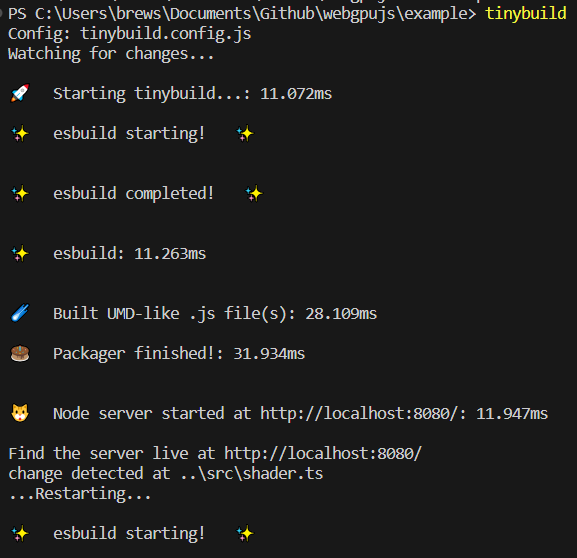
Bundler และ Server ที่ตั้งไว้ล่วงหน้ารวมถึง CLI เต็มรูปแบบไฟล์ config หรือ wrapper (in-script) สำหรับการปรับแต่ง ESBuild และการปรับแต่งเซิร์ฟเวอร์และสำหรับการสร้างการแจกแจงหลายครั้งจากการกำหนดค่าเดียว (เช่นเบราว์เซอร์, ESM, Node) การรวมกลุ่มและให้บริการห้องสมุดและโปรแกรมที่ซับซ้อนในมิลลิวินาทีด้วยสภาพแวดล้อมการทดสอบการโหลดซ้ำที่ร้อนแรงและทำให้ง่ายต่อการขยายการผลิต
ในโฟลเดอร์โครงการที่มี package.json (เช่นหลังจากเรียกใช้ npm init เป็นครั้งแรก)
สร้างไฟล์ tinybuild.config.js เช่น SO (คัดลอก/วางหรือ tinybuild สามารถสร้างไฟล์ให้คุณได้โดยเพียงแค่วิ่ง):
 //import {defaultBundler, defaultServer, packager} from 'tinybuild'

const config = {
    //build:true, //enable this to skip serve step (same as cli)
    //serve:true //or enable this to skip build step (same as cli)
    bundler : { //esbuild settings, set false to skip build step or add bundle:true to config object to only bundle (alt methods)
        entryPoints : [ //entry point file(s). These can include .js, .mjs, .ts, .jsx, .tsx, or other javascript files. Make sure your entry point is a ts file if you want to generate types
        "index.js"
        ] ,
        outfile : "dist/index" , //exit point file, will append .js as well as indicators like .esm.js, .node.js for other build flags
        //outdir:'dist'               //exit point folder, define for multiple entryPoints
        bundleBrowser : true , //create plain js build? Can include globals and init scripts
        bundleESM : false , //create esm module js files // { platform:'node' } //etc you can also supply an object here to add more specific esbuild settings
        bundleTypes : false , //create .d.ts files, //you need a .tsconfig for this to work, tinybuild will create one for you when you set this true, however, and has typescript support built in
        bundleNode : false , //create node platform plain js build, specify platform:'node' to do the rest of the files
        bundleHTML : false , //wrap the first entry point file as a plain js script in a boilerplate html file, frontend scripts can be run standalone like a .exe! Server serves this as start page if set to true.
        //bundleIIFE:false,   //create an iife build, this is compiled temporarily to create the types files and only saved with bundleIIFE:true
        //bundleCommonJS:false, //cjs format outputted as .cjs
        minify : true ,
        sourcemap : false ,
        //plugins:[] //custom esbuild plugins? e.g. esbuild-sass-plugin for scss support
        //includeDefaultPlugins:true //true by default, includes the presets for the streaming imports, worker bundling, and auto npm install
        //blobWorkers:true, //package workers as blobs or files? blobs are faster but inflate the main package size
        //workerBundler:{minifyWhitespace:true} //bundler settings specific to the worker. e.g. apply platform:'node' when bundling node workers, default is minifyWhitespace:true as full minifying may cause unforeseen errors
        //globalThis:null //'mymodule'
        //globals:{'index.js':['Graph']}
        //init:{'index.js':function(bundle) { console.log('prepackaged bundle script!', bundle); }.toString(); }
        //  outputs:{ //overwrites main config settings for specific use cases
        //     node:{ //e.g. for bundleNode
        //     // external:[] //externals for node environment builds
        //     },
        //     //commonjs:{} //bundleCommonJS
        //     //browser:{}
        //     //esm:{}
        //     iife:{
        //     // external:[] //we only use the iife for types so it doesn't really matter if it bundles node, just note otherwise if you need iife for some obscure reason
        //     }
        // },
        //refer to esbuild docs for more settings
     } ,
    server : {  //node server settings, set false to skip server step or add serve:true to config object to only serve (alt methods)
        debug : false ,
        protocol : "http" ,  //'http' or 'https'. HTTPS required for Nodejs <---> Python sockets. If using http, set production to False in python/server.py as well
        host : "localhost" , //'localhost' or '127.0.0.1' etc.
        port : 8080 , //e.g. port 80, 443, 8000
        //redirect: 'http://localhost:8082' //instead of serving the default content, redirect ot another url
        //headers: { 'Content-Security-Policy': '*'  }, //global header overrides
        startpage : 'index.html' ,  //default home page/app entry point
        /*
        routes:{ //set additional page routes (for sites instead of single page applications)
            '/page2': 'mypage.html',
            '/custom':{ //e.g. custom page template
                headers: { 'Content-Security-Policy': '*' }, //page specific headers
                template:'<html><head></head><body><div>Hello World!</div></body></html>'
                //path: 'mypage.html' //or a file path (e.g. plus specific headers)
            },
            '/redirect':{ //e.g. custom redirect
                redirect:'https://google.com'
            },
            '/other':(request,response) => {}, //custom request/response handling
            '/': 'index.html', //alt start page declaration
            '/404':'packager/node_server/other/404.html', //e.g. custom error page
        },
        */
        socket_protocol : "ws" , //frontend socket protocol, wss for served, ws for localhost
        hotreload : 5000 ,  //hotreload websocket server port
        //reloadscripts: false, //hot swap scripts, can break things if script handles initializations, otherwise css, link, srcs all hot swap without page reloading fairly intelligently
        //delay: 50, //millisecond delay on the watch command for hot reloading
        //pwa: "service-worker.js",  //pwa mode? Injects service worker webpage code to live site, will create a service worker and webmanifest for you if not existent
        //watch: ['../'], //watch additional directories other than the current working directory
        //python: false,//7000,  //quart server port (configured via the python server script file still)
        //python_node:7001, //websocket relay port (relays messages to client from nodejs that were sent to it by python)
        errpage : 'node_modules/tinybuild/tinybuild/node_server/other/404.html' , //default error page, etc.
        certpath : 'node_modules/tinybuild/tinybuild/node_server/ssl/cert.pem' , //if using https, this is required. See cert.pfx.md for instructions
        keypath : 'node_modules/tinybuild/tinybuild/node_server/ssl/key.pem' //if using https, this is required. See cert.pfx.md for instructions
    } ,
    // electron:true //desktop apps as a full chromium bundle, not small and needs some customization for things like bluetooth menus. Better for full featured applications. Can trigger backend runtimes on local machines.
    /*mobile:{ //this will copy the dist and index.html to capacitor builds that can create small interoperable javascript webview + native functionality (e.g. bluetooth) mobile apps (~2Mb at minimum).
        //android:'open', //'open'//true //Requires Android Studio, it will be launched
        //ios:false //'open'//true //Requires XCode
    }, */
    //tauri:true, //alternative tauri build options for very minimal native engine desktop apps that generally lack the latest web APIs. Good for simple apps, you can bundle it with backend runtimes on local machines.
    /*
    assets:[ //for the mobile/desktop bundlers to copy into their respective folders
        './assets',
        './favicon.ico'
    ]
    */
}

export default config ;
จากนั้นเรียกใช้ tinybuild เพื่อจัดหาสิ่งนี้ให้กับ Packager เพื่อสร้างและเรียกใช้โครงการของคุณ ปรับแต่งตามความต้องการของคุณเช่นสำหรับจุดเริ่มต้นที่แตกต่างกันและกรณีการใช้งาน TypeScript ได้รับการยอมรับโดยอัตโนมัติรวมถึง JSX และ TSX CSS จะถูกรวบรวมโดยอัตโนมัติหากคุณนำเข้าในสคริปต์ของคุณที่ไหนสักแห่ง ดูตัวอย่างเพิ่มเติม
สำหรับการใช้ TinyBuild ในเครื่อง ( npm install vs npm install -g ) คุณต้องนำเข้าและเรียกใช้ packager(config) จากไลบรารี TinyBuild ด้วยตัวคุณเองและเรียกใช้ในไฟล์สคริปต์
สร้าง tinybuild.js ที่รากของไดเรกทอรีโครงการของคุณ
 import { packager } from 'tinybuild'
import config from './tinybuild.config.js'

packager ( config ) ;
จากนั้นในคอนโซลจากไดเรกทอรีโครงการนั้นรัน node tinybuild.js
EG tinybuild build หรือ tinybuild serve เพื่อเรียกใช้คำสั่งที่แยกได้
tinybuild help แสดงรายการอาร์กิวเมนต์ที่ยอมรับได้โปรดดูแผ่นหม้อต้มที่สร้างขึ้นใน repo ใหม่สำหรับข้อมูลเพิ่มเติม คำสั่ง tinybuild จะใช้ tinybuild.config.js หรือ tinybuild.js ที่แก้ไขของคุณ (ซึ่งรวมถึงไลบรารีและดำเนินการ packager กับไฟล์ bundler และ/หรือเซิร์ฟเวอร์สำหรับการควบคุมเพิ่มเติม) ไฟล์กำหนดค่าหลังจากเริ่มต้นเพื่อให้คุณสามารถใช้งานได้ package.json ทั่วไป
คำสั่งทั่วโลก:
tinybuild - เรียกใช้การตั้งค่า Boilerplate TinyBuild Bundler + Server ในไดเรกทอรีการทำงานปัจจุบัน มันจะสร้าง index.js ที่ขาดหายไป, package.json (พร้อมการติดตั้ง Auto NPM/เส้นด้าย) และ TinyBuild.js และเสิร์ฟพร้อมโฟลเดอร์ดูในไดเรกทอรีการทำงาน (ลบ node_modules เพราะมันช้าลง) สำหรับการโหลดซ้ำคำสั่งท้องถิ่น:
node path/to/tinybuild.js - จะใช้ไดเรกทอรีการทำงานปัจจุบันเป็นข้อมูลอ้างอิงเพื่อเรียกใช้ packager config นี้start - เรียกใช้เทียบเท่ากับ node tinybuild.js ในไดเรกทอรีการทำงานปัจจุบันbuild / bundle - เรียกใช้ Esbuild Bundler สามารถระบุ config ด้วย config={"bundler":{}} ผ่านวัตถุ jsonifiedserve - เรียกใช้เซิร์ฟเวอร์การพัฒนาโหนดสามารถระบุ config ด้วย config={"server":{}} ผ่านวัตถุและวัตถุ JSonifiedmode=python - รันเซิร์ฟเวอร์การพัฒนาเช่นเดียวกับ Python ซึ่งให้บริการ DIST จากพอร์ตแยกต่างหาก (7000 ตามค่าเริ่มต้น)mode=dev สำหรับโหมดเซิร์ฟเวอร์ dev (ใช้โดยค่าเริ่มต้นหากคุณพิมพ์ tinybuild บน Boilerplate)path=custom.js - กำหนดเป้าหมายไฟล์รายการ tinybuild.js ที่เทียบเท่ากันentryPoints=index.js - ตั้งค่าจุดเข้าสำหรับสคริปต์ของคุณสามารถเป็นอาร์เรย์ jsonified ของสตริงoutfile=dist/index - ตั้งค่าไดเรกทอรีเอาต์พุตและชื่อไฟล์ (ลบชื่อส่วนขยาย)outdir=dist - หรือใช้ outdir เมื่อใช้หลายจุดเข้าbundleBrowser=true ผลิตชุดข้อมูล. JS ที่เป็นมิตรกับเบราว์เซอร์จริงโดยค่าเริ่มต้นbundleESM=false - สร้างชุดโมดูล ESM โดยค่าเริ่มต้นจะถูกระบุโดย .esm.jsbundleTypes=false - สร้างไฟล์. d.ts, เท็จโดยค่าเริ่มต้นจุดเริ่มต้นต้องใช้โดยไฟล์ typeScript แต่จะพยายามสร้างประเภทสำหรับไฟล์ JS ใน repo เป็นอย่างอื่น ไฟล์ถูกจัดระเบียบเหมือน repo ของคุณในโฟลเดอร์ DIST ที่ใช้bundleNode=false - สร้างชุดชุดแยกต่างหากเพื่อรวมการพึ่งพาโหนด ระบุโดย .node.jsbundleHTML=true - BUNDLE HTML Boilerplate ที่ห่อหุ้มและเรียกใช้ Browser Bundle เป็นการทดสอบอย่างรวดเร็ว หาก TRUE คำสั่ง Packager จะตั้งค่าไฟล์นี้เป็น startpage มิฉะนั้นคุณมี index.html คุณสามารถปรับแต่งและใช้ที่มีแผ่นหม้อต้มพื้นฐานเดียวกัน ค้นหา EG index.build.html ใน Distexternal=['node-fetch'] -ทำเครื่องหมายภายนอกใน repo ของคุณการดึงข้อมูลโหนดใช้ในงานของเราจำนวนมากดังนั้นจึงอยู่ที่นั่นโดยค่าเริ่มต้นชุดโหนดมีการยกเว้นของตัวเอง (ดูตัวเลือก ESBUILD ของเราใน readMe)platform=browser -ชุดที่ไม่ใช่โหนดใช้เบราว์เซอร์ตามค่าเริ่มต้นตั้งค่าเป็นโหนดเพื่อให้กลุ่มทั้งหมดกำหนดเป้าหมายแพลตฟอร์มโหนด ภายนอกจะต้องตั้งค่าอย่างเหมาะสมglobalThis=myCustomBundle - คุณสามารถตั้งค่าการส่งออกใด ๆ บนจุดเข้าร่วมของคุณในการตั้งค่า BundleBrowser เพื่อให้สามารถเข้าถึงได้เป็นตัวแปรทั่วโลก ไม่ได้ตั้งค่าตามค่าเริ่มต้นglobals={[entryPoint]:['myFunction']} - คุณสามารถระบุฟังก์ชั่นเพิ่มเติมคลาสตัวแปร ฯลฯ ส่งออกจากชุดข้อมูลของคุณเพื่อติดตั้งเป็น globals ในการตั้งค่า BundleBrowserhost=localhost - ตั้งชื่อโฮสต์สำหรับเซิร์ฟเวอร์, localhost โดยค่าเริ่มต้น คุณสามารถตั้งค่าเป็น URL เซิร์ฟเวอร์หรือที่อยู่ IP ของคุณเมื่อให้บริการ โดยทั่วไปใช้พอร์ต 80 เมื่อให้บริการport=8080 - พอร์ตสำหรับเซิร์ฟเวอร์ 8080 โดยค่าเริ่มต้นprotocol=http - http หรือ https? คุณต้องมีใบรับรอง SSL และกุญแจเพื่อเรียกใช้ httpspython=7000 - พอร์ตสำหรับเซิร์ฟเวอร์ Python เพื่อให้เซิร์ฟเวอร์โหนดสามารถส่งสัญญาณฆ่าได้ 7000 ตามค่าเริ่มต้น เรียกใช้เซิร์ฟเวอร์ Python พร้อมกันหรือใช้ mode=pythonhotreload=5000 - พอร์ต HOTRELOAD สำหรับเซิร์ฟเวอร์โหนด 5000 ตามค่าเริ่มต้นwatch=../../path/to/other/src หรือ watch=['path/to/src1','src2','.xml'] - ดูโฟลเดอร์และส่วนขยายเพิ่มเติมextensions=xml,3ds หรือ extensions=['xml','3ds'] ดูส่วนขยายเฉพาะสำหรับการเปลี่ยนแปลงignore=../../path/to/other/src,path2/src2 หรือ ignore=['path/to/src1','../path2/src2'] - ละเว้นไฟล์และโฟลเดอร์startpage=index.html - หน้ารายการ html สำหรับหน้าหน้าแรก '/', index.html โดยค่าเริ่มต้นcertpath=tinybuild/node_server/ssl/cert.pem - ไฟล์ใบรับรองสำหรับ httpskeypath=tinybuild/node_server/ssl/key.pem - ไฟล์คีย์สำหรับ httpspwa=tinybuild/pwa/workbox-config.js ผู้ปฏิบัติงานบริการกำหนดค่าสำหรับ PWA โดยใช้ Workbox-CLI (ติดตั้งแยกต่างหากผ่าน package.json) เซิร์ฟเวอร์จะติดตั้ง manifest.json ในโฟลเดอร์หลักหากไม่พบ https จำเป็นต้องใช้config="{"server":{},"bundler":{}}" - ผ่านวัตถุกำหนดค่า JSonified สำหรับ packager ดูการตั้งค่า Bundler และ Server ในเอกสารinit - เริ่มต้นโฟลเดอร์เป็นที่เก็บ TinyBuild ใหม่พร้อมไฟล์ที่จำเป็นคุณสามารถรวมแหล่งที่มาโดยใช้คำสั่งด้านล่างcore=true - รวมแหล่งที่มาเล็ก ๆ ในที่เก็บใหม่ด้วยแพ็คเกจที่เหมาะสม jsonentry=index.js -ตั้งชื่อไฟล์จุดเข้าที่คุณต้องการสร้างค่าเริ่มต้นเป็น index.jsscript=console.log("Hello%20World!") -ผ่าน jsonified และ uri-ench (สำหรับช่องว่าง ฯลฯ ) สตริง JavaScript, ค่าเริ่มต้นไปยังคอนโซล log ของ Hello World!electron - เริ่มแอพอิเล็กตรอนด้วยแผ่นหม้อไอน้ำคัดลอก DIST และสินทรัพย์ที่ระบุ ดูเอกสารอิเล็กตรอนmobile={android:'open',ios:false} - ใช้ตัวเก็บประจุเพื่อสร้างแอพมือถือที่รวมอยู่ใช้ 'เปิด' เพื่อเรียกใช้ Android Studio หรือ XCode หรือตั้งค่าเป็น TRUE เพื่อใช้ CLI โดยสมมติว่าคุณติดตั้งการพึ่งพา ดูเอกสารตัวเก็บประจุtauri - ทางเลือกที่น้อยที่สุดของเดสก์ท็อปรันไทม์ผ่าน Tauri ดูเอกสาร Tauriassets=['./assets','favicon.ico'] - ระบุสินทรัพย์เพิ่มเติมเพื่อคัดลอกไปยังการแจกแจงแบบดั้งเดิมดูไฟล์ readme.md ในแต่ละโฟลเดอร์ย่อยสำหรับคำอธิบายเพิ่มเติมเกี่ยวกับวิธีการทำงานกับแอปพลิเคชันประเภทนี้
หากคุณติดตั้ง TinyBuild บน Mac และใช้งานไม่ได้ลองเรียกใช้คำสั่งต่อไปนี้ในเทอร์มินัลตามโพสต์ StackoverFlow นี้:
 brew install dos2unix
sudo dos2unix node_modules/tinybuild/tinybuild/bin/global.js
Windows อาจส่งข้อผิดพลาดสำหรับการอนุญาตแพ็คเกจทั่วโลกเพียงคัดลอกข้อผิดพลาดที่คุณเข้าสู่ Google และใช้โซลูชันบรรทัดคำสั่งที่คุณพบและคุณจะไปได้ดี
อย่าลังเลที่จะแนะนำหรือทำการเปลี่ยนแปลงและรายงานข้อบกพร่องผ่านปัญหาหรือติดต่อโดยตรงกับ Joshua Brewster ระบบการพัฒนาทั้งหมดเป็นแบบแยกส่วนและเป็นระบบอัตโนมัติที่เรียบง่ายบนเครื่องมือพัฒนาที่เรียบง่ายหลายอย่าง เราใช้สิ่งนี้ในเวิร์กโฟลว์การพัฒนาประจำวันของเราดังนั้นจึงเป็นการทดสอบการต่อสู้ แต่มีขนาดเล็ก





