react native dynamic search bar
New tsconfig file is here ?



 |  |
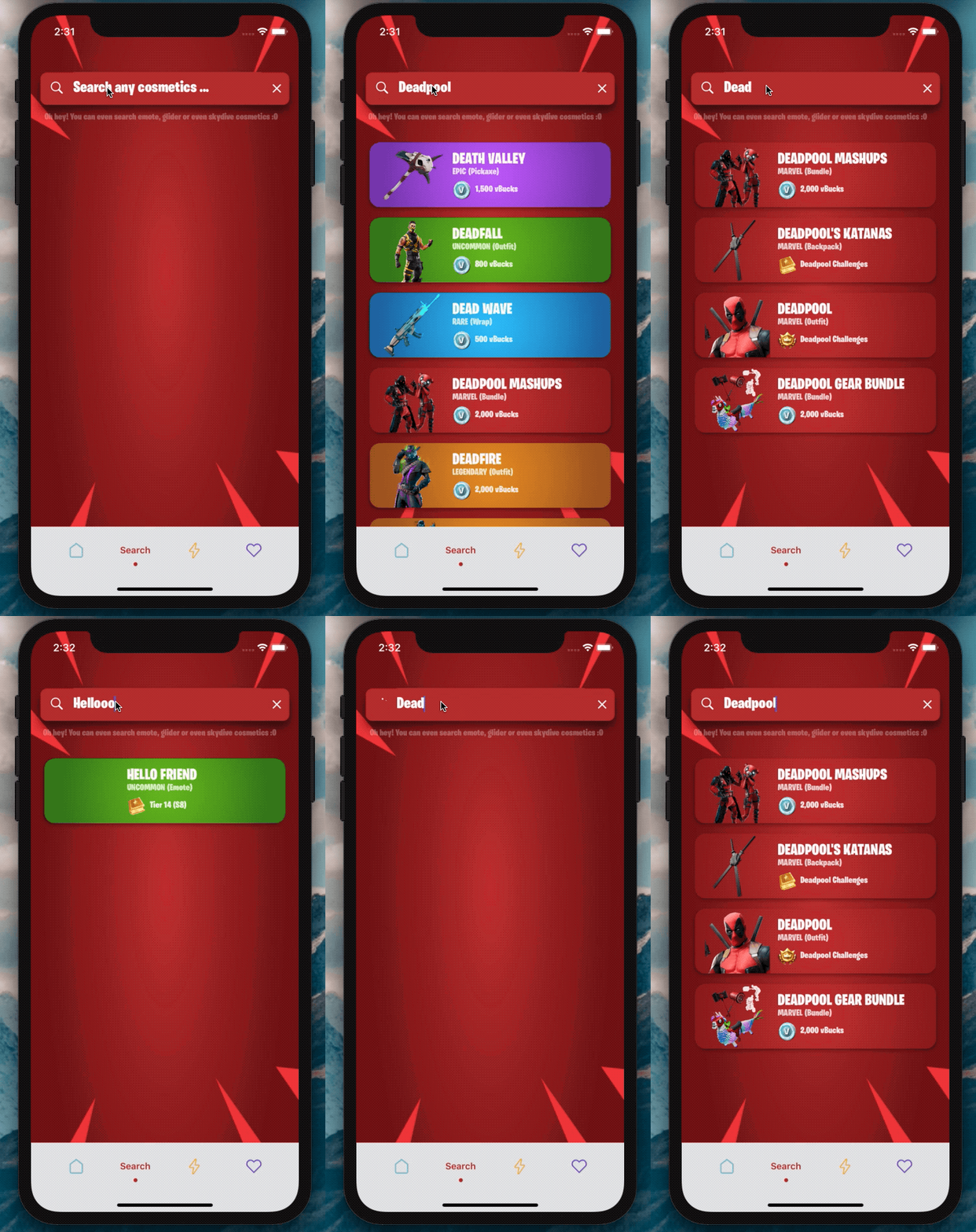
2.0版在这里?
我迫不及待想看看您将使用此SearchBar做什么?
添加依赖项:
npm i react-native-dynamic-search-barnpm i react-native-spinkitnpm i @freakycoder/react-native-bounceablenpm i WrathChaos/react-native-dynamic-search-bar#exponpm i react-native-animated-spinkitnpm i @freakycoder/react-native-bounceable "react-native-spinkit" : ">= 1.5.0" ,
"@freakycoder/react-native-bounceable" : ">= 0.2.2" , "react-native-animated-spinkit" : ">= 1.5.0" ,
"@freakycoder/react-native-bounceable" : ">= 0.2.2" , import SearchBar from "react-native-dynamic-search-bar" ; < SearchBar
placeholder = "Search here"
onPress = { ( ) => alert ( "onPress" ) }
onChangeText = { ( text ) => console . log ( text ) }
/> 您可以检查高级用法的示例
 < SearchBar
  fontColor = "#c6c6c6"
  iconColor = "#c6c6c6"
  shadowColor = "#282828"
  cancelIconColor = "#c6c6c6"
  backgroundColor = "#353d5e"
  placeholder = "Search here"
  onChangeText = { ( text ) => this . filterList ( text ) }
  onSearchPress = { ( ) => console . log ( "Search Icon is pressed" ) }
  onClearPress = { ( ) => this . filterList ( "" ) }
  onPress = { ( ) => alert ( "onPress" ) }
/> 您可以检查高级内置旋转器使用量的示例
 import React , { Component } from "react" ;
import { View } from "react-native" ;
import SearchBar from "react-native-dynamic-search-bar" ;

export default class Test extends Component {
  handleOnChangeText = ( text ) => {
    // ? Visible the spinner
    this . setState ( {
      searchText : text ,
      spinnerVisibility : true ,
    } ) ;

    // ? After you've done to implement your use-case
    // ? Do not forget to set false to spinner's visibility
    this . setState ( {
      spinnerVisibility : false ,
    } ) ;
  } ;

  render ( ) {
    const { spinnerVisibility } = this . state ;
    return (
      < View >
        < SearchBar
          height = { 50 }
          fontSize = { 24 }
          fontColor = "#fdfdfd"
          iconColor = "#fdfdfd"
          shadowColor = "#282828"
          cancelIconColor = "#fdfdfd"
          backgroundColor = "#ba312f"
          spinnerVisibility = { spinnerVisibility }
          placeholder = "Search any cosmetics ..."
          fontFamily = "BurbankBigCondensed-Black"
          shadowStyle = { styles . searchBarShadowStyle }
          onChangeText = { this . handleOnChangeText }
        />
      </ View >
    ) ;
  }
}| 财产 | 类型 | 默认 | 描述 |
|---|---|---|---|
| 风格 | ViewStyle | 默认 | 设置或覆盖主搜索视图的样式对象 |
| darkmode | 布尔 | 错误的 | 启用黑暗模式 |
| OnChangeText | 功能 | 功能 | 为OnchangeText逻辑设置自己的功能 |
| OnPress | 功能 | 功能 | 为OnPress功能设置自己的功能 |
| onSearchPress | 功能 | 功能 | 为搜索按钮的ONPRESS功能设置自己的功能 |
| Onclearpress | 功能 | 功能 | 为清除按钮的ONPRESS功能设置自己的功能 |
| Onblur | 功能 | 功能 | 为文本输入的Onblur功能设置您自己的功能 |
| 焦点 | 功能 | 功能 | 为文本输入的Onblur功能设置您自己的功能 |
| TextInputStyle | 文本风格 | 默认 | 设置或覆盖文本输入样式对象 |
| searchiconimagestyle | 成像派 | 默认 | 设置或覆盖搜索图标样式样式样式样式样式样式样式 |
| CLELICONIMPAGESTYLE | 成像派 | 默认 | 设置或覆盖清晰图像样式样式样式样式样式样式 |
| 想象成分 | 成分 | 图像 | 设置自己的图像组件,而不是React-Native的默认图像一个 |
| searchiconComponent | 成分 | 默认 | 设置自己的组件,而不是搜索组件的图标 |
| CLELICONCOMPONENT | 成分 | 默认 | 设置自己的组件,而不是图标的清除组件 |
| SearchIconImagesource | Isource | 默认 | 更改搜索图标映像源 |
| CleariconImagesource | Isource | 默认 | 更改清晰图标映像源 |
| CleariconImagesource | Isource | 默认 | 更改清晰图标映像源 |
| 占位符 | 细绳 | “在这里搜索...” | 设置自己的占位符 |
| Optronholdertextcolor | 颜色 | 不明确的 | 设定占位符文字颜色 |
| Spinnercolor | 颜色 | #FDFDFD | 更改旋转器颜色 |
| 旋转 | 数字 | 默认 | 更改旋转器尺寸 |
| Spinnertype | 成分 | 圆圈 | 更改旋转器类型 |
| 旋转性 | 布尔 | 错误的 | 更改旋转器的可见性 |
动态搜索栏可与Expo一起使用。您只需要添加同行依赖性:
"react-native-dynamic-vector-icons" : "WrathChaos/react-native-dynamic-vector-icons#expo" - >您需要将此代码添加到应用程序/gradle中
apply from : "../../node_modules/react-native-vector-icons/fonts.gradle" - >您需要在Android上启用实验layoutanimation。这是如何做的:
 import { UIManager } from 'react-native' ;

constructor ( ) {
    super ( ) ;
    if ( Platform . OS === 'android' ) {
      UIManager . setLayoutAnimationEnabledExperimental && UIManager . setLayoutAnimationEnabledExperimental ( true ) ;
    }
}freakycoder,[email protected]
React Native Dynamic搜索栏库可根据MIT许可证获得。有关更多信息,请参见许可证文件。





