react native dynamic search bar
New tsconfig file is here ?



 |  |
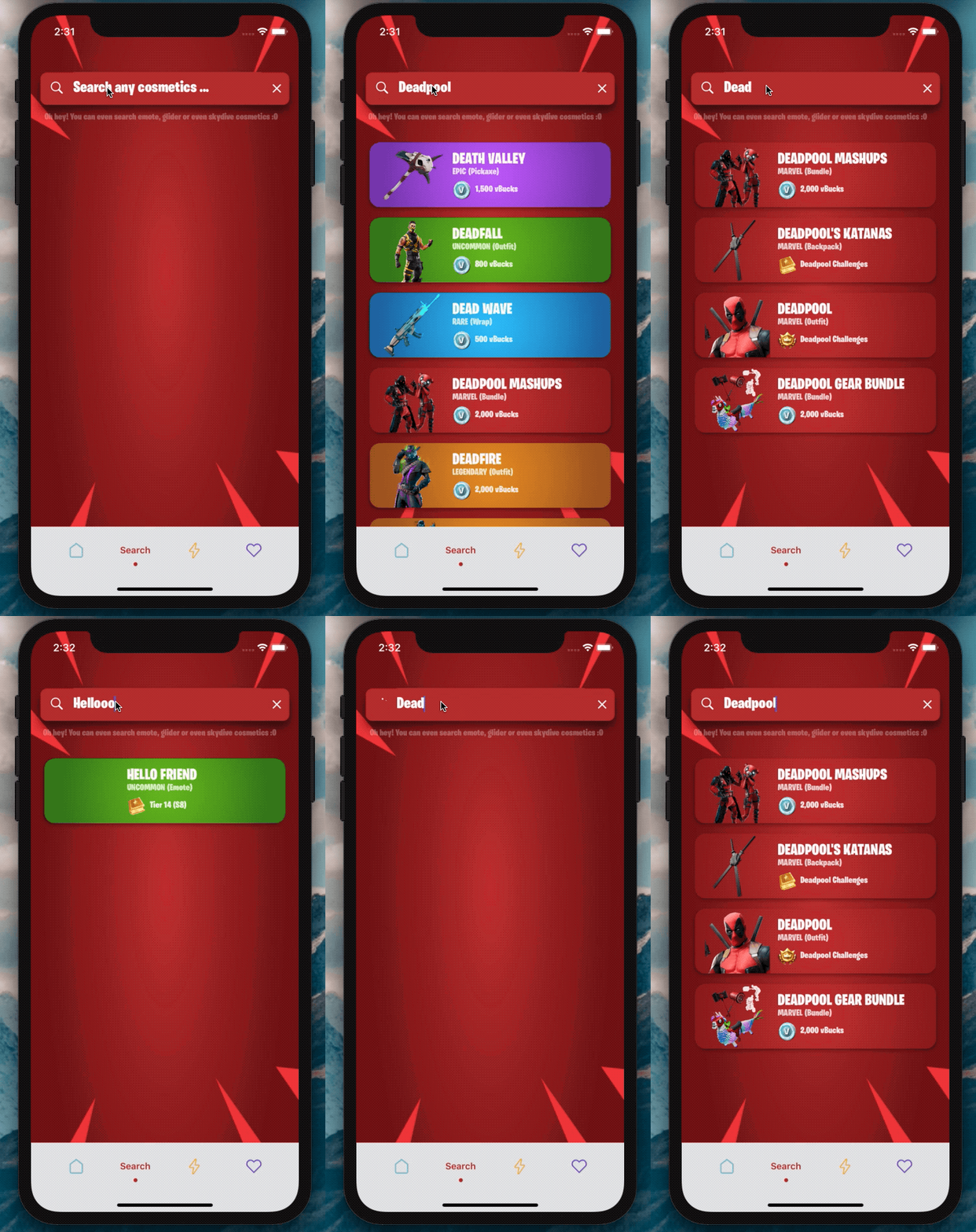
Versi 2.0 ada di sini?
Saya tidak sabar untuk melihat apa yang akan Anda buat dengan SearchBar ini?
Tambahkan ketergantungan:
npm i react-native-dynamic-search-barnpm i react-native-spinkitnpm i @freakycoder/react-native-bounceablenpm i WrathChaos/react-native-dynamic-search-bar#exponpm i react-native-animated-spinkitnpm i @freakycoder/react-native-bounceable "react-native-spinkit" : ">= 1.5.0" ,
"@freakycoder/react-native-bounceable" : ">= 0.2.2" , "react-native-animated-spinkit" : ">= 1.5.0" ,
"@freakycoder/react-native-bounceable" : ">= 0.2.2" , import SearchBar from "react-native-dynamic-search-bar" ; < SearchBar
placeholder = "Search here"
onPress = { ( ) => alert ( "onPress" ) }
onChangeText = { ( text ) => console . log ( text ) }
/> Anda dapat memeriksa contoh untuk penggunaan lanjutan
 < SearchBar
  fontColor = "#c6c6c6"
  iconColor = "#c6c6c6"
  shadowColor = "#282828"
  cancelIconColor = "#c6c6c6"
  backgroundColor = "#353d5e"
  placeholder = "Search here"
  onChangeText = { ( text ) => this . filterList ( text ) }
  onSearchPress = { ( ) => console . log ( "Search Icon is pressed" ) }
  onClearPress = { ( ) => this . filterList ( "" ) }
  onPress = { ( ) => alert ( "onPress" ) }
/> Anda dapat memeriksa contoh untuk penggunaan pemintal bawaan canggih
 import React , { Component } from "react" ;
import { View } from "react-native" ;
import SearchBar from "react-native-dynamic-search-bar" ;

export default class Test extends Component {
  handleOnChangeText = ( text ) => {
    // ? Visible the spinner
    this . setState ( {
      searchText : text ,
      spinnerVisibility : true ,
    } ) ;

    // ? After you've done to implement your use-case
    // ? Do not forget to set false to spinner's visibility
    this . setState ( {
      spinnerVisibility : false ,
    } ) ;
  } ;

  render ( ) {
    const { spinnerVisibility } = this . state ;
    return (
      < View >
        < SearchBar
          height = { 50 }
          fontSize = { 24 }
          fontColor = "#fdfdfd"
          iconColor = "#fdfdfd"
          shadowColor = "#282828"
          cancelIconColor = "#fdfdfd"
          backgroundColor = "#ba312f"
          spinnerVisibility = { spinnerVisibility }
          placeholder = "Search any cosmetics ..."
          fontFamily = "BurbankBigCondensed-Black"
          shadowStyle = { styles . searchBarShadowStyle }
          onChangeText = { this . handleOnChangeText }
        />
      </ View >
    ) ;
  }
}| Milik | Jenis | Bawaan | Keterangan |
|---|---|---|---|
| gaya | View style | bawaan | atur atau angkanya objek gaya untuk tampilan pencarian utama |
| Darkmode | Boolean | PALSU | Aktifkan mode gelap |
| OnchangeText | fungsi | fungsi | Atur fungsi Anda sendiri untuk logika OnchangeText |
| Onpress | fungsi | fungsi | Atur fungsi Anda sendiri untuk fungsionalitas OnPress |
| OnSearchpress | fungsi | fungsi | Atur fungsi Anda sendiri untuk fungsionalitas OnPress Tombol Pencarian |
| OnClearpress | fungsi | fungsi | Atur fungsi Anda sendiri untuk fungsionalitas OnPress Tombol Clear |
| Onblur | fungsi | fungsi | Atur fungsi Anda sendiri untuk fungsionalitas Onblur input teks |
| Onfocus | fungsi | fungsi | Atur fungsi Anda sendiri untuk fungsionalitas Onblur input teks |
| TextInputStyle | TextStyle | bawaan | atur atau angkanya objek gaya untuk input teks |
| Searchiconimagestyle | Imagestyle | bawaan | atur atau angkanya objek gaya untuk gaya gambar ikon pencarian |
| Cleariconimagestyle | Imagestyle | bawaan | atur atau angkanya objek gaya untuk gaya gambar ikon yang jelas |
| Komponen imagec | komponen | Gambar | Atur komponen gambar Anda sendiri alih-alih gambar default asli React-asli |
| SearchIcOncomponent | komponen | bawaan | Atur komponen Anda sendiri, bukan ikon untuk komponen pencarian |
| ClearicOncomponent | komponen | bawaan | Atur komponen Anda sendiri, bukan ikon untuk komponen yang jelas |
| SearchiconimageSource | Isource | bawaan | Ubah Sumber Gambar Ikon Pencarian |
| CleariconimageSource | Isource | bawaan | Ubah sumber gambar ikon yang jelas |
| CleariconimageSource | Isource | bawaan | Ubah sumber gambar ikon yang jelas |
| placeholder | rangkaian | "Cari di sini ..." | Atur string pemegang placeholder Anda sendiri |
| PlaceholderTextColor | warna | belum diartikan | atur warna teks placeholder |
| SpinnerColor | warna | #fdfdfd | Ubah Warna Pemintal |
| berputar | nomor | bawaan | Ubah Ukuran Pemintal |
| SpinnerType | komponen | Lingkaran | Ubah tipe pemintal |
| spinnervisibility | Boolean | PALSU | Ubah visibilitas pemintal |
Bilah pencarian dinamis dapat digunakan dengan Expo. Anda hanya perlu menambahkan ketergantungan rekan:
"react-native-dynamic-vector-icons" : "WrathChaos/react-native-dynamic-vector-icons#expo" -> Anda perlu menambahkan baris kode ini ke dalam App/Gradle
apply from : "../../node_modules/react-native-vector-icons/fonts.gradle" -> Anda perlu mengaktifkan Layoutimation Eksperimental di Android. Inilah cara melakukannya:
 import { UIManager } from 'react-native' ;

constructor ( ) {
    super ( ) ;
    if ( Platform . OS === 'android' ) {
      UIManager . setLayoutAnimationEnabledExperimental && UIManager . setLayoutAnimationEnabledExperimental ( true ) ;
    }
}Freakycoder, [email protected]
React Native Dynamic Search Bar Library tersedia di bawah lisensi MIT. Lihat file lisensi untuk info lebih lanjut.





