reddit_desktop
1.0.172


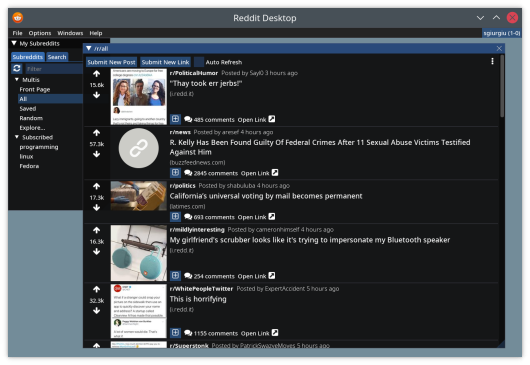
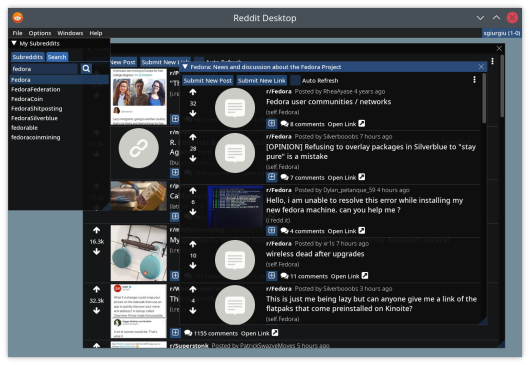
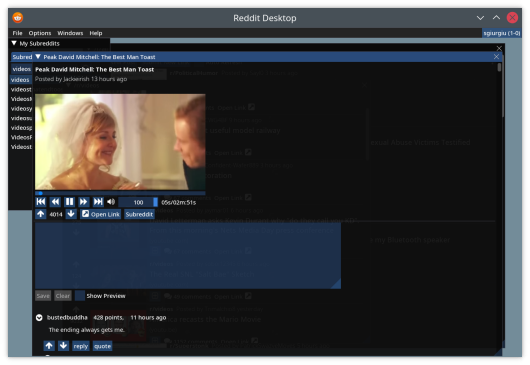
Reddit桌面是Reddit的桌面客户端。
要下载用于操作系统的最新版本,请访问发布页面。
对于Windows,下载.msi可执行文件,该可执行文件将为您提供准备安装的软件包。
对于Linux,下载用于基于Debian的Distributions的*-debian.deb软件包或Fedora的*-fedora.rpm软件包,然后使用您的软件包管理器安装它们( sudo apt install <deb file>或sudo dnf install <rpm file> )。
对于Fedora,您还需要安装提供LIBMPV的存储库,例如RPMFusion。例如:
 dnf install -yq
    http://download1.rpmfusion.org/free/fedora/rpmfusion-free-release-stable.noarch.rpm
    http://download1.rpmfusion.org/nonfree/fedora/rpmfusion-nonfree-release-stable.noarch.rpm &&
    rpm --import /etc/pki/rpm-gpg/RPM-GPG-KEY-rpmfusion-free-fedora-latest &&
    rpm --import /etc/pki/rpm-gpg/RPM-GPG-KEY-rpmfusion-nonfree-fedora-latest
如果您宁愿运行容器映像(Docker或Podman),请从“版本”页面下载reddit_desktop_runtime.tar.gz文件。为您的容器(例如podman load -i reddit_desktop_runtime.tar.gz )加载它
 mkdir -p ~/.config/reddit_desktop

podman run --rm -v ~/.config/reddit_desktop:/root/.config/reddit_desktop
        -v /tmp/.X11-unix:/tmp/.X11-unix --security-opt=label=type:container_runtime_t
         -e DISPLAY -v /run/user/$(id -u)/:/run/user/0/   -e XDG_RUNTIME_DIR=/run/user/0
        -e PULSE_SERVER=/run/user/0/pulse/native
        --ipc host
        localhost/reddit_desktop_runtime
docker/run_container.sh脚本提供了一个示例。
 Set-ExecutionPolicy Bypass -Scope Process -Force; iex ((New-Object System.Net.WebClient).DownloadString('https://chocolatey.org/install.ps1'))

choco feature enable -n allowGlobalConfirmation
choco install 7zip.install
choco install git.install
choco install cmake.install --installargs 'ADD_CMAKE_TO_PATH=System'
choco install ninja
choco install wixtoolset
choco install powershell-core
E:projectsvcpkg 。根据需要更改。) New-Item -ItemType Directory -Force -Path E:projects
cd E:projects
git clone https://github.com/Microsoft/vcpkg.git
cd vcpkg
.bootstrap-vcpkg.bat
 New-Item -ItemType Directory -Force -Path E:projectsmpv
cd E:projectsmpv

#Download latest youtube-dl.exe release
$youtube_dl_latest_uri = "https://api.github.com/repos/ytdl-org/youtube-dl/releases/latest"
$latestYoutubeDlRelease = Invoke-RestMethod $youtube_dl_latest_uri
$latestYoutubeDlReleaseAssets = $latestYoutubeDlRelease.assets
$latestYoutubeExeAsset = $latestYoutubeDlReleaseAssets | where-object {$_.name -EQ "youtube-dl.exe" }
Invoke-WebRequest $latestYoutubeExeAsset.browser_download_url -OutFile "$pwd$($latestYoutubeExeAsset.name)"

# Download the latest release from libmpv folder, manually
Start-Process https://sourceforge.net/projects/mpv-player-windows/files/libmpv/
lib /dev:mpv.def /machine:x64 /out:mpv.lib apt install -y dpkg build-essential cmake gcc g++ git
libmpv-dev ca-certificates curl zip unzip tar libglu1-mesa-dev libgl1-mesa-dev
pkg-config generate-ninja ninja-build libxmu-dev libxi-dev libgl-dev
 dnf install -yq
http://download1.rpmfusion.org/free/fedora/rpmfusion-free-release-stable.noarch.rpm
http://download1.rpmfusion.org/nonfree/fedora/rpmfusion-nonfree-release-stable.noarch.rpm &&
rpm --import /etc/pki/rpm-gpg/RPM-GPG-KEY-rpmfusion-free-fedora-latest &&
rpm --import /etc/pki/rpm-gpg/RPM-GPG-KEY-rpmfusion-nonfree-fedora-latest
 dnf -yq install cmake gcc g++ pkgconf-pkg-config git
    tar rpm-build ninja-build perl-FindBin perl-English perl-File-Compare
    ibus-devel libXmu-devel libXi-devel mesa-libGL-devel mesa-libGLU-devel
    mpv-libs-devel
 pkg install llvm clang boost-all glfw glew gumbo libfmt spdlog stb freetype2 openssl
            git cmake ninja sqlite3 pkgconf mpv uriparser libvdpau libvdpau-va-gl mesa-gallium-vdpau
            libva-vdpau-driver mesa-dri
cd <projects folder>
git clone --recurse-submodules https://github.com/sgiurgiu/reddit_desktop.git
Linux
mkdir build && cd build
cmake -GNinja -DCMAKE_TOOLCHAIN_FILE=<vcpkg folder>/scripts/buildsystems/vcpkg.cmake -DCMAKE_BUILD_TYPE=Release -DENABLE_TESTS=OFF -DENABLE_M4DC=ON -DENABLE_CMARK=OFF <git cloned folder>
ninja
现在使用src/reddit_desktop从该文件夹运行它
视窗
  cmake -B . -S <git cloned folder> -G Ninja -DCMAKE_TOOLCHAIN_FILE=<vcpkg folder>/scripts/buildsystems/vcpkg.cmake -DVCPKG_TARGET_TRIPLET=x64-windows-static -DENABLE_TESTS=False -DCMAKE_BUILD_TYPE=Release -DCPACK_GENERATOR=WIX -DLIBMPV_DIR="<libmpv folder>" -DLIBMPV_INCLUDE="<libmpv include folder>" -DYOUTUBE_DL="<youtube-dl.exe path>"
  cmake --build .
在Windows和Linux上构建它的脚本都可以在scripts文件夹中找到,也可以在docker文件夹中找到。如果不更新此读数,这些脚本是为特定操作系统构建软件包的过程的权限。
freebsd mkdir build && cd build
cmake -DCMAKE_BUILD_TYPE=Release -DENABLE_TESTS=OFF -DENABLE_M4DC=ON -DENABLE_CMARK=OFF <git cloned folder>
make
该应用程序将Dear Imgui库用于其UI。非常感谢Ocornut和所有其他贡献者的出色工作。





