reddit_desktop
1.0.172


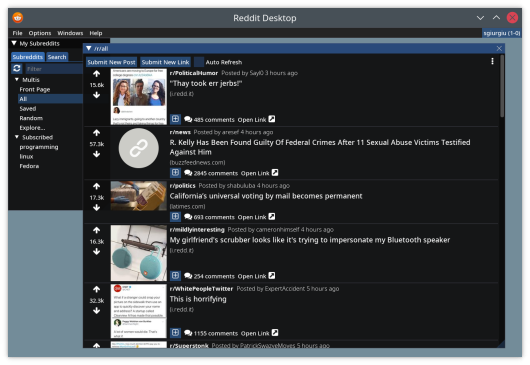
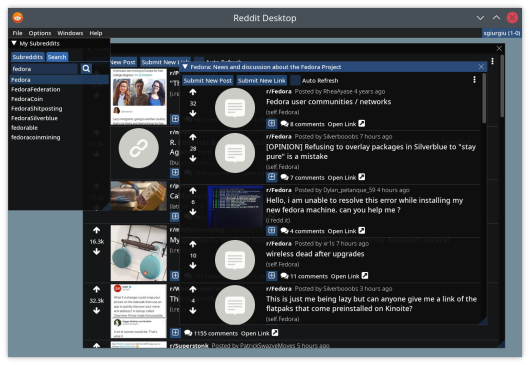
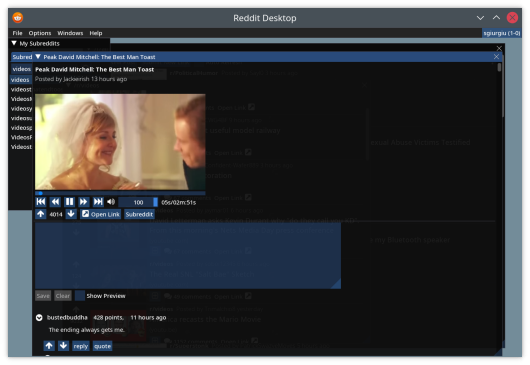
Reddit Desktop is a desktop client for reddit.
To download the latest release for your OS, please visit the releases page.
For Windows, download the .msi executable, which will provide you with a package, ready to be installed.
For Linux, download the *-debian.deb package for Debian based distributions or the *-fedora.rpm package
for Fedora, and install them with your package manager (sudo apt install <deb file> or sudo dnf install <rpm file>).
For Fedora you will also need to install a repository that provides libmpv, such as rpmfusion. For example:
dnf install -yq
    http://download1.rpmfusion.org/free/fedora/rpmfusion-free-release-stable.noarch.rpm
    http://download1.rpmfusion.org/nonfree/fedora/rpmfusion-nonfree-release-stable.noarch.rpm &&
    rpm --import /etc/pki/rpm-gpg/RPM-GPG-KEY-rpmfusion-free-fedora-latest &&
    rpm --import /etc/pki/rpm-gpg/RPM-GPG-KEY-rpmfusion-nonfree-fedora-latest
If you would rather run the container image (docker or podman), download the reddit_desktop_runtime.tar.gz file from the releases page. Load it for your container (e.g. podman load -i reddit_desktop_runtime.tar.gz) then run it with
mkdir -p ~/.config/reddit_desktop

podman run --rm -v ~/.config/reddit_desktop:/root/.config/reddit_desktop
        -v /tmp/.X11-unix:/tmp/.X11-unix --security-opt=label=type:container_runtime_t
         -e DISPLAY -v /run/user/$(id -u)/:/run/user/0/   -e XDG_RUNTIME_DIR=/run/user/0
        -e PULSE_SERVER=/run/user/0/pulse/native
        --ipc host
        localhost/reddit_desktop_runtime
The docker/run_container.sh script provides an example.
Set-ExecutionPolicy Bypass -Scope Process -Force; iex ((New-Object System.Net.WebClient).DownloadString('https://chocolatey.org/install.ps1'))

choco feature enable -n allowGlobalConfirmation
choco install 7zip.install
choco install git.install
choco install cmake.install --installargs 'ADD_CMAKE_TO_PATH=System'
choco install ninja
choco install wixtoolset
choco install powershell-core
E:projectsvcpkg. Change as desired.)
New-Item -ItemType Directory -Force -Path E:projects
cd E:projects
git clone https://github.com/Microsoft/vcpkg.git
cd vcpkg
.bootstrap-vcpkg.bat
New-Item -ItemType Directory -Force -Path E:projectsmpv
cd E:projectsmpv

#Download latest youtube-dl.exe release
$youtube_dl_latest_uri = "https://api.github.com/repos/ytdl-org/youtube-dl/releases/latest"
$latestYoutubeDlRelease = Invoke-RestMethod $youtube_dl_latest_uri
$latestYoutubeDlReleaseAssets = $latestYoutubeDlRelease.assets
$latestYoutubeExeAsset = $latestYoutubeDlReleaseAssets | where-object {$_.name -EQ "youtube-dl.exe" }
Invoke-WebRequest $latestYoutubeExeAsset.browser_download_url -OutFile "$pwd$($latestYoutubeExeAsset.name)"

# Download the latest release from libmpv folder, manually
Start-Process https://sourceforge.net/projects/mpv-player-windows/files/libmpv/
lib /dev:mpv.def /machine:x64 /out:mpv.libapt install -y dpkg build-essential cmake gcc g++ git
libmpv-dev ca-certificates curl zip unzip tar libglu1-mesa-dev libgl1-mesa-dev
pkg-config generate-ninja ninja-build libxmu-dev libxi-dev libgl-dev
dnf install -yq
http://download1.rpmfusion.org/free/fedora/rpmfusion-free-release-stable.noarch.rpm
http://download1.rpmfusion.org/nonfree/fedora/rpmfusion-nonfree-release-stable.noarch.rpm &&
rpm --import /etc/pki/rpm-gpg/RPM-GPG-KEY-rpmfusion-free-fedora-latest &&
rpm --import /etc/pki/rpm-gpg/RPM-GPG-KEY-rpmfusion-nonfree-fedora-latest
dnf -yq install cmake gcc g++ pkgconf-pkg-config git
    tar rpm-build ninja-build perl-FindBin perl-English perl-File-Compare
    ibus-devel libXmu-devel libXi-devel mesa-libGL-devel mesa-libGLU-devel
    mpv-libs-devel
pkg install llvm clang boost-all glfw glew gumbo libfmt spdlog stb freetype2 openssl
            git cmake ninja sqlite3 pkgconf mpv uriparser libvdpau libvdpau-va-gl mesa-gallium-vdpau
            libva-vdpau-driver mesa-dri
cd <projects folder>
git clone --recurse-submodules https://github.com/sgiurgiu/reddit_desktop.git
Linux
mkdir build && cd build
cmake -GNinja -DCMAKE_TOOLCHAIN_FILE=<vcpkg folder>/scripts/buildsystems/vcpkg.cmake -DCMAKE_BUILD_TYPE=Release -DENABLE_TESTS=OFF -DENABLE_M4DC=ON -DENABLE_CMARK=OFF <git cloned folder>
ninja
And now run it from that folder with src/reddit_desktop
Windows
  cmake -B . -S <git cloned folder> -G Ninja -DCMAKE_TOOLCHAIN_FILE=<vcpkg folder>/scripts/buildsystems/vcpkg.cmake -DVCPKG_TARGET_TRIPLET=x64-windows-static -DENABLE_TESTS=False -DCMAKE_BUILD_TYPE=Release -DCPACK_GENERATOR=WIX -DLIBMPV_DIR="<libmpv folder>" -DLIBMPV_INCLUDE="<libmpv include folder>" -DYOUTUBE_DL="<youtube-dl.exe path>"
  cmake --build .
The scripts that build it on windows and linux can be found in the scripts folder, as well in the docker folder. Those scripts are the authority when it comes to the process of building a package for a particular OS
should this readme not be updated.
FreeBSD
mkdir build && cd build
cmake -DCMAKE_BUILD_TYPE=Release -DENABLE_TESTS=OFF -DENABLE_M4DC=ON -DENABLE_CMARK=OFF <git cloned folder>
make
This application uses the Dear ImGui library for its UI. Big thanks to ocornut and all the other contributors for their amazing work.





