reddit_desktop
1.0.172


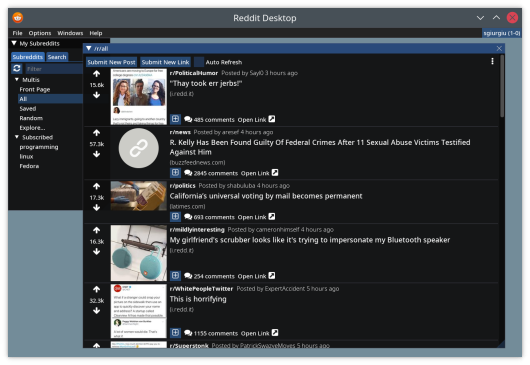
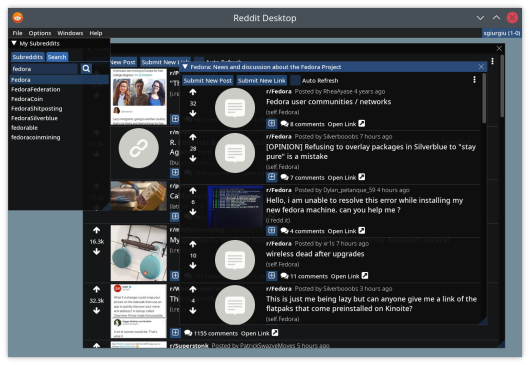
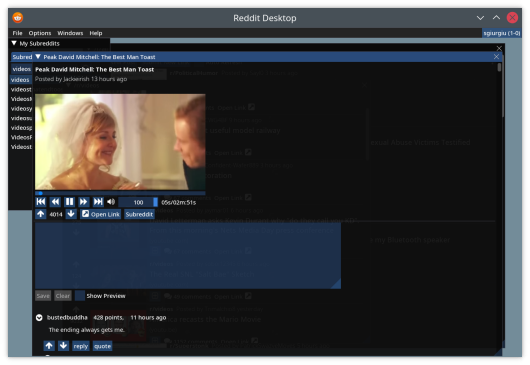
Reddit Desktop ist ein Desktop -Client für Reddit.
Um die neueste Version für Ihr Betriebssystem herunterzuladen, besuchen Sie bitte die Seite "Veröffentlichungen".
Laden Sie für Windows die ausführbare Datei .msi herunter, die Ihnen ein Paket bietet, das bereit ist, installiert zu werden.
Laden Sie für Linux das Paket *-debian.deb für Debian-basierte Verteilungen oder das Paket *-fedora.rpm für Fedora herunter und installieren Sie es mit Ihrem Paketmanager ( sudo apt install <deb file> oder sudo dnf install <rpm file> ).
Für Fedora müssen Sie auch ein Repository installieren, das LIBMPV anbietet, z. B. RPMFusion. Zum Beispiel:
 dnf install -yq
    http://download1.rpmfusion.org/free/fedora/rpmfusion-free-release-stable.noarch.rpm
    http://download1.rpmfusion.org/nonfree/fedora/rpmfusion-nonfree-release-stable.noarch.rpm &&
    rpm --import /etc/pki/rpm-gpg/RPM-GPG-KEY-rpmfusion-free-fedora-latest &&
    rpm --import /etc/pki/rpm-gpg/RPM-GPG-KEY-rpmfusion-nonfree-fedora-latest
Wenn Sie das Containerbild (Docker oder Podman) lieber ausführen möchten, laden Sie die Datei reddit_desktop_runtime.tar.gz von der Seite "Releases" herunter. Laden Sie es für Ihren Container (z. B. podman load -i reddit_desktop_runtime.tar.gz ) und führen Sie es mit
 mkdir -p ~/.config/reddit_desktop

podman run --rm -v ~/.config/reddit_desktop:/root/.config/reddit_desktop
        -v /tmp/.X11-unix:/tmp/.X11-unix --security-opt=label=type:container_runtime_t
         -e DISPLAY -v /run/user/$(id -u)/:/run/user/0/   -e XDG_RUNTIME_DIR=/run/user/0
        -e PULSE_SERVER=/run/user/0/pulse/native
        --ipc host
        localhost/reddit_desktop_runtime
Das Skript docker/run_container.sh bietet ein Beispiel.
 Set-ExecutionPolicy Bypass -Scope Process -Force; iex ((New-Object System.Net.WebClient).DownloadString('https://chocolatey.org/install.ps1'))

choco feature enable -n allowGlobalConfirmation
choco install 7zip.install
choco install git.install
choco install cmake.install --installargs 'ADD_CMAKE_TO_PATH=System'
choco install ninja
choco install wixtoolset
choco install powershell-core
E:projectsvcpkg . Änderung wie gewünscht.) New-Item -ItemType Directory -Force -Path E:projects
cd E:projects
git clone https://github.com/Microsoft/vcpkg.git
cd vcpkg
.bootstrap-vcpkg.bat
 New-Item -ItemType Directory -Force -Path E:projectsmpv
cd E:projectsmpv

#Download latest youtube-dl.exe release
$youtube_dl_latest_uri = "https://api.github.com/repos/ytdl-org/youtube-dl/releases/latest"
$latestYoutubeDlRelease = Invoke-RestMethod $youtube_dl_latest_uri
$latestYoutubeDlReleaseAssets = $latestYoutubeDlRelease.assets
$latestYoutubeExeAsset = $latestYoutubeDlReleaseAssets | where-object {$_.name -EQ "youtube-dl.exe" }
Invoke-WebRequest $latestYoutubeExeAsset.browser_download_url -OutFile "$pwd$($latestYoutubeExeAsset.name)"

# Download the latest release from libmpv folder, manually
Start-Process https://sourceforge.net/projects/mpv-player-windows/files/libmpv/
lib /dev:mpv.def /machine:x64 /out:mpv.lib apt install -y dpkg build-essential cmake gcc g++ git
libmpv-dev ca-certificates curl zip unzip tar libglu1-mesa-dev libgl1-mesa-dev
pkg-config generate-ninja ninja-build libxmu-dev libxi-dev libgl-dev
 dnf install -yq
http://download1.rpmfusion.org/free/fedora/rpmfusion-free-release-stable.noarch.rpm
http://download1.rpmfusion.org/nonfree/fedora/rpmfusion-nonfree-release-stable.noarch.rpm &&
rpm --import /etc/pki/rpm-gpg/RPM-GPG-KEY-rpmfusion-free-fedora-latest &&
rpm --import /etc/pki/rpm-gpg/RPM-GPG-KEY-rpmfusion-nonfree-fedora-latest
 dnf -yq install cmake gcc g++ pkgconf-pkg-config git
    tar rpm-build ninja-build perl-FindBin perl-English perl-File-Compare
    ibus-devel libXmu-devel libXi-devel mesa-libGL-devel mesa-libGLU-devel
    mpv-libs-devel
 pkg install llvm clang boost-all glfw glew gumbo libfmt spdlog stb freetype2 openssl
            git cmake ninja sqlite3 pkgconf mpv uriparser libvdpau libvdpau-va-gl mesa-gallium-vdpau
            libva-vdpau-driver mesa-dri
cd <projects folder>
git clone --recurse-submodules https://github.com/sgiurgiu/reddit_desktop.git
Linux
mkdir build && cd build
cmake -GNinja -DCMAKE_TOOLCHAIN_FILE=<vcpkg folder>/scripts/buildsystems/vcpkg.cmake -DCMAKE_BUILD_TYPE=Release -DENABLE_TESTS=OFF -DENABLE_M4DC=ON -DENABLE_CMARK=OFF <git cloned folder>
ninja
Und führen Sie es nun aus diesem Ordner mit src/reddit_desktop aus
Fenster
  cmake -B . -S <git cloned folder> -G Ninja -DCMAKE_TOOLCHAIN_FILE=<vcpkg folder>/scripts/buildsystems/vcpkg.cmake -DVCPKG_TARGET_TRIPLET=x64-windows-static -DENABLE_TESTS=False -DCMAKE_BUILD_TYPE=Release -DCPACK_GENERATOR=WIX -DLIBMPV_DIR="<libmpv folder>" -DLIBMPV_INCLUDE="<libmpv include folder>" -DYOUTUBE_DL="<youtube-dl.exe path>"
  cmake --build .
Die Skripte, die es unter Windows und Linux erstellen, finden Sie im Ordner scripts sowie im Ordner docker . Diese Skripte sind die Autorität, wenn es darum geht, ein Paket für ein bestimmtes Betriebssystem zu erstellen, falls dieser Readme nicht aktualisiert wird.
FreeBSD mkdir build && cd build
cmake -DCMAKE_BUILD_TYPE=Release -DENABLE_TESTS=OFF -DENABLE_M4DC=ON -DENABLE_CMARK=OFF <git cloned folder>
make
Diese Anwendung verwendet die LEAR IMGUI -Bibliothek für ihre Benutzeroberfläche. Vielen Dank an Ocornut und all die anderen Mitwirkenden für ihre erstaunliche Arbeit.





