reddit_desktop
1.0.172


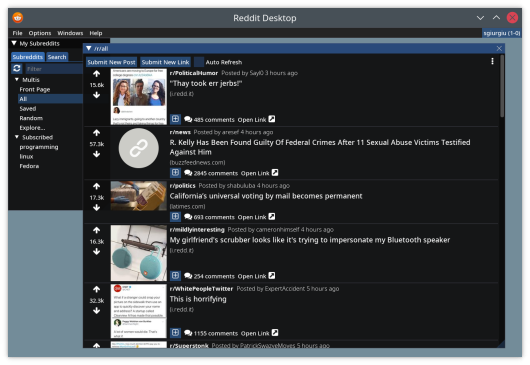
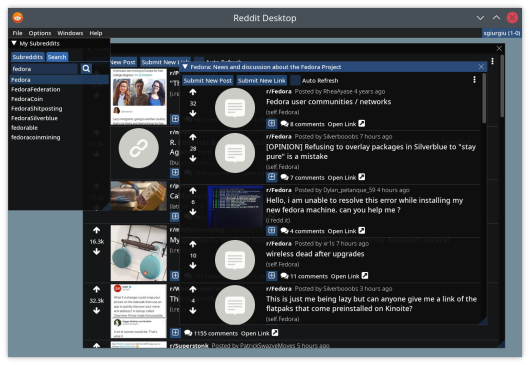
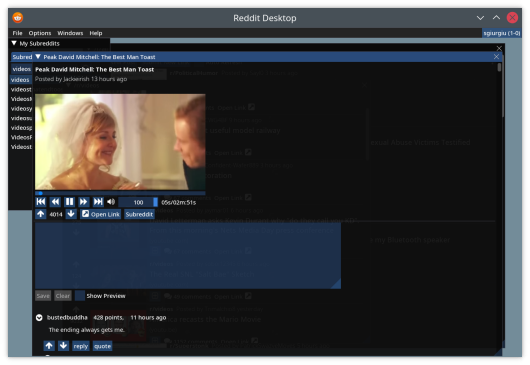
Reddit Desktop adalah klien desktop untuk Reddit.
Untuk mengunduh rilis terbaru untuk OS Anda, silakan kunjungi halaman rilis.
Untuk Windows, unduh .MSI Executable, yang akan memberi Anda paket, siap diinstal.
Untuk Linux, unduh paket *-debian.deb untuk distribusi berbasis Debian atau paket *-fedora.rpm untuk fedora, dan instal dengan manajer paket Anda ( sudo apt install <deb file> atau sudo dnf install <rpm file> ).
Untuk Fedora, Anda juga perlu menginstal repositori yang menyediakan libmpv, seperti RPMFusion. Misalnya:
 dnf install -yq
    http://download1.rpmfusion.org/free/fedora/rpmfusion-free-release-stable.noarch.rpm
    http://download1.rpmfusion.org/nonfree/fedora/rpmfusion-nonfree-release-stable.noarch.rpm &&
    rpm --import /etc/pki/rpm-gpg/RPM-GPG-KEY-rpmfusion-free-fedora-latest &&
    rpm --import /etc/pki/rpm-gpg/RPM-GPG-KEY-rpmfusion-nonfree-fedora-latest
Jika Anda lebih suka menjalankan gambar kontainer (Docker atau Podman), unduh file reddit_desktop_runtime.tar.gz dari halaman rilis. Muatkan untuk wadah Anda ( podman load -i reddit_desktop_runtime.tar.gz .
 mkdir -p ~/.config/reddit_desktop

podman run --rm -v ~/.config/reddit_desktop:/root/.config/reddit_desktop
        -v /tmp/.X11-unix:/tmp/.X11-unix --security-opt=label=type:container_runtime_t
         -e DISPLAY -v /run/user/$(id -u)/:/run/user/0/   -e XDG_RUNTIME_DIR=/run/user/0
        -e PULSE_SERVER=/run/user/0/pulse/native
        --ipc host
        localhost/reddit_desktop_runtime
Skrip docker/run_container.sh memberikan contoh.
 Set-ExecutionPolicy Bypass -Scope Process -Force; iex ((New-Object System.Net.WebClient).DownloadString('https://chocolatey.org/install.ps1'))

choco feature enable -n allowGlobalConfirmation
choco install 7zip.install
choco install git.install
choco install cmake.install --installargs 'ADD_CMAKE_TO_PATH=System'
choco install ninja
choco install wixtoolset
choco install powershell-core
E:projectsvcpkg . Ubah seperti yang diinginkan.) New-Item -ItemType Directory -Force -Path E:projects
cd E:projects
git clone https://github.com/Microsoft/vcpkg.git
cd vcpkg
.bootstrap-vcpkg.bat
 New-Item -ItemType Directory -Force -Path E:projectsmpv
cd E:projectsmpv

#Download latest youtube-dl.exe release
$youtube_dl_latest_uri = "https://api.github.com/repos/ytdl-org/youtube-dl/releases/latest"
$latestYoutubeDlRelease = Invoke-RestMethod $youtube_dl_latest_uri
$latestYoutubeDlReleaseAssets = $latestYoutubeDlRelease.assets
$latestYoutubeExeAsset = $latestYoutubeDlReleaseAssets | where-object {$_.name -EQ "youtube-dl.exe" }
Invoke-WebRequest $latestYoutubeExeAsset.browser_download_url -OutFile "$pwd$($latestYoutubeExeAsset.name)"

# Download the latest release from libmpv folder, manually
Start-Process https://sourceforge.net/projects/mpv-player-windows/files/libmpv/
lib /dev:mpv.def /machine:x64 /out:mpv.lib apt install -y dpkg build-essential cmake gcc g++ git
libmpv-dev ca-certificates curl zip unzip tar libglu1-mesa-dev libgl1-mesa-dev
pkg-config generate-ninja ninja-build libxmu-dev libxi-dev libgl-dev
 dnf install -yq
http://download1.rpmfusion.org/free/fedora/rpmfusion-free-release-stable.noarch.rpm
http://download1.rpmfusion.org/nonfree/fedora/rpmfusion-nonfree-release-stable.noarch.rpm &&
rpm --import /etc/pki/rpm-gpg/RPM-GPG-KEY-rpmfusion-free-fedora-latest &&
rpm --import /etc/pki/rpm-gpg/RPM-GPG-KEY-rpmfusion-nonfree-fedora-latest
 dnf -yq install cmake gcc g++ pkgconf-pkg-config git
    tar rpm-build ninja-build perl-FindBin perl-English perl-File-Compare
    ibus-devel libXmu-devel libXi-devel mesa-libGL-devel mesa-libGLU-devel
    mpv-libs-devel
 pkg install llvm clang boost-all glfw glew gumbo libfmt spdlog stb freetype2 openssl
            git cmake ninja sqlite3 pkgconf mpv uriparser libvdpau libvdpau-va-gl mesa-gallium-vdpau
            libva-vdpau-driver mesa-dri
cd <projects folder>
git clone --recurse-submodules https://github.com/sgiurgiu/reddit_desktop.git
Linux
mkdir build && cd build
cmake -GNinja -DCMAKE_TOOLCHAIN_FILE=<vcpkg folder>/scripts/buildsystems/vcpkg.cmake -DCMAKE_BUILD_TYPE=Release -DENABLE_TESTS=OFF -DENABLE_M4DC=ON -DENABLE_CMARK=OFF <git cloned folder>
ninja
Dan sekarang jalankan dari folder itu dengan src/reddit_desktop
Windows
  cmake -B . -S <git cloned folder> -G Ninja -DCMAKE_TOOLCHAIN_FILE=<vcpkg folder>/scripts/buildsystems/vcpkg.cmake -DVCPKG_TARGET_TRIPLET=x64-windows-static -DENABLE_TESTS=False -DCMAKE_BUILD_TYPE=Release -DCPACK_GENERATOR=WIX -DLIBMPV_DIR="<libmpv folder>" -DLIBMPV_INCLUDE="<libmpv include folder>" -DYOUTUBE_DL="<youtube-dl.exe path>"
  cmake --build .
Skrip yang membangunnya di Windows dan Linux dapat ditemukan di folder scripts , juga di folder docker . Skrip -skrip itu adalah otoritas ketika datang ke proses membangun paket untuk OS tertentu jika readme ini tidak diperbarui.
Freebsd mkdir build && cd build
cmake -DCMAKE_BUILD_TYPE=Release -DENABLE_TESTS=OFF -DENABLE_M4DC=ON -DENABLE_CMARK=OFF <git cloned folder>
make
Aplikasi ini menggunakan Perpustakaan Imgui yang terhormat untuk UI -nya. Terima kasih banyak kepada Ocornut dan semua kontributor lainnya atas pekerjaan luar biasa mereka.





