lightly
More and better Transforms

Lightly SSL是用于自学学习的计算机视觉框架。
对于具有更多功能的商业版本,包括Docker支持和用于嵌入,分类,检测和细分任务的训练型模型,请与[email protected]联系。
我们还在顶部构建了一个整个平台,并具有积极学习和数据策划的其他功能。如果您对轻度工人解决方案感兴趣,可以轻松处理数百万个样本并在数据上运行功能强大的算法,请Lightly.ai。可以免费入门!
这个自我监督的学习框架提供了以下功能:
您可以在此处找到所有受支持模型的示例代码。我们为所有型号提供了Pytorch,Pytorch Lightning和Pytorch Lightning分布式示例,以启动您的项目。
型号:
| 模型 | 年 | 纸 | 文档 | Colab(Pytorch) | COLAB(Pytorch Lightning) |
|---|---|---|---|---|---|
| 目的 | 2024 | 纸 | 文档 | ||
| 巴洛双胞胎 | 2021 | 纸 | 文档 | ||
| BYOL | 2020 | 纸 | 文档 | ||
| DCL和DCLW | 2021 | 纸 | 文档 | ||
| densecl | 2021 | 纸 | 文档 | ||
| 恐龙 | 2021 | 纸 | 文档 | ||
| 梅 | 2021 | 纸 | 文档 | ||
| MSN | 2022 | 纸 | 文档 | ||
| moco | 2019 | 纸 | 文档 | ||
| nnclr | 2021 | 纸 | 文档 | ||
| PMSN | 2022 | 纸 | 文档 | ||
| simclr | 2020 | 纸 | 文档 | ||
| simmim | 2022 | 纸 | 文档 | ||
| Simsiam | 2021 | 纸 | 文档 | ||
| 沃夫 | 2020 | 纸 | 文档 | ||
| Vicreg | 2021 | 纸 | 文档 |
是否想跳到教程并轻率地行动?
社区和合作伙伴项目:
轻轻需要python 3.7+ 。我们建议在Linux或OSX环境中轻轻安装。 Python 3.13尚未得到支持,因为Pytorch本身缺乏Python 3.13兼容性。
由于轻度包装的模块化性质,一些模块可以与较旧版本的依赖关系一起使用。但是,截至今天,使用所有功能都需要以下依赖性:
轻度与Pytorch和Pytorch Lightning v2.0+兼容!
您可以通过以下方式轻轻安装PYPI的依赖项。
pip3 install lightly
我们强烈建议在专用的Virtualenv中轻轻安装,以避免与您的系统软件包发生冲突。
使用Pytorch的全部功能,您可以轻轻地以模块化方式使用最新的自我监督学习方法。尝试各种骨架,模型和损失功能。该框架的设计易于从头开始。在我们的文档中找到更多示例。
 import torch
import torchvision

from lightly import loss
from lightly import transforms
from lightly . data import LightlyDataset
from lightly . models . modules import heads


# Create a PyTorch module for the SimCLR model.
class SimCLR ( torch . nn . Module ):
    def __init__ ( self , backbone ):
        super (). __init__ ()
        self . backbone = backbone
        self . projection_head = heads . SimCLRProjectionHead (
            input_dim = 512 ,  # Resnet18 features have 512 dimensions.
            hidden_dim = 512 ,
            output_dim = 128 ,
        )

    def forward ( self , x ):
        features = self . backbone ( x ). flatten ( start_dim = 1 )
        z = self . projection_head ( features )
        return z


# Use a resnet backbone from torchvision.
backbone = torchvision . models . resnet18 ()
# Ignore the classification head as we only want the features.
backbone . fc = torch . nn . Identity ()

# Build the SimCLR model.
model = SimCLR ( backbone )

# Prepare transform that creates multiple random views for every image.
transform = transforms . SimCLRTransform ( input_size = 32 , cj_prob = 0.5 )


# Create a dataset from your image folder.
dataset = LightlyDataset ( input_dir = "./my/cute/cats/dataset/" , transform = transform )

# Build a PyTorch dataloader.
dataloader = torch . utils . data . DataLoader (
    dataset ,  # Pass the dataset to the dataloader.
    batch_size = 128 ,  # A large batch size helps with the learning.
    shuffle = True ,  # Shuffling is important!
)

# Lightly exposes building blocks such as loss functions.
criterion = loss . NTXentLoss ( temperature = 0.5 )

# Get a PyTorch optimizer.
optimizer = torch . optim . SGD ( model . parameters (), lr = 0.1 , weight_decay = 1e-6 )

# Train the model.
for epoch in range ( 10 ):
    for ( view0 , view1 ), targets , filenames in dataloader :
        z0 = model ( view0 )
        z1 = model ( view1 )
        loss = criterion ( z0 , z1 )
        loss . backward ()
        optimizer . step ()
        optimizer . zero_grad ()
        print ( f"loss: { loss . item ():.5f } " )
您可以通过交换模型和损耗函数来轻松使用Simsiam之类的另一个模型。
 # PyTorch module for the SimSiam model.
class SimSiam ( torch . nn . Module ):
    def __init__ ( self , backbone ):
        super (). __init__ ()
        self . backbone = backbone
        self . projection_head = heads . SimSiamProjectionHead ( 512 , 512 , 128 )
        self . prediction_head = heads . SimSiamPredictionHead ( 128 , 64 , 128 )

    def forward ( self , x ):
        features = self . backbone ( x ). flatten ( start_dim = 1 )
        z = self . projection_head ( features )
        p = self . prediction_head ( z )
        z = z . detach ()
        return z , p


model = SimSiam ( backbone )

# Use the SimSiam loss function.
criterion = loss . NegativeCosineSimilarity ()
您可以在此处找到Simsiam的更完整的示例。
使用Pytorch Lightning训练模型:
 from pytorch_lightning import LightningModule , Trainer

class SimCLR ( LightningModule ):
    def __init__ ( self ):
        super (). __init__ ()
        resnet = torchvision . models . resnet18 ()
        resnet . fc = torch . nn . Identity ()
        self . backbone = resnet
        self . projection_head = heads . SimCLRProjectionHead ( 512 , 512 , 128 )
        self . criterion = loss . NTXentLoss ()

    def forward ( self , x ):
        features = self . backbone ( x ). flatten ( start_dim = 1 )
        z = self . projection_head ( features )
        return z

    def training_step ( self , batch , batch_index ):
        ( view0 , view1 ), _ , _ = batch
        z0 = self . forward ( view0 )
        z1 = self . forward ( view1 )
        loss = self . criterion ( z0 , z1 )
        return loss

    def configure_optimizers ( self ):
        optim = torch . optim . SGD ( self . parameters (), lr = 0.06 )
        return optim


model = SimCLR ()
trainer = Trainer ( max_epochs = 10 , devices = 1 , accelerator = "gpu" )
trainer . fit ( model , dataloader )
请参阅我们的文档以获取完整的Pytorch闪电示例。
或在4 GPU上训练模型:
 # Use distributed version of loss functions.
criterion = loss . NTXentLoss ( gather_distributed = True )

trainer = Trainer (
    max_epochs = 10 ,
    devices = 4 ,
    accelerator = "gpu" ,
    strategy = "ddp" ,
    sync_batchnorm = True ,
    use_distributed_sampler = True ,  # or replace_sampler_ddp=True for PyTorch Lightning <2.0
)
trainer . fit ( model , dataloader )
我们提供具有分布式聚集和同步batchnorm的多GPU培训示例。看看我们有关分布培训的文档。
在各种数据集上实现模型及其性能。没有调整超级参数以提高准确性。有关详细结果和有关基准测试的更多信息,请单击此处。
ImagEnet1k基准
注意:评估设置基于以下论文:
有关详细信息,请参见基准测试脚本。
| 模型 | 骨干 | 批量大小 | 时代 | 线性top1 | Finetune Top1 | knn top1 | 张板 | 检查点 |
|---|---|---|---|---|---|---|---|---|
| Barlowtwins | Res50 | 256 | 100 | 62.9 | 72.6 | 45.6 | 关联 | 关联 |
| BYOL | Res50 | 256 | 100 | 62.5 | 74.5 | 46.0 | 关联 | 关联 |
| 恐龙 | Res50 | 128 | 100 | 68.2 | 72.5 | 49.9 | 关联 | 关联 |
| 梅 | VIT-B/16 | 256 | 100 | 46.0 | 81.3 | 11.2 | 关联 | 关联 |
| Mocov2 | Res50 | 256 | 100 | 61.5 | 74.3 | 41.8 | 关联 | 关联 |
| simclr* | Res50 | 256 | 100 | 63.2 | 73.9 | 44.8 | 关联 | 关联 |
| SIMCLR* + DCL | Res50 | 256 | 100 | 65.1 | 73.5 | 49.6 | 关联 | 关联 |
| SIMCLR* + DCLW | Res50 | 256 | 100 | 64.5 | 73.2 | 48.5 | 关联 | 关联 |
| 沃夫 | Res50 | 256 | 100 | 67.2 | 75.4 | 49.5 | 关联 | 关联 |
| tico | Res50 | 256 | 100 | 49.7 | 72.7 | 26.6 | 关联 | 关联 |
| Vicreg | Res50 | 256 | 100 | 63.0 | 73.7 | 46.3 | 关联 | 关联 |
*我们使用平方根学习率缩放而不是线性缩放,因为它可以为较小的批量尺寸提供更好的结果。请参阅Simclr纸中的附录B.1。
ImagEnet100基准测试详细结果
成像基准测试详细的结果
CIFAR-10基准测试详细结果
在下面,您可以看到软件包中不同概念的示意图。在我们的文档中,更详细地说明了大胆的术语。
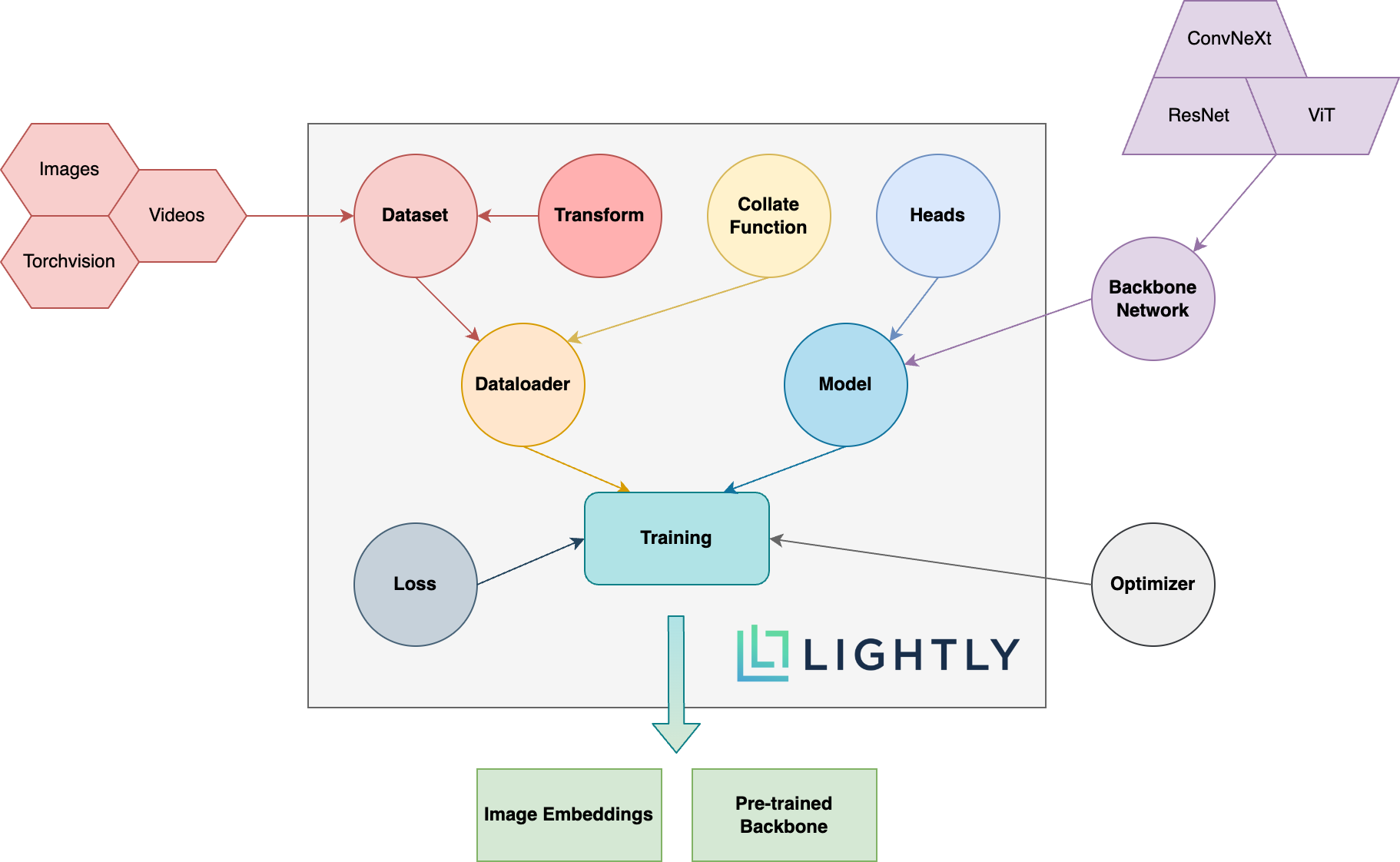
前往文档,看看您可以轻松实现的目标!
要安装DEV依赖项(例如,为框架做出贡献),您可以使用以下命令:
pip3 install -e ".[dev]"
有关如何贡献的更多信息,请在此处查看。
单位测试在测试目录中,我们建议使用Pytest运行它们。有两种测试配置。默认情况下,只能运行一个子集:
make test-fast
要运行所有测试(包括慢速测试),您可以使用以下命令:
make test
测试特定文件或目录使用:
pytest <path to file or directory>
用黑色和ISORT运行格式代码:
make format
自我监督的学习:
我为什么要关心自我监督的学习?来自ImageNet的预训练模型不是更好地用于转移学习吗?
我该如何贡献?
这个框架是免费的吗?
如果这个框架是免费的,那么公司如何轻轻地赚钱?
Lightly是苏黎世Eth Eth的衍生产品,可帮助公司建立有效的主动学习管道,以选择其模型最相关的数据。
您可以通过遵循以下链接来了解有关公司及其服务的更多信息:
回到顶部





