Il2CppInspector
Il2CppInspector 2021.1

令我感到非常遗憾的是,我不得不宣布,在可预见的未来,IL2Cppinspector的开发工作已停止。
这样做的原因是,由于健康和个人生活的变化,我根本没有时间去做该项目。这对我来说是非常令人沮丧的,但是我真的几乎无能为力。
请随意分叉该项目并进行改进!您也可以继续发布问题,因为我想在我或其他人确实有机会重新研究此问题的情况下保存的错误和问题。但是请注意,我不会在可预见的未来回应问题或公关。
如果您需要IL2CPP工具,我建议我的朋友和同事的出色项目CPP2IL,它是一种正在进行的工作工具,可以将IL2CPP二进制文件直接转换为IL代码,可以在DNSpy中很容易查看,这是一项庞然大物的任务,所以请执行此操作,并在这个令人惊叹的项目中支持他的工作!
快乐黑客,
凯蒂。
IL2Cppinspector可帮助您逆向工程IL2CPP应用程序,提供当前可用的最完整分析。
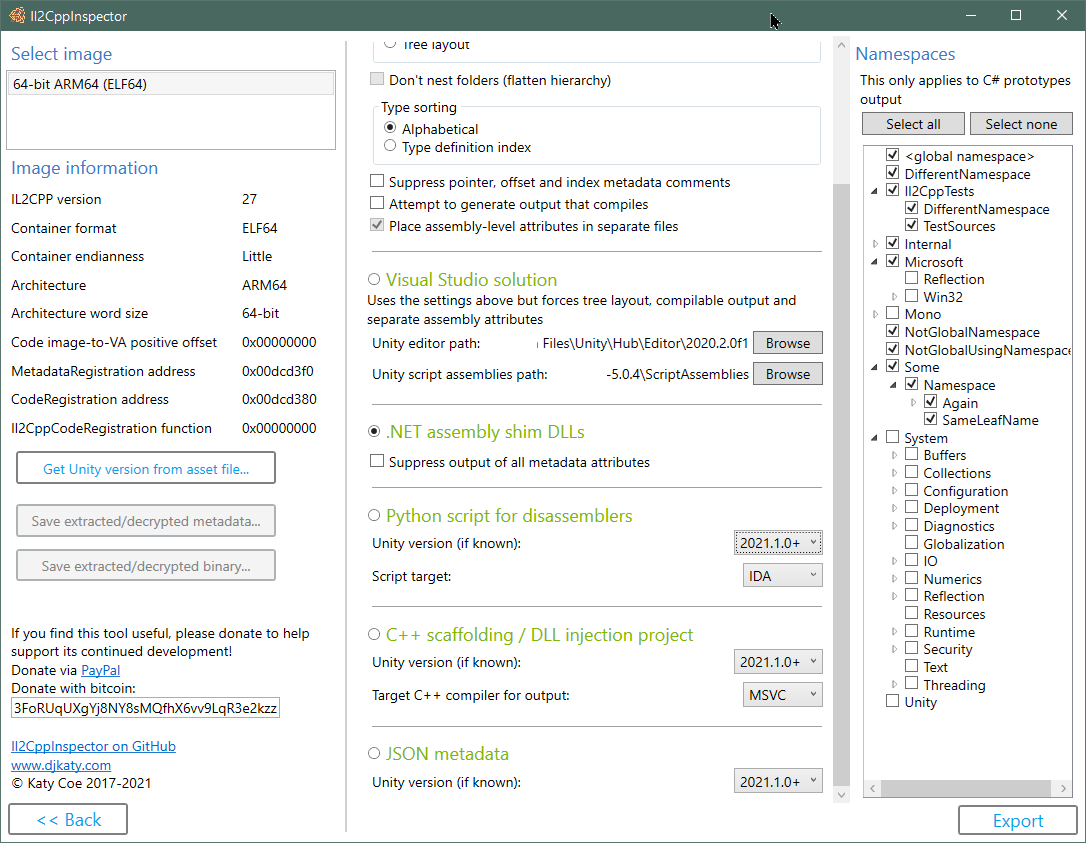
输出IL2CPP类型定义,元数据和方法指针作为C#存根代码
创建.NET组装垫片DLL,其中包含IL2CPP应用结构和元数据,以用于诸如ILSPY,DNSpy,Unity Asset Loads AssetStudio或托管代理生成等代表层中的元数据。
在IL2CPP应用程序中为所有类型,方法,功能指针和API函数创建C ++脚手架,以在X64DBG,Cydia基板等中使用。
创建IDA和Ghidra Python脚本以填充符号,功能和键入信息;包括用于实现其他目标脚本的API挂钩
直接从IL2CPP文件创建Visual Studio C ++ DLL注入项目
直接从IL2CPP文件创建Visual Studio C#代码存根解决方案
直接从IL2CPP文件中创建使用完整的地址图创建JSON Metadata 。
从任意C#源代码中创建IL2CPP二进制文件,而无需统一项目
三个主要的API用于您自己的自定义静态分析项目,以查询低级别的二进制元数据,.NET类型模型和整个C ++应用程序。这些也可以作为Nuget软件包使用。
插件SDK允许您创建自定义插件来扩展IL2Cppinspector的功能
击败某些类型的混淆
支持所有主要的文件格式和处理器架构
在Windows,MacOS X和Linux上工作。具有拖放支持的Windows用户的集成GUI
自Unity 5.3.0以来,用IL2CPP的每一个版本进行测试
您可以在我的系列IL2CPP逆向工程中阅读有关IL2CPP的工作方式的更多信息:
第1部分:Hello World和IL2CPP工具链
第2部分:结构概述并找到元数据
IL2CPPPENDER插件开发Wiki
如何创建,使用和调试IL2CPP DLL注射项目
在IL2CPP DLL注射项目中使用代码
使用IL2Cppinspector的类型模型提取Protobuf-NET定义(案例研究:秋季家伙)
查找混淆的global-metadata.dat文件的加载程序 - 说明了如何在几乎任何global-metadata.dat应用程序中找到加载程序,DEOBFUSCATION和/或解密代码
启用英雄联盟的加载:野生裂痕 - 涵盖XOR解密,XOR弦解,API导出腐烂解密,数据混淆二进制元数据
启用Honkai Impact的加载(3个部分) - 涵盖图像中查找功能,global -metadata.dat的数据混淆,IDA分解器技术,如何编写插件
vmprotect控制流honkai Impact中的混淆 - 涵盖了使用X64DBG和IDA分解器从控制流扁平的函数中推出代码路径
逆向工程Genshin与PowerShell的影响 - 涵盖通过蛮力攻击 /反向模糊的编写测试安全带,以在掺杂的二进制中找到功能
文件格式和架构支持:
很高兴有:
using必要的指令。范围和类型名称冲突会自动解决以生成编译的代码。类库目标.NET CORE 3.1。由Visual Studio 2019建造。
注意:IL2Cppinspector不是一个反编译器。它可以为您提供每种方法的应用程序和功能地址的结构,以便您可以轻松地直接跳到拆卸器中的感兴趣方法。它不会尝试恢复应用程序的整个源代码。
 git clone --recursive https://github.com/djkaty/Il2CppInspector
cd Il2CppInspector
构建CLI和Windows GUI版本:
dotnet publish -c Release
获取所有当前插件(可选):
powershell -f get-plugins.ps1
构建CLI版本:
 cd Il2CppInspector.CLI
dotnet publish -r osx-x64 -c Release
获取所有当前插件(可选):
../get-plugins.sh
构建CLI版本:
 cd Il2CppInspector.CLI
dotnet publish -r linux-x64 -c Release
获取所有当前插件(可选):
../get-plugins.sh
对于支持.NET Core的其他操作系统,将-r xxx添加到最终命令中,其中xxx是从https://docs.microsoft.com/en-us/dotnet/articles/core/rid-catalog中删除的。
用于命令行使用的输出二进制文件放置在Il2CppInspector/Il2CppInspector.CLI/bin/Release/netcoreapp3.0/[win|osx|linux]-x64/publish/Il2CppInspector.exe 。
Windows GUI的输出二进制文件放置在Il2CppInspector/Il2CppInspector.GUI/bin/Release/netcoreapp3.1/[win|osx|linux]-x64/publish/Il2CppInspector.exe 。
plugins文件夹应与Il2CppInspector.exe放置在同一文件夹中。
在命令提示符下运行Il2CppInspector.exe 。
文件格式和体系结构将自动检测到。
默认情况下,所有输出都是生成的。要仅生成特定的输出,请使用--select-outputs开关与输出选择开关结合使用。
  -i, --bin                   (Default: libil2cpp.so) IL2CPP binary, APK, AAB, XAPK, IPA, Zip or Linux process map text input file(s) (single file or comma-separated list for split APKs)

  -m, --metadata              (Default: global-metadata.dat) IL2CPP metadata file input (ignored for APK/AAB/XAPK/IPA/Zip)

  --image-base                For ELF memory dumps, the image base address in hex (ignored for standard ELF files and other file formats)

  --select-outputs            Only generate outputs specified on the command line (use --cs-out, --py-out, --cpp-out, --json-out, --dll-out to select outputs). If not specified, all outputs are generated

  -c, --cs-out                (Default: types.cs) C# output file (when using single-file layout) or path (when using per namespace, assembly or class layout)

  -p, --py-out                (Default: il2cpp.py) Python script output file

  -h, --cpp-out               (Default: cpp) C++ scaffolding / DLL injection project output path

  -o, --json-out              (Default: metadata.json) JSON metadata output file

  -d, --dll-out               (Default: dll) .NET assembly shim DLLs output path

  --metadata-out              IL2CPP metadata file output (for extracted or decrypted metadata; ignored otherwise)

  --binary-out                IL2CPP binary file output (for extracted or decrypted binaries; ignored otherwise; suffixes will be appended for multiple files)

  -e, --exclude-namespaces    (Default: System Mono Microsoft.Reflection Microsoft.Win32 Internal.Runtime Unity UnityEditor UnityEngine UnityEngineInternal AOT JetBrains.Annotations) Comma-separated list of namespaces to suppress in C# output, or 'none' to include all namespaces

  -l, --layout                (Default: single) Partitioning of C# output ('single' = single file, 'namespace' = one file per namespace in folders, 'assembly' = one file per assembly, 'class' = one file per class in namespace folders, 'tree' = one file per class in assembly and
                              namespace folders)

  -s, --sort                  (Default: index) Sort order of type definitions in C# output ('index' = by type definition index, 'name' = by type name). No effect when using file-per-class or tree layout

  -f, --flatten               Flatten the namespace hierarchy into a single folder rather than using per-namespace subfolders. Only used when layout is per-namespace or per-class. Ignored for tree layout

  -n, --suppress-metadata     Diff tidying: suppress method pointers, field offsets and type indices from C# output. Useful for comparing two versions of a binary for changes with a diff tool

  --suppress-dll-metadata     Diff tidying: suppress method pointers, field offsets and type indices attributes from DLL output. Useful for comparing two versions of a binary for changes

  -k, --must-compile          Compilation tidying: try really hard to make code that compiles. Suppress generation of code for items with CompilerGenerated attribute. Comment out attributes without parameterless constructors or all-optional constructor arguments. Don't emit
                              add/remove/raise on events. Specify AttributeTargets.All on classes with AttributeUsage attribute. Force auto-properties to have get accessors. Force regular properties to have bodies. Suppress global::Locale classes. Generate dummy parameterless
                              base constructors and ref return fields.

  --separate-attributes       Place assembly-level attributes in their own AssemblyInfo.cs files. Only used when layout is per-assembly or tree

  -j, --project               Create a Visual Studio solution and projects. Implies --layout tree, --must-compile and --separate-attributes

  --cpp-compiler              (Default: BinaryFormat) Compiler to target for C++ output (MSVC or GCC); selects based on binary executable type by default

  -t, --script-target         (Default: IDA) Application to target for Python script output (IDA or Ghidra) - case-sensitive

  --unity-path                (Default: C:Program FilesUnityHubEditor*) Path to Unity editor (when using --project). Wildcards select last matching folder in alphanumeric order

  --unity-assemblies          (Default: C:Program FilesUnityHubEditor*EditorDataResourcesPackageManagerProjectTemplateslibcachecom.unity.template.3d-*ScriptAssemblies) Path to Unity script assemblies (when using --project). Wildcards select last matching folder in
                              alphanumeric order

  --unity-version             Version of Unity used to create the input files, if known. Used to enhance Python, C++ and JSON output. If not specified, a close match will be inferred automatically.

  --unity-version-from-asset  A Unity asset file used to determine the exact Unity version. Overrides --unity-version.

  --plugins                   Specify options for plugins. Enclose each plugin's configuration in quotes as follows: --plugins "pluginone --option1 value1 --option2 value2" "plugintwo --option...". Use --plugins <name> to get help on a specific plugin

  --help                      Display this help screen.

  --version                   Display version information.
Apple Universal Binaries和apks/Xapks带有多个架构的二进制文件:使用CLI时,将生成多个输出文件,除了第一个文件名外,每个文件名在二进制中的图像索引均由第一个后缀。不支持的图像将跳过。
IPA软件包:必须先解密可执行文件。不支持加密的可执行二进制文件。
拆分APK软件包:使用CLI时,指定每个文件名之间使用逗号的APK文件列表。
由内存转储创建的精灵二进制文件:使用--image-base指定图像库(在十六进制中)。如果提供的图像库不正确,则应用程序可能会崩溃。
GameGuardian转储(和其他Linux进程映射转储) :您可以使用*-maps.txt文件代替IL2CPP二进制文件。 IL2CppinSpector将扫描包含地图文件的文件夹,以自动自动匹配.bin文件并重新组装和重新安装libil2cpp.so 。因此,您无需手动创建文件或使用此类转储时提供图像基础地址。为此,均不得重命名文本文件和任何二进制文件,并且所有文件都必须在同一文件夹中。
包装的PE文件(DLL) :警告:加载包装的PE文件将导致DLL的输入点和初始化功能执行。请勿加载恶意DLL,也不要在处理包装的PE文件时以管理员的身份运行IL2Cppinspector。自行使用。
IL2CppinSpector可以使用指针元数据创建C#代码存根文件,以允许您以易于阅读的格式探索IL2CPP二进制文件。
指定-c开关以选择C#输出文件或路径。
要将类型从某些命名空间中排除在C#源文件输出中生成的类型,请在--exclude-namespaces中提供逗号分隔的case敏感名称空间的列表。如果未指定参数,将排除以下名称空间:
 System
Mono
Microsoft.Reflection
Microsoft.Win32
Internal.Runtime
Unity
UnityEditor
UnityEngine
UnityEngineInternal
AOT
JetBrains.Annotations
向--exclude-namespaces提供一个参数将覆盖默认列表。要输出所有名称空间,请使用--exclude-namespaces=none 。这仅适用于C#原型输出。
您可以使用--layout Switch指定输出布局:
single文件中的所有类型namespace - 每个文件一个名称空间(每个文件都会给出命名空间名称)assembly - 每个文件一个汇编(每个文件都会给出汇编名称)class - 每个文件一个类tree - 带有顶级汇编文件夹和二级名称空间文件夹的树状文件夹结构中的每个文件中的一个类您可以使用--sort开关指定内部文件类型排序:
index - 按类型定义索引排序,如IL2CPP元数据所示name - 按类型名称按字母顺序排序使用class或tree布局时,此开关没有效果。
当layout是class或namespace时, --flatten开关允许您缩放嵌套名称空间的层次结构,即。一系列的子折线System/IO/Compression将是一个顶级次级子折线System.IO.Compression 。
--suppress-metadata开关使您可以抑制评论的输出,包括方法指针,现场偏移和类型索引。当您想将两个版本的两个版本之间的更改分开以查看哪些类型已更改时,这很有用。
--seperate-attributes Switch指示IL2Cppinspector将汇编级属性放在其自己的AssemblyInfo.cs文件中,而不是在每个汇编生成的第一个文件的顶部,当时layout是assembly或tree时。
只需使用-p开关运行IL2Cppinspector即可选择IDA脚本输出文件。将您的二进制文件加载到IDA中,按Alt+F7,然后选择生成的脚本。在IDA分析文件时观察输出窗口 - 这可能需要很长时间。
IL2Cppinspector生成了三个文件,用于IDAPYTHON:PYTHON脚本本身,JSON元数据文件和C ++类型的标头文件(如果使用CLI(如果使用cli)或il2cpp.h ,则默认情况下cpp/appdata/il2cpp-types.h如果使用了GUI)。这些文件必须存在才能使脚本成功运行。
如果您知道与哪个版本的Unity一起编译了二进制文件,则可以通过使用--unity-version指定此功能来改进输出,例如--unity-version 2019.3.1f1 。您还可以从应用程序中提供任何资产文件,以检测--unity-version-from-asset统一版本。否则,IL2Cppinspector将根据二进制内容进行有根据的猜测。
IL2Cppinspector生成了IDA项目的以下数据:
应用IL2Cppinspector后IDA C ++解次数(省略为简洁的初始化代码):
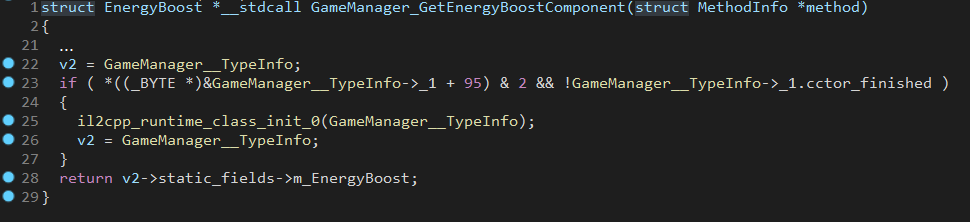
使用-p开关运行IL2Cppinspector,以选择GHIDRA脚本输出文件,以及-t Ghidra (case敏感)将Ghidra指定为您想要生产的脚本类型。
IL2Cppinspector为Ghidra生成了三个文件:Python脚本本身,JSON Metadata文件和C ++类型的标头文件。这些文件必须存在才能使脚本成功运行。
如果您知道与哪个版本的Unity一起编译了二进制文件,则可以通过使用--unity-version指定此功能来改进输出,例如--unity-version 2019.3.1f1 。您还可以从应用程序中提供任何资产文件,以检测--unity-version-from-asset统一版本。否则,IL2Cppinspector将根据二进制内容进行有根据的猜测。
注意:为了获得最佳结果,请选择Ghidra询问首次加载二进制时是否想执行自动分析。如果您在运行下面的脚本时收到一个Conflicting data exists at address ,请将二进制文件重新加载到项目中,然后在自动分析提示下选择不选择。
注意:要大大加快精灵文件的分析,请将图像库设置为二进制的加载选项中的零( 0x00000000 )。出于兼容的原因,在小精灵文件上执行Ghidra Python脚本将在必要时将文件的图像库更改为零,但是,如果当前的图像群为非零,则可能需要很长时间才能完成。其他文件格式将保留相同的图像基础。
将元数据进口到现有的Ghidra项目:
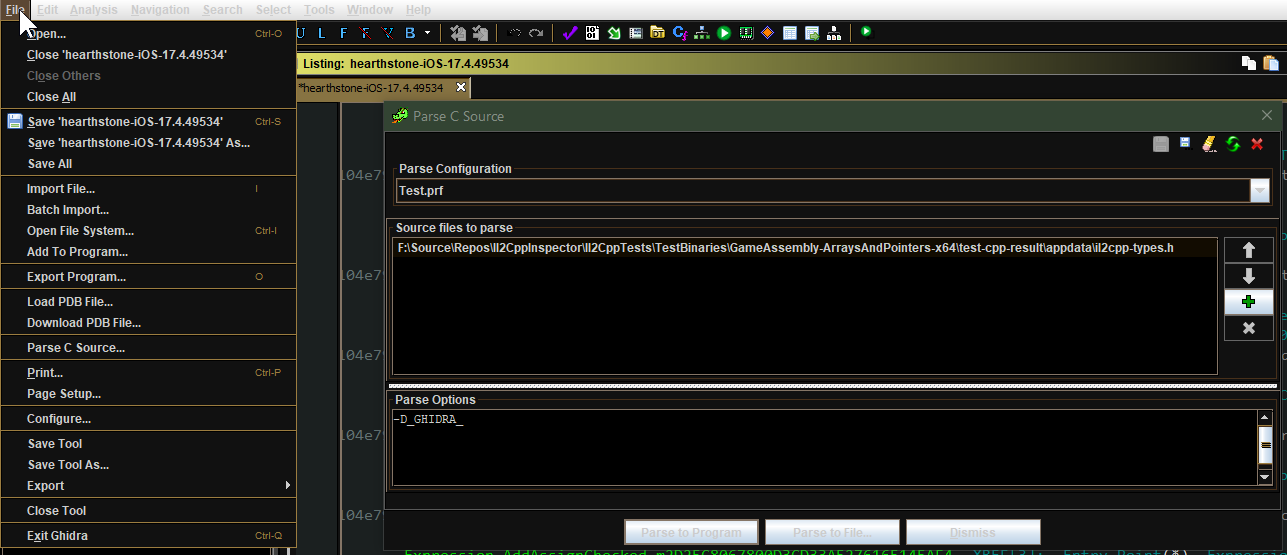
从代码浏览器中,选择文件 - > parse c源...
创建一个新的配置文件,并添加生成的C ++类型标头文件。如果使用GUI,则默认情况下,这是cpp/appdata/il2cpp-types.h默认情况下是il2cpp.h 。
确保将解析选项设置为完全如下:
-D_GHIDRA_
单击解析以进行编程并接受任何警告。这可能需要很长时间才能完成。
打开脚本管理器,然后将您在IL2Cppinspector中选择的输出文件夹作为脚本文件夹。
如果您已将IL2Cppinspector的脚本用于其他二进制文件,请确保python文件以不同的命名,或禁用以前的脚本文件夹的使用。
单击“刷新”以使脚本显示在脚本管理器中。
右键单击脚本并选择运行。这可能需要一段时间才能完成。
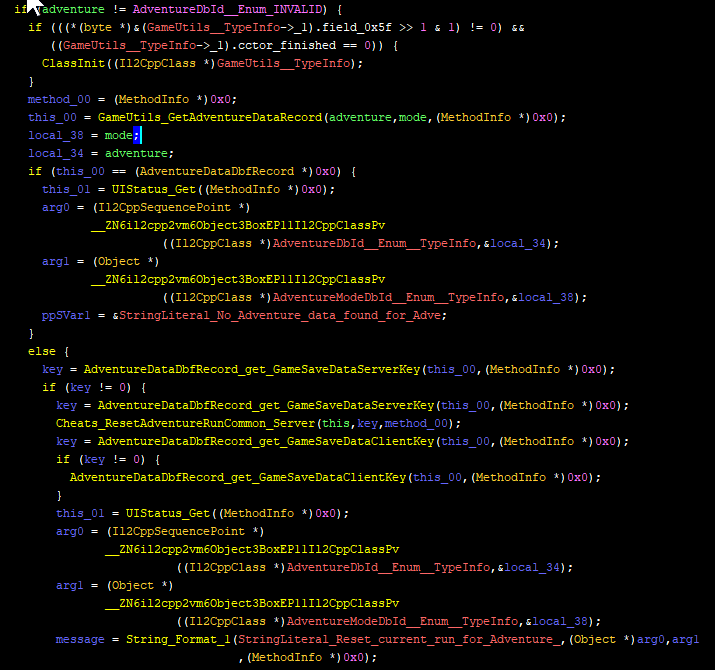
IL2Cppinspector为Ghidra项目生成了与IDA相同的数据 - 有关详细信息,请参见上面的部分。
应用IL2Cppinspector后GHIDRA C ++的解说:
IL2CppinSpector生成了一系列C ++源文件,您可以通过多种方式使用它们:
使用-h开关运行IL2Cppinspector,以选择C ++输出文件夹。
如果您知道与哪个版本的Unity一起编译了二进制文件,则可以通过使用--unity-version指定此功能来改进输出,例如--unity-version 2019.3.1f1 。您还可以从应用程序中提供任何资产文件,以检测--unity-version-from-asset统一版本。否则,IL2Cppinspector将根据二进制内容进行有根据的猜测。
您可以针对哪个您希望使用以下输出文件的C ++编译器:指定--cpp-compiler MSVC用于Visual Studio和--cpp-compiler GCC ,用于GCC或Clang。
IL2CppinSpector执行自动名称冲突解决方案,以避免在C ++中使用预定义的符号和关键字,并处理应用程序中同名符号的重新定义。
某些IL2CPP二进制文件仅包含一组API导出,或根本没有。在这些情况下,IL2Cppinspector将仅使用可用的出口来构建脚手架,以确保该项目成功编译。
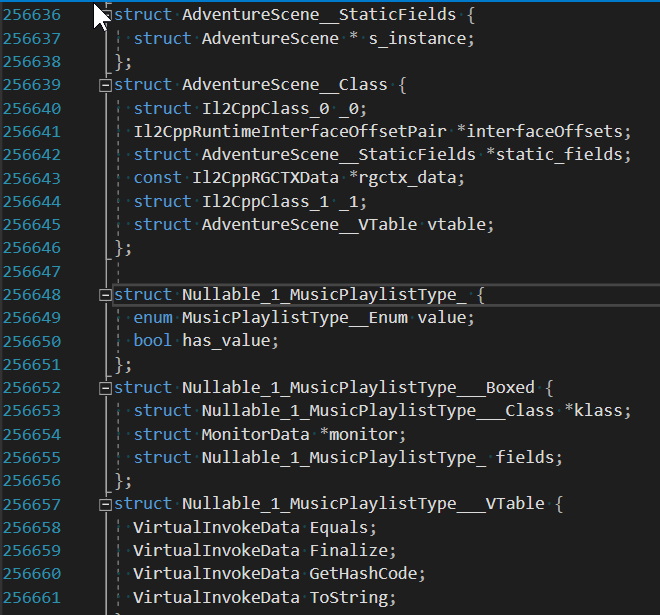
生成以下文件:
appdata此文件夹包含项目 - 静脉二进制特定声明: ilc2pp-types.h :
il2cpp-functions.h :
MethodInfo ** ) il2cpp-types-ptr.h :
Il2CppClass ** ) il2cpp-api-functions.h :
il2cpp-api-functions-ptr.h :
il2cpp_开头的函数) il2cpp-metadata-version.h :
#define以上文件包含调试器中动态分析所需的所有数据。
此外,为DLL注入生成以下文件:
framework -Project-Nostic二进制二进制式样板代码和脚手架:
dllmain.cpp :
init_il2cpp() (请参见下文),并在新线程中启动Run() (见下文) helpers.cpp and helpers.h :
helpers.h中的评论。 il2cpp-init.cpp , il2cpp-init.h和il2cpp-appdata.h :
void init_il2cpp()函数,该函数使用上述所有标头来生成可用功能指针和类指针,这些指针和类指针映射到运行时内存映像中正确位置pch-il2cpp.cpp和pch-il2cpp.h :
appdata文件夹中所有标题的预编译标头(PCH) user - 特定于项目特定的二进制用户代码,您可以根据需要进行修改:
main.cpp和main.h :Run()函数,该函数表示您自定义注入代码的入口点。该函数在新线程中执行,因此不会阻止DllMain 。这是唯一您应该编辑的文件夹。
对于Visual Studio用户,还会生成以下文件:
IL2CppDLL.vcxproj , Il2CppDLL.vcxproj.filters和Il2CppDLL.sln :默认的main.cpp包含评论的代码,以允许您使用helpers.h的功能写入日志或打开新的控制台。要在源代码中指定日志文件目标,请使用extern const LPCWSTR LOG_FILE = L"my_log_file.txt" 。
提示:发布目标应用程序的新版本时,您可以将C ++脚手架项目重新输入。 appdata和framework文件夹将被覆盖,但user文件夹和项目/解决方案文件将不会更改。这使得在更新目标应用程序后可以轻松更新您的项目!
兼容性:建议使用Visual Studio 2019(MSVC ++构建工具V142或更高版本)。脚手架项目已通过Visual Studio 2019和Visual Studio 2017(MSVC ++构建工具V141)进行了测试,但是使用Visual Studio 2017时,省略了一些辅助代码,以使编译能够成功。
Il2CppDLL.sln )加载到Visual Studio中main.cpp中添加您希望在Run()函数中执行的代码您可以访问应用程序中的所有C#等效类型和方法,以及所有可用的IL2CPP API函数。不需要其他功能指针或类型声明。
示例(创建Vector3并将其y坐标记录到文件):
 // in main.cpp
void Run ()
{
    // Vector3 example

    // (Call an IL2CPP API function)
    Vector3__Boxed* myVector3 = (Vector3__Boxed*) il2cpp_object_new ((Il2CppClass*) *Vector3__TypeInfo);

    // (Call an instance constructor)
    Vector3__ctor (myVector3, 1 . 0f , 2 . 0f , 3 . 0f , NULL );

    // (Access an instance field)
    il2cppi_log_write ( to_string (myVector3-> fields . y ));
}
可以在此处找到更多详细的教程:
如何创建,使用和调试IL2CPP DLL注射项目
在IL2CPP DLL注射项目中使用代码
IL2CppinSpector可以使用解决方案(.sln)文件,Project(.csproj)文件和汇编名称 - namespace-class类绿色的文件夹结构来创建一个完整的Visual Studio工作区。每个项目都会创建一个单个组件。
使用--project项目开关生成解决方案工作区。
为了使IL2Cppinspector能够创建包含正确的Unity Assembly参考的CSPROJ文件,您必须为已安装的Unity编辑器以及现有Unity Project的项目模板或ScriptAssemblies文件夹提供路径。
注意:默认设置将选择最新的Unity安装版本和默认3D项目模板的最新安装版本,如果已安装在默认位置中。
典型的Unity编辑器位置(用--unity-path指定): C: Program Files Unity Hub editor editor 20xx.yz
典型的Unity项目模板位置(用--unity-assemblies指定): C: Program Files Unity Unity hub editor 20xx.yz editor data resources resources packagemanager projectTemplates libcache libcache libcache libcache <name-of-template> of-template> of-template> of-template> of-template>> of-template>> of-template> of-template>
典型的Unity脚本组件在现有项目中的位置(用--unity-aseemblies指定): x: myproject liblary scriptAssemblies
用您的Unity版本编号替换X , Y和Z。将<-template>替换为所需的模板。
注意:指定这些路径时,您可以使用Asterisk通配符(*)一次或多次。 IL2Cppinspector将以字母数字顺序选择最后一个匹配的文件夹。如果您有多个并排的Unity安装,并且希望始终选择最新版本或模板,这将很有用。
如果您第一次加载解决方案时,将组装参考无法正确解决,只需关闭并重新打开解决方案即可迫使它们解决。
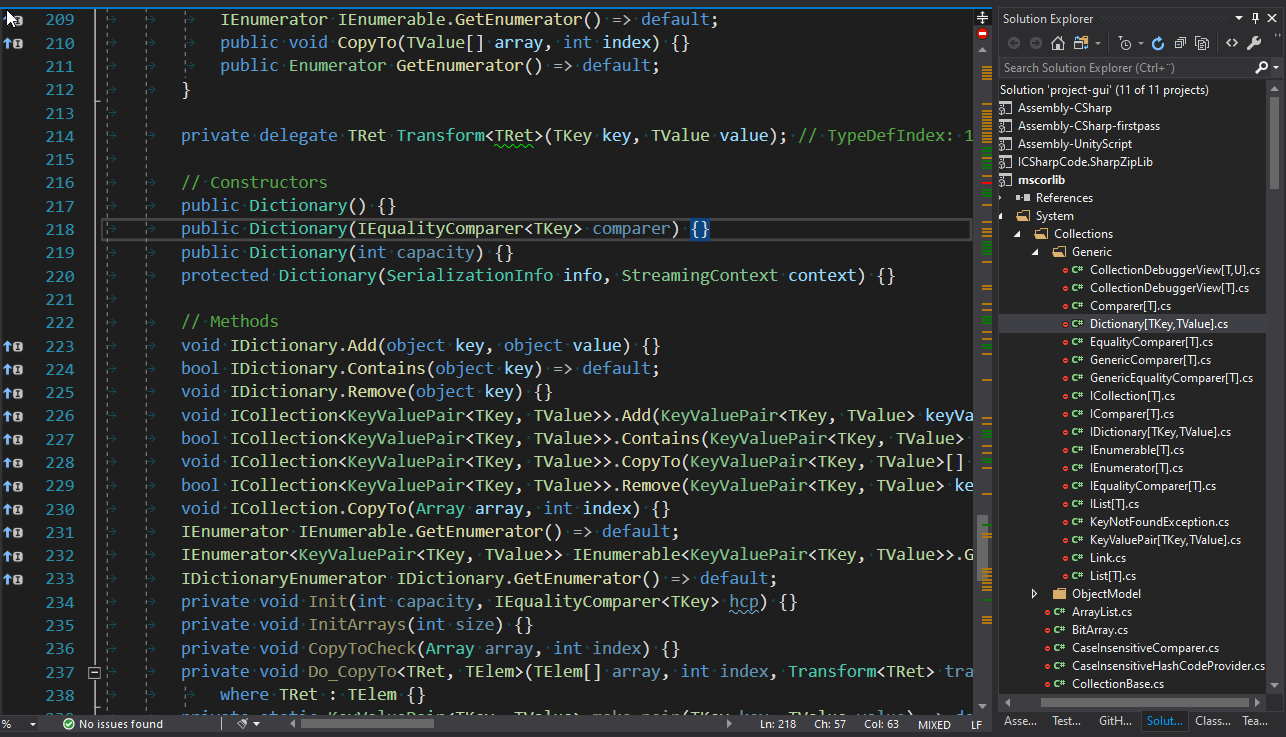
IL2Cppinspector可以创建一个包含有关应用程序的各种元数据的JSON文件。
使用-o开关指定JSON输出路径。
输出模式如下:
addressMap (对象)
二进制中所有IL2CPP相关内容的地址图
methodDefinitions (数组)虚拟地址,二进制符号,C ++函数签名和.NET方法签名在二进制中的每个.NET等效方法的签名
constructedGenericMethods (数组)虚拟地址,二进制符号,C ++函数签名和.NET方法签名在二进制中的每个.NET等效混凝土通用方法的签名
customAttributesGenerators (数组)二进制中每个自定义属性生成器函数的虚拟地址,名称和C ++功能签名
methodInvokers (数组)每个方法的虚拟地址,名称和C ++功能签名。
统一版本低于5.3.2的stringLiterals (数组):unity版本5.3.2及以后的每个字符串的序数,名称和文本:二进制中每个字符串的虚拟地址,名称和文本
typeInfoPointers (数组)虚拟地址,名称,C ++派生的类型名称和.NET类型名称等效的每个类定义指针( Il2CppClass * )
typeRefPointers (array)二进制中每个类型参考指针( Il2CppType * )的虚拟地址,名称和.NET类型名称等效
methodInfoPointers (数组)二进制中每个运行时方法定义指针( MethodInfo * )的虚拟地址,名称和.NET方法签名
functionAddresses (array)二进制中每个已知函数的开始的虚拟地址,包括上述所有这些功能以及上述类别中未包含的任何其他功能
typeMetadata (数组)二进制中的键元数据项目的虚拟地址,名称和C ++类型名称。这包括Il2CppCodeRegistration和Il2CppMetadataRegistration ,具体取决于二进制版本,也可能包括指向每个Il2CppCodeGenModule的指针
arrayMetadata (数组)二进制中的键元数据数组的虚拟地址,名称,C ++类型名称和大小
functionMetadata (数组)二进制中关键元数据函数的虚拟地址,名称和C ++函数签名。根据IL2Cppinspector分析二进制文件的不同,这可能包括il2cpp_codegen_register 。
apis (数组)二进制中标识的每个IL2CPP API函数的虚拟地址,名称和C ++函数签名
exports (数组)二进制中每个导出的虚拟地址和名称
symbols (数组)每个命名的(非零名称长度)的虚拟地址,名称和符号类型和二进制中定义的非零地址函数定义,类型,字段名称和导入(对于ELF)。当前不支持PE文件。
提供了三个PowerShell脚本,以实现易于构建和测试IL2CPP二进制文件:
il2cpp.ps1是主要的主力,并在TestSources中编译每个指定的c#源文件(或者如果没有提供,则全部)作为单独的组件,并将其输出到TestAssemblies中。然后,它将每个指定的组件中的每个指定组件都用于TestAssemblies ,并将每个架构的单独IL2CPP项目编译为这些架构:
将它们放在TestBinaries文件夹中。每个构建的C ++源代码都放入TestCpp文件夹中。然后调用generate-tests.ps1 。
指定源文件的逗号分隔列表(没有.cs扩展名)作为第一个参数(或-assemblies )处理。
您可以选择使用第二个参数(或-unityVersion )指定Unity版本或Unity安装路径。如果没有提供,则将使用最新的安装Unity版本。您也可以指定通配符,例如。 2019*将使用Unity 2019,2018.3 2018.3*的最新安装版本使用Unity 2018.3等的最新安装版本。使用Unity Hub安装所需的版本。
因此,使用一个命令,您可以为任何给定的源文件列表(每个源文件列表,每个源文件的一组输出)生成每个架构的汇编DLL,C ++源代码和IL2CPP二进制文件,用于指定的Unity版本。
generate-tests.ps1在Il2CppTests项目中生成一个名为Tests.cs的文件,在TestBinaries中包含一个IL2CPP项目一个测试。该文件将由Il2CppTests项目编译。然后,您可以在Visual Studio的测试资源管理器中看到每个IL2CPP项目的一个测试。
自动生成的测试在测试中生成C#,JSON和C标头文件中的TestBinaries中的IL2CPP二进制文件夹(每个文件名都带有test ),并将它们(whitespace-nistersmentimentiment)与TestExpectedResults中的相应项目名称文件进行比较。通过这种方式,您可以检查具有已知结构的文件,以表明正在正确执行分析,或者通过对调试器中的特定二进制文件进行分析,而无需更改项目的命令行参数。
update-expected-results.ps1将所有输出测试从TestBinaries复制到TestExpectedResults中,因此更新将用于验证正确测试结果的文件。
示例用途:
./il2cpp.ps1
构建每个c#源文件„ nto a .net组装dll,一个C ++源文件夹和一个IL2CPP二进制架构
./il2cpp.ps1 MyFirstTest
将MyFirstTest.cs构建到MyFirstTest.dll中,为每个受支持的体系结构创建一个名为MyFirstTest的C ++源文件夹和一个IL2CPP二进制文件
./il2cpp.ps1 MyFirstTest,MySecondTest 2019.3.1f1
使用Unity 2019.3.1f1将MyFirstTest.cs和MySecondTest.cs构建到单个组件DLL,C ++源文件夹和IL2CPP二进制文件中
./il2cpp.ps1 MyFirstTest,MySecondTest F:UnityHubEditor2019.3.1f1
如上所述,但为您的Unity安装指定了自定义路径。
最低支持的Unity版本是2017.1.0F3。
要了解有关这些功能的更多信息,请参见“使用IL2Cppinspector”部分的部分,以在IL2CPP逆向工程第1部分中生成IL2CPP代码。
注意: IL2Cppinspector API也可以作为Nuget软件包提供! (搜索:noisycowstudios.il2cppinspector)
IL2CppinSpector提供以下可重复使用的类库API:
使用这些API轻松查询IL2CPP类型,创建新的输出模块并将IL2Cppinspector与您自己的静态分析应用程序集成在一起。
要在自己的项目中使用IL2Cppinspector,请添加Il2CppInspector.Common.dll的引用。
using以下指令包括以下指令:
using Il2CppInspector使用Il2CppInspector 。using Il2CppInspector.Reflection反射使用TypeModel 。using Il2CppInspector.Model to use AppModel .See the source code for further details or the tutorials above.
Plugins should be placed in the plugins folder in the same folder as Il2CppInspector.exe . Each plugin should be placed into its own sub-folder with any dependencies or configuration files needed.
From the GUI you can enable and disable plugins, change the execution order and configure individual plugin settings via the Manage plugins... button.
From the CLI you can specify which plugins and settings to use as follows.
For one plugin:
Il2CppInspector.exe --plugins "myplugin --firstOption value1 --secondOption value2"
For multiple plugins:
Il2CppInspector.exe --plugins "plugin1 --option1 ..." "plugin2 --option2 ..." ...
Plugins will be executed in the order specified.
Core plugins (those that are part of Il2CppInspector's base functionality) are always enabled when using the CLI, but can be disabled in the GUI.
When using the CLI, core plugins always execute first by default. You can force the core plugins to execute in a different order by specifying their names in the desired execution order.例如:
Il2CppInspector.exe --plugins "analytics --output foo.csv"
will run the core plugins first then the analytics example plugin, but:
Il2CppInspector.exe --plugins "analytics --output foo.csv" "xor"
will cause the xor core plugin to run after analytics .
For help on a specific plugin, specify the plugin name with no arguments:
Il2CppInspector.exe --plugins myplugin
To get more plugins, click Get Plugins in the Manage Plugins window in the GUI, visit the Il2CppInspectorPlugins repository or use the get-plugins.ps1 or get-plugins.sh scripts to update to the latest plugin releases.
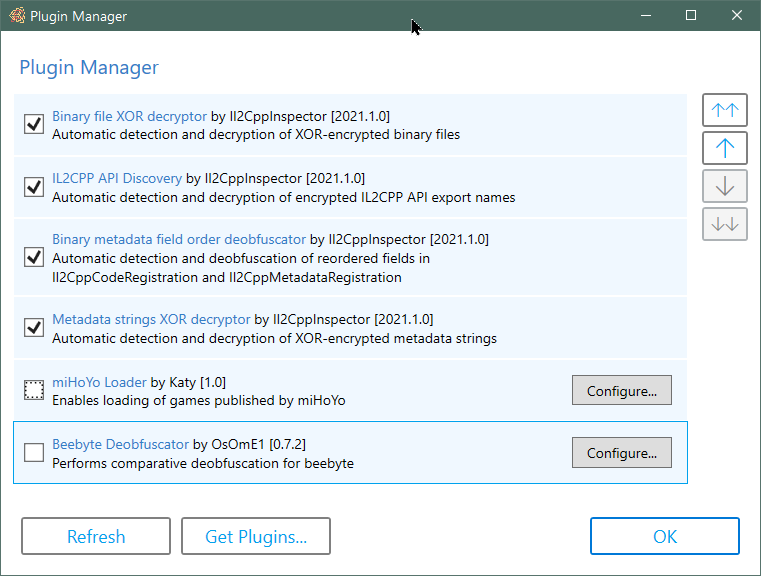
Plugins let you extend the functionality of Il2CppInspector. For example you can pre and post-process metadata and binaries to enable inspection of IL2CPP applications that Il2CppInspector cannot handle automatically.
Plugin support is currently experimental and has limited functionality.
Details on how to create your own plugins can be found in the Il2CppInspector Plugin Development Wiki.
You can find out more about plugins, and browse the source code of current plugins and examples in the Il2CppInspectorPlugins repository.
The current version of Il2CppInspector can output Python scripts targeting the IDA and Ghidra disassemblers.
When Il2CppInspector generates such a script, it generates a concatenation of a shared block of code ( Outputs/ScriptResources/shared-main.py ) which parses the JSON metadata and dispatches it to a set of implementation-specific functions to be processed, and a block of code specific to the target application which implements these functions (a file from Outputs/ScriptResources/Targets ).
If you would like to add support for a new target application, create a new Python script in Outputs/ScriptResources/Targets with the nane <target-name-without-whitespace>.py and implement the following functions:
CustomInitializer() - perform any custom initialization required for the target before applying the metadataDefineCode(code) - parse and apply the specified C++ declaration text (this is not required for Unity 5.3.2 and later; if you don't need to support earlier versions, just specify pass as the implementation)GetScriptDirectory() - retrieve the directory that the Python script is running in. This will normally be os.path.dirname(os.path.realpath(__file__))MakeFunction(start, name=None) - define address start as the start of a function, optionally with name nameSetComment(addr, text) - place the comment text at address addrSetFunctionType(addr, sig) - parse the C++ function signature in sig and apply it to the function at address addrSetHeaderComment(addr, text) - place the header/plate/pre-item comment text at address addrSetName(addr, name) - set the symbol (or label or name) of address addr to nameSetType(addr, type) - define address addr to be an item of the C++ type type Refer to the source code of IDA.py and Ghidra.py for examples.
When you add a new target and re-compile Il2CppInspector:
-t ( --script-target ) switch via the CLIIf you develop an API for a target that you think might be useful to others, please feel free to submit a PR with the code!
| Unity version | IL2CPP version | 支持 |
|---|---|---|
| 4.6.1+ | 第一版 | 不支持 |
| 5.2.x | 15 | 不支持 |
| 5.3.0-5.3.1 | 16 | 在职的 |
| 5.3.2 | 19 | 在职的 |
| 5.3.3-5.3.4 | 20 | 在职的 |
| 5.3.5-5.4.6 | 21 | 在职的 |
| 5.5.0-5.5.6 | 22 | 在职的 |
| 5.6.0-5.6.7 | 23 | 在职的 |
| 2017.1.0-2018.2.21 | 24 | 在职的 |
| 2018.3.0-2018.4.x | 24.1 | 在职的 |
| 2019.1.0-2019.3.6 | 24.2 | 在职的 |
| 2019.3.7-2019.4.14 | 24.3 | 在职的 |
| 2019.4.15-2019.4.20 | 24.4 | 在职的 |
| 2019.4.21-2019.4.x | 24.5 | 在职的 |
| 2020.1.0-2020.1.10 | 24.3 | 在职的 |
| 2020.1.11-2020.1.17 | 24.4 | 在职的 |
| 2020.2.0-2020.2.3 | 27 | 在职的 |
| 2020.2.4-2020.3.x | 27.1 | 在职的 |
| 2021.1.0-2021.1.x | 27.2 | 部分的 |
Please refer to the companion repository https://github.com/nneonneo/Il2CppVersions if you would like to track the changes between each IL2CPP release version.
If you have files that don't work or are in an unsupported format, please open a new issue on GitHub and attach a sample with details on the file format, and I'll try to add support. Include both the IL2CPP binary and global-metadata.dat in your submission.
Please check the binary file in a disassembler to ensure that it is a plain IL2CPP binary before filing an issue. Il2CppInspector is not intended to handle packed, encrypted or obfuscated IL2CPP files.
If you found Il2CppInspector useful, you can really help support the project by making a small donation at http://paypal.me/djkaty!
You can also donate with bitcoin: 3FoRUqUXgYj8NY8sMQfhX6vv9LqR3e2kzz
很多爱! - Katy
Thanks to the following major contributors!
This project uses:
Thanks to the following individuals whose code and research helped me develop this tool:
The following books and documents were also very helpful:
Pizza spinner animation in the GUI made by Chris Gannon - https://gannon.tv/
This software is licensed under AGPLv3.







