Il2CppInspector
Il2CppInspector 2021.1

IL2CPPINSPECTORでの開発作業が近い将来に停止されたことを発表しなければならないことは非常に残念です。
その理由は、私の個人的な生活の健康と変化のために、私は単にプロジェクトに取り組むことにコミットする時間がないからです。これは私にとって非常にイライラしますが、本当にそれについて本当にできることはほとんどありません。
プロジェクトをフォークして改善してください!また、私または他の誰かがこれに取り組む機会がある場合に備えて、バグや問題の大要を保存したいので、問題を投稿し続けることもできます。ただし、近い将来に進行中の問題やPRに対応していないことに注意してください。
IL2CPPツールが必要な場合は、IL2CPPバイナリをDNSPYなどで簡単に表示できるIL2CPPバイナリを直接変換するための進行中のツールである友人や同僚の優れたプロジェクトCPP2ILをお勧めします。
ハッピーハッキング、
ケイティ。
IL2CPPINSPECTORは、IL2CPPアプリケーションをリバースエンジニアリングするのに役立ち、現在利用可能な最も完全な分析を提供します。
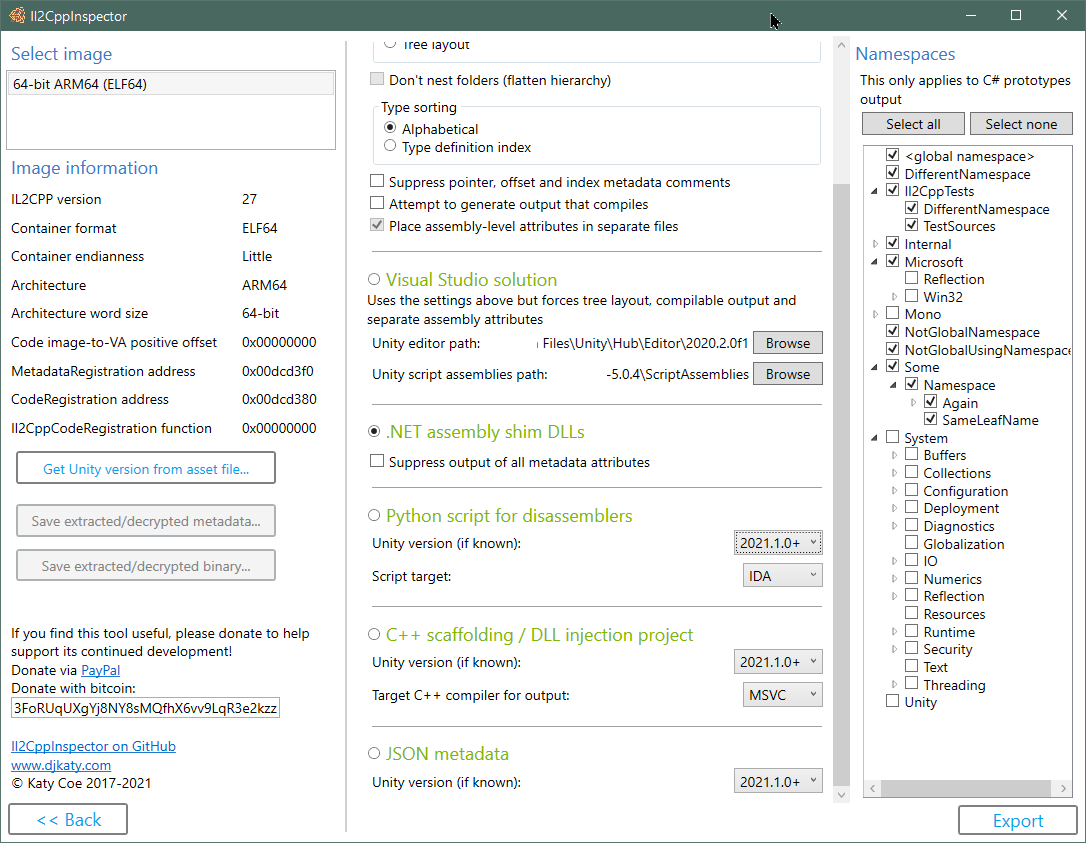
C#スタブコードとしての出力IL2CPPタイプ定義、メタデータ、メソッドポインター
ILSPY、DNSPY、ASTETSTUDIOのUNITYアセットロード、またはIL2CPPASSEMBLYINHOLLOWROWERのマネージドプロキシ生成などの逆コンパイラで使用するIL2CPPアプリケーション構造とメタデータを含む.NETアセンブリSHIM DLLを作成します
X64DBG、Cydia基板などで使用するIL2CPPアプリケーションで、すべてのタイプ、メソッド、機能ポインター、API関数のC ++足場を作成します。
IDAおよびGhidra Pythonスクリプトを作成して、シンボル、機能、およびタイプ情報を入力します。他のターゲットにスクリプトを実装するためのAPIフックが含まれています
IL2CPPファイルから直接VisualStudio C ++ DLLインジェクションプロジェクトを作成する
IL2CPPファイルから直接、ビジュアルスタジオC#コードスタブソリューションを作成する
IL2CPPファイルから直接アドレスマップを使用してJSONメタデータを作成します。
Unityプロジェクトなしで任意のC#ソースコードからIL2CPPバイナリを作成する
低レベルのバイナリメタデータ、.NETタイプモデル、およびC ++アプリケーション全体を照会するための独自のカスタム静的分析プロジェクトで使用する3つの主要なAPI 。これらは、Nugetパッケージとしても利用できます。
プラグインSDKを使用すると、IL2CPPINSPECTORの機能を拡張するカスタムプラグインを作成できます
特定の種類の難読化を打ち負かします
すべての主要なファイル形式とプロセッサアーキテクチャをサポートします
Windows、MacOS X、Linuxで動作します。ドラッグアンドドロップサポートを備えたWindowsユーザー向けの統合GUI
Unity 5.3.0以降のIL2CPPのすべてのリリースでテストされました
私のシリーズIL2CPPリバースエンジニアリングでIL2CPPの仕組みについて詳しく読むことができます。
パート1:Hello WorldとIL2CPPツールチェーン
パート2:構造の概要とメタデータの検索
IL2CPPINSPECTORプラグインの開発wiki
IL2CPP DLLインジェクションプロジェクトを作成、使用、デバッグする方法
IL2CPP DLLインジェクションプロジェクトでコードを操作します
IL2CPPINSPECTORのタイプモデルを使用してProtoBUF-NET定義を抽出します(ケーススタディ:秋の人)
難読化されたGlobal-Metadata.datファイルのローダーの検索 - ほぼすべてのIL2CPPアプリケーションで、 global-metadata.datのローダー、デオブファッケーション、および/または復号化コードを見つける方法を説明します
リーグオブレジェンドの負荷を有効にする:ワイルドリフト - XORの復号化、XOR文字列の復号化、APIエクスポート腐敗復号化、バイナリメタデータのデータ難読化
Honkai Impactの負荷を有効にする(3部品) - 画像の発見機能、Global -Metadata.datのデータ観測、IDAの逆コンパイラテクニック、プラグインの書き方をカバーする
vmprotectコントロールフローホンカイインパクトにおける難読化 - X64DBGとIDAの逆コンパイラを使用して、コントロールフローの平坦化を伴う関数からコードパスを外挿するカバー
PowerShellによるリバースエンジニアリングのGenshinの影響 - ブルートフォース攻撃 /逆ファジングを介して難読化されたバイナリで機能を見つけるためのテストハーネスの書き込みをカバーする
ファイル形式とアーキテクチャサポート:
持っていてうれしい:
usingが含まれます。範囲とタイプ名の競合は、コンパイルされるコードを作成するために自動的に解決されます。クラスライブラリターゲット.NETコア3.1。 Visual Studio 2019で構築されています。
注:IL2CPPINSPECTORは逆コンパイラではありません。すべてのメソッドのアプリケーションと関数アドレスの構造を提供できるため、廃止装置の関心のある方法に簡単に直接ジャンプできます。アプリケーションのソースコード全体を回復しようとはしません。
 git clone --recursive https://github.com/djkaty/Il2CppInspector
cd Il2CppInspector
CLIおよびWindows GUIバージョンを構築します。
dotnet publish -c Release
現在のすべてのプラグインを取得します(オプション):
powershell -f get-plugins.ps1
CLIバージョンを作成します:
 cd Il2CppInspector.CLI
dotnet publish -r osx-x64 -c Release
現在のすべてのプラグインを取得します(オプション):
../get-plugins.sh
CLIバージョンを作成します:
 cd Il2CppInspector.CLI
dotnet publish -r linux-x64 -c Release
現在のすべてのプラグインを取得します(オプション):
../get-plugins.sh
.NETコアをサポートする他のオペレーティングシステムの場合、xxxがhttps://docs.microsoft.com/en-us/dotnet/articles/core/rid-catalogからxxxが削除される最終コマンドに-r xxxを追加します。
コマンドライン使用の出力バイナリはIl2CppInspector/Il2CppInspector.CLI/bin/Release/netcoreapp3.0/[win|osx|linux]-x64/publish/Il2CppInspector.exeに配置されます。
Windows GUI用の出力バイナリはIl2CppInspector/Il2CppInspector.GUI/bin/Release/netcoreapp3.1/[win|osx|linux]-x64/publish/Il2CppInspector.exeに配置されています。
pluginsフォルダーは、 Il2CppInspector.exeと同じフォルダーに配置する必要があります。
コマンドプロンプトでIl2CppInspector.exeを実行します。
ファイル形式とアーキテクチャが自動的に検出されます。
すべての出力はデフォルトで生成されます。特定の出力のみを生成するには、出力選択スイッチと組み合わせて--select-outputsスイッチを使用します。
  -i, --bin                   (Default: libil2cpp.so) IL2CPP binary, APK, AAB, XAPK, IPA, Zip or Linux process map text input file(s) (single file or comma-separated list for split APKs)

  -m, --metadata              (Default: global-metadata.dat) IL2CPP metadata file input (ignored for APK/AAB/XAPK/IPA/Zip)

  --image-base                For ELF memory dumps, the image base address in hex (ignored for standard ELF files and other file formats)

  --select-outputs            Only generate outputs specified on the command line (use --cs-out, --py-out, --cpp-out, --json-out, --dll-out to select outputs). If not specified, all outputs are generated

  -c, --cs-out                (Default: types.cs) C# output file (when using single-file layout) or path (when using per namespace, assembly or class layout)

  -p, --py-out                (Default: il2cpp.py) Python script output file

  -h, --cpp-out               (Default: cpp) C++ scaffolding / DLL injection project output path

  -o, --json-out              (Default: metadata.json) JSON metadata output file

  -d, --dll-out               (Default: dll) .NET assembly shim DLLs output path

  --metadata-out              IL2CPP metadata file output (for extracted or decrypted metadata; ignored otherwise)

  --binary-out                IL2CPP binary file output (for extracted or decrypted binaries; ignored otherwise; suffixes will be appended for multiple files)

  -e, --exclude-namespaces    (Default: System Mono Microsoft.Reflection Microsoft.Win32 Internal.Runtime Unity UnityEditor UnityEngine UnityEngineInternal AOT JetBrains.Annotations) Comma-separated list of namespaces to suppress in C# output, or 'none' to include all namespaces

  -l, --layout                (Default: single) Partitioning of C# output ('single' = single file, 'namespace' = one file per namespace in folders, 'assembly' = one file per assembly, 'class' = one file per class in namespace folders, 'tree' = one file per class in assembly and
                              namespace folders)

  -s, --sort                  (Default: index) Sort order of type definitions in C# output ('index' = by type definition index, 'name' = by type name). No effect when using file-per-class or tree layout

  -f, --flatten               Flatten the namespace hierarchy into a single folder rather than using per-namespace subfolders. Only used when layout is per-namespace or per-class. Ignored for tree layout

  -n, --suppress-metadata     Diff tidying: suppress method pointers, field offsets and type indices from C# output. Useful for comparing two versions of a binary for changes with a diff tool

  --suppress-dll-metadata     Diff tidying: suppress method pointers, field offsets and type indices attributes from DLL output. Useful for comparing two versions of a binary for changes

  -k, --must-compile          Compilation tidying: try really hard to make code that compiles. Suppress generation of code for items with CompilerGenerated attribute. Comment out attributes without parameterless constructors or all-optional constructor arguments. Don't emit
                              add/remove/raise on events. Specify AttributeTargets.All on classes with AttributeUsage attribute. Force auto-properties to have get accessors. Force regular properties to have bodies. Suppress global::Locale classes. Generate dummy parameterless
                              base constructors and ref return fields.

  --separate-attributes       Place assembly-level attributes in their own AssemblyInfo.cs files. Only used when layout is per-assembly or tree

  -j, --project               Create a Visual Studio solution and projects. Implies --layout tree, --must-compile and --separate-attributes

  --cpp-compiler              (Default: BinaryFormat) Compiler to target for C++ output (MSVC or GCC); selects based on binary executable type by default

  -t, --script-target         (Default: IDA) Application to target for Python script output (IDA or Ghidra) - case-sensitive

  --unity-path                (Default: C:Program FilesUnityHubEditor*) Path to Unity editor (when using --project). Wildcards select last matching folder in alphanumeric order

  --unity-assemblies          (Default: C:Program FilesUnityHubEditor*EditorDataResourcesPackageManagerProjectTemplateslibcachecom.unity.template.3d-*ScriptAssemblies) Path to Unity script assemblies (when using --project). Wildcards select last matching folder in
                              alphanumeric order

  --unity-version             Version of Unity used to create the input files, if known. Used to enhance Python, C++ and JSON output. If not specified, a close match will be inferred automatically.

  --unity-version-from-asset  A Unity asset file used to determine the exact Unity version. Overrides --unity-version.

  --plugins                   Specify options for plugins. Enclose each plugin's configuration in quotes as follows: --plugins "pluginone --option1 value1 --option2 value2" "plugintwo --option...". Use --plugins <name> to get help on a specific plugin

  --help                      Display this help screen.

  --version                   Display version information.
Apple Universal Binaries and Apks/Xapks with Binaries for Multiple Architectures :CLIを使用すると、複数の出力ファイルが生成され、各ファイル名はバイナリの画像のインデックスによって最初の接尾辞が付いています。サポートされていない画像がスキップされます。
IPAパッケージ:実行可能ファイルは最初に復号化する必要があります。暗号化された実行可能バイナリはサポートされていません。
APKパッケージの分割:CLIを使用する場合、各ファイル名の間にコンマを使用してAPKファイルのリストを指定します。
メモリダンプから作成されたエルフバイナリ: --image-baseを使用して画像ベース(16進数)を指定します。付属の画像ベースが正しくない場合、アプリケーションがクラッシュする場合があります。
GameGuardianダンプ(およびその他のLinuxプロセスマップダンプ) :IL2CPPバイナリの代わりに*-maps.txtファイルを使用できます。 IL2CPPINSPECTORは、 .binファイルを一致させるためにマップファイルを含むフォルダーをスキャンし、 libil2cpp.so自動的に再組み立てして再度再構築します。したがって、この種のダンプを使用するときに、ファイルを手動で作成したり、画像ベースアドレスを提供する必要はありません。これが機能するためには、テキストファイルもバイナリファイルのいずれも名前が変更される必要はなく、すべてが同じフォルダーにある必要があります。
パックされたPEファイル(DLL) :警告:梱包されたPEファイルをロードすると、DLLのエントリポイントと初期化機能が実行されます。梱包されたPEファイルを処理するときに、悪意のあるDLLをロードしないでください。あなた自身の責任で使用してください。
IL2CPPINSPECTORは、ポインターメタデータを備えたC#コードスタブファイルを作成して、読みやすい形式でIL2CPPバイナリを探索できるようにすることができます。
-cスイッチを指定して、C#出力ファイルまたはパスを選択します。
特定の名前空間からのタイプをC#ソースファイルの出力で生成しないようにするには、 --exclude-namespacesでケースに敏感な名前空間のコンマ区切りリストを提供します。引数が指定されていない場合、次の名前空間は除外されます。
 System
Mono
Microsoft.Reflection
Microsoft.Win32
Internal.Runtime
Unity
UnityEditor
UnityEngine
UnityEngineInternal
AOT
JetBrains.Annotations
--exclude-namespacesに引数を提供すると、デフォルトのリストがオーバーライドされます。すべての名前空間を出力するには、 --exclude-namespaces=noneを使用します。これは、C#プロトタイプ出力にのみ適用されます。
--layoutスイッチを使用して出力レイアウトを指定できます。
single - 単一のファイルのすべてのタイプnamespace - ファイルごとに1つの名前空間(各ファイルに名前空間名が与えられます)assembly - ファイルごとに1つのアセンブリ(各ファイルにアセンブリ名が与えられます)class - ファイルごとに1つのクラスtree - トップレベルのアセンブリフォルダーとセカンドレベルの名前空間フォルダーを備えたツリーのようなフォルダー構造のファイルごとに1つのクラス--sortスイッチを使用して、ファイル内タイプの順序を指定できます。
index - IL2CPPメタデータに見られるタイプ別の定義インデックスによってソートname - タイプ名でアルファベット順にソートしますこのスイッチは、 classまたはtreeレイアウトを使用する場合、効果はありません。
--flattenスイッチを使用すると、 layoutがclassまたはnamespaceの場合、ネストされた名前空間の階層を平らにすることができます。一連のサブフォルダーSystem/IO/Compression代わりに単一のトップレベルのサブフォルダーSystem.IO.Compressionになります。
--suppress-metadataスイッチを使用すると、メソッドポインター、フィールドオフセット、タイプインデックスなどのコメントの出力を抑制できます。これは、アプリケーションの2つのバージョン間の変更を区別して、どのタイプが変更されたかを確認する場合に役立ちます。
--seperate-attributes Switchは、IL2CPPINSPECTORに、レイアウトがlayoutまたはtreeである場合、各アセンブリに対して生成された最初のファイルの上部ではなく、 assemblyレベルの属性を独自のAssemblyInfo.csファイルに配置するよう指示します。
-pスイッチを使用してIL2CPPINSPECTORを実行して、IDAスクリプト出力ファイルを選択するだけです。バイナリファイルをIDAにロードし、ALT+F7を押して、生成されたスクリプトを選択します。 IDAがファイルを分析している間、出力ウィンドウを観察します - これには長い時間がかかる場合があります。
iDapythonのIL2CPPINSPECTORによって3つのファイルが生成されます。Pythonスクリプト自体、JSONメタデータファイル、C ++タイプヘッダーファイル(これは、CLIを使用した場合はcpp/appdata/il2cpp-types.h 、またはGUIを使用した場合はil2cpp.h )です。これらのファイルは、スクリプトが正常に実行されるために存在する必要があります。
バイナリがコンパイルされたunityのバージョンがわかっている場合、これを-unity --unity-version 2019.3.1f1で--unity-versionで指定することで出力を改善できます。アプリケーションから任意のアセットファイルを提供して、Unityバージョン--unity-version-from-assetで検出することもできます。それ以外の場合、IL2CPPINSPECTORは、バイナリの内容に基づいて教育を受けた推測を行います。
IL2CPPINSPECTORは、IDAプロジェクトの次のデータを生成します。
IDA C ++の例IL2CPPINSPECTORを適用した後の逆コンパイル(簡潔にするために初期化コードが省略):
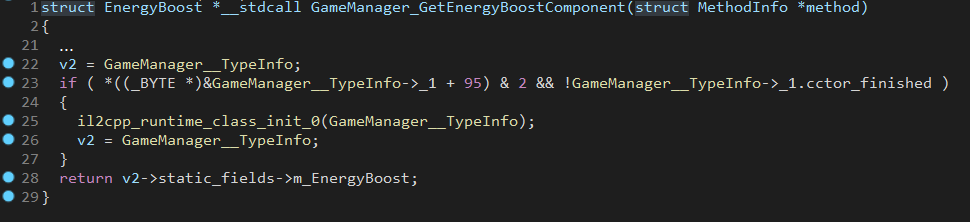
-pスイッチを使用してIL2CPPINSPECTORを実行して、Ghidraスクリプト出力ファイルを選択し、 -t Ghidra (ケースセンシティブ)を選択して、Ghidraを作成したいスクリプトタイプとして指定します。
GhidraのIL2CPPINSPECTORによって3つのファイルが生成されます。Pythonスクリプト自体、JSONメタデータファイル、C ++タイプのヘッダーファイルです。これらのファイルは、スクリプトが正常に実行されるために存在する必要があります。
バイナリがコンパイルされたunityのバージョンがわかっている場合、これを-unity --unity-version 2019.3.1f1で--unity-versionで指定することで出力を改善できます。アプリケーションから任意のアセットファイルを提供して、Unityバージョン--unity-version-from-assetで検出することもできます。それ以外の場合、IL2CPPINSPECTORは、バイナリの内容に基づいて教育を受けた推測を行います。
注:最良の結果を得るには、Ghidraがバイナリが最初にロードされたときに自動分析を実行するかどうかを尋ねるときにNOを選択します。下のスクリプトを実行するときにConflicting data exists at address場合は、バイナリをプロジェクトに再ロードし、自動分析プロンプトでNOを選択します。
注: ELFファイルの分析を大幅に高速化するには、バイナリのロードオプションで画像ベースをゼロ( 0x00000000 )に設定します。互換性の理由から、ELFファイルでGhidra Pythonスクリプトを実行すると、必要に応じてファイルの画像ベースがゼロに変更されますが、現在の画像ベースがゼロでない場合は、完了するのに非常に長い時間がかかる場合があります。他のファイル形式は同じ画像ベースを保持します。
メタデータを既存のGhidraプロジェクトにインポートするには:
コードブラウザから、ファイル - > parse cソースを選択してください...
新しいプロファイルを作成し、生成されたC ++タイプヘッダーファイルを追加します。これは、CLIを使用した場合はデフォルトでは、 cpp/appdata/il2cpp-types.hまたはGUIを使用した場合はil2cpp.hです。
解析オプションが次のように正確に設定されていることを確認してください。
-D_GHIDRA_
[解析]をクリックしてプログラムし、警告を受け入れます。これには完了するのに長い時間がかかる場合があります。
スクリプトマネージャーを開き、IL2CPPINSPECTORで選択した出力フォルダーをスクリプトフォルダーとして追加します。
他のバイナリにIL2CPPINSPECTORのスクリプトを使用した場合、Pythonファイルの名前が異なることを確認するか、以前のスクリプトフォルダーの使用を無効にします。
[更新]をクリックして、スクリプトをスクリプトマネージャーに表示します。
スクリプトを右クリックして[実行]を選択します。これには完了するまでに時間がかかる場合があります。
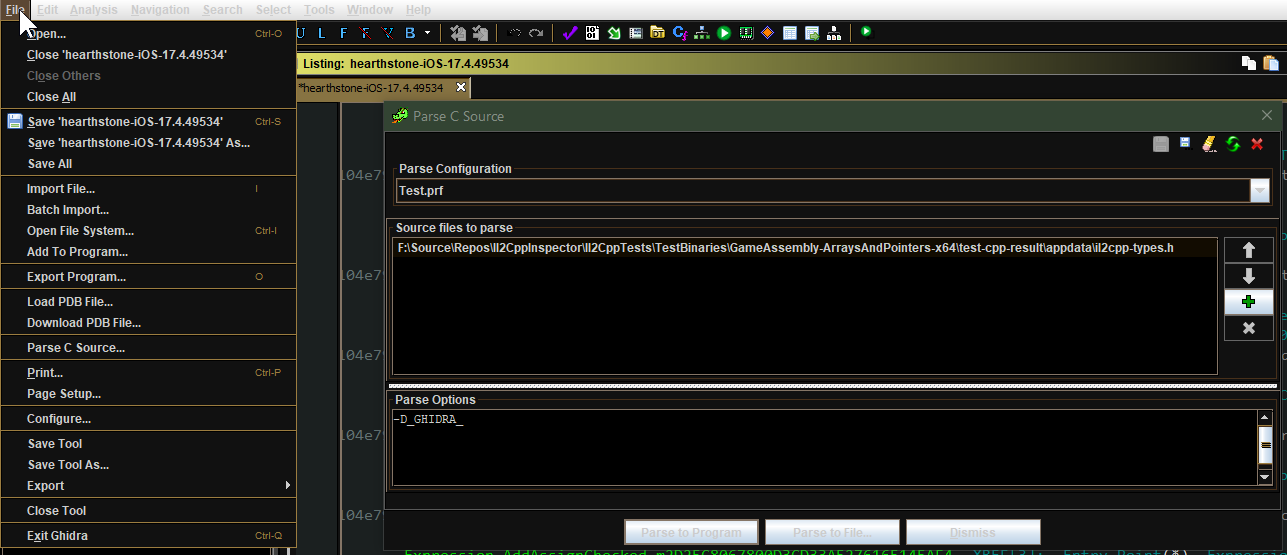
IL2CPPINSPECTORは、IDAと同様にGhidraプロジェクトの同一のデータを生成します。詳細については、上記のセクションを参照してください。
IL2CPPINSPECTORを適用した後のGHIDRA C ++の例の例:
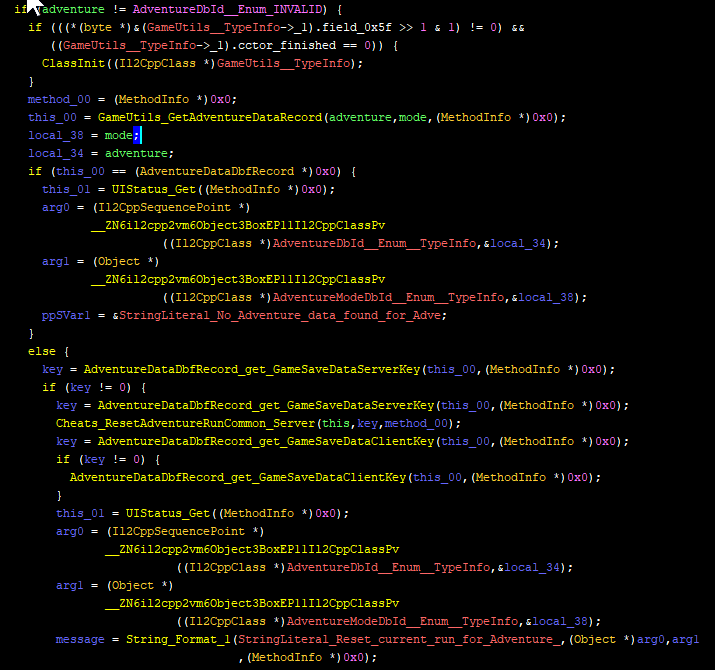
IL2CPPINSPECTORは、さまざまな方法で使用できる一連のC ++ソースファイルを生成します。たとえば、:
-hスイッチを使用してIL2CPPINSPECTORを実行して、C ++出力フォルダーを選択します。
バイナリがコンパイルされたunityのバージョンがわかっている場合、これを--unity-version 2019.3.1f1で--unity-versionで指定することで出力を改善できます。アプリケーションから任意のアセットファイルを提供して、Unityバージョン--unity-version-from-assetで検出することもできます。それ以外の場合、IL2CPPINSPECTORは、バイナリの内容に基づいて教育を受けた推測を行います。
出力ファイルを使用するC ++コンパイラ--cpp-compiler MSVCターゲット--cpp-compiler GCCできます。
IL2CPPINSPECTORは、C ++で事前に定義されたシンボルとキーワードの使用を回避し、アプリケーションで同じ名前の記号の再定義を処理するために、自動名競合解決を実行します。
一部のIL2CPPバイナリファイルには、APIエクスポートの部分的なセットのみが含まれているか、まったく含まれていません。これらの場合、IL2CPPINSPECTORは、利用可能なエクスポートのみを使用して足場を構築し、プロジェクトが正常にコンパイルされることを確認します。
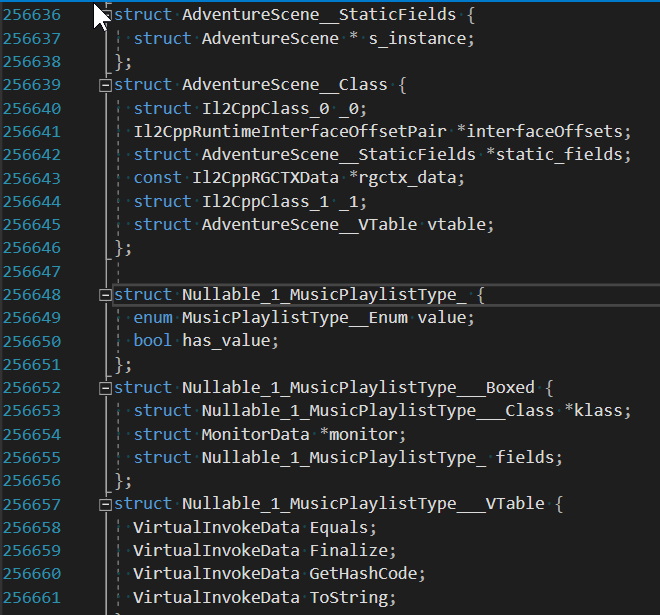
次のファイルが生成されます。
appdataこのフォルダーには、プロジェクトに依存しないバイナリ固有の宣言が含まれています。 ilc2pp-types.h :
il2cpp-functions.h :
MethodInfo ** )へのオフセットil2cpp-types-ptr.h :
Il2CppClass ** )へのオフセットil2cpp-api-functions.h :
il2cpp-api-functions-ptr.h :
il2cpp_から始まる関数)へのオフセットil2cpp-metadata-version.h :
#define上記のファイルには、デバッガーの動的分析に必要なすべてのデータが含まれています。
さらに、DLL注入のために次のファイルが生成されます。
framework - プロジェクトに依存しないバイナリに依存しないボイラープレートコードと足場:
dllmain.cpp :
init_il2cpp() (以下を参照)を呼び出し、新しいスレッドでRun() (以下を参照)を呼び出すDLLインジェクションスタブを提供しますhelpers.cpp and helpers.h :
helpers.hのコメントを参照してください。 il2cpp-init.cpp 、 il2cpp-init.hおよびil2cpp-appdata.h :
void init_il2cpp()関数を提供します。 pch-il2cpp.cppおよびpch-il2cpp.h :
appdataフォルダー内のすべてのヘッダーに事前コンパイルヘッダー(PCH)を有効にするために必要な足場を提供しますuser - 必要に応じて変更できるプロジェクト固有のバイナリ存在ユーザーコード:
main.cpp and main.h :Run()関数が含まれています。関数は新しいスレッドで実行されるため、 DllMainをブロックしません。これは、ファイルを編集する唯一のフォルダーです。
Visual Studioユーザーの場合、次のファイルも生成されます。
IL2CppDLL.vcxproj 、 Il2CppDLL.vcxproj.filtersおよびIl2CppDLL.sln :デフォルトのmain.cppは、 helpers.hの関数を使用してログに書き込むか、新しいコンソールを開くことができるコメントコードが含まれています。ソースコードでログファイルターゲットを指定するには、 extern const LPCWSTR LOG_FILE = L"my_log_file.txt"を使用します。
ヒント:ターゲットアプリケーションの新しいバージョンがリリースされたら、C ++足場プロジェクトを再出力できます。 appdataおよびframeworkフォルダーは上書きされますが、 userフォルダーとプロジェクト/ソリューションファイルは変更されません。これにより、ターゲットアプリケーションが更新されたときにプロジェクトを簡単に更新できます!
互換性: Visual Studio 2019(MSVC ++ビルドツールV142以降)を使用することをお勧めします。足場プロジェクトは、Visual Studio 2019およびVisual Studio 2017(MSVC ++ビルドツールV141)でテストされていますが、Visual Studio 2017を使用してコンパイルを成功させるためにいくつかのヘルパーコードを省略しています。
Il2CppDLL.sln )をVisual Studioにロードするmain.cppでRun()関数で実行するコードを追加しますアプリケーション内のすべてのC#等価タイプとメソッドに加えて、利用可能なすべてのIL2CPP API関数にアクセスできます。追加の関数ポインターまたはタイプ宣言は必要ありません。
例( Vector3を作成し、ファイルに合わせてそのyをログに記録します):
 // in main.cpp
void Run ()
{
    // Vector3 example

    // (Call an IL2CPP API function)
    Vector3__Boxed* myVector3 = (Vector3__Boxed*) il2cpp_object_new ((Il2CppClass*) *Vector3__TypeInfo);

    // (Call an instance constructor)
    Vector3__ctor (myVector3, 1 . 0f , 2 . 0f , 3 . 0f , NULL );

    // (Access an instance field)
    il2cppi_log_write ( to_string (myVector3-> fields . y ));
}
より詳細なチュートリアルはこちらをご覧ください:
IL2CPP DLLインジェクションプロジェクトを作成、使用、デバッグする方法
IL2CPP DLLインジェクションプロジェクトでコードを操作します
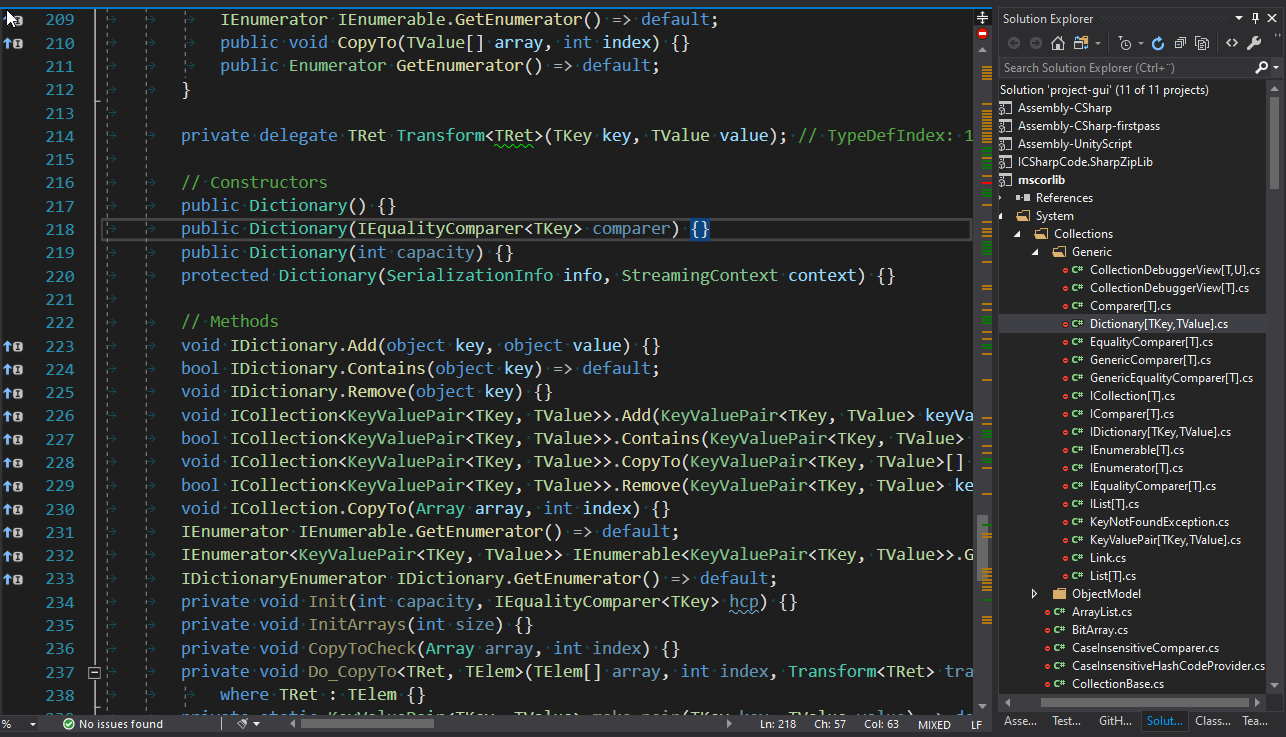
IL2CPPINSPECTORは、ソリューション(.SLN)ファイル、プロジェクト(.CSPROJ)ファイル、およびアセンブリネームズスペースクラスのツリーのようなフォルダー構造を備えた完全なビジュアルスタジオワークスペースを作成できます。各プロジェクトは単一のアセンブリを作成します。
--projectスイッチを使用して、ソリューションワークスペースを生成します。
IL2CPPINSPECTORが正しいUnityアセンブリ参照を含む.csprojファイルを作成できるようにするには、既存のUnityプロジェクトのインストールされたUnityエディターとプロジェクトテンプレートまたはScriptAssembliesフォルダーへのパスを提供する必要があります。
注:デフォルト設定は、デフォルトの場所にインストールされている場合、Unityの最新バージョンとデフォルト3Dプロジェクトテンプレートの最新バージョンを選択します。
典型的なUnityエディターの場所( --unity-pathで指定): C:プログラムファイル Unity Hub Editor 20xx.yz
典型的なUnityプロジェクトテンプレートの場所( --unity-assembliesで指定): c:プログラムファイル Unity hub editor 20xx.yz editor data resources packagemanager projecttemplates libcache <name-of-template>
既存のプロジェクトの典型的なUnityスクリプトアセンブリの場所( --unity-aseembliesで指定): x: myproject brivery scriptAssemblies
x 、 y 、 zをUnityバージョン番号に置き換えます。目的のテンプレートに<Name-of-Template>を置き換えます。
注:これらのパスを指定するときに、アスタリスクワイルドカード(*)を1回以上使用できます。 IL2CPPINSPECTORは、最後の一致するフォルダーを英数字で選択します。これは、複数の並んでUnityインストールがあり、常に最新バージョンまたはテンプレートを選択したい場合に役立ちます。
アセンブリ参照が最初にソリューションをロードしたときに正しく解決されない場合は、ソリューションを強制的に解決するためにソリューションを閉じて再び開きます。
IL2CPPINSPECTORは、アプリケーションに関するさまざまなメタデータを含むJSONファイルを作成できます。
-oスイッチを使用して、JSON出力パスを指定します。
出力スキーマは次のとおりです。
addressMap (オブジェクト)
バイナリのすべてのIL2CPP関連コンテンツのアドレスマップ
methodDefinitions (配列)仮想アドレス、バイナリシンボル、C ++関数署名、およびバイナリのすべての.NET等価メソッドの.NETメソッド署名
constructedGenericMethods (配列)仮想アドレス、バイナリシンボル、C ++関数の署名、および.NETメソッドの署名すべての.NET等価コンクリートジェネリックメソッドの署名
customAttributesGenerators (配列)バイナリのすべてのカスタム属性ジェネレーター関数の仮想アドレス、名前、およびC ++関数署名
methodInvokers (配列)すべての方法の仮想アドレス、名前、およびC ++関数の署名
stringLiterals (Array)5.3.2未満のUnityバージョンのバージョン、unityバージョン5.3.2以降のバイナリのすべての文字列の順序、名前、テキスト:バイナリのすべての文字列の仮想アドレス、名前、テキスト
typeInfoPointers (配列)バイナリのすべてのクラス定義ポインター( Il2CppClass * )に等価なすべてのクラス定義に相当する仮想アドレス、名前、C ++派生タイプ名、および.NETタイプ名
typeRefPointers (配列)バイナリのすべてのタイプ参照ポインター( Il2CppType * )に相当する仮想アドレス、名前、および.NETタイプ名
methodInfoPointers (配列)バイナリのすべての実行時メソッド定義ポインター( MethodInfo * )の仮想アドレス、名前、および.NETメソッド署名
functionAddresses (配列)バイナリ内のすべての既知の関数の開始の仮想アドレス。
typeMetadata (配列)バイナリ内のキーメタデータアイテムの仮想アドレス、名前、およびC ++タイプ名。これには、 Il2CppCodeRegistrationとIl2CppMetadataRegistrationが含まれます。また、バイナリバージョンに応じて、各Il2CppCodeGenModuleへのポインターも含まれる場合があります。
arrayMetadata (配列)バイナリ内のキーメタデータアレイの仮想アドレス、名前、C ++タイプ名とサイズ
functionMetadata (array)バイナリ内のキーメタデータ関数の仮想アドレス、名前、およびc ++関数署名。バイナリがIL2CPPINSPECTORによってどのように分析されたかによって、これにはil2cpp_codegen_registerが含まれる場合があります。
apis (配列)バイナリで識別されたすべてのIL2CPP API関数の仮想アドレス、名前、およびC ++関数署名
exports (配列)バイナリ内のすべてのエクスポートの仮想アドレスと名前
symbols (配列)バイナリで定義されているすべての名前付き(ゼロ以外の名前の長さ)および非ゼロアドレス関数の定義、タイプ、フィールド名、およびインポート(ELF)の仮想アドレス、名前、およびシンボルタイプ。現在、PEファイルではサポートされていません。
IL2CPPバイナリの簡単な構築とテストを可能にするために、3つのPowerShellスクリプトが提供されています。
il2cpp.ps1は主要な主力であり、 TestSourcesの各指定されたC#ソースファイル(またはそれらすべてが提供されていない場合)を別のアセンブリとしてコンパイルし、それらをTestAssembliesに出力します。次に、これらのアーキテクチャのそれぞれに対して、すべての指定されたアセンブリをTestAssembliesに採用し、それぞれを別のIL2CPPプロジェクトとしてコンパイルします。
これらはTestBinariesフォルダーに配置されます。各ビルドのC ++ソースコードは、 TestCppフォルダーに配置されます。その後、 generate-tests.ps1を呼び出します。
最初の引数(または-assemblies )として処理するために、ソースファイルのコンマ分離されたリスト( .cs拡張機能なし)を指定します。
オプションで、2番目の引数(または-unityVersion )を使用して、UnityバージョンまたはUnityインストールパスを指定できます。提供されていない場合、最新のインストールされたUnityバージョンが使用されます。また、ワイルドカードを指定することもできます。 2019* 、UNITY 2019、2018.3の最新のインストールバージョンを使用します2018.3* Unity 2018.3などの最新のインストールバージョンを使用します。
したがって、1つのコマンドを使用すると、特定のバージョンのUnityに対して、ソースファイルの特定のリスト、ソースファイルごとに1つの出力セットについて、各アーキテクチャのアセンブリDLL、C ++ソースコード、およびIL2CPPバイナリを生成できます。
generate-tests.ps1 Tests.csというファイルを生成します。IL2CPPTESTSプロジェクトでは、 TestBinaries Il2CppTests IL2CPPプロジェクトごとに1つのテストを含みます。このファイルは、 Il2CppTestsプロジェクトによってコンパイルされます。その後、Visual StudioのテストエクスプローラーでIL2CPPプロジェクトごとに1つのテストを見ることができます。
自動生成されたテストは、 TestBinariesのテストIL2CPPバイナリのフォルダー( testの接頭辞)にC#、JSON、およびCヘッダーファイルを生成し、それら(Whitespace-Insensitive)と対応するプロジェクト名ファイルをTestExpectedResultsで比較します。このようにして、分析が正しく実行されていることを既知の構造のファイルを確認するか、プロジェクトのコマンドライン引数を変更することなく、デバッガー内の特定のバイナリの分析を踏み出すことができます。
update-expected-results.ps1 TestBinariesのすべての出力テスト結果をTestExpectedResultsにコピーするため、正しいテスト結果を確認するために使用されるファイルを更新します。
使用例:
./il2cpp.ps1
各C#ソースファイルを.NETアセンブリDLL、C ++ソースフォルダー、およびサポートされているアーキテクチャごとに1つのIL2CPPバイナリにビルドします
./il2cpp.ps1 MyFirstTest
MyFirstTest.csをMyFirstTest.dllに構築し、サポートされているアーキテクチャごとにMyFirstTestという名前のC ++ソースフォルダーとIL2CPPバイナリを作成します
./il2cpp.ps1 MyFirstTest,MySecondTest 2019.3.1f1
MyFirstTest.csとMySecondTest.csを個々のアセンブリDLL、C ++ソースフォルダー、およびIL2CPPバイナリに組み込み、Unity 2019.3.1F1
./il2cpp.ps1 MyFirstTest,MySecondTest F:UnityHubEditor2019.3.1f1
上記のように、ただし、Unityインストールのカスタムパスを指定します。
サポートされている最小Unityバージョンは2017.1.0F3です。
これらの機能の詳細については、 IL2CPPINSPECTORを使用してIL2CPPリバースエンジニアリングパート1でIL2CPPコードを生成するというタイトルのセクションを参照してください。
注: IL2CPPINSPECTOR APIは、NUGETパッケージとしても利用できます! (検索:noisycowstudios.il2cppinspector)
IL2CPPINSPECTORは、次の再利用可能なクラスライブラリAPIを提供します。
これらのAPIを使用して、IL2CPPタイプを簡単にクエリし、新しい出力モジュールを作成し、IL2CPPINSPECTORを独自の静的分析アプリケーションと統合します。
独自のプロジェクトでIL2CPPINSPECTORを利用するには、 Il2CppInspector.Common.dllへの参照を追加します。
指令using以下を含めます。
using Il2CppInspector to use Il2CppInspector .using Il2CppInspector.Reflection to use TypeModel .using Il2CppInspector.Model to use AppModel .See the source code for further details or the tutorials above.
Plugins should be placed in the plugins folder in the same folder as Il2CppInspector.exe . Each plugin should be placed into its own sub-folder with any dependencies or configuration files needed.
From the GUI you can enable and disable plugins, change the execution order and configure individual plugin settings via the Manage plugins... button.
From the CLI you can specify which plugins and settings to use as follows.
For one plugin:
Il2CppInspector.exe --plugins "myplugin --firstOption value1 --secondOption value2"
For multiple plugins:
Il2CppInspector.exe --plugins "plugin1 --option1 ..." "plugin2 --option2 ..." ...
Plugins will be executed in the order specified.
Core plugins (those that are part of Il2CppInspector's base functionality) are always enabled when using the CLI, but can be disabled in the GUI.
When using the CLI, core plugins always execute first by default. You can force the core plugins to execute in a different order by specifying their names in the desired execution order.例えば:
Il2CppInspector.exe --plugins "analytics --output foo.csv"
will run the core plugins first then the analytics example plugin, but:
Il2CppInspector.exe --plugins "analytics --output foo.csv" "xor"
will cause the xor core plugin to run after analytics .
For help on a specific plugin, specify the plugin name with no arguments:
Il2CppInspector.exe --plugins myplugin
To get more plugins, click Get Plugins in the Manage Plugins window in the GUI, visit the Il2CppInspectorPlugins repository or use the get-plugins.ps1 or get-plugins.sh scripts to update to the latest plugin releases.
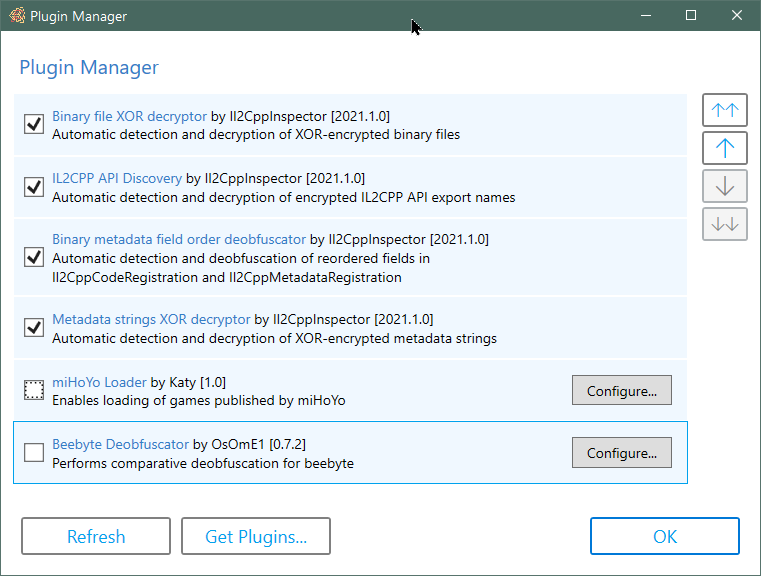
Plugins let you extend the functionality of Il2CppInspector. For example you can pre and post-process metadata and binaries to enable inspection of IL2CPP applications that Il2CppInspector cannot handle automatically.
Plugin support is currently experimental and has limited functionality.
Details on how to create your own plugins can be found in the Il2CppInspector Plugin Development Wiki.
You can find out more about plugins, and browse the source code of current plugins and examples in the Il2CppInspectorPlugins repository.
The current version of Il2CppInspector can output Python scripts targeting the IDA and Ghidra disassemblers.
When Il2CppInspector generates such a script, it generates a concatenation of a shared block of code ( Outputs/ScriptResources/shared-main.py ) which parses the JSON metadata and dispatches it to a set of implementation-specific functions to be processed, and a block of code specific to the target application which implements these functions (a file from Outputs/ScriptResources/Targets ).
If you would like to add support for a new target application, create a new Python script in Outputs/ScriptResources/Targets with the nane <target-name-without-whitespace>.py and implement the following functions:
CustomInitializer() - perform any custom initialization required for the target before applying the metadataDefineCode(code) - parse and apply the specified C++ declaration text (this is not required for Unity 5.3.2 and later; if you don't need to support earlier versions, just specify pass as the implementation)GetScriptDirectory() - retrieve the directory that the Python script is running in. This will normally be os.path.dirname(os.path.realpath(__file__))MakeFunction(start, name=None) - define address start as the start of a function, optionally with name nameSetComment(addr, text) - place the comment text at address addrSetFunctionType(addr, sig) - parse the C++ function signature in sig and apply it to the function at address addrSetHeaderComment(addr, text) - place the header/plate/pre-item comment text at address addrSetName(addr, name) - set the symbol (or label or name) of address addr to nameSetType(addr, type) - define address addr to be an item of the C++ type type Refer to the source code of IDA.py and Ghidra.py for examples.
When you add a new target and re-compile Il2CppInspector:
-t ( --script-target ) switch via the CLIIf you develop an API for a target that you think might be useful to others, please feel free to submit a PR with the code!
| Unity version | IL2CPP version | サポート |
|---|---|---|
| 4.6.1+ | First release | Unsupported |
| 5.2.x | 15 | Unsupported |
| 5.3.0-5.3.1 | 16 | 働く |
| 5.3.2 | 19 | 働く |
| 5.3.3-5.3.4 | 20 | 働く |
| 5.3.5-5.4.6 | 21 | 働く |
| 5.5.0-5.5.6 | 22 | 働く |
| 5.6.0-5.6.7 | 23 | 働く |
| 2017.1.0-2018.2.21 | 24 | 働く |
| 2018.3.0-2018.4.x | 24.1 | 働く |
| 2019.1.0-2019.3.6 | 24.2 | 働く |
| 2019.3.7-2019.4.14 | 24.3 | 働く |
| 2019.4.15-2019.4.20 | 24.4 | 働く |
| 2019.4.21-2019.4.x | 24.5 | 働く |
| 2020.1.0-2020.1.10 | 24.3 | 働く |
| 2020.1.11-2020.1.17 | 24.4 | 働く |
| 2020.2.0-2020.2.3 | 27 | 働く |
| 2020.2.4-2020.3.x | 27.1 | 働く |
| 2021.1.0-2021.1.x | 27.2 | 部分的 |
Please refer to the companion repository https://github.com/nneonneo/Il2CppVersions if you would like to track the changes between each IL2CPP release version.
If you have files that don't work or are in an unsupported format, please open a new issue on GitHub and attach a sample with details on the file format, and I'll try to add support. Include both the IL2CPP binary and global-metadata.dat in your submission.
Please check the binary file in a disassembler to ensure that it is a plain IL2CPP binary before filing an issue. Il2CppInspector is not intended to handle packed, encrypted or obfuscated IL2CPP files.
If you found Il2CppInspector useful, you can really help support the project by making a small donation at http://paypal.me/djkaty!
You can also donate with bitcoin: 3FoRUqUXgYj8NY8sMQfhX6vv9LqR3e2kzz
Much love! - Katy
Thanks to the following major contributors!
This project uses:
Thanks to the following individuals whose code and research helped me develop this tool:
The following books and documents were also very helpful:
Pizza spinner animation in the GUI made by Chris Gannon - https://gannon.tv/
This software is licensed under AGPLv3.







