Il2CppInspector
Il2CppInspector 2021.1

ด้วยความเสียใจอย่างยิ่งที่ฉันต้องประกาศว่างานพัฒนาบน IL2CPPINSPECTOR ได้ถูกหยุดไว้สำหรับอนาคตอันใกล้
เหตุผลนี้คือเนื่องจากสุขภาพและการเปลี่ยนแปลงในชีวิตส่วนตัวของฉันฉันไม่มีเวลาที่จะทำงานในโครงการอีกต่อไป นี่เป็นเรื่องที่น่าผิดหวังมากสำหรับฉัน แต่มีเพียงเล็กน้อยที่ฉันสามารถทำได้เกี่ยวกับเรื่องนี้
โปรดอย่าลังเลที่จะแยกโครงการและทำการปรับปรุง! นอกจากนี้คุณยังสามารถโพสต์ปัญหาต่อไปได้เนื่องจากฉันต้องการมีบทสรุปของข้อบกพร่องและปัญหาที่บันทึกไว้ในกรณีที่ฉันหรือคนอื่นมีโอกาสได้กลับไปทำงานนี้ โปรดทราบว่าฉันจะไม่ตอบสนองต่อปัญหาหรือ PRS ในอนาคตอันใกล้
หากคุณต้องการเครื่องมือ IL2CPP ฉันขอแนะนำโครงการ CPP2IL ที่ยอดเยี่ยมของเพื่อนและเพื่อนร่วมงานซึ่งเป็นเครื่องมือในการทำงานเพื่อแปลงไบนารี IL2CPP โดยตรงกลับเข้าสู่รหัส IL ซึ่งสามารถดูได้อย่างง่ายดายใน DNSPY ฯลฯ นี่เป็นงานแมมมอ ธ
แฮ็คมีความสุข
Katy
IL2CPPINSPECTOR ช่วยให้คุณย้อนกลับแอปพลิเคชัน IL2CPP ซึ่งให้การวิเคราะห์ที่สมบูรณ์ที่สุดในปัจจุบัน
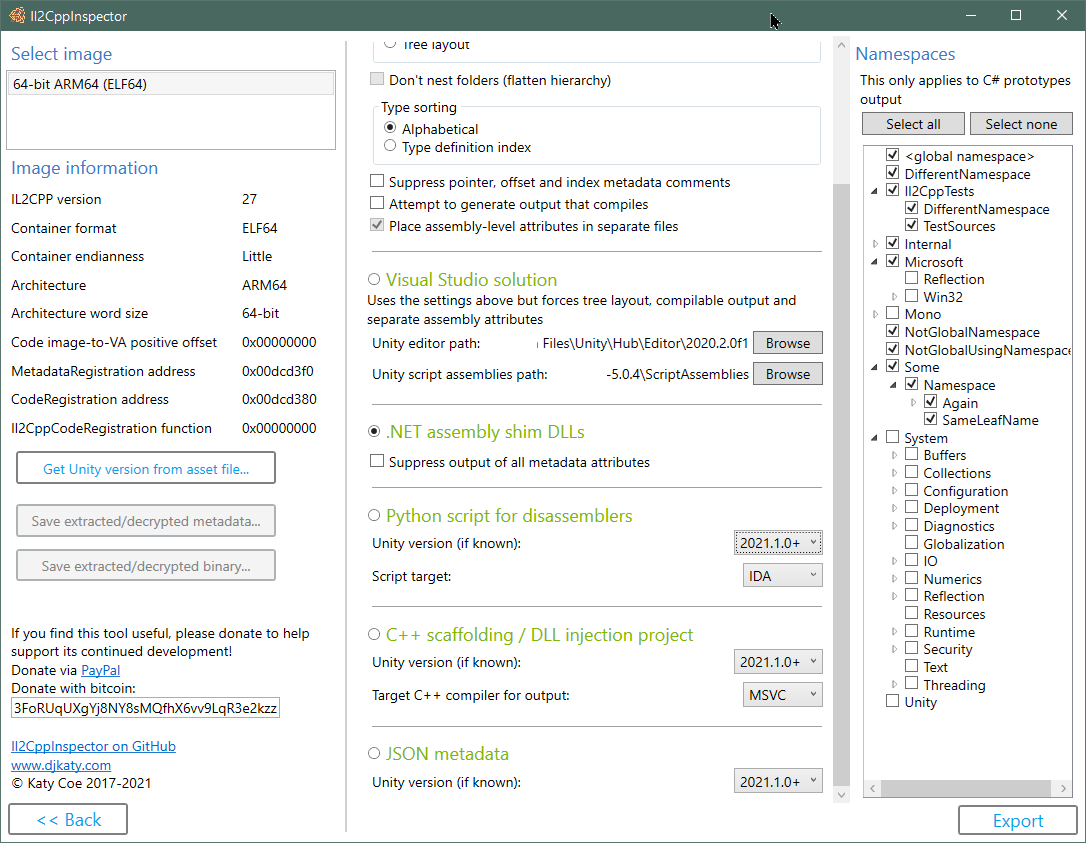
คำจำกัดความประเภท IL2CPP, ข้อมูลเมตาและพอยน์เตอร์เมธอดเป็น รหัส c# stub code
สร้าง . NET ASSEMBLY Shim DLLS ที่มีโครงสร้างแอปพลิเคชัน IL2CPP และข้อมูลเมตาสำหรับใช้ใน decompilers เช่น ILSPY, DNSPY, การโหลดสินทรัพย์ Unity กับ AssetStudio หรือการสร้างพร็อกซีที่มีการจัดการ
สร้าง c ++ scaffolding สำหรับทุกประเภทวิธีการพอยน์เตอร์ฟังก์ชั่นและฟังก์ชั่น API ในแอปพลิเคชัน IL2CPP สำหรับใช้ใน X64DBG, CYDIA Substrate เป็นต้น
สร้าง สคริปต์ IDA และ Ghidra Python เพื่อเติมสัญลักษณ์ฟังก์ชั่นและข้อมูลประเภท รวมถึง API hooks เพื่อใช้สคริปต์สำหรับเป้าหมายอื่น ๆ
สร้าง โครงการฉีด Visual Studio C ++ DLL โดยตรงจากไฟล์ IL2CPP
สร้าง Visual Studio C# Code Stub Solutions โดยตรงจากไฟล์ IL2CPP
สร้าง ข้อมูลเมตา JSON ด้วยแผนที่ที่อยู่ที่สมบูรณ์โดยตรงจากไฟล์ IL2CPP
สร้าง Binaries IL2CPP จากรหัสแหล่ง C# โดยพลการโดยไม่มีโครงการ Unity
API ที่สำคัญสามประการ สำหรับใช้ในโครงการการวิเคราะห์แบบคงที่ของคุณเองสำหรับการสืบค้นข้อมูลเมตาไบนารีระดับต่ำรุ่น. NET แบบจำลองและแอปพลิเคชัน C ++ ทั้งหมด สิ่งเหล่านี้ยังมีอยู่ในแพ็คเกจ NUGET
ปลั๊กอิน SDK ช่วยให้คุณสร้างปลั๊กอินที่กำหนดเองเพื่อขยายขีดความสามารถของ IL2CPPINSPECTOR
เอาชนะบางประเภทของการทำให้งงงวย
รองรับ รูปแบบไฟล์ที่สำคัญทั้งหมดและสถาปัตยกรรมโปรเซสเซอร์
ทำงานบน Windows, MacOS X และ Linux GUI ในตัว สำหรับผู้ใช้ Windows ที่มีการสนับสนุน Drag & Drop
ทดสอบกับการเปิดตัว IL2CPP ทุกครั้งตั้งแต่ Unity 5.3.0
คุณสามารถอ่านเพิ่มเติมเกี่ยวกับวิธีการทำงานของ IL2CPP ในซีรี่ส์ IL2CPP Reverse Engineering:
ตอนที่ 1: Hello World และ IL2CPP Toolchain
ส่วนที่ 2: ภาพรวมโครงสร้างและการค้นหาข้อมูลเมตา
การพัฒนาปลั๊กอิน IL2CPPINSPECTOR WIKI
วิธีการสร้างใช้และดีบักโครงการฉีด DLL IL2CPP DLL
ทำงานกับรหัสในโครงการฉีด IL2CPP DLL
การใช้แบบจำลองประเภทของ IL2CPPINSPECTOR เพื่อแยกคำจำกัดความของ Protobuf-Net (กรณีศึกษา: Fall Guys)
การค้นหาตัวโหลดสำหรับไฟล์ Global-metadata.dat ที่ทำให้งงงวย-อธิบายวิธีการค้นหาตัวโหลด, deobfuscation และ/หรือรหัสถอดรหัสสำหรับ global-metadata.dat ในเกือบทุกแอปพลิเคชัน IL2CPP
เปิดใช้งานการโหลดของ League of Legends: Wild Rift - ครอบคลุมการถอดรหัส XOR, การถอดรหัสสตริง XOR, การถอดรหัสการส่งออก API การหมุน
เปิดใช้งานการโหลดของ Honkai Impact (3 ส่วน) - ครอบคลุมการค้นหาฟังก์ชั่นในภาพการทำให้งงงวยข้อมูลของ Global -metadata.dat, เทคนิคการถอดรหัสของ IDA, วิธีการเขียนปลั๊กอินวิธีการเขียนปลั๊กอิน
การควบคุมการไหลเวียนของการควบคุม VMProtect ใน Honkai Impact - ครอบคลุมการคาดการณ์เส้นทางรหัสจากฟังก์ชั่นที่มีการไหลเวียนของการไหลของการควบคุมโดยใช้ X64DBG และ IDA decompiler
ย้อนกลับวิศวกรรม Genshin ผลกระทบกับ PowerShell - ครอบคลุมการเขียนชุดทดสอบเพื่อค้นหาฟังก์ชั่นในไบนารีที่ทำให้งงงวยผ่านการโจมตีแบบเดรัจฉาน
รูปแบบไฟล์และการสนับสนุนสถาปัตยกรรม:
ยินดีที่มี:
using ที่จำเป็น ขอบเขตและประเภทความขัดแย้งชื่อได้รับการแก้ไขโดยอัตโนมัติเพื่อสร้างรหัสที่รวบรวมไลบรารีคลาสเป้าหมาย. NET CORE 3.1 สร้างขึ้นด้วย Visual Studio 2019
หมายเหตุ : IL2CPPINSPECTOR ไม่ใช่ decompiler มันสามารถให้โครงสร้างของที่อยู่แอปพลิเคชันและฟังก์ชั่นสำหรับทุกวิธีเพื่อให้คุณสามารถข้ามไปยังวิธีการที่น่าสนใจในการถอดชิ้นส่วนของคุณได้อย่างง่ายดาย มันไม่ได้พยายามกู้คืนซอร์สโค้ดทั้งหมดของแอปพลิเคชัน
 git clone --recursive https://github.com/djkaty/Il2CppInspector
cd Il2CppInspector
สร้างเวอร์ชัน CLI และ Windows GUI:
dotnet publish -c Release
รับปลั๊กอินปัจจุบันทั้งหมด (ไม่บังคับ):
powershell -f get-plugins.ps1
สร้างเวอร์ชัน CLI:
 cd Il2CppInspector.CLI
dotnet publish -r osx-x64 -c Release
รับปลั๊กอินปัจจุบันทั้งหมด (ไม่บังคับ):
../get-plugins.sh
สร้างเวอร์ชัน CLI:
 cd Il2CppInspector.CLI
dotnet publish -r linux-x64 -c Release
รับปลั๊กอินปัจจุบันทั้งหมด (ไม่บังคับ):
../get-plugins.sh
สำหรับระบบปฏิบัติการอื่น ๆ ที่รองรับ. net core ให้เพิ่ม -r xxx ไปยังคำสั่งสุดท้ายโดยที่ xxx คือการกำจัดจาก https://docs.microsoft.com/en-us/dotnet/articles/core/rid-catalog
ไบนารีเอาท์พุทสำหรับการใช้บรรทัดคำสั่งถูกวางไว้ใน Il2CppInspector/Il2CppInspector.CLI/bin/Release/netcoreapp3.0/[win|osx|linux]-x64/publish/Il2CppInspector.exe
ไบนารีเอาท์พุทสำหรับ Windows GUI ถูกวางไว้ใน Il2CppInspector/Il2CppInspector.GUI/bin/Release/netcoreapp3.1/[win|osx|linux]-x64/publish/Il2CppInspector.exe
ควรวางโฟลเดอร์ plugins ไว้ในโฟลเดอร์เดียวกับ Il2CppInspector.exe
เรียกใช้ Il2CppInspector.exe ที่พรอมต์คำสั่ง
รูปแบบไฟล์และสถาปัตยกรรมจะถูกตรวจพบโดยอัตโนมัติ
เอาต์พุตทั้งหมดถูกสร้างขึ้นโดยค่าเริ่มต้น ในการสร้างเอาต์พุตเฉพาะเฉพาะให้ใช้สวิตช์ --select-outputs ร่วมกับสวิตช์การเลือกเอาต์พุต
  -i, --bin                   (Default: libil2cpp.so) IL2CPP binary, APK, AAB, XAPK, IPA, Zip or Linux process map text input file(s) (single file or comma-separated list for split APKs)

  -m, --metadata              (Default: global-metadata.dat) IL2CPP metadata file input (ignored for APK/AAB/XAPK/IPA/Zip)

  --image-base                For ELF memory dumps, the image base address in hex (ignored for standard ELF files and other file formats)

  --select-outputs            Only generate outputs specified on the command line (use --cs-out, --py-out, --cpp-out, --json-out, --dll-out to select outputs). If not specified, all outputs are generated

  -c, --cs-out                (Default: types.cs) C# output file (when using single-file layout) or path (when using per namespace, assembly or class layout)

  -p, --py-out                (Default: il2cpp.py) Python script output file

  -h, --cpp-out               (Default: cpp) C++ scaffolding / DLL injection project output path

  -o, --json-out              (Default: metadata.json) JSON metadata output file

  -d, --dll-out               (Default: dll) .NET assembly shim DLLs output path

  --metadata-out              IL2CPP metadata file output (for extracted or decrypted metadata; ignored otherwise)

  --binary-out                IL2CPP binary file output (for extracted or decrypted binaries; ignored otherwise; suffixes will be appended for multiple files)

  -e, --exclude-namespaces    (Default: System Mono Microsoft.Reflection Microsoft.Win32 Internal.Runtime Unity UnityEditor UnityEngine UnityEngineInternal AOT JetBrains.Annotations) Comma-separated list of namespaces to suppress in C# output, or 'none' to include all namespaces

  -l, --layout                (Default: single) Partitioning of C# output ('single' = single file, 'namespace' = one file per namespace in folders, 'assembly' = one file per assembly, 'class' = one file per class in namespace folders, 'tree' = one file per class in assembly and
                              namespace folders)

  -s, --sort                  (Default: index) Sort order of type definitions in C# output ('index' = by type definition index, 'name' = by type name). No effect when using file-per-class or tree layout

  -f, --flatten               Flatten the namespace hierarchy into a single folder rather than using per-namespace subfolders. Only used when layout is per-namespace or per-class. Ignored for tree layout

  -n, --suppress-metadata     Diff tidying: suppress method pointers, field offsets and type indices from C# output. Useful for comparing two versions of a binary for changes with a diff tool

  --suppress-dll-metadata     Diff tidying: suppress method pointers, field offsets and type indices attributes from DLL output. Useful for comparing two versions of a binary for changes

  -k, --must-compile          Compilation tidying: try really hard to make code that compiles. Suppress generation of code for items with CompilerGenerated attribute. Comment out attributes without parameterless constructors or all-optional constructor arguments. Don't emit
                              add/remove/raise on events. Specify AttributeTargets.All on classes with AttributeUsage attribute. Force auto-properties to have get accessors. Force regular properties to have bodies. Suppress global::Locale classes. Generate dummy parameterless
                              base constructors and ref return fields.

  --separate-attributes       Place assembly-level attributes in their own AssemblyInfo.cs files. Only used when layout is per-assembly or tree

  -j, --project               Create a Visual Studio solution and projects. Implies --layout tree, --must-compile and --separate-attributes

  --cpp-compiler              (Default: BinaryFormat) Compiler to target for C++ output (MSVC or GCC); selects based on binary executable type by default

  -t, --script-target         (Default: IDA) Application to target for Python script output (IDA or Ghidra) - case-sensitive

  --unity-path                (Default: C:Program FilesUnityHubEditor*) Path to Unity editor (when using --project). Wildcards select last matching folder in alphanumeric order

  --unity-assemblies          (Default: C:Program FilesUnityHubEditor*EditorDataResourcesPackageManagerProjectTemplateslibcachecom.unity.template.3d-*ScriptAssemblies) Path to Unity script assemblies (when using --project). Wildcards select last matching folder in
                              alphanumeric order

  --unity-version             Version of Unity used to create the input files, if known. Used to enhance Python, C++ and JSON output. If not specified, a close match will be inferred automatically.

  --unity-version-from-asset  A Unity asset file used to determine the exact Unity version. Overrides --unity-version.

  --plugins                   Specify options for plugins. Enclose each plugin's configuration in quotes as follows: --plugins "pluginone --option1 value1 --option2 value2" "plugintwo --option...". Use --plugins <name> to get help on a specific plugin

  --help                      Display this help screen.

  --version                   Display version information.
Apple Universal Binaries และ APKS/XAPKS พร้อมไบนารีสำหรับสถาปัตยกรรมหลายรายการ : เมื่อใช้ CLI ไฟล์เอาต์พุตหลายไฟล์จะถูกสร้างขึ้นโดยมีชื่อไฟล์แต่ละตัวนอกเหนือจากคำต่อท้ายแรกโดยดัชนีของภาพในไบนารี ภาพที่ไม่ได้รับการสนับสนุนจะถูกข้าม
แพ็คเกจ IPA : ต้องทำการถอดรหัสก่อน ไม่รองรับไบนารีปฏิบัติการที่เข้ารหัส
แยกแพ็คเกจ APK : เมื่อใช้ CLI ให้ระบุรายการไฟล์ APK ที่มีเครื่องหมายจุลภาคระหว่างชื่อไฟล์แต่ละตัว
Elf Binaries ที่สร้างขึ้นจากการถ่ายโอนข้อมูลหน่วยความจำ : ระบุฐานภาพ (ในฐานสิบหก) โดยใช้ --image-base หากฐานภาพที่ให้มาไม่ถูกต้องแอปพลิเคชันอาจผิดพลาด
GameGuardian Dumps (และการถ่ายภาพแผนที่กระบวนการ linux อื่น ๆ ) : คุณสามารถใช้ไฟล์ *-maps.txt แทน IL2CPP ไบนารี IL2CPPINSPECTOR จะสแกนโฟลเดอร์ที่มีไฟล์แผนที่สำหรับการจับคู่ไฟล์ .bin และประกอบใหม่และ rebase libil2cpp.so โดยอัตโนมัติ ดังนั้นคุณไม่จำเป็นต้องสร้างไฟล์ด้วยตนเองหรือระบุที่อยู่ฐานภาพเมื่อใช้การถ่ายโอนข้อมูลประเภทนี้ เพื่อให้การทำงานนี้ไม่ต้องเปลี่ยนชื่อไฟล์ข้อความหรือไฟล์ไบนารีใด ๆ และทั้งหมดจะต้องอยู่ในโฟลเดอร์เดียวกัน
ไฟล์ PE ที่บรรจุ (DLLS) : คำเตือน: การโหลดไฟล์ PE ที่บรรจุจะทำให้จุดเริ่มต้นของ DLL และฟังก์ชั่นการเริ่มต้นเพื่อดำเนินการ อย่าโหลด DLL ที่เป็นอันตรายและไม่เรียกใช้ IL2CPPINSPECTOR ในฐานะผู้ดูแลระบบเมื่อจัดการไฟล์ PE ที่บรรจุ ใช้ความเสี่ยงของคุณเอง
IL2CPPINSPECTOR สามารถสร้างไฟล์ c# code stub ด้วย metadata ตัวชี้เพื่อให้คุณสำรวจไบนารี IL2CPP ในรูปแบบที่อ่านง่าย
ระบุสวิตช์ -c เพื่อเลือกไฟล์หรือเส้นทางเอาต์พุต C#
หากต้องการแยกประเภทจากเนมสเปซบางอย่างจากการถูกสร้างขึ้นในเอาต์พุตไฟล์ C# แหล่งที่มาให้จัดทำรายการเนมสเปซที่แยกตัวแบบ case-sensitive ใน --exclude-namespaces เนมสเปซต่อไปนี้จะถูกแยกออกหากไม่มีการระบุอาร์กิวเมนต์:
 System
Mono
Microsoft.Reflection
Microsoft.Win32
Internal.Runtime
Unity
UnityEditor
UnityEngine
UnityEngineInternal
AOT
JetBrains.Annotations
การให้อาร์กิวเมนต์แก่ --exclude-namespaces จะแทนที่รายการเริ่มต้น ในการส่งออกเนมสเปซทั้งหมดให้ใช้ --exclude-namespaces=none สิ่งนี้ใช้กับเอาต์พุตต้นแบบ C# เท่านั้น
คุณสามารถระบุเค้าโครงเอาต์พุตด้วยสวิตช์ --layout เอาต์:
single - ทุกประเภทในไฟล์เดียวnamespace - หนึ่งเนมสเปซต่อไฟล์ (แต่ละไฟล์จะได้รับชื่อเนมสเปซ)assembly - หนึ่งแอสเซมบลีต่อไฟล์ (แต่ละไฟล์จะได้รับชื่อแอสเซมบลี)class - หนึ่งคลาสต่อไฟล์tree -หนึ่งคลาสต่อไฟล์ในโครงสร้างโฟลเดอร์เหมือนต้นไม้พร้อมโฟลเดอร์แอสเซมบลีระดับบนและโฟลเดอร์เนมสเปซระดับที่สอง คุณสามารถระบุประเภทการสั่งซื้อภายในไฟล์ได้ด้วยสวิตช์ --sort เรียงลำดับ:
index - เรียงลำดับตามประเภทดัชนีคำจำกัดความตามที่พบในข้อมูลเมตา IL2CPPname - เรียงลำดับตามตัวอักษรตามชื่อชื่อ สวิตช์นี้ไม่มีผลเมื่อใช้เลย์เอาต์ class หรือ tree
สวิตช์ --flatten ช่วยให้คุณสามารถแบนลำดับชั้นของเนมสเปซที่ซ้อนกันได้เมื่อ layout เป็น class หรือ namespace เช่น ชุดของ Subfolders System/IO/Compression จะเป็น System.IO.Compression ย่อยระดับสูงระดับบนเดียวแทนการบีบอัด
สวิตช์ --suppress-metadata ช่วยให้คุณสามารถระงับเอาต์พุตของความคิดเห็นรวมถึงพอยน์เตอร์วิธีการออฟเซ็ตฟิลด์และดัชนีประเภท สิ่งนี้มีประโยชน์เมื่อคุณต้องการแยกการเปลี่ยนแปลงระหว่างแอปพลิเคชันสองเวอร์ชันเพื่อดูว่าประเภทใดที่มีการเปลี่ยนแปลง
สวิตช์ --seperate-attributes บิวต์นำ IL2CPPINSPECTOR ไปใส่แอตทริบิวต์ระดับแอสเซมบลีในแอ AssemblyInfo.cs ของตัวเองแทนที่จะอยู่ที่ด้านบนของไฟล์แรกที่สร้างขึ้นสำหรับแต่ละชุดเมื่อ layout เป็น assembly หรือ tree
เพียงเรียกใช้ IL2CPPINSPECTOR ด้วยสวิตช์ -p เพื่อเลือกไฟล์เอาต์พุตสคริปต์ IDA โหลดไฟล์ไบนารีของคุณลงใน IDA กด ALT+F7 และเลือกสคริปต์ที่สร้างขึ้น สังเกตหน้าต่างเอาต์พุตในขณะที่ IDA วิเคราะห์ไฟล์ - อาจใช้เวลานาน
สามไฟล์ถูกสร้างขึ้นโดย IL2CPPINSPECTOR สำหรับ IDAPYTHON: สคริปต์ Python เองไฟล์ข้อมูลเมตา JSON และไฟล์ส่วนหัวของ C ++ (นี่คือ cpp/appdata/il2cpp-types.h โดยค่าเริ่มต้นหากคุณใช้ CLI หรือ il2cpp.h หากคุณใช้ GUI) ไฟล์เหล่านี้จะต้องแสดงให้สคริปต์ทำงานสำเร็จ
หากคุณรู้ว่า Binary ถูกรวบรวมด้วยความสามัคคีเวอร์ชันใดคุณสามารถปรับปรุงเอาท์พุทได้โดยการระบุสิ่งนี้ด้วย --unity-version เช่น --unity-version 2019.3.1f1 นอกจากนี้คุณยังสามารถจัดหาไฟล์สินทรัพย์ใด ๆ จากแอปพลิเคชันเพื่อตรวจจับเวอร์ชัน Unity ด้วย --unity-version-from-asset มิฉะนั้น IL2CPPINSPECTOR จะทำการคาดเดาการศึกษาตามเนื้อหาของไบนารี
IL2CPPINSPECTOR สร้างข้อมูลต่อไปนี้สำหรับโครงการ IDA:
ตัวอย่าง IDA C ++ decompilation หลังจากใช้ IL2CPPINSPECTOR (รหัสการเริ่มต้นที่ถูกละเว้นเพื่อความกะทัดรัด):
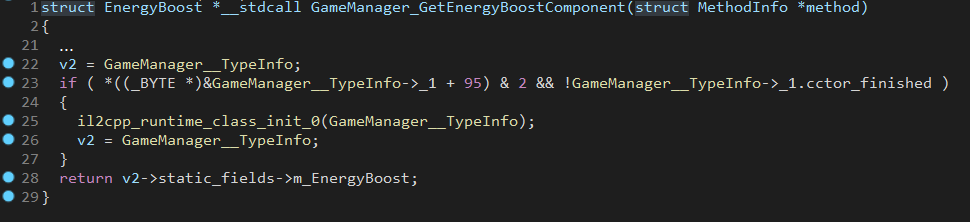
เรียกใช้ IL2CPPINSPECTOR ด้วยสวิตช์ -p เพื่อเลือกไฟล์เอาต์พุตสคริปต์ GHIDRA และ -t Ghidra (ตัวพิมพ์ใหญ่) เพื่อระบุ Ghidra เป็นประเภทสคริปต์ที่คุณต้องการสร้าง
ไฟล์สามไฟล์ถูกสร้างขึ้นโดย IL2CPPINSPECTOR สำหรับ GHIDRA: สคริปต์ Python เอง, ไฟล์ข้อมูลเมตา JSON และไฟล์ส่วนหัวประเภท C ++ ไฟล์เหล่านี้จะต้องแสดงให้สคริปต์ทำงานสำเร็จ
หากคุณรู้ว่า Binary ถูกรวบรวมด้วยความสามัคคีเวอร์ชันใดคุณสามารถปรับปรุงเอาท์พุทได้โดยการระบุสิ่งนี้ด้วย --unity-version เช่น --unity-version 2019.3.1f1 นอกจากนี้คุณยังสามารถจัดหาไฟล์สินทรัพย์ใด ๆ จากแอปพลิเคชันเพื่อตรวจจับเวอร์ชัน Unity ด้วย --unity-version-from-asset มิฉะนั้น IL2CPPINSPECTOR จะทำการคาดเดาการศึกษาตามเนื้อหาของไบนารี
หมายเหตุ: เพื่อผลลัพธ์ที่ดีที่สุดให้เลือก NO เมื่อ Ghidra ถามว่าคุณต้องการทำการวิเคราะห์อัตโนมัติเมื่อมีการโหลดไบนารีครั้งแรกหรือไม่ หากคุณได้รับ Conflicting data exists at address เมื่อเรียกใช้สคริปต์ด้านล่างให้โหลดไบนารีลงในโครงการอีกครั้งและเลือก NO ที่การวิเคราะห์อัตโนมัติ
หมายเหตุ: หากต้องการเพิ่มความเร็วในการวิเคราะห์อย่างมีนัยสำคัญสำหรับไฟล์ ELF ให้ตั้งค่าฐานภาพเป็นศูนย์ ( 0x00000000 ) ในตัวเลือกโหลดสำหรับไบนารี ด้วยเหตุผลความเข้ากันได้การดำเนินการสคริปต์ Ghidra Python บนไฟล์ ELF จะเปลี่ยนฐานรูปภาพของไฟล์เป็นศูนย์สำหรับคุณหากจำเป็นอย่างไรก็ตามหากฐานภาพปัจจุบันไม่ใช่ศูนย์อาจใช้เวลานานมาก รูปแบบไฟล์อื่น ๆ จะรักษาฐานภาพเดียวกัน
เพื่อนำเข้าข้อมูลเมตาไปสู่โครงการ Ghidra ที่มีอยู่:
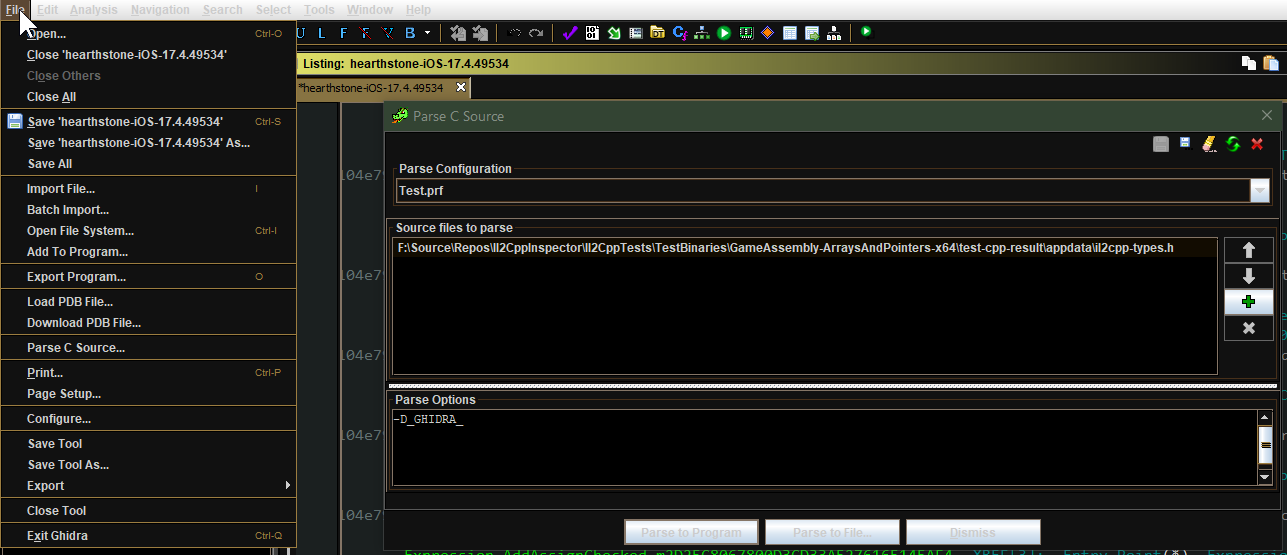
จาก เบราว์เซอร์รหัส เลือก ไฟล์ -> แหล่งที่มาของ Parse C ...
สร้างโปรไฟล์ใหม่และเพิ่มไฟล์ส่วนหัวของ C ++ ที่สร้างขึ้น นี่คือ cpp/appdata/il2cpp-types.h โดยค่าเริ่มต้นหากคุณใช้ CLI หรือ il2cpp.h หากคุณใช้ GUI
ตรวจสอบให้แน่ใจว่ามีการตั้ง ค่าตัวเลือกการแยกวิเคราะห์ ไว้อย่างนี้:
-D_GHIDRA_
คลิกแยกวิเคราะห์เพื่อโปรแกรมและยอมรับคำเตือนใด ๆ สิ่งนี้อาจใช้เวลานานกว่าจะเสร็จสมบูรณ์
เปิด ตัวจัดการสคริปต์ และเพิ่มโฟลเดอร์เอาต์พุตที่คุณเลือกใน IL2CPPINSPECTOR เป็นโฟลเดอร์สคริปต์
หากคุณใช้สคริปต์จาก IL2CPPINSPECTOR สำหรับไบนารีอื่น ๆ ให้แน่ใจว่าไฟล์ Python มีชื่อแตกต่างกันหรือปิดการใช้งานของโฟลเดอร์สคริปต์ก่อนหน้า
คลิกรีเฟรชเพื่อให้สคริปต์ปรากฏใน ตัวจัดการสคริปต์
คลิกขวาที่สคริปต์แล้วเลือก เรียกใช้ สิ่งนี้อาจใช้เวลาสักครู่กว่าจะเสร็จสมบูรณ์
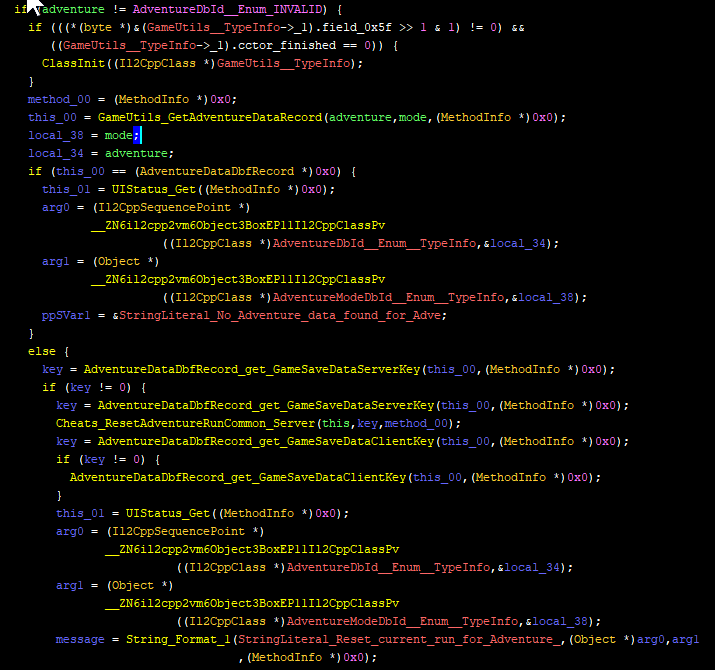
IL2CPPINSPECTOR สร้างข้อมูลที่เหมือนกันสำหรับโครงการ GHIDRA เช่นเดียวกับ IDA - ดูส่วนด้านบนสำหรับรายละเอียด
ตัวอย่าง Ghidra C ++ decompilation หลังจากใช้ IL2CPPINSPECTOR:
IL2CPPINSPECTOR สร้างชุดของไฟล์ต้นฉบับ C ++ ซึ่งคุณสามารถใช้ได้หลายวิธีตัวอย่างเช่น:
เรียกใช้ IL2CPPINSPECTOR ด้วยสวิตช์ -h เพื่อเลือกโฟลเดอร์เอาต์พุต C ++
หากคุณรู้ว่า Binary ถูกรวบรวมด้วยความสามัคคีเวอร์ชันใดคุณสามารถปรับปรุงเอาท์พุทได้โดยการระบุสิ่งนี้ด้วย --unity-version เช่น --unity-version 2019.3.1f1 นอกจากนี้คุณยังสามารถจัดหาไฟล์สินทรัพย์ใด ๆ จากแอปพลิเคชันเพื่อตรวจจับเวอร์ชัน Unity ด้วย --unity-version-from-asset มิฉะนั้น IL2CPPINSPECTOR จะทำการคาดเดาการศึกษาตามเนื้อหาของไบนารี
คุณสามารถกำหนดเป้าหมายคอมไพเลอร์ C ++ ที่คุณต้องการใช้ไฟล์เอาต์พุตด้วย: ระบุ --cpp-compiler MSVC สำหรับ Visual Studio และ --cpp-compiler GCC สำหรับ GCC หรือ Clang
IL2CPPINSPECTOR ดำเนินการแก้ไขความขัดแย้งชื่ออัตโนมัติเพื่อหลีกเลี่ยงการใช้สัญลักษณ์และคำหลักที่กำหนดไว้ล่วงหน้าใน C ++ และเพื่อจัดการการกำหนดสัญลักษณ์ชื่อเดียวกันในแอปพลิเคชันใหม่
ไฟล์ไบนารี IL2CPP บางไฟล์มีเพียงชุดการส่งออก API บางส่วนหรือไม่มีเลย สำหรับกรณีเหล่านี้ IL2CPPINSPECTOR จะสร้างนั่งร้านโดยใช้การส่งออกที่มีอยู่เท่านั้นเพื่อให้แน่ใจว่าโครงการรวบรวมได้สำเร็จ
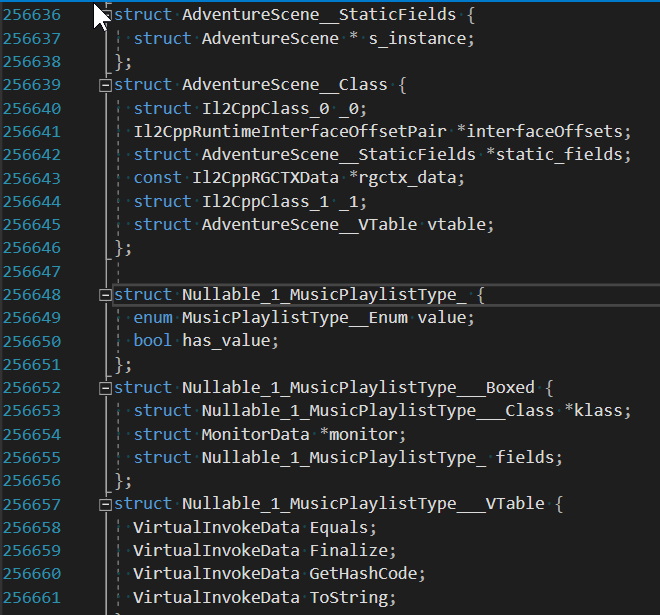
ไฟล์ต่อไปนี้ถูกสร้างขึ้น:
appdata โฟลเดอร์นี้มีการประกาศเฉพาะไบนารีโครงการอเนกประสงค์: ilc2pp-types.h :
il2cpp-functions.h :
MethodInfo ** ) il2cpp-types-ptr.h :
Il2CppClass ** ) il2cpp-api-functions.h :
il2cpp-api-functions-ptr.h :
il2cpp_ ) il2cpp-metadata-version.h :
#define สำหรับเวอร์ชัน IL2CPP ที่ใช้โดย Binary เป้าหมายไฟล์ข้างต้นมีข้อมูลทั้งหมดที่จำเป็นสำหรับการวิเคราะห์แบบไดนามิกในดีบักเกอร์
นอกจากนี้ไฟล์ต่อไปนี้ถูกสร้างขึ้นสำหรับการฉีด DLL:
framework -รหัส Binary-Agnostic Boilerplate รหัสและนั่งร้าน:
dllmain.cpp :
init_il2cpp() (ดูด้านล่าง) และเริ่ม Run() (ดูด้านล่าง) ในเธรดใหม่ helpers.cpp และ helpers.h :
helpers.h สำหรับรายละเอียด il2cpp-init.cpp , il2cpp-init.h และ il2cpp-appdata.h :
void init_il2cpp() ซึ่งใช้ส่วนหัวทั้งหมดข้างต้นเพื่อสร้างพอยน์เตอร์ฟังก์ชั่นที่ใช้งานได้และพอยน์เตอร์คลาสที่แมปไปยังสถานที่ที่ถูกต้องในภาพในหน่วยความจำที่รันไทม์ pch-il2cpp.cpp และ pch-il2cpp.h :
appdata user -รหัสผู้ใช้ไบนารีแบบไบนารีเฉพาะโครงการซึ่งคุณสามารถแก้ไขได้ตามที่ต้องการ:
main.cpp และ main.h :Run() ซึ่งหมายถึงจุดเริ่มต้นสำหรับรหัสที่คุณฉีดเอง ฟังก์ชั่นดำเนินการในเธรดใหม่และดังนั้นจึงไม่บล็อก DllMainนี่เป็นโฟลเดอร์เดียวที่คุณควรแก้ไขไฟล์
สำหรับผู้ใช้ Visual Studio ไฟล์ต่อไปนี้จะถูกสร้างขึ้น:
IL2CppDLL.vcxproj , Il2CppDLL.vcxproj.filters และ Il2CppDLL.sln : main.cpp เริ่มต้นรวมถึงรหัสความคิดเห็นเพื่อให้คุณเขียนลงในบันทึกหรือเปิดคอนโซลใหม่โดยใช้ฟังก์ชั่นจาก helpers.h ในการระบุเป้าหมายไฟล์บันทึกในซอร์สโค้ดของคุณให้ใช้ extern const LPCWSTR LOG_FILE = L"my_log_file.txt"
เคล็ดลับ: เมื่อแอปพลิเคชันเป้าหมายรุ่นใหม่ถูกปล่อยออกมาคุณสามารถส่งออกโครงการ C ++ Scaffolding ในสถานที่ใหม่ โฟลเดอร์ appdata และ framework จะถูกเขียนทับ แต่โฟลเดอร์ user และไฟล์โครงการ/โซลูชันจะไม่เปลี่ยนแปลง สิ่งนี้ทำให้ง่ายต่อการอัปเดตโครงการของคุณเมื่อแอปพลิเคชันเป้าหมายได้รับการอัปเดตแล้ว!
ความเข้ากันได้: ขอแนะนำให้ใช้ Visual Studio 2019 (MSVC ++ Build Tools V142 หรือใหม่กว่า) โครงการนั่งร้านได้รับการทดสอบกับ Visual Studio 2019 และ Visual Studio 2017 (MSVC ++ Build Tools V141) อย่างไรก็ตามรหัสผู้ช่วยบางตัวจะถูกละเว้นเมื่อใช้ Visual Studio 2017 เพื่อให้การรวบรวมประสบความสำเร็จ
Il2CppDLL.sln ) ลงใน Visual StudioRun() ใน main.cppคุณสามารถเข้าถึงประเภทและวิธีการที่เทียบเท่า C#ทั้งหมดในแอปพลิเคชันรวมถึงฟังก์ชั่น IL2CPP API ทั้งหมดที่มีอยู่ ไม่จำเป็นต้องมีตัวชี้ฟังก์ชั่นเพิ่มเติมหรือการประกาศประเภท
ตัวอย่าง (สร้าง Vector3 และบันทึกการประสานงาน y ไปยังไฟล์):
 // in main.cpp
void Run ()
{
    // Vector3 example

    // (Call an IL2CPP API function)
    Vector3__Boxed* myVector3 = (Vector3__Boxed*) il2cpp_object_new ((Il2CppClass*) *Vector3__TypeInfo);

    // (Call an instance constructor)
    Vector3__ctor (myVector3, 1 . 0f , 2 . 0f , 3 . 0f , NULL );

    // (Access an instance field)
    il2cppi_log_write ( to_string (myVector3-> fields . y ));
}
สามารถพบบทเรียนโดยละเอียดเพิ่มเติมได้ที่นี่:
วิธีการสร้างใช้และดีบักโครงการฉีด DLL IL2CPP DLL
ทำงานกับรหัสในโครงการฉีด IL2CPP DLL
IL2CPPINSPECTOR สามารถสร้างพื้นที่ทำงานของ Visual Studio ที่สมบูรณ์พร้อมไฟล์โซลูชัน (.sln) ไฟล์โครงการ (.csproj) และโครงสร้างโฟลเดอร์ที่เหมือนชุดประกอบการประกอบ แต่ละโครงการสร้างแอสเซมบลีเดียว
ใช้สวิตช์ --project เพื่อสร้างพื้นที่ทำงานโซลูชัน
เพื่อให้ IL2CPPInspector สามารถสร้างไฟล์. csproj ซึ่งมีการอ้างอิงแอสเซมบลีที่ถูกต้องคุณต้องจัดเตรียมเส้นทางไปยังตัวแก้ไข Unity ที่ติดตั้งและเทมเพลตโครงการหรือโฟลเดอร์ ScriptAssemblies ของโครงการ Unity ที่มีอยู่
หมายเหตุ: การตั้งค่าเริ่มต้นจะเลือก Unity เวอร์ชันล่าสุดที่ติดตั้งและเวอร์ชันล่าสุดที่ติดตั้งของเทมเพลตโครงการ 3D เริ่มต้นหากติดตั้งในตำแหน่งเริ่มต้น
ตำแหน่งตัวแก้ไขความสามัคคีทั่วไป (ระบุด้วย --unity-path ): C: Program Files Unity Hub Editor 20xx.yz
ตำแหน่งเทมเพลตโครงการ Unity Project ทั่วไป (ระบุด้วย --unity-assemblies ): C: Program Files Unity Hub Editor 20XX.YZ Editor Data Resources PackageManager ProjectTemplates libcache <ชื่อ
ตำแหน่งสคริปต์ความสามัคคีทั่วไปในโครงการที่มีอยู่ (ระบุด้วย --unity-aseemblies ): X: MyProject Library ScriptAssemblies
แทนที่ X , Y และ Z ด้วยหมายเลขเวอร์ชัน Unity ของคุณ แทนที่ <name-of-template> ด้วยเทมเพลตที่ต้องการ
หมายเหตุ: คุณสามารถใช้ Asterisk Wildcard (*) หนึ่งครั้งหรือมากกว่าเมื่อระบุเส้นทางเหล่านี้ IL2CPPINSPECTOR จะเลือกโฟลเดอร์การจับคู่สุดท้ายตามลำดับตัวอักษรและตัวเลข สิ่งนี้มีประโยชน์หากคุณมีการติดตั้ง Unity แบบเคียงข้างกันหลายแบบและต้องการเลือกเวอร์ชันหรือเทมเพลตล่าสุดเสมอ
ในกรณีที่การอ้างอิงแอสเซมบลีไม่ได้รับการแก้ไขอย่างถูกต้องในครั้งแรกที่คุณโหลดโซลูชันเพียงแค่ปิดและเปิดอีกครั้งเพื่อบังคับให้พวกเขาได้รับการแก้ไข
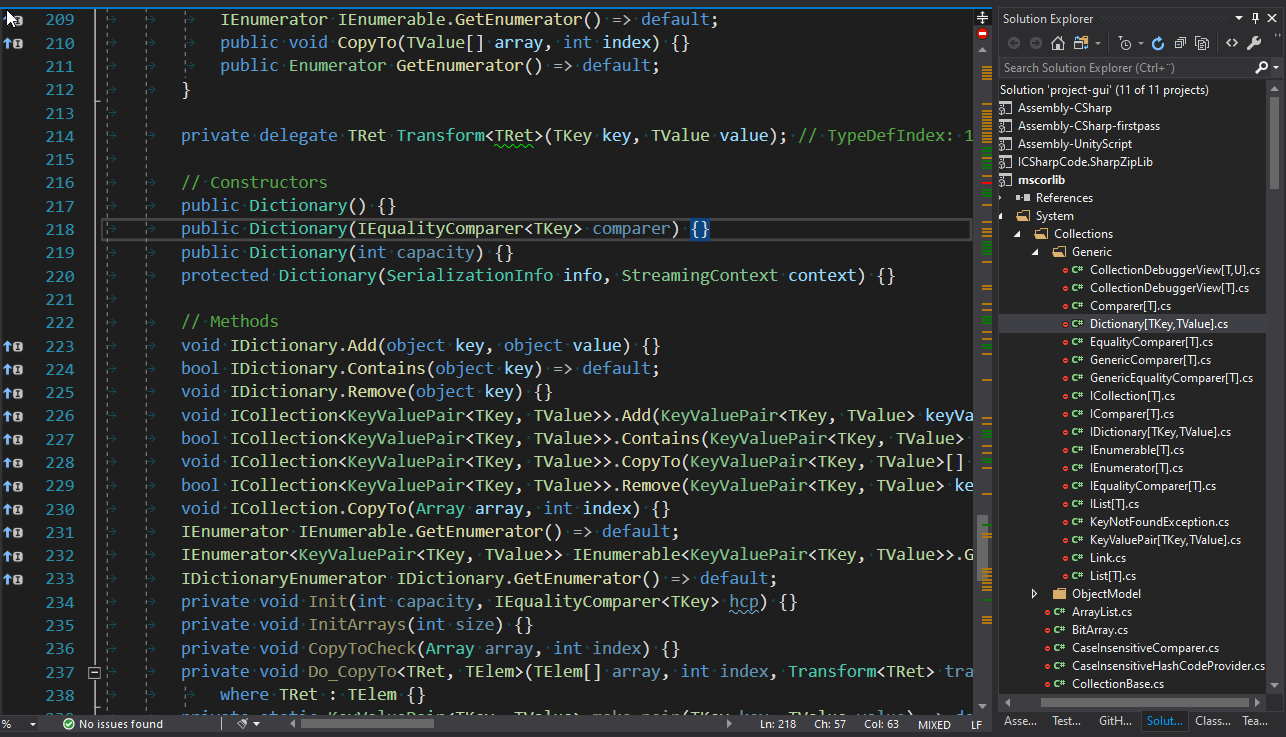
IL2CPPINSPECTOR สามารถสร้างไฟล์ JSON ที่มีข้อมูลเมตาต่าง ๆ เกี่ยวกับแอปพลิเคชัน
ใช้สวิตช์ -o เพื่อระบุเส้นทางเอาต์พุต JSON
สคีมาเอาท์พุทมีดังนี้:
addressMap (วัตถุ)
แผนที่ที่อยู่ของเนื้อหาที่เกี่ยวข้องกับ IL2CPP ทั้งหมดในไบนารี
methodDefinitions (อาร์เรย์) ที่อยู่เสมือน, สัญลักษณ์ไบนารี, ลายเซ็นฟังก์ชัน C ++ และลายเซ็นวิธี. NET ของทุกวิธี. NET เทียบเท่าในไบนารีทุกวิธี
constructedGenericMethods (อาร์เรย์) ที่อยู่เสมือน, สัญลักษณ์ไบนารี, ลายเซ็นฟังก์ชั่น C ++ และลายเซ็นวิธี. NET ของวิธีการทั่วไป. NET-NET เทียบเท่าทุกครั้งในไบนารีในไบนารี
customAttributesGenerators (Array) ที่อยู่เสมือนชื่อและลายเซ็นฟังก์ชัน C ++ ของฟังก์ชันเครื่องกำเนิดแอตทริบิวต์ที่กำหนดเองทุกฟังก์ชันในไบนารี
methodInvokers (อาร์เรย์) ที่อยู่เสมือนชื่อและลายเซ็นฟังก์ชัน C ++ ของทุกวิธีฟังก์ชัน thunk ในไบนารี
stringLiterals (อาร์เรย์) สำหรับเวอร์ชันเอกภาพต่ำกว่า 5.3.2: ลำดับชื่อและข้อความของทุกสตริงตัวอักษรในไบนารีสำหรับ Unity Version 5.3.2 และใหม่กว่า: ที่อยู่เสมือนชื่อและข้อความของทุกสตริงที่แท้จริงในไบนารี
typeInfoPointers (อาร์เรย์) ที่อยู่เสมือนชื่อชื่อ C ++ ชื่อประเภทที่ได้รับและชื่อ. NET ชื่อที่เทียบเท่ากันของตัวชี้นิยามคลาสทุกตัว ( Il2CppClass * ) ในไบนารี
typeRefPointers (อาร์เรย์) ที่อยู่เสมือนชื่อชื่อและชื่อ. NET เทียบเท่ากับตัวชี้อ้างอิงทุกประเภท ( Il2CppType * ) ในไบนารี
methodInfoPointers (อาร์เรย์) ที่อยู่เสมือนชื่อและ. NET Method Signature ของทุกวิธีการกำหนดวิธีการใช้งานตัวชี้ ( MethodInfo * ) ในไบนารี
functionAddresses (อาร์เรย์) ที่อยู่เสมือนจริงของการเริ่มต้นของฟังก์ชั่นที่รู้จักทุกอย่างในไบนารีรวมถึงทั้งหมดที่อยู่ข้างต้นบวกกับที่อื่น ๆ ที่ตรวจพบ แต่ไม่รวมอยู่ในหมวดหมู่ข้างต้น
typeMetadata (อาร์เรย์) ที่อยู่เสมือนชื่อและชื่อประเภท C ++ ของรายการข้อมูลเมตาคีย์ในไบนารี ซึ่งรวมถึง Il2CppCodeRegistration และ Il2CppMetadataRegistration และขึ้นอยู่กับรุ่นไบนารีอาจรวมถึงตัวชี้ไปยังแต่ละ Il2CppCodeGenModule
arrayMetadata (อาร์เรย์) ที่อยู่เสมือนชื่อชื่อ C ++ ชื่อและขนาดของอาร์เรย์เมตาดาต้าคีย์ในไบนารี
functionMetadata (อาร์เรย์) ที่อยู่เสมือนชื่อและลายเซ็นฟังก์ชัน C ++ ของฟังก์ชันเมตาดาต้าคีย์ในไบนารี ขึ้นอยู่กับวิธีการวิเคราะห์ไบนารีโดย IL2CPPINSPECTOR ซึ่งอาจรวมถึง il2cpp_codegen_register
apis (อาร์เรย์) ที่อยู่เสมือนชื่อและลายเซ็นฟังก์ชัน C ++ ของทุกฟังก์ชัน IL2CPP API ที่ระบุในไบนารีทุกรายการ
exports (อาร์เรย์) ที่อยู่เสมือนจริงและชื่อของการส่งออกทุกครั้งในไบนารี
symbols (อาร์เรย์) ที่อยู่เสมือนชื่อและประเภทสัญลักษณ์ของทุกชื่อ (ความยาวชื่อที่ไม่ใช่ศูนย์) และนิยามฟังก์ชั่นที่อยู่ที่ไม่ใช่ศูนย์ประเภทชื่อฟิลด์ชื่อและการนำเข้า (สำหรับ ELF) ที่กำหนดไว้ในไบนารี ปัจจุบันไม่รองรับไฟล์ PE
มีสคริปต์ PowerShell สามรายการเพื่อให้ง่ายต่อการสร้างและทดสอบไบนารี IL2CPP:
il2cpp.ps1 เป็น workhorse หลักและรวบรวมไฟล์ต้นฉบับ C# ที่ระบุแต่ละไฟล์ใน TestSources (หรือทั้งหมดของพวกเขาหากไม่มีการจัดหา) เป็นชุดประกอบแยกต่างหากและส่งออกไปยัง TestAssemblies จากนั้นจะใช้ทุกชุดประกอบที่ระบุใน TestAssemblies และรวบรวมแต่ละส่วนเป็นโครงการ IL2CPP แยกต่างหากสำหรับแต่ละสถาปัตยกรรมเหล่านี้:
สิ่งเหล่านี้จะถูกวางไว้ในโฟลเดอร์ TestBinaries ซอร์สโค้ด C ++ สำหรับแต่ละบิลด์จะถูกวางไว้ในโฟลเดอร์ TestCpp จากนั้นเรียก generate-tests.ps1 ps1
ระบุรายการไฟล์ต้นฉบับที่คั่นด้วยเครื่องหมายจุลภาค (โดยไม่มีส่วนขยาย .cs ) เพื่อประมวลผลเป็นอาร์กิวเมนต์แรก (หรือ -assemblies )
คุณสามารถเลือกระบุเวอร์ชัน Unity หรือ Unity Install Path ด้วยอาร์กิวเมนต์ที่ 2 (หรือ -unityVersion ) หากไม่มีการจัดหาจะไม่มีการใช้เวอร์ชัน Unity ที่ติดตั้งล่าสุด นอกจากนี้คุณยังสามารถระบุไวด์การ์ดได้เช่น 2019* จะใช้เวอร์ชันล่าสุดที่ติดตั้งของ Unity 2019, 2018.3* จะใช้ Unity 2018.3 เวอร์ชันล่าสุดที่ติดตั้ง ฯลฯ ใช้ Unity Hub เพื่อติดตั้งเวอร์ชันที่ต้องการ
ดังนั้นด้วยคำสั่งหนึ่งคำสั่งคุณสามารถสร้างแอสเซมบลี DLL, ซอร์สโค้ด C ++ และ IL2CPP ไบนารีสำหรับแต่ละสถาปัตยกรรมสำหรับรายการไฟล์ต้นฉบับใด ๆ ที่กำหนดไว้หนึ่งชุดของเอาต์พุตต่อไฟล์แหล่งที่มาสำหรับ Unity เวอร์ชันที่ระบุ
generate-tests.ps1 สร้างไฟล์ที่เรียกว่า Tests.cs ในโครงการ Il2CppTests ซึ่งมีการทดสอบหนึ่งครั้งต่อโครงการ IL2CPP ใน TestBinaries ไฟล์นี้จะถูกรวบรวมโดยโครงการ Il2CppTests จากนั้นคุณจะสามารถดูหนึ่งการทดสอบต่อโครงการ IL2CPP ใน Explorer ทดสอบของ Visual Studio
การทดสอบที่สร้างโดยอัตโนมัติจะสร้างไฟล์ส่วนหัว C#, JSON และ C ในโฟลเดอร์ทดสอบ IL2CPP ของ Binary ใน TestBinaries (ชื่อไฟล์แต่ละไฟล์นำหน้าด้วย test ) และเปรียบเทียบ (whitespace-insensitive) กับไฟล์ชื่อโครงการ TestExpectedResults ด้วยวิธีนี้คุณสามารถตรวจสอบไฟล์ที่มีโครงสร้างที่รู้จักว่าการวิเคราะห์กำลังดำเนินการอย่างถูกต้องหรือขั้นตอนผ่านการวิเคราะห์ไบนารีเฉพาะในดีบักเกอร์โดยไม่ต้องเปลี่ยนอาร์กิวเมนต์บรรทัดคำสั่งของโครงการ
update-expected-results.ps1 ลอกผลการทดสอบผลลัพธ์ทั้งหมดจาก TestBinaries เป็น TestExpectedResults ดังนั้นการอัปเดตไฟล์ที่จะใช้เพื่อตรวจสอบผลการทดสอบที่ถูกต้อง
ตัวอย่างการใช้:
./il2cpp.ps1
สร้างไฟล์ต้นฉบับ C# แต่ละไฟล์ìnto A .NET ASSEMBLY DLL, โฟลเดอร์ต้นฉบับ C ++ และหนึ่งไบนารี IL2CPP ต่อสถาปัตยกรรมที่รองรับ
./il2cpp.ps1 MyFirstTest
สร้าง MyFirstTest.cs เป็น MyFirstTest.dll สร้างโฟลเดอร์แหล่ง C ++ ชื่อ MyFirstTest และไบนารี IL2CPP สำหรับสถาปัตยกรรมที่รองรับแต่ละตัว
./il2cpp.ps1 MyFirstTest,MySecondTest 2019.3.1f1
สร้าง MyFirstTest.cs และ MySecondTest.cs ลงในแต่ละแอสเซมบลี dlls, โฟลเดอร์ต้นฉบับ C ++ และไบนารี IL2CPP โดยใช้ Unity 2019.3.1f1
./il2cpp.ps1 MyFirstTest,MySecondTest F:UnityHubEditor2019.3.1f1
ดังที่ได้กล่าวไว้ข้างต้น แต่ระบุเส้นทางที่กำหนดเองสำหรับการติดตั้ง Unity ของคุณ
รุ่น Unity ที่รองรับขั้นต่ำคือ 2017.1.0F3
หากต้องการเรียนรู้เพิ่มเติมเกี่ยวกับคุณสมบัติเหล่านี้ดูส่วนที่มีชื่อว่า ใช้ IL2CPPINSPECTOR เพื่อสร้างรหัส IL2CPP ใน IL2CPP Reverse Engineering ตอนที่ 1
หมายเหตุ: IL2CPPINSPECTOR APIs ยังมีอยู่ในแพ็คเกจ NUGET! (ค้นหา: NoisyCowStudios.IL2CPPINSPECTOR)
IL2CPPINSPECTOR เสนอ APIs คลาสที่ใช้งานได้อีกครั้งต่อไปนี้: APIs:
ใช้ APIs เหล่านี้เพื่อค้นหาประเภท IL2CPP ได้อย่างง่ายดายสร้างโมดูลเอาต์พุตใหม่และรวม IL2CPPINSPECTOR เข้ากับแอปพลิเคชันการวิเคราะห์แบบคงที่ของคุณเอง
ในการใช้ประโยชน์จาก IL2CPPINSPECTOR ในโครงการของคุณเองให้เพิ่มการอ้างอิงถึง Il2CppInspector.Common.dll
Include the following using directives:
using Il2CppInspector to use Il2CppInspector .using Il2CppInspector.Reflection to use TypeModel .using Il2CppInspector.Model to use AppModel .See the source code for further details or the tutorials above.
Plugins should be placed in the plugins folder in the same folder as Il2CppInspector.exe . Each plugin should be placed into its own sub-folder with any dependencies or configuration files needed.
From the GUI you can enable and disable plugins, change the execution order and configure individual plugin settings via the Manage plugins... button.
From the CLI you can specify which plugins and settings to use as follows.
For one plugin:
Il2CppInspector.exe --plugins "myplugin --firstOption value1 --secondOption value2"
For multiple plugins:
Il2CppInspector.exe --plugins "plugin1 --option1 ..." "plugin2 --option2 ..." ...
Plugins will be executed in the order specified.
Core plugins (those that are part of Il2CppInspector's base functionality) are always enabled when using the CLI, but can be disabled in the GUI.
When using the CLI, core plugins always execute first by default. You can force the core plugins to execute in a different order by specifying their names in the desired execution order. ตัวอย่างเช่น:
Il2CppInspector.exe --plugins "analytics --output foo.csv"
will run the core plugins first then the analytics example plugin, but:
Il2CppInspector.exe --plugins "analytics --output foo.csv" "xor"
will cause the xor core plugin to run after analytics .
For help on a specific plugin, specify the plugin name with no arguments:
Il2CppInspector.exe --plugins myplugin
To get more plugins, click Get Plugins in the Manage Plugins window in the GUI, visit the Il2CppInspectorPlugins repository or use the get-plugins.ps1 or get-plugins.sh scripts to update to the latest plugin releases.
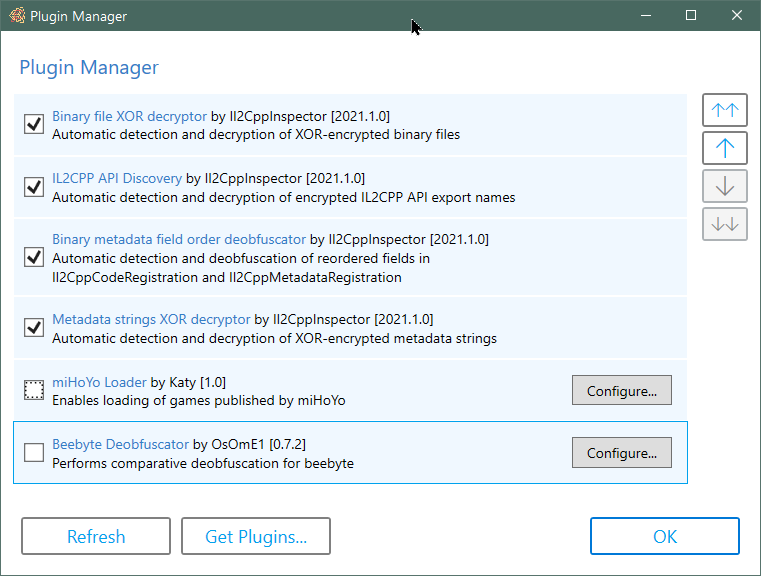
Plugins let you extend the functionality of Il2CppInspector. For example you can pre and post-process metadata and binaries to enable inspection of IL2CPP applications that Il2CppInspector cannot handle automatically.
Plugin support is currently experimental and has limited functionality.
Details on how to create your own plugins can be found in the Il2CppInspector Plugin Development Wiki.
You can find out more about plugins, and browse the source code of current plugins and examples in the Il2CppInspectorPlugins repository.
The current version of Il2CppInspector can output Python scripts targeting the IDA and Ghidra disassemblers.
When Il2CppInspector generates such a script, it generates a concatenation of a shared block of code ( Outputs/ScriptResources/shared-main.py ) which parses the JSON metadata and dispatches it to a set of implementation-specific functions to be processed, and a block of code specific to the target application which implements these functions (a file from Outputs/ScriptResources/Targets ).
If you would like to add support for a new target application, create a new Python script in Outputs/ScriptResources/Targets with the nane <target-name-without-whitespace>.py and implement the following functions:
CustomInitializer() - perform any custom initialization required for the target before applying the metadataDefineCode(code) - parse and apply the specified C++ declaration text (this is not required for Unity 5.3.2 and later; if you don't need to support earlier versions, just specify pass as the implementation)GetScriptDirectory() - retrieve the directory that the Python script is running in. This will normally be os.path.dirname(os.path.realpath(__file__))MakeFunction(start, name=None) - define address start as the start of a function, optionally with name nameSetComment(addr, text) - place the comment text at address addrSetFunctionType(addr, sig) - parse the C++ function signature in sig and apply it to the function at address addrSetHeaderComment(addr, text) - place the header/plate/pre-item comment text at address addrSetName(addr, name) - set the symbol (or label or name) of address addr to nameSetType(addr, type) - define address addr to be an item of the C++ type type Refer to the source code of IDA.py and Ghidra.py for examples.
When you add a new target and re-compile Il2CppInspector:
-t ( --script-target ) switch via the CLIIf you develop an API for a target that you think might be useful to others, please feel free to submit a PR with the code!
| Unity version | IL2CPP version | สนับสนุน |
|---|---|---|
| 4.6.1+ | First release | Unsupported |
| 5.2.x | 15 | Unsupported |
| 5.3.0-5.3.1 | 16 | การทำงาน |
| 5.3.2 | 19 | การทำงาน |
| 5.3.3-5.3.4 | 20 | การทำงาน |
| 5.3.5-5.4.6 | 21 | การทำงาน |
| 5.5.0-5.5.6 | 22 | การทำงาน |
| 5.6.0-5.6.7 | 23 | การทำงาน |
| 2017.1.0-2018.2.21 | 24 | การทำงาน |
| 2018.3.0-2018.4.x | 24.1 | การทำงาน |
| 2019.1.0-2019.3.6 | 24.2 | การทำงาน |
| 2019.3.7-2019.4.14 | 24.3 | การทำงาน |
| 2019.4.15-2019.4.20 | 24.4 | การทำงาน |
| 2019.4.21-2019.4.x | 24.5 | การทำงาน |
| 2020.1.0-2020.1.10 | 24.3 | การทำงาน |
| 2020.1.11-2020.1.17 | 24.4 | การทำงาน |
| 2020.2.0-2020.2.3 | 27 | การทำงาน |
| 2020.2.4-2020.3.x | 27.1 | การทำงาน |
| 2021.1.0-2021.1.x | 27.2 | Partial |
Please refer to the companion repository https://github.com/nneonneo/Il2CppVersions if you would like to track the changes between each IL2CPP release version.
If you have files that don't work or are in an unsupported format, please open a new issue on GitHub and attach a sample with details on the file format, and I'll try to add support. Include both the IL2CPP binary and global-metadata.dat in your submission.
Please check the binary file in a disassembler to ensure that it is a plain IL2CPP binary before filing an issue. Il2CppInspector is not intended to handle packed, encrypted or obfuscated IL2CPP files.
If you found Il2CppInspector useful, you can really help support the project by making a small donation at http://paypal.me/djkaty!
You can also donate with bitcoin: 3FoRUqUXgYj8NY8sMQfhX6vv9LqR3e2kzz
Much love! - Katy
Thanks to the following major contributors!
This project uses:
Thanks to the following individuals whose code and research helped me develop this tool:
The following books and documents were also very helpful:
Pizza spinner animation in the GUI made by Chris Gannon - https://gannon.tv/
This software is licensed under AGPLv3.







